1
Wiring diagram
Manual LED RGB/RGBW Controller
SR-1002MS/SR-1011MS/SR-1021MS
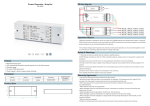
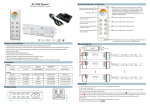
1)Connection Diagram for Single Unit
N
Power Supply
12-36VDC
AC110-230V
L
GND
Manual LED RGB/RGBY(W) Controller
2)Connection Diagram for Multiple Units
GND
Can stop at a single static color with the function pause,can adjust the speed and brightness.
To work with power repeater to expand output unlimitedly.
Manual LED RGB/RGBY(W) Controller
Can connect with other externer controllers,such as external switches.
Production IntroductionI
SR-10** Series LED controllers can be used for RGB or RGBW led lights,mainly come in two types for constant
voltage and constant current led lights.With LED display on panel,can easy control by button.Moreover,it can
connect with external controller by wire which makes the control system easier and more convenient.
Parameter
Item No
GND
Input Voltage Max load current Max Output Power
Remarks
SR-1002MS
12-36VDC
4*5A
4*(60-180W)
constant voltage
SR-1011MS
12-36VDC
4*0.350A
4*(4.2-12.6W)
constant current
SR-1021MS
12-36VDC
4*0.7A
4*(8.4-25.2W)
constant current
Operation Method
Manual LED RGB/RGBY(W) Controller
Manual/Display
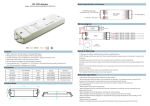
Product Size
178.9
45.5
GND
18.6
Manual LED RGB/RGBY(W) Controller
170.4
AC110-230V
L
256 levels of Grey Scale per RGB/RGBY,even&smooth for full color changes without any flash.
9 fantastic modes such as color smooth,color skipping effects,etc.4 static colors(R,G,B,Y)
N
Power Supply
12-36VDC
Feature
Operation
Warranty Agreement
1) We provide lifelong technical assistance with this product:
3-year warranty. We print date on every products, for example :1125 means year 2011,week 25.The
warranty is for free repair or replacement and covers manufacturing faults only.
For faults beyond the 3-year warranty we reserve the right to charge for time and parts.
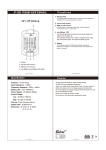
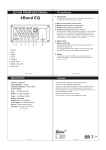
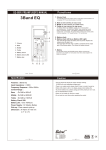
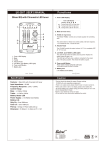
“Bright" button
“Mode" button
“Speed" button
Choose channel:
Hold down the “mode” and”bright”button for two seconds,ch digital display flashes,then press speed button to
choose”3”or “4”,then press any button for 2 seconds to confirm the channel you need.
Speed Button:
To speed up/down color changing,0-9 level cycling changing,”0”is the maximum speed, “9”is the minimum
speed.
Mode Button:
Modes of color changing,9 dynamic modes,gradient,skipping, etc,4 static modes(R,G,B,Y).
Bright Button:
To adjust the brightness,1-8 level cycling changing,”1”is the lowest brightness,”8”is the highest brightness.
It is also available under the circumstance wire connecting terminal pluging in switches as follows:
Safety & Warnings
1) The product shall be installed and serviced by a qualified person.
2) IP20.Please avoid the sun and rain. When installed outdoors, please ensure it is mounted in a water proof
enclosure.
3) Always be sure to mount this unit in an area with proper ventilation to avoid overheating.
4) Please check if the output voltage of any LED power supplies used comply with the working voltage of the
product.
5) Never connect any cables while power is on and always assure correct connections to avoid short circuits
before switching on.
6) Please ensure that the cable is secured tightly in the connector
7) For update information please consult your supplier.
2) Limited Warrenty
Any defects caused by wrong operation.
Any damages caused by unauthorized removal, maintenance, modifying, incorrect connection and
replacement of chips.
Any damages due to transportation, vibration etc. after purchase.
Any damages caused by earthquake, fire, lightning, pollution and abnormal voltage.
Any damages caused by negligence, inappropriate storing at high temperatures and humidity or near
harmful chemicals.
Product has been updated
3) Repair or replacement as provided under this warranty is the exclusive remedy to the customer.