1
Telephone operation
7. Press or to choose Y (yes) if you wish to customize this entry, or choose
N (no) for a normal ringer. If you choose Y, a
will be displayed with the
directory entry.
8. Press SELECT to confirm and you will hear a confirmation tone.
Delete a directory entry
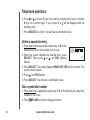
1. Press /VOL+/ when the handset is not in use. The screen displays
DIRECTORY.
2. Press or to scroll through the entries stored in the directory alphabetically.
- OR -
Press the dial pad key for the first letter of the entry you want to delete. If
necessary, scroll or to find the desired entry.
SPEED EDIT DEL
8005959511
3. When the screen displays the desired entry, press
SELECT. Then press or until DEL (delete) flashes.
4. Press SELECT. The screen displays ERASE NO YES
and the number. The current choice flashes.
5. Press until YES flashes.
6. Press SELECT. You will hear a confirmation beep.
18
www.vtechphones.com