1
3.
Troubleshooting
3
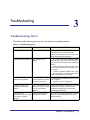
Troubleshooting Chart
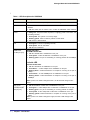
The following table lists symptoms, causes, and solutions of possible problems.
Table 1. Troubleshooting Chart
Problem
Cause
Solution
Power LED is off.
No power is received
Check the power cord connections for the switch
at the switch and the connected device.
Make sure that all cables used are correct and
comply with Ethernet specifications.
Link LED is off or intermittent. Port connection is not
working.
• Check the crimp on the connectors. Make
Slow file transfer or there is
performance degradation.
Half- or full-duplex setting on
the switch and the connected
device are not the same.
• Make sure that the attached device is set to
One or more devices are not
properly connected, or cabling
does not meet Ethernet
guidelines.
Verify that the cabling is correct. Be sure that all
connectors are securely positioned in the
required ports. Equipment may have been
accidentally disconnected.
A segment or device is not
recognized as part of the
network.
A network loop (redundant
ACT LED flashes
continuously on all connected path) has been created.
ports and the network is
disabled.
sure the plug is fully inserted and locked into
the port at both the switch and the connecting
device.
• Make sure that all cables used are correct
and comply with Ethernet specifications. See
Appendix A.
• Check for a defective adapter card, cable,
or port by testing it in an alternate environment
where all products are functioning.
auto negotiate.
• Check the system message log.
Break the loop by ensuring that there is only one
path from any networked device to any other
networked device.
Chapter 3. Troubleshooting
|
21