1
2
Install Procedure
You must have administrative rights to complete the following steps. Installing the software
with floating licenses on a network consists of the following steps:
STEP 1
Close any programs that are running on the computer where the software is being
installed.
STEP 2
Choose a computer in the network to be the AAA 3.6 license server. This can be any
computer in the network.
STEP 3
Insert CD into the CD-ROM drive. If the installation does not start automatically:
select run from the Start Menu. In the Run dialog, type: X:\setup
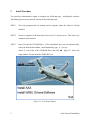
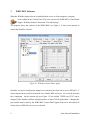
(where X is the letter of the CD-ROM drive) and click OK. Figure 2.1 shows the
setup window. Do not insert the WIBU-BOX yet.
Figure 2.1 AAA Setup Window
2
AAA Network Installation