1
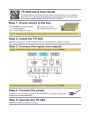
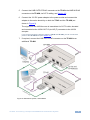
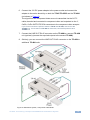
5. Connect the LINE OUTPUT RJ-45 connector on the TP-45 to the LINE IN RJ-45
connector on the TP-46N, via CAT 5 cabling, see Section 4.3.
6. Connect the 12V DC power adapter to the power socket and connect the
adapter to the mains electricity on both the TP-45 and the TP-46N (not
shown in Figure 2).
The signal from the UXGA source is transmitted via CAT 5 cable, decoded
and converted at the UXGA OUT 15-pin HD (F) connector to the UXGA
acceptor.
If you cannot connect the power to both the TP-45 and TP-46N, you can connect the
power to the TP-46N alone (see Section 3.1).
7. If required, connect the LINE OUT RJ-45 connector on the TP-46N to an
additional TP-46N.
Figure 2: Distribution System, UXGA Mode
TP-46N - Connecting a Component/UXGA/Audio Distribution System
9