1
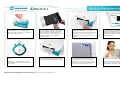
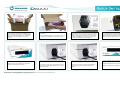
Step 1 - Locate the appropriate sized Codonics
Disinfection Sleeve for your mobile device.
One single or two nested sleeves are utilized
for the Double-Pass model.
Step 5 - The D6000 will disinfect the mobile
device.
Step 2 - Slip the mobile device into the
sleeve(s) and close each sleeve by using the
zip(s) or the adhesive strip(s) on the sleeve
flap. Note: If marker is present, the white
portion of the sleeve marker is blank. (A check
mark will be visible upon a completed
disinfection cycle).
Step 6 - When the disinfection process is
completed successfully, the Check Mark LED
on the D6000 Front Panel will flash in green.
On average, a mobile device the size of an
®
iPad will be processed for disinfection in thirty
(30) seconds.
Codonics Disinfection Technology D6000 Quick Set Up/Reference Guide
Copyright © 2013 - 2014 by Daylight Medical, Inc. All rights reserved, worldwide. Printed in the USA. Part Number 900-617-001.
Step 3 - Place the sleeved mobile device into
the Entry Slot of the D6000 Front Panel.
The mobile device must be face (screen) down
with the sleeve closure (zip or flap) on the
leading (front) end as it is processed into the
Entry Slot.
Step 7 - The disinfected mobile device is
ejected from the Entry Slot on the Front Panel
for the Double-Pass unit. Note: If the marker
option was chosen, the sleeve marker will now
show a visible check mark. The mobile device
is now ready to be picked up by the user.
Step 4 – The D6000 sensors detect the entry
of a mobile device and activate the transport
rollers, which will feed the sleeved device
through the Cartridge’s two high-output
ultraviolet C (UVC) bulbs utilized for the
disinfection process.
Step 8 - Remove the exterior Codonics
Disinfection Sleeve and discard it.
The disinfected mobile device is now ready for
use and can be taken into medical settings
where infection prevention is desirable.