1
Installation Instructions - Unix & Linux
• Choose the directory where Gridgen’s license file (or files if you have licensed an NCR) provided by
Pointwise will be placed. It is recommended that you place all license files in gridgen_home_path/
licenses.
After your planning is complete the First Time Installation process is quite straightforward and may be run
using Gridgen’s Install Script on the CD. The Install Script performs many tasks:
1.
Extracts Gridgen’s files from the CD
2.
Extracts the license managers files from the CD
3.
Generates your host ID and host name
4.
Imports your Gridgen license file
5.
Starts, stops, or queries the FLEXlm license server (uses the daemon lmgrd)
If you have licensed an NCR, the install script can also perform these additional tasks:
6.
Generates your NCR host ID
7.
Imports your NCR license file
8.
Starts, stops, or queries the NCR license server
You are responsible for reporting the host ID and host name to us between tasks 3 and 4. For users with a
licensed NCR, the NCR host ID (task 6) must be reported in addition to the Gridgen host ID and hostname to
receive an appropriate license file.
Of course, you cannot run the Install Script until the CD’s file system has been mounted on your workstation.
1.2
First Time Installation
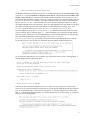
To start the Install Script you must first open a shell window, change to the gridgen subdirectory at the
CD’s mount_directory, and start the Install Script using the following commands.
If installing on an SGI Prism workstation, the following commands will need to be used to execute the
installation script:
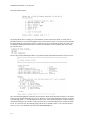
When first started the Install Script’s main menu will be displayed as shown below.
Since this is a First Time Installation you will choose the first option above by typing a 1 and pressing the
1-2