1
QUICKI 701
TABLET PC
SPIS TREŚCI:
SAFETY INSTRUCTIONS: ........................................................................................................................... 8
INFORMATION CONCERNING MAINTANANCE AND EXPLOATATION: .................................................... 8
REMARKS CONCERNING SAFETY: ............................................................................................................ 8
1.OUTLOOK DESCRIPTION: ...................................................................................................................... 9
2. POWER BUTTON USAGE: ..................................................................................................................... 9
Turn On ................................................................................................................................................ 9
Turn Off: .............................................................................................................................................. 9
Sleep Mode On/Off: ............................................................................................................................ 9
Force Off: ............................................................................................................................................. 9
Reset Button: ....................................................................................................................................... 9
3. BATERRY MANAGEMENT: ................................................................................................................... 9
Charge battery ................................................................................................................................... 10
4.TOUCH SCREEN NAVIGATION: ........................................................................................................... 10
5.ETHERNET/USB ADAPTER: .................................................................................................................. 10
Flash Drive ......................................................................................................................................... 11
6.USING MICRO SD CARD: ..................................................................................................................... 11
Remove Micro SD Card...................................................................................................................... 11
7.GETTING STARTED: ............................................................................................................................. 12
Charge the device .............................................................................................................................. 12
Turn the device on............................................................................................................................. 12
Wi-Fi Network Setup ......................................................................................................................... 12
8.MAIN SCREEN: .................................................................................................................................... 13
9.SCREEN LOCK: ..................................................................................................................................... 13
10.MENU OF MAIN SCREEN: ................................................................................................................. 14
11. APPLICATION MANAGEMENT: ........................................................................................................ 15
12. NEWS&WEATHER: ........................................................................................................................... 15
13 CLOCK: .............................................................................................................................................. 16
Alarm ................................................................................................................................................. 16
Add Alarm .......................................................................................................................................... 16
Turning off an Alarm Alert ................................................................................................................. 16
Turn Alarm on.................................................................................................................................... 16
Edit Alarm .......................................................................................................................................... 16
Delete Alarm...................................................................................................................................... 16
14. BROWSER: ....................................................................................................................................... 17
15. CAMERA:.......................................................................................................................................... 17
Take Videos ....................................................................................................................................... 17
16. CALENDAR: ...................................................................................................................................... 17
Add Event .......................................................................................................................................... 17
17. CALCULATOR: .................................................................................................................................. 18
18. EMAIL:.............................................................................................................................................. 18
Add Email accounts ........................................................................................................................... 18
Email Inbox ........................................................................................................................................ 18
Open Email Message ......................................................................................................................... 19
Compose New Email Message .......................................................................................................... 19
Edit Email Account............................................................................................................................. 19
Delete Email Accounts ....................................................................................................................... 19
Set Default Email Account ................................................................................................................. 19
19. My Pad: ............................................................................................................................................ 20
Copy Media between Computer and Tablet ..................................................................................... 20
Delete files ......................................................................................................................................... 20
20. MUSIC PLAYER: ................................................................................................................................ 21
21. VIDEO PLAYER:................................................................................................................................. 21
22. QUICK PIC: ....................................................................................................................................... 21
23. CONTACTS: ...................................................................................................................................... 22
Add New Contacts ............................................................................................................................. 22
Add Contact to Favorites ................................................................................................................... 22
Edit Contacts...................................................................................................................................... 22
Delete Contacts ................................................................................................................................. 22
24. APK MANAGER: ............................................................................................................................... 22
25.YouTube :.......................................................................................................................................... 22
26.SETTING WF-FI:................................................................................................................................. 23
27. Ethernet: .......................................................................................................................................... 23
29 SETTINGS: ......................................................................................................................................... 24
29. FREQUENTLY ASKED QUESTION: ..................................................................................................... 26
INFORMACJE DOTYCZĄCE KONSERWACJI I EKSPLOATACJI: ................................................................. 31
INFORMACJE DOTYCZĄCE BEZPIECZEŃSTWA: ...................................................................................... 31
1.BUDOWA URZĄDZENIA: ..................................................................................................................... 32
2.FUNKCJE ............................................................................................................................................. 32
WŁĄCZANIE/WYŁĄCZANIE................................................................................................................. 32
3.OBSŁUGA EKRANU GŁÓWNEGO:........................................................................................................ 32
4.ŁADOWANIE AKUMULATORA: ........................................................................................................... 33
Ładowanie akumulatora .................................................................................................................... 33
5.ADAPTER ETHERNET/ USB .................................................................................................................. 33
Pamięć USB .................................................................................................................................... 33
6.UŻYCIE KARTY microSD....................................................................................................................... 34
Wyjmowanie karty Micro SD ............................................................................................................. 34
7.PRZYGOTOWANIE DO UŻYCIA: ........................................................................................................... 34
Ładowanie urządzenia ....................................................................................................................... 34
Włączenie urządzenia ........................................................................................................................ 35
8. KONFUGURACJA Wi-Fi:...................................................................................................................... 35
9. EKRAN GŁÓWNY: ............................................................................................................................... 35
10. BLOKADA EKRANU GŁÓWNEGO: ..................................................................................................... 36
11. MENU EKRANU GŁÓWNEGO: .......................................................................................................... 36
Dodaj ................................................................................................................................................. 37
Tapeta ................................................................................................................................................ 37
Szukaj ................................................................................................................................................. 37
Powiadomienia .................................................................................................................................. 37
Ustawienia ......................................................................................................................................... 38
12. ZARZĄDZANIE APLIKACJAMI: ........................................................................................................... 38
13. NEWS & WEATHER: ......................................................................................................................... 38
14. ZEGAR .............................................................................................................................................. 38
Alarm ................................................................................................................................................. 38
Dodaj Alarm ....................................................................................................................................... 39
Wyłącz Alarm ..................................................................................................................................... 39
Włącz Alarm....................................................................................................................................... 39
Edytuj alarm ...................................................................................................................................... 39
Usuń alarm ........................................................................................................................................ 39
15. PRZEGLĄDARKA: .............................................................................................................................. 40
16. APARAT ............................................................................................................................................ 40
17. KALENDARZ...................................................................................................................................... 40
18. KALKULATOR.................................................................................................................................... 41
19. POCZTA ............................................................................................................................................ 41
Dodawanie konta e-mail ................................................................................................................... 41
Skrzynka odbiorcza ............................................................................................................................ 41
Otwórz wiadomość ............................................................................................................................ 42
Utwórz nową wiadomość .................................................................................................................. 42
Edytuj konto ...................................................................................................................................... 42
Usuń konta ........................................................................................................................................ 42
Ustaw domyślne konto ...................................................................................................................... 42
20. My Pad ............................................................................................................................................. 43
21. ODTWARZACZ MUZYKI: ................................................................................................................... 44
22. ODTWARZACZ WIDEO ..................................................................................................................... 44
23. QuickPic ........................................................................................................................................... 44
24. KONTAKTY: ...................................................................................................................................... 44
Dodaj nowe kontakty ........................................................................................................................ 44
Dodaj kontakt do Ulubionych ............................................................................................................ 45
Edytuj kontakty.................................................................................................................................. 45
Usuń kontakty ................................................................................................................................... 45
25 APK MANAGER ................................................................................................................................. 45
26 YouTube ............................................................................................................................................ 45
27 USTAWIENIA Wi-Fi:........................................................................................................................... 45
28. ETHERNET: ....................................................................................................................................... 46
29. USTAWIENIA .................................................................................................................................... 46
Najczęściej zadawane pytania ............................................................................................................... 48
Please make a backup copy of this manual and store it on separate media. In case of reset
of the tablet this manual will be no longer available on the unit until it is uploaded again.
You can also download a back-up copy of this manual from Apollo web page:
www.apollo.eu
THANK YOU!
Thank you for purchasing Apollo tablet.
The present instruction manual comprises important information concerning the product, therefore you
should get acquainted with it prior to start use the product. Improper maintenance and use not in
accordance with its main applicability can cause product damage and be a threat of accidents.
We hope that the quality and functionality of the appliance will meet your expectations. In order to
provide answers to any questions which might arise when using the appliance we ask you to read the
below Instruction Manual.
SAFETY INSTRUCTIONS:
• Instruction manual is an integral part of the product.
• Carefully read and follow the below manual before use.
• Keep this Instruction Manual and the Warranty Card along with the proof of purchase for
any claims.
• Never attempt any repairs of the appliance. Any repairs must be performed by an
Authorized Service Station or a Central Service (more information see the Warranty Card).
• Never use the appliance in a manner inconsistent with the intended use and this Manual.
INFORMATION CONCERNING MAINTANANCE AND EXPLOATATION:
• Before use check if the appliance is not damaged. Particular attention must be paid to the
power cord. Should any component, including the power cord, be damaged the appliance
must not be used.
• Use dry delicate cloth for cleaning.
• Switch off the device prior to begin cleaning and make sure that the plug is pulled out of the
outlet.
• During the cleaning follow the general safety rules and be especially careful.
• Product is designed only and exclusively for indoors use.
• Never immerse the appliance in water or any other solution because it can cause corrosion
of electronics circuits.
• The product should be safeguard from children and in any case should not be the subject of
play.
• The product should be protected against dust pollution and moisture, because this can lead
to components damage.
• Do not store the device in high and low temperatures. Unsuitable weather conditions can
shorten the life of components and cause distortion in housing.
• Do not tie and do not bend excessively the power cord.
• Do not use near flammable objects. Do not cover the device.
• Do not drop, strike, bend and shake the device.
• Do not attempt to modify or repair device in any way – it can cause electric shocks.
• Use only AC adapter included with the device.
• The manufacturer is not liable for any damages that may arise as a result of installation and
use of the device not in accordance with the technical specification described in this
manual.
REMARKS CONCERNING SAFETY:
• Do not turn on the tablet in the places where it is not allowed to use wireless devices such
as during takeoff and landing aircraft, near medical equipment, chemicals.
• Do not use the device during driving a car.
• Do not remove the cover. There are no user-serviceable parts inside
• Do not connect incompatible products
According to provisions of the Law of 1 July 2005 on Waste Electrical and Electronic Equipment it is forbidden to
dispose of waste equipment marked with crossed out wheeled bin together with other wastes. The user who
intends to dispose of such an equipment is obliged to deliver the waste electrical or electronic equipment to the
waste equipment collection points. Such points are established by i.a. retailers and wholesalers of the equipment
and the commune organizational units operating in waste collection business. The above legal obligations have
been introduced to reduce the amount of waste electrical and electronic equipment and to ensure appropriate standard for
collection, recovery and recycling of waste equipment. Proper fulfilment of those obligations is of particular importance
when the waste equipment contains hazardous components of particularly adverse effect on environment and human
health. Weight: ……
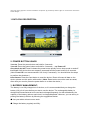
1.OUTLOOK DESCRIPTION:
2. POWER BUTTON USAGE:
Turn On: Press the power button and hold for 2 seconds.
Turn Off: Press the power button and hold for 2 seconds, →tap Power off.
Sleep Mode On/Off: Press & release the power button quickly to turn sleep mode on and off.
Force Off: If the device does not respond, press and hold the power button for 8 seconds.
(Note: Force Off is not recommended. Use it only if necessary. You should follow the steps
to perform the shutdown.)
Reset Button: Press the reset button to reset the device. Reset will erase all data on the
device, please use this option with caution. (Note: Reset button cannot be used as restart,
after reset you need to press the power button to re-boot the device.)
3. BATERRY MANAGEMENT:
The battery is not fully charged out of the box, so it is recommended that you charge the
battery (fully) for 4 hours before you start to use the device. The rechargeable battery is
designed and manufactured to be used and recharged frequently. As with all batteries, the
capacity of the battery reduces each time it is charged/depleted. However, you can still try to
prolong the battery’s lifetime by following the suggestions below:
● Use your tablet at least once a week.
● Charge the battery regularly and fully.
● Never leave the battery fully discharged for a long period of time.
● Never overcharge your battery.
● Always keep the device and the battery away from heat.
Charge battery
Plug the power adapter into an electrical wall outlet, and then connect to the device
to fully charge the battery before use (approx. 4hour).
☆ You cannot charge the battery using the USB cable.
When fully charged, the battery icon displays as: .
A fully discharged battery takes approximately 4 -5 hours to fully charge. You can
use the tablet while its charging.
4.TOUCH SCREEN NAVIGATION:
The touch-screen allows for quick, easy and convenient navigation on all applications.
Throughout the User Guide you are instructed to use the following tap or touch navigation
methods:
Tap: Quick tap and release on an item on the screen.
Finger slide: Touch and slide your finger across the screen and then release.
Touch & hold: Touch and hold in place approx 2 seconds, and then release to display an
options window.
To avoid scratches on the screen, do not place objects on the touch screen surface.
5.ETHERNET/USB ADAPTER:
You must use the Ethernet / USB adapter if you want to use a Flash drive for
accessing/storing your photos, music, video or other files.
Flash Drive
Insert your Flash Drive(U-disk) to the Ethernet / USB Adapter, → insert the Ethernet /
USB Adapter into the Tablet.
Don’t insert and remove the Flash Drive repeatedly in a short time, as this
may cause damage to the Flash Drive.
The Ethernet / USB Adapter can also be used for Ethernet network
connections.
6.USING MICRO SD CARD:
The device supports a maximum 32GB micro SD card.
Insert your card into the Micro SD Card slot until it clicks in.
Remove Micro SD Card
Use one of the following methods for removing the Micro SD card.
Close all applications or documents which have been opened on the card.
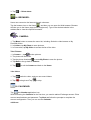
Tap
→ Settings → Storage → external sdcard → Unmount external SDcard.
Press the card lightly; it is partially ejected allowing you to pull the card out.
Don’t insert and remove the Micro SD Card repeatedly in a short time, as this may cause
damage to the card. We recommend using major brands of memory cards to avoid
incompatibility
7.GETTING STARTED:
Charge the device
You cannot charge the battery using USB cable. You can use the device while the battery is
charging, although the charging time is longer when operating and charging at the same
time.
ON MODE: The battery indicator light will turn green after fully charged when unit is ON
mode;
OFF MODE: The battery indicator light will turn off after fully charged when unit is OFF
mode.
In order to optimize your tablet’s battery life, it is highly recommended to charge the battery
fully (charge time being approximately 4hrs) before its first use:
Drain the battery completely before its subsequent charge.
Over charging the battery reduces your battery life.
Turn the device on
Press and hold the power button for 2 seconds until an image appears on the screen. Then
release the power button and let the software load on the tablet. Please allow at least 45
seconds for the tablet to fully start-up.
Wi-Fi Network Setup
Since many features of your Tablet require internet connection, we recommend you set up
your Wi-Fi network immediately.
→ Settings, → Wireless & networks.
1. Tap
2. Select Wi-Fi to turn on.
The device automatically scans and lists all local Wi-Fi Networks found. A
indicates
secure network that require a password to connect. Tap the desired network you want to
connect to, → enter the Network Password if applicable, → tap Connect.
3. Tap
to return to the Home screen.
☆ If your Wi-Fi network is set as hidden, it won’t be found by auto scan. Tap Add Wi-Fi
network and follow the prompts to add your network.
8.MAIN SCREEN:
Battery status
icon
Time display Volume reduction icon
Volume increase icon
Shortcut menu icon
Back icon
Desktop icon
Wi-Fi status icon
Picture capture icon
Rotating screen icon
☆ To move an icon to the Home screen, touch & hold on the icon and then release it when it
appears on the Home screen.
☆ Touch, hold and then slide icons to reposition them, and then release the
icon.
☆Touch, hold and slide icons onto
to delete them.
9.SCREEN LOCK:
Your Tablet can be set up for automatic screen lock. You can also lock your screen by
pressing and quickly releasing the power button to manually lock screen
10.MENU OF MAIN SCREEN:
On the Home screen, you can tap to display the Function Menu.
Add
Home screen displays only 16 icons at a time. In order to add more item, finger slide the
screen horizontally to expose available space, and then tap the Add button again. If the
screen is full, the Add icon option won’t respond.
Shortcuts
Add quick launch shortcuts on the Home screen to applications, bookmarks or settings.
If you select items that are shortcuts already on the Home screen, they will be duplicated,
resulting in multiple icons for the same item.
Widgets:
Analog clock: Add a round analog clock.
Calendar: Add a calendar widget to display current date and events.
Music Player: Add a music widget to quickly begin playing music without launching the
music application.
Wallpaper
Select wallpaper from Picture and Wallpapers.
Search
Perform a quick Google search.
Tap in the entry field, → enter the desired search text, → tap
Notifications
List any pending notifications (i.e., new email, calendar events, etc).
Settings
Hide
11. APPLICATION MANAGEMENT:
Tablet gives you access to exciting world of Android apps. While some of these apps are
pre-installed on your tablet, you can download host of additional apps through built in
libraries, Android Market or other online sources.
1. Pre-installed Apps:
Your tablet has pre-installed apps like YouTube, iReader etc. Just Tap the app you
like to access, and follow on-screen directions (as applicable).
2. Install Apps:
• Access applicable apps library.
• You can find the apps using Categories or by manually searching for them.
• Once you locate the desired app, tap on the app.
• Tap “Download”(allow a few seconds for app to download)
• Tap “Install”(allow a few seconds for app to get installed)
• App is now installed on your tablet.
3. Uninstall Apps:
• Tap “Settings” –“Applications”–“Manage Applications”
• Tap on the app you wish to uninstall.
• Tap “Ok”(allow few seconds for app to get uninstalled)
• You have successfully uninstalled the app.
12. NEWS&WEATHER:
Tap the News & Weather
application icon.
General setting
You can make Weather settings, News settings and Refresh settings.
13 CLOCK:
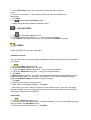
Tap the
Clock application icon. You can see the time and date.
Alarm
You can use your Tablet as an alarm clock by setting multiple alarms.
☆ This clock icon
displayed at the top of screens indicates that one or more alarms
have been set and are active.
Add Alarm
Clock application icon.
1. Tap the
→ Add alarm
2. Tap
3. Set up your alarm as desired.
☆If you don’t select a repeat, the alarm is automatically deleted after it is activated.
4. Tap Turn alarm on
5. Tap Done
Turning off an Alarm Alert
When a scheduled alarm is activated, a pop-up window with the alarm title appears.
Tap Snooze if you want to be reminded again in 10 minutes.
Tap Dismiss to cancel the alert.
Turn Alarm on
If you wish to temporarily turn on or off the repeat alarms, rather than deleting them follow
the below mentioned steps:
1. In the Alarm screen, tap
2. Tap
on the alarm(s) you want to turn off.
to turn on again.
Edit Alarm
1. Tap the
Clock application icon.
2. Tap on the alarm you want to edit → make desired edits.
Delete Alarm
Clock application icon.
1. Tap the
2. Tap on the alarm you want to delete.
3. Tap
→ Delete alarm.
14. BROWSER:
Users can connect to the Internet through a browser.
Tap the browser icon on the Home
, and then you can open the Web browser. Browser
will take you to the Home page (www.Google.com). Type in the desired website in the
address bar to view the respective website.
15. CAMERA:
1. Tap Menu button to access the menu list, including: Switch to video/camera or My
Photo/My Video.
2. In Camera, tap My Photo to scan pictures.
3. In Camcorder, tap My Video to access the list of the video.
Take Pictures
to take pictures.
1. In Camera → tap
2. The picture will be saved.
to enter My Photo to scan the picture.
3. Tap the picture thumbnail
4. Tap Back to the go back to Camera.
5. Tap
to exit the Camera and back to the Home.
Take Videos
1. Tap
2. Tap
switch to video, and you can record videos.
to begin and Tap
to stop.
16. CALENDAR:
Tap
the Calendar application icon.
While accessing the Calendar for the first time, you need to add an Exchange account. Enter
account email address and password. Tap Next and follow the prompts to complete the
account configuration. Then you can use the Calendar.
Add Event
1. On the Calendar screen, tap on the date to which you want to add an
event.
2. Tap on the event time, → tap in each entry field to enter the desired event
information.
3. Tap Done.
4. Tap
to select desired Calendar screen.
☆ Dates with green bars indicate scheduled events.
17. CALCULATOR:
1. Tap
the Calculator application icon.
2. Tap the numbers and symbols (+, x, - etc) to perform calculation.
3. Tap CLEAR to clear the result one by one, tap and hold CLEAR to clear all.
18. EMAIL:
POP3 and SMTP accounts are supported.
Add Email accounts
You can enter one or more personal email addresses that you would like to access through
your Tablet.
the Email application icon.
1.Tap
2. On the Your Accounts screen, tap Next.
3. Tap on the Email address entry field, → enter your email address.
4. Tap on the Password entry field, → enter your email password.
5. Tap Done.
6. Manual Setup (optional): The server settings are automatically populated based on your
email account provider (i.e., gmail.com, etc). However, if you need to change the server
settings tap Manual Setup and make necessary changes.
7. Tap Next.
8. Optional: Enter a name for the account.
9. Enter name for outgoing message, → tap Done.
☆After setup, if you are unable to connect to a free email account, check with your email
provider to make sure their servers support free accounts on Post Office Protocol (POP) or
Simple Mail Transfer Protocol (SMTP).
Email Inbox
1. Tap
the Email application icon.
2. If you set up only one email account, it opens immediately. If you set up multiple accounts,
they are listed in the Accounts screen.
3. Tap on the desired email account, →tap Inbox.
Open Email Message
1. On the Inbox screen, tap on an email to open it.
2. For attachments, tap Open to launch appropriate application, or tap Save to save
attachment to a Micro SD card / Flash Drive.
3. To replay, tap Reply or Reply all.
a. Tap in the Compose Mail entry field to compose an email.
b. Tap Send to send.
c. Save as draft to save without sending or Discard to discard without saving or sending.
4. To delete the email immediately, tap Delete.
Compose New Email Message
1.On the Inbox screen, tap
→ Compose.
2. Tap in the To entry field and then enter the recipient’s email address.
3. Optionally, if you want to add Cc or Bcc recipients, tap
→ Add Cc/Bcc and then enter
the recipients email address.
4. Tap in the Subject entry field to enter your desired subject title.
5. Tap in the Compose Mail area to enter your personal message.
6. If desired, tap
→ Add Attachment to attach a file.
7. When ready to send the email, tap
→ Send.
Edit Email Account
1. Tap
the Email application icon.
→ Account settings.
2. On the Inbox screen, tap
3. Set your desired preferences to customize your email account.
to return to the Inbox screen.
4. Tap
Delete Email Accounts
If you have multiple accounts, and you delete the account designated as the default account,
the next email listed will automatically set as the default.
1. Tap
the Email application icon.
2. On the Inbox screen, tap
→ Accounts.
3. Touch & hold on the account you want to delete.
4. In the pop-up Account options window, tap Remove account.
5. Tap OK to confirm the deletion.
Set Default Email Account
You must always have one account designated as the default account, so if you have
multiple email accounts, you can select anyone as the default.
1. Tap the
Email application icon.
2. On the Inbox screen tap
→ Account Settings.
3. Tap Default Account to select it.
If you delete the account that was designated as the default account, the next
email listed is automatically designated as default.
19. My Pad:
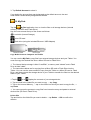
Tap the
My Pad application icon to view the files on all storage devices (Internal
memory, microSD card, Flash Drive).
Use the icons across the top of the screen as follows:
Local disk (Internal Storage)
micro SD card
Flash drive (using the included Ethernet / USB Adapter)
Copy Media between Computer and Tablet
You can use the My Pad to copy files from external storage devices and your Tablet. You
must first copy the desired files onto a Micro SD card or Flash Drive.
☆ The internal device storage is titled “LocalDisk”, a memory card “sdcard”,and a Flash
Drive is titled “udisk”.
☆ The instructions below are for copying from a Micro SD card or Flash Drive into the
Tablet. You can use the same method to copy from the Tablet to a Micro SD card or Flash
Drive, and then connect the storage device to your Tablet to transfer the files into the desired
folder of your Tablet.
1.Tap the
or to
display the contents of your storage device.
2. Tap and hold in the folder/file you want to copy, → tap Copy.
3. Tap on the Internal Memory, → tap on the folder into which you want to copy the file, →
tap Paste.
☆ You can reverse the process to copy files from internal memory and paste to external
devices like (SD Card / Flash Drive).
Delete files
Tap and hold on the folder/file you want to delete → tap Delete → OK to confirm the
deletion.
20. MUSIC PLAYER:
☆ Audio file formats supported: MP2, MP3, APE, FLAC, WAV, AAC, WMA.
Play Music
the Music Player application icon.
1. Tap
2. Select an audio file from Music/Favorite/My List to play it.
3. To stop the music, tap the Pause
icon.
4. To leave the music playing and return to previous screens, tap
the Home screen.
or tap
to return to
21. VIDEO PLAYER:
Video file formats support multiple 1080P formats as: AVI, 3GP, MP4, RM/RMVB, and FLV.
Play Video
1. Tap the
Video Player application icon.
2. Select a video file from Movies/Favorites/History to play it.
3. Tap on the screen to display video controls (adjust volume, pause/play, previous/next,
adjust brightness).
4. Tap Back button or
to return to the My Video screen.
22. QUICK PIC:
You can view all Photos and Videos through the QuickPic. Media files are sorted into
groups by local disk, SD Card and camera.
23. CONTACTS:
You can create an address book of your personal contacts, including personal notes.
Add New Contacts
1. Tap the
Contacts application icon.
→ New Contact.
2. Tap
3. Tap in the name fields to enter the contact’s first and last name.
on the right of options to access additional choices.
4. Tap
5. Tap on the option name to access choices.
6. Tap in the option entry fields to enter the contact’s information.
7. Tap Done.
Add Contact to Favorites
1. In the Contacts screen, tap on the desired contact name.
2. Tap
in the upper right corner.
3. Tap
to return to the Contacts screen.
4. Tap Favorites to view list of favorite contacts.
Edit Contacts
1. In the Contacts screen, tap on the desired contact name you want to edit.
2. Tap
→ Edit Contact.
3. Make desired changes, → tap Done.
Delete Contacts
1. In the Contacts screen, touch & hold on the contact, →tap Delete contact or in the
Contacts screen, tap on the contact you want to delete, tap
2. Tap OK to confirm the deletion.
→ Delete Contact.
24. APK MANAGER:
It is a free apk installer and uninstaller. With this lightweight tool you can manage your apps
easily and quickly.
25.YouTube :
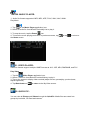
1. Tap the
YouTube application icon to view YuTube.com videos.
2. Tap on a video to launch it.
3. Tap on the screen to display video controls (adjust volume, pause/play, previous/next,
adjust brightness).
4. Tap Back button to return to the YouTube screen.
26.SETTING WF-FI:
1.Tap
Wi-Fi Settings application icon.
1. Select “Wi-Fi” to turn on.
2. All the networks in range will be listed, tap to select the network you would like to connect
to.
3. If the network was successfully connected to, before, the network information will be saved
in the pop-up window. Select "Connect" to connect to the network. Choose "forget" to remove
network information;
4. If the Network is not encrypted (password protected), in the pop-up window, select
"Connect" to start connection;
5. If the Network is encrypted (password protected), enter the password in the pop-up
window, and tap "Connect" to start connection;
6. When internet connections are successful, the wireless connection icon in the status bar
appears.
27. Ethernet:
Connect the Ethernet / USB Adapter to its port (slot) of the device and then plug the network
cable (LAN) into the Ethernet port of the Ethernet / USB Adapter. And, the upper right corner
".
of the screen displays "
Tap Settings → Ethernet configuration to turn on Ethernet.
The device can automatically access network IP address connection. And you can choose
manual setup IP address to get a connection.
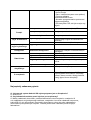
29 SETTINGS:
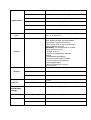
Wireless &
networks
Wi-Fi
Turn on Wi-Fi.
Wi-Fi Settings
Set up & manage wireless access points.
VPN settings
Set up & manage Virtual Private Networks
(VPNs)
Mobile networks
Set options for roaming, networks, APNs.
Configure Ethernet.
Silent mode
Silence all sounds except media & alarms.
Volume
To adjust the Media volume, Alarm volume and
Notification volume. Tap & slide
and then tap OK.
Select desired ringtone sound.
Sound
Notification ringtone
Audible selection
Screen lock sounds
Brightness
Auto-rotate
Display
Animation
Screen timeout
Location&
security
Select to enable a sound when making a screen
selection.
Play sounds when locking and unlocking the screen.
Tap & slide
to adjust the screen
brightness as desired, and then tap OK.
When selected, the orientation of the screen switches
between Portrait and Landscape automatically when
you rotate the device.
All window animations are shown.
Use wireless networks
Adjust the delay before the screen automatically turns
off.
Location determined by Wi-Fi and/or mobile networks
Set up screen lock
Lock screen with a pattern, PIN, or password.
Visible passwords
Show password as you type.
Select device
administrators
Add or remove device administrators.
Use secure credential
Install from SD card
Allow applications to access secure certificates and
other credentials.
Install encrypted certificates from SD card.
Set password
Set or change the credential storage password.
Clear storage
Clear credential storage of all contents and reset its
password.
Unknown sources
Allow installation of non-Market applications.
Manage applications
Manage and remove installed applications.
Running services
View and control currently running services.
Storage use
View storage used by applications
Battery use
What has been using the battery
Developments
Set options for application development.
Applications
Accounts &
sync
Add accounts and edit, and back up contacts when
you’re on the move
Factory data reset
External SD card
Tap to reset the device to its initial factory
state, erasing all data and downloaded
applications. Tap Reset Device to
proceed with reset, or tap to cancel and
return to previous screen.
WARNING! The following will be erased
during the factory reset:
~ Google account
~ System and application data and
settings
~ Downloaded applications
The factory reset will NOT erased:
~ Current system software and
bundled applications
~ Micro SD card files, such as
music or photo
External sdcard space
Internal storage
Available space
User space
Available space
Language&
Select language
keyboard
Android keyboard
Select the language and region according to your
location.
Onscreen keyboard settings.
Voice
input&output
settings
Voice output
Text-to-speech settings
Accessibility
Accessibility settings
Accessibility related applications installed
Date &time
Set date
Set the date.
Select time zone
Select the time zone.
Privacy
Storage
Set time
Set the time.
Use 24-hour format
You can choose to use 24-hour format or
12-hour format.
You can select the date format.
Select date
Touch panel
calibration
Calibrate the touch screen.
About device
View Status (Battery, Wi-Fi, etc), Battery use, Legal
information, Model number, Android version, Kernel
version and Build number.
29. FREQUENTLY ASKED QUESTION:
Q: What Android OS version is on my Device?
A: Android 2.3
Q: Do I have to charge the battery before use?
A: You should charge the battery, but you can use the device while it’s charging. Use the
included power adapter to charge the battery; this device does not charge via the USB cable.
In order to optimize your tablet’s battery life, it is highly recommended to charge the battery
fully before its first use. Drain the battery completely before its subsequent charge.
Q: Can I use any of my personal email addresses to send/receive email?
A: The device supports POP3 and SMTP accounts. Some free email accounts are not
supported on your tablet. Check with your email provider to see if you account is supported.
Q: Which media cards are compatible with my Device?
A: Micro SD cards.
Q: What type of music files can I play on my device?
A: MP2, MP3, WAV, AAC, WMA, APE, FLAC.
Q: How do I add music files to my device?
A: Copy the music files from your computer onto a microSD or Flash Drive, and
then use the My Pad application to copy the files onto the device. Or, you can download files
from the web.
Q: What type of photo files can I view on my device?
A: JPG, JPEG, BMP and PNG.
Q: How do I add photo files to my device?
A: You can tap pictures through your tablet. These files would get saved on the internal
memory of your tablet. Or copy the photo files from your computer onto a micro SD card or
Flash Drive, and then use the My Pad application to copy the files onto the device. Or, you
can download files from the web.
Q: What type of video files can I play on my device?
A: Standard 1080P video: AVI, 3GP, MP4, MPG, RM, RMVB, MOV, FLV.
Q: How do I add video files to my device?
A: You can record videos through your tablet. These files would get saved on the internal
memory of your tablet. Or, copy the video files from your computer onto a SD card or Flash
Drive, and then use the File Browser application to copy the files into the device. Or, you can
download files from the web.
Q: Do I need a Wi-Fi adapter to connect to the Internet?
A: No. The Wi-Fi adapter is built-in to the device.
Wykonaj kopie zapasową niniejszej instrukcji i zapisz ją na osobnym nośniku. W
przypadku resetu tabletu niniejsza instrukcja zostanie skasowana z urządzenia i będzie
wymagała ponownego wgrania.
Możesz także ściągnąć kopię zapasową niniejszej instrukcji ze strony internetowej Apollo:
www.apollo.eu
Informujemy iż użyte zdjęcia – są tylko poglądowe i mogą nieznacznie się różnić w
zaleźnośi od modelu
Spis treści
WSKAZÓWKI BEZPIECZEŃSTWA: ........................................................................................................... 30
INFORMACJE DOTYCZĄCE KONSERWACJI I EKSPLOATACJI: ................................................................. 31
INFORMACJE DOTYCZĄCE BEZPIECZEŃSTWA: ...................................................................................... 31
1.BUDOWA URZĄDZENIA: ..................................................................................................................... 32
2.FUNKCJE ............................................................................................................................................. 32
WŁĄCZANIE/WYŁĄCZANIE................................................................................................................. 32
3.OBSŁUGA EKRANU GŁÓWNEGO:........................................................................................................ 32
4.ŁADOWANIE AKUMULATORA: ........................................................................................................... 33
Ładowanie akumulatora .................................................................................................................... 33
5.ADAPTER ETHERNET/ USB .................................................................................................................. 33
Pamięć USB .................................................................................................................................... 33
6.UŻYCIE KARTY microSD....................................................................................................................... 34
Wyjmowanie karty Micro SD ............................................................................................................. 34
7.PRZYGOTOWANIE DO UŻYCIA: ........................................................................................................... 34
Ładowanie urządzenia ....................................................................................................................... 34
Włączenie urządzenia ........................................................................................................................ 35
8. KONFUGURACJA Wi-Fi:...................................................................................................................... 35
9. EKRAN GŁÓWNY: ............................................................................................................................... 35
10. BLOKADA EKRANU GŁÓWNEGO: ..................................................................................................... 36
11. MENU EKRANU GŁÓWNEGO: .......................................................................................................... 36
Dodaj ................................................................................................................................................. 37
Tapeta ................................................................................................................................................ 37
Szukaj ................................................................................................................................................. 37
Powiadomienia .................................................................................................................................. 37
Ustawienia ......................................................................................................................................... 38
12. ZARZĄDZANIE APLIKACJAMI: ........................................................................................................... 38
13. NEWS & WEATHER: ......................................................................................................................... 38
14. ZEGAR .............................................................................................................................................. 38
Alarm ................................................................................................................................................. 38
Dodaj Alarm ....................................................................................................................................... 39
Wyłącz Alarm ..................................................................................................................................... 39
Włącz Alarm....................................................................................................................................... 39
Edytuj alarm ...................................................................................................................................... 39
Usuń alarm ........................................................................................................................................ 39
15. PRZEGLĄDARKA: .............................................................................................................................. 40
16. APARAT ............................................................................................................................................ 40
17. KALENDARZ...................................................................................................................................... 40
18. KALKULATOR.................................................................................................................................... 41
19. POCZTA ............................................................................................................................................ 41
Dodawanie konta e-mail ................................................................................................................... 41
Skrzynka odbiorcza ............................................................................................................................ 41
Otwórz wiadomość ............................................................................................................................ 42
Utwórz nową wiadomość .................................................................................................................. 42
Edytuj konto ...................................................................................................................................... 42
Usuń konta ........................................................................................................................................ 42
Ustaw domyślne konto ...................................................................................................................... 42
20. My Pad ............................................................................................................................................. 43
21. ODTWARZACZ MUZYKI: ................................................................................................................... 44
22. ODTWARZACZ WIDEO ..................................................................................................................... 44
23. QuickPic ........................................................................................................................................... 44
24. KONTAKTY: ...................................................................................................................................... 44
Dodaj nowe kontakty ........................................................................................................................ 44
Dodaj kontakt do Ulubionych ............................................................................................................ 45
Edytuj kontakty.................................................................................................................................. 45
Usuń kontakty ................................................................................................................................... 45
25 APK MANAGER ................................................................................................................................. 45
26 YouTube ............................................................................................................................................ 45
27 USTAWIENIA Wi-Fi:........................................................................................................................... 45
28. ETHERNET: ....................................................................................................................................... 46
29. USTAWIENIA .................................................................................................................................... 46
Najczęściej zadawane pytania ............................................................................................................... 48
WSKAZÓWKI BEZPIECZEŃSTWA:
• Instrukcja obsługi jest integralną częścią produktu.
• Przed rozpoczęciem użytkowania urządzenia należy dokładnie zapoznać się z niniejszą
instrukcją obsługi i bezwzględnie jej przestrzegać.
• Należy zachować niniejszą instrukcję obsługi i kartę gwarancyjną wraz z dowodem zakupu
w razie ewentualnej reklamacji.
• Nie wolno na własną rękę dokonywać napraw urządzenia. Wszelkich napraw może
dokonywać jedynie Autoryzowany Punkt Serwisowy lub Serwis Centralny (dokładne dane
znajdują się w Karcie Gwarancyjnej).
• Nigdy nie należy używać urządzenia w sposób niezgodny z jego przeznaczeniem i
niniejszą instrukcją. Należy używać tylko oryginalnych akcesoriów.
INFORMACJE DOTYCZĄCE KONSERWACJI I EKSPLOATACJI:
• Przed użyciem należy sprawdzić, czy urządzenie nie jest uszkodzone. Jeżeli jakakolwiek
część, łącznie z przewodem zasilającym jest uszkodzona, nie należy korzystać z
urządzenia.
• Do czyszczenia należy stosować suche, delikatne tkaniny
• Przed rozpoczęciem czyszczenia należy wyłączyć urządzenie oraz upewnić się, że zasilacz
został odłączony od źródła zasilania
• Podczas czyszczenia należy przestrzegać ogólnych przepisów BHP oraz zachować
szczególną ostrożność.
• Produkt jest przeznaczony tylko i wyłącznie do użytku wewnętrznego
• Nigdy nie należy zanurzać urządzenia w wodzie lub jakimkolwiek innym roztworze, gdyż
może to spowodować korozję obwodów elektronicznych
• Tablet należy chronić przed dziećmi. W żadnym wypadku nie może stać się ich
przedmiotem zabaw.
• Nie używać w środowisku wilgotnym lub zapylonym, gdyż może to doprowadzić do
uszkodzenia podzespołów
• Nie przechowywać urządzenia w wysokiej oraz niskiej temperaturze. Nieodpowiednie
warunki atmosferyczne mogą skrócić żywotność komponentów oraz spowodować
zniekształcenia obudowy
• Nie wiązać i nie skręcać przewodu przyłączeniowego
• Nie używać w pobliżu łatwopalnych materiałów oraz nie przykrywać urządzenia
• Nie wolno upuszczać, uderzać, zginać oraz potrząsać urządzeniem
• Nie dokonywać samodzielnych napraw lub modyfikacji ryzyko porażenia prądem
elektrycznym
• Używaj tylko ładowarki dołączonej do urządzenia
• Producent nie ponosi odpowiedzialności za szkody powstałe w skutek nie przestrzegania
niniejszej instrukcji
INFORMACJE DOTYCZĄCE BEZPIECZEŃSTWA:
• Nie wolno włączać tabletu w miejscach w których obowiązuje zakaz użytkowania urządzeń
bezprzewodowych, np. podczas startu i lądowania samolotu, przy aparaturze medycznej, w
składach chemikaliów
• Nie używaj urządzenia podczas jazdy samochodem
• Nie podłączaj niekompatybilnych produktów
Zgodnie z przepisami ustawy z dnia 1 lipca 2005 r. o zużytym sprzęcie elektrycznym i elektronicznym zabronione jest
umieszczanie łącznie z innymi odpadami zużytego sprzętu oznakowanego symbolem przekreślonego kosza.
Użytkownik, który zamierza pozbyć się tego produktu, jest obowiązany do oddania zużytego sprzętu elektrycznego i
elektronicznego do punktu zbierania zużytego sprzętu. Punkty zbierania prowadzone są m.in. przez sprzedawców
hurtowych i detalicznych tego sprzętu oraz przez gminne jednostki organizacyjne prowadzące działalność w zakresie
odbierania odpadów. Powyższe obowiązki ustawowe wprowadzone zostały w celu ograniczenia ilości odpadów
powstałych ze zużytego sprzętu elektrycznego i elektronicznego oraz zapewnienia odpowiedniego poziomu zbierania, odzysku i
recyklingu zużytego sprzętu. Prawidłowa realizacja tych obowiązków ma znaczenie zwłaszcza w przypadku, gdy w zużytym
sprzęcie znajdują się składniki niebezpieczne, które mają szczególnie negatywny wpływ na środowisko i zdrowie ludzi. Masa
sprzętu:………..
1.BUDOWA URZĄDZENIA:
2.FUNKCJE
WŁĄCZANIE/WYŁĄCZANIE
Włączenie: Naciśnij i przytrzymaj przycisk „POWER” przez 2 sekundy.
Wyłączenie: Naciśnij i przytrzymaj przycisk „POWER” przez 2 sekundy, → dotknij
Wyłączenie zasilania.
Włączenie / wyłączenie stanu wstrzymania: Szybko naciśnij i zwolnij przycisk „POWER”,
aby włączyć i wyłączyć tryb wstrzymania.
Wymuszone wyłączenie: Jeśli urządzenie nie reaguje, naciśnij i przytrzymaj przycisk
„POWER” przez 8 sekund. (Uwaga: Wymuszone wyłączenie nie jest zalecane. Używaj go
tylko w razie potrzeby. Postępuj zgodnie z wyświetlanymi instrukcjami, aby wyłączyć.)
Przycisk resetowania: Naciśnij przycisk resetowania, aby zresetować urządzenie.
Resetowanie kasuje wszystkie dane na urządzeniu, należy go używać z rozwagą. (Uwaga:
Przycisk resetowania nie może być stosowany w celu ponownego uruchomienia urządzenia,
po resetowaniu należy nacisnąć przycisk zasilania, aby ponownie uruchomić urządzenie.)
3.OBSŁUGA EKRANU GŁÓWNEGO:
Ekran dotykowy pozwala na szybką, łatwą oraz wygodną nawigację w aplikacjach.
Kliknięcie: Szybkie kliknięcie elementu ekranu.
Przeciąganie: Dotknięcie i przeciąganie elementu palcem po ekranie, a następnie
upuszczenie.
Dotknięcie i przytrzymanie: Dotknięcie i przytrzymanie elementu przez około 2 sekundy, a
następnie go upuszczenie w celu wyświetlenia okna opcji.
Aby uniknąć zarysowań na ekranie, kładź żadnych przedmiotów na powierzchni ekranu
dotykowego.
4.ŁADOWANIE AKUMULATORA:
Urządzenie została częściowo naładowane, ale przed pierwszym użyciem należy pamiętać,
aby naładować akumulator, co zajmuje około 4 godziny. Akumulator został zaprojektowany i
wyprodukowany do częstego użytku i wielokrotnego ładowania. Pojemność akumulatora
zmniejsza się z każdym ładowaniem/rozładowaniem. Jednak, można przedłużyć żywotność
akumulatora postępując zgodnie z poniższymi zaleceniami:
● Korzystaj z tabletu co najmniej raz w tygodniu.
● Ładuj akumulator regularnie do maksymalnego poziomu mocy.
● Nie pozostawiaj akumulatora w pełni rozładowanego przez dłuższy okres czasu.
● Nie należy przeładowywać akumulatora.
● Urządzenie oraz akumulator należy trzymać z dala od źródeł ciepła.
Ładowanie akumulatora
Podłącz zasilacz bezpośrednio do gniazda sieciowego, a następnie podłącz urządzenie
☆ Nie można naładować akumulatora za pomocą kabla USB.
Gdy akumulator jest w pełni naładowany, to ikona akumulatora jest wyświetlana jako:
Naładowanie całkowicie rozładowanego akumulatora do maksymalnego poziomu mocy trwa
około 4 – 5 godzin. Podczas ładowania można korzystać z tabletu.
5.ADAPTER ETHERNET/ USB
Skorzystaj z adaptera Ethernet / USB, aby podłączyć pamięci USB do przechowywania
zdjęć, muzyki, wideo lub innych plików.
Adapter Ethernet / USB
Gniazdo USB
Pamięć USB
Podłącz pamięć USB do adaptera Ethernet / USB, a następnie podłącz adapter Ethernet /
USB do tabletu.
☆ Nie podłączaj / odłączaj pamięci USB wielokrotnie w krótkim czasie, ponieważ może to
spowodować uszkodzenie U-dysku.
Adapter Ethernet / USB może być również używany do połączeń internetowych.
Interfejs Ethernet
6.UŻYCIE KARTY microSD
Urządzenie obsługuje kartę Micro SD do 32GB.
Włóż kartę do czytnika karty Micro SD.
Wyjmowanie karty Micro SD
Użyj jednej z następujących metod, aby wyjąć kartę Micro SD.
Zamknij wszystkie aplikacje lub dokumenty na karcie, które zostały otwarte.
Dotknij
→ Ustawienia → Pamięć → Zewnętrzna karta SD → Bezpieczne usunięcie
zewnętrznej karty SD.
Wciśnij lekko kartę; karta zostanie częściowo wysunięta, co pozwoli na jej wyjęcie.
Nie wkładaj / wyjmuj karty Micro SD wielokrotnie w krótkim czasie, gdyż może to
spowodować uszkodzenie karty.
Zalecamy korzystanie ze znanych marek kart pamięci, aby uniknąć niezgodności.
7.PRZYGOTOWANIE DO UŻYCIA:
Ładowanie urządzenia
Nie można naładować akumulatora za pomocą kabla USB.
Można korzystać z urządzenia podczas ładowania. Przy jednoczesnym korzystaniu i
ładowaniu czas ładowania wydłuża się.
TRYB WŁĄCZENIA: Gdy urządzenie jest w trybie włączenia, wskaźnik akumulatora po
pełnym naładowaniu zmienia kolor na zielony.
TRYB WYŁĄCZENIA: Gdy urządzenie jest w trybie wyłączenia, wskaźnik akumulatora po
pełnym naładowaniu wyłącza się.
W celu optymalizacji żywotności akumulatora, zaleca się przed pierwszym użyciem pełne
naładowanie akumulatora (czas ładowania wynosi około 4 godzin)
Rozładuj akumulator całkowicie przed kolejnym ładowaniem.
Przeładowanie zmniejsza żywotność akumulatora.
Włączenie urządzenia
Naciśnij i przytrzymaj przycisk zasilania przez 2 sekundy, aż do momentu wyświetlania się
obraz na ekranie.
Zwolnij przycisk zasilania i pozwól oprogramowaniu załadować się.
Zaczekaj przynajmniej 45 sekund, aż tablet się uruchomi.
8. KONFUGURACJA Wi-Fi:
Ponieważ wiele funkcji tabletu wymaga połączenia z Internetem, zalecamy od razu
skonfigurować sieć Wi-Fi.
1. Dotknij
, → Ustawienia, → Sieci zwykłe & bezprzewodowe.
2. Wybierz Wi-Fi, aby włączyć.
Urządzenie automatycznie skanuje i wyświetla listę wszystkich dostępnych lokalnych sieci
Wi-Fi.
wskazuje bezpieczną sieć, która wymaga hasła do połączenia. Wybierz żądaną sieć, z
którą chcesz się połączyć, → wejdź do Sieć Hasło jeżeli jest to konieczne, → dotknij Połącz.
3. Dotknij
, aby powrócić do ekranu głównego.
Jeżeli sieć Wi-Fi jest ustawiona jako ukryta, to nie zostanie znaleziona przez automatyczne
skanowanie. Naciśnij Dodaj sieć Wi-Fi i postępuj zgodnie z wyświetlanymi instrukcjami, aby
dodać sieć
9. EKRAN GŁÓWNY:
Aby przenieść ikonę na Ekran główny, naciśnij i przytrzymaj ikonę, a następnie upuść ją,
gdy pojawi się na Ekranie głównym.
Naciśnij, przytrzymaj, i przeciągnij ikony, aby je ułożyć, a następnie upuść.
Naciśnij, przytrzymaj, i przeciągnij ikony na
, aby je usunąć.
10. BLOKADA EKRANU GŁÓWNEGO:
Można ustawić automatyczną blokadę ekranu. Można również ręcznie zablokować ekran
poprzez naciśnięcie i szybkie zwolnienie przycisku zasilania.
11. MENU EKRANU GŁÓWNEGO:
Dotknij
na Ekranie głównym, aby wyświetlić Menu funkcji.
Menu Funkcji
Dodaj
Ekran główny wyświetla jednocześnie16 ikon na raz. Aby dodać więcej elementów,
przeciągnij palcem poziomo po ekranie, aby odsłonić dostępne miejsca, a następnie
ponownie naciśnij przycisk Dodaj. Jeżeli ekran jest zapełniony, ikona Dodaj będzie
nieaktywna.
Skróty
Dodaj szybkie uruchamianie skrótów do aplikacji, zakładek lub ustawień na Ekranie
głównym.
☆ W przypadku wybrania elementów, które są już skrótami, zostaną one zdublowane,
powodując pojawienie się wielu ikon dla tego samego elementu.
Widżety
Zegar Analogowy: Dodaj okrągły zegar analogowy
Kalendarz: Dodaj kalendarz, aby wyświetlać aktualną datę i wydarzenie.
Odtwarzacz Muzyki: Dodaj odtwarzacz muzyki , aby bez uruchamiania aplikacji plików
muzycznych szybko odtworzyć muzykę.
Foldery
Nowy folder: Dodaj folder do którego można dodać żądane aplikacje. Aby przenieść
aplikacje z ekranu głównego do folderu, naciśnij, przytrzymaj i przeciągnij ikony
bezpośrednio na ikonę folderu.
Aby dodać aplikacje z ekranu Wszystkie aplikacje, najpierw dotknij folder, aby go
odtworzyć, odtwórz ekran Wszystkie aplikacje, a następnie naciśnij i przytrzymaj ikonę
aplikacji. Ikona została skopiowana do folderu.
Tapeta
Wybierz tapetę z Obrazy i Tapety.
Szukaj
Dokonaj szybkiego wyszukiwania w Google. Dotknij w polu wprowadzania, → wpisz żądany
tekst do wyszukania, → dotknij .
Powiadomienia
Lista oczekujących powiadomień (np. nowa wiadomość, kalendarz wydarzeń, itp.).
Ustawienia
Więcej informacji na temat ustawienia zawarto w “Ustawienia” na stronie 20.
12. ZARZĄDZANIE APLIKACJAMI:
Tablet umożliwia dostęp do aplikacji Android. Chociaż niektóre z tych aplikacji są
zainstalowane na tablecie, można pobrać wiele innych aplikacji za pomocą bibliotek, Android
Market lub innych źródeł online:
1. Przeinstalowane aplikacje:
Tablet ma fabrycznie zainstalowane aplikacje YouTube, iReader, itp. Wystarczy dotknąć
aplikację do której chcesz uzyskać dostęp i postępować zgodnie z wyświetlanymi
instrukcjami.
2. Zainstaluj aplikacje:
• Znajdź odpowiednią bibliotekę aplikacji.
• Można znaleźć aplikacje za pomocą Kategorii lub wyszukując je ręcznie.
• Po zlokalizowaniu żądanej aplikacji, dotknij aplikację.
• Dotknij “Pobierz” (zaczekaj kilka sekund, aby pobrać aplikację)
• Dotknij “Zainstaluj” (zaczekaj kilka sekund, aby zainstalować aplikację)
• Aplikacja została zainstalowana na tablecie.
3. Odinstaluj aplikacje:
• Dotknij “Ustawienia” – “Aplikacje” – “Zarządzanie aplikacjami”
• Dotknij aplikację, którą chcesz odinstalować.
• Dotknij “Odinstaluj”
• Dotknij “Ok” (zaczekaj kilka sekund, aby odinstalować aplikację)
• Aplikacja została odinstalowana.
13. NEWS & WEATHER:
Dotknij
ikonę aplikacji News & Weather.
Można zmienić ustawienia Pogody, Wiadomości oraz Odświeżania.
14. ZEGAR
Wybierz ikonę
czasową.
Zegar. W aplikacji Zegar można ustawić czas lokalny oraz strefę
Alarm
Można używać tabletu jako alarmu.
☆ Ikona zegara
, która jest wyświetlana u góry ekranu, wskazuje, że jeden lub więcej
alarmów zostały ustawiony i jest aktywny.
Dodaj Alarm
1. Dotknij
ikonę aplikacji Zegar.
2. Dotknij → Dodaj Zegar
3. Skonfiguruj alarm zgodnie z oczekiwaniami.
☆ Jeśli nie wybierzesz powtórzenia, to alarm jest automatycznie usuwany po aktywacji.
4. Dotknij Włącz alarm.
5. Dotknij Gotowe.
Wyłącz Alarm
Gdy Alarm jest aktywny wyświetla się ikonka” alarmu”.
Dotknij Drzemkę aby dzwonek ponownie zadzwonił w ciągu 10 minut.
Naciśnij Odrzuć, aby anulować alarm.
Włącz Alarm
Jeśli chcesz czasowo włączyć lub wyłączyć powtarzanie alarmów, zamiast ich usuwania,
postępuj zgodnie z poniższymi krokami:
1. Na ekranie Alarmu, dotknij
alarm (y), który (e) chcesz wyłączyć.
2. Dotknij , aby włączyć ponownie.
Edytuj alarm
ikonę aplikacji Zegar.
1. Dotknij
2. Dotknij alarm, który chcesz edytować, → dokonaj edycji
Usuń alarm
1. Dotknij
ikonę aplikacji Zegar
2. Dotknij alarm, który chcesz usunąć.
3. Naciśnij
→ Usuń alarm
15. PRZEGLĄDARKA:
Użytkownicy mogą łączyć się z Internetem za pomocą przeglądarki. Dotknij
ikonę
aplikacji Browser na stronie głównej, a następnie możesz odtworzyć przeglądarkę
internetową (www.Google.com). Wpisz żądaną stronę internetową w pasku adresu, aby ją
wyświetlić.
16. APARAT
Dotknij
ikonę aplikacji Aparat
Menu funkcji
1. Naciśnij przycisk Menu, aby uzyskać dostęp do listy menu, w tym: Przełącz do
Wideo/Aparat lub Moje obrazy/Moje wideo.
2. Wybierz Aparat → Moje obrazy, aby zrobić zdjęcia.
3. Wybierz Aparat → Moje wideo, aby uzyskać dostęp do listy wideo.
Pobierz zdjęcie
1. Wybierz Aparat →
, aby pobrać zdjęcia.
2. Obraz zostanie zapisany.
3. Dotknij miniaturę obrazu
, aby wejść do Moje obrazy i zeskanować obraz.
4. Dotknij Wstecz, aby powrócić do Kamery.
5. Dotknij
, aby wyjść z Kamery i powrócić do Ekranu głównego.
Pobierz wideo
1. Dotknij
2. Dotknij
, aby przełączyć w tryb wideo, a następnie można nagrywać filmy.
, aby rozpocząć i dotknij
, aby zatrzymać.
17. KALENDARZ
Dotknij
ikonę aplikacji Kalendarz
Podczas uzyskiwania dostępu do Kalendarza po raz pierwszy, musisz dodać konto
Exchange. Wpisz adres e-mail i hasło do konta. Dotknij Dalej i postępuj zgodnie z
wyświetlanymi instrukcjami, aby zakończyć konfigurację konta. Następnie można korzystać z
Kalendarza.
Dodaj wydarzenie
1. Na ekranie Kalendarza, dotknij datę do której chcesz dodać wydarzenie.
2. Dotknij czas wydarzenia, → dotknij w polu wprowadzania danych, aby wprowadzić żądaną
informację dotyczącą wydarzeń.
3. Dotknij Gotowe.
4. Dotknij , aby wybrać żądany ekran Kalendarza.
☆Daty z zielonymi paskami oznaczają zaplanowane wydarzenia.
18. KALKULATOR
1. Dotknij
ikonę aplikacji Kalkulator
2. Dotknij numery i symbole (+, x, -, itp.), aby dokonać obliczeń.
3. Dotknij Usuń, aby usunąć wynik jeden po drugim, dotknij i przytrzymaj Usuń, aby usunąć
wszystko.
19. POCZTA
☆ Konta POP3 i SMTP są obsługiwane.
Dodawanie konta e-mail
Możesz wpisać jeden lub kilka osobistych adresów e-mail, do których chcesz uzyskać dostęp
za pośrednictwem tabletu.
1. Dotknij
ikonę aplikacji Poczta
2. Na ekranie Twoje konta, dotknij Dalej.
3. Dotknij w polu wprowadzania adresu E-mail, → wpisz swój adres e-mail.
4. Dotknij w polu wprowadzania Hasła, → wpisz swoje hasło.
5. Dotknij Gotowe.
6. Konfiguracja ręczna (opcjonalnie): Ustawienia serwera są automatycznie wypełniane na
podstawie informacje dostawcy konta e-mail (np. gmail.com, itp.). Jednakże jeżeli musisz
zmienić ustawienia serwera, dotknij Konfiguracja ręczna i dokonaj niezbędnych zmian.
7. Dotknij Dalej.
8. Opcjonalne: Wpisz nazwę konta.
9. Wpisz nazwę dla wiadomości wychodzących, → Dotknij Dalej.
☆Jeśli po instalacji nie jesteś w stanie połączyć się z bezpłatnym kontem e-mail, skontaktuj
się z dostawcą poczty e-mail, aby upewnić się, że ich serwery obsługują darmowe konta na
Post Office Protocol (POP) lub Simple Mail Transfer Protocol (SMTP).
Skrzynka odbiorcza
ikonę aplikacji E-mail.
1. Dotknij
2. Jeśli ustawisz tylko jedno konto e-mail, to twoje konto otworzy się natychmiast. Jeśli
ustawisz wiele kont, to zostaną one wymienione na ekranie Kont.
3. Wybierz żądane konto e-mail, → dotknij Skrzynka odbiorcza.
Otwórz wiadomość
1. Na ekranie Skrzynki odbiorczej, dotknij wiadomość, aby ją otworzyć.
2. Aby załączyć plik, dotknij Otwórz, aby uruchomić odpowiednią aplikację lub dotknij
Zapisz, aby zapisać załącznik na kartę Micro SD/pamięć USB.
3. Dotknij Odpowiedz lub Odpowiedz wszystkim, aby odpowiedzieć.
a. Dotknij w polu Utwórz wiadomość, aby utworzyć wiadomość.
b. Dotknij Wyślij, aby wysłać.
c. Zapisz jako kopię bez wysyłania lub Odrzuć bez zapisywania lub wysyłania.
4. Dotknij Usuń, aby usunąć wiadomość natychmiast.
Utwórz nową wiadomość
→ Utwórz.
1. Na ekranie Skrzynki odbiorczej, dotknij
2. Dotknij w polu Do, a następnie wpisz adres odbiorcy.
3. Opcjonalnie, jeśli chcesz dodać odbiorców DW lub UDW, dotknij
a następnie wpisz adres odbiorcy.
4. Dotknij w polu Temat, aby wpisać żądany tytuł wiadomości
5. Dotknij w polu Utwórz wiadomość, aby wpisać swoją wiadomość.
→ Dodaj DW/UDW,
6. W razie potrzeby, dotknij
→ Dodaj załącznik, aby dołączyć plik.
7. Gdy wszystko jest gotowe, aby wysłać wiadomość, dotknij
→ Wyślij.
Edytuj konto
1. Dotknij
ikonę aplikacji E-mail.
2. Na ekranie Skrzynki odbiorczej, dotknij
→ Ustawienia Konta.
3. Ustaw żądane preferencje, aby dostosować swoje konto e-mail.
4. Dotknij
, aby powrócić do ekranu Skrzynki odbiorczej.
Usuń konta
☆ W przypadku kilku kont, usunięcie konta wyznaczonego jako domyślne spowoduje, że
następne na liście konto automatycznie zostanie ustawione jako domyślne.
1. Dotknij
ikonę aplikacji E-mail.
2. Na ekranie Skrzynki odbiorczej, dotknij
→ Konta.
3. Dotknij i przytrzymaj konto, które chcesz usunąć.
4. W wyskakującym oknie Opcje konta, dotknij Usuń konto.
5. Dotknij Ok, aby potwierdzić usunięcie.
Ustaw domyślne konto
Musisz zawsze mieć jedno konto wyznaczone jako domyślne, w przypadku kilku kont,
możesz wybrać jedno jako domyślne.
1. Dotknij
ikonę aplikacji E-mail.
2. Na ekranie Skrzynki odbiorczej, dotknij
→ Ustawienia konta.
3. Dotknij Domyślne konto, aby je wybrać.
W przypadku kilku kont, usunięcie konta wyznaczonego jako domyślne spowoduje, że
następne na liście konto automatycznie zostanie ustawione jako domyślne.
20. My Pad
Dotknij
ikonę aplikacji My Pad, aby wyświetlić pliki na wszystkich urządzeniach pamięci
masowej (Pamięć wewnętrzna, Karta micro SD, Pamięć USB).
Użyj ikon u góry ekranu w następujący sposób:
Dysk lokalny (Pamięć wewnętrzna)
Karta Micro SD
Pamięć USB (za pomocą dołączonego adaptera Ethernet / USB)
Adapter Ethernet / USB
Czytniki gniazd USB
Kopiuj pliki między komputerem a tabletem
Możesz użyć My Pad do kopiowania plików z zewnętrznych urządzeń pamięci masowej i
tabletu.
Należy najpierw skopiować żądany plik na kartę Micro SD lub pamięć USB.
☆ Wewnętrzne urządzenie pamięci masowej jest zatytułowane “Dysk lokalny”, karta pamięci
- “karta SD”, a pamięć USB ”U-dysk”.
☆ Poniższe instrukcji są do kopiowania z karty Micro SD lub pamięci USB na tablet. Można
używać tej samej metody do kopiowania z tabletu na kartę Micro SD lub pamięć USB, a
następnie podłączyć urządzenie pamięci masowej z tabletem, aby przenieść pliki do
odpowiedniego folderu na tablecie.
1. Dotknij
lub
, aby wyświetlić zawartość urządzenia pamięci masowej.
2. Dotknij i przytrzymaj folder/plik, który chcesz skopiować, → Dotknij Kopiuj.
3. Dotknij na Pamięci wewnętrznej, → Dotknij folder, w który chcesz skopiować plik, →
Dotknij Wklej.
☆Można odwrócić proces kopiowania plików z pamięci wewnętrznej i zapisać na zewnętrzne
urządzenie pamięci masowej (Karta SD / Pamięć USB).
Usuń pliki
Dotknij i przytrzymaj folder/plik, który chcesz usunąć, → Dotknij Usuń → Ok, aby potwierdzić
usunięcie.
21. ODTWARZACZ MUZYKI:
☆ Obsługiwane formaty: MP2, MP3, APE, FLAC, WAV, AAC, WMA.
Odtwarzanie muzyki
1. Dotknij ikonę aplikacji Music player.
2. Wybierz plik z Muzyka/Ulubione/Moja lista, aby go odtworzyć.
3. Dotknij ikonę Pauza, aby zatrzymać muzykę.
4. Aby wyjść z odtwarzania muzyki i powrócić do poprzednich ekranów, dotknij
lub
, aby powrócić do Ekranu głównego.
22. ODTWARZACZ WIDEO
Obsługiwane formaty: AVI, 3GP, MP4, RM/RMVB, i FLV.
Odtwarzanie wideo
1. Dotknij
ikonę aplikacji Video player.
2. Wybierz plik wideo z Filmy/Ulubione/Historia, aby go odtworzyć.
3. Dotknij ekran, aby wyświetlić ustawienia wideo (regulacja głośności, pauza/odtwarzanie,
poprzedni/następny, regulacja głośności).
4. Dotknij przycisk Wstecz lub
, aby powrócić do ekranu Moje wideo.
23. QuickPic
☆ Można przeglądać wszystkie Zdjęcia i Wideo za pomocą QuickPic. Pliki multimedialne
są sortowane w grupy do dysku lokalnego, karty SD oraz kamery.
24. KONTAKTY:
Możesz utworzyć książkę adresową kontaktów osobistych, w tym notatek osobistych.
Dodaj nowe kontakty
1. Dotknij
ikonę aplikacji Contacts.
2. Dotknij
→ Nowe kontakty.
3. Dotknij w polu wprowadzania danych, aby wpisać imię i nazwisko.
opcję po prawej stronie, aby uzyskać dostęp do dodatkowych opcji.
4. Dotknij
5. Dotknij nazwę opcji, aby uzyskać dostęp do wyborów.
6. Dotknij w polu opcji, aby wpisać informację kontaktową.
7. Dotknij Gotowe.
Dodaj kontakt do Ulubionych
1. Na ekranie Kontakty, dotknij wybrany kontakt.
2. Dotknij
w prawym górnym rogu.
3. Dotknij
, aby powrócić do ekranu Kontakty.
4. Dotknij Ulubione, aby zobaczyć listę ulubionych kontaktów.
Edytuj kontakty
1. Na ekranie Kontakty, dotknij wybrany kontakt, które chcesz edytować.
Edytuj kontakt.
2. Dotknij
3. Dokonaj żądanych zmian, dotknij → Gotowe.
Usuń kontakty
1. Na ekranie Kontakty, naciśnij i przytrzymaj kontakt, dotknij → Usuń kontakt lub na
ekranie Kontakty, dotknij kontakt, który chcesz usunąć, dotknij
2. Dotknij Ok, aby potwierdzić usunięcie.
→ Usuń kontakt
25 APK MANAGER
Jest to darmowy instalator i deinstalator APK. Za pomocą tego narzędzia możesz łatwo i
szybko zarządzać aplikacjami.
26 YouTube
1. Dotknij
ikonę aplikacji YouTube, aby zobaczyć wideo YuTube.com.
2. Dotknij wideo, aby je uruchomić.
3. Dotknij ekran, aby wyświetlić ustawienia wideo (regulacja głośności, pauza/odtwarzanie,
poprzedni/następny, regulacja głośności).
4. Dotknij przycisk Wstecz, aby wrócić do ekranu YouTube.
27 USTAWIENIA Wi-Fi:
1. Dotknij
ikonę aplikacji Wi-Fi Settings.
2. Wybierz “Wi-Fi”, aby włączyć.
3. Wszystkie sieci dostępne zostaną wyświetlone, dotknij, aby wybrać sieć, którą chcesz
podłączyć.
4. Jeśli sieć została prawidłowo podłączona, to informacja o sieci zostanie zapisana
wyskakującym oknie. Wybierz „Połącz”, aby połączyć się z siecią. Wybierz “Zapomnij”,
aby usunąć informacje o sieci.
5. Jeśli sieć nie jest szyfrowana (nie chroniona hasłem), w wyskakującym oknie, wybierz
“Połącz”, aby rozpocząć połączenie;
6. Jeśli sieć jest szyfrowana (chroniona hasłem), wpisz hasło w wyskakującym oknie, i
wybierz “Połącz”, aby rozpocząć połączenie;
7. Jeśli połączenia internetowe powiodły się, ikona połączenia bezprzewodowego pojawia się
w pasku stanu.
28. ETHERNET:
Podłącz adapter Ethernet / USB do portu (czytnika) urządzenia, a następnie podłącz kabel
sieciowy (LAN) do portu adaptera Ethernet / USB. W prawym górnym rogu ekranu wyświetli
się „
”.
Dotknij Ustawienia → Konfiguracja sieci Ethernet, aby włączyć Ethernet. Urządzenie
automatycznie uzyskuje połączenie z IP adresem. Można ręcznie skonfigurować IP adres,
aby uzyskać połączenie.
29. USTAWIENIA
Sieci zwykłe &
bezprzewodowe
WI-FI
Włącz Wi-Fi.
Ustawienia VPN
Skonfiguruj i zarządzaj punktami dostępu
bezprzewodowego
Skonfiguruj i zarządzaj wirtualnymi
sieciami prywatnymi (VPN)
Ustaw opcje dla roamingu, sieci, APN
Sieci komórkowe
Skonfiguruj Ethernet.
Ethernet
Tryb cichy
Głośność
Dźwięk
Dzwonek powiadomień
Ścisz wszystkie dźwięki oprócz mediów i
alarmów.
Aby wyregulować głośność Mediów,
Alarmów i Powiadomień. Dotknij
i przesuń, a następnie
dotknij OK.
Wybierz żądany dźwięk dzwonka.
Słyszalny wybór
Dźwięki blokady ekranu
Jasność
Wyświetlacz
Automatyczne obracanie
ekranu
Animacja
Wygaszacz ekranu
Użyj sieci bezprzewodowych
Lokalizacja &
Bezpieczność
Wszystkie okna animacji są widoczne.
Ustaw czas wygaszania ekranu po okresie
bezczynności.
Lokalizacja jest wyznaczona przez Wi-Fi
i/lub sieci bezprzewodowe.
Zablokuj ekran wzorem, PIN lub hasłem.
Pokaż hasło podczas wpisywania.
Dodaj lub usuń administratorów urządzeń.
Zainstaluj z karty SD
Wyczyść dane
uwierzytelniające
Zainstaluj zaszyfrowane certyfikaty z karty
SD.
Ustaw lub zmień hasło danych
uwierzytelniających.
Wyczyść dane uwierzytelniające
wszystkich treści i zresetuj hasło.
Nieznane źródła
Zarządzanie aplikacjami
Pozostaw instalację nierynkowych aplikacji
Zarządzaj i usuń zainstalowane aplikacji.
Działające usługi
Oglądaj i kontroluj aktualnie uruchomione
usługi.
Zobacz pamięć używaną przez aplikacje
Stan akumulatora
Ustaw opcji dla tworzenia aplikacji
Dodaj konta i edytuj, oraz utwórz kopię
zapasową kontaktów.
Użycie pamięci
Użycie akumulatora
Rozwój
Konta &
Synchronizacja
Resetowanie danych
fabrycznych
Prywatność
Dotknij
i przesuń, aby
dostosować jasność ekranu według
potrzeb, a następnie naciśnij Ok.
Po wybraniu, orientacja ekranu
automatycznie zmienia się między
pionową, a poziomą, po obróceniu
urządzenia.
Ustaw blokadę ekranu
Widoczne hasła
Wybierz administratora
urządzenia
Używaj bezpiecznych
danych uwierzytelniających
Ustaw hasło
Aplikacje
Wybierz, aby włączyć dźwięk po
dokonaniu wyboru ekranu.
Odtwarzaj dźwięki podczas blokowania i
odblokowania ekranu.
Pozwól aplikacjom uzyskać dostęp do
bezpiecznych certyfikatów oraz innych
danych uwierzytelniających.
Dotknij, aby zresetować urządzenie do
pierwotnego stanu fabrycznego, usunięcia
wszystkich danych oraz pobranych
aplikacji. Dotknij Resetuj urządzenie, aby
kontynuować resetowanie, lub dotknij, aby
anulować i powrócić do poprzedniego
ekranu. UWAGA! Poniższe zostanie
usunięte podczas resetowania:
~ Konto Google
~ Dane i ustawienia system oraz aplikacji
~ Pobrane aplikacje
Resetowanie NIE usunie:
~ Aktualne oprogramowanie systemowe i
dołączone aplikacje
~ Pliki karty Micro SD, taki jak muzyka czy
zdjęcia
Pamięć
Język & Klawiatura
Ustawienia wejścia &
wyjścia głosowego
Dostępność
Data & Czas
Zewnętrzna karta SD
Przestrzeń zewnętrznej karty SD
Wewnętrzna pamięć
Dostępna przestrzeń
Przestrzeń użytkownika
Dostępna przestrzeń
Wybierz język
Wybierz język i region w zależności od
lokalizacji
Ustawienia ekranowej klawiatury
Ustawienia tekst-mowa
Klawiatura Android
Wyjście głosowe
Ustawienia dostępności
Ustawić datę
Wybierz strefę czasową
Ustawić czas
Użyj 24-godzinnego formatu
Wybierz format daty
Kalibracja panelu
dotykowego
O urządzeniu
Dostępność związana z zainstalowanymi
aplikacjami.
Ustawić datę.
Wybierz strefę czasową.
Ustawić czas.
Wybierz 24-godzinny lub 12-godzinny
format.
Wybierz format daty.
Kalibruj ekran dotykowy.
Zobacz Stan (Akumulatora, Wi-Fi, itp.),
Wykorzystanie akumulatora, Informacje
prawne, Numer modelu, Wersję Android,
Wersję jądra, Numer kompilacji.
Najczęściej zadawane pytania
Q: Jaka wersja system Android OS wykorzystywana jest na Urządzeniu?
A: Android 2.3
Q: Czy ładować akumulator przed użyciem po raz pierwszy?
A: Należy naładować akumulator, podczas ładowania można korzystać z urządzenia. W
celu naładowania użyj dołączonego zasilacza; urządzenie nie można naładować za pomocą
kabla USB. W celu optymalizacji żywotności akumulatora, zaleca się pełne naładowania
akumulatora przed pierwszym użyciem. Rozładuj akumulator całkowicie przed kolejnym
ładowaniem.
Q: Czy można użyć jednego z osobistych adresów e-mail do wysyłania/odbierania
wiadomości e-mail?
A: Urządzenie obsługuje konta POP3 oraz SMTP. Niektóre darmowe konta e-mail nie są
obsługiwane. Sprawdź u swojego dostawcy poczty e-mail, czy konto jest obsługiwane.
Q: Które karty medialne są kompatybilne z Tabletem?
A: Karty Micro SD
Q:Jaki typ plików muzycznych można odtworzyć?
A: MP2, MP3, WAV, AAC, WMA, APE, FLAC.
Q: Jak pobierać pliki muzyczne?
A: Skopiuj pliki muzyczne z komputera na kartę SD lub pamięć USB, a następnie użyj
aplikacji My Pad, aby skopiować pliki na urządzenie. Można też pobierać pliki z sieci.
Q: W jakim formacie można oglądać zdjęcia na urządzeniu?
A: JPG, JPEG, BMP oraz PNG.
Q: Jak pobierać zdjęcia?
A: Wystarczy dotknąć zdjęcie, aby zapisać plik w wewnętrznej pamięci tabletu. Można
skopiować pliki z komputera na kartę SD lub pamięć USB, a następnie za pomocą aplikacji
My Pad skopiować pliki na urządzenie. Można też pobierać pliki z sieci.
Q: Jaki typ plików wideo obsługuje urządzenie?
A: Standard 1080P wideo: AVI, 3GP, MP4, MPG, RM, RMVB, MOV, FLV.
Q: Jak pobierać pliki wideo?
A: Wystarczy dotknąć plik wideo, aby go zapisać w wewnętrznej pamięci tabletu. Można
skopiować pliki wideo z komputera na kartę SD lub pamięć USB, a następnie za pomocą
aplikacji File Browser skopiować pliki na urządzenie. Można też pobierać pliki z sieci.
Q: Czy muszę mieć kartę Wi-Fi do łączenia z Internetem?
A: Urządzenie ma wbudowaną kartę Wi-Fi.