1
DIVE MODE
COMPASS Mode
The NiTek Q4 has a digital compass that is displayed on the
second underwater screen in DIVE mode. The compass
must calibrated before use.
To Calibrate Your Digital Compass
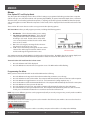
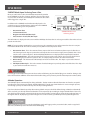
From the SURFACE mode screen repeatedly press the A
button to scroll to the COMPASS screen.
COMPASS Mode Screen
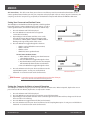
1. Press and hold the B button while holding the
computer in a horizontal position. Holding the unit
flat, smoothly rotate the computer twice in a 20-second period. Fol lowing this exercise, a “Calibration
Complete” message will be displayed.
Web Resource - Go to Dive Rite TV for a step-by-step video
showing compass calibration: http://www.diverite.com/tv/gear/
DIVE Mode
The DIVE computer mode is automatically entered when the computer enters the water. It begins performing its dive
calculations once you descend below 5 feet (1.5m). While in DIVE mode, the computer calculates and displays information about your dive and prompts you with safety stop information and warnings, if needed. When diving, there are two
screens you can toggle between, and you can switch to different gas mixes and setpoints, when needed.
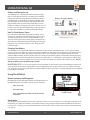
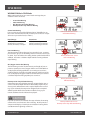
Primary Underwater Screen
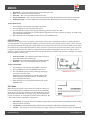
The primary underwater screen in DIVE mode displays your depth, dive time, max depth, remaining no-decompression
time, whether you are in open circuit (O/C) or closed circuit (C/C) mode, mix P02, mix number, 02 percentage, HE percentage, and OLI (oxygen limit indicator) and PGT (pressure gas in tissue)
bar graphs, which are graphic representations of your “CNS clock”.
1. Depth – This is your current depth.
2. Maximum Depth – This is the maximum depth you have
reached during your dive.
3. P02 – This is the partial pressure of 02 at your current depth.
It is based on the F02 settings for the mix selected.
4. 02 (OLI) Bar Graph – This is the oxygen limit index (OLI)
that calculates the cumulative effect of your exposure to
elevated partial pressures of oxygen (P02). This bar
graph can display up to nine bars. If all bars are displayed,
it means that you have used 100 percent of your “CNS”
clock triggering a visual warning. This graph increases when
you descend due to higher partial pressures and may decrease
when you ascend.
OLI
Bar
PGT
Bar
Primary Underwater Screen
VISUAL WARNING
Oxygen Limit Index (OLI) Warning
The OLI warning accounts for the intensity and length of your exposure to partial pressures of oxygen. When 7 of the OLI
bars are displayed, the OLI graph flashes as a warning to ascend to a shallower depth. If you fail to heed this warning and
all 9 of the bars are displayed, the graph continues to flash until you ascend to a shallower depth and the graph drops to
seven bars.
CO8400 NiTek Q4
15
www.DiveRite.com