1
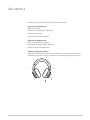
Headphone overview
L
R
AN
C
ANC
Power on/off
Active Noise Canceling
Play/pause music
Volume
Track selection
Open mic
Voice dial (phone feature)
Answer or end a call
Decline a call
Mute
Call back last call
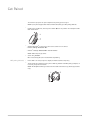
Slide the switch
to power on or off.
Slide the switch to activate or deactivate Active Noise Canceling (ANC). ANC will block out
unwanted noise.
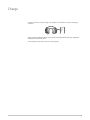
Tap the Play/pause button
Rotate the volume wheel
on the left ear cup to play or pause music.
forward (+) or backward (–) to control the volume.
Rotate the track wheel forward
or backward
to control the track selection.
You will be able to hear your surroundings by tapping the Mic button
when not on a call.
Press the Call button for 3 seconds, wait for the phone prompt and then tell the phone to dial
the name of a stored contact.
Tap the Call button
on the right ear cup.
Press and hold the Call
button for 2 seconds.
During a conversation, press the Mic button . You hear “mute on” or “mute off.” While the
microphone is muted, an alert repeats every 15 minutes.
To dial your last number you dialed, double-tap the Call button
.
4