1
Super Hybrid Engine
Super Hybrid Engine offers different power modes. The assigned instant
key toggles power savings between various power saving modes. The
power saving modes control many aspects of your Eee PC to maximize
performance versus battery time. The selected mode is shown on the
display.
To change the power mode
•
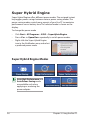
Click Start > All Programs > ASUS > SuperHybridEngine.
•
Press <Fn> + <Space Bar> repeatedly to switch power modes.
•
Right-click the Super Hybrid Engine
icon in the Notification area, and select
a preferred power mode.
Super Hybrid Engine Modes
Auto High Performance and
Auto Power-Saving mode
are available only when
applying or removing the
power adapter.
3-6
Chapter 3: Using the Eee PC