1
Contents
1.
2.
3.
Introduction............................................................................................................................5
Getting Started .......................................................................................................................6
2.1.
Package Contents .........................................................................................................6
2.2.
Keypad .........................................................................................................................6
2.3.
Turn On/Off the Power ................................................................................................7
2.4.
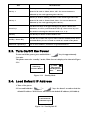
Load Default IP Address ..............................................................................................7
2.5.
Enter Administrative Mode..........................................................................................8
2.6.
Locking & Unlocking the Keypad ...............................................................................8
2.7.
Adjusting the Speaker Volume.....................................................................................9
2.8.
Selecting the Character Mode ......................................................................................9
2.9.
Erasing the Character Mode.........................................................................................9
Configuring Network Environment .....................................................................................10
3.1.
Network Configuration ..............................................................................................10
3.1.1. Fixed IP 10
3.1.2. DHCP 11
3.1.3. PPPoE 12
3.2.
Wireless Configuration ..............................................................................................13
3.2.1. Wireless LAN Settings.......................................................................................13
3.2.1.1. Wireless LAN.............................................................................................13
3.3.
SIP Configuration.......................................................................................................16
3.3.1. Registrar IP Settings...........................................................................................16
3.3.2. Outbound Proxy Settings ...................................................................................17
3.3.3. SIP Proxy Server Settings ..................................................................................18
3.3.4. Setting up the User Account...............................................................................19
3.4.
Using the Phonebook .................................................................................................20
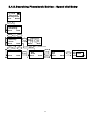
3.4.1. Searching Phonebook Entries - Edit Entry ........................................................20
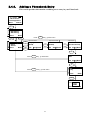
3.4.2. Searching Phonebook Entries - Erase Entry ......................................................21
3.4.3. Searching Phonebook Entries – Speed dial Entry..............................................22
3.4.4. Adding a Phonebook Entry ................................................................................23
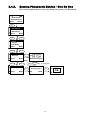
3.4.5. Erasing Phonebook Entries - One By One.........................................................24
3.4.6. Erasing Phonebook Entries - All........................................................................25
3.5.
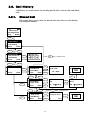
Call History ................................................................................................................26
3.5.1. Missed Call ........................................................................................................26
3.5.2. Received Call .....................................................................................................27
3.5.3. Dialed Call .........................................................................................................28
3.5.4. Erasing Call........................................................................................................29
3.6.
Settings.......................................................................................................................30
3.6.1. Setting the Ring Melody ....................................................................................30
3.6.2. Setting the Vibration Mode ................................................................................31
3.6.3. Adjusting the Ring Volume................................................................................31
3.6.4. Setting the Time .................................................................................................32
3.6.5. Setting the Date..................................................................................................32
3.6.6. Setting the Banner..............................................................................................33
3.6.7. Setting the Key Lock..........................................................................................33
3