1
KEY
DESCRIPTION
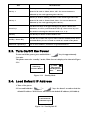
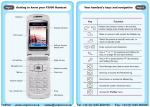
This key is used for making selections on the bottom left side of the
Soft key 1
phone LCD, such as: Menu, Select, OK... Its current function is
indicated by the word appearing above the key.
This key is used for making selections on the bottom right side of the
Soft key 2
phone LCD, such as: Names, Back, Clear... Its current function is
indicated by the word appearing above the key.
Use the arrow keys to navigate through your phone’s menus and
Arrow keys
submenus, as well as your Phonebook. The up / down arrow keys are
also used for selecting the character mode: A, a, 1, @.
Talk Key
Use this key to answer a call or make a call.
End Key / Power Key
Numerical / special keys
Use this key to end a call, reject a call or return to Standby mode. Press
and hold this key for two seconds to switch off / switch on the phone.
Use to enter numbers, characters or special characters.
2.3. Turn On/Off the Power
” key for approximately
To turn on/off the power, press and hold the “
2 seconds.
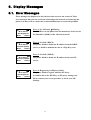
The phone enters the “standby” mode; Main Screen is displayed as shown in Figure
2.3-1
12:00
Wi-Fi Phone
Not Registered
Menu
Names
Initializing...
>>Please Wait!<<
Figure 2.3-1 Standby Mode
2.4. Load Default IP Address
1. Turn of the power.
2. Press and hold the “
”+“
” keys for about 2 seconds to load the
default IP address. Wi-Fi Phone will reset to the default IP address (192.168.0.6).
Load Default IP
<<Release key!>>
Figure 2.4-1 Load default IP
7