1
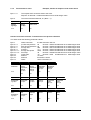
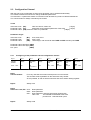
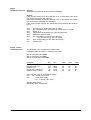
2.1.2
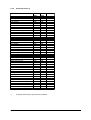
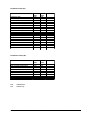
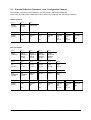
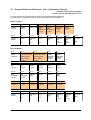
From slave to master:
Transfer of the process data
Byte 1
Byte 2
Byte 3
Byte 4
Byte 5
StatusInstruction
Actual
Process
temperature,
Pre-flow
High Byte
Actual
Process
temperature,
Pre-flow
Low Byte
Process
temperature,
Back-flow
High Byte
Process
temperature,
Back-flow
Low Byte
Byte 6
Byte 7
Byte 8
Byte 9
Byte 10
Byte 11
flow
High Byte
flow
Low Byte
Pressure
High Byte
Pressure
Low Byte
Power
High Byte
Power
Low Byte
Byte 12
Byte 13
Byte 14
Byte 15
Byte 16
Byte 17
Filmtemperature
High Byte
Filmtemperature
Low Byte
Controller
output
0x9C...0x64
Alarms 1
Alarms 2
Status
Definition
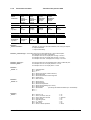
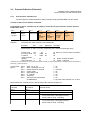
„Status instruction“ :
Indicates, if a range error has been detected, when writing the setpoint.
0 = setpoint value OK.
1 = setpoint value faulty
Definition „Flow-Through“ :The sending value is to be interpreted without or with a decimal place.
This depends on the system configuration.
For example: Send: 50 - Display Flow-Through = 50 l/min.
For example: Send: 50 - Display Flow-Through = 5.0 l/min.
For example: Send: 504 - Display Flow-Through = 50,4 l/min.
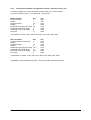
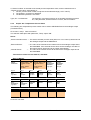
Definition „Pressure“ :
Definition „Work“ :
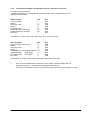
Definition
„Alarms 1“ :
Definition
„Alarms 2“ :
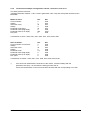
Definition
„Status“ :
Manual: SC-PB-EN
The sending value has to be interpreted with or without a decimal point.
For example: Send: 50 - Display Preasure = 5.0 bar
For example: Send: 70 - Display Work = 7.0 kW
Bit 0 = collecting alarm
Bit 1 = alarm 1
Bit 2 = --Bit 3 = alarm pump (phase, rotation direction)
Bit 4 = alarm filling level
Bit 5 = alarm flow transducer and through-flow
Bit 6 = system error
Bit 7 = auto tune error
Bit 0 = alarm
Bit 1 = alarm
Bit 2 = alarm
Bit 3 = alarm
Bit 4 = alarm
Bit 5 = alarm
Bit 6 = --Bit 7 = ---
pre-flow
back-flow
film-temperature
sensor breakage (act. sensor)
pressure
delta T
(monitoring the difference between pre- and backflow)
Bit 0 = slave on / off
Bit 1 = slave „cool down“ and „out“
Bit 2 = sensor internal or external
Bit 3 = suction mode
Bit 4 = evacuating mode
Bit 5 = 2nd. setpoint
Bit 6 = auto tuning
Bit 7 = hand- or remote-operation
Version: 04/13
1 = on
1 = on
1 = external
1 = on
1 = on
1 = on
1 = on
1 = hand
©Elotech GmbH
Seite 9 / 22