1
Smart Sight - Asyril SA
User Guide
Programming the Vision model
6.2.
v2.1
© Copyright Asyril S.A.
FO 32.03.118
Prelocalization
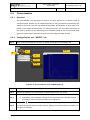
6.2.1. Overview
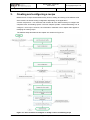
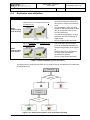
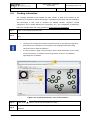
The prelocalization tool thresholds the picture and then inspects it for discrete blobs of
connected pixels. Results may be filtered depending on their geometrical characteristics but
mainly on their area. This first step allows locating fastly all candidates of good parts to be
picked on the surface of the Asycube. To configure this tool, you must select the surface of
your parts (in pixels or in mm depending on the calibration used) as well as a threshold value
(greyscale value) used to transform each portion of the image into black & white.
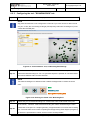
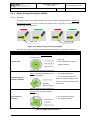
6.2.2. Configuring the tool: "MODEL" tab
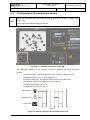
Step 0
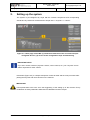
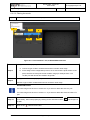
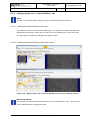
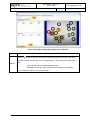
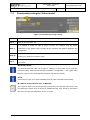
Click on the "Prelocalization" tab then on "Model" and finally on the "Settings" tab
3 -a
0
4
1
2
3 -b
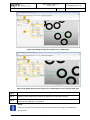
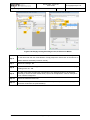
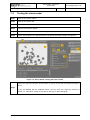
Figure 6-3: "Prelocalization" tool, 01\Model\Settings
Step 1
Choose a "Hard Threshold (fixed)" type threshold
Step 2
Choose the polarity of your parts (black on white background or vice versa)
a- In the image selector, choose Current.Histogram
b- Depending on the histogram, change the threshold value of the number of pixels
Step 3
according to the level of grey as shown in the Figure 6-3.
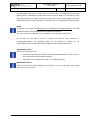
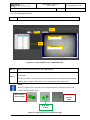
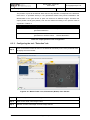
Click on the
Step 4
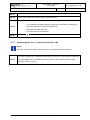
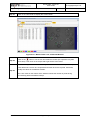
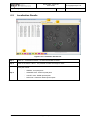
button to run the tool and observe the resulting detected area by selecting
"LastRun.InputImage" from the image selector. Modify the threshold value if necessary and
run again if necessary.
User Guide
Smart Sight – Asyril SA
21/52