1
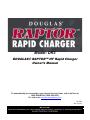
Douglas Raptor Fast Charger
Owner’s Manual
I.B.1650
Fault Codes
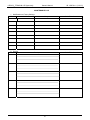
In case of a fault, one of the corresponding fault codes listed below will appear on the display. If it is a critical
fault, charging will stop and the red Fault LED will be illuminated.
Fault
Critical
Cause
DF1
Yes
Low output current
DF2
Yes
Output fault
DF3
Yes
Improper battery
DF4
No
The battery has been discharged
more than 80% of its capacity
DF5
No
Battery requires inspection
TH
Yes
Charger overheating
BAT TEMP
Yes
DF MOD
No
WRG MOD
Yes
Battery temperature reached
maximum
Alternating with charge
parameters – one or more module
in DF1 fault – the charge process
continues – the fault module(s) is
(are) displayed + red led flashing.
Blocking fault – one or more
modules are not compatible with
the charger configuration (for
example 24V charger with one
48V module). This can happen if
the user replaces one module with
another one with a different
voltage setting.
20
Solution
Check input voltage and fuses. Call for
service.
Check for proper battery connection (reversed
polarity). Check output fuse. Call for service
Battery voltage too high (>2.3 Vpc) or too low
(<1.6 Vpc). Use proper charger for battery.
Prevent future over discharging of battery.
Battery charge gauges and lift interrupts may
need calibration.
Non critical fault. Check battery cables for
condition and size, check for loose
connections, check for defective cells.
Check that fans are working. Verify that
ambient temperature is not too high. Inspect
to see if charger ventilation is obstructed or
impaired.
Allow battery to cool. Check max temperature
setting in Configuration->Battery->Max Temp
Check power modules. If all modules in DF1
fault a DF1 error will follow.
Use correct module(s).