1
Quadro4Li Manual I: Installation Guide
Step 2: Configuring the Quadro
PPP/PPTP Configuration
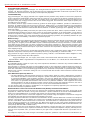
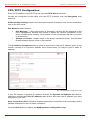
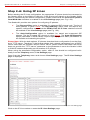
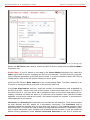
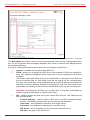
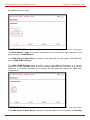
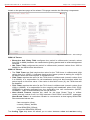
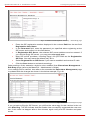
Enter the IP address of the PPTP server into the PPTP Server text field.
Choose the encryption for the traffic over the PPTP interface from the Encryption drop
down list.
Authentication Settings require the Username and the Password used for the authentication on the ISP server.
Dial Behavior radio buttons:
•
Dial Manually - if this radio button is activated, a button will be displayed in the
main management window that serves to switch the Internet connection on/off.
When accessing the Internet, every station of the connected LAN has to connect
to Quadro first.
•
Always connected - Quadro stays in the always connected mode. This will allow
Quadro always remain online in the network.
The IP Address Assignment field is used to specify the external IP address given to the
Quadro. Usually it is a dynamic address but in some cases you may be given a static IP
address.
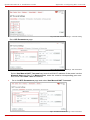
Fig. l- 20: PPP/PPTP Configuration page
If your ISP assigns a dynamic IP address, activate the Dynamic IP Address radio button,
otherwise activate the Fixed IP Address radio button and enter the IP address you were
assigned by your ISP.
Keep Connection Alive checkbox enables keeping the connection alive by sending control
packets dedicated for the link state verification.
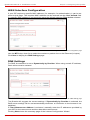
Click the Next button to display the WAN Interface Configuration page.
Quadro4Li; (SW Version 5.3.x)
24