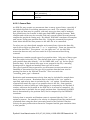
1
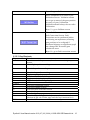
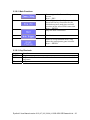
Eye
tracking
mode
left / right
Binocular
Left
Right
Binocular
left / right
Binocular
Left
Right
Binocular
Analog
output
mapping
Monocular
Monocular
Binocular
Binocular
Binocular
Monocular
Monocular
Binocular
Binocular
Binocular
Channels
available
DAC0
DAC1
DAC2
DAC3
DAC4
DAC5
6
6
6
6
6
4
4
4
4
4
X
left X
left X
-left X
X
left X
left X
-left X
Y
left Y
left Y
-left Y
Y
left Y
left Y
-left Y
P
left P
left P
-left P
P
right X
-right X
right X
-right X
-right X
right X
-right Y
-right Y
right Y
-right Y
-right Y
right Y
------
-right P
-right P
right P
------
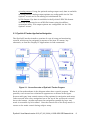
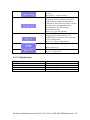
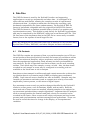
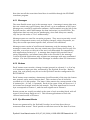
Table 1: Analog channel data assignments
8.3.2 Analog Data Types and Ranges
Both gaze and HREF position data are available for analog output. These are
selectable through the EyeLink II tracker's Set Options menu screen. Each of
these is scaled to a voltage on the analog output as described below. Raw pupil
(or pupil-CR) data is also available for applications that implement their own
calibrations.
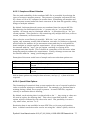
8.3.3 Scaling of Analog Position Data
Each of the types of position data is scaled to match the selected analog output
voltage range. Several variables in analog.ini set what proportion of the expected
data range for each type will be represented at the output, and what the total
voltage range will be.
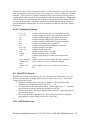
•
Total analog voltage range is set by analog_dac_range, followed by the
highest and lowest voltage required. The voltage range may be from -10 to
+10 volts, with other typical ranges being -5 to +5, or 0 to +10 volts.
•
The fraction of the total data range to be covered is set by the
analog_x_range and analog_y_range variables. These are followed by the
data type, and the minimum and maximum range fraction. For example, 0
to 1.0 would cover the full range of the data, 0.1 to 0.9 would cover the
central 80% of the data, and -0.2 to 1.2 would add a 20% margin above and
below the expected data range.
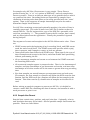
•
For raw data, the default range is 0.1 to 0.9, because the pupil position will
never reach the edges of the eye camera image. It is possible that the scaled
EyeLink II User Manual version 2.12 (07/02/2006) © 2002-2006 SR Research Ltd. 99