1
MICR Command Example | 7
7. MICR Command Example
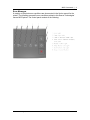
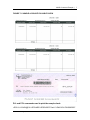
Figure 7.1, is an illustration of an Accounts Payable check and remittance information.
The page used a PCL macro for the static data and background design. This manual
does not address macro design and programming but the variable text information
including all the PJL and PCL commands used to print the example are located later in
this chapter. For illustrative purposes there are some extra spaces in the text preceding
the printable data. The following paragraphs describe the command functions. The
commands are a minimal set chosen to produce the example. Please consult Lexmark
Technical publications for the complete descriptions of PJL and PCL printer commands
PJL Unlock Sequence
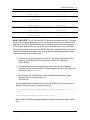
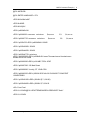
The first two lines of the variable text example are PJL commands that unlock the MICR
font resources and enter PCL language processing. The password, PASSWORD, is the
default. These commands and all of the following commands are all case sensitive.
<ESC> is used to illustrate the ASCII Escape Character, ASCII 27, hex 1B. An actual
data stream requires the Escape Character, not <ESC>.
PCL Initial Set-Up
The next two commands set up some printer PCL variables. These commands are
normally early in the data stream. <ESC>&l2a1h6d1e64F sets the paper size to
LETTER, the input tray to TRAY 1, the lines per inch to 6, the top margin to 1, and the
lines per page to 64. The next command, <ESC>&u600D, is the Unit of Measure
command set to 600 dots per inch as mentioned in chapter 7. This affects proper MICR
line spacing and X and Y cursor positioning.
PCL MACRO Call
The next command calls macro 100 that was previously loaded in RAM memory. When
called, the graphic background, logos, and static data are written to the internal print
buffer.
PCL Font Calls, Positioning Commands and Variable Print Data
The next eleven lines of data in the example call printer resident fonts, position the
cursor, and print the variable information. This is using the minimal data required,
particularly the font selection strings, <ESC>(s4099t0b10H being a very short version to
call Courier, Normal Weight, 10 Pitch.
<ESC>*p300x600Y is a PCL positioning command. In this case its values are 600 pixels
down and 300 pixels to the right of the upper left corner of the page. The Unit of
Measure command determines the exact distance.
The next 4 lines call the secured MICR font resources using the ID for the font call. The
Form Feed prints the page.
PJL Re-Lock Sequence
The last two lines re-lock the secured fonts. The password is not changed in this
example.
Source Technologies, LLC
25
ST9712 Secure MICR Printer User’s Guide