1
The Garageband Quick Start Guide - Patrick Baird
First Steps
!
!
!
!
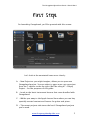
On launching Garageband, you’ll be greeted with this screen:
!
!
!
!
!
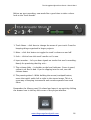
Let’s look at the annotated icons more closely:
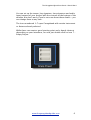
A. – New Project as you might imagine, allows you to open new
Garageband project. You can select to open a pre-set up project
from the 7 options to the the right. We’ll be using #7 - Empty
Project - for the purposes of this guide.
!
B. – Leads to the basic instrument lessons that come bundled with
Garageband.
!
!
C. – Whisks you away to the Apple Lesson Store where you can buy
specially created content and lessons for guitar and piano.
D. - The recent projects tab stores the last 8 Garageband projects
you’ve used.
www.thegaragebandguide.com
5