1
Geog 255: Geographical Information Science I Spring 2011 g. Switch to Layout View and zoom in and/or out to the Buildings layers fit to
the top middle frame. Add a Text as Buildings and change its properties if
needed. [1 mark]
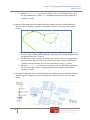
10) Activate Bus Stops frame and add Roads.shp, BusRoutes.shp and BusStops.shp
feature classes. Change its symbol and display its labels as similar as the image
below.
a. For Bus Stops layer, change its symbol same as the one in the image above.
You may have to add symbol package by pressing More Symbols button from
the Symbol Selector. [1 mark]
b. For Bus Route layer, change its symbol same as the one in the image above.
You can choose any color, but the symbol must have arrows inside the line
symbols and the direction of the arrows should be correct. [1 mark]
c. Switch to Layout View and zoom in and/or out to the Bus Stops layers fit to
the top right frame. Add an appropriate text and change its properties if
needed. [1 mark]
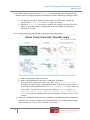
11) Activate Restaurants frame and add Roads.shp, Buildings.shp and Restaurants.shp
feature classes. Change its symbol and display its labels as similar as the image
below.
10