1
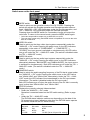
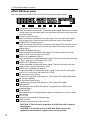
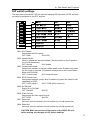
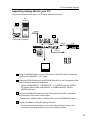
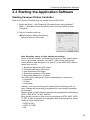
3.3 Starting the Application Software 3.3 Starting the Application Software Starting Canopus Picture Controller Start up the Picture Controller that is provided with the ADVC-500. 1. Select the [Start] → [All Programs] ([Programs] when using Windows® 2000) → [Canopus Picture Controller] menus, and then select [Picture Controller]. 2. Picture Controller starts up. èSwitch tabs to display the following setting window on the screen: Note: Retention values of video adjustment settings. Picture Controller enables the following five types of video-quality adjustment on a personal computer via 1394I/F; Video Quality settings will remain effective after the power is turned off, or the ADVC-500 is disconnected from your PC. 1. Brightness adjustment (256 steps) 2. Contrast adjustment (256 steps) 3. Hue adjustment (256 steps) 4. Saturation adjustment (256 steps) 5. Sharpness adjustment (16 steps) The video quality settings are stored independently for each input. Composite S-Video Component However, note that the settings are shared with the following color formats. Change the format setting and adjust the video quality separately as necessary. Default values of Video Quality parameters are designated individually for NTSC 0 IRE, NTSC 7.5 IRE, and PAL. When power is turned on after color format setting of NTSC 0IRE, NTSC 7.5 IRE, or PAL is changed, the changed Video Quality parameter will be initialized to the default value. NTSC (0 IRE) NTSC (7.5 IRE) PAL 15