1
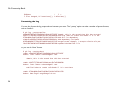
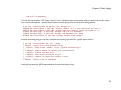
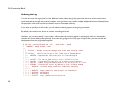
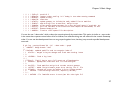
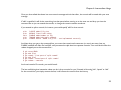
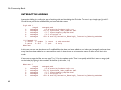
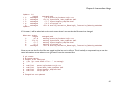
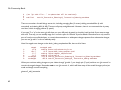
Git Community Book
The open Git resource pulled together by the whole community
AUTHORS
Thank these guys:
Alecs King ([email protected]), Amos Waterland ([email protected]), Andrew Ruder ([email protected]), Andy
Parkins ([email protected]), Arjen Laarhoven ([email protected]), Brian Hetro ([email protected]), Carl Worth
([email protected]), Christian Meder ([email protected]), Dan McGee ([email protected]), David Kastrup
([email protected]), Dmitry V. Levin ([email protected]), Francis Daly ([email protected]), Gerrit Pape ([email protected]),
Greg Louis ([email protected]), Gustaf Hendeby ([email protected]), Horst H. von Brand ([email protected]), J.
Bruce Fields ([email protected]), Jakub Narebski ([email protected]), Jim Meyering ([email protected]), Johan Herland
([email protected]), Johannes Schindelin ([email protected]), Jon Loeliger ([email protected]), Josh Triplett
([email protected]), Junio C Hamano ([email protected]), Linus Torvalds ([email protected]), Lukas Sandström
([email protected]), Marcus Fritzsch ([email protected]), Michael Coleman ([email protected]), Michael Smith
([email protected]), Mike Coleman ([email protected]), Miklos Vajna ([email protected]), Nicolas Pitre
([email protected]), Oliver Steele ([email protected]), Paolo Ciarrocchi ([email protected]), Pavel Roskin
([email protected]), Ralf Wildenhues ([email protected]), Robin Rosenberg ([email protected]),
Santi Béjar ([email protected]), Scott Chacon ([email protected]), Sergei Organov ([email protected]), Shawn Bohrer
([email protected]), Shawn O. Pearce ([email protected]), Steffen Prohaska ([email protected]), Tom Prince
([email protected]), William Pursell ([email protected]), Yasushi SHOJI ([email protected])
MAINTAINER / EDITOR
Bug this guy:
Scott Chacon ([email protected])
Chapter 1: Introduction
Chapter 1
Introduction
WELCOME TO GIT
Welcome to Git - the fast, distributed version control system.
This book is meant to be a starting point for people new to Git to learn it as quickly and easily as possible.
This book will start out by introducing you to the way Git stores data, to give you the context for why it is different than
other VCS tools. This is meant to take you about 20 minutes.
Next we will cover Basic Git Usage - the commands you will be using 90% of the time. These should give you a good
basis to use Git comfortably for most of what you're going to use it for. This section should take you about 30 minutes to
read through.
5
Git Community Book
Next we will go over Intermediate Git Usage - things that are slightly more complex, but may replace some of the
basic commands you learned in the first section. This will mostly be tricks and commands that will feel more comfortable
after you know the basic commands.
After you have all of that mastered, we will cover Advanced Git - commands that most people probably don't use very
often, but can be very helpful in certain situations. Learning these commands should round out your day-to-day git
knowledge; you will be a master of the Git!
Now that you know Git, we will then cover Working with Git. Here we will go over how to use Git in scripts, with
deployment tools, with editors and more. These sections are meant to help you integrate Git into your environment.
Lastly, we will have a series of articles on low-level documentation that may help the Git hackers who want to learn
how the actual internals and protocols work in Git.
Feedback and Contributing
At any point, if you see a mistake or want to contribute to the book, you can send me an email at [email protected], or
you can clone the source of this book at http://github.com/schacon/gitbook and send me a patch or a pull-request.
References
Much of this book is pulled together from different sources and then added to.
If you would like to read some of the original articles or resources, please visit them and thank the authors:
• Git User Manual
• The Git Tutorial
• The Git Tutorial pt 2
6
Chapter 1: Introduction
• "My Git Workflow" blog post
THE GIT OBJECT MODEL
The SHA
All the information needed to represent the history of a project is stored in files referenced by a 40-digit "object name"
that looks something like this:
6ff87c4664981e4397625791c8ea3bbb5f2279a3
You will see these 40-character strings all over the place in Git. In each case the name is calculated by taking the SHA1
hash of the contents of the object. The SHA1 hash is a cryptographic hash function. What that means to us is that it is
virtually impossible to find two different objects with the same name. This has a number of advantages; among others:
• Git can quickly determine whether two objects are identical or not, just by comparing names.
• Since object names are computed the same way in every repository, the same content stored in two repositories
will always be stored under the same name.
• Git can detect errors when it reads an object, by checking that the object's name is still the SHA1 hash of its
contents.
The Objects
Every object consists of three things - a type, a size and content. The size is simply the size of the contents, the
contents depend on what type of object it is, and there are four different types of objects: "blob", "tree", "commit", and
"tag".
7
Git Community Book
• A "blob" is used to store file data - it is generally a file.
• A "tree" is basically like a directory - it references a bunch of other trees and/or blobs (i.e. files and subdirectories)
• A "commit" points to a single tree, marking it as what the project looked like at a certain point in time. It
contains meta-information about that point in time, such as a timestamp, the author of the changes since the last
commit, a pointer to the previous commit(s), etc.
• A "tag" is a way to mark a specific commit as special in some way. It is normally used to tag certain commits as
specific releases or something along those lines.
Almost all of Git is built around manipulating this simple structure of four different object types. It is sort of its own little
filesystem that sits on top of your machine's filesystem.
Different from SVN
It is important to note that this is very different from most SCM systems that you may be familiar with. Subversion, CVS,
Perforce, Mercurial and the like all use Delta Storage systems - they store the differences between one commit and the
next. Git does not do this - it stores a snapshot of what all the files in your project look like in this tree structure each
time you commit. This is a very important concept to understand when using Git.
Blob Object
A blob generally stores the contents of a file.
8
Chapter 1: Introduction
You can use git show to examine the contents of any blob. Assuming we have the SHA for a blob, we can examine its
contents like this:
$ git show 6ff87c4664
Note that the only valid version of the GPL as far as this project
is concerned is _this_ particular version of the license (ie v2, not
v2.2 or v3.x or whatever), unless explicitly otherwise stated.
...
A "blob" object is nothing but a chunk of binary data. It doesn't refer to anything else or have attributes of any kind, not
even a file name.
Since the blob is entirely defined by its data, if two files in a directory tree (or in multiple different versions of the
repository) have the same contents, they will share the same blob object. The object is totally independent of its location
in the directory tree, and renaming a file does not change the object that file is associated with.
9
Git Community Book
Tree Object
A tree is a simple object that has a bunch of pointers to blobs and other trees - it generally represents the contents of a
directory or subdirectory.
The ever-versatile git show command can also be used to examine tree objects, but git ls-tree will give you more details.
Assuming we have the SHA for a tree, we can examine it like this:
$ git ls-tree fb3a8bdd0ce
100644 blob 63c918c667fa005ff12ad89437f2fdc80926e21c
100644 blob 5529b198e8d14decbe4ad99db3f7fb632de0439d
100644 blob 6ff87c4664981e4397625791c8ea3bbb5f2279a3
040000 tree 2fb783e477100ce076f6bf57e4a6f026013dc745
100755 blob 3c0032cec592a765692234f1cba47dfdcc3a9200
100644 blob 289b046a443c0647624607d471289b2c7dcd470b
100644 blob 4eb463797adc693dc168b926b6932ff53f17d0b1
100644 blob 548142c327a6790ff8821d67c2ee1eff7a656b52
...
.gitignore
.mailmap
COPYING
Documentation
GIT-VERSION-GEN
INSTALL
Makefile
README
As you can see, a tree object contains a list of entries, each with a mode, object type, SHA1 name, and name, sorted by
name. It represents the contents of a single directory tree.
10
Chapter 1: Introduction
An object referenced by a tree may be blob, representing the contents of a file, or another tree, representing the contents
of a subdirectory. Since trees and blobs, like all other objects, are named by the SHA1 hash of their contents, two trees
have the same SHA1 name if and only if their contents (including, recursively, the contents of all subdirectories) are
identical. This allows git to quickly determine the differences between two related tree objects, since it can ignore any
entries with identical object names.
(Note: in the presence of submodules, trees may also have commits as entries. See the Submodules section.)
Note that the files all have mode 644 or 755: git actually only pays attention to the executable bit.
Commit Object
The "commit" object links a physical state of a tree with a description of how we got there and why.
You can use the --pretty=raw option to git show or git log to examine your favorite commit:
$ git show -s --pretty=raw 2be7fcb476
commit 2be7fcb4764f2dbcee52635b91fedb1b3dcf7ab4
11
Git Community Book
tree fb3a8bdd0ceddd019615af4d57a53f43d8cee2bf
parent 257a84d9d02e90447b149af58b271c19405edb6a
author Dave Watson <[email protected]> 1187576872 -0400
committer Junio C Hamano <[email protected]> 1187591163 -0700
Fix misspelling of 'suppress' in docs
Signed-off-by: Junio C Hamano <[email protected]>
As you can see, a commit is defined by:
• a tree: The SHA1 name of a tree object (as defined below), representing the contents of a directory at a certain
point in time.
• parent(s): The SHA1 name of some number of commits which represent the immediately previous step(s) in
the history of the project. The example above has one parent; merge commits may have more than one. A
commit with no parents is called a "root" commit, and represents the initial revision of a project. Each project
must have at least one root. A project can also have multiple roots, though that isn't common (or necessarily a
good idea).
• an author: The name of the person responsible for this change, together with its date.
• a committer: The name of the person who actually created the commit, with the date it was done. This may
be different from the author; for example, if the author wrote a patch and emailed it to another person who
used the patch to create the commit.
• a comment describing this commit.
Note that a commit does not itself contain any information about what actually changed; all changes are calculated by
comparing the contents of the tree referred to by this commit with the trees associated with its parents. In particular, git
does not attempt to record file renames explicitly, though it can identify cases where the existence of the same file data at
changing paths suggests a rename. (See, for example, the -M option to git diff).
12
Chapter 1: Introduction
A commit is usually created by git commit, which creates a commit whose parent is normally the current HEAD, and
whose tree is taken from the content currently stored in the index.
The Object Model
So, now that we've looked at the 3 main object types (blob, tree and commit), let's take a quick look at how they all fit
together.
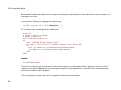
If we had a simple project with the following directory structure:
$>tree
.
|-- README
`-- lib
|-- inc
|
`-- tricks.rb
`-- mylib.rb
2 directories, 3 files
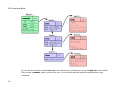
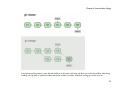
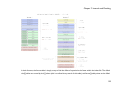
And we committed this to a Git repository, it would be represented like this:
13
Git Community Book
You can see that we have created a tree object for each directory (including the root) and a blob object for each file.
Then we have a commit object to point to the root, so we can track what our project looked like when it was
committed.
14
Chapter 1: Introduction
Tag Object
A tag object contains an object name (called simply 'object'), object type, tag name, the name of the person ("tagger") who
created the tag, and a message, which may contain a signature, as can be seen using git cat-file:
$ git cat-file tag v1.5.0
object 437b1b20df4b356c9342dac8d38849f24ef44f27
type commit
tag v1.5.0
tagger Junio C Hamano <[email protected]> 1171411200 +0000
GIT 1.5.0
-----BEGIN PGP SIGNATURE----Version: GnuPG v1.4.6 (GNU/Linux)
iD8DBQBF0lGqwMbZpPMRm5oRAuRiAJ9ohBLd7s2kqjkKlq1qqC57SbnmzQCdG4ui
nLE/L9aUXdWeTFPron96DLA=
=2E+0
-----END PGP SIGNATURE-----
15
Git Community Book
See the git tag command to learn how to create and verify tag objects. (Note that git tag can also be used to create
"lightweight tags", which are not tag objects at all, but just simple references whose names begin with "refs/tags/").
GIT DIRECTORY AND WORKING DIRECTORY
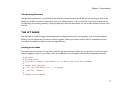
The Git Directory
The 'git directory' is the directory that stores all Git's history and meta information for your project - including all of the
objects (commits, trees, blobs, tags), all of the pointers to where different branches are and more.
There is only one Git Directory per project (as opposed to one per subdirectory like with SVN or CVS), and that
directory is (by default, though not necessarily) '.git' in the root of your project. If you look at the contents of that
directory, you can see all of your important files:
$>tree -L 1
.
|-- HEAD
|-- config
|-- description
|-- hooks/
|-- index
|-- logs/
|-- objects/
`-- refs/
#
#
#
#
#
#
#
#
pointer to your current branch
your configuration preferences
description of your project
pre/post action hooks
index file (see next section)
a history of where your branches have been
your objects (commits, trees, blobs, tags)
pointers to your branches
(there may be some other files/directories in there as well, but they are not important for now)
16
Chapter 1: Introduction
The Working Directory
The Git 'working directory' is the directory that holds the current checkout of the files you are working on. Files in this
directory are often removed or replaced by Git as you switch branches - this is normal. All your history is stored in the
Git Directory; the working directory is simply a temporary checkout place where you can modify the files until your next
commit.
THE GIT INDEX
The Git index is used as a staging area between your working directory and your repository. You can use the index to
build up a set of changes that you want to commit together. When you create a commit, what is committed is what is
currently in the index, not what is in your working directory.
Looking at the Index
The easiest way to see what is in the index is with the git status command. When you run git status, you can see which
files are staged (currently in your index), which are modified but not yet staged, and which are completely untracked.
$>git status
# On branch master
# Your branch is behind 'origin/master' by 11 commits, and can be fast-forwarded.
#
# Changes to be committed:
#
(use "git reset HEAD <file>..." to unstage)
#
#
modified:
daemon.c
#
# Changed but not updated:
17
Git Community Book
#
(use "git add <file>..." to update what will be committed)
#
#
modified:
grep.c
#
modified:
grep.h
#
# Untracked files:
#
(use "git add <file>..." to include in what will be committed)
#
#
blametree
#
blametree-init
#
git-gui/git-citool
If you blow the index away entirely, you generally haven't lost any information as long as you have the name of the tree
that it described.
And with that, you should have a pretty good understanding of the basics of what Git is doing behind the scenes, and why
it is a bit different than most other SCM systems. Don't worry if you don't totally understand it all right now; we'll revisit
all of these topics in the next sections. Now we're ready to move on to installing, configuring and using Git.
18
Chapter 2: First Time
Chapter 2
First Time
INSTALLING GIT
Installing from Source
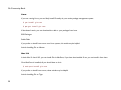
In short, on a Unix-based system, you can download the Git source code from the Git Download Page, and then run
something along the lines of :
$ make prefix=/usr all ;# as yourself
$ make prefix=/usr install ;# as root
You will need the expat, curl, zlib, and openssl libraries installed - though with the possible exception of expat, these will
normally already be there.
19
Git Community Book
Linux
If you are running Linux, you can likely install Git easily via your native package management system:
$ yum install git-core
$ apt-get install git-core
If that doesn't work, you can download the .deb or .rpm packages from here:
RPM Packages
Stable Debs
If you prefer to install from source on a Linux system, this article may be helpful:
Article: Installing Git on Ubuntu
Mac 10.4
In both Mac 10.4 and 10.5, you can install Git via MacPorts, if you have that installed. If not, you can install it from here.
Once MacPorts is installed, all you should have to do is:
$ sudo port install git-core
If you prefer to install from source, these articles may be helpful:
Article: Installing Git on Tiger
20
Chapter 2: First Time
Article: Installing Git and git-svn on Tiger from source
Mac 10.5
With Leopard, you can also install via MacPorts, but here you have the additional option of using a nice installer, which you
can download from here: Git OSX Installer
If you prefer to install it from source, these guides may be particularly helpful to you :
Article: Installing Git on OSX Leopard
Article: Installing Git on OS 10.5
Windows
On Windows, installing Git is pretty easy. Simply download and install the msysGit package.
See the Git on Windows chapter for a screencast demonstrating installing and using Git on Windows.
SETUP AND INITIALIZATION
Git Config
The first thing you're going to want to do is set up your name and email address for Git to use to sign your commits.
21
Git Community Book
$ git config --global user.name "Scott Chacon"
$ git config --global user.email "[email protected]"
That will set up a file in your home directory which may be used by any of your projects. By default that file is ~/.gitconfig
and the contents will look like this:
[user]
name = Scott Chacon
email = [email protected]
If you want to override those values for a specific project (to use a work email address, for example), you can run the git
config command without the --global option while in that project. This will add a [user] section like the one shown above to
the .git/config file in your project's root directory.
22
Chapter 3: Basic Usage
Chapter 3
Basic Usage
GETTING A GIT REPOSITORY
So now that we're all set up, we need a Git repository. We can do this one of two ways - we can clone one that already
exists, or we can initialize one either from existing files that aren't in source control yet, or from an empty directory.
Cloning a Repository
In order to get a copy of a project, you will need to know the project's Git URL - the location of the repository. Git can
operate over many different protocols, so it may begin with ssh://, http(s)://, git://, or just a username (in which case git will
assume ssh). Some repositories may be accessed over more than one protocol. For example, the source code to Git itself
can be cloned either over the git:// protocol:
git clone git://git.kernel.org/pub/scm/git/git.git
23
Git Community Book
or over http:
git clone http://www.kernel.org/pub/scm/git/git.git
The git:// protocol is faster and more efficient, but sometimes it is necessary to use http when behind corporate firewalls
or what have you. In either case you should then have a new directory named 'git' that contains all the Git source code
and history - it is basically a complete copy of what was on the server.
By default, Git will name the new directory it has checked out your cloned code into after whatever comes directly before
the '.git' in the path of the cloned project. (ie. git clone http://git.kernel.org/linux/kernel/git/torvalds/linux-2.6.git will result in a
new directory named 'linux-2.6')
Initializing a New Repository
Assume you have a tarball named project.tar.gz with your initial work. You can place it under git revision control as
follows.
$ tar xzf project.tar.gz
$ cd project
$ git init
Git will reply
Initialized empty Git repository in .git/
You've now initialized the working directory--you may notice a new directory created, named ".git".
gitcast:c1_init
24
Chapter 3: Basic Usage
NORMAL WORKFLOW
Modify some files, then add their updated contents to the index:
$ git add file1 file2 file3
You are now ready to commit. You can see what is about to be committed using git diff with the --cached option:
$ git diff --cached
(Without --cached, git diff will show you any changes that you've made but not yet added to the index.) You can also get a
brief summary of the situation with git status:
$ git status
# On branch master
# Changes to be committed:
#
(use "git reset HEAD <file>..." to unstage)
#
#
modified:
file1
#
modified:
file2
#
modified:
file3
#
If you need to make any further adjustments, do so now, and then add any newly modified content to the index. Finally,
commit your changes with:
$ git commit
This will again prompt you for a message describing the change, and then record a new version of the project.
Alternatively, instead of running git
add
beforehand, you can use
25
Git Community Book
$ git commit -a
which will automatically notice any modified (but not new) files, add them to the index, and commit, all in one step.
A note on commit messages: Though not required, it's a good idea to begin the commit message with a single short (less
than 50 character) line summarizing the change, followed by a blank line and then a more thorough description. Tools that
turn commits into email, for example, use the first line on the Subject: line and the rest of the commit message in the
body.
Git tracks content not files
Many revision control systems provide an "add" command that tells the system to start tracking changes to a new file. Git's
"add" command does something simpler and more powerful: git add is used both for new and newly modified files, and in
both cases it takes a snapshot of the given files and stages that content in the index, ready for inclusion in the next commit.
gitcast:c2_normal_workflow
BASIC BRANCHING AND MERGING
A single git repository can maintain multiple branches of development. To create a new branch named "experimental", use
$ git branch experimental
If you now run
$ git branch
26
Chapter 3: Basic Usage
you'll get a list of all existing branches:
experimental
* master
The "experimental" branch is the one you just created, and the "master" branch is a default branch that was created for
you automatically. The asterisk marks the branch you are currently on; type
$ git checkout experimental
to switch to the experimental branch. Now edit a file, commit the change, and switch back to the master branch:
(edit file)
$ git commit -a
$ git checkout master
Check that the change you made is no longer visible, since it was made on the experimental branch and you're back on the
master branch.
You can make a different change on the master branch:
(edit file)
$ git commit -a
at this point the two branches have diverged, with different changes made in each. To merge the changes made in
experimental into master, run
$ git merge experimental
27
Git Community Book
If the changes don't conflict, you're done. If there are conflicts, markers will be left in the problematic files showing the
conflict;
$ git diff
will show this. Once you've edited the files to resolve the conflicts,
$ git commit -a
will commit the result of the merge. Finally,
$ gitk
will show a nice graphical representation of the resulting history.
At this point you could delete the experimental branch with
$ git branch -d experimental
This command ensures that the changes in the experimental branch are already in the current branch.
If you develop on a branch crazy-idea, then regret it, you can always delete the branch with
$ git branch -D crazy-idea
Branches are cheap and easy, so this is a good way to try something out.
28
Chapter 3: Basic Usage
How to merge
You can rejoin two diverging branches of development using git merge:
$ git merge branchname
merges the changes made in the branch "branchname" into the current branch. If there are conflicts--for example, if the
same file is modified in two different ways in the remote branch and the local branch--then you are warned; the output
may look something like this:
$ git merge next
100% (4/4) done
Auto-merged file.txt
CONFLICT (content): Merge conflict in file.txt
Automatic merge failed; fix conflicts and then commit the result.
Conflict markers are left in the problematic files, and after you resolve the conflicts manually, you can update the index
with the contents and run git commit, as you normally would when modifying a file.
If you examine the resulting commit using gitk, you will see that it has two parents: one pointing to the top of the current
branch, and one to the top of the other branch.
Resolving a merge
When a merge isn't resolved automatically, git leaves the index and the working tree in a special state that gives you all the
information you need to help resolve the merge.
Files with conflicts are marked specially in the index, so until you resolve the problem and update the index, git commit
will fail:
29
Git Community Book
$ git commit
file.txt: needs merge
Also, git status will list those files as "unmerged", and the files with conflicts will have conflict markers added, like this:
<<<<<<< HEAD:file.txt
Hello world
=======
Goodbye
>>>>>>> 77976da35a11db4580b80ae27e8d65caf5208086:file.txt
All you need to do is edit the files to resolve the conflicts, and then
$ git add file.txt
$ git commit
Note that the commit message will already be filled in for you with some information about the merge. Normally you can
just use this default message unchanged, but you may add additional commentary of your own if desired.
The above is all you need to know to resolve a simple merge. But git also provides more information to help resolve
conflicts:
Undoing a merge
If you get stuck and decide to just give up and throw the whole mess away, you can always return to the pre-merge state
with
$ git reset --hard HEAD
Or, if you've already committed the merge that you want to throw away,
30
Chapter 3: Basic Usage
$ git reset --hard ORIG_HEAD
However, this last command can be dangerous in some cases--never throw away a commit if that commit may itself have
been merged into another branch, as doing so may confuse further merges.
Fast-forward merges
There is one special case not mentioned above, which is treated differently. Normally, a merge results in a merge commit
with two parents, one for each of the two lines of development that were merged.
However, if the current branch has not diverged from the other--so every commit present in the current branch is already
contained in the other--then git just performs a "fast forward"; the head of the current branch is moved forward to point
at the head of the merged-in branch, without any new commits being created.
gitcast:c6-branch-merge
REVIEWING HISTORY - GIT LOG
The git log command can show lists of commits. On its own, it shows all commits reachable from the parent commit; but
you can also make more specific requests:
$
$
$
$
git
git
git
git
log
log
log
log
v2.5..
test..master
master..test
master...test
# commits since (not reachable from) v2.5
# commits reachable from master but not test
# commits reachable from test but not master
# commits reachable from either test or
#
master, but not both
$ git log --since="2 weeks ago" # commits from the last 2 weeks
$ git log Makefile
# commits that modify Makefile
31
Git Community Book
$ git log fs/
$ git log -S'foo()'
$ git log --no-merges
#
#
#
#
commits that modify any file under fs/
commits that add or remove any file data
matching the string 'foo()'
dont show merge commits
And of course you can combine all of these; the following finds commits since v2.5 which touch the Makefile or any file
under fs:
$ git log v2.5.. Makefile fs/
Git log will show a listing of each commit, with the most recent commits first, that match the arguments given to the log
command.
commit f491239170cb1463c7c3cd970862d6de636ba787
Author: Matt McCutchen <[email protected]>
Date:
Thu Aug 14 13:37:41 2008 -0400
git format-patch documentation: clarify what --cover-letter does
commit 7950659dc9ef7f2b50b18010622299c508bfdfc3
Author: Eric Raible <[email protected]>
Date:
Thu Aug 14 10:12:54 2008 -0700
bash completion: 'git apply' should use 'fix' not 'strip'
Bring completion up to date with the man page.
You can also ask git log to show patches:
$ git log -p
commit da9973c6f9600d90e64aac647f3ed22dfd692f70
Author: Robert Schiele <[email protected]>
32
Chapter 3: Basic Usage
Date:
Mon Aug 18 16:17:04 2008 +0200
adapt git-cvsserver manpage to dash-free syntax
diff --git a/Documentation/git-cvsserver.txt b/Documentation/git-cvsserver.txt
index c2d3c90..785779e 100644
--- a/Documentation/git-cvsserver.txt
+++ b/Documentation/git-cvsserver.txt
@@ -11,7 +11,7 @@ SYNOPSIS
SSH:
[verse]
-export CVS_SERVER=git-cvsserver
+export CVS_SERVER="git cvsserver"
'cvs' -d :ext:user@server/path/repo.git co <HEAD_name>
pserver (/etc/inetd.conf):
Log Stats
If you pass the --stat option to 'git log', it will show you which files have changed in that commit and how many lines
were added and removed from each.
$ git log --stat
commit dba9194a49452b5f093b96872e19c91b50e526aa
Author: Junio C Hamano <[email protected]>
Date:
Sun Aug 17 15:44:11 2008 -0700
Start 1.6.0.X maintenance series
Documentation/RelNotes-1.6.0.1.txt |
15 +++++++++++++++
33
Git Community Book
RelNotes
|
2 +2 files changed, 16 insertions(+), 1 deletions(-)
Formatting the Log
You can also format the log output almost however you want. The '--pretty' option can take a number of preset formats,
such as 'oneline':
$ git log --pretty=oneline
a6b444f570558a5f31ab508dc2a24dc34773825f
49d77f72783e4e9f12d1bbcacc45e7a15c800240
9764edd90cf9a423c9698a2f1e814f16f0111238
e1ba1e3ca83d53a2f16b39c453fad33380f8d1cc
0f87b4d9020fff756c18323106b3fd4e2f422135
f0ce7d5979dfb0f415799d086e14a8d2f9653300
dammit, this is the second time this has reverted
modified index to create refs/heads if it is not
Add diff-lcs dependency
Add dependency for Open4
merged recent changes: * accepts relative alt pat
updated the Manifest file
or you can do 'short' format:
$ git log --pretty=short
commit a6b444f570558a5f31ab508dc2a24dc34773825f
Author: Scott Chacon <[email protected]>
dammit, this is the second time this has reverted
commit 49d77f72783e4e9f12d1bbcacc45e7a15c800240
Author: Scott Chacon <[email protected]>
modified index to create refs/heads if it is not there
commit 9764edd90cf9a423c9698a2f1e814f16f0111238
Author: Hans Engel <[email protected]>
34
Chapter 3: Basic Usage
Add diff-lcs dependency
You can also use 'medium', 'full', 'fuller', 'email' or 'raw'. If those formats aren't exactly what you need, you can also create
your own format with the '--pretty=format' option (see the git log docs for all the formatting options).
$ git log --pretty=format:'%h was %an, %ar, message: %s'
a6b444f was Scott Chacon, 5 days ago, message: dammit, this is the second time this has re
49d77f7 was Scott Chacon, 8 days ago, message: modified index to create refs/heads if it i
9764edd was Hans Engel, 11 days ago, message: Add diff-lcs dependency
e1ba1e3 was Hans Engel, 11 days ago, message: Add dependency for Open4
0f87b4d was Scott Chacon, 12 days ago, message: merged recent changes:
Another interesting thing you can do is visualize the commit graph with the '--graph' option, like so:
$ git log --pretty=format:'%h : %s' --graph
* 2d3acf9 : ignore errors from SIGCHLD on trap
*
5e3ee11 : Merge branch 'master' of git://github.com/dustin/grit
|\
| * 420eac9 : Added a method for getting the current branch.
* | 30e367c : timeout code and tests
* | 5a09431 : add timeout protection to grit
* | e1193f8 : support for heads with slashes in them
|/
* d6016bc : require time for xmlschema
It will give a pretty nice ASCII representation of the commit history lines.
35
Git Community Book
Ordering the Log
You can also view the log entries in a few different orders. Note that git log starts with the most recent commit and
works backwards through the parents; however, since git history can contain multiple independent lines of development,
the particular order that commits are listed in may be somewhat arbitrary.
If you want to specify a certain order, you can add an ordering option to the git log command.
By default, the commits are shown in reverse chronological order.
However, you can also specify '--topo-order', which makes the commits appear in topological order (i.e. descendant
commits are shown before their parents). If we view the git log for the Grit repo in topo-order, you can see that the
development lines are all grouped together.
$ git log --pretty=format:'%h : %s' --topo-order --graph
*
4a904d7 : Merge branch 'idx2'
|\
| *
dfeffce : merged in bryces changes and fixed some testing issues
| |\
| | * 23f4ecf : Clarify how to get a full count out of Repo#commits
| | *
9d6d250 : Appropriate time-zone test fix from halorgium
| | |\
| | | * cec36f7 : Fix the to_hash test to run in US/Pacific time
| | * | decfe7b : fixed manifest and grit.rb to make correct gemspec
| | * | cd27d57 : added lib/grit/commit_stats.rb to the big list o' files
| | * | 823a9d9 : cleared out errors by adding in Grit::Git#run method
| | * |
4eb3bf0 : resolved merge conflicts, hopefully amicably
| | |\ \
| | | * | d065e76 : empty commit to push project to runcoderun
| | | * | 3fa3284 : whitespace
| | | * | d01cffd : whitespace
| | | * | 7c74272 : oops, update version here too
36
Chapter 3: Basic Usage
|
|
|
|
|
|
|
|
|
|
|
|
|
|
|
|
|
|
|
|
|
|
|
|
|
|
|
|
|
|
*
*
*
*
*
*
*
*
*
*
|
|
|
|
|
|
|
|
|
|
13f8cc3
06bae5a
0b5bedf
d40e1f0
ef8a23c
15dd347
3dabb6a
eac1c37
0a7d387
4d6b69c
:
:
:
:
:
:
:
:
:
:
push 0.8.3
capture stderr and log it if debug is true when running commands
update history
some docs
update gemspec to include the newly added files to manifest
add missing files to manifest; add grit test
allow sending debug messages to a user defined logger if provided; tes
pull out the date in this assertion and compare as xmlschemaw, to avoi
Removed debug print.
Fixed to close opened file description.
You can also use '--date-order', which orders the commits primarily by commit date. This option is similar to --topo-order
in the sense that no parent comes before all of its children, but otherwise things are still ordered in the commit timestamp
order. You can see that development lines are not grouped together here, that they jump around as parallel development
occurred:
$ git log --pretty=format:'%h : %s' --date-order --graph
*
4a904d7 : Merge branch 'idx2'
|\
* | 81a3e0d : updated packfile code to recognize index v2
| *
dfeffce : merged in bryces changes and fixed some testing issues
| |\
| * | c615d80 : fixed a log issue
|/ /
| * 23f4ecf : Clarify how to get a full count out of Repo#commits
| *
9d6d250 : Appropriate time-zone test fix from halorgium
| |\
| * | decfe7b : fixed manifest and grit.rb to make correct gemspec
| * | cd27d57 : added lib/grit/commit_stats.rb to the big list o' file
| * | 823a9d9 : cleared out errors by adding in Grit::Git#run method
| * |
4eb3bf0 : resolved merge conflicts, hopefully amicably
| |\ \
| * | | ba23640 : Fix CommitDb errors in test (was this the right fix?
37
Git Community Book
|
|
|
|
|
*
*
|
|
|
|
*
*
*
*
|
|
|
|
|
*
*
|
|
|
|
*
|
|
*
*
|
|
|
|
|
|
|
|
|
|
|
|
|
4d8873e
b3285ad
44dda6c
839ba9f
d065e76
791ec6b
756a947
3fa3284
d01cffd
a0e4a3d
7569d0d
:
:
:
:
:
:
:
:
:
:
:
test_commit no longer fails if you're not in PDT
Use the appropriate method to find a first occurrenc
more cleanly accept separate options for initializin
needed to be able to ask Repo.new to work with a bar
empty commit to push project to runcoderun
updated grit gemspec
including code from github updates
whitespace
whitespace
updated grit gemspec
including code from github updates
Lastly, you can reverse the order of the log with the '--reverse' option.
gitcast:c4-git-log
COMPARING COMMITS - GIT DIFF
You can generate diffs between any two versions of your project using git diff:
$ git diff master..test
That will produce the diff between the tips of the two branches. If you'd prefer to find the diff from their common
ancestor to test, you can use three dots instead of two:
$ git diff master...test
git diff is an incredibly useful tool for figuring out what has changed between any two points in your project's history, or to
see what people are trying to introduce in new branches, etc.
38
Chapter 3: Basic Usage
What you will commit
You will commonly use git diff for figuring out differences between your last commit, your index, and your current working
directory. A common use is to simply run
$ git diff
which will show you changes in the working directory that are not yet staged for the next commit. If you want to see what
is staged for the next commit, you can run
$ git diff --cached
which will show you the difference between the index and your last commit; what you would be committing if you run "git
commit" without the "-a" option. Lastly, you can run
$ git diff HEAD
which shows changes in the working directory since your last commit; what you would be committing if you run "git
commit -a".
More Diff Options
If you want to see how your current working directory differs from the state of the project in another branch, you can run
something like
$ git diff test
This will show you what is different between your current working directory and the snapshot on the 'test' branch. You
can also limit the comparison to a specific file or subdirectory by adding a path limiter:
39
Git Community Book
$ git diff HEAD -- ./lib
That command will show the changes between your current working directory and the last commit (or, more accurately,
the tip of the current branch), limiting the comparison to files in the 'lib' subdirectory.
If you don't want to see the whole patch, you can add the '--stat' option, which will limit the output to the files that have
changed along with a little text graph depicting how many lines changed in each file.
$>git diff --stat
layout/book_index_template.html
text/05_Installing_Git/0_Source.markdown
text/05_Installing_Git/1_Linux.markdown
text/05_Installing_Git/2_Mac_104.markdown
text/05_Installing_Git/3_Mac_105.markdown
text/05_Installing_Git/4_Windows.markdown
.../1_Getting_a_Git_Repo.markdown
.../0_ Comparing_Commits_Git_Diff.markdown
.../0_ Hosting_Git_gitweb_repoorcz_github.markdown
9 files changed, 115 insertions(+), 6 deletions(-)
|
|
|
|
|
|
|
|
|
8
14
17
11
8
7
7
45
4
++++++++
+++++++
+++++
++++
+++
+++++++++++++++++++++++-
Sometimes that makes it easier to see overall what has changed, to jog your memory.
DISTRIBUTED WORKFLOWS
Suppose that Alice has started a new project with a git repository in /home/alice/project, and that Bob, who has a home
directory on the same machine, wants to contribute.
Bob begins with:
$ git clone /home/alice/project myrepo
40
Chapter 3: Basic Usage
This creates a new directory "myrepo" containing a clone of Alice's repository. The clone is on an equal footing with the
original project, possessing its own copy of the original project's history.
Bob then makes some changes and commits them:
(edit files)
$ git commit -a
(repeat as necessary)
When he's ready, he tells Alice to pull changes from the repository at /home/bob/myrepo. She does this with:
$ cd /home/alice/project
$ git pull /home/bob/myrepo master
This merges the changes from Bob's "master" branch into Alice's current branch. If Alice has made her own changes in the
meantime, then she may need to manually fix any conflicts. (Note that the "master" argument in the above command is
actually unnecessary, as it is the default.)
The "pull" command thus performs two operations: it fetches changes from a remote branch, then merges them into the
current branch.
When you are working in a small closely knit group, it is not unusual to interact with the same repository over and over
again. By defining 'remote' repository shorthand, you can make it easier:
$ git remote add bob /home/bob/myrepo
With this, Alice can perform the first operation alone using the "git fetch" command without merging them with her own
branch, using:
$ git fetch bob
41
Git Community Book
Unlike the longhand form, when Alice fetches from Bob using a remote repository shorthand set up with
what was fetched is stored in a remote tracking branch, in this case bob/master. So after this:
git remote,
$ git log -p master..bob/master
shows a list of all the changes that Bob made since he branched from Alice's master branch.
After examining those changes, Alice could merge the changes into her master branch:
$ git merge bob/master
This merge can also be done by 'pulling from her own remote tracking branch', like this:
$ git pull . remotes/bob/master
Note that git pull always merges into the current branch, regardless of what else is given on the command line.
Later, Bob can update his repo with Alice's latest changes using
$ git pull
Note that he doesn't need to give the path to Alice's repository; when Bob cloned Alice's repository, git stored the
location of her repository in the repository configuration, and that location is used for pulls:
$ git config --get remote.origin.url
/home/alice/project
(The complete configuration created by git-clone is visible using "git config -l", and the git config man page explains the
meaning of each option.)
42
Chapter 3: Basic Usage
Git also keeps a pristine copy of Alice's master branch under the name "origin/master":
$ git branch -r
origin/master
If Bob later decides to work from a different host, he can still perform clones and pulls using the ssh protocol:
$ git clone alice.org:/home/alice/project myrepo
Alternatively, git has a native protocol, or can use rsync or http; see git pull for details.
Git can also be used in a CVS-like mode, with a central repository that various users push changes to; see git push and
gitcvs-migration.
Public git repositories
Another way to submit changes to a project is to tell the maintainer of that project to pull the changes from your
repository using git pull. This is a way to get updates from the "main" repository, but it works just as well in the other
direction.
If you and the maintainer both have accounts on the same machine, then you can just pull changes from each other's
repositories directly; commands that accept repository URLs as arguments will also accept a local directory name:
$ git clone /path/to/repository
$ git pull /path/to/other/repository
or an ssh URL:
$ git clone ssh://yourhost/~you/repository
43
Git Community Book
For projects with few developers, or for synchronizing a few private repositories, this may be all you need.
However, the more common way to do this is to maintain a separate public repository (usually on a different host) for
others to pull changes from. This is usually more convenient, and allows you to cleanly separate private work in progress
from publicly visible work.
You will continue to do your day-to-day work in your personal repository, but periodically "push" changes from your
personal repository into your public repository, allowing other developers to pull from that repository. So the flow of
changes, in a situation where there is one other developer with a public repository, looks like this:
you push
your personal repo ------------------> your public repo
^
|
|
|
| you pull
| they pull
|
|
|
|
|
they push
V
their public repo <------------------- their repo
Pushing changes to a public repository
Note that exporting via http or git allow other maintainers to fetch your latest changes, but they do not allow write
access. For this, you will need to update the public repository with the latest changes created in your private repository.
The simplest way to do this is using git push and ssh; to update the remote branch named "master" with the latest state of
your branch named "master", run
$ git push ssh://yourserver.com/~you/proj.git master:master
44
Chapter 3: Basic Usage
or just
$ git push ssh://yourserver.com/~you/proj.git master
As with git-fetch, git-push will complain if this does not result in a fast forward; see the following section for details on
handling this case.
Note that the target of a "push" is normally a bare repository. You can also push to a repository that has a checked-out
working tree, but the working tree will not be updated by the push. This may lead to unexpected results if the branch you
push to is the currently checked-out branch!
As with git-fetch, you may also set up configuration options to save typing; so, for example, after
$ cat >>.git/config <<EOF
[remote "public-repo"]
url = ssh://yourserver.com/~you/proj.git
EOF
you should be able to perform the above push with just
$ git push public-repo master
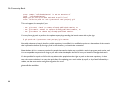
See the explanations of the remote..url, branch..remote, and remote..push options in git config for details.
What to do when a push fails
If a push would not result in a fast forward of the remote branch, then it will fail with an error like:
45
Git Community Book
error: remote 'refs/heads/master' is not an ancestor of
local 'refs/heads/master'.
Maybe you are not up-to-date and need to pull first?
error: failed to push to 'ssh://yourserver.com/~you/proj.git'
This can happen, for example, if you:
- use `git-reset --hard` to remove already-published commits, or
- use `git-commit --amend` to replace already-published commits, or
- use `git-rebase` to rebase any already-published commits.
You may force git-push to perform the update anyway by preceding the branch name with a plus sign:
$ git push ssh://yourserver.com/~you/proj.git +master
Normally whenever a branch head in a public repository is modified, it is modified to point to a descendant of the commit
that it pointed to before. By forcing a push in this situation, you break that convention.
Nevertheless, this is a common practice for people that need a simple way to publish a work-in-progress patch series, and
it is an acceptable compromise as long as you warn other developers that this is how you intend to manage the branch.
It's also possible for a push to fail in this way when other people have the right to push to the same repository. In that
case, the correct solution is to retry the push after first updating your work: either by a pull, or by a fetch followed by a
rebase; see the next section and gitcvs-migration for more.
gitcast:c8-dist-workflow
46
Chapter 3: Basic Usage
GIT TAG
Lightweight Tags
We can create a tag to refer to a particular commit by running git tag with no arguments.
$ git tag stable-1 1b2e1d63ff
After that, we can use stable-1 to refer to the commit 1b2e1d63ff.
This creates a "lightweight" tag, basically a branch that never moves. If you would also like to include a comment with the
tag, and possibly sign it cryptographically, then we can create a tag object instead.
Tag Objects
If one of -a, -s, or -u is passed, the command creates a tag object, and requires the tag message. Unless -m or -F is given,
an editor is started for the user to type in the tag message.
When this happens, a new object is added to the Git object database and the tag ref points to that tag object, rather than
the commit itself. The strength of this is that you can sign the tag, so you can verify that it is the correct commit later. You
can create a tag object like this:
$ git tag -a stable-1 1b2e1d63ff
It is actually possible to tag any object, but tagging commit objects is the most common. (In the Linux kernel source, the
first tag object references a tree, rather than a commit)
47
Git Community Book
Signed Tags
If you have a GPG key setup, you can create signed tags fairly easily. First, you will probably want to setup your key id in
your .git/config or ~.gitconfig file.
[user]
signingkey = <gpg-key-id>
You can also set that with
$ git config (--global) user.signingkey <gpg-key-id>
Now you can create a signed tag simply by replacing the -a with a -s.
$ git tag -s stable-1 1b2e1d63ff
If you don't have your GPG key in your config file, you can accomplish the same thing this way:
$ git tag -u <gpg-key-id> stable-1 1b2e1d63ff
48
Chapter 4: Intermediate Usage
Chapter 4
Intermediate Usage
IGNORING FILES
A project will often generate files that you do 'not' want to track with git. This typically includes files generated by a build
process or temporary backup files made by your editor. Of course, 'not' tracking files with git is just a matter of 'not'
calling "git-add" on them. But it quickly becomes annoying to have these untracked files lying around; e.g. they make " git
add ." and "git commit -a" practically useless, and they keep showing up in the output of " git status".
You can tell git to ignore certain files by creating a file called .gitignore in the top level of your working directory, with
contents such as:
# Lines starting with '#' are considered comments.
# Ignore any file named foo.txt.
foo.txt
# Ignore (generated) html files,
49
Git Community Book
*.html
# except foo.html which is maintained by hand.
!foo.html
# Ignore objects and archives.
*.[oa]
See gitignore for a detailed explanation of the syntax. You can also place .gitignore files in other directories in your
working tree, and they will apply to those directories and their subdirectories. The .gitignore files can be added to your
repository like any other files (just run git add .gitignore and git commit, as usual), which is convenient when the
exclude patterns (such as patterns matching build output files) would also make sense for other users who clone your
repository.
If you wish the exclude patterns to affect only certain repositories (instead of every repository for a given project), you
may instead put them in a file in your repository named .git/info/exclude, or in any file specified by the core.excludesfile
configuration variable. Some git commands can also take exclude patterns directly on the command line. See gitignore for
the details.
REBASING
Suppose that you create a branch "mywork" on a remote-tracking branch "origin".
$ git checkout -b mywork origin
50
Chapter 4: Intermediate Usage
Now you do some work, creating two new commits.
$ vi file.txt
$ git commit
$ vi otherfile.txt
$ git commit
...
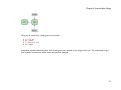
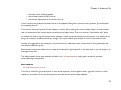
Meanwhile, someone else does some work creating two new commits on the origin branch too. This means both 'origin'
and 'mywork' has advanced, which means the work has diverged.
51
Git Community Book
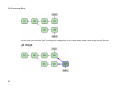
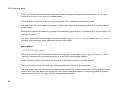
At this point, you could use "pull" to merge your changes back in; the result would create a new merge commit, like this:
52
Chapter 4: Intermediate Usage
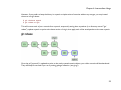
However, if you prefer to keep the history in mywork a simple series of commits without any merges, you may instead
choose to use git rebase:
$ git checkout mywork
$ git rebase origin
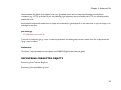
This will remove each of your commits from mywork, temporarily saving them as patches (in a directory named ".git/
rebase"), update mywork to point at the latest version of origin, then apply each of the saved patches to the new mywork.
Once the ref ('mywork') is updated to point to the newly created commit objects, your older commits will be abandoned.
They will likely be removed if you run a pruning garbage collection. (see git gc)
53
Git Community Book
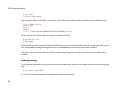
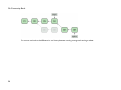
So now we can look at the difference in our history between running a merge and running a rebase:
54
Chapter 4: Intermediate Usage
In the process of the rebase, it may discover conflicts. In that case it will stop and allow you to fix the conflicts; after fixing
conflicts, use "git-add" to update the index with those contents, and then, instead of running git-commit, just run
55
Git Community Book
$ git rebase --continue
and git will continue applying the rest of the patches.
At any point you may use the --abort option to abort this process and return mywork to the state it had before you
started the rebase:
$ git rebase --abort
gitcast:c7-rebase
INTERACTIVE REBASING
You can also rebase interactively. This is often used to re-write your own commit objects before pusing them somewhere.
It is an easy way to split, merge or re-order commits before sharing them with others. You can also use it to clean up
commits you've pulled from someone when applying them locally.
If you have a number of commits that you would like to somehow modify during the rebase, you can invoke interactive
mode by passing a '-i' or '--interactive' to the 'git rebase' command.
$ git rebase -i origin/master
This will invoke interactive rebase mode on all the commits you have made since the last time you have pushed (or
merged from the origin repository).
To see what commits those are beforehand, you can run log this way:
$ git log github/master..
56
Chapter 4: Intermediate Usage
Once you run the 'rebase -i' command, you will be thrown into your editor of choice with something that looks like this:
pick
pick
pick
pick
pick
#
#
#
#
#
#
#
#
#
#
fc62e55
9824bf4
21d80a5
76b9da6
c264051
added file_size
fixed little thing
added number to log
added the apply command
Revert "added file_size" - not implemented correctly
Rebase f408319..b04dc3d onto f408319
Commands:
p, pick = use commit
e, edit = use commit, but stop for amending
s, squash = use commit, but meld into previous commit
If you remove a line here THAT COMMIT WILL BE LOST.
However, if you remove everything, the rebase will be aborted.
This means that there are 5 commits since you last pushed and it gives you one line per commit with the following format:
(action) (partial-sha) (short commit message)
Now, you can change the action (which is by default 'pick') to either 'edit' or 'squash', or just leave it as 'pick'. You can also
reorder the commits just by moving the lines around however you want. Then, when you exit the editor, git will try to
apply the commits however they are now arranged and do the action specified.
If 'pick' is specified, it will simply try to apply the patch and save the commit with the same message as before.
57
Git Community Book
If 'squash' is specified, it will combine that commit with the previous one to create a new commit. This will drop you into
your editor again to merge the commit messages of the two commits it is now squashing together. So, if you exit the
editor with this:
pick
squash
squash
squash
squash
fc62e55
9824bf4
21d80a5
76b9da6
c264051
added file_size
fixed little thing
added number to log
added the apply command
Revert "added file_size" - not implemented correctly
Then you will have to create a single commit message from this:
# This is a combination of 5 commits.
# The first commit's message is:
added file_size
# This is the 2nd commit message:
fixed little thing
# This is the 3rd commit message:
added number to log
# This is the 4th commit message:
added the apply command
# This is the 5th commit message:
Revert "added file_size" - not implemented correctly
This reverts commit fc62e5543b195f18391886b9f663d5a7eca38e84.
58
Chapter 4: Intermediate Usage
Once you have edited that down into once commit message and exit the editor, the commit will be saved with your new
message.
If 'edit' is specified, it will do the same thing, but then pause before moving on to the next one and drop you into the
command line so you can amend the commit, or change the commit contents somehow.
If you wanted to split a commit, for instance, you would specify 'edit' for that commit:
pick
pick
edit
pick
pick
fc62e55
9824bf4
21d80a5
76b9da6
c264051
added file_size
fixed little thing
added number to log
added the apply command
Revert "added file_size" - not implemented correctly
And then when you get to the command line, you revert that commit and create two (or more) new ones. Lets say
21d80a5 modified two files, file1 and file2, and you wanted to split them into seperate commits. You could do this after the
rebase dropped you to the command line :
$
$
$
$
$
$
git
git
git
git
git
git
reset HEAD^
add file1
commit 'first part of split commit'
add file2
commit 'second part of split commit'
rebase --continue
And now instead of 5 commits, you would have 6.
The last useful thing that interactive rebase can do is drop commits for you. If instead of choosing 'pick', 'squash' or 'edit'
for the commit line, you simply remove the line, it will remove the commit from the history.
59
Git Community Book
INTERACTIVE ADDING
Interactive Adding is a really nice way of working with and visualizing the Git index. To start it up, simply type 'git add -i'.
Git will show you all the modified files you have and their status.
$>git add -i
staged
1:
unchanged
2:
unchanged
3:
unchanged
4:
unchanged
5:
unchanged
unstaged
+4/-0
+23/-11
+7/-7
+3/-3
+121/-0
*** Commands ***
1: status
2: update
5: patch
6: diff
What now>
path
assets/stylesheets/style.css
layout/book_index_template.html
layout/chapter_template.html
script/pdf.rb
text/14_Interactive_Rebasing/0_ Interactive_Rebasing.markdown
3: revert
7: quit
4: add untracked
8: help
In this case, we can see that there are 5 modified files that have not been added to our index yet (unstaged), and even how
many lines have been added to or removed from each. It then shows us an interactive menu of what we can do in this
mode.
If we want to stage the files, we can type '2' or 'u' for the update mode. Then I can specify which files I want to stage (add
to the index) by typing in the numbers of the files (in this case, 1-4)
What now> 2
1:
2:
3:
4:
5:
60
staged
unchanged
unchanged
unchanged
unchanged
unchanged
unstaged
+4/-0
+23/-11
+7/-7
+3/-3
+121/-0
path
assets/stylesheets/style.css
layout/book_index_template.html
layout/chapter_template.html
script/pdf.rb
text/14_Interactive_Rebasing/0_ Interactive_Rebasing.markdown
Chapter 4: Intermediate Usage
Update>> 1-4
staged
* 1:
unchanged
* 2:
unchanged
* 3:
unchanged
* 4:
unchanged
5:
unchanged
Update>>
unstaged
+4/-0
+23/-11
+7/-7
+3/-3
+121/-0
path
assets/stylesheets/style.css
layout/book_index_template.html
layout/chapter_template.html
script/pdf.rb
text/14_Interactive_Rebasing/0_ Interactive_Rebasing.markdown
If I hit enter, I will be taken back to the main menu where I can see that the file status has changed:
What now> status
staged
1:
+4/-0
2:
+23/-11
3:
+7/-7
4:
+3/-3
5:
unchanged
unstaged
nothing
nothing
nothing
nothing
+121/-0
path
assets/stylesheets/style.css
layout/book_index_template.html
layout/chapter_template.html
script/pdf.rb
text/14_Interactive_Rebasing/0_ Interactive_Rebasing.markdown
Now we can see the first four files are staged and the last one is still not. This is basically a compressed way to see the
same information we see when we run 'git status' from the command line:
$
#
#
#
#
#
#
#
#
#
#
git status
On branch master
Changes to be committed:
(use "git reset HEAD <file>..." to unstage)
modified:
modified:
modified:
modified:
assets/stylesheets/style.css
layout/book_index_template.html
layout/chapter_template.html
script/pdf.rb
Changed but not updated:
61
Git Community Book
#
#
#
#
(use "git add <file>..." to update what will be committed)
modified:
text/14_Interactive_Rebasing/0_ Interactive_Rebasing.markdown
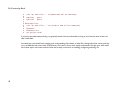
There are a number of useful things we can do, including unstaging files (3: revert), adding untracked files (4: add
untracked), and viewing diffs (6: diff). Those are all pretty straightforward. However, there is one command that is pretty
cool here, which is staging patches (5: patch).
If you type '5' or 'p' in the menu, git will show you your diff patch by patch (or hunk by hunk) and ask if you want to stage
each one. That way you can actually stage for a commit a part of a file edit. If you've edited a file and want to only commit
part of it and not an unfinished part, or commit documentation or whitespace changes seperate from substantive changes,
you can use 'git add -i' to do so relatively easily.
Here I've staged some changes to the book_index_template.html file, but not all of them:
1:
2:
3:
4:
5:
6:
staged
+4/-0
+20/-7
+7/-7
+3/-3
unchanged
unchanged
unstaged
nothing
+3/-4
nothing
nothing
+121/-0
+85/-0
path
assets/stylesheets/style.css
layout/book_index_template.html
layout/chapter_template.html
script/pdf.rb
text/14_Interactive_Rebasing/0_ Interactive_Rebasing.markdown
text/15_Interactive_Adding/0_ Interactive_Adding.markdown
When you are done making changes to your index through 'git add -i', you simply quit (7: quit) and then run 'git commit' to
commit the staged changes. Remember not to run 'git commit -a', which will blow away all the careful changes you've just
made and simply commit everything.
gitcast:c3_add_interactive
62
Chapter 4: Intermediate Usage
STASHING
While you are in the middle of working on something complicated, you find an unrelated but obvious and trivial bug. You
would like to fix it before continuing. You can use git stash to save the current state of your work, and after fixing the bug
(or, optionally after doing so on a different branch and then coming back), unstash the work-in-progress changes.
$ git stash "work in progress for foo feature"
This command will save your changes away to the stash, and reset your working tree and the index to match the tip of
your current branch. Then you can make your fix as usual.
... edit and test ...
$ git commit -a -m "blorpl: typofix"
After that, you can go back to what you were working on with
git stash apply:
$ git stash apply
Stash Queue
You can also use stashing to queue up stashed changes.
If you run 'git stash list' you can see which stashes you have saved:
$>git stash list
stash@{0}: WIP on book: 51bea1d... fixed images
stash@{1}: WIP on master: 9705ae6... changed the browse code to the official repo
Then you can apply them individually with 'git stash apply stash@{1}'. You can clear out the list with 'git stash clear'.
63
Git Community Book
GIT TREEISHES
There are a number of ways to refer to a particular commit or tree other than spelling out the entire 40-character sha. In
Git, these are referred to as a 'treeish'.
Partial Sha
If your commit sha is '980e3ccdaac54a0d4de358f3fe5d718027d96aae', git will recognize any of the following identically:
980e3ccdaac54a0d4de358f3fe5d718027d96aae
980e3ccdaac54a0d4
980e3cc
As long as the partial sha is unique - it can't be confused with another (which is incredibly unlikely if you use at least 5
characters), git will expand a partial sha for you.
Branch, Remote or Tag Name
You can always use a branch, remote or tag name instead of a sha, since they are simply pointers anyhow. If your master
branch is on the 980e3 commit and you've pushed it to origin and have tagged it 'v1.0', then all of the following are
equivalent:
980e3ccdaac54a0d4de358f3fe5d718027d96aae
origin/master
refs/remotes/origin/master
master
refs/heads/master
v1.0
refs/tags/v1.0
64
Chapter 4: Intermediate Usage
Which means the following will give you identical output:
$ git log master
$ git log refs/tags/v1.0
Date Spec
The Ref Log that git keeps will allow you to do some relative stuff locally, such as:
master@{yesterday}
master@{1 month ago}
Which is shorthand for 'where the master branch head was yesterday', etc. Note that this format can result in different
shas on different computers, even if the master branch is currently pointing to the same place.
Ordinal Spec
This format will give you the Nth previous value of a particular reference. For example:
master@{5}
will give you the 5th prior value of the master head ref.
65
Git Community Book
Carrot Parent
This will give you the Nth parent of a particular commit. This format is only useful on merge commits - commit objects
that have more than one direct parent.
master^2
Tilde Spec
The tilde spec will give you the Nth grandparent of a commit object. For example,
master~2
will give us the first parent of the first parent of the commit that master points to. It is equivalent to:
master^^
You can keep doing this, too. The following specs will point to the same commit:
master^^^^^^
master~3^~2
master~6
Tree Pointer
This disambiguates a commit from the tree that it points to. If you want the sha that a commit points to, you can add the
'{tree}' spec to the end of it.
master^{tree}
66
Chapter 4: Intermediate Usage
Blob Spec
If you want the sha of a particular blob, you can add the blob path at the end of the treeish, like so:
master:/path/to/file
Range
Finally, you can specify a range of commits with the range spec. This will give you all the commits between 7b593b5 and
51bea1 (where 51bea1 is most recent), excluding 7b593b5 but including 51bea1:
7b593b5..51bea1
This will include every commit since 7b593b:
7b593b..
TRACKING BRANCHES
A 'tracking branch' in Git is a local branch that is connected to a remote branch. When you push and pull on that branch, it
automatically pushes and pulls to the remote branch that it is connected with.
Use this if you always pull from the same upstream branch into the new branch, and if you don't want to use "git pull "
explicitly.
The 'git clone' command automatically sets up a 'master' branch that is a tracking branch for 'origin/master' - the master
branch on the cloned repository.
67
Git Community Book
You can create a tracking branch manually by adding the '--track' option to the 'branch' command in Git.
git branch --track experimental origin/experimental
Then when you run:
$ git pull experimental
It will automatically fetch from 'origin' and merge 'origin/experimental' into your local 'experimental' branch.
Likewise, when you push to origin, it will push what your 'experimental' points to to origins 'experimental', without having
to specify it.
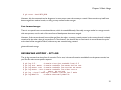
FINDING WITH GIT GREP
Finding files with words or phrases in Git is really easy with the git grep command. It is possible to do this with the normal
unix 'grep' command, but with 'git grep' you can also search through previous versions of the project without having to
check them out.
For example, if I wanted to see every place that used the 'xmmap' call in my git.git repository, I could run this:
$ git grep xmmap
config.c:
contents = xmmap(NULL, contents_sz, PROT_READ,
diff.c:
s->data = xmmap(NULL, s->size, PROT_READ, MAP_PRIVATE, fd, 0);
git-compat-util.h:extern void *xmmap(void *start, size_t length, int prot, int fla
read-cache.c:
mmap = xmmap(NULL, mmap_size, PROT_READ | PROT_WRITE, MAP_PRIVATE,
refs.c: log_mapped = xmmap(NULL, mapsz, PROT_READ, MAP_PRIVATE, logfd, 0);
sha1_file.c:
map = xmmap(NULL, mapsz, PROT_READ, MAP_PRIVATE, fd, 0);
sha1_file.c:
idx_map = xmmap(NULL, idx_size, PROT_READ, MAP_PRIVATE, fd, 0);
68
Chapter 4: Intermediate Usage
sha1_file.c:
win->base = xmmap(NULL, win->len,
sha1_file.c:
map = xmmap(NULL, *size, PROT_READ, MAP_PRIVATE, f
sha1_file.c:
buf = xmmap(NULL, size, PROT_READ, MAP_PRIVATE, fd, 0);
wrapper.c:void *xmmap(void *start, size_t length,
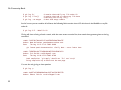
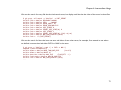
If I wanted to see the line number of each match as well, I can add the '-n' option:
$>git grep -n xmmap
config.c:1016:
contents = xmmap(NULL, contents_sz, PROT_READ,
diff.c:1833:
s->data = xmmap(NULL, s->size, PROT_READ, MAP_PRIVATE, fd,
git-compat-util.h:291:extern void *xmmap(void *start, size_t length, int prot, int
read-cache.c:1178:
mmap = xmmap(NULL, mmap_size, PROT_READ | PROT_WRITE, MAP_
refs.c:1345:
log_mapped = xmmap(NULL, mapsz, PROT_READ, MAP_PRIVATE, logfd, 0);
sha1_file.c:377:
map = xmmap(NULL, mapsz, PROT_READ, MAP_PRIVATE, fd, 0);
sha1_file.c:479:
idx_map = xmmap(NULL, idx_size, PROT_READ, MAP_PRIVATE, fd
sha1_file.c:780:
win->base = xmmap(NULL, win->len,
sha1_file.c:1076:
map = xmmap(NULL, *size, PROT_READ, MAP_PR
sha1_file.c:2393:
buf = xmmap(NULL, size, PROT_READ, MAP_PRIVATE, fd
wrapper.c:89:void *xmmap(void *start, size_t length,
If we're only interested in the filename, we can pass the '--name-only' option:
$>git grep --name-only xmmap
config.c
diff.c
git-compat-util.h
read-cache.c
refs.c
sha1_file.c
wrapper.c
We could also see how many line matches we have in each file with the '-c' option:
69
Git Community Book
$>git grep -c xmmap
config.c:1
diff.c:1
git-compat-util.h:1
read-cache.c:1
refs.c:1
sha1_file.c:5
wrapper.c:1
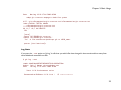
Now, if I wanted to see where that was used in a specific version of git, I could add the tag reference to the end, like this:
$ git grep xmmap v1.5.0
v1.5.0:config.c:
contents = xmmap(NULL, st.st_size, PROT_READ,
v1.5.0:diff.c:
s->data = xmmap(NULL, s->size, PROT_READ, MAP_PRIVATE, fd,
v1.5.0:git-compat-util.h:static inline void *xmmap(void *start, size_t length,
v1.5.0:read-cache.c:
cache_mmap = xmmap(NULL, cache_mmap_size,
v1.5.0:refs.c: log_mapped = xmmap(NULL, st.st_size, PROT_READ, MAP_PRIVATE, logfd
v1.5.0:sha1_file.c:
map = xmmap(NULL, st.st_size, PROT_READ, MAP_PRIVATE, fd,
v1.5.0:sha1_file.c:
idx_map = xmmap(NULL, idx_size, PROT_READ, MAP_PRIVATE, fd
v1.5.0:sha1_file.c:
win->base = xmmap(NULL, win->len,
v1.5.0:sha1_file.c:
map = xmmap(NULL, st.st_size, PROT_READ, MAP_PRIVATE, fd,
v1.5.0:sha1_file.c:
buf = xmmap(NULL, size, PROT_READ, MAP_PRIVATE, fd
We can see that there are some differences between the current lines and these lines in version 1.5.0, one of which is that
xmmap is now used in wrapper.c where it was not back in v1.5.0.
We can also combine search terms in grep. Say we wanted to search for where SORT_DIRENT is defined in our
repository:
$ git grep -e '#define' --and -e SORT_DIRENT
builtin-fsck.c:#define SORT_DIRENT 0
builtin-fsck.c:#define SORT_DIRENT 1
70
Chapter 4: Intermediate Usage
We can also search for every file that has both search terms, but display each line that has either of the terms in those files:
$ git grep --all-match -e '#define' -e SORT_DIRENT
builtin-fsck.c:#define REACHABLE 0x0001
builtin-fsck.c:#define SEEN
0x0002
builtin-fsck.c:#define ERROR_OBJECT 01
builtin-fsck.c:#define ERROR_REACHABLE 02
builtin-fsck.c:#define SORT_DIRENT 0
builtin-fsck.c:#define DIRENT_SORT_HINT(de) 0
builtin-fsck.c:#define SORT_DIRENT 1
builtin-fsck.c:#define DIRENT_SORT_HINT(de) ((de)->d_ino)
builtin-fsck.c:#define MAX_SHA1_ENTRIES (1024)
builtin-fsck.c: if (SORT_DIRENT)
We can also search for lines that have one term and either of two other terms, for example, if we wanted to see where
we defined constants that had either PATH or MAX in the name:
$ git grep -e '#define' --and \( -e PATH -e MAX \)
abspath.c:#define MAXDEPTH 5
builtin-blame.c:#define MORE_THAN_ONE_PATH
(1u<<13)
builtin-blame.c:#define MAXSG 16
builtin-describe.c:#define MAX_TAGS
(FLAG_BITS - 1)
builtin-fetch-pack.c:#define MAX_IN_VAIN 256
builtin-fsck.c:#define MAX_SHA1_ENTRIES (1024)
...
71
Git Community Book
UNDOING IN GIT - RESET, CHECKOUT AND REVERT
Git provides multiple methods for fixing up mistakes as you are developing. Selecting an appropriate method depends on
whether or not you have committed the mistake, and if you have committed the mistake, whether you have shared the
erroneous commit with anyone else.
Fixing un-committed mistakes
If you've messed up the working tree, but haven't yet committed your mistake, you can return the entire working tree to
the last committed state with
$ git reset --hard HEAD
This will throw away any changes you may have added to the git index and as well as any outstanding changes you have in
your working tree. In other words, it causes the results of "git diff" and "git diff --cached" to both be empty.
If you just want to restore just one file, say your hello.rb, use git checkout instead
$ git checkout -- hello.rb
$ git checkout HEAD hello.rb
The first command restores hello.rb to the version in the index, so that "git diff hello.rb" returns no differences. The
second command will restore hello.rb to the version in the HEAD revision, so that both "git diff hello.rb" and "git diff -cached hello.rb" return no differences.
72
Chapter 4: Intermediate Usage
Fixing committed mistakes
If you make a commit that you later wish you hadn't, there are two fundamentally different ways to fix the problem:
1. You can create a new commit that undoes whatever was done by the old commit. This is the correct thing if
your mistake has already been made public.
2. You can go back and modify the old commit. You should never do this if you have already made the history
public; git does not normally expect the "history" of a project to change, and cannot correctly perform repeated
merges from a branch that has had its history changed.
Fixing a mistake with a new commit
Creating a new commit that reverts an earlier change is very easy; just pass the git revert command a reference to the bad
commit; for example, to revert the most recent commit:
$ git revert HEAD
This will create a new commit which undoes the change in HEAD. You will be given a chance to edit the commit message
for the new commit.
You can also revert an earlier change, for example, the next-to-last:
$ git revert HEAD^
In this case git will attempt to undo the old change while leaving intact any changes made since then. If more recent
changes overlap with the changes to be reverted, then you will be asked to fix conflicts manually, just as in the case of
resolving a merge.
73
Git Community Book
Fixing a mistake by modifying a commit
If you have just committed something but realize you need to fix up that commit, recent versions of git commit support an
--amend flag which instructs git to replace the HEAD commit with a new one, based on the current contents of the
index. This gives you an opportunity to add files that you forgot to add or correct typos in a commit message, prior to
pushing the change out for the world to see.
If you find a mistake in an older commit, but still one that you have not yet published to the world, you use git rebase in
interactive mode, with "git rebase -i" marking the change that requires correction with edit. This will allow you to amend
the commit during the rebasing process.
MAINTAINING GIT
Ensuring good performance
On large repositories, git depends on compression to keep the history information from taking up too much space on disk
or in memory.
This compression is not performed automatically. Therefore you should occasionally run git gc:
$ git gc
to recompress the archive. This can be very time-consuming, so you may prefer to run git-gc when you are not doing
other work.
74
Chapter 4: Intermediate Usage
Ensuring reliability
The git fsck command runs a number of self-consistency checks on the repository, and reports on any problems. This may
take some time. The most common warning by far is about "dangling" objects:
$ git fsck
dangling commit 7281251ddd2a61e38657c827739c57015671a6b3
dangling commit 2706a059f258c6b245f298dc4ff2ccd30ec21a63
dangling commit 13472b7c4b80851a1bc551779171dcb03655e9b5
dangling blob 218761f9d90712d37a9c5e36f406f92202db07eb
dangling commit bf093535a34a4d35731aa2bd90fe6b176302f14f
dangling commit 8e4bec7f2ddaa268bef999853c25755452100f8e
dangling tree d50bb86186bf27b681d25af89d3b5b68382e4085
dangling tree b24c2473f1fd3d91352a624795be026d64c8841f
...
Dangling objects are not a problem. At worst they may take up a little extra disk space. They can sometimes provide a
last-resort method for recovering lost work.
SETTING UP A PUBLIC REPOSITORY
Assume your personal repository is in the directory ~/proj. We first create a new clone of the repository and tell gitdaemon that it is meant to be public:
$ git clone --bare ~/proj proj.git
$ touch proj.git/git-daemon-export-ok
The resulting directory proj.git contains a "bare" git repository--it is just the contents of the ".git" directory, without any
files checked out around it.
75
Git Community Book
Next, copy proj.git to the server where you plan to host the public repository. You can use scp, rsync, or whatever is
most convenient.
Exporting a git repository via the git protocol
This is the preferred method.
If someone else administers the server, they should tell you what directory to put the repository in, and what git:// URL it
will appear at.
Otherwise, all you need to do is start git daemon; it will listen on port 9418. By default, it will allow access to any
directory that looks like a git directory and contains the magic file git-daemon-export-ok. Passing some directory paths as
git-daemon arguments will further restrict the exports to those paths.
You can also run git-daemon as an inetd service; see the git daemon man page for details. (See especially the examples
section.)
Exporting a git repository via http
The git protocol gives better performance and reliability, but on a host with a web server set up, http exports may be
simpler to set up.
All you need to do is place the newly created bare git repository in a directory that is exported by the web server, and
make some adjustments to give web clients some extra information they need:
$ mv proj.git /home/you/public_html/proj.git
$ cd proj.git
76
Chapter 4: Intermediate Usage
$ git --bare update-server-info
$ chmod a+x hooks/post-update
(For an explanation of the last two lines, see git update-server-info and githooks.)
Advertise the URL of proj.git. Anybody else should then be able to clone or pull from that URL, for example with a
command line like:
$ git clone http://yourserver.com/~you/proj.git
SETTING UP A PRIVATE REPOSITORY
If you need to setup a private repository and want to do so locally, rather than using a hosted solution, you have a number
of options.
Repo Access over SSH
Generally, the easiest solution is to simply use Git over SSH. If users already have ssh accounts on a machine, you can put
the git repository anywhere on the box that they have access to and let them access it over normal ssh logins. For
example, say you have a repository you want to host. You can export it as a bare repo and then scp it onto your server
like so:
$ git clone --bare /home/user/myrepo/.git /tmp/myrepo.git
$ scp -r /tmp/myrepo.git myserver.com:/opt/git/myrepo.git
Then someone else with an ssh account on myserver.com can clone via:
$ git clone myserver.com:/opt/git/myrepo.git
77
Git Community Book
Which will simply prompt them for thier ssh password or use thier public key, however they have ssh authentication
setup.
Multiple User Access using Gitosis
If you don't want to setup seperate accounts for every user, you can use a tool called Gitosis. In gitosis, there is an
authorized_keys file that contains the public keys of everyone authorized to access the repository, and then everyone uses
the 'git' user to do pushes and pulls.
Installing and Setting up Gitosis
78
Chapter 5: Advanced Git
Chapter 5
Advanced Git
CREATING NEW EMPTY BRANCHES
Ocasionally, you may want to keep branches in your repository that do not share an ancestor with your normal code.
Some examples of this might be generated documentation or something along those lines. If you want to create a new
branch head that does not use your current codebase as a parent, you can create an empty branch like this:
git symbolic-ref HEAD refs/heads/newbranch
rm .git/index
git clean -fdx
<do work>
git add your files
git commit -m 'Initial commit'
gitcast:c9-empty-branch
79
Git Community Book
MODIFYING YOUR HISTORY
Interactive rebasing is a good way to modify individual commits.
git filter-branch is a good way to edit commits en masse.
ADVANCED BRANCHING AND MERGING
Getting conflict-resolution help during a merge
All of the changes that git was able to merge automatically are already added to the index file, so git diff shows only the
conflicts. It uses an unusual syntax:
$ git diff
diff --cc file.txt
index 802992c,2b60207..0000000
--- a/file.txt
+++ b/file.txt
@@@ -1,1 -1,1 +1,5 @@@
++<<<<<<< HEAD:file.txt
+Hello world
++=======
+ Goodbye
++>>>>>>> 77976da35a11db4580b80ae27e8d65caf5208086:file.txt
Recall that the commit which will be committed after we resolve this conflict will have two parents instead of the usual
one: one parent will be HEAD, the tip of the current branch; the other will be the tip of the other branch, which is stored
temporarily in MERGE_HEAD.
80
Chapter 5: Advanced Git
During the merge, the index holds three versions of each file. Each of these three "file stages" represents a different
version of the file:
$ git show :1:file.txt
$ git show :2:file.txt
$ git show :3:file.txt
# the file in a common ancestor of both branches
# the version from HEAD.
# the version from MERGE_HEAD.
When you ask git diff to show the conflicts, it runs a three-way diff between the conflicted merge results in the work tree
with stages 2 and 3 to show only hunks whose contents come from both sides, mixed (in other words, when a hunk's
merge results come only from stage 2, that part is not conflicting and is not shown. Same for stage 3).
The diff above shows the differences between the working-tree version of file.txt and the stage 2 and stage 3 versions. So
instead of preceding each line by a single "+" or "-", it now uses two columns: the first column is used for differences
between the first parent and the working directory copy, and the second for differences between the second parent and
the working directory copy. (See the "COMBINED DIFF FORMAT" section of git diff-files for a details of the format.)
After resolving the conflict in the obvious way (but before updating the index), the diff will look like:
$ git diff
diff --cc file.txt
index 802992c,2b60207..0000000
--- a/file.txt
+++ b/file.txt
@@@ -1,1 -1,1 +1,1 @@@
- Hello world
-Goodbye
++Goodbye world
This shows that our resolved version deleted "Hello world" from the first parent, deleted "Goodbye" from the second
parent, and added "Goodbye world", which was previously absent from both.
81
Git Community Book
Some special diff options allow diffing the working directory against any of these stages:
$
$
$
$
$
$
git
git
git
git
git
git
diff
diff
diff
diff
diff
diff
-1 file.txt
#
--base file.txt #
-2 file.txt
#
--ours file.txt #
-3 file.txt
#
--theirs file.txt
diff against stage 1
same as the above
diff against stage 2
same as the above
diff against stage 3
# same as the above.
The git log and gitk commands also provide special help for merges:
$ git log --merge
$ gitk --merge
These will display all commits which exist only on HEAD or on MERGE_HEAD, and which touch an unmerged file.
You may also use git mergetool, which lets you merge the unmerged files using external tools such as emacs or kdiff3.
Each time you resolve the conflicts in a file and update the index:
$ git add file.txt
the different stages of that file will be "collapsed", after which git-diff will (by default) no longer show diffs for that file.
Multiway Merge
You can merge several heads at one time by simply listing them on the same git merge command. For instance,
$ git merge scott/master rick/master tom/master
82
Chapter 5: Advanced Git
is the equivalent of:
$ git merge scott/master
$ git merge rick/master
$ git merge tom/master
Subtree
There are situations where you want to include contents in your project from an independently developed project. You
can just pull from the other project as long as there are no conflicting paths.
The problematic case is when there are conflicting files. Potential candidates are Makefiles and other standard filenames.
You could merge these files but probably you do not want to. A better solution for this problem can be to merge the
project as its own subdirectory. This is not supported by the recursive merge strategy, so just pulling won't work.
What you want is the subtree merge strategy, which helps you in such a situation.
In this example, let's say you have the repository at /path/to/B (but it can be an URL as well, if you want). You want to
merge the master branch of that repository to the dir-B subdirectory in your current branch.
Here is the command sequence you need:
$
$
$
$
$
git
git
git
git
git
remote add -f Bproject /path/to/B (1)
merge -s ours --no-commit Bproject/master (2)
read-tree --prefix=dir-B/ -u Bproject/master (3)
commit -m "Merge B project as our subdirectory" (4)
pull -s subtree Bproject master (5)
83
Git Community Book
The benefit of using subtree merge is that it requires less administrative burden from the users of your repository. It
works with older (before Git v1.5.2) clients and you have the code right after clone.
However if you use submodules then you can choose not to transfer the submodule objects. This may be a problem with
the subtree merge.
Also, in case you make changes to the other project, it is easier to submit changes if you just use submodules.
(from Using Subtree Merge)
FINDING ISSUES - GIT BISECT
Suppose version 2.6.18 of your project worked, but the version at "master" crashes. Sometimes the best way to find the
cause of such a regression is to perform a brute-force search through the project's history to find the particular commit
that caused the problem. The git bisect command can help you do this:
$ git bisect start
$ git bisect good v2.6.18
$ git bisect bad master
Bisecting: 3537 revisions left to test after this
[65934a9a028b88e83e2b0f8b36618fe503349f8e] BLOCK: Make USB storage depend on SCSI rather than selecting it [try
If you run "git branch" at this point, you'll see that git has temporarily moved you to a new branch named "bisect". This
branch points to a commit (with commit id 65934...) that is reachable from "master" but not from v2.6.18. Compile and
test it, and see whether it crashes. Assume it does crash. Then:
$ git bisect bad
Bisecting: 1769 revisions left to test after this
[7eff82c8b1511017ae605f0c99ac275a7e21b867] i2c-core: Drop useless bitmaskings
84
Chapter 5: Advanced Git
checks out an older version. Continue like this, telling git at each stage whether the version it gives you is good or bad, and
notice that the number of revisions left to test is cut approximately in half each time.
After about 13 tests (in this case), it will output the commit id of the guilty commit. You can then examine the commit
with git show, find out who wrote it, and mail them your bug report with the commit id. Finally, run
$ git bisect reset
to return you to the branch you were on before and delete the temporary "bisect" branch.
Note that the version which git-bisect checks out for you at each point is just a suggestion, and you're free to try a
different version if you think it would be a good idea. For example, occasionally you may land on a commit that broke
something unrelated; run
$ git bisect visualize
which will run gitk and label the commit it chose with a marker that says "bisect". Choose a safe-looking commit nearby,
note its commit id, and check it out with:
$ git reset --hard fb47ddb2db...
then test, run "bisect good" or "bisect bad" as appropriate, and continue.
FINDING ISSUES - GIT BLAME
The git blame command is really helpful for figuring out who changed which sections of a file. If you simple run 'git blame
[filename]' you'll get an output of the entire file with the last commit sha, date and author for every line in the file.
85
Git Community Book
$ git blame sha1_file.c
...
0fcfd160 (Linus Torvalds
0fcfd160 (Linus Torvalds
1f688557 (Junio C Hamano
a733cb60 (Linus Torvalds
8e440259 (Peter Eriksen
8e440259 (Peter Eriksen
8e440259 (Peter Eriksen
8e440259 (Peter Eriksen
f35a6d3b (Linus Torvalds
70f5d5d3 (Nicolas Pitre
...
2005-04-18
2005-04-18
2005-06-27
2005-06-28
2006-04-02
2006-04-02
2006-04-02
2006-04-02
2007-04-09
2008-02-28
13:04:43
13:04:43
03:35:33
14:21:02
14:44:09
14:44:09
14:44:09
14:44:09
21:20:29
00:25:19
-0700
-0700
-0700
-0700
+0200
+0200
+0200
+0200
-0700
-0500
8)
9)
10)
11)
12)
13)
14)
15)
16)
17)
*/
#include
#include
#include
#include
#include
#include
#include
#include
#include
"cache.h"
"delta.h"
"pack.h"
"blob.h"
"commit.h"
"tag.h"
"tree.h"
"refs.h"
"pack-revindex.h"628522ec (Junio C Hamano
This is often helpful if a file had a line reverted or a mistake that broke the build to help you see who changed that line last.
You can also specify a start and end line for the blame:
$>git blame -L 160,+10 sha1_file.c
ace1534d (Junio C Hamano 2005-05-07
ace1534d (Junio C Hamano 2005-05-07
0fcfd160 (Linus Torvalds 2005-04-18
0fcfd160 (Linus Torvalds 2005-04-18
790296fd (Jim Meyering
2008-01-03
0fcfd160 (Linus Torvalds 2005-04-18
ace1534d (Junio C Hamano 2005-05-07
ace1534d (Junio C Hamano 2005-05-07
ace1534d (Junio C Hamano 2005-05-07
d19938ab (Junio C Hamano 2005-05-09
86
00:38:04
00:38:04
13:04:43
13:04:43
15:18:07
13:04:43
00:38:04
00:38:04
00:38:04
17:57:56
-0700
-0700
-0700
-0700
+0100
-0700
-0700
-0700
-0700
-0700
160)}
161)
162)/*
163) *
164) *
165) *
166) *
167) *
168) *
169) *
NOTE! This returns a statically allocate
careful about using it. Do an "xstrdup()
filename.
Also note that this returns the location
SHA1 file can happen from any alternate
DB_ENVIRONMENT environment variable if i
Chapter 5: Advanced Git
GIT AND EMAIL
Submitting patches to a project
If you just have a few changes, the simplest way to submit them may just be to send them as patches in email:
First, use git format-patch; for example:
$ git format-patch origin
will produce a numbered series of files in the current directory, one for each patch in the current branch but not in origin/
HEAD.
You can then import these into your mail client and send them by hand. However, if you have a lot to send at once, you
may prefer to use the git send-email script to automate the process. Consult the mailing list for your project first to
determine how they prefer such patches be handled.
Importing patches to a project
Git also provides a tool called git am (am stands for "apply mailbox"), for importing such an emailed series of patches. Just
save all of the patch-containing messages, in order, into a single mailbox file, say "patches.mbox", then run
$ git am -3 patches.mbox
Git will apply each patch in order; if any conflicts are found, it will stop, and you can manually fix the conflicts and resolve
the merge. (The "-3" option tells git to perform a merge; if you would prefer it just to abort and leave your tree and index
untouched, you may omit that option.)
87
Git Community Book
Once the index is updated with the results of the conflict resolution, instead of creating a new commit, just run
$ git am --resolved
and git will create the commit for you and continue applying the remaining patches from the mailbox.
The final result will be a series of commits, one for each patch in the original mailbox, with authorship and commit log
message each taken from the message containing each patch.
CUSTOMIZING GIT
git config
Changing your Editor
$ git config --global core.editor emacs
Adding Aliases
$ git config --global alias.last 'cat-file commit HEAD'
$ git last
tree c85fbd1996b8e7e5eda1288b56042c0cdb91836b
parent cdc9a0a28173b6ba4aca00eb34f5aabb39980735
author Scott Chacon <[email protected]> 1220473867 -0700
committer Scott Chacon <[email protected]> 1220473867 -0700
fixed a weird formatting problem
88
Chapter 5: Advanced Git
$ git cat-file commit HEAD
tree c85fbd1996b8e7e5eda1288b56042c0cdb91836b
parent cdc9a0a28173b6ba4aca00eb34f5aabb39980735
author Scott Chacon <[email protected]> 1220473867 -0700
committer Scott Chacon <[email protected]> 1220473867 -0700
fixed a weird formatting problem
Adding Color
See all color.* options in the git config docs
$
$
$
$
git
git
git
git
config
config
config
config
color.branch auto
color.diff auto
color.interactive auto
color.status auto
Or, you can set all of them on with the color.ui option:
$ git config color.ui true
Commit Template
$ git config commit.template '/etc/git-commit-template'
Log Format
$ git config format.pretty oneline
89
Git Community Book
Other Config Options
There are also a number of interesting options for packing, gc-ing, merging, remotes, branches, http transport, diffs, paging,
whitespace and more. If you want to tweak these, check out the git config docs.
GIT HOOKS
Hooks are little scripts you can place in $GIT_DIR/hooks directory to trigger action at certain points. When git-init is run,
a handful example hooks are copied in the hooks directory of the new repository, but by default they are all disabled. To
enable a hook, rename it by removing its .sample suffix.
applypatch-msg
GIT_DIR/hooks/applypatch-msg
This hook is invoked by git-am script. It takes a single parameter, the name of the file that holds the proposed commit log
message. Exiting with non-zero status causes git-am to abort before applying the patch.
The hook is allowed to edit the message file in place, and can be used to normalize the message into some project
standard format (if the project has one). It can also be used to refuse the commit after inspecting the message file. The
default applypatch-msg hook, when enabled, runs the commit-msg hook, if the latter is enabled.
pre-applypatch
GIT_DIR/hooks/pre-applypatch
90
Chapter 5: Advanced Git
This hook is invoked by git-am. It takes no parameter, and is invoked after the patch is applied, but before a commit is
made. If it exits with non-zero status, then the working tree will not be committed after applying the patch.
It can be used to inspect the current working tree and refuse to make a commit if it does not pass certain test. The default
pre-applypatch hook, when enabled, runs the pre-commit hook, if the latter is enabled.
post-applypatch
GIT_DIR/hooks/post-applypatch
This hook is invoked by 'git-am'. It takes no parameter, and is invoked after the patch is applied and a commit is made.
This hook is meant primarily for notification, and cannot affect the outcome of 'git-am'.
pre-commit
GIT_DIR/hooks/pre-commit
This hook is invoked by 'git-commit', and can be bypassed with \--no-verify option. It takes no parameter, and is invoked
before obtaining the proposed commit log message and making a commit. Exiting with non-zero status from this script
causes the 'git-commit' to abort.
The default 'pre-commit' hook, when enabled, catches introduction of lines with trailing whitespaces and aborts the
commit when such a line is found.
All the 'git-commit' hooks are invoked with the environment variable
editor to modify the commit message.
GIT_EDITOR=:
if the command will not bring up an
91
Git Community Book
Here is an example of a Ruby script that runs RSpec tests before allowing a commit.
html_path = "spec_results.html"
`spec -f h:#{html_path} -f p spec` # run the spec. send progress to screen. save html results to html_path
# find out how many errors were found
html = open
open(html_path).read
read
examples = html.match
match(/(\d+) examples/)[0].to_i
to_i rescue 0
failures = html.match
match(/(\d+) failures/)[0].to_i
to_i rescue 0
pending = html.match
match(/(\d+) pending/)[0].to_i
to_i rescue 0
if failures.zero?
zero?
puts "0 failures! #{examples} run, #{pending} pending"
else
puts "\aDID NOT COMMIT YOUR FILES!"
puts "View spec results at #{File
File.expand_path
expand_path(html_path)}"
puts
puts "#{failures} failures! #{examples} run, #{pending} pending"
exit 1
end
prepare-commit-msg
GIT_DIR/hooks/prepare-commit-msg
This hook is invoked by 'git-commit' right after preparing the default log message, and before the editor is started.
It takes one to three parameters. The first is the name of the file that the commit log message. The second is the source of
the commit message, and can be: message (if a -m or -F option was given); template (if a -t option was given or the
92
Chapter 5: Advanced Git
configuration option commit.template is set); merge (if the commit is a merge or a .git/MERGE_MSG file exists); squash (if
a .git/SQUASH_MSG file exists); or commit, followed by a commit SHA1 (if a -c, -C or \--amend option was given).
If the exit status is non-zero, 'git-commit' will abort.
The purpose of the hook is to edit the message file in place, and it is not suppressed by the \--no-verify option. A nonzero exit means a failure of the hook and aborts the commit. It should not be used as replacement for pre-commit hook.
The sample prepare-commit-msg hook that comes with git comments out the Conflicts: part of a merge's commit
message.
commit-msg
GIT_DIR/hooks/commit-msg
This hook is invoked by 'git-commit', and can be bypassed with \--no-verify option. It takes a single parameter, the name
of the file that holds the proposed commit log message. Exiting with non-zero status causes the 'git-commit' to abort.
The hook is allowed to edit the message file in place, and can be used to normalize the message into some project
standard format (if the project has one). It can also be used to refuse the commit after inspecting the message file.
The default 'commit-msg' hook, when enabled, detects duplicate "Signed-off-by" lines, and aborts the commit if one is
found.
post-commit
GIT_DIR/hooks/post-commit
93
Git Community Book
This hook is invoked by 'git-commit'. It takes no parameter, and is invoked after a commit is made.
This hook is meant primarily for notification, and cannot affect the outcome of 'git-commit'.
pre-rebase
GIT_DIR/hooks/pre-rebase
This hook is called by 'git-rebase' and can be used to prevent a branch from getting rebased.
post-checkout
GIT_DIR/hooks/post-checkout
This hook is invoked when a 'git-checkout' is run after having updated the worktree. The hook is given three parameters:
the ref of the previous HEAD, the ref of the new HEAD (which may or may not have changed), and a flag indicating
whether the checkout was a branch checkout (changing branches, flag=1) or a file checkout (retrieving a file from the
index, flag=0). This hook cannot affect the outcome of 'git-checkout'.
This hook can be used to perform repository validity checks, auto-display differences from the previous HEAD if different,
or set working dir metadata properties.
post-merge
GIT_DIR/hooks/post-merge
94
Chapter 5: Advanced Git
This hook is invoked by 'git-merge', which happens when a 'git-pull' is done on a local repository. The hook takes a single
parameter, a status flag specifying whether or not the merge being done was a squash merge. This hook cannot affect the
outcome of 'git-merge' and is not executed, if the merge failed due to conflicts.
This hook can be used in conjunction with a corresponding pre-commit hook to save and restore any form of metadata
associated with the working tree (eg: permissions/ownership, ACLS, etc). See contrib/hooks/setgitperms.perl for an
example of how to do this.
pre-receive
GIT_DIR/hooks/pre-receive
This hook is invoked by 'git-receive-pack' on the remote repository, which happens when a 'git-push' is done on a local
repository. Just before starting to update refs on the remote repository, the pre-receive hook is invoked. Its exit status
determines the success or failure of the update.
This hook executes once for the receive operation. It takes no arguments, but for each ref to be updated it receives on
standard input a line of the format:
SP SP LF
where <old-value> is the old object name stored in the ref, <new-value> is the new object name to be stored in the ref
and <ref-name> is the full name of the ref. When creating a new ref, <old-value> is 40 0.
If the hook exits with non-zero status, none of the refs will be updated. If the hook exits with zero, updating of individual
refs can still be prevented by the <<update,'update'>> hook.
95
Git Community Book
Both standard output and standard error output are forwarded to 'git-send-pack' on the other end, so you can simply
messages for the user.
echo
If you wrote it in Ruby, you might get the args this way:
rev_old, rev_new, ref = STDIN.read
read.split
split(" ")
Or in a bash script, something like this would work:
#!/bin/sh
# <oldrev> <newrev> <refname>
# update a blame tree
while read oldrev newrev ref
do
echo "STARTING [$oldrev $newrev $ref]"
for path in `git diff-tree -r $oldrev..$newrev | awk '{print $6}'`
do
echo "git update-ref refs/blametree/$ref/$path $newrev"
`git update-ref refs/blametree/$ref/$path $newrev`
done
done
update
GIT_DIR/hooks/update
This hook is invoked by 'git-receive-pack' on the remote repository, which happens when a 'git-push' is done on a local
repository. Just before updating the ref on the remote repository, the update hook is invoked. Its exit status determines
the success or failure of the ref update.
The hook executes once for each ref to be updated, and takes three parameters:
96
Chapter 5: Advanced Git
• the name of the ref being updated,
• the old object name stored in the ref,
• and the new objectname to be stored in the ref.
A zero exit from the update hook allows the ref to be updated. Exiting with a non-zero status prevents 'git-receive-pack'
from updating that ref.
This hook can be used to prevent 'forced' update on certain refs by making sure that the object name is a commit object
that is a descendant of the commit object named by the old object name. That is, to enforce a "fast forward only" policy.
It could also be used to log the old..new status. However, it does not know the entire set of branches, so it would end up
firing one e-mail per ref when used naively, though. The <<post-receive,'post-receive'>> hook is more suited to that.
Another use suggested on the mailing list is to use this hook to implement access control which is finer grained than the
one based on filesystem group.
Both standard output and standard error output are forwarded to 'git-send-pack' on the other end, so you can simply
messages for the user.
echo
The default 'update' hook, when enabled--and with hooks.allowunannotated config option turned on--prevents
unannotated tags to be pushed.
post-receive
GIT_DIR/hooks/post-receive
This hook is invoked by 'git-receive-pack' on the remote repository, which happens when a 'git-push' is done on a local
repository. It executes on the remote repository once after all the refs have been updated.
97
Git Community Book
This hook executes once for the receive operation. It takes no arguments, but gets the same information as the <<prereceive,'pre-receive'>> hook does on its standard input.
This hook does not affect the outcome of 'git-receive-pack', as it is called after the real work is done.
This supersedes the <<post-update,'post-update'>> hook in that it gets both old and new values of all the refs in addition
to their names.
Both standard output and standard error output are forwarded to 'git-send-pack' on the other end, so you can simply
messages for the user.
echo
The default 'post-receive' hook is empty, but there is a sample script post-receive-email provided in the contrib/hooks
directory in git distribution, which implements sending commit emails.
post-update
GIT_DIR/hooks/post-update
This hook is invoked by 'git-receive-pack' on the remote repository, which happens when a 'git-push' is done on a local
repository. It executes on the remote repository once after all the refs have been updated.
It takes a variable number of parameters, each of which is the name of ref that was actually updated.
This hook is meant primarily for notification, and cannot affect the outcome of 'git-receive-pack'.
The 'post-update' hook can tell what are the heads that were pushed, but it does not know what their original and updated
values are, so it is a poor place to do log old..new. The <<post-receive,'post-receive'>> hook does get both original and
updated values of the refs. You might consider it instead if you need them.
98
Chapter 5: Advanced Git
When enabled, the default 'post-update' hook runs 'git-update-server-info' to keep the information used by dumb
transports (e.g., HTTP) up-to-date. If you are publishing a git repository that is accessible via HTTP, you should probably
enable this hook.
Both standard output and standard error output are forwarded to 'git-send-pack' on the other end, so you can simply
messages for the user.
echo
pre-auto-gc
GIT_DIR/hooks/pre-auto-gc
This hook is invoked by 'git-gc --auto'. It takes no parameter, and exiting with non-zero status from this script causes the
'git-gc --auto' to abort.
References
Git Hooks * http://probablycorey.wordpress.com/2008/03/07/git-hooks-make-me-giddy/
RECOVERING CORRUPTED OBJECTS
Recovering Lost Commits Blog Post
Recovering Corrupted Blobs by Linus
99
Git Community Book
SUBMODULES
Large projects are often composed of smaller, self-contained modules. For example, an embedded Linux distribution's
source tree would include every piece of software in the distribution with some local modifications; a movie player might
need to build against a specific, known-working version of a decompression library; several independent programs might all
share the same build scripts.
With centralized revision control systems this is often accomplished by including every module in one single repository.
Developers can check out all modules or only the modules they need to work with. They can even modify files across
several modules in a single commit while moving things around or updating APIs and translations.
Git does not allow partial checkouts, so duplicating this approach in Git would force developers to keep a local copy of
modules they are not interested in touching. Commits in an enormous checkout would be slower than you'd expect as Git
would have to scan every directory for changes. If modules have a lot of local history, clones would take forever.
On the plus side, distributed revision control systems can much better integrate with external sources. In a centralized
model, a single arbitrary snapshot of the external project is exported from its own revision control and then imported into
the local revision control on a vendor branch. All the history is hidden. With distributed revision control you can clone the
entire external history and much more easily follow development and re-merge local changes.
Git's submodule support allows a repository to contain, as a subdirectory, a checkout of an external project. Submodules
maintain their own identity; the submodule support just stores the submodule repository location and commit ID, so
other developers who clone the containing project ("superproject") can easily clone all the submodules at the same
revision. Partial checkouts of the superproject are possible: you can tell Git to clone none, some or all of the submodules.
The git submodule command is available since Git 1.5.3. Users with Git 1.5.2 can look up the submodule commits in the
repository and manually check them out; earlier versions won't recognize the submodules at all.
100
Chapter 5: Advanced Git
To see how submodule support works, create (for example) four example repositories that can be used later as a
submodule:
$ mkdir ~/git
$ cd ~/git
$ for i in a b c d
do
mkdir $i
cd $i
git init
echo "module $i" > $i.txt
git add $i.txt
git commit -m "Initial commit, submodule $i"
cd ..
done
Now create the superproject and add all the submodules:
$ mkdir super
$ cd super
$ git init
$ for i in a b c d
do
git submodule add ~/git/$i $i
done
NOTE: Do not use local URLs here if you plan to publish your superproject!
See what files git-submodule created:
$ ls -a
. .. .git
.gitmodules
a
b
c
d
101
Git Community Book
The git-submodule
add
command does a couple of things:
• It clones the submodule under the current directory and by default checks out the master branch.
• It adds the submodule's clone path to the gitmodules file and adds this file to the index, ready to be committed.
• It adds the submodule's current commit ID to the index, ready to be committed.
Commit the superproject:
$ git commit -m "Add submodules a, b, c and d."
Now clone the superproject:
$ cd ..
$ git clone super cloned
$ cd cloned
The submodule directories are there, but they're empty:
$ ls -a a
. ..
$ git submodule status
-d266b9873ad50488163457f025db7cdd9683d88b
-e81d457da15309b4fef4249aba9b50187999670d
-c1536a972b9affea0f16e0680ba87332dc059146
-d96249ff5d57de5de093e6baff9e0aafa5276a74
a
b
c
d
NOTE: The commit object names shown above would be different for you, but they should match the HEAD commit
object names of your repositories. You can check it by running git ls-remote ../git/a.
Pulling down the submodules is a two-step process. First run
to .git/config:
102
git submodule init
to add the submodule repository URLs
Chapter 5: Advanced Git
$ git submodule init
Now use git-submodule
update
to clone the repositories and check out the commits specified in the superproject:
$ git submodule update
$ cd a
$ ls -a
. .. .git a.txt
One major difference between git-submodule update and git-submodule add is that git-submodule update checks out
a specific commit, rather than the tip of a branch. It's like checking out a tag: the head is detached, so you're not working
on a branch.
$ git branch
* (no branch)
master
If you want to make a change within a submodule and you have a detached head, then you should create or checkout a
branch, make your changes, publish the change within the submodule, and then update the superproject to reference the
new commit:
$ git checkout master
or
$ git checkout -b fix-up
then
$ echo "adding a line again" >> a.txt
$ git commit -a -m "Updated the submodule from within the superproject."
103
Git Community Book
$ git push
$ cd ..
$ git diff
diff --git a/a b/a
index d266b98..261dfac 160000
--- a/a
+++ b/a
@@ -1 +1 @@
-Subproject commit d266b9873ad50488163457f025db7cdd9683d88b
+Subproject commit 261dfac35cb99d380eb966e102c1197139f7fa24
$ git add a
$ git commit -m "Updated submodule a."
$ git push
You have to run git
submodule update
after git
pull
if you want to update submodules, too.
Pitfalls with submodules
Always publish the submodule change before publishing the change to the superproject that references it. If you forget to
publish the submodule change, others won't be able to clone the repository:
$ cd ~/git/super/a
$ echo i added another line to this file >> a.txt
$ git commit -a -m "doing it wrong this time"
$ cd ..
$ git add a
$ git commit -m "Updated submodule a again."
$ git push
$ cd ~/git/cloned
$ git pull
$ git submodule update
error: pathspec '261dfac35cb99d380eb966e102c1197139f7fa24' did not match any file(s) known to git.
104
Chapter 5: Advanced Git
Did you forget to 'git add'?
Unable to checkout '261dfac35cb99d380eb966e102c1197139f7fa24' in submodule path 'a'
If you are staging an updated submodule for commit manually, be careful to not add a trailing slash when specifying the
path. With the slash appended, Git will assume you are removing the submodule and checking that directory's contents
into the containing repository.
$
$
$
$
$
$
#
#
#
#
#
#
#
#
#
#
#
#
cd ~/git/super/a
echo i added another line to this file >> a.txt
git commit -a -m "doing it wrong this time"
cd ..
git add a/
git status
On branch master
Changes to be committed:
(use "git reset HEAD <file>..." to unstage)
deleted:
new file:
a
a/a.txt
Modified submodules:
* a aa5c351...0000000 (1):
< Initial commit, submodule a
To fix the index after performing this operation, reset the changes and then add the submodule without the trailing slash.
$
$
$
#
#
git reset HEAD A
git add a
git status
On branch master
Changes to be committed:
105
Git Community Book
#
(use "git reset HEAD <file>..." to unstage)
#
#
modified:
a
#
# Modified submodules:
#
# * a aa5c351...8d3ba36 (1):
#
> doing it wrong this time
#
You also should not rewind branches in a submodule beyond commits that were ever recorded in any superproject.
It's not safe to run git submodule update if you've made and committed changes within a submodule without checking
out a branch first. They will be silently overwritten:
$ cat a.txt
module a
$ echo line added from private2 >> a.txt
$ git commit -a -m "line added inside private2"
$ cd ..
$ git submodule update
Submodule path 'a': checked out 'd266b9873ad50488163457f025db7cdd9683d88b'
$ cd a
$ cat a.txt
module a
NOTE: The changes are still visible in the submodule's reflog.
This is not the case if you did not commit your changes.
gitcast:c11-git-submodules
106
Chapter 6: Working with Git
Chapter 6
Working with Git
GIT ON WINDOWS
(mSysGit)
gitcast:c10-windows-git
DEPLOYING WITH GIT
Capistrano and Git
GitHub Guide on Deploying with Cap
107
Git Community Book
Git and Capistrano Screencast
SUBVERSION INTEGRATION
SCM MIGRATION
So you've made the decision to move away from your existing system and convert your whole project to Git. How can
you do that easily?
Importing Subversion
Git comes with a script called git-svn that has a clone command that will import a subversion repository into a new git
repository. There is also a free tool on the GitHub service that will do this for you.
$ git-svn clone http://my-project.googlecode.com/svn/trunk new-project
This will give you a new Git repository with all the history of the original Subversion repo. This takes a pretty good
amount of time, generally, since it starts with version 1 and checks out and commits locally every single revision one by
one.
Importing Perforce
In contrib/fast-import you will find the git-p4 script, which is a Python script that will import a Perforce repository for you.
$ ~/git.git/contrib/fast-import/git-p4 clone //depot/project/main@all myproject
108
Chapter 6: Working with Git
Importing Others
These are other SCMs that listed high on the Git Survey, should find import docs for them. !!TODO!!
• CVS
• Mercurial (hg)
• Bazaar-NG
• Darcs
• ClearCase
GRAPHICAL GIT
Git has a couple of fairly popular Graphial User Interfaces that can read and/or maniplulate Git repositories.
Bundled GUIs
Git comes with two major GUI programs written in Tcl/Tk. Gitk is a repository browser and commit history visualization
tool.
gitk
git gui is a tool that helps you visualize the index operations, like add, remove and commit. It won't do everything you can
do on the command line, but for many of the basic operations, it's pretty good.
109
Git Community Book
git gui
Third Party Projects
For Mac users, there are GitX and GitNub
For Linux or other Qt users, there is QGit
HOSTED GIT
github
repoorcz
ALTERNATIVE USES
ContentDistribution
TicGit
110
Chapter 6: Working with Git
SCRIPTING AND GIT
Ruby and Git
grit
jgit + jruby
PHP and Git
Python and Git
pygit
Perl and Git
perlgit
GIT AND EDITORS
textmate
eclipse
111
Git Community Book
netbeans
112
Chapter 7: Internals and Plumbing
Chapter 7
Internals and Plumbing
HOW GIT STORES OBJECTS
This chapter goes into detail about how Git physically stores objects.
All objects are stored as compressed contents by their sha values. They contain the object type, size and contents in a
gzipped format.
There are two formats that Git keeps objects in - loose objects and packed objects.
Loose Objects
Loose objects are the simpler format. It is simply the compressed data stored in a single file on disk. Every object written
to a seperate file.
113
Git Community Book
If the sha of your object is ab04d884140f7b0cf8bbf86d6883869f16a46f65, then the file will be stored in the following
path:
GIT_DIR/objects/ab/04d884140f7b0cf8bbf86d6883869f16a46f65
It pulls the first two characters off and uses that as the subdirectory, so that there are never too many objects in one
directory. The actual file name is the remaining 38 characters.
The easiest way to describe exactly how the object data is stored is this Ruby implementation of object storage:
def put_raw_object
put_raw_object(content, type)
size = content.length
length.to_s
to_s
header = "#{type} #{size}\0" # type(space)size(null byte)
store = header + content
sha1 = Digest
Digest::SHA1
SHA1.hexdigest
hexdigest(store)
path = @git_dir + '/' + sha1[0...2] + '/' + sha1[2..40]
if !File
File.exists?
exists?(path)
content = Zlib
Zlib::Deflate
Deflate.deflate
deflate(store)
FileUtils
FileUtils.mkdir_p
mkdir_p(@directory+
+'/'+
+sha1[0...2])
File
File.open
open(path, 'w') do |f|
f.write
write content
end
end
return sha1
end
114
Chapter 7: Internals and Plumbing
Packed Objects
The other format for object storage is the packfile. Since Git stores each version of each file as a seperate object, it can get
pretty inefficient. Imagine having a file several thousand lines long and changing a single line. Git will store the second file in
it's entirety, which is a great big waste of space.
In order to save that space, Git utilizes the packfile. This is a format where Git will only save the part that has changed in
the second file, with a pointer to the file it is similar to.
When objects are written to disk, it is often in the loose format, since that format is less expensive to access. However,
eventually you'll want to save the space by packing up the objects - this is done with the git gc command. It will use a
rather complicated heuristic to determine which files are likely most similar and base the deltas off that analysis. There can
be multiple packfiles, they can be repacked if neccesary (git repack) or unpacked back into loose files (git unpack-objects)
relatively easily.
Git will also write out an index file for each packfile that is much smaller and contains offsets into the packfile to more
quickly find specific objects by sha.
The actual details of the packfile implementation are found in the Packfile chapter a little later on.
BROWSING GIT OBJECTS
We can ask git about particular objects with the cat-file command. Note that you can shorten the shas to only a few
characters to save yourself typing all 40 hex digits:
$ git-cat-file -t 54196cc2
commit
$ git-cat-file commit 54196cc2
115
Git Community Book
tree 92b8b694ffb1675e5975148e1121810081dbdffe
author J. Bruce Fields <[email protected]> 1143414668 -0500
committer J. Bruce Fields <[email protected]> 1143414668 -0500
initial commit
A tree can refer to one or more "blob" objects, each corresponding to a file. In addition, a tree can also refer to other
tree objects, thus creating a directory hierarchy. You can examine the contents of any tree using ls-tree (remember that a
long enough initial portion of the SHA1 will also work):
$ git ls-tree 92b8b694
100644 blob 3b18e512dba79e4c8300dd08aeb37f8e728b8dad
file.txt
Thus we see that this tree has one file in it. The SHA1 hash is a reference to that file's data:
$ git cat-file -t 3b18e512
blob
A "blob" is just file data, which we can also examine with cat-file:
$ git cat-file blob 3b18e512
hello world
Note that this is the old file data; so the object that git named in its response to the initial tree was a tree with a snapshot
of the directory state that was recorded by the first commit.
All of these objects are stored under their SHA1 names inside the git directory:
$ find .git/objects/
.git/objects/
.git/objects/pack
116
Chapter 7: Internals and Plumbing
.git/objects/info
.git/objects/3b
.git/objects/3b/18e512dba79e4c8300dd08aeb37f8e728b8dad
.git/objects/92
.git/objects/92/b8b694ffb1675e5975148e1121810081dbdffe
.git/objects/54
.git/objects/54/196cc2703dc165cbd373a65a4dcf22d50ae7f7
.git/objects/a0
.git/objects/a0/423896973644771497bdc03eb99d5281615b51
.git/objects/d0
.git/objects/d0/492b368b66bdabf2ac1fd8c92b39d3db916e59
.git/objects/c4
.git/objects/c4/d59f390b9cfd4318117afde11d601c1085f241
and the contents of these files is just the compressed data plus a header identifying their length and their type. The type is
either a blob, a tree, a commit, or a tag.
The simplest commit to find is the HEAD commit, which we can find from .git/HEAD:
$ cat .git/HEAD
ref: refs/heads/master
As you can see, this tells us which branch we're currently on, and it tells us this by naming a file under the .git directory,
which itself contains a SHA1 name referring to a commit object, which we can examine with cat-file:
$ cat .git/refs/heads/master
c4d59f390b9cfd4318117afde11d601c1085f241
$ git cat-file -t c4d59f39
commit
$ git cat-file commit c4d59f39
tree d0492b368b66bdabf2ac1fd8c92b39d3db916e59
parent 54196cc2703dc165cbd373a65a4dcf22d50ae7f7
author J. Bruce Fields <[email protected]> 1143418702 -0500
117
Git Community Book
committer J. Bruce Fields <[email protected]> 1143418702 -0500
add emphasis
The "tree" object here refers to the new state of the tree:
$ git ls-tree d0492b36
100644 blob a0423896973644771497bdc03eb99d5281615b51
$ git cat-file blob a0423896
hello world!
file.txt
and the "parent" object refers to the previous commit:
$ git-cat-file commit 54196cc2
tree 92b8b694ffb1675e5975148e1121810081dbdffe
author J. Bruce Fields <[email protected]> 1143414668 -0500
committer J. Bruce Fields <[email protected]> 1143414668 -0500
GIT REFERENCES
Branches, remote-tracking branches, and tags are all references to commits. All references are named with a slashseparated path name starting with "refs"; the names we've been using so far are actually shorthand:
- The branch "test" is short for "refs/heads/test".
- The tag "v2.6.18" is short for "refs/tags/v2.6.18".
- "origin/master" is short for "refs/remotes/origin/master".
The full name is occasionally useful if, for example, there ever exists a tag and a branch with the same name.
118
Chapter 7: Internals and Plumbing
(Newly created refs are actually stored in the .git/refs directory, under the path given by their name. However, for
efficiency reasons they may also be packed together in a single file; see git pack-refs).
As another useful shortcut, the "HEAD" of a repository can be referred to just using the name of that repository. So, for
example, "origin" is usually a shortcut for the HEAD branch in the repository "origin".
For the complete list of paths which git checks for references, and the order it uses to decide which to choose when there
are multiple references with the same shorthand name, see the "SPECIFYING REVISIONS" section of git rev-parse.
Showing commits unique to a given branch
Suppose you would like to see all the commits reachable from the branch head named "master" but not from any other
head in your repository.
We can list all the heads in this repository with git show-ref:
$ git show-ref --heads
bf62196b5e363d73353a9dcf094c59595f3153b7
db768d5504c1bb46f63ee9d6e1772bd047e05bf9
a07157ac624b2524a059a3414e99f6f44bebc1e7
24dbc180ea14dc1aebe09f14c8ecf32010690627
1e87486ae06626c2f31eaa63d26fc0fd646c8af2
refs/heads/core-tutorial
refs/heads/maint
refs/heads/master
refs/heads/tutorial-2
refs/heads/tutorial-fixes
We can get just the branch-head names, and remove "master", with the help of the standard utilities cut and grep:
$ git show-ref --heads | cut -d' ' -f2 | grep -v '^refs/heads/master'
refs/heads/core-tutorial
refs/heads/maint
refs/heads/tutorial-2
refs/heads/tutorial-fixes
119
Git Community Book
And then we can ask to see all the commits reachable from master but not from these other heads:
$ gitk master --not $( git show-ref --heads | cut -d' ' -f2 |
grep -v '^refs/heads/master' )
Obviously, endless variations are possible; for example, to see all commits reachable from some head but not from any tag
in the repository:
$ gitk $( git show-ref --heads ) --not
$( git show-ref --tags )
(See git rev-parse for explanations of commit-selecting syntax such as
--not.)
(!!update-ref!!)
THE GIT INDEX
The index is a binary file (generally kept in .git/index) containing a sorted list of path names, each with permissions and the
SHA1 of a blob object; git ls-files can show you the contents of the index:
$ git ls-files --stage
100644 63c918c667fa005ff12ad89437f2fdc80926e21c
100644 5529b198e8d14decbe4ad99db3f7fb632de0439d
100644 6ff87c4664981e4397625791c8ea3bbb5f2279a3
100644 a37b2152bd26be2c2289e1f57a292534a51a93c7
100644 fbefe9a45b00a54b58d94d06eca48b03d40a50e0
...
100644 2511aef8d89ab52be5ec6a5e46236b4b6bcd07ea
100644 2ade97b2574a9f77e7ae4002a4e07a6a38e46d07
100644 d5de8292e05e7c36c4b68857c1cf9855e3d2f70a
120
0
0
0
0
0
.gitignore
.mailmap
COPYING
Documentation/.gitignore
Documentation/Makefile
0
0
0
xdiff/xtypes.h
xdiff/xutils.c
xdiff/xutils.h
Chapter 7: Internals and Plumbing
Note that in older documentation you may see the index called the "current directory cache" or just the "cache". It has
three important properties:
1. The index contains all the information necessary to generate a single (uniquely determined) tree object.
For example, running git commit generates this tree object from the index, stores it in the object database, and
uses it as the tree object associated with the new commit.
2. The index enables fast comparisons between the tree object it defines and the working tree.
It does this by storing some additional data for each entry (such as the last modified time). This data is not
displayed above, and is not stored in the created tree object, but it can be used to determine quickly which files
in the working directory differ from what was stored in the index, and thus save git from having to read all of the
data from such files to look for changes.
3. It can efficiently represent information about merge conflicts between different tree objects, allowing each
pathname to be associated with sufficient information about the trees involved that you can create a three-way
merge between them.
During a merge, the index can store multiple versions of a single file (called "stages"). The third column in the git
ls-files output above is the stage number, and will take on values other than 0 for files with merge conflicts.
The index is thus a sort of temporary staging area, which is filled with a tree which you are in the process of working on.
THE PACKFILE
This chapter explains in detail, down to the bits, how the packfile and pack index files are formatted.
121
Git Community Book
The Packfile Index
First off, we have the packfile index, which is basically just a series of bookmarks into a packfile.
There are two versions of the packfile index - version one, which is the default in versions of Git earlier than 1.6, and
version two, which is the default from 1.6 forward, but which can be read by Git versions going back to 1.5.2, and has been
further backported to 1.4.4.5 if you are still on the 1.4 series.
Version 2 also includes a CRC checksum of each object so compressed data can be copied directly from pack to pack
during repacking without undetected data corruption. Version 2 indexes can also handle packfiles larger than 4 Gb.
122
Chapter 7: Internals and Plumbing
In both formats, the fanout table is simply a way to find the offset of a particular sha faster within the index file. The offset/
sha1[] tables are sorted by sha1[] values (this is to allow binary search of this table), and fanout[] table points at the offset/
123
Git Community Book
sha1[] table in a specific way (so that part of the latter table that covers all hashes that start with a given byte can be found
to avoid 8 iterations of the binary search).
In version 1, the offsets and shas are in the same space, where in version two, there are seperate tables for the shas, crc
checksums and offsets. At the end of both files are checksum shas for both the index file and the packfile it references.
Importantly, packfile indexes are not neccesary to extract objects from a packfile, they are simply used to quickly retrieve
individual objects from a pack. The packfile format is used in upload-pack and receieve-pack programs (push and fetch
protocols) to transfer objects and there is no index used then - it can be built after the fact by scanning the packfile.
The Packfile Format
The packfile itself is a very simple format. There is a header, a series of packed objects (each with it's own header and
body) and then a checksum trailer. The first four bytes is the string 'PACK', which is sort of used to make sure you're
getting the start of the packfile correctly. This is followed by a 4-byte packfile version number and then a 4-byte number of
entries in that file. In Ruby, you might read the header data like this:
def read_pack_header
sig = @session.recv
recv(4)
ver = @session.recv
recv(4).unpack
unpack("N")[0]
entries = @session.recv
recv(4).unpack
unpack("N")[0]
[sig, ver, entries]
end
After that, you get a series of packed objects, in order of thier SHAs which each consist of an object header and object
contents. At the end of the packfile is a 20-byte SHA1 sum of all the shas (in sorted order) in that packfile.
124
Chapter 7: Internals and Plumbing
125
Git Community Book
The object header is a series of one or more 1 byte (8 bit) hunks that specify the type of object the following data is, and
the size of the data when expanded. Each byte is really 7 bits of data, with the first bit being used to say if that hunk is the
last one or not before the data starts. If the first bit is a 1, you will read another byte, otherwise the data starts next. The
first 3 bits in the first byte specifies the type of data, according to the table below.
(Currently, of the 8 values that can be expressed with 3 bits (0-7), 0 (000) is 'undefined' and 5 (101) is not yet used.)
Here, we can see an example of a header of two bytes, where the first specifies that the following data is a commit, and
the remainder of the first and the last 7 bits of the second specifies that the data will be 144 bytes when expanded.
126
Chapter 7: Internals and Plumbing
It is important to note that the size specified in the header data is not the size of the data that actually follows, but the size
of that data when expanded. This is why the offsets in the packfile index are so useful, otherwise you have to expand every
object just to tell when the next header starts.
127
Git Community Book
The data part is just zlib stream for non-delta object types; for the two delta object representations, the data portion
contains something that identifies which base object this delta representation depends on, and the delta to apply on the
base object to resurrect this object. ref-delta uses 20-byte hash of the base object at the beginning of data, while ofsdelta stores an offset within the same packfile to identify the base object. In either case, two important constraints a
reimplementor must adhere to are:
• delta representation must be based on some other object within the same packfile;
• the base object must be of the same underlying type (blob, tree, commit or tag);
RAW GIT
Here we will take a look at how to manipulate git at a more raw level, in case you would like to write a tool that generates
new blobs, trees or commits in a more artificial way. If you want to write a script that uses more low-level git plumbing to
do something new, here are some of the tools you'll need.
Creating Blobs
Creating a blob in your Git repository and getting a SHA back is pretty easy. The git hash-object command is all you'll
need. To create a blob object from an existing file, just run it with the '-w' option (which tells it to write the blob, not just
compute the SHA).
$ git hash-object -w myfile.txt
6ff87c4664981e4397625791c8ea3bbb5f2279a3
$ git hash-object -w myfile2.txt
3bb0e8592a41ae3185ee32266c860714980dbed7
128
Chapter 7: Internals and Plumbing
The STDOUT output of the command will the the SHA of the blob that was created.
Creating Trees
Now lets say you want to create a tree from your new objects. The git mktree command makes it pretty simple to
generate new tree objects from git ls-tree formatted output. For example, if you write the following to a file named '/tmp/
tree.txt' :
100644 blob 6ff87c4664981e4397625791c8ea3bbb5f2279a3
100644 blob 3bb0e8592a41ae3185ee32266c860714980dbed7
file1
file2
and then piped that through the git mktree command, Git will write a new tree to the object database and give you back
the new sha of that tree.
$ cat /tmp/tree.txt | git mk-tree
f66a66ab6a7bfe86d52a66516ace212efa00fe1f
Then, we can take that and make it a subdirectory of yet another tree, and so on. If we wanted to create a new tree with
that one as a subtree, we just create a new file (/tmp/newtree.txt) with our new SHA as a tree in it:
100644 blob 6ff87c4664981e4397625791c8ea3bbb5f2279a3
040000 tree f66a66ab6a7bfe86d52a66516ace212efa00fe1f
file1-copy
our_files
and then use git mk-tree again:
$ cat /tmp/newtree.txt | git mk-tree
5bac6559179bd543a024d6d187692343e2d8ae83
And we now have an artificial directory structure in Git that looks like this:
129
Git Community Book
.
|-- file1-copy
`-- our_files
|-- file1
`-- file2
1 directory, 3 files
without that structure ever having actually existed on disk. Plus, we have a SHA ( 5bac6559) that points to it.
Rearranging Trees
We can also do tree manipulation by combining trees into new structures using the index file. As a simple example, let's
take the tree we just created and make a new tree that has two copies of our 5bac6559 tree in it using a temporary index
file. (You can do this by resetting the GIT_INDEX_FILE environment variable or on the command line)
First, we read the tree into our index file under a new prefix using the git read-tree command, and then write the index
contents as a tree using the git write-tree command:
$ export GIT_INDEX_FILE=/tmp/index
$ git read-tree --prefix=copy1/ 5bac6559
$ git read-tree --prefix=copy2/ 5bac6559
$ git write-tree
bb2fa6de7625322322382215d9ea78cfe76508c1
$>git ls-tree bb2fa
040000 tree 5bac6559179bd543a024d6d187692343e2d8ae83
040000 tree 5bac6559179bd543a024d6d187692343e2d8ae83
copy1
copy2
So now we can see that we've created a new tree just from index manipulation. You can also do interesting merge
operations and such in a temporary index this way - see the git read-tree docs for more information.
130
Chapter 7: Internals and Plumbing
Creating Commits
Now that we have a tree SHA, we can create a commit object that points to it. We can do this using the git commit-tree
command. Most of the data that goes into the commit has to be set as environment variables, so you'll want to set the
following:
GIT_AUTHOR_NAME
GIT_AUTHOR_EMAIL
GIT_AUTHOR_DATE
GIT_COMMITTER_NAME
GIT_COMMITTER_EMAIL
GIT_COMMITTER_DATE
Then you will need to write your commit message to a file or somehow pipe it into the command through STDIN. Then,
you can create your commit object based on the tree sha we have.
$ git commit-tree bb2fa < /tmp/message
a5f85ba5875917319471dfd98dfc636c1dc65650
If you want to specify one or more parent commits, simply add the shas on the command line with a '-p' option before
each. The SHA of the new commit object will be returned via STDOUT.
Updating a Branch Ref
Now that we have a new commit object SHA, we can update a branch to point to it if we want to. Lets say we want to
update our 'master' branch to point to the new commit we just created - we would use the git update-ref command:
$ git update-ref refs/heads/master a5f85ba5875917319471dfd98dfc636c1dc65650
131
Git Community Book
TRANSFER PROTOCOLS
Here we will go over how clients and servers talk to each other to transfer Git data around.
Fetching Data over HTTP
Fetching over an http/s URL will make Git use a slightly dumber protocol. In this case, all of the logic is entirely on the
client side. The server requires no special setup - any static webserver will work fine if the git directory you are fetching
from is in the webserver path.
In order for this to work, you do need to run a single command on the server repo everytime anything is updated, though
- git update-server-info, which updates the objects/info/packs and info/refs files to list which refs and packfiles are available,
since you can't do a listing over http. When that command is run, the objects/info/packs file looks something like this:
P pack-ce2bd34abc3d8ebc5922dc81b2e1f30bf17c10cc.pack
P pack-7ad5f5d05f5e20025898c95296fe4b9c861246d8.pack
So that if the fetch can't find a loose file, it can try these packfiles. The info/refs file will look something like this:
184063c9b594f8968d61a686b2f6052779551613
32aae7aef7a412d62192f710f2130302997ec883
refs/heads/development
refs/heads/master
Then when you fetch from this repo, it will start with these refs and walk the commit objects until the client has all the
objects that it needs.
For instance, if you ask to fetch the master branch, it will see that master is pointing to
pointing to ab04d88, so you need 32aae7ae. You fetch that object
132
32aae7ae
and that your master is
Chapter 7: Internals and Plumbing
CONNECT http://myserver.com
GET /git/myproject.git/objects/32/aae7aef7a412d62192f710f2130302997ec883 - 200
and it looks like this:
tree aa176fb83a47d00386be237b450fb9dfb5be251a
parent bd71cad2d597d0f1827d4a3f67bb96a646f02889
author Scott Chacon <[email protected]> 1220463037 -0700
committer Scott Chacon <[email protected]> 1220463037 -0700
added chapters on private repo setup, scm migration, raw git
So now it fetches the tree aa176fb8:
GET /git/myproject.git/objects/aa/176fb83a47d00386be237b450fb9dfb5be251a - 200
which looks like this:
100644 blob 6ff87c4664981e4397625791c8ea3bbb5f2279a3
100644 blob 97b51a6d3685b093cfb345c9e79516e5099a13fb
100644 blob 9d1b23b8660817e4a74006f15fae86e2a508c573
COPYING
README
Rakefile
So then it fetches those objects:
GET /git/myproject.git/objects/6f/f87c4664981e4397625791c8ea3bbb5f2279a3 - 200
GET /git/myproject.git/objects/97/b51a6d3685b093cfb345c9e79516e5099a13fb - 200
GET /git/myproject.git/objects/9d/1b23b8660817e4a74006f15fae86e2a508c573 - 200
It actually does this with Curl, and can open up multiple parallel threads to speed up this process. When it's done recursing
the tree pointed to by the commit, it fetches the next parent.
GET /git/myproject.git/objects/bd/71cad2d597d0f1827d4a3f67bb96a646f02889 - 200
133
Git Community Book
Now in this case, the commit that comes back looks like this:
tree b4cc00cf8546edd4fcf29defc3aec14de53e6cf8
parent ab04d884140f7b0cf8bbf86d6883869f16a46f65
author Scott Chacon <[email protected]> 1220421161 -0700
committer Scott Chacon <[email protected]> 1220421161 -0700
added chapters on the packfile and how git stores objects
and we can see that the parent, ab04d88 is where our master branch is currently pointing. So, we recursively fetch this
tree and then stop, since we know we have everything before this point. You can force Git to double check that we have
everything with the '--recover' option. See git http-fetch for more information.
If one of the loose object fetches fails, Git will download the packfile indexes looking for the sha that it needs, then
download that packfile.
It is important if you are running a git server that serves repos this way to implement a post-receive hook that runs the 'git
update-server-info' command each time or there will be confusion.
Fetching Data with Upload Pack
For the smarter protocols, fetching objects is much more efficient. A socket is opened, either over ssh or over port 9418
(in the case of the git:// protocol), and the git fetch-pack command on the client begins communicating with a forked git
upload-pack process on the server.
Then the server will tell the client which SHAs it has for each ref, and the client figures out what it needs and responds
with a list of SHAs it wants and already has.
134
Chapter 7: Internals and Plumbing
At this point, the server will generate a packfile with all the objects that the client needs and begin streaming it down to
the client.
Let's look at an example.
The client connects and sends the request header. The clone command
$ git clone git://myserver.com/project.git
produces the following request:
0032git-upload-pack /project.git\000host=myserver.com\000
The first four bytes contain the hex length of the line (including 4 byte line length and trailing newline if present). Following
are the command and arguments. This is followed by a null byte and then the host information. The request is terminated
by a null byte.
The request is processed and turned into a call to git-upload-pack:
$ git-upload-pack /path/to/repos/project.git
This immediately returns information of the repo:
007c74730d410fcb6603ace96f1dc55ea6196122532d
003e7d1665144a3a975c05f1f43902ddaf084e784dbe
003d5a3f6be755bbb7deae50065988cbfa1ffa9ab68a
003e7e47fe2bd8d01d481f44d7af0531bd93d3b21c01
003f74730d410fcb6603ace96f1dc55ea6196122532d
0000
HEAD\000multi_ack thin-pack side-band side-band-64k ofs-delta shall
refs/heads/debug
refs/heads/dist
refs/heads/local
refs/heads/master
135
Git Community Book
Each line starts with a four byte line length declaration in hex. The section is terminated by a line length declaration of
0000.
This is sent back to the client verbatim. The client responds with another request:
0054want 74730d410fcb6603ace96f1dc55ea6196122532d multi_ack side-band-64k ofs-delta
0032want 7d1665144a3a975c05f1f43902ddaf084e784dbe
0032want 5a3f6be755bbb7deae50065988cbfa1ffa9ab68a
0032want 7e47fe2bd8d01d481f44d7af0531bd93d3b21c01
0032want 74730d410fcb6603ace96f1dc55ea6196122532d
00000009done
The is sent to the open git-upload-pack process which then streams out the final response:
"0008NAK\n"
"0023\002Counting objects: 2797, done.\n"
"002b\002Compressing objects:
0% (1/1177)
\r"
"002c\002Compressing objects:
1% (12/1177)
\r"
"002c\002Compressing objects:
2% (24/1177)
\r"
"002c\002Compressing objects:
3% (36/1177)
\r"
"002c\002Compressing objects:
4% (48/1177)
\r"
"002c\002Compressing objects:
5% (59/1177)
\r"
"002c\002Compressing objects:
6% (71/1177)
\r"
"0053\002Compressing objects:
7% (83/1177)
\rCompressing objects:
8% (95/1177)
\r"
...
"005b\002Compressing objects: 100% (1177/1177)
\rCompressing objects: 100% (1177/1177), done.\n"
"2004\001PACK\000\000\000\002\000\000\n\355\225\017x\234\235\216K\n\302"...
"2005\001\360\204{\225\376\330\345]z2673"...
...
"0037\002Total 2797 (delta 1799), reused 2360 (delta 1529)\n"
...
"<\276\255L\273s\005\001w0006\001[0000"
136
Chapter 7: Internals and Plumbing
See the Packfile chapter previously for the actual format of the packfile data in the response.
Pushing Data
Pushing data over the git and ssh protocols is similar, but simpler. Basically what happens is the client requests a receivepack instance, which is started up if the client has access, then the server returns all the ref head shas it has again and the
client generates a packfile of everything the server needs (generally only if what is on the server is a direct ancestor of
what it is pushing) and sends that packfile upstream, where the server either stores it on disk and builds an index for it, or
unpacks it (if there aren't many objects in it)
This entire process is accomplished through the git send-pack command on the client, which is invoked by git push and the
git receive-pack command on the server side, which is invoked by the ssh connect process or git daemon (if it's an open
push server).
GLOSSARY
Here we have the meanings of some terms used into Git context.
These terms were entirely copied from Git Glossary.
alternate object database
Via the alternates mechanism, a repository
can inherit part of its object database
from another object database, which is called "alternate".
bare repository
137
Git Community Book
A bare repository is normally an appropriately
named directory with a `.git` suffix that does not
have a locally checked-out copy of any of the files under
revision control. That is, all of the `git`
administrative and control files that would normally be present in the
hidden `.git` sub-directory are directly present in the
`repository.git` directory instead,
and no other files are present and checked out. Usually publishers of
public repositories make bare repositories available.
blob object
Untyped object, e.g. the contents of a file.
branch
A "branch" is an active line of development. The most recent
commit on a branch is referred to as the tip of
that branch. The tip of the branch is referenced by a branch
head, which moves forward as additional development
is done on the branch. A single git
repository can track an arbitrary number of
branches, but your working tree is
associated with just one of them (the "current" or "checked out"
branch), and HEAD points to that branch.
cache
Obsolete for: index.
138
Chapter 7: Internals and Plumbing
chain
A list of objects, where each object in the list contains
a reference to its successor (for example, the successor of a
commit could be one of its parents).
changeset
BitKeeper/cvsps speak for "commit". Since git does not
store changes, but states, it really does not make sense to use the term
"changesets" with git.
checkout
The action of updating all or part of the
working tree with a tree object
or blob from the
object database, and updating the
index and HEAD if the whole working tree has
been pointed at a new branch.
cherry-picking
In SCM jargon, "cherry pick" means to choose a subset of
changes out of a series of changes (typically commits) and record them
as a new series of changes on top of a different codebase. In GIT, this is
performed by the "git cherry-pick" command to extract the change introduced
139
Git Community Book
by an existing commit and to record it based on the tip
of the current branch as a new commit.
clean
A working tree is clean, if it
corresponds to the revision referenced by the current
head. Also see "dirty".
commit
As a noun: A single point in the
git history; the entire history of a project is represented as a
set of interrelated commits. The word "commit" is often
used by git in the same places other revision control systems
use the words "revision" or "version". Also used as a short
hand for commit object.
As a verb: The action of storing a new snapshot of the project's
state in the git history, by creating a new commit representing the current
state of the index and advancing HEAD
to point at the new commit.
commit object
An object which contains the information about a
140
Chapter 7: Internals and Plumbing
particular revision, such as parents, committer,
author, date and the tree object which corresponds
to the top directory of the stored
revision.
core git
Fundamental data structures and utilities of git. Exposes only limited
source code management tools.
DAG
Directed acyclic graph. The commit objects form a
directed acyclic graph, because they have parents (directed), and the
graph of commit objects is acyclic (there is no chain
which begins and ends with the same object).
dangling object
An unreachable object which is not
reachable even from other unreachable objects; a
dangling object has no references to it from any
reference or object in the repository.
detached HEAD
Normally the HEAD stores the name of a
141
Git Community Book
branch. However, git also allows you to check out
an arbitrary commit that isn't necessarily the tip of any
particular branch. In this case HEAD is said to be "detached".
dircache
You are waaaaay behind. See index.
directory
The list you get with "ls" :-)
dirty
A working tree is said to be "dirty" if
it contains modifications which have not been committed to the current
branch.
ent
Favorite synonym to "tree-ish" by some total geeks. See
`http://en.wikipedia.org/wiki/Ent_(Middle-earth)` for an in-depth
explanation. Avoid this term, not to confuse people.
evil merge
An evil merge is a merge that introduces changes that
142
Chapter 7: Internals and Plumbing
do not appear in any parent.
fast forward
A fast-forward is a special type of merge where you have a
revision and you are "merging" another
branch's changes that happen to be a descendant of what
you have. In such these cases, you do not make a new merge
commit but instead just update to his
revision. This will happen frequently on a
tracking branch of a remote
repository.
fetch
Fetching a branch means to get the
branch's head ref from a remote
repository, to find out which objects are
missing from the local object database,
and to get them, too. See also git fetch.
file system
Linus Torvalds originally designed git to be a user space file system,
i.e. the infrastructure to hold files and directories. That ensured the
efficiency and speed of git.
git archive
143
Git Community Book
Synonym for repository (for arch people).
grafts
Grafts enables two otherwise different lines of development to be joined
together by recording fake ancestry information for commits. This way
you can make git pretend the set of parents a commit has
is different from what was recorded when the commit was
created. Configured via the `.git/info/grafts` file.
hash
In git's context, synonym to object name.
head
A named reference to the commit at the tip of a
branch. Heads are stored in
`$GIT_DIR/refs/heads/`, except when using packed refs. (See
git pack-refs.)
HEAD
The current branch. In more detail: Your working tree is normally derived
from the state of the tree referred to by HEAD. HEAD is a reference to one
of the heads in your repository, except when using a detached HEAD, in which
case it may reference an arbitrary commit.
144
Chapter 7: Internals and Plumbing
head ref
A synonym for head.
hook
During the normal execution of several git commands, call-outs are made
to optional scripts that allow a developer to add functionality or
checking. Typically, the hooks allow for a command to be pre-verified
and potentially aborted, and allow for a post-notification after the
operation is done. The hook scripts are found in the
`$GIT_DIR/hooks/` directory, and are enabled by simply
removing the `.sample` suffix from the filename. In earlier versions
of git you had to make them executable.
index
A collection of files with stat information, whose contents are stored
as objects. The index is a stored version of your
working tree. Truth be told, it can also contain a second, and even
a third version of a working tree, which are used
when merging.
index entry
The information regarding a particular file, stored in the
145
Git Community Book
index. An index entry can be unmerged, if a
merge was started, but not yet finished (i.e. if
the index contains multiple versions of that file).
master
The default development branch. Whenever you
create a git repository,
"master" is created, and
cases, this contains the
purely by convention and
a branch named
becomes the active branch. In most
local development, though that is
is not required.
merge
As a verb: To bring the contents of another
branch (possibly from an external
repository) into the current branch. In the
case where the merged-in branch is from a different repository,
this is done by first fetching the remote branch
and then merging the result into the current branch. This
combination of fetch and merge operations is called a
pull. Merging is performed by an automatic process
that identifies changes made since the branches diverged, and
then applies all those changes together. In cases where changes
conflict, manual intervention may be required to complete the
merge.
As a noun: unless it is a fast forward, a
146
Chapter 7: Internals and Plumbing
successful merge results in the creation of a new commit
representing the result of the merge, and having as
parents the tips of the merged branches.
This commit is referred to as a "merge commit", or sometimes just a
"merge".
object
The unit of storage in git. It is uniquely identified by the
SHA1> of its contents. Consequently, an
object can not be changed.
object database
Stores a set of "objects", and an individual object is
identified by its object name. The objects usually
live in `$GIT_DIR/objects/`.
object identifier
Synonym for object name.
object name
The unique identifier of an object. The hash
of the object's contents using the Secure Hash Algorithm
1 and usually represented by the 40 character hexadecimal encoding of
the hash of the object.
147
Git Community Book
object type
One of the identifiers "commit", "tree", "tag" or "blob" describing the
type of an object.
octopus
To merge more than two branches. Also denotes an
intelligent predator.
origin
The default upstream repository. Most projects have
at least one upstream project which they track. By default
'origin' is used for that purpose. New upstream updates
will be fetched into remote tracking branches named
origin/name-of-upstream-branch, which you can see using
"`git branch -r`".
pack
A set of objects which have been compressed into one file (to save space
or to transmit them efficiently).
pack index
148
Chapter 7: Internals and Plumbing
The list of identifiers, and other information, of the objects in a
pack, to assist in efficiently accessing the contents of a
pack.
parent
A commit object contains a (possibly empty) list
of the logical predecessor(s) in the line of development, i.e. its
parents.
pickaxe
The term pickaxe refers to an option to the diffcore
routines that help select changes that add or delete a given text
string. With the `--pickaxe-all` option, it can be used to view the full
changeset that introduced or removed, say, a
particular line of text. See git diff.
plumbing
Cute name for core git.
porcelain
Cute name for programs and program suites depending on
149
Git Community Book
core git, presenting a high level access to
core git. Porcelains expose more of a SCM
interface than the plumbing.
pull
Pulling a branch means to fetch it and
merge it.
See also git pull.
push
Pushing a branch means to get the branch's
head ref from a remote repository,
find out if it is a direct ancestor to the branch's local
head ref, and in that case, putting all
objects, which are reachable from the local
head ref, and which are missing from the remote
repository, into the remote
object database, and updating the remote
head ref. If the remote head is not an
ancestor to the local head, the push fails.
reachable
All of the ancestors of a given commit are said to be
"reachable" from that commit. More
generally, one object is reachable from
another if we can reach the one from the other by a chain
that follows tags to whatever they tag,
150
Chapter 7: Internals and Plumbing
commits to their parents or trees, and
trees to the trees or blobs
that they contain.
rebase
To reapply a series of changes from a branch to a
different base, and reset the head of that branch
to the result.
ref
A 40-byte hex representation of a SHA1 or a name that
denotes a particular object. These may be stored in
`$GIT_DIR/refs/`.
reflog
A reflog shows the local "history" of a ref. In other words,
it can tell you what the 3rd last revision in _this_ repository
was, and what was the current state in _this_ repository,
yesterday 9:14pm. See git reflog for details.
refspec
A "refspec" is used by fetch and
151
Git Community Book
push to describe the mapping between remote
ref and local ref. They are combined with a colon in
the format <src>:<dst>, preceded by an optional plus sign, +.
For example: `git fetch $URL
refs/heads/master:refs/heads/origin` means "grab the master
branch head from the $URL and store
it as my origin branch head". And `git push
$URL refs/heads/master:refs/heads/to-upstream` means "publish my
master branch head as to-upstream branch at $URL". See also
git push.
repository
A collection of refs together with an
object database containing all objects
which are reachable from the refs, possibly
accompanied by meta data from one or more porcelains. A
repository can share an object database with other repositories
via alternates mechanism.
resolve
The action of fixing up manually what a failed automatic
merge left behind.
revision
A particular state of files and directories which was stored in the
152
Chapter 7: Internals and Plumbing
object database. It is referenced by a
commit object.
rewind
To throw away part of the development, i.e. to assign the
head to an earlier revision.
SCM
Source code management (tool).
SHA1
Synonym for object name.
shallow repository
A shallow repository has an incomplete
history some of whose commits have parents cauterized away (in other
words, git is told to pretend that these commits do not have the
parents, even though they are recorded in the commit
object). This is sometimes useful when you are interested only in the
recent history of a project even though the real history recorded in the
upstream is much larger. A shallow repository
is created by giving the `--depth` option to git clone, and
its history can be later deepened with git fetch.
symref
153
Git Community Book
Symbolic reference: instead of containing the SHA1
id itself, it is of the format 'ref: refs/some/thing' and when
referenced, it recursively dereferences to this reference.
'HEAD' is a prime example of a symref. Symbolic
references are manipulated with the git symbolic-ref
command.
tag
A ref pointing to a tag or
commit object. In contrast to a head,
a tag is not changed by a commit. Tags (not
tag objects) are stored in `$GIT_DIR/refs/tags/`. A
git tag has nothing to do with a Lisp tag (which would be
called an object type in git's context). A
tag is most typically used to mark a particular point in the
commit ancestry chain.
tag object
An object containing a ref pointing to
another object, which can contain a message just like a
commit object. It can also contain a (PGP)
signature, in which case it is called a "signed tag object".
topic branch
A regular git branch that is used by a developer to
154
Chapter 7: Internals and Plumbing
identify a conceptual line of development. Since branches are very easy
and inexpensive, it is often desirable to have several small branches
that each contain very well defined concepts or small incremental yet
related changes.
tracking branch
A regular git branch that is used to follow changes from
another repository. A tracking
branch should not contain direct modifications or have local commits
made to it. A tracking branch can usually be
identified as the right-hand-side ref in a Pull:
refspec.
tree
Either a working tree, or a tree object together with the dependent
blob and tree objects (i.e. a stored representation of a working tree).
tree object
An object containing a list of file names and modes along
with refs to the associated blob and/or tree objects. A
tree is equivalent to a directory.
tree-ish
A ref pointing to either a commit object, a tree object, or a tag
155
Git Community Book
object pointing to a tag or commit or tree object.
unmerged index
An index which contains unmerged
index entries.
unreachable object
An object which is not reachable from a
branch, tag, or any other reference.
working tree
The tree of actual checked out files. The working tree is
normally equal to the HEAD plus any local changes
that you have made but not yet committed.
156