1
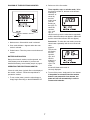
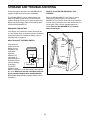
DIAGRAM OF THE ELECTRONIC MONITOR
2. Select one of the five modes:
Time, reps/min, reps, or calories modeÑWhen
the power is turned on, the time mode will automatically be
selected, as
shown by
the time
mode arrow
(see the
drawing at
the right). To
select the
reps/min,
reps, total
reps, or
calories mode, press the select button repeatedly
until the desired mode arrow appears. (Make sure
that the scan mode indicator does not appear.)
2
1
3
Scan modeÑTo select the scan mode, press the
select button repeatedly until the scan mode indicator
appears.
The console
will display
the time,
reps/min,
reps, and
calories
modes in a
repeating
cycle. The
mode
arrows will show which mode is
currently displayed.
1. Mode arrowsÑShow which mode is selected.
2. Scan mode indicatorÑAppears when the scan
mode is selected.
3. Select buttonÑTurns the power on and selects all
modes.
BATTERY INSTALLATION
Before the electronic monitor can be operated, one
ÒAAAÓ battery must be installed. If you have not
installed the battery, see assembly step 3 on page 4.
OPERATING THE ELECTRONIC MONITOR
If there is a thin piece of plastic film on the display of
the monitor, remove it. Follow the steps below to
operate the monitor.
3. To turn off the power, simply wait for four minutes.
If the pedals are not moved and the monitor
button is not pressed for four minutes, the
power will turn off automatically in order to
conserve the batteries.
1. To turn on the power, press the select button or
simply begin exercising on the AIR WALKER XT.
7