1
1.3.3 Third step
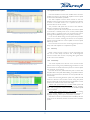
When the message “Do you want to update SHARC DSP?” is
displayed, press YES push-button. Only if KDSP board is installed,
the SHARC processor firmware update will be activated and it will
last about 20 minutes.
Upon concluding, a message “ Firmware update completed,
press OK to restart” will indicate that the procedure has been
successfully completed, before restarting the amplifier please
remove the firmware card.
1.3.4 Fourth step
Verify the result of the firmware update procedure. Turn on
the amplifier, go to Menu=>Setup=>Hardware Info and read the
version numbers. All installed boards must have the same version
number, and the SHARC firmware version must be the same
written on the smartcard label.
For example:
KFRONT:4.0.2-34
KCNTRL:4.0.2-34
KDSP:4.0.2-2000
KAESOP:4.0.2-5
FW version is 4.0.2. The last number on each line (after the
hyphen) is the build count (meaningless) except for the KDSP
board. For the KDSP the last 4 digit number after the hyphen
represents the SHARC firmware version (here it is 2000).
If something is mismatching, please check the smartcard
version and the KAESOP file version matching, then retry the
entire procedure from the beginning.
Please remember that if firmware update process stops before
completion (for mains drop or any other problem), it is necessary
to start it again from the beginning (switching the amplifier off and
back on), as it could happen that 2 different firmware versions
are present in the amplifier different boards, causing possible
problems to the amplifier itself.
8