1
HOW TO...
3.1
HOW TO RESET THE APPLIANCE
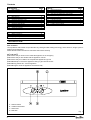
When the led status indicator is flashing red, the
appliance will require to be reset manually. Using
the mode switch, turn it left to the “0” (off/reset
position) then turn it back to the “I” position (see also
3.2).
IMPORTANT
If the appliance requires to be reset frequently, it
may be indicative of a fault, please contact your
installer or Vokera Customer Service for further
advice.
3.2
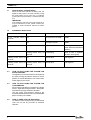
DIAGNOSTIC INDICATORS
Green LED
Red LED
Action required
On for 1 second, off for 5 Off
seconds
No request for hot water
NONE
On
Off
Hot water request
NONE
Off
On
Appliance lockout
Ensure gas is turned on at
meter. Wait 2 minutes before
resetting
On
Flashing on/off every 0,5 Overheating
seconds
Flashing on/off every 0,5 Off
seconds
Allow to cool, if problem
persists, call engineer
Internal fault
Call engineer
Flashing on/off every 0,5 Flashing on/off every 0,5 Internal fault
seconds
seconds
Call engineer
3.3
HOW TO SHUT DOWN THE SYSTEM FOR
SHORT PERIODS
The appliance can be shut down for short periods
by simply turning the selector switch to the off
position. It is also advisable to turn off the main
water supply to the house.
3.4
HOW TO SHUT DOWN THE SYSTEM FOR
LONG PERIODS
If the house is to be left unoccupied for any length
of time – especially during the winter – the system
should be thoroughly drained of all water.
The gas, water, and electricity supply to the
house should also be turned off. For more detailed
advice contact your installer.
3.5
HOW TO CARE FOR THE APPLIANCE
To clean the outer casing use only a clean damp
cloth. Do not use any scourers or abrasive
cleaners.
4
Status