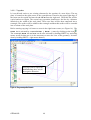
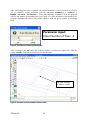
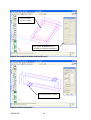
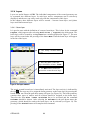
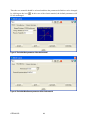
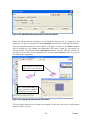
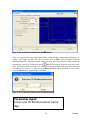
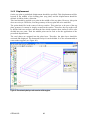
1
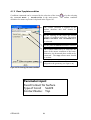
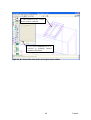
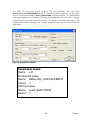
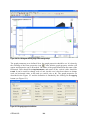
Cervenka Consulting Ltd.
Na Hrebenkach 55
150 00 Prague
Czech Republic
Phone: +420 220 610 018
E-mail: [email protected]
Web: http://www.cervenka.cz
ATENA Program Documentation
Part 4-6
ATENA Science – GiD Tutorial
Step by step guide for nonlinear analysis
with ATENA and GiD
Written by
Zdenka Procházková, Jan Červenka,
Zdeněk Janda, Dobromil Pryl
Prague, March 12, 2010
Trademarks:
ATENA is registered trademark of Vladimir Cervenka.
GiD is registered trademark of CIMNE of Barcelona, Spain.
Microsoft and Microsoft Windows are registered trademarks of Microsoft Corporation.
Other names may be trademarks of their respective owners.
Copyright © 2000-2010 Cervenka Consulting Ltd.
ATENA Science – GiD Tutorial
CONTENTS
1.
INTRODUCTION ............................................................................................................ 1
2.
STARTING PROGRAM .................................................................................................... 2
3.
PRE-PROCESSING ......................................................................................................... 3
3.1
Introduction .................................................................................................................................... 3
3.1.1
Introduction of the graphical user interface ................................................................................... 3
3.2
Geometrical model ......................................................................................................................... 8
3.2.1
Concrete beam................................................................................................................................ 8
3.2.2
Loading and supporting steel plates ............................................................................................. 15
3.2.3
Reinforcement bars ...................................................................................................................... 27
3.2.4
Layers........................................................................................................................................... 30
3.3
Material parameters ..................................................................................................................... 39
3.3.1
Concrete beam.............................................................................................................................. 39
3.3.2
Loading and supporting steel plates ............................................................................................. 45
3.3.3
Reinforcement bars ...................................................................................................................... 50
3.4
Boundary conditions .................................................................................................................... 56
3.4.1
Support ......................................................................................................................................... 56
3.4.2
Displacement................................................................................................................................ 62
3.4.3
Symmetry condition ..................................................................................................................... 70
3.4.4
Monitors ....................................................................................................................................... 73
3.5
Intervals – Loading history .......................................................................................................... 80
3.6
Mesh generation ........................................................................................................................... 82
3.6.1
Notes on meshing ......................................................................................................................... 84
3.6.2
Structured mesh............................................................................................................................ 85
4.
FE NON-LINEAR ANALYSIS........................................................................................... 92
4.1
Missing contacts ........................................................................................................................... 94
4.1.1
Master Top beam condition.......................................................................................................... 95
4.1.2
Slave Top plate condition............................................................................................................. 98
4.1.3
Master bottom beam and Slave bottom plate conditions............................................................ 100
4.2
AtenaWin interface description ................................................................................................ 102
4.3
Load-displacement graph.......................................................................................................... 104
4.4
Crack width display .................................................................................................................... 109
5.
POST-PROCESSING ................................................................................................... 115
i
Tutorial
5.1
GiD post-processing....................................................................................................................115
5.2
AtenaWin post-processing .........................................................................................................121
6.
CONCLUSION .......................................................................................................... 124
7.
PROGRAM DISTRIBUTORS AND DEVELOPERS ................................................................ 125
8.
LITERATURE ............................................................................................................ 128
ATENA-GiD
ii
1. INTRODUCTION
This tutorial provides a basic introduction to the usage of the program ATENA and GiD,
and it is specifically targeted for ATENA-GiD beginners. ATENA-GiD is a finite element
based software system specifically developed for the nonlinear analysis of reinforced
concrete structures. ATENA is used for the analysis itself and the program GiD is used for
the data preparation and the mesh generation.
This tutorial contains a step by step explanation how to perform a non-linear analysis on an
example problem of a reinforced beam without smeared reinforcement. The geometrical
and material properties correspond to the experimental setup by Leonhard in 1962. More
details about the problem or experiment can be also obtained from the original report [6] or
from the program developer or distributor.
It is possible to create and analyse the example problem described in this tutorial in demo
version of ATENA-GiD. Because of that a rather coarse finite element mesh is used. It is
recommended that in the analysis of real engineering problems, users use sufficiently fine
meshes, and if needed a mesh sensitivity study should be performed.
The step by step demonstration is performed on an example of simply supported beam,
which is loaded by two loads as it is shown in Figure 1. The problem is symmetric around
its vertical axis; therefore, only one symmetric half of the beam will be analyzed.
It is recommended to print-out this version, in order to easily follow the instructions. In
case of printing, it is advisable to use both sided and colour printing.
Figure 1: Geometry of the structure
1
Tutorial
The steps necessary for the data preparation, non-linear analysis and post-processing are
depicted on subsequent figures, which show the computer screen for each step and the
corresponding user action. There is always also a short description for each figure.
It should be noted that not all features of ATENA-GiD system are described in this
manual. For more details about the data preparation and post-processing, the user is
encouraged to read the manual of the program GiD and ATENA-GiD manual [2].
2. STARTING PROGRAM
Before using the ATENA-GiD system it is necessary to install it on your computer. The
programs GiD and ATENA can be installed using the standard ATENA installation. At
the end of the installation, the user must select the installation of GiD and ATENA-GiD
interface. After that your computer should be ready to run the example problem described
in this document. The installation process is described in detail in ATENA-GiD manual
[2].
In order to start a nonlinear analysis in ATENA-GiD system, first the program GiD is
started. The recommended version is 9.0.4 or newer (the oldest supported version is
7.7.2b). The program GiD can be started from the start menu of your computer using the
following path: Start | All Programs | CervenkaConsulting | ATENA
Science | GiD.
This opens the program GiD, which is used for the preparation of the numerical model of
the analyzed structure. This process is described in the subsequent Chapter 3. The
execution of the nonlinear analysis is described in Chapter 4 and the post-processing in
Chapter 5.
ATENA-GiD
2
3. PRE-PROCESSING
3.1 Introduction
This chapter explains the basic steps, which are to be performed in order to define a
complete geometrical, and then a finite element model for the non-linear FE analysis by
ATENA.
The purpose of the geometrical model is to describe the geometry of the structure, its
material properties and boundary conditions. The analytical model for the finite element
analysis will be created during the pre-processing with the help of the fully automated
mesh generator.
The definition of the geometry starts with the creation of geometrical points. These points
are later connected into boundary lines. The surfaces are defined by selecting appropriate
bounding lines. Volumes can be formed either by extrusion of surfaces or manually by
selecting all bounding surfaces. Three-dimensional regions are modelled by volumes in
GiD. The reinforcement is modelled as a line. These reinforcement lines are not usually
connected to any surface or volume, but they usually lie inside the volumes entities that
form the concrete structure.
After creation of the geometry, material properties should be defined and assigned to
individual volumes. Boundary conditions are used to define supports and loads. The
boundary conditions and loads are defined in GiD with the help of “Intervals”. Interval
represents a set of boundary conditions and loads that are applied in a specified number of
steps. An appropriate definition of intervals can be used to specify a complete loading
history.
In ATENA analysis it is always useful to define monitoring points. The monitoring points
are used to see the evolution of certain quantities during the analysis. For instance they can
be used to follow the development of deflection or forces at given locations. The
monitoring points are defined as special conditions that should be specified in the first
interval.
3.1.1 Introduction of the graphical user interface
Before starting the definition of the geometrical model it is good to introduce the graphical
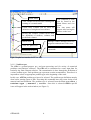
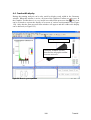
user interface of ATENA-GiD. The main window is shown in the Figure 2. It shows the
basic layout of GiD program right after its start and it explains the basic functionality of
the various icons and menus.
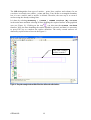
This window shows the basic layout of the GiD program. At this stage it contains only
commands for the creation of geometric objects. In order to activate ATENA specific
materials and boundary conditions, an appropriate problem type needs to be selected. This
is described in the next section.
3
Tutorial
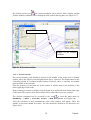
Main Menu
View Toolbar can be used for zooming and
rotating of a created model
Create lines Toolbar can be used for
definition of straight and curved lines
The command of icons
can be found in the
Main Menu and vice
versa.
The icon name will
appear after leaving the
mouse on the icon.
Surface and Volumes Toolbar can be used
for definition of surfaces, volumes and
predefined volumes
Delete icon
Message window through which the
program communicates with a user
View XY plane icon
Command line for manual input of
commands
Directions of axis
Figure 2: Graphical user interface of ATENA-GiD.
3.1.1.1 Problem type
The GiD is a general-purpose pre- and post-processing tool for variety of numerical
problems (and analysis software). The GiD can be customized to create input data for
basically any finite element software. The customization is done through the definition of
various problem types. Each problem type represents certain customization. Therefore it is
important to select an appropriate problem type at the beginning of the work.
In this case, ATENA problem type has to be selected. The problem type definition must be
done before starting input of data. Executing this command later may cause losing of all
material and load definition. The problem type is selected from the Main menu Data |
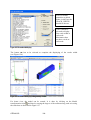
Problem Type | AtenaV4 | Static. Once this is selected ATENA specific
icons will appear in the main window (see Figure 3).
ATENA-GiD
4
Starts definition of concrete material
Starts definition of reinforcement material
Draw all materials
Define boundary condition… Load & Supports
Draw boundary condition… Load & Supports
Start ATENA static analysis using AtenaWin
Figure 3: Problem type menu and basic ATENA icons.
It is also recommended to explore the help of the program GiD. This can be found in the
Main menu or by pressing F1 on your keyboard.
It is also much recommended to save file and also regularly save created model during the
formation of the geometrical model. Saving is done by selecting File | Save or
Save as. The name of the document can be chosen for example 3DBeam.
3.1.1.2 Problem data
Before starting the model definition it is advisable to define some global analysis
parameters. It is done by the command Data | Problem Data | Problem Data
in the main menu (see Figure 4).
5
Tutorial
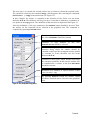
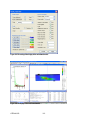
The Problem Data can be also
executed by this icon
Figure 4: The command Problem Data
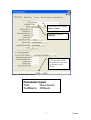
After selecting this command the Problem Data window will appear (see Figure 5). There
the Title and Task Name should be changed to rename files where the results of the
analysis will be saved.
When the analysis is finished, all results are saved in files. From those files, results can be
executed and processed lately. Therefore it is useful to rename the title of the files where
results should be saved and it is useful to do this saving in the beginning of the any
creation of project. Later it could be forgotten.
ATENA-GiD
6
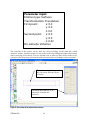
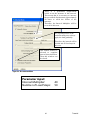
Title could be for example
Shear beam
Task name could be
3DBeam
The button Accept has
to be selected to finish
the definition. After that
the window can be
closed.
Figure 5: The Problem Data definition
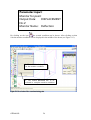
Parameter input:
Title:
Shear beam
TaskName: 3DBeam
7
Tutorial
3.2 Geometrical model
This chapter describes definition of the geometrical model. Because the beam is
symmetric, only half of the beam will be created in this example.
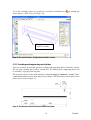
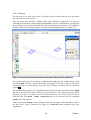
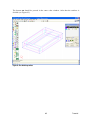
The geometrical model of this half beam (see Figure 6) is composed of three 3D regions
and two reinforcement bars. In GiD the 3D regions are called “Volumes”. Therefore the
geometrical model contains three volumes – beam, loading and supporting plates. The
reinforcement is modelled by two straight lines. The definition of these geometrical
entities is described in the subsequent chapters.
It is useful to use the layer function for the definition of the geometrical model. It is a
function, where particular parts of the model can be placed on different layers and then
displayed, hidden or locked etc. In this geometrical model, three separate layers will be
created – beam layer, plates layer and reinforcement layer.
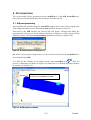
Figure 6: The geometrical model is composed from three volumes – beam and two plates
3.2.1 Concrete beam
A concrete beam forms the main part of the example. This section describes the definition
of the three-dimensional beam geometry. The geometry of the beam will be created by an
extrusion of a rectangular surface. That will be defined by four lines.
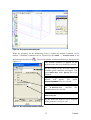
First step is to create points, which will be later connected into a rectangular surface. A
point is created using the command Geometry | Create | Point in the Main
menu. In order to create a rectangle, four points are needed. Each point is defined by three
coordinates (x,y,z). The coordinates of points should be written in the command line in the
bottom part of the main window.
The coordinates can be written all together separated by comma. A dot represents a
decimal point. The definition of coordinates of each point is completed by ENTER. (In the
command line it is very handy to use the key arrow up and down on your keyboard to view
previously entered coordinates. These previous coordinates can be changed and entered
again.)
ATENA-GiD
8
In this case the following points should be entered:
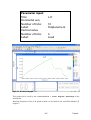
Parameter input:
Coordinates of points:
1: (0,0,0)
2: (1.275,0,0)
3: (1.275,0.19,0)
4: (0,0.19,0)
NOTE: The table named “Parameter input:” will guide you through the whole tutorial.
This table shows the parameters, which should be entered. There are predefined default
parameters in some dialog windows. The table Parameter input: shows only parameters,
which should be changed.
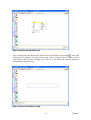
After entering coordinates the points appear in the graphical area (see Figure 7). It is useful
to enlarge the model such that it fills the whole screen. For that the command View |
Zoom | Frame in the main menu or the Frame icon
can be used (see Figure 8).
Figure 7: Four created points before zooming.
9
Tutorial
Figure 8: Using of the Zoom frame icon enables to have a better view of the created geometry.
Next step is to connect these points by lines. Lines are created using the command
Geometry | Create | Straight line in the Main menu or by clicking on the
icon
. Then the message window at the bottom will show the following sentence:
Enter points to define line (ESC to leave).
The lines can be defined by entering exact coordinates into a command line or it is possible
to directly pick the already existing points. In this example the direct picking has been
chosen.
The direct picking can be done by selecting Contextual | Join Ctrl-a in the
Mouse menu. The Mouse menu can be found by clicking on the right button of the mouse
in the graphical area (see Figure 9).
Alternatively this option can be activated directly by pressing the key Ctrl and ‘a’ at the
same time.
ATENA-GiD
10
Figure 9: The Join function in the Mouse menu.
After selecting the join function the mouse cursor will change to this shape . Then after
clicking into a graphical area the nearest point will be selected. Now all points can be
connected by lines into the rectangle (see Figure 10). The create line function should be
finished by pressing ESC key.
Figure 10: The lines connected into a rectangle.
11
Tutorial
The GiD distinguishes four types of entities – point, lines, surfaces and volumes. In our
case there are already two entities - points and lines. Lines define a rectangular boundary
but it is not a surface until a surface is defined. Therefore, the next step is to create a
surface using the already existing lines.
It is done by selecting Geometry | Create | NURBS surface |By contour
in the main menu and then selecting all lines defining the required surface in the graphical
area (see Figure 11). Clicking on the icon
can also start the Create surface
function. Next, the lines bounding the surface should be selected, and then it is necessary
to press ESC key to complete the surface definition. The newly created surfaces are
denoted by a pink colour as seen in the Figure 11.
The pink rectangle
defines a surface
Figure 11: The pink rectangle in the middle of blue lines defines the added surface.
ATENA-GiD
12
The next step is to extrude the created surface into a volume to obtain the required beam.
The extrusion is done by the command Copy, which appears after selecting the command
Utilities | Copy in the main menu (see Figure 12).
In this example, the surface is extruded in the direction of the Z-axis over the beam
thickness 0.32 m. The thickness will be given by a vector that is defined by coordinates of
two points in the Copy menu. The definition of the extrusion is depicted in the Figure 12.
After the definition of all copy parameters, the Select button should be pressed. Then
the surface for the extrusion can be selected in the graphical area. The command is
completed by pressing Finish button.
Selection of entities which should be extruded: in
this case Surfaces should be selected
Selection of copy method: in
Translation should be selected
this
case
Manual inserting of vector coordinates for a
direction along which the entities should be
extruded: in this case the rectangular surface should
be extruded in Z-axis direction over the beam
thickness 0.32 m.
Selection of entity types which should result from
the extrusion operation. In this case the surface will
be extruded into a volume, so the item Volumes
should be selected.
Definition of a numbers of copied entities: in this
case it is only 1 copy
By pressing Select button the entities, which
should be extruded can be selected in the graphical
area.
Figure 12: The description of Copy menu
13
Tutorial
Parameter input:
Entities type: Surfaces
Transformation: Translation
First point:
x: 0.0
y: 0.0
z: 0.0
Second point: x: 0.0
y: 0.0
z: 0.32
Do extrude: Volumes
The selection of the surface can be done by a direct clicking on the pink line, which
defines a surface. Another option is to select the surface by holding the right mouse button
and by moving of the mouse. The box should cross at least one line of the surface to be
selected. After the proper selection the pink selected surface will change to the red colour.
The pink rectangle changes to
the red colour after the correct
selection
The button Finish has to be
selected to complete the
extrusion
Figure 13: The selection of the surface for the extrusion
ATENA-GiD
14
To see the extruded volume it is possible to use Rotate Trackball icon
mouse button + SHIFT key (see Figure 14).
or holding left
The light blue prism
defines a volume
Figure 14: The extruded volume – the light blue prism defines a volume
3.2.2 Loading and supporting steel plates
After the creation of the beam geometry loading and supporting plates should be created.
The top plate (loading plate) will be created first. The bottom plate (supporting plate) will
be created by copying of the top plate.
The top plate will be created with using the commands Copy and Create lines. These
commands should be known from the previous chapter. The dimensions and location of the
plates can be seen on Figure 15.
Figure 15: The dimensions of the half beam and location of steel plates
15
Tutorial
3.2.2.1 Top plate
It is useful and easier to use existing elements for the creation of a new object. The top
plate is located on the right corner of the created beam. Therefore the upper-right edge of
the beam can be copied and moved to 0.115 m from the right end. Then this line will be
copied and moved again. The second copy operation should move the line by a distance
identical to the width of the steel plates. These two lines will be then connected into a
rectangle. The surface will be added to this rectangle and then this surface will be extruded
into a volume of the steel plate.
Before starting copying it is better to zoom in the right beam corner (see Figure 16). The
Zoom in is activated by command View | Zoom | In or by clicking on the icon .
The command Zoom in and out can be also activated by holding SHIFT key and using
mouse scroll (In that case it is also necessary to move the view of the geometry. It can be
done by holding SHIFT + right mouse button.).
This edge will be copied by
0.115 m along the x axis in
the negative direction.
Figure 16: The geometry after Zoom in
ATENA-GiD
16
The Copy menu appears after selecting Utilities | Copy in the Main menu. The
new line should be in the 0.115 m distance from the right edge of the beam. The copied
entity is line, and there is no extrusion necessary. The parameter definition is depicted in
the Figure 17. After the definition of all parameters, the Select button should be pressed.
Then the line required for the copying can be selected in the graphical area (see Figure 18).
After the selection of the line, it is necessary to press Finish button to complete the
translation (see Figure 19).
Parameter input:
Entities type: Lines
Transformation: Translation
First point:
x: 0.0
y: 0.0
z: 0.0
Second point: x: -0.115
y: 0.0
z: 0.0
Do extrude: No
Figure 17: The definition of translation of the line
17
Tutorial
This line should be selected
for the translation
The button Finish has to be selected
to complete the translation
Figure 18: The selection of the line which should be copied
The copied line
Figure 19: The new copied line
ATENA-GiD
18
Now the new line will be copied again to create the second edge of the top plate. The
width of the plate is 0.100 m. Therefore the second line will be translated by 0.100 m. The
parameter definition is depicted in the Figure 20. After the definition of all parameters the
Select button should be pressed. Then the line required for copying can be selected in
the graphical area (see Figure 21). After the selection of the line it is necessary to press
Finish button to complete the translation (see Figure 22).
Parameter input:
Entities type: Lines
Transformation: Translation
First point:
x: 0.0
y: 0.0
z: 0.0
Second point: x: -0.100
y: 0.0
z: 0.0
Do extrude: No
Figure 20: The parameter definition of the second line
19
Tutorial
This line should be selected
for the translation
The button Finish has to be
selected to complete translation
Figure 21: The selection of the line which should be copied
The copied line
Figure 22: The repeated copy operation to create the second line
ATENA-GiD
20
The next step is to connect these newly copied lines into a rectangle. This can be done by
creation of new lines using the command Geometry | Create | Straight line
from the main menu or by clicking the icon . Also the Join function should be used
(Ctrl + a; see chapter 3.2.1). The connection of lines is depicted in the Figure 23 and the
Figure 24.
First this point should be selected.
Make sure that the command Join
(Ctrl+a) is activated otherwise a
new point may be created.
Then move the
mouse and select
the next line point
Figure 23: The two lines need to be connected to form a rectangle, i.e. the creation of the bottom line
First this point
should be selected.
Then move the mouse and
select the next line point
Figure 24: The creation of the top line to finalize the rectangle for the bottom surface of the top plate.
21
Tutorial
After connecting lines into a rectangle, the surface should be created. For that it is useful to
use an automatic surface definition with the command Geometry | Create |
NURBS surface |Automatic. When this automatic method is used, the program
asks for the number of bounding lines (see Figure 25). After definition of this number, the
program automatically creates all possible surfaces with the given number of bounding
lines.
Parameter input:
Enter Number of lines: 4
Figure 25: The definition of number of bounding lines
After clicking on the OK button, the required surface is created (see Figure 26). Then the
button Cancel should be selected to leave this function.
The pink rectangle
of the new surface
Figure 26: The surface created by automatic surface creation.
ATENA-GiD
22
The geometry definition of the top plate will be finished by extrusion of the surface. The
extrusion is done by the Copy command, which appears after selecting item from the
main menu Utilities | Copy. The height of the steel plate is 0.030 m. The
definition of the extrusion is depicted in the Figure 27. After the definition of all
parameters the Select button should be pressed. Then the surface required for the
extrusion can be selected in the graphical area (see Figure 28). After the selection of
surface it is necessary to press Finish button to complete the extrusion (see Figure 29).
Parameter input:
Entities type: Surfaces
Transformation: Translation
First point:
x: 0.0
y: 0.0
z: 0.0
Second point: x: 0.0
y: 0.0
z: 0.03
Do extrude: Volumes
Figure 27: The definition of the steel plate extrusion
23
Tutorial
The red colored
selected surface
The button Finish has to be
selected to complete extrusion
Figure 28: The selection of the surface which should be extruded to obtain steel plate geometry
The steel plate
volume defined by
light blue prism
Figure 29: The volume of the top steel plate
ATENA-GiD
24
3.2.2.2 Bottom plate
The bottom steel plate will be created by copying of the top plate.
The copy starts by command Utilities | Copy in the Main menu. The definition of
the extrusion is depicted in the Figure 30. After the definition of all parameters the
Select button should be pressed. Then the volume required for the translation can be
selected in the graphical area (see Figure 31). It is important to select the correct volume
representing the top plate. After the selection of volume it is necessary to press Finish
button to complete the translation (see Figure 32).
Parameter input:
Entities type: Volumes
Transformation: Translation
First point:
x: 0.0
y: 0.0
z: 0.0
Second point: x: -0.81
y: 0.0
z: -0.35
Do extrude: No
Figure 30: The parameter definition
25
Tutorial
The red colored
selected volume
The button Finish has to be
selected to complete translation
Figure 31: The selection of the volume which should be copied
The bottom plate volume
Figure 32: The bottom and top plates
ATENA-GiD
26
3.2.3 Reinforcement bars
The geometry of reinforcement bars will be defined only by two lines. The first bar will be
created and then the second bar will be copied.
The creation of the first bar starts by clicking the icon
or with the command from the
main menu Geometry | Create | Straight line. The command line in the
bottom of the main window should be used for the coordinates definition. The coordinates
of the reinforcement are (0.05,0.05,0.05) and (1.275,0.05,0.05). See Figure 33.
The first bar
Figure 33: The first reinforcement bar
Parameter input:
Coordinates of the line:
1: 0.05,0.05,0.05
2: 1.275,0.05,0.05
27
Tutorial
Second reinforcement bar will be created by copying of the first bar. The copy starts by the
command Utilities | Copy in the main menu. The definition of the translation is
depicted in the Figure 34. After the definition of all parameters the Select button should
be pressed. Then the line required for the translation can be selected in the graphical area
(see Figure 35). After the selection of line it is necessary to press Finish button to
complete the translation (see Figure 36).
Parameter input:
Entities type: Lines
Transformation: Translation
First point:
x: 0.0
y: 0.0
z: 0.0
Second point: x: 0.0
y: 0.09
z: 0.0
Do extrude: No
Figure 34: The parameter definition for the copying of the first bar
ATENA-GiD
28
The selected bar
The button Finish has to be
selected to complete translation
Figure 35: The selection of the first reinforcement bar which should be copied
The copied bar
Figure 36: The first and second reinforcement bar
29
Tutorial
3.2.4 Layers
Layers are useful feature of GiD. The individual components of the created geometry can
be separated into different layers. In each layer and its components can be selectively
displayed, and the user can easily work only with the components of this layer.
In this chapter, three different layers will be created – concrete beam layer, steel plates
layer and reinforcement layer.
3.2.4.1 Beam layer
It is good to start with the definition of concrete beam layer. This is done by the command
Layers, which appears after selecting Utilities | Layers in the main menu. The
beam layer will be created by writing beam into a window depicted in Figure 37. The new
layer will be created after the pressing of the button New. Then the beam layer will appear
in the list of the layers.
3. The newly created beam
la er
1. Here the name of the new
layer should be written - beam
2. The New button should be
pressed to create the new layer
Figure 37: The Layers command
The newly created beam layer is immediately activated. The layer activity is indicated by
the sign . The next step is to assign the beam geometry to the beam layer by pressing the
button Send to. Then the pull down menu will open (see Figure 38). The beam geometry
contains three types of entities and all of them should be assigned to the beam layer.
Therefore the item Also lower entities has to be activated and the command
Volumes should be chosen. After selecting the Volumes in the pull down menu, the
geometry, which should be send to the beam layer, can be selected (see Figure 39). The
pressing of the Finish button will complete this command.
ATENA-GiD
30
1. After pressing Send to
button the pull down menu will
appear
2. The option Also lower
entities has to be active
3. Then the Volumes should
be selected
Figure 38: The definition of the Send to command for the beam layer
Selected volume of the beam,
this volume will be assigned to
the beam layer after the
pressing of the Finish button.
Figure 39: The selection of the volume, which should be sent to the beam layer
31
Tutorial
The buttons On or Off activates the display of the content of the chosen layer. It can be
seen or hidden. The yellow bulb
next to the name of the beam indicates the display
status of the layer. Also direct clicking on the bulb for an individual layer can switch
between the display modes. The Layer0 (the layer which was already there before creating
the beam layer) should be selected and then the button Off. The yellow bulb will change
to the grey colour . It means that all its content should not be displayed. The Layer0 still
contains the geometry of steel plates and reinforcement. Therefore these geometries should
disappear in the graphical area after deactivation of the Layer0 (see Figure 40). It should
be possible to see only the beam and it assures that the beam geometry was successfully
sent to the beam layer.
1. The Layer0 should be selected
2. Then button Off should be selected to deactivate the
3. Afterwards the yellow bulb change yellow colour to the grey
Figure 40: The steel plates and reinforcement geometry will disappear after deactivating of the Layer0
ATENA-GiD
32
3.2.4.2 Bar layer
The next step is to create a bars layer. This layer will be created with the same procedure
like for the previous beam layer.
First the beam layer should be hidden and Layer0 should be displayed. It is done by
selecting the beam layer and pressing the button Off.Layer0 is displayed by selecting this
layer and then by pressing the button On. Afterwards the beam geometry will disappear
and the reinforcement and steel plates will appear in the graphical area (see Figure 41).
Figure 41: The Layer0 is activated and reinforcement and steel plates will appear in the graphical area
The reinforcement layer is created by writing the name bars into the window and pressing
the button New. Then the reinforcement layer will appear in the list of layers. The newly
created bars layer is automatically activated. The activation is indicated by the checkbox
symbol .
The reinforcement geometry is assigned into the bars layer by pressing of the button Send
to. Then the pull down menu will open (see Figure 42). The reinforcement geometry
contains two types of entities and all of them should be moved into the bars layer.
Therefore the item Also lower entities has to be activated and the command
Lines should be chosen.
After selecting the Lines in the pull down menu the geometry, which should be send to
the bars layer, can be selected (see Figure 43). Finish button completes the layer
assignment.
33
Tutorial
1. After pressing Send to button the pull down
menu will appear
2. The option Also lower entities has to be active
3. Then the Lines should be selected
Figure 42: The definition of Send to command for the reinforcement layer
Selected lines of the
reinforcement; these lines will
be sent to the bars layer after
the pressing of Finish
button.
Figure 43: The selection of the lines, which should be sent to the bars layer
ATENA-GiD
34
3.2.4.3 Plate layer
It is useful to deactivate of the display of the bars layer by click the appropriate yellow
bulb or the button Off (see Figure 44). The reinforcement lines should disappear.
Figure 44: The reinforcement disappear after deactivating of the reinforcement layer
The last step is to create a plate layer. Like in previous two layers it is done by writing the
name plates into the window and pressing button New. Then the plate layer will appear in
the list of layers. The newly created plate layer is automatically activated. The activation is
indicated by the checkbox symbol .
The moving of the steel plate geometry into the plate layer can be started by pressing of
the button Send to. Then the pull down menu will open (see Figure 45). The
reinforcement geometry contains two types of entities and all of them should be moved
into the bars layer. Therefore the option Also lower entities have to be activated
and the command Lines should be chosen.
After selecting the Lines in the pull down menu, the geometry, which should be assigned
to the bar layer, can be selected (see Figure 46). Finish button will complete this
command.
35
Tutorial
1. After pressing Send to button the pull down
menu will appear
2. The option Also lower entities has to be active
3. Then the Volumes should be selected
Figure 45: The definition of Send to command for the plates layer
The button Finish has to be selected
to complete Send to command
Figure 46: The selection of the volumes, which should be sent to the plates layer
ATENA-GiD
36
If the display of the plate layer is deactivated, the volumes of the steel plates should
disappear. Deactivation is done by selecting the plate layer in the list of layers and then
pressing the button Off (see Figure 44).
The Layer0, which is now active, is empty. It does not contain any geometry and therefore
this layer can be deleted. It is done by selecting this Layer and by pressing the button
Delete. After that the Layer0 will be deleted (see Figure 47).
1. The Layer0 has to be selected
2. Then the Delete button
should be selected to delete Layer0
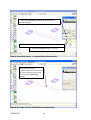
Figure 47: After deactivation of the plates layer the graphical area will stay empty. The Layer0 is active and it
does not contains any geometry therefore it can be deleted.
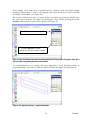
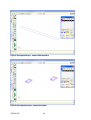
It is recommended to try to display each layer separately to verify that they contain all
required geometry. The correct results are shown in Figure 48, Figure 49 and Figure 50.
Figure 48: The displayed beam layer – contains beam volume
37
Tutorial
Figure 49: The displayed bar layer – contains reinforcement lines
Figure 50: The displayed plate layer – contains plate volumes
ATENA-GiD
38
3.3 Material parameters
This tutorial example contains three entities, which are made from three different
materials. These three entities are concrete beam, steel plates and reinforcement bars. In
this chapter the characteristics of materials will be defined and then the material will be
assigned to an appropriate geometrical entity.
3.3.1 Concrete beam
Before definition of the concrete beam material it is good to display only the beam layer.
The material definition of the beam starts by selecting the icon
or with the command
Data | Materials | SOLID Concrete in main menu (see Figure 51).
Figure 51: The selection of the command for the definition of the concrete material
After the selection of this command, the window for the definition of the SOLID Concrete
appears (see Figure 52).
39
Tutorial
Figure 52: The window for the definition of the SOLID Concrete
First, it is important to copy material definition of the already existing material and save it
under a new name. In this case, the new name shall be Beam and it should be created
based on the predefined material Concrete EC2. After the selection of the predefined
material (i.e. material Concrete EC2) the icon New SOLID Concrete
selected.
should be
The selection of this material and selection of the New SOLID Concrete icon are depicted
in the Figure 53. After the selection of the New SOLID Concrete icon the new window for
the definition of the new material name will appear (see Figure 54). Here the name Beam
should be written, and OK button is used to complete this command.
ATENA-GiD
40
1. The pull down menu with options of
predefined materials will appear after the clicking
on the arrow. In this case the Concrete EC2
should be chosen.
2. This icon starts the creation of the new material.
Once this icon is selected the New SOLID Concrete
window appear see Figure 54.
Figure 53: Description of the new material creation
Figure 54: The window for the definition of the New SOLID Concrete
Parameter input:
Enter new SOLID Concrete name:
Beam
When the new material is created, its name will be offered in the pull down menu (see
Figure 55). This new material should be selected, and then the its parameters can be
changed.
41
Tutorial
Newly created material named Beam
Figure 55: The selection of the New SOLID Concrete material
The parameters of the new material Beam are predefined according to Eurocode 2. In this
example it is necessary to have parameters of concrete class 30/37 and Safety Format
should be Mean. It can be done by selecting this class parameter and safety format in the
material window. The process of the class and safety format definition is depicted in the
Figure 56. It is very important to select checkbox Generate Material otherwise no
parameters will be updated. All parameters definition is completed by clicking on the
Update Changes icon
.
4. The Update changes
icon has to be selected
to complete parameter
definition
It is important to read
all help notes
1. The Generate Material
checkbox has to be
selected to update any
parameter changes
3. The Mean Safety Format
should be selected
2. The Strength Class 30/37
should be selected
Figure 56: The description of the class definition
ATENA-GiD
42
After updating of EC 2 parameters, the rest of parameters will change automatically. The
following pictures show the generated material parameters of concrete class 30/37.
See Figure 57, Figure 58, Figure 59, Figure 60, and Figure 61.
If needed it is possible to modify these generated default parameters. However, it should
be understood that the manual definition changes every time the Update changes button is
selected. It is not recommended to modify these default parameters unless the user is an
expert in nonlinear modelling and simulation.
In this tutorial problem, the generated parameters will not be modified.
Figure 57: The default Basic parameters of the concrete class 30/37
Figure 58: The default Tensile parameters of the concrete class 30/37
43
Tutorial
Figure 59: The default Compressive parameters of the concrete class 30/37
Figure 60: The default Miscellaneous parameters of the concrete class 30/37
Figure 61: The default Element Geometry parameters of the concrete class 30/37
ATENA-GiD
44
When the Beam material parameters are defined the material can be assigned to the
geometry. It is done by selecting the button Assign in the bottom of the material window.
After this the several options will appear. In this case the Beam material will be assigned
to the beam which is a volume. Therefore the option Volumes should be selected. Then
the volume of the beam geometry can be selected in the graphical area, and the button
Finish has to be pressed to complete the assignement.
The volume of the
beam has to be selected
The button Finish has to
be selected to complete
assigning of the material
Figure 62: The assigning of the CONCRETE material to the volume
The beam material was created and assigned. Now, in the following section the steel plate
material will be created.
3.3.2 Loading and supporting steel plates
Before definition of the loading and supporting plate material it is a good idea to display
only the plate layer.
Loading and supporting steel plates are made from steel material. It is assumed that the
load level will not be so high to cause any plastic deformation in the plates. Because of that
an elastic material will be used for the steel plates. The material definition starts with the
command Data | Materials | SOLID Elastic in the main menu (see Figure
63).
45
Tutorial
Figure 63: The selection of the command for the definition of the plates material
After the selection of this command the window for the definition of the SOLID Elastic
will appear (seeFigure 64).
Figure 64: The window for the definition of the SOLID Elastic
The process of the Elastic material creation is very similar to the creation of the Concrete
material. First, it is important to copy the material definition of the already existing
ATENA-GiD
46
material, and save it under a new name. There is only one elastic material and it will be
chosen to be copied for the material of this example. The Elastic 3D should be selected and
then the icon New SOLID Elastic
should be pressed. The selection of this material and
selection of the New SOLID Elastic icon are depicted in the Figure 65.
1. The pull down menu with options of
predefined materials will appear after the clicking
on the arrow. In this case the Elastic 3D should
be chosen.
2. This icon starts the creation of the new material.
Once this icon is selected the New SOLID Elastic
window appears (see Figure 66).
Figure 65: Description of the new elastic material creation
After the selection of the icon New SOLID Elastic the new window for the definition of
the new material name will appear (see Figure 66). Here the name Plates should be written
and then it is necessary to press OK button to complete this command.
Figure 66: The window for the definition of the New SOLID Elastic material
Parameter input:
Enter new SOLID Elastic name:
Plates
47
Tutorial
Then the new material should be selected and then the parameter definition can be changed
by clicking on the icon
be left unchanged.
. In this case of the elastic material, the default parameters will
Figure 67: The default Basic parameters of the elastic material
Figure 68: The default Miscellaneous parameters of the elastic material
ATENA-GiD
48
Figure 69: The default Element Geometry parameters of the elastic material
When the elastic material parameters are defined the material can be assigned to the
geometry. It is done by selecting the button Assign in the bottom of the material window.
After selecting this button the several options will appear. In this case the Plates material
will be assigned to the loading and supporting steel plates, which are represented by
volume entities. Therefore the option Volumes should be selected. Then the volumes of
the plates can be selected in the graphical area and the button Finish has to be pressed
to complete the assignment.
The volumes of the steel
plates have to be selected
The button Finish has
to be selected to complete
assigning of the material
Figure 70: The assigning of the Plates material to the volumes
The steel plate material was created and assigned. In the last section, the reinforcement
material will be created.
49
Tutorial
3.3.3 Reinforcement bars
Before definition of the reinforcement material it is good to display only the Bar layer.
The material definition of the reinforcement starts by selecting the icon
or with the
command Data | Materials | 1D Reinforcement (see Figure 71).
Figure 71: The selection of the command for the definition of the reinforcement material
After the selection of this command the window for the definition of the 1D Reinforcement
will appear (see Figure 72).
ATENA-GiD
50
Figure 72:The window for the definition of the 1D Reinforcement
First, it is important to copy material definition of the already existing material and save it
under a new name. In this case, the new name will be Bars. The predefined material
Reinforcement EC2 should be chosen for the copying. After the selection of the predefined
material the icon New 1D Reinforcement
should be selected. After the selection of the
New 1D Reinforcement icon, the new window for the definition of the new material name
will appear (see Figure 73). Here the name Bars should be typed, and then it is necessary
to press OK button to complete the command.
Figure 73:The window for the definition of the New 1D Reinforcement
Parameter input:
Enter new 1D Reinforcement name:
Bars
51
Tutorial
This new material should be selected, and then it is possible to change the parameter
definition. The parameters of the new material Bars are predefined according to Eurocode
2. In this example the Mean Yield Strength should be 560 MPa and Class of
Reinforcement should be A. The parameter definition is depicted in the Figure 74. It is
very important after all changes are updated to select checkbox Generate Material and do
update again. Otherwise no parameters will be updated. All parameters definition is
completed by clicking on the Update Changes icon
.
5. The Update changes
icon has to be selected
to complete parameter
definition
4. The Characteristic Yield
Strength should be changed to
560MPA
It is important to
read all help notes
2. The Class of Reinforcement
should be changed to class A
1. The Generate Material checkbox
has to be selected to generate
properties of parameters
3. The Safety Format should be
changed to Mean
Figure 74: The description of the reinforcement definition
In the Basic properties the bar diameter and number of bars can be defined. By checking
the checkbox Calculator, dialogs for the profile definition will appear. In this tutorial
example, the Profile should be 26 mm and number of profiles will stay 1. Then the Update
has to be clicked to recalculate the reinforcement area. Then it is
changes icon
necessary to click on the Update changes icon again to save all changes into the material
(see Figure 75).
ATENA-GiD
52
1. The Calculator checkbox has to be
selected to be possible to define profile
2. The profile diameter should be
changed to 26 mm
It is important to read all help notes
Figure 75: The default Basic parameters of the reinforcement, the icon Update changes has to be clicked 2x to
change parameters
The rest of the reinforcement parameters will be default. There is no change necessary (see
Figure 76, Figure 77, and Figure 78).
Figure 76: The default Reinf Function parameters of the reinforcement
53
Tutorial
Figure 77: The default Miscellaneous parameters of the reinforcement
Figure 78: The default Element Geometry parameters of the reinforcement
When the bar material parameters are defined the material can be assigned to the geometry.
It is done by selecting the button Assign in the bottom of the material window. After this
the several options will appear. In this case the Bars material will be assigned to two
straight lines. Therefore the option Lines should be selected. Then the lines of the
reinforcement can be selected in the graphical area and the button Finish has to be
pressed to complete the assignment (see Figure 79).
ATENA-GiD
54
The button Finish has to
be selected to complete
the assignment of the
material
The lines of the reinforcement
has to be selected
Figure 79: The assigning of the Bars material into lines
All materials are created and assigned. The icon Draw all materials
can be used to
check if all materials are correctly assigned. But before that it is important to display all
layers and their content. It is simply done by clicking on the grey bulb which should
change to the yellow after the clicking. Then the Draw all materials icon
See Figure 80.
can be used.
The two pink dots represent the
reinforcement bars
Figure 80: The drawn assigned materials
55
Tutorial
3.4 Boundary conditions
In this chapter the boundary condition are described. The analyzed beam is supported at
the bottom steel plate in the vertical direction. There the support condition will be defined.
Since only a symmetric half of the beam is analyzed, it is necessary to enforce the fixed
condition along the right side of the beam. It means that the horizontal displacements along
x-axis should be equal to zero.
The beam is loaded at the top steel plate. The object of this example is to determine the
maximal load-carrying capacity of the beam. It means that it should be possible to trace the
structural response also in the post-peak regime. The easiest method to accomplish this is
by loading the beam by prescribed displacements condition at the top steel plate.
It is important to monitor forces, displacement or stresses during the non-linear analysis.
The monitor data are important information about the state of the structure. For instant
from monitoring of applied forces, it is possible to determine if the maximal load was
reached or not.
In summary, there are four types of the boundary conditions in this example – monitors,
support, displacement and symmetry conditions.
3.4.1 Support
The analyzed beam is supported at the bottom steel plate in the vertical direction. The
support condition should be applied to the line. This line has to be added into the bottom
plate geometry. It will be done by dividing the bottom plate surface.
The steel plates are assigned into the plate layer. Therefore the plate layer should be
activated and displayed. The bar layer can be hidden but the beam layer is better to keep
displayed to be able recognize the bottom surface. It is also recommended to zoom at the
bottom plate. Make sure that the zoomed surface is the bottom surface of the bottom plate
(see Figure 81 and Figure 82).
This surface will be divided
Figure 81: The bottom surface of the bottom plate
ATENA-GiD
56
The division of the surface starts with the execution of the command from main menu
Geometry | Edit | Divide| Surfaces | Num Division or by selecting
of the Divide surface icon
(see Figure 82).
Figure 82: The executing of the division command
shape, and
After the execution of the divide command the cursor will change into this
the surface required for dividing should be selected. Once the surface is selected the dialog
window will appear on the screen (see Figure 83).
This dialog asks for the direction, along which the surface should be divided. There are U
and V direction, and in the graphical area it is possible to see green axis representing U and
V direction. In this case USense should be chosen. Once the USense button is chosen the
program asks for the number of the divisions. Bottom surface should be divided into two
parts (see Figure 84).
57
Tutorial
The plate layer has to be active. The
activation symbol is .
USense has to
be selected.
Once this button
is selected an
input window
will appear (see
Figure 84).
The green lines represent axis
of the U and V direction
Figure 83: The dividing of the surface
Figure 84: The enter value window
Parameter input:
Enter number of divisions:
2
The button OK should be pressed in the above dialog. After that the surfaces is divided into
two parts (see Figure 85).
ATENA-GiD
58
The new line for
the support
Figure 85: The divided top surface
When the geometry for the support is created the support condition can be defined.
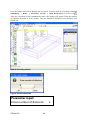
Conditions command can be executed by the Data | Conditions in the main menu
or by the icon
. The support condition definition is depicted in the Figure 86.
59
Tutorial
The support condition is to be applied on a
line, therefore this icon should be selected.
By clicking on the arrow, the list of available
line conditions will appear. The option
Constraint for Line should be
selected.
By clicking on this button the several options
will appear. The option GLOBAL coordinate
system has to be selected.
The support is in the vertical direction.
Therefore the Z-Constraint has to be
selected.
In order to prevent any rigid displacement
the Y-Constrain should be selected too.
By this button the monitor can be assigned to
the geometry (see Figure 87).
Figure 86: The support condition definition
Parameter input:
Constraint for Line
Coordinate System: GLOBAL
Y-Constraint
Z-Constraint
By clicking on the icon
the created condition can be drawn. After clicking on that
icon the support condition will be displayed on the assigned lines (see Figure 88).
ATENA-GiD
60
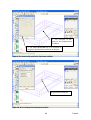
1. The selection of the line
for the support condition
2. The button Finish has
to be selected to complete
support condition definition
Figure 87: The selection of the support line
Display of the support condition
Figure 88: The support condition
61
Tutorial
3.4.2 Displacement
On the top plate a predefined displacement should be specified. This displacement will be
located in the middle of the loading plate (top plate) and the displacement should be
defined -0.0001m in the z direction.
This load should be applied on a point in the middle of the top plate. However, this point
does not exist yet. Therefore, first the geometry of the top plate has to be modified.
The point should lie in the centre of the top surface. This point has to be part of the top
plate geometry. It cannot be simply created on the surface. Therefore, the top surface will
be divided into two surfaces, and then the line which separates these surfaces will be also
divided into two parts. Then the middle point can be used to for the application of the
prescribed displacement.
The steel plates are assigned into the plate layer. Therefore, the plate layer should be
activated and displayed. The beam and bar layers can be hidden. It is also recommended to
zoom at the top plate (see Figure 89).
Figure 89: The activated plate layer and zoom view of the top plate
ATENA-GiD
62
The top surface will be divided using the command from the main menu Geometry |
Edit | Divide| Surfaces | Num Division or by selecting Divide surface
icon
(see Figure 90).
Figure 90: The execution of the division command
63
Tutorial
shape, and the
After the executing the divide command the cursor will change into this
appropriate surface should be selected. Once the surface is selected a dialog window will
appear on the screen (see Figure 91).
The green lines represent axis
of the U and V direction
USense has to be selected. Once this
button is selected the Enter value
dialog will appear (see Figure 92).
Figure 91: The dividing of the surface
The dialog window asks for a direction, along which the surface should be divided. The
possible direction are denoted as U and V, and they are represented as green axes in the
graphical area. In this case USense should be chosen since it is necessary to divide the
surface along the U direction. Once the USense button is chosen the program asks for the
number of the divisions. Top surface should be divided into two parts (see Figure 92).
Figure 92: The enter value window
Parameter input:
Enter number of divisions:
ATENA-GiD
64
2
The button OK should be pressed in the enter value window. After that the surfaces is
divided (see Figure 93).
Figure 93: The divided top surface
65
Tutorial
Now the middle line can be divided into two parts. It can be done by executing command
Geometry | Edit | Divide| Lines | Num Division or by the icon .
After the execution of this command the enter value dialog will appear. Here the number
of required divisions is to be written. The line should be divided in two divisions (see
Figure 95).
Figure 94: The dividing of the line
Figure 95: The enter value window
Parameter input:
Enter number of divisions:
ATENA-GiD
66
2
After the specification of the required division the button OK has to be pressed and the
appropriate line should be selected (see Figure 96). The line selection is completed by
pressing the ESC key has (see Figure 97).
The line which should be divided
Figure 96: The selection of the line
The middle point on, which the
displacement condition will be applied.
Figure 97: The divided line
67
Tutorial
Now the necessary point for the displacement condition is already created. Boundary
conditions automatically belong to the same layer as the geometry, onto which they are
assigned. Therefore it is not necessary to control which layer is activated.
The condition command can be executed by the icon
or by Data | Conditions
in the main menu. The displacement condition definition is depicted in the Figure 98.
The displacement condition is applied on the
point therefore this icon should be selected.
By clicking on the arrow the choice of
available conditions will be displayed. The
option Displacement for Point has to
be selected.
The displacement is in vertical direction.
Therefore Z-Displacement -0.0001 m
should be defined.
By this button the displacement can be
assigned to the geometry (see Figure 99).
Figure 98: The displacement condition definition
Parameter input:
Displacement for Point
Z-Displacement: -0.0001 m
the created condition can be displayed and can be used to
By clicking on the icon
verify if it is correctly applied at the right locations. After clicking on that icon the
displacement condition should be displayed at the point in the middle of the top plate (see
Figure 100).
ATENA-GiD
68
1. The selection of the
point for the displacement
condition
2. The button Finish has to be selected to
complete displacement condition definition
Figure 99: The selection of the point for the displacement condition
Displacement condition
Figure 100: The visual display of the displacement condition
69
Tutorial
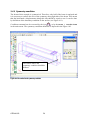
3.4.3 Symmetry condition
The beam of this example is symmetrical. Therefore, only half of the beam is analysed and
it is necessary to enforce the axis of the symmetry along right side of the beam. This means
that the horizontal x-displacements along this side should be equal to zero. It can be done
by definition of the boundary condition on the surface (see Figure 101).
Condition command can be executed by the icon
or by the Data | Conditions
in the main menu. The symmetry condition definition is depicted in the Figure 102.
The surface where the
symmetry condition should be
defined
Figure 101: The surface for the symmetry condition
ATENA-GiD
70
The symmetry condition is applied on the
surface therefore this icon should be
selected.
By the clicking on the arrow the list of
available conditions will be offered. The
option Constraint for Surface
has to be selected.
The X-Constraint has to be selected
to obtain symmetry condition.
By this button this condition can be
assigned to the geometry (see Figure 103).
Figure 102: The symmetry condition definition
Parameter input:
Constraint for Surface
Coordinate System: GLOBAL
X-Constraint
the created condition can be shown in the graphical area.
By clicking on the icon
After clicking on that icon the symmetry condition will be displayed on the middle surface
of the beam (see Figure 104).
71
Tutorial
1. The selection of the surface
for the symmetry condition
2. The button Finish has to be
selected to complete symmetry
condition definition
Figure 103: The selection of the surface for the symmetry condition
Displacement condition
Display of the symmetry condition
Figure 104: The visualization of the applied symmetry condition
ATENA-GiD
72
3.4.4 Monitors
Monitors provide important information about state of the structure. They can be used to
monitor various important quantities during the analysis. For instance it may be interesting
to monitor the development of deflections or strains at certain critical locations during the
nonlinear analysis.
In this example, two monitors will be defined. One monitor will be monitoring loads on the
top plate and second one will monitor deflections in the middle of the beam. The monitors
are represented in GiD as a special condition that needs to be applied in the first interval.
In this example, the monitors will be defined as a point condition at the top plate and in the
middle of the beam. The problem is that in the current model a suitable point for the
application of the monitoring condition exists only at the top plate, but there is no suitable
point at the middle of the beam. Therefore, the geometry will have to be modified.
3.4.4.1 First monitor
The first monitor should be located on the top plate and it will be used to monitor the loads
that are applied onto the structure. It will be applied on the point where the displacement
condition is also defined. Since the loading is applied as prescribed displacement, the
applied forces are represented in the finite element analysis as reactions. This means that
the reaction in the z-direction should be evaluated at this monitor.
The definition of the monitor condition starts by the icon
or by executing command
Data | Conditions in the main menu. The monitor condition definition is depicted
in the Figure 105.
The monitor condition is applied on the
point therefore this icon should be selected.
By the clicking on the arrow the several
options will appear. The option Monitor
for point has to be selected.
By the clicking on this button the available
monitoring quantities will appear. The
option REACTIONS has to be selected
The monitor point will monitor reactions in
the Z direction therefore this checkbox
has to be selected.
The name of the top plate monitor will be
Load.
By this button the monitor can be assigned
to the geometry (see Figure 106).
Figure 105: The first monitor condition definition
73
Tutorial
Parameter input:
Monitor for point
Output Data:
REACTIONS
Dir-Z
Monitor Name: Load
1. The selection of the point for
the monitor condition
2. The button Finish has to be
selected to complete monitor condition
Figure 106: The selection of the first monitoring point
ATENA-GiD
74
By clicking on the icon
the created condition can be drawn. After clicking on that
icon the monitor condition will be displayed at the point in the top plate (see Figure 107).
Displacement condition
Display of the monitor
condition
Figure 107: The first monitor condition
3.4.4.2 Second monitor
The second monitor point should be located at the middle of the beam near its bottom
surface, where the largest vertical displacement can be expected. The displacement in the
z-direction should be evaluated at this location. However, there is currently no suitable
point available at that location.
First the geometry of the point has to be created. It will be done by the division of the
down-right edge of the beam.
Before starting it is better to display only the beam layer and zoom at the down-right edge
of the beam. The process of the line division will be same like in previous sections.
or from the main menu by
The division command can be executed by the icon
Geometry | Edit | Divide| Lines | Num Division (see Figure 108).
After the execution of this command the enter value window will appear. There the
number of divisions should be written. The line should be divided in two divisions (see
Figure 109).
75
Tutorial
This edge will be divided
Figure 108: The executing of the division command
Figure 109: The enter value window
Parameter input:
Enter number of divisions:
2
After the specification of the division number, the button OK has to be pressed and the
appropriate line is to be selected (see Figure 110). After the line is selected the ESC key
has to be pressed to complete this command
ATENA-GiD
76
Figure 110: The created second monitor point
When the geometry for the monitoring point is created the monitor condition can be
defined. Conditions command can be executed by the Data | Conditions in the
main menu or by the icon
Figure 111.
. The second monitor condition definition is depicted in the
The monitor condition is applied on the
point therefore this icon should be selected.
By the clicking on the arrow the choice of
available point conditions will appear. The
option Monitor for point has to be
selected.
By the clicking on this button the several
options
will
appear.
The
option
DISPLACEMENT has to be selected
The monitor point will monitor reactions in
the Z direction, therefore this
checkbox has to be selected.
The name of the top plate monitor will be
Deflection.
By this button the monitor can be assigned
to the geometry (see Figure 112).
Figure 111: The second monitor condition definition
77
Tutorial
Parameter input:
Monitor for point
Output Data:
DISPLACEMENT
Dir-Z
Monitor Name: Deflection
By clicking on the icon
the created condition can be drawn. After clicking on that
icon the monitor condition will be displayed in the middle of the beam (see Figure 113).
1. The selection of the point
for the monitor condition
2. The button Finish has to be
selected to complete monitor condition
Figure 112: The selection of the second monitoring point
ATENA-GiD
78
Figure 113: The second monitor condition
Now, all boundary condition should be defined. For control it is recommended to display
boundary condition. It can be done by clicking on the icon
(see Figure 146).
Load monitor and
displacement condition
Support
condition
Symmetry
Deflection
monitor
Figure 114: All boundary conditions
79
Tutorial
3.5 Intervals – Loading history
This section describes the definition of the loading history for the analysis of Leonhardt's
shear beam. The loading history in GiD consists of intervals. Each interval is divided into
load steps. Because in this case the structure is loaded by only one type of force (defined
displacement), only one interval will be used. Then this interval will be subdivided in
several steps.
The objective is to gradually increase the load up to failure. Very often before an analysis
is started it is difficult to estimate the required loading level that would lead to failure. The
maximal load level however, can be often estimated either by simple hand calculation or
by performing an initial analysis with a very small load level. Then from the resulting
stresses it is possible to estimate how much the load must be increased to fail the structure.
In this example, it is known from the experimental results that the beam should fail at the
deflection of about 0.003 m. In previous section the prescribed displacement of 0.0001 m
was applied at the top plate. This means that the predefined displacement should be
multiplied approximately 30 times to reach the failure. Base on this assumption, the Load
interval will be multiplied by 40. Naturally, such a load should not be applied to the
structure in one moment. Therefore it is necessary to subdivide the interval in several load
steps. In this case the interval will be divided in 50 load steps.
The loading history can be prescribed by selecting item Data | Interval Data in
the main menu (see Figure 115). After selection of this command the Interval data window
will appear and the data which should be defined are depicted in the Figure 116.
Figure 115: The Interval data command
ATENA-GiD
80
There is a predefined displacement
0.0001 m on the structure in this interval.
This means that it is necessary to increase
the prescribed displacement approximately
40 times to reach the failure of the
structure.
Therefore, the Interval Multiplier will be
set to 40 in this case.
It is a good practice in the
nonlinear analysis to always
apply the load gradually.
Therefore, the interval will be
divided into 50 load steps in
this case.
This button should be
selected to complete
interval data definition.
Then this window can
be closed.
Figure 116: The contact conditions
Parameter input:
Interval Multiplier:
Number of Load Steps:
81
40
50
Tutorial
3.6 Mesh generation
The generation of a finite element mesh is the last step in pre-processing. Because it should
be possible to create this tutorial example in demo version of ATENA and GiD it is
necessary to use a rather coarse mesh. The demo version of ATENA is limited to 300
elements so the generated model should satisfy this limit.
The easiest way of the mesh definition is to use automatic generation. Program will
automatically define the smallest suitable mesh. This command can be executed by
selecting Mesh | Generate mesh (see Figure 117) or this option can be activated
directly by pressing the key Ctrl and ‘g’ at the same time. Then the program asks for the
definition of the size of the generated mesh (see Figure 118). The default size of the mesh
can be used. By the selecting Ok button the mesh will be generated and the list of elements
and nodes of the mesh will appear (see Figure 119).
Figure 117: The Generate mesh command
ATENA-GiD
82
Figure 118: The program offer the size of mesh
Figure 119: The numbers of elements and node of this geometrical model
The demo version of the GiD is limited to 1000 nodes. The example of this tutorial
contains 789 nodes. Therefore the automatic sized mesh could be generated (see Figure
120).
But the demo version of ATENA is limited to 300 elements (see Figure 121). And this
mesh contains almost 3000 elements; therefore this mesh will not be functional in ATENA
and the number of element should be decreased.
It can be done by using the structured mesh option, which allows better control about the
number of generated elements. Also in structural analysis it is usually preferred to use
brick elements. Therefore, in the next steps of the mesh generation the option to create six
side brick element will be described.
In this case the structured mesh will be specified only for the beam volume because it is an
important part of the structure for the structural analysis.
83
Tutorial
Figure 120: The generated mesh
Figure 121: The limitation of demo version of ATENA
In this example the beam will have structured brick mesh, and steel plates will be meshed
with tetrahedral elements.
3.6.1 Notes on meshing
The finite element mesh quality has a very important influence on the quality of the
analysis results, the speed, and memory requirements. Refining only the important parts
can save a lot of processor time and disk space.
A bad mesh, like a single layer of volume elements in a region where bending plays a
significant role, can produce very wrong results – see the "Mesh Study" example in the
ATENA Engineering Example Manual. A minimum of 4-6 elements per thickness is
recommended for at least qualitative results in bending. Alternatively, shell elements may
be used (see section Shell Material in the User’s Manual for ATENA-GiD).
ATENA-GiD
84
3.6.2 Structured mesh
Because this example should be possible to create in demo version, the mesh of the beam
volume will be structured and limited to 300 elements. The finite element size should be 5
elements over the beam height, 2 elements over the beam width and 16 elements over the
beam length. It should be noted that such a mesh is not an optimal one for this problem
type, but our mesh size is limited by the capacity of the demo version of the program. In
real structural problems finer meshes should be used.
The structured mesh is done by command Mesh | Structured | Volumes in the
main menu.
Figure 122: The Structured mesh command
Once this command is executed the volume, which should be structured has to be selected
(see Figure 123). After the selection the program asks for the number of cells which should
be assigned to the lines (see Figure 124).
85
Tutorial
Figure 123: The selection of the beam volume which should be structured
Figure 124: The number of cells for length of the beam
Parameter input:
Enter number of cells to assign to lines:
16
When the number of cells is defined, the button Assign has to be pressed to select lines
which should be structured. The 16 cells will be assigned to the beam length. When one of
the longitudinal edges of the beam volume is selected, the program automatically detects
which lines should have the same number of cells to guarantee the generation of a
structured mesh. (see Figure 125).
ATENA-GiD
86
Figure 125: The selection of the length lines
After the selection the ESC key should be pressed to return to the definition of number of
cells. Then the 5 cells should be defined and assigned to the height of the beam (see Figure
126). Then the selection can be done by selecting the button Assign, and one of the
vertical beam edges shall be selected. (see Figure 127).
Figure 126: The number of cells for height of the beam
Parameter input:
Enter number of cells to assign to lines:
87
5
Tutorial
Figure 127: The selection of the height lines
Next step is to assign the number of element along the width of the beam. The 2 cells
should be defined to these lines. Procedure is same like in previous two examples. But
when the first line will be selected program will automatically select only another two
lines. The last line of the width is divided into two parts. Therefore it is not selected by
program and another number of cells has to be assigned to these two lines.
Figure 128: The selection of the width lines
ATENA-GiD
88
Last step is to assign 2 cells to the each of the lines of the bottom-right edge of the beam.
See Figure 129 and Figure 130.
Figure 129: The number of cells for bottom-right edge of the beam
Parameter input:
Enter number of cells to assign to lines:
1
Now all necessary divisions are defined and the command is completed by selecting the
Close button in the Enter value window above.
Figure 130: The selection of the bottom-right edge lines
After the structured mesh definition the mesh can be generated. It is done by command
Mesh | Generate mesh or it can be activated directly by pressing the key Ctrl and
‘g’ at the same time. After that the enter value window will appear (see Figure 131). Here
it is necessary to define the default element size for the volumes that are not mesh using
the structured option. There the value 0.065 can be left and the button Ok can be pressed.
89
Tutorial
The generation of the mesh will start and then the list of elements will appear. The number
of elements can be checked in that list (see Figure 132). It is necessary that the total
number of elements is below 300. This limit is necessary only for the demo version of
ATENA. If a full version of ATENA is available it is recommended to use more elements.
The generation of the mesh is finished by selecting button Ok (see Figure 133).
Figure 131: The enter value window
Figure 132: The list of the elements of the mesh
Figure 133: The generated structured mesh
ATENA-GiD
90
For better view of the structured mesh the created model can be rendered. It is done by
selecting Render in the Mouse menu which appears after clicking on the right-mouse
button (see Figure 134).
Figure 134: The flat rendered geometrical model
When the mesh is correctly generated the geometrical model definition is finished and
calculation can be started. See following chapter 4.
91
Tutorial
4. FE NON-LINEAR ANALYSIS
This chapter describes the process of running a non-linear analysis of the Leonhardt beam
using the data that have been prepared in the previous sections of the tutorial.
or by the using of
The finite element analysis is started by the clicking on the icon
command Calculate | Calculate. After selecting this command, the program will
start to generate the input files for each step of the non-linear analysis. This process is
indicated by the dialog box (see Figure 135). And then the AtenaWin window will appear
and analysis will be in progress (see Figure 136).
Figure 135: The initializing of the analysis
If the creation of the geometrical model and definition of the boundary conditions were
done right, the static analysis should be finished in one minute. Then in the Geometry
window it is possible to see that the loading steel plate strangely distorted and shifted (see
Figure 137) by the applied loads. Due to that the structure could not be calculated
correctly. It is because there is no connection defined between the concrete beam and the
steel plates. Program does not automatically detect possible contact between volumes.
Contacts have to be added manually by boundary special conditions.
Therefore, it is necessary to return back to GiD graphical interface and defined fixed
contacts. AtenaWin can be simply closed without any savings of data and then it is
necessary to return back to the GiD graphical interface and define the missing contacts.
It should be noted that this problem is a direct consequence of the modelling approach that
was chosen in the previous section.
In this tutorial, the geometry is created by three individual and separated volumes. In such
a case contacts have to be added manually. If the corresponding surfaces of the steel plates
would be also parts of the geometry of the beam, all parts of the structure would be
connected and no special condition would have to be defined.
ATENA-GiD
92
Figure 136: The AtenaWin interface window
The moved loading steel plate
Figure 137: The moved loading steel plate.
93
Tutorial
There should be Info window in the GiD (see Figure 138). This informative window can
be closed and the definition of the missing contacts can be started (see 4.1).
Figure 138: The GiD interface after analysis
4.1 Missing contacts
The geometry is composed from three 3D regions – concrete beam and two steel plates.
These regions should be connected together. However in this example there is no
connection yet. Therefore, suitable contact conditions have to be added. In ATENA a
suitable condition for connecting independent surface together is called Fixed Contact.
Fixed contact condition distinguishes Master and Slave conditions. In this case, the beam
surfaces will be masters and plates will be slaves. Therefore, four contact conditions have
to be added – two master conditions on beam (top and bottom) and two slave conditions on
plates (top and bottom).
The conditions should be applied on the geometrical model and not on the mesh itself,
otherwise it would be lost during next mesh generation. Therefore, if the mesh is displayed
in the graphical area of the program the icon
should be selected to switch between the
mesh view and geometry view. This can be alternatively also accomplished by selecting
the command Geometry | View geometry in the main menu.
ATENA-GiD
94
4.1.1 Master Top beam condition
Conditions command can be executed by the selection of the icon
or by the selecting
the command Data | Conditions in the main menu. The contact condition
definition for master top beam is depicted in the Figure 139.
The contact condition is applied on the
surface therefore this icon should be
selected.
By the clicking on the arrow the available
conditions will appear. The option Fixed
Contact for Surface has to be
selected.
For the beam the Master should be
selected.
The Contact Name can be Top.
By this button this condition can be
assigned to the geometry (see Figure 140).
Figure 139: The master top beam contact condition
Parameter input:
Fixed Contact for Surface
Type of Cond: MASTER
Contact Name: Top
95
Tutorial
1. The selection of the surface
for the contact condition
2. The button Finish has to be
selected to complete contact
condition definition
Figure 140: The selection of the surface for the master top beam contact condition
Next the command draw condition can to be selected to display and verify condition
definition. The button Draw should be selected in the bottom of the Conditions window.
After clicking on that button several options will appear (see Figure 141). For example the
Colors can be selected and the master contact condition will be drawn (see Figure 142).
ATENA-GiD
96
This button should be selected to draw
contact condition (see Figure 142)
Colors can be selected
Figure 141: The draw coloured contact condition command
Figure 142: The Master Top beam condition
97
Tutorial
4.1.2 Slave Top plate condition
Conditions command can be executed by the selection of the icon
or by the selecting
the command Data | Conditions in the main menu. The contact condition
definition for master top beam is depicted in the Figure 143.
The contact condition is applied on the
surface therefore this icon should be
selected.
By the clicking on the arrow the several
options of conditions will offer. The option
Fixed Contact for Surface has to
be selected.
For the plate the Slave should be selected.
The Contact Name has to be same like the
name of the master condition of the beam.
Otherwise, the beam and plate would not be
connected. The Top contact name should
be written.
By this button this condition can be
assigned to the geometry (see Figure 144).
Figure 143: The slave top plate contact condition
Parameter input:
Fixed Contact for Surface
Type of Cond: SLAVE
Contact Name: Top
ATENA-GiD
98
1. The selection of the surface
for the contact condition
2. The button Finish has to be
selected to complete contact
condition definition
Figure 144: The selection of the surface for the slave top plate contact condition
99
Tutorial
4.1.3 Master bottom beam and Slave bottom plate conditions
The bottom conditions will be done by the same procedure like in the case of top contact
conditions. Only the name has to be different. It is recommended to use contact name
Bottom. The Figure 145 shows the right definition of bottom contact conditions.
Figure 145: The contact conditions
all boundary condition can be displayed. It is a good method
B the clicking in the icon
for checking if all conditions were properly defined (see Figure 146).
ATENA-GiD
100
First monitor and
displacement
Top
master
contact
Bottom
slave
contact
Support
condition
Bottom
master
contact
Top
slave
contact
Symmetr
y
Second
monitor
Figure 146: All boundary conditions
When the contact conditions are finished it is important to generate mesh again. After any
change of boundary condition and geometry the mesh has to be generated again. It is done
by the command Mesh | Generate mesh in the main menu or by pressing the key
Ctrl and ‘g’ at the same time.
If the new mesh is generated, the analysis can be started again. It is done by using the
. After
command Calculate | Calculate or by the clicking on the icon
selecting this command, the program will first generate ATENA input file for the nonlinear analysis and then the AtenaWin window will appear and analysis will be in progress
(see Figure 147).
101
Tutorial
4.2 AtenaWin interface description
Window F
Window A
Window E
Window B
Window C
Window D
Figure 147: The analysis in progress
Basic description of the AtenaWin interface:
Window A: contains specification of input commands that describes a problem
Window B: contains results from the current analysis
Window C: contains important messages from ATENA kernel sent during analysis
Window D: contains error and warning from ATENA kernel sent during analysis
Window E: contains graphical representation of the analysed structure
Window F: contains relative error – time graph
ATENA-GiD
102
When the analysis is running it is possible to stop the calculation. However, it is not
recommended to do it in this first tutorial example.
For that it is possible to use Application | Suspend/Break ASAP/Break
after Iteration/Break after Step command in the main menu or icons of the
Execution toolbar:
Break after Iteration icon –
it can stop running analysis
after iteration
Suspend icon – it
can pause running
analysis
Break ASAP icon – it can
stop running analysis as
soon as possible
Break after Step icon –
it can stop running
analysis after step
For detailed description of the AtenaWin user interface it is recommended to read
AtenaWin Mannual [7].
103
Tutorial
4.3 Load-displacement graph
During the running analysis it is very useful to see the evolution of the applied load and
beam deflections. The progress of the load and deflection is available in the monitors that
were defined in the previous Section 3.4.4. Now, it will be described how to visualize
these monitors during the nonlinear analysis.
The first step in the visualization of monitors is to open a new graph window by the
clicking on the icon
of the Monitor set 2. The window for the graph will appear
(Monitor set 2 is monitoring after step. Monitor set 1 is monitoring after iteration. In this
case the monitors were defined as being after steps therefore the Monitor set 2 should be
selected).
The graph parameters are not defined yet therefore this window is empty. If the newly
become active
created window is selected by clicking inside it, the Graph series icon
(see Figure 148). This icon
Graph series should be selected now, and a dialog for the
definition of the graph parameters will appear. Individual graphs can be created now by the
clicking the button New Series (see Figure 149).
Monitor set 1 icon
Monitor set 2 icon
Graph Windows appears after
clicking on the Monitor set 2 icon
Figure 148: The execution of the graph
ATENA-GiD
104
Graph series icon –
this icon is active
after selecting a
Graph Window
The name of the graph should be L-D. For the horizontal value the name
Deflection_DISPLACEMENT should be selected and factor should be -1. The name
for the vertical value should be Load_REACTIONS and factor will also -1. All definition
of the graph parameters is finished by clicking on the OK button. After this, the L-D graph
is shown on the top of the AtenaWin interface. This graph is showing actual stage of the
running analysis and it changes as the analysis progresses based on the current loads and
deflections.
Figure 149: The graph series definition
Parameter input:
Name: L-D
Horizontal value
Name: Deflection_DISPLACEMENT
Factor: -1
Vertical value
Name: Load_REACTIONS
Factor: -1
105
Tutorial
Figure 150: The L-D diagram showing stage of the running analysis
The graph parameters were defined. Now, the graph properties should be set. It is done by
the selecting of the Draw properties icon
. After that the graph property window will
appear and properties can be described. The name of the graph should be L-D, name of the
horizontal value should be Displacement and name of the vertical value should be
Load. It can be useful to change scale of axis (in this case it has been chosen to change
scale on horizontal value to 10 and on vertical axis to 6). The graph properties are
described in the Figure 151 and the definition is finished by the clicking on the Apply
button (see Figure 151).
Figure 151: The graph properties definition
ATENA-GiD
106
Parameter input:
Title:
Horizontal axis
Number of ticks:
Label:
Vertical value
Number of ticks:
Label:
L-D
10
Displacement
6
Load
Figure 152: The defined L-D graph
This graph can be saved by the command File | Save Figure Settings in the
main menu.
Detailed description of the L-D graph creation can be found in the AtenaWin Manual [7]
chapter 5.
107
Tutorial
When there are more windows in the layout of the AtenaWin the command Default layout
1 and Default Layout 2 in the main menu can be used to organize all windows. After
selecting the option Default layout 2 (Window(s) | Default layout 2 in the
main menu), all widows of the same type will appear at the same location one behind each
other (see Figure 153). It means that all text windows are at the bottom of the basic layout,
all geometry windows are on the right side and all graphs are on the left side. Individual
windows can be switched by icons
and .
Geometry window
All opened graphs
All opened text windows
Figure 153: The executing of the Default layout 2
ATENA-GiD
108
4.4 Crack width display
During the running analysis can be also useful to display crack width in the Geometry
window. When this window is active, all icons of the Graphics Toolbar are active too. In
the Graphics Toolbar there is a very useful icon called Post-processor data . This icon
can be selected to activate the display of iso-areas of various result quantities (see Figure
154). After that the Post-processor data window will appear and the width crack display
can be defined (see Figure 155).
Post-processor data icon
Geometry Window is active,
therefore the all graphic toolbar
icon are active too.
Figure 154: The active geometry window
109
Tutorial
List of available
quantities at global
nodes; in this case the
CRACK_WIDTH
should be chosen.
COD1 should be
selected to display
first crack width at
each node.
Maximum, there
are three cracks at
each node.
Figure 155: The crack width display
The button OK has to be selected to complete the displaying of the cracks width
(see Figure 156).
Figure 156: The crack width display in the geometry window
For better view, the model can be rotated. It is done by clicking on the Model
transformation icon
and then by setting the degree of the rotation along each axis using
the slide bars as described in Figure 157.
ATENA-GiD
110
Figure 157: The crack width display and the rotation of the model
Also for better view the model can be displayed undeformed. It is done by the clicking on
the Draw properties icon
and then by the setting the Draw undeformed checkbox (see
Figure 158). This command is completed by selecting the Apply button (see Figure 159
and Figure 160).
Figure 158: The setting of the display of the undeformed model
111
Tutorial
Figure 159: The setting of the display of the undeformed model
Figure 160: The display of the undeformed model
ATENA-GiD
112
Another option for the better visualization of the cracking pattern is available. It is done by
the clicking on the Draw Crack Option icon
(see Figure 161) and then by the setting of
the crack width and multiplier (see Figure 162). This command is completed again by
selecting of the Apply button (see Figure 163).
Figure 161: The execution of the Draw Crack Option
Parameter input:
Averaged at element
Max. crack level:
3
Min. crack width:
0,0001
Width multiplier:
5
Figure 162: The setting of the Draw crack option
113
Tutorial
Figure 163: The drawn crack width
All of these options of the crack width display, crack drawing are in the fact post
processing features of AtenaWin, but they can be used already during the execution of the
nonlinear analysis. This is one of the unique features of ATENA software. During analysis
execution all AtenaWin post-processing capabilities are available. For more information it
is recommended to study AtenaWin Manual [7].
ATENA-GiD
114
5. POST-PROCESSING
The created model can be post-process in the AtenaWin or in the GiD. AtenaWin postprocessing was already briefly described in the previous Section 4.4.
5.1 GiD post-processing
After finishing the nonlinear analysis, AtenaWin window can be closed. The program asks
if all changes should be saved. Then button Yes should be selected in all cases.
Then back in the GiD interface the process info will appear. Through this dialog the
program asks if the process of the analysed problem is finished or if the post-processing
should be started. The button Postprocess should be selected (see Figure 164).
Figure 164: The button Postprocess should be pressed
But before any post-processing features can be used the results from the AtenaWin have
to be imported into GiD.
It is done by the clicking on the Import results from AtenaWin icon
. Then the
process of importing will start (see Figure 166) and when it is finished the model changes
its colours (see Figure 167).
This icon should be selected to import
results from AtenaWin into GiD.
Figure 165: The GiD postprocessor interface
115
Tutorial
Figure 166: The importing of the results from AtenaWin into GiD
Figure 167: The importing of the results from AtenaWin were finished
ATENA-GiD
116
After importing data from AtenaWin, the post-processing can be started. Let’s display
cracks like in previous chapter 4.4 of FE non-linear analysis in AtenaWin.
First of all it should be checked which step will be post-processed. It is done by selecting
View Results | Default Analysis/Step | AtenaResults2GiD in the
main menu or by the Default Analysis/Step icon
. From the L-D graph (Figure 152) it
is possible to see that structure failed after 30th step, therefore it is good to post-process for
example step 35 (see Figure 168).
Figure 168: The selection of the step which should be post-processed
117
Tutorial
or by the selecting the command from main
By the clicking on the Contour fill icon
menu View results | Contour Fill | CRACK WIDTH | COD1 crack width
can be displayed like in previous chapter (see Figure 169).
The message window shows maximum
and minimum crack width
Figure 169: The display of the crack width
In the command Contour Fill, the pull down menu offers options which can be displayed.
Currently rather limited set of quantities is available, however, much more result types are
available in ATENA. To be able to visualize these additional quantities, the program has
to be switched to pre-processing.
It is done by selecting icon
Toggle between pre and postprocess (see Figure 170).
After that a dialog window appears and the button OK should be pressed. The program
switches into pre-processing. Then the command Data | Problem Data | Post
Data can be selected in the main menu and a window for the definition of the post data
will appear (see Figure 171). This dialog you can run directly by clicking to icon
postprocessor.
ATENA-GiD
118
in
This icon should be selected to switch
between pre and post-processing
Figure 170: Switch between pre and postprocessing
Figure 171: The selection of the data which should be available for the post-processing
For example the FRACTURE STRAIN can be chosen. The definition of post data is
completed by selecting Accept button (see Figure 172). Then the button Close can be
pressed and the GiD will switch to post-process automatically. But there in the postprocess the data from AtenaWin has to be imported again.
It is done by the clicking on the AtenaWin icon
. Then the FRACTURE STRAIN can
be found in the options for the post processing (see Figure 173, to obtain this figure the
35th step has to be selected again).
119
Tutorial
Figure 172: The selection of the FRACTURE STRAIN
The message window shows maximum
and minimum fracture strain
The 35th step is post-processed
Figure 173: The displayed FRACTURE STRAIN
More post-processing capabilities can be found in the Help of the GiD or in the GiD
manual [5].
ATENA-GiD
120
5.2 AtenaWin post-processing
Results can be post-processed also in AtenaWin. The L-D graph and Crack width, which
have been explained in the chapter 4 (section 4.3 and 4.4) are the few of the many
possibilities of post-processing in AtenaWin.
For post-processing in AtenaWin it is important to know how to open results in
AtenaWin. First of all AtenaWin should be started from the Start menu on your computer
(see Figure 174).
Figure 174: Starting of the AtenaWin
Then results data can be restored by Application | Restore FE Model From
command in the main menu (see Figure 175). The step data file name should be
“3DBeam.0xx”, where 3DBeam is the task name as it was defined in GiD in Section
3.1.1.2. The suffix 0xx represents the load step number, which should be post-processed.
In this case for example the 25th step can be chosen (see Figure 176). Then the display
crack width can be defined (see Figure 177). The process of displaying of the crack width
is described in the chapter 4.4.
More information about post-processing can be found in AtenaWin Manual [7].
121
Tutorial
Figure 175: The Restore FE Model From command
Figure 176: The 25th step should be opened
ATENA-GiD
122
Figure 177: The crack width display of the 25th step
123
Tutorial
6. CONCLUSION
This tutorial provides a step by step introduction to the usage of ATENA-GiD on an
example of a reinforced concrete beam without shear reinforcement. Although this
example is relatively simple from geometrical and topological point of view, it is not a
simple problem from the numerical point of view. Due to the missing shear reinforcement
the beam fails by a diagonal shear crack, which is very difficult to capture using smeared
crack approach.
This example demonstrates the powerful simulation capabilities of ATENA-GiD for
modelling the brittle failure of concrete structures. Even with a coarse mesh, which was
used in this demonstration example, the diagonal shear crack was successfully captured.
Further improvement of the results can be achieved by decreasing the finite element size to
for instance 8 elements over the beam height, 4 elements over the beam width and 25
elements over the beam length.
The objective of this tutorial is to provide the user with basic understanding of the program
behaviour and usage. For more information the user should consult the user’s manual [2]or
contact the program distributor or developer. Our team is ready to answer your questions
and help you to resolve your problems.
The theoretical derivations and formulations that are used in the program are described in
the theory manual [1].
The experienced users can also find useful information in the manual for the analysis
module only [4].
ATENA-GiD
124
7. PROGRAM DISTRIBUTORS AND DEVELOPERS
Program developer: Cervenka Consulting Ltd.
Na Hrebenkach 55, 150 00 Prague 5, Czech Republic
phone: +420 220 610 018
fax: +420 220 612 227
www.cervenka.cz
email: [email protected]
Program distributors:
AUSTRALIA
Palmer Technologies Pty Ltd,
PO Box 1513, Coorparoo DC Q 4151
Greg Palmer BE PhD
phone: +61 7 3847 4048
fax: +61 7 3394 4934
e-mail: [email protected] , www.palmertechgroup.com
FINLAND
A&S Virtual Systems Oy
Laivalahdenkatu 2b, 00880 Helsinky, Finland
Juha Airola
phone: +358 207 412 210
fax: +358 9 727 6110
e-mail: [email protected], www.virtualsystems.fi
GERMANY
WOELFEL Beratende Ingenieure GmbH u. Co.
Bereich Technische Programme, Max-Planck Strasse 15, D-97204 Hoechberg
phone: +49 931 49708-360
fax: +49 931 49708-650
e-mail: [email protected], www.woelfel.de
125
Tutorial
INDIA
Computer Solutions
"Shri Sai Kripa", 56, Motilal Nehru Road, Ground Floor, Kolkata - 700 029. West Bengal,
India
Mr. Amal Kumar Paul
phone: +91 33 2454 0005
fax: +91 33 2475 5420
email: [email protected]
JAPAN
RESEARCH CENTER of COMPUTATIONAL MECHANICS, Inc. (RCCM)
Togoshi Nl-Bldg. 1-7-1 Togoshi Shinagawa-ku, Tokyo 142-0041, Japan
phone: +813 3785 3033
fax: +813 3785 6066
e-mail: [email protected], [email protected], www.rccm.co.jp
ROMANIA
SC INAS SA
37C Bd. N Romanescu, 200738 Craiova, Romania
phone: +40 251 438 789
fax: +40 251 426 335
email: [email protected], www.inas.ro
RUSSIA
Softline Trade
Office 304, 2/4, Luzhnetskaya Naberezhnaya, building 3 A, 119270 Moscow, Russia
phone/fax: +7(495)232-00-23
email: [email protected], www.softlinegroup.com
SOUTH KOREA
CNG SOFTEK
#302, Cheongsan Bldg., 214-6, Poi-Dong, Gangnam-Gu, Seoul, Korea. 135-963
phone: +82-2-529-0841
fax: +82-2-529-0846
e-mail: [email protected] / [email protected], www.cngst.com
ATENA-GiD
126
USA Ensoft, Inc.
3003 West Howard Lane, Austin, Texas 78728
phone: +1 (512) 244-6464
ext. #201: Sales and Order Status
ext. #208: Technical Support
ext. #202: Consulting Engineering
fax: +1 (512) 244-6067
email: ensoft.ensoftinc@com, www.ensoftinc.com
127
Tutorial
8. LITERATURE
[1]
ATENA Program Documentation, Part 1, ATENA Theory Manual, CERVENKA
CONSULTING, 2009
[2]
ATENA Program Documentation, Part 8, User’s Manual for ATENA-GiD
Interface, CERVENKA CONSULTING, 2009
[3]
ATENA Program Documentation, Part 3, ATENA Examples of Application,
CERVENKA CONSULTING, 2005
[4]
ATENA Program Documentation, Part 6, ATENA Input File Format, CERVENKA
CONSULTING, 2009
[5]
GiD Reference Manual, version 9.0.4, International Center For Numerical Methods
In Engineering (CIMNE), 2009
[6]
Leonhardt and Walther, Schubversuche an einfeldringen Stahlbetonbalken mit und
Ohne Schubbewehrung, Deutscher Ausschuss fuer Stahlbeton, Heft 51, Berlin
1962, Ernst&Sohn.
[7]
ATENA Program Documentation, Part 7, AtenaWin Description, CERVENKA
CONSULTING, 2009
ATENA-GiD
128