1
SY-161
3.6/7.2V Li-ion & NiMH Battery Charger
PLEASE NOTE:
*PowerBase Industrial (HK) Ltd. will not be responsible
for any personal loss and/or injury if the defect was
caused by misuse or mishandling by the user in any
way.
The dimensions of the Li-ion batteries have the
limitation as follows:
- The width of the Li-ion battery cannot be in excess of
4cm.
- The distance between 2 pins of the Li-ion battery must
be more than 3mm.
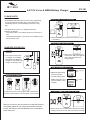
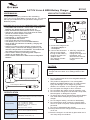
Charge 3.6V / 7.2V Li-ion battery
Li- ion Battery
3.6V
Li- ion Battery
7.2V
.
3.) Adjust the shell of the charger to fit in the 3.6V / 7.2V
Li-ion battery.
Charge 2AA or AAA batteries
CHARGER OPERATION
Standby
4.) When 2AA or AAA batteries are
inserted, the "RED" LED light will
flash when the batteries are
being charged.
1.) Connect the Charger with
AC adaptor or car adaptor.
Both Green and Red LED
will light on, this indicates the
charger is in standby mode.
RED and GREEN LED Light
5.) Red LED light flashing
when the charging
process is taking place.
Adjust (+) (-) contact
Green LED light turns on
when the battery is fully
charged.
Easy
adjustable
contact
Front
Battery charging
stage.
Red Light
Flashing
Fully charged
stage
Green Light
Back
2.) Adjust the 2 pins on the charger so that it matches the
connectors of the battery. Place the battery on the charger.
Li-ion or NiMH battery does not work
Li- ion Battery
3.6V
Remark: In order to have the maximum charge performance
and stability, please do not charge the electronics devices
through the USB port and the batteries in the compartment
at the same time.
6.) Built in faulty Li-ion or NiMH battery detection for safety.
Flashing will occur on both “Red” and “Green” LED light.