1
Getting Started
Installation
Page Title
Connecting the DVI Galvanic Isolator
1.
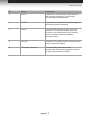
Connect the included DVI cable from the imaging source (e.g. camera) to the DVI In
port on the DVI Galvanic Isolator.
2.
Connect a DVI cable from the DVI Out port on the DVI Galvanic Isolator to a video
scaler or high-resolution display.
3.
Connect a bonding wire from the Grounding Terminal to an approved safety ground.
4.
Connect the included locking power supply to the DVI Galvanic Isolator and connect
the AC power to an available electrical outlet. Do not overtighten the locking power
connector.
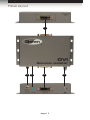
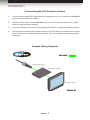
Sample Wiring Diagram
DVI CABLE
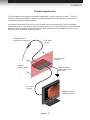
Laparoscopic Camera
DVI Galvanic Isolator
Monitor / Display
EXT-DVI-GI
page | 4