1
Camera User Guide
C
Y
P
O
ENGLISH
• Make sure you read this guide before using the camera.
• Store this guide safely so that you can use it in the future.
Checking the Package Contents
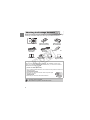
Check if the following items are included in your camera package. If anything
is missing, contact the retailer from which you purchased the camera.
Camera
Battery Pack NB-6L
(with Terminal Cover)
Interface Cable
IFC-400PCU
Getting Started
AV Cable
AVC-DC400
C
Wrist Strap WS-DC7
Y
P
O
DIGITAL CAMERA
Solution Disk
Using the PDF Manuals
Battery Charger
CB-2LY/CB-2LYE
Warranty
Card
“Canon Customer
Support” Leaflet
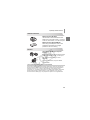
Also refer to the PDF manuals on the CD-ROM. After installation, shortcut icons
appear on the desktop. If the software installation fails, you can find the manuals in
the Readme folder on the CD-ROM.
• Camera User Guide (This Guide)
Once you have mastered the basics, use the camera’s many features to shoot more
challenging photos.
• Personal Printing Guide
Read when you want to connect the camera to a printer (sold
separately) and print.
• Software Guide
Read when you want to use the included software.
• A memory card is not included.
• Adobe Reader is required to view the PDF manuals.
2
Read This First
Test Shots and Disclaimer
Take some initial test shots and play them back to make sure the images
were recorded correctly. Please note that Canon Inc., its subsidiaries and
affiliates, and its distributors are not liable for any consequential damages
arising from any malfunction of a camera or accessory, including memory
cards, that results in the failure of an image to be recorded or to be recorded
in a way that is machine readable.
Warning Against Copyright Infringement
The images recorded with this camera are intended for personal use. Do not
record images that infringe upon copyright laws without the prior permission
of the copyright holder. Please be advised that in certain cases the copying
of images from performances, exhibitions, or commercial properties by
means of a camera or other device may contravene copyright or other legal
rights even if the image was shot for personal use.
Warranty Limitations
Y
P
O
This camera’s warranty is only effective in the country of sale. If there is a
problem with the camera while abroad, please return it to the country of sale
before proceeding with a warranty claim to a Canon Customer Support Help
Desk. For Canon Customer Support contacts, please see the customer
support list supplied with your camera.
LCD Monitor
C
• The LCD monitor is produced with extremely high-precision
manufacturing techniques. More than 99.99% of the pixels operate to
specification, but occasionally non-performing pixels may appear as bright
or dark dots. This is not a malfunction and has no effect on the recorded
image.
• The LCD monitor may be covered with a thin plastic film for protection
against scratches during shipment. If so, remove the film before using the
camera.
Camera Body Temperature
Please take care when operating the camera for an extended period as the
camera body may become warm. This is not a malfunction.
3
What Do You Want to Do?
4
Shoot
Shoot, leaving it to the camera to make settings. . . . . . . . . . . . . . . 24
Shoot to match special conditions. . . . . . . . . . . . . . . . . . . . . . 54 – 56
Take good people shots
I
Portraits
(p. 54)
F
At night
(p. 54)
Shoot various other scenes
’
Indoors
(p. 55)
t
V
Kids and pets
(p. 55)
Y
P
O
Fireworks
(p. 56)
C
w
At the beach
(p. 55)
S
Underwater
(p. 56)
P
Against snow
(p. 56)
Low light
(p. 55)
Focus on faces . . . . . . . . . . . . . . . . . . . . . . . . . . . . . . . . . . . 24, 62, 78
Shoot in places where I cannot use the flash
(turn off the flash) . . . . . . . . . . . . . . . . . . . . . . . . . . . . . . . . . . . . 57
Take pictures with me in them too (self-timer) . . . . . . . . 61, 62, 74, 75
Insert the date and time into my shots . . . . . . . . . . . . . . . . . . . . . . 60
Take close-up pictures of subjects (macro shooting) . . . . . . . . . . . 67
Take sepia toned or black and white pictures . . . . . . . . . . . . . . . . . 72
Change the size of picture I want to take (recording pixels) . . . . . . 68
Take pictures continuously . . . . . . . . . . . . . . . . . . . . . . . . . . . . . . . 73
Change the ISO speed . . . . . . . . . . . . . . . . . . . . . . . . . . . . . . . . . . 70
Make dark subjects appear brighter (i-Contrast) . . . . . . . . . . . . . . . 83
4
What Do You Want to Do?
1
View
Look at my pictures . . . . . . . . . . . . . . . . . . . . . . . . . . . . . . . . . . . . 28
Automatically play back pictures (slideshow). . . . . . . . . . . . . . . . . 96
Look at my pictures on a TV . . . . . . . . . . . . . . . . . . . . . . . . . . . . . 99
Look at my pictures on a computer . . . . . . . . . . . . . . . . . . . . . . . . 33
Quickly search pictures . . . . . . . . . . . . . . . . . . . . . . . . . . . . . . 94, 95
Erase pictures . . . . . . . . . . . . . . . . . . . . . . . . . . . . . . . . . . . . 29, 101
Protect pictures from accidental erasure . . . . . . . . . . . . . . . . . . . 100
E
Shoot/View Movies
Y
P
O
Shoot movies . . . . . . . . . . . . . . . . . . . . . . . . . . . . . . . . . . . . . . . . . 30
View movies . . . . . . . . . . . . . . . . . . . . . . . . . . . . . . . . . . . . . . . . . . 32
2
Print
C
Easily print pictures . . . . . . . . . . . . . . . . . . . . . . . . . . . . . . . . . . . 108
Save
Save images to a computer . . . . . . . . . . . . . . . . . . . . . . . . . . . . . . 33
3
Other
Turn off sounds . . . . . . . . . . . . . . . . . . . . . . . . . . . . . . . . . . . . . . . 48
Use the camera abroad . . . . . . . . . . . . . . . . . . . . . . . . . . . . . . . . . 15
Understand what is displayed on the screen. . . . . . . . . . . . . . . . 128
5
Table of Contents
Chapters 1 – 3 explain the basic operations and frequently used functions
of this camera. Chapters 4 onward explain the advanced functions, letting
you learn more as you read each chapter.
Checking the Package Contents .......2
Read This First ..................................3
What Do You Want to Do? ................4
Conventions Used in this Guide ........8
Safety Precautions.............................9
1 Getting Started...............13
Charging the Battery........................14
Compatible Memory Cards
(Sold Separately).........................16
Inserting the Battery and Memory
Card.............................................16
Setting the Date and Time ...............19
Setting the Display Language..........21
Formatting Memory Cards ...............22
Pressing the Shutter Button.............23
Taking Pictures (Smart Auto)...........24
Viewing Images ...............................28
Erasing Images................................29
Shooting Movies ..............................30
Viewing Movies................................32
Transferring Images to a Computer for
Viewing........................................33
Accessories .....................................37
Separately Sold Accessories ...........38
C
3 Shooting in Special
Conditions and Commonly
Used Functions..............53
Y
P
O
2 Learning More................41
Components Guide..........................42
Indicator ...........................................43
Screen Display.................................44
FUNC. Menu – Basic Operations ....46
MENU – Basic Operations...............47
Changing the Sound Settings ..........48
Changing the Screen Brightness .....49
6
Returning the Camera to
Default Settings .......................... 50
Low Level
Memory Card Formatting............ 51
Power Saving Function
(Auto Power Down)..................... 52
Shooting in Various Conditions ....... 54
Turning the Flash Off ...................... 57
Zooming in Closely on Subjects
(Digital Zoom) ............................. 58
Inserting the Date and Time............ 60
Using the Self-Timer ....................... 61
Using the Face Self-Timer .............. 62
4 Choosing Settings
Yourself ..........................63
Shooting in Program AE.................. 64
Adjusting the Brightness
(Exposure Compensation) .......... 65
Turning the Flash On ...................... 66
Shooting Far Away Subjects
(Infinity) ....................................... 66
Shooting Close-ups (Macro) ........... 67
Changing the Recording Pixel Setting
(Image Size) ............................... 68
Changing the Compression Ratio
(Image Quality) ........................... 68
Changing the ISO Speed ................ 70
Adjusting the White Balance ........... 71
Changing the Tone of an Image
(My Colors) ................................. 72
Table of Contents
Continuous Shooting....................... 73
Shooting Using the
Two Second Self-Timer .............. 74
Customizing the Self-Timer............. 75
Shooting Using a TV Monitor .......... 76
Changing the Composition
with the Focus Lock.................... 76
5 Getting More Out of Your
Camera ...........................77
Changing the AF Frame Mode........ 78
Magnifying the Focal Point.............. 80
Shooting with the AF Lock .............. 81
Changing the Metering Mode.......... 81
Shooting with the AE Lock .............. 82
Shooting with the FE Lock .............. 82
Correcting the Brightness
and Shooting (i-Contrast) ........... 83
Red-Eye Correction ........................ 84
Shooting with Slow Synchro ........... 85
Shooting Long Exposures............... 86
C
Protecting Images ......................... 100
Erasing All Images ........................ 101
Rotating Images ............................ 102
Resizing Images............................ 103
Correcting the Brightness
(i-Contrast) ................................ 104
Correcting the Red-Eye Effect....... 105
8 Printing .........................107
Printing Images ............................. 108
Choosing Images for Printing
(DPOF)...................................... 110
9 Customizing Camera
Settings ........................113
Y
P
O
6 Using Various
Functions for Shooting
Movies ............................87
Changing the Image Quality ........... 88
AE Lock/Exposure Shift .................. 89
Other Shooting Functions ............... 90
Playback Functions......................... 91
7 Using Various Playback and
Editing Functions ..........93
Quickly Searching Images .............. 94
Searching for Images Using
the Jump Display ........................ 95
Viewing Slideshows ........................ 96
Checking the Focus ........................ 97
Magnifying Images.......................... 98
Changing Image Transitions ........... 98
Viewing Images on a TV ................. 99
Changing Camera Settings ........... 114
Changing Shooting Function
Settings ..................................... 117
Changing Playback Function
Settings ..................................... 120
10 Useful Information.......121
Using Household Power................ 122
Troubleshooting............................. 123
List of Messages That
Appear on the Screen ............... 126
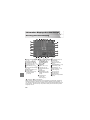
Information Displayed
on the Screen............................ 128
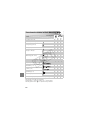
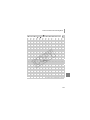
Functions Available
in Each Shooting Mode............. 130
Menus............................................ 132
Handling Precautions .................... 135
Specifications ................................ 136
7
Conventions Used in this Guide
• Icons are used in the text to represent the camera buttons and switches.
• Language that displays on the screen appears inside [ ] (square
brackets).
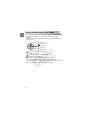
• The directional buttons and FUNC./SET button are represented by the
following icons.
(Up button)
(FUNC./SET button)
(Right button)
(Left button)
(Down button)
Y
P
O
•
: Things you should be careful about.
•
: Troubleshooting tips.
•
: Hints for getting more out of your camera.
•
: Supplemental information.
• (p. xx): Reference pages.“xx” stands for a page number.
• This guide assumes all functions are at their default settings.
• The various types of memory cards that can be used in this camera are
collectively referred to as memory cards in this guide.
C
8
Safety Precautions
• Before using the camera, please ensure that you read the safety precautions
described below. Always ensure that the camera is operated correctly.
• The safety precautions noted on the following pages are intended to prevent injuries
to yourself and other persons, or damage to the equipment.
• Be sure to also check the guides included with any separately sold accessories you
use.
Warning
Denotes the possibility of serious injury or death.
Caution
Denotes the possibility of injury.
Caution
Denotes the possibility of damage to the equipment.
Warning
Camera
Y
P
O
• Do not trigger the flash in close proximity to people’s eyes.
Exposure to the intense light produced by the flash could damage eyesight. In particular,
remain at least one meter (39 inches) away from infants when using the flash.
• Store this equipment out of the reach of children and infants.
Strap: Putting the strap around a child’s neck could result in asphyxiation.
Memory card: Dangerous if swallowed. If this occurs, contact a doctor immediately.
C
• Do not attempt to disassemble or alter any part of the equipment unless
expressly indicated to do so in this guide.
• To avoid the risk of injury, do not touch the interior of the camera if it has been
dropped or otherwise damaged.
• Stop operating the camera immediately if it emits smoke, a strange smell, or
otherwise behaves abnormally.
• Do not use organic solvents such as alcohol, benzine, or thinner to clean the
equipment.
• Do not allow liquids or foreign objects to enter the camera.
This could result in fire or electrical shock.
If liquid or foreign objects come into contact with the camera interior, immediately turn the
camera power off and remove the battery.
• Use only recommended power sources.
Using other power sources could result in fire or electrical shock.
9
Safety Precautions
Battery and Battery Charger
• Use only recommended batteries.
• Do not place the battery near or in direct flame.
• Do not let the battery come into contact with water (e.g. sea water) or other
liquids.
• Do not attempt to disassemble, alter or apply heat to the battery.
• Avoid dropping or subjecting the battery to severe impacts.
This may cause explosions or leaks, resulting in fire, injury and damage to the
surroundings. In the event that a battery leaks and the eyes, mouth, skin or clothing
contacts these substances, immediately flush with water and seek medical assistance.
If the battery charger becomes wet, unplug it from the outlet and consult your camera
distributor or the closest Canon Customer Support Help Desk.
• Use only the specified battery charger to charge the battery.
• Unplug the power cord periodically and wipe away any dust and dirt that has
collected on the plug, the exterior of the power outlet, and the surrounding area.
• Do not handle the power cord with wet hands.
• Do not use the equipment in a manner that exceeds the rated capacity of the
electrical outlet or wiring accessories. Do not use if the power cord or plug are
damaged, or not fully plugged into the outlet.
• Do not allow dirt or metal objects (such as pins or keys) to contact the charger
terminals or plug.
This could result in fire or electrical shock.
Other Warnings
C
Y
P
O
• Do not play the supplied CD-ROM(s) in any CD player that does not support
data CD-ROMs.
Playing the CD-ROM(s) in an audio CD player (music player) could damage the speakers.
It is also possible to suffer hearing loss from listening with headphones to the loud sounds
of a CD-ROM played on a music CD player.
Caution
• Be careful not to bang the camera or subject it to strong impacts or shocks
when hanging it by the strap.
• Be careful not to bump or push strongly on the lens.
This could damage the camera or lead to injury.
• Avoid using, placing or storing the camera in the following places.
- Places subject to strong sunlight.
- Places subject to temperatures above 40 °C (104 °F).
- Humid or dusty areas.
These could cause leakage, overheating or an explosion of the battery, resulting in
electrical shock, fire, burns or other injuries. High temperatures may also cause
deformation of the casing.
10
Safety Precautions
• When using the flash, be careful not to cover it with your fingers or clothing.
This could result in burns or damage to the flash.
Caution
• Do not aim the camera at bright light sources (the sun, etc.).
Doing so may cause malfunctions or damage the image sensor.
• When using the camera on a beach or at a windy location, be careful not to
allow dust or sand to enter the camera.
This may cause the camera to malfunction.
• In regular use, small amounts of smoke may be emitted from the flash.
This is due to the high intensity of the flash burning dust and foreign materials stuck to the
front of the unit. Please use a cotton swab to remove dirt, dust or other foreign matter from
the flash to prevent heat build-up and damage to the unit.
Y
P
O
• Unplug the battery charger from the power outlet after recharging is complete,
or when you are not using it.
• Do not place anything, such as cloth on top of the battery charger while it is
charging.
Leaving the unit plugged in for a long period of time may cause it to overheat and distort,
resulting in fire.
• Remove and store the battery when you are not using the camera.
If the battery is left inside the camera, damage caused by leakage may occur.
C
• Before you discard battery, cover the terminals with tape or other insulators.
Contacting other metal materials in waste containers may lead to fire or explosions.
• Do not place the battery near pets.
Pets biting the battery could cause leakage, overheating or explosion, resulting in fire or
injuries.
• Do not sit down with the camera in your pocket.
Doing so may cause malfunctions or damage the LCD monitor.
• When putting the camera in your bag, ensure that hard objects do not come into
contact with the LCD monitor.
• Do not attach accessories to the strap.
Doing so may cause malfunctions or damage the LCD monitor.
11
C
12
Y
P
O
1
Getting Started
Y
P
O
This chapter explains preparations before shooting, how to shoot in
A mode, and then how to view and erase the images you take.
The latter part of this chapter explains how to shoot and view movies
and transfer images to a computer.
C
Attaching the Strap/Holding the Camera
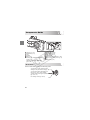
• Be sure to attach the supplied strap to the camera and wrap it around your
wrist when shooting to avoid dropping the camera.
• Keep your arms tight against your body while holding the camera firmly by
the sides. Be sure that your fingers do not block the flash.
Strap
13
Charging the Battery
Use the included charger to charge the battery. Be sure to charge the battery
as it is not charged at the time of purchase.
Remove the cover.
Insert the battery.
● Align the S marks on the battery and
charger, then insert the battery by sliding it
in
and down
.
Y
P
O
Charge the battery.
● For CB-2LY: Flip out the plug
CB-2LY
and plug
the charger into a power outlet
.
● For CB-2LYE: Plug the power cord into
the charger, then plug the other end into a
power outlet.
X The charge lamp lights red and charging
starts.
● The charge lamp will light green when
charging has finished. Charging takes
approx. 1 hour and 55 minutes.
C
CB-2LYE
Remove the battery.
● Unplug the battery charger from the power
outlet, then remove the battery by sliding it
in
and up
.
To protect the battery and prolong its life, do not charge it for longer than
24 hours continuously.
14
Charging the Battery
Approximate Number of Shots That Can Be Taken
Number of Shots
240
7
Playback Time (Hours)
• The number of shots that can be taken is based on the Camera & Imaging Products
Association (CIPA) measurement standard.
• Under some shooting conditions, the number of shots that can be taken may be less
than mentioned above.
Battery Charge Indicator
An icon or message will appear on the screen indicating the battery’s charge
state.
Display
Summary
Y
P
O
Sufficient charge.
Slightly depleted, but sufficient.
(Blinking red)
Nearly depleted. Charge the battery.
“Change the battery pack.”
Depleted. Recharge the battery.
Using the battery and charger effectively
C
• Charge the battery on the day, or the day before, it will be used.
Charged batteries continue to discharge naturally even if they are not used.
Attach the cover to a charged battery so that
the S mark is visible.
• How to store the battery for long periods:
Deplete and remove the battery from the camera. Attach the terminal cover
and store the battery. Storing a battery for long periods of time (about a year)
without depleting it may shorten its life span or affect its performance.
• The battery charger can also be used when abroad.
The charger can be used in regions that have 100 – 240 V (50/60 Hz) AC power.
If the plug does not fit the outlet, use a commercially available plug adapter. Do
not use electrical transformers for foreign travel as they will cause damage.
• The battery may develop a bulge.
This is a normal characteristic of the battery and does not indicate a problem.
However, if the battery bulges to the point where it will no longer fit into the
camera, please contact a Canon Customer Support Help Desk.
• If the battery is quickly depleted even after charging, it has reached the
end of its life span.
Purchase a new battery.
15
Compatible Memory Cards
(Sold Separately)
•
•
•
•
•
•
SD memory cards (2GB and less)*
SDHC memory cards (More than 2 GB, up to and including 32 GB)*
SDXC memory cards (More than 32 GB)*
MultiMediaCards
MMCplus memory cards
HC MMCplus memory cards
* This memory card complies with the SD standards. Some cards may not
operate properly depending on the brand of card used.
Depending on your computer's OS version, SDXC memory cards may
not be recognized when using a commercially available card reader.
Check to make sure that your OS supports this function beforehand.
Y
P
O
Inserting the Battery and Memory Card
Insert the included battery and a memory card (sold separately).
C
Check the card’s write-protect tab.
● If the memory card has a write-protect tab,
you will not be able to record images if the
tab is in the locked position. Slide the tab
up until you hear a click.
Open the cover.
● Slide the cover
16
and open it
.
Inserting the Battery and Memory Card
Insert the battery.
● Insert the battery as shown until it locks
into place with a click.
● Be sure to insert the battery in the correct
direction or it will not properly lock into
place.
Terminals
Insert the memory card.
● Insert the memory card as shown until it
Y
P
O
locks into place with a click.
● Be sure the memory card is oriented
correctly. Inserting the memory card in the
wrong direction could damage the
camera.
C
Terminals
Close the cover.
● Close the cover
, and press downward
as you slide it until it clicks into place
.
What if [Memory card locked] appears on the screen?
SD, SDHC and SDXC memory cards have a write-protect tab. If this tab is in the
locked position, [Memory card locked] will appear on the screen and you will not
be able to take or erase images.
17
Inserting the Battery and Memory Card
Removing the Battery and Memory Card
Remove the battery.
● Open the cover and press the battery lock
in the direction of the arrow.
X The battery will pop up.
Remove the memory card.
● Push the memory card in until you hear a
click, then slowly release it.
X The memory card will pop up.
Y
P
O
Approximate Number of Shots per Memory Card
Memory Card
Number of shots
C
4 GB
1231
16 GB
5042
• Values are based on the default settings.
• The number of shots that can be taken will vary depending on camera settings, the
subject and the memory card used.
Can you check the number of shots that can be taken?
You can check the number of shots that can be taken when the camera is in a
Shooting mode (p. 24).
Number of shots
that can be taken
18
Setting the Date and Time
The Date/Time settings screen will appear the first time the camera is turned
on. Since the dates and times recorded into your images are based on these
settings, be sure to set them.
Turn on the camera.
● Press the power button.
X The Date/Time screen will appear.
Set the date and time.
● Press the qr buttons to choose an
option.
Y
P
O
● Press the op buttons to set a value.
C
Complete the setting.
● Press the m button.
X Once the date and time have been set,
the Date/Time screen will close.
● Pressing the power button will turn off the
camera.
Reappearing Date/Time screen
Set the correct date and time. If you have not set the date and time, the Date/
Time screen will appear each time you turn on the camera.
19
Setting the Date and Time
Changing the Date and Time
You can change the current date and time settings.
Display the menus.
● Press the n button.
Choose [Date/Time] in the 3 tab.
● Press the qr buttons to choose the 3
tab.
● Press the op buttons to choose [Date/
Y
P
O
Time], then press the m button.
C
Change the date and time.
● Follow Steps 2 and 3 on p. 19 to adjust
the setting.
● Pressing the n button will close the
menu.
Date/Time battery
• The camera has a built-in date/time battery (backup battery) that allows the
date/time settings to be retained for about three weeks after the battery pack
has been removed.
• By inserting a charged battery or connecting an AC adapter kit (sold
separately, p. 38) the date/time battery can be charged in about 4 hours even if
the camera is not turned on.
• If the date/time battery is depleted, the Date/Time menu will appear when you
turn the camera on. Follow the steps on p. 19 to set the date and time.
20
Setting the Display Language
You can change the language that displays on the screen.
Enter Playback mode.
● Press the 1 button.
Display the settings screen.
● Press and hold the m button, then press
the n button.
Y
P
O
Set the display language.
● Press the opqr buttons to choose a
language, then press the m button.
X Once the display language has been set,
the settings screen will close.
C
You can also change the display language by pressing the n button,
choosing the 3 tab, and choosing the [Language] menu item.
21
Formatting Memory Cards
Before you use a new memory card or one that has been formatted in other
devices, you should format the card with this camera. Formatting (initializing)
a memory card erases all data on the memory card. As you cannot retrieve
the erased data, exercise adequate caution before formatting the memory
card.
Display the menu.
● Press the n button.
Choose [Format].
● Press the qr buttons to choose the 3
tab.
Y
P
O
● Press the op buttons to choose
[Format], then press the m button.
Format the memory card.
C
● Press the qr buttons to choose [OK],
then press the m button.
X A confirmation screen will appear.
● Press the op buttons to choose [OK],
then press the m button.
X The memory card will be formatted.
X When formatting ends, [Memory card
formatting complete] will appear on the
screen.
22
Pressing the Shutter Button
● Press the m button.
Formatting or erasing data on a memory card merely changes the file
management information on the card and does not ensure its contents
are completely erased. Be careful when transferring or disposing of a
memory card. When disposing of a memory card, take precautions such
as physically destroying the card to prevent personal information leaks.
The total capacity of the memory card displayed in the formatting screen
may be less than indicated on the memory card.
Y
P
O
Pressing the Shutter Button
To take images that are in focus, be sure to first press the shutter button
lightly (halfway) to focus, then press fully to shoot.
C
Press halfway (lightly to focus).
● Press lightly until the camera beeps twice
and AF frames appear where the camera
focused.
Press fully (all the way to shoot).
X The camera plays the shutter sound and
takes the shot.
If you shoot without pressing the shutter button halfway, the image may
not be in focus.
23
Taking Pictures (Smart Auto)
Since the camera can determine the subject and shooting conditions, you
can let it automatically select the best settings for the scene and just shoot.
The camera can also detect and focus on faces, setting the color and
brightness to optimal levels.
Turn on the camera.
● Press the power button.
X The start-up screen will appear.
Choose A mode.
● Set the mode switch to A.
● When you point the camera toward the
Y
P
O
subject, the camera will make a slight
noise as it determines the scene.
X The icon for the determined scene will
appear in the upper right of the screen.
X The camera will focus on detected faces
and display frames on them.
C
Compose the shot.
● Moving the zoom lever toward i will
Zoom bar
24
zoom in on your subject, making it appear
larger. Moving the lever toward j will
zoom out from your subject, making it
appear smaller (the zoom bar will appear).
Taking Pictures (Smart Auto)
Focus.
● Press the shutter button halfway to focus.
X When the camera focuses, it will beep
twice and AF frames will appear where the
camera focused.
Several AF frames will appear when the
camera focuses on more than one point.
AF Frame
Y
P
O
Shoot.
● Press the shutter button fully.
X The camera will play the shutter sound
C
and shoot. The flash will automatically fire
in low light conditions.
X The image will appear on the screen for
about two seconds.
● You can take a second picture even while
an image is displayed by pressing the
shutter button again.
25
Taking Pictures (Smart Auto)
Scene Icons
The camera displays an icon for the scene it has determined and then
automatically focuses and selects the optimum settings for subject
brightness and color.
Background
Bright
Including Blue
Skies
Dark
Sunsets
Subject
Backlit
When
Using
Tripod
Backlit
People
—
Non-Human Subjects/
Landscapes
Close Subjects
Icon Background Color
Y
P
O
*
*
—
Gray
Light Blue
Orange
—
Dark Blue
* Appears when the scene is dark and the camera is attached to a tripod.
Under certain conditions, the icon that appears may not match the actual
scene. Especially when there is an orange or blue colored background (a
wall for example),
or the “Including Blue Skies” icons may appear
and it may not be possible to shoot with the appropriate color. If this
happens, try shooting in G mode (p. 64).
C
26
Taking Pictures (Smart Auto)
What if...
• What if white and gray frames appear when you point the camera toward
a subject?
When faces are detected, a white frame appears on the face of the main
subject, while gray frames appear on other detected faces. The frames will
follow the subjects within a certain range (p. 78).
• What if the indicator blinks orange and
blinks on the screen?
Attach the camera to a tripod so that the camera does not move and blur the
image.
• What if the camera does not play any sounds?
Pressing the l button while turning on the camera power will turn off all
sounds except for warning sounds. To turn the sounds on, press the n
button, choose the 3 tab, and then choose [Mute]. Press the qr buttons to
choose [Off].
• What if the image comes out dark even if the flash fired when shooting?
The subject is too far away for the flash to reach. Move the zoom lever toward
j and hold it until the lens stops moving. The camera will be at its maximum
wide angle setting and you can shoot within the effective flash range of
approximately 30 cm – 4.0 m (12 in. – 13 ft.).
Move the zoom lever toward i and hold it until the lens stops moving. The
camera will be at its maximum telephoto setting and you can shoot within the
effective flash range of approximately 50 cm – 2.0 m (1.6 – 6.6 ft.).
• What if the camera beeps once when the shutter button is pressed
halfway?
Your subject may be too close. Move the zoom lever toward j and hold it until
the lens stops moving. The camera will be at its maximum wide angle setting
and you will be able to focus on subjects that are approximately 3 cm (1.2 in.)
or more away from the end of the lens.
Move the zoom lever toward i and hold it until the lens stops moving. The
camera will be at its maximum telephoto setting and you will be able to focus
on subjects that are about 50 cm (1.6 ft.) or more away from the end of the
lens.
• What if the lamp lights when the shutter button is pressed halfway?
To reduce red-eye and to assist in focusing, the lamp may light when shooting
in dark areas.
• What if the h icon blinks when you try to shoot?
The flash is charging. You can shoot when recharging ends.
C
Y
P
O
27
Viewing Images
You can view the images you have taken on the screen.
Enter Playback mode.
● Press the 1 button.
X The last image you took will appear.
Choose an image.
● Pressing the q button will cycle through
the images in the reverse order they were
taken, from the newest image to the
oldest.
● Pressing the r button will cycle through
the images in the order they were taken,
from oldest to newest.
● The images change more quickly if you
keep the qr buttons pressed, but they
will appear coarse.
● The lens will retract after approximately 1
minute elapses.
● Pressing the 1 button again while the
lens is retracted will turn off the power.
C
Y
P
O
Switching to Shooting mode
Pressing the shutter button halfway while in Playback mode switches the
camera to Shooting mode.
28
Erasing Images
You can choose and erase images one at a time. Please note that erased
images cannot be recovered. Exercise adequate caution before erasing an
image.
Enter Playback mode.
● Press the 1 button.
X The last image you took will appear.
Choose an image to erase.
● Press the qr buttons to display an image
to erase.
C
Y
P
O
Erase the image.
● Press the p button.
X [Erase?] appears.
● Press the qr buttons to choose [Erase],
then press the m button.
X The displayed image will be erased.
● To exit instead of erasing, press the qr
buttons to choose [Cancel], then press the
m button.
29
Shooting Movies
The camera can automatically select all settings so that you can shoot
movies just by pressing the shutter button.
Enter E mode.
● Set the mode switch to E.
Shooting Time
Y
P
O
Compose the shot.
C
● Moving the zoom lever toward i will
zoom in on your subject, making it appear
larger. Moving the lever toward j will
zoom out from your subject, making it
appear smaller.
Focus.
● Press the shutter button halfway to focus.
X When the camera focuses, it will beep
twice and the indicator will light green.
Shoot.
● Press the shutter button fully.
30
Shooting Movies
X Recording will start, and [
Rec] and the
elapsed time will appear on the screen.
● Once shooting begins, take your finger off
the shutter button.
● If you change the composition of your shot
during shooting, the focus will stay the
same, but the brightness and tone will
automatically adjust.
● Do not touch the microphone while
shooting.
● Do not press any buttons other than the
shutter button while shooting. The sound
the buttons make will be recorded in the
movie.
Elapsed Time
Microphone
Y
P
O
Stop shooting.
● Press the shutter button fully again.
X The camera will beep once and stop
C
shooting.
X The movie will record to the memory card.
X Shooting will automatically stop when the
memory card fills.
Magnifying the subject while shooting
Pressing the zoom lever toward i while shooting will zoom in on the subject.
However, operation sounds will be recorded and the movie may appear coarse.
Estimated Shooting Times
Memory Card
Shooting Time
4 GB
32 min. 26 sec.
16 GB
2 hrs. 12 min. 50 sec.
• Shooting times are based on default settings.
• Recording will automatically stop when either the clip file size reaches 4 GB or the
recording time reaches approximately 1 hour.
• Recording may stop even if the maximum clip length has not been reached on some
memory cards. SD Speed Class 4 or higher memory cards are recommended.
31
Viewing Movies
You can view the movies you have shot on the screen.
Enter Playback mode.
● Press the 1 button.
X The last image you shot will appear.
X
appears on movies.
Choose a movie.
● Press the qr buttons to choose a movie,
then press the m button.
X The movie control panel will appear.
C
Y
P
O
Play the movie.
● Press the qr buttons to choose
(Play), then press the m button.
X The movie will play.
● You can pause/resume the movie by
pressing the m button again.
● Press the op buttons to adjust the
volume.
X After the movie finishes,
32
appears.
Transferring Images to a Computer for
Viewing
You can use the included software to transfer images you have shot with the
camera to a computer for viewing. If you are already using ZoomBrowser
EX/ImageBrowser, install the software from the included CD-ROM,
overwriting your current installation.
System Requirements
Windows
OS
Computer model
CPU
Windows 7
Windows Vista (including Service Pack 1 and 2)
Windows XP Service Pack 2, Service Pack 3
The above OS should be pre-installed on computers with built-in
USB ports.
Pentium 1.3 GHz or higher
Y
P
O
RAM
Windows 7 (64 bit): 2 GB or more
Windows 7 (32 bit), Windows Vista: 1 GB or more
Windows XP: 512 MB or more
Interface
Free Hard Disk
Space
USB
ZoomBrowser EX: 200 MB or more*
PhotoStitch: 40 MB or more
Display
1,024 x 768 pixels or higher
C
* For Windows XP, Microsoft .NET Framework 3.0 or later (max. 500MB) must be
installed. Installation may take some time depending on your computer’s capabilities.
Macintosh
OS
Computer model
CPU
Mac OS X (v10.4 – v10.6)
The above OS should be pre-installed on computers with built-in
USB ports.
PowerPC G4/G5 or Intel Processor
RAM
Mac OS X v10.4 – v10.5: 512 MB or more
Mac OS X v10.6: 1 GB or more
Interface
Free Hard Disk
Space
Display
USB
ImageBrowser: 300 MB or more
PhotoStitch: 50 MB or more
1,024 x 768 pixels or higher
33
Transferring Images to a Computer for Viewing
Preparations
Windows Vista and Mac OS X (v10.5) are used for these explanations.
Install the Software.
Windows
Place the CD in the computer’s
CD-ROM drive.
● Place the supplied CD-ROM (DIGITAL
CAMERA Solution Disk) (p. 2) into the
computer’s CD-ROM drive.
Y
P
O
Begin installation.
● Click [Easy Installation] and follow the onscreen instructions to proceed with the
installation.
● If the [User Account Control] window
appears, follow the on-screen instructions
to proceed.
C
When the install finishes, click
[Restart] or [Finish].
Remove the CD-ROM.
● Remove the CD-ROM when your desktop
screen appears.
Macintosh
Place the CD in the computer’s
CD-ROM drive.
● Place the supplied CD-ROM (DIGITAL
CAMERA Solution Disk) (p. 2) into the
computer’s CD-ROM drive.
Begin installation.
● Double-click the
on the CD.
● Click [Install], and follow the on-screen
instructions to proceed with the installation.
34
Transferring Images to a Computer for Viewing
Connect the camera to the
computer.
● Turn off the camera.
● Open the cover, and insert the cable's
smaller plug firmly into the camera
terminal in the direction shown.
● Insert the cable’s larger plug into the
computer. For connection details, refer to
the user guide provided with the
computer.
Turn on the camera.
● Press the 1 button to turn on the camera.
Y
P
O
Open CameraWindow.
Windows
● Click [Downloads Images From Canon
Camera using Canon CameraWindow].
C
X CameraWindow will appear.
● If CameraWindow does not appear, click
the [Start] menu and choose
[All Programs], followed by [Canon
Utilities], [CameraWindow] and
[CameraWindow].
Macintosh
X CameraWindow will appear when you
establish a connection between the
camera and computer.
● If CameraWindow does not appear, click
the CameraWindow icon on the Dock (the
bar which appears at the bottom of the
desktop).
35
Transferring Images to a Computer for Viewing
For Windows 7, use the following steps to display CameraWindow.
• Click
on the task bar.
• In the screen that appears, click the
link to modify the program.
• Click [Downloads Images From Canon Camera using Canon
CameraWindow], then click [OK].
• Double click
.
Transfer and View Images
● Click [Import Images from Camera], and
then click [Import Untransferred Images].
X All images not previously transferred will
transfer to the computer. Transferred
images will be sorted by date and saved in
separate folders in the Pictures folder.
● When [Image import complete.] appears,
click [OK], then click [X] to close
CameraWindow.
● Turn off the camera and unplug the cable.
● For further operations, refer to the
Software Guide.
C
Y
P
O
You can transfer images without installing the included software by
simply connecting your camera to a computer. There are, however, the
following limitations.
• After connecting to the camera, it may take a few minutes until you can
transfer images.
• Movies will not transfer correctly.
• Images shot in the vertical position may be transferred in the horizontal
position.
• Protection settings for images may be lost when transferred to a
computer.
• There may be problems transferring images or image information
correctly depending on the version of the operating system in use, the
file size, or the software in use.
36
Accessories
Supplied with Camera
Wrist Strap
WS-DC7
DIGITAL CAMERA
Solution Disk
Battery Pack NB-6L*
(with Terminal Cover)
Battery Charger
CB-2LY/CB-2LYE*
AV Cable
AVC-DC400*
Interface Cable
IFC-400PCU*
C
Y
P
O
Memory Card
*Also available for purchase separately.
Card Reader
Windows/Macintosh
Canon-Brand PictBridge Compliant Printers
Compact Photo Printers
(SELPHY series)
Inkjet Printers
(PIXMA series)
See the user guide supplied with the printer for more information on the
printer and interface cables.
TV/Video
37
Separately Sold Accessories
The following camera accessories are sold separately.
Some accessories are not sold in some regions, or may no longer be
available.
Power Supplies
AC Adapter Kit ACK-DC40
This kit lets you power the camera using
household power. Recommended for
powering the camera for an extended period
of time or when connecting to a computer or
printer. Cannot be used to charge the battery
inside the camera.
Y
P
O
Battery Charger CB-2LY/CB-2LYE
An adapter for charging Battery Pack NB-6L.
Battery Pack NB-6L
Rechargeable lithium-ion battery.
CAUTION
C
RISK OF EXPLOSION IF BATTERY IS REPLACED BY AN INCORRECT TYPE.
DISPOSE OF USED BATTERIES ACCORDING TO LOCAL REGULATION.
Using accessories abroad
The battery charger and the AC adapter kit can be used in regions that have 100
– 240 V (50/60 Hz) AC power. If the plug does not fit the outlet, use a
commercially available plug adapter. Do not use electrical transformers for
foreign travel as they will cause damage.
Flash
High-Power Flash HF-DC1
This attachable supplementary flash can be
used to capture photographic subjects that
are too distant for the light from the built-in
flash to illuminate.
38
Separately Sold Accessories
Other Accessories
Waterproof Case WP-DC36
Use this case to take underwater shots at
depths of up to 40 meters (130 ft.), or to shoot
in the rain, at the beach, or on the ski slopes.
Waterproof Case Weight WW-DC1
When using the Waterproof Case to take
photographs underwater, the weights
prevent the case from floating.
Printers
SELPHY series
C
PIXMA series
Y
P
O
Canon-Brand PictBridge Compliant
Printers
By connecting your camera to a Canon-brand
PictBridge compliant printer, you can print
your images without having to use a
computer.
For more information, visit your nearest
Canon retailer.
Use of genuine Canon accessories is recommended.
This product is designed to achieve excellent performance when used with genuine
Canon accessories. Canon shall not be liable for any damage to this product and/or
accidents such as fire, etc., caused by the malfunction of non-genuine Canon
accessories (e.g., a leakage and/or explosion of a battery pack). Please note that this
warranty does not apply to repairs arising out of the malfunction of non-genuine
Canon accessories, although you may request such repairs on a chargeable basis.
39
C
40
Y
P
O
2
Learning More
Y
P
O
This chapter explains the parts of the camera and what appears on
the screen, as well as the basic operating instructions.
C
41
Components Guide
Y
P
O
Lamp (pp. 43, 117)
Microphone (p. 31)
Lens
Speaker
Zoom Lever
Shooting: i (Telephoto) / j (Wide
Angle) (p. 24)
Playback: k (Magnify) / g (Index)
(pp. 94, 98)
Mode Switch
C
Shutter Button (p. 23)
Power Button (p. 19)
Flash (pp. 57, 66)
Tripod Socket
DC Coupler Terminal Cover (p. 122)
Memory Card / Battery Cover (p. 16)
Strap Mount (p. 13)
Use the mode switch to change the Shooting mode.
You can leave it to the camera to select
settings for fully automatic shooting (p. 24).
You can shoot with the best settings for
the scene (p. 54) or choose settings
yourself to take various types of pictures
(pp. 53, 63, 77).
For shooting movies (pp. 30, 87).
42
Indicator
Y
P
O
Screen (LCD Monitor) (p. 44)
Indicator (p. 43)
1 (Playback) Button (pp. 28, 93, 107)
Mode Switch
A/V OUT (Audio/Video Output) /
DIGITAL Terminal (pp. 35, 99, 108)
n Button (p. 47)
l (Display) Button (p. 44)
Indicator
C
b (Exposure Compensation) (p. 65) /
d (Jump) Button (p. 95)/ o Button
e (Macro) (p. 67) / u (Infinity) (p. 66) /
q Button
m FUNC./SET (Function/Set) Button
(p. 46)
h (Flash) (pp. 57, 66, 85) / r Button
Q (Self-Timer) (pp. 61, 74, 75) /
a (Single Image Erase) (p. 29) /
p Button
The indicator on the back of the camera will light or blink depending on the
camera’s status.
Colors
Green
Orange
Status
Lights
Blinks
Lights
Blinks
Operation Status
Shooting preparation complete/Display off (p. 116)
Recording/reading/transmitting image data
Shooting preparation complete (flash on)
Camera shake warning (p. 57)
When the indicator blinks green, data is being recorded to/read from the
memory card or various information is being transmitted. Do not turn off
the power, open the memory card slot/battery cover, shake or jolt the
camera. These actions may corrupt the image data or cause the camera
or memory card to malfunction.
43
Screen Display
Switching the Display
You can change the screen display using the l button. Refer to p. 128
for details on information that appears on the screen.
Shooting
Information Display
Playback
No Information
Display
C
No Information Display
Y
P
O
Simple Information
Display
Detailed Information
Display
Focus Check Display
(p. 97)
You can also switch the display by pressing the l button while the
image displays shortly after shooting. However, Simple Information
Display is not available. You can change the display that appears first by
pressing the n button to choose the 4 tab, then setting
[Review Info] (p. 118).
44
Screen Display
Screen Display in Dark Shooting Conditions
The display automatically brightens when shooting in dark conditions,
allowing you to check the composition (Night Display function). However, the
brightness of the image on the screen, and the brightness of the actual
image recorded may be different. Screen noise may appear and the
movement of the subject may appear somewhat jagged on the screen. This
has no effect on the recorded image.
Overexposure Warning during Playback
In “Detailed Information Display” (p. 44), overexposed areas of the image
flash on the screen.
Histogram during Playback
High
Low
Dark
C
Bright
Y
P
O
● The graph that appears in “Detailed
Information Display” (p. 44) is called the
histogram. The histogram shows the
distribution of brightness in an image
horizontally, and the amount of brightness
vertically. When the graph approaches the
right side, the image is bright, but when it
approaches the left side, the image is
dark, and in this way you can judge the
exposure.
45
FUNC. Menu – Basic Operations
Commonly used shooting functions can be set with the FUNC. menu. The
menu items and options differ depending on the mode (pp. 130 – 131).
Choose a shooting mode.
● Set the mode switch to the desired
shooting mode.
Display the FUNC. menu.
● Press the m button.
Y
P
O
Choose a menu item.
● Press the op buttons to choose a menu
item.
X The available options for the menu item
C
appear in the lower part of the screen.
Choose an option.
Available Options
Menu Items
● Press the qr buttons to choose an
option.
● You can also choose settings by pressing
the l button on options that display
.
Complete the setting.
● Press the m button.
X The shooting screen will reappear and the
setting you chose will appear on the
screen.
46
MENU – Basic Operations
Various functions can be set from the menus. The menu items are organized
under tabs, such as for shooting (4) and playback (1). The available
menu items differ depending on the mode (pp. 132 – 135).
Display the menu.
● Press the n button.
Choose a tab.
● Press the qr buttons, or move the zoom
lever (p. 42) left or right to choose a tab.
Y
P
O
Choose a menu item.
● Press the op buttons to choose a menu
item.
● Some items require you to press the m
C
button or r button to display a submenu in
which you change the setting.
Choose an option.
● Press the qr buttons to choose an
option.
Complete the setting.
● Press the n button.
X The normal screen will reappear.
47
Changing the Sound Settings
You can silence or adjust the volume of camera sounds.
Muting Sounds
Display the menu.
● Press the n button.
Choose [Mute].
● Press the qr buttons to choose the 3
tab.
● Press the op buttons to choose [Mute],
then press the qr buttons to choose [On].
● Press the n button again to return to
Y
P
O
the normal screen.
Adjusting the Volume
C
Display the menu.
● Press the n button.
Choose [Volume].
● Press the qr buttons to choose the 3
tab.
● Press the op buttons to choose
[Volume], then press the m button.
Change the volume.
● Press the op buttons to choose an item,
then press the qr buttons to adjust the
volume.
● Press the n button twice to return to
the normal screen.
48
Changing the Screen Brightness
The screen brightness can be changed in two ways.
Using the Menu
Display the menu.
● Press the n button.
Choose [LCD Brightness].
● Press the qr buttons to choose the 3
tab.
● Press the op buttons to choose [LCD
Brightness].
Y
P
O
Change the brightness.
● Press the qr buttons to change the
brightness.
● Press the n button twice to return to
the normal screen.
C
Using the l Button
● Press the l button for more than one
second.
X The screen increases to maximum
brightness regardless of the setting in the
3 tab.
● Pressing the l button again for more
than one second will return the screen to
the original brightness.
• The next time you turn on the camera, the screen will be at the
brightness setting chosen in the 3 tab.
• When you have set the brightness to its highest setting in the 3 tab,
you cannot change the brightness with the l button.
49
Returning the Camera to Default Settings
When you have mistakenly changed a setting, you can reset the camera to
the default settings.
Display the menu.
● Press the n button.
Choose [Reset All].
● Press the qr buttons to choose the 3
tab.
● Press the op buttons to choose [Reset
All], then press the m button.
Y
P
O
Reset the settings.
● Press the qr buttons to choose [OK],
then press the m button.
X The camera will reset to the default
settings.
C
Are there functions that cannot be reset?
• The [Date/Time] (p. 19) in the 3 tab, [Language] (p. 21), [Video System]
(p. 99).
• The saved data for custom white balance (p. 71).
50
Low Level Memory Card Formatting
Perform low level formatting when you think that the recording/reading
speed of a memory card has dropped. Performing a low-level format on a
memory card erases all data on the memory card. As you cannot retrieve the
erased data, exercise adequate caution before performing a low-level
format.
Display the menu.
● Press the n button.
Choose [Format].
● Press the qr buttons to choose the 3
tab.
Y
P
O
● Press the op buttons to choose
[Format], then press the m button.
C
Perform the low level format.
● Press the op buttons to choose [Low
Level Format], then press the qr buttons
to display
.
● Press the opqr buttons to choose
[OK], then press the m button.
X A confirmation screen will appear.
● Press the op buttons to choose [OK],
then press the m button.
X When low level formatting ends, [Memory
card formatting complete] will appear.
● Press the m button.
About low level formatting
• If the [Memory card error] message appears, or if the camera does not work
correctly, performing a low level format may solve the problem. Copy the
images from the memory card to a computer or other device before performing
a low level format.
51
Power Saving Function (Auto Power Down)
• Low level formatting may take longer than standard formatting, since all
recorded data are erased.
• You can stop a low level format of a memory card by choosing [Stop].
When stopping low level formatting, the data will be erased but the
memory card can be used without problem.
Power Saving Function
(Auto Power Down)
To save battery power, the camera shuts down automatically when it is not
operated for a certain time.
Power Saving during Shooting
Y
P
O
The screen will turn off approximately 1 minute after the camera is last
operated. After about 2 more minutes, the lens will retract and the power will
turn off. When the screen has turned off but the lens has not yet retracted,
pressing the shutter button halfway (p. 23) turns on the screen and shooting
can continue.
C
Power Saving during Playback
The power will turn off approximately 5 minutes after the camera is last
operated.
• You can turn off the Power Saving Function (p. 116).
• You can adjust the time before the screen turns off (p. 116).
52
3
Shooting in Special
Conditions and Commonly
Used Functions
Y
P
O
This chapter explains how to shoot in different conditions, as well as
how to use common functions, such as the self-timer.
C
• When you choose a Shooting mode that matches a particular set of
conditions, the camera will automatically select any necessary settings.
All you need do is press the shutter button to take an optimized picture.
• This chapter assumes the mode switch is set to A for “Turning the
Flash Off” (p. 57) to “Using the Self-Timer” (p. 61). When shooting in a
mode other than A, check which functions are available in that mode
(pp. 130 – 131).
• “Using the Face Self-Timer” (p. 62) assumes the mode switch has been
set to 4 and
mode has been chosen.
53
Shooting in Various Conditions
The camera will select the necessary settings for the conditions in which you
wish to shoot when you choose the matching mode.
Set the mode switch to 4 (p. 42).
Choose the Shooting mode.
● After pressing the m button, press the
op buttons to choose G.
Choose the desired shooting
mode.
● Press the qr buttons to choose the
Y
P
O
desired mode, then press the m button.
● To shoot special scenes (p. 55), choose
(at the far right), then press the l
button. Press the qr buttons to choose
an item, then press the m button.
Shoot.
C
ITake portraits (Portrait)
● Produces a soft effect when
photographing people.
FTake snapshots at night
(Night Snapshot)
● Lets you take beautiful snapshots of city
nightscapes or people against night
backgrounds.
● If you hold the camera firmly, you can take
pictures with reduced camera shake, even
without a tripod.
54
Shooting in Various Conditions
VTake shots of kids and pets
(Kids&Pets)
● Lets you capture subjects that move
around, such as children and pets, without
missing photo opportunities.
’Take indoor shots (Indoor)
● Lets you shoot indoors with natural colors.
Special Scenes
Y
P
O
Take shots in low light
conditions (Low Light)
C
● Depending on the scene, the ISO speed
will be set higher and the shutter speed
faster than in A mode so that you can
shoot in dark places with reduced camera
shake and subject blur.
● A recording pixel setting of
will appear,
and the image will be fixed at 1600 x 1200
pixels.
wTake shots of people at the
beach (Beach)
● Lets you take shots of brightly lit people
on sandy beaches where the reflected
sunlight is strong.
55
Shooting in Various Conditions
S Shoot underwater (Underwater)
● Lets you take natural-colored shots of
aquatic life and underwater scenery when
used with Waterproof Case WP-DC36
(sold separately).
OTake shots of foliage (Foliage)
● Lets you shoot trees and leaves, such as
new growth, autumn leaves or blossoms,
in vivid colors.
PTake shots of people in snow
(Snow)
Y
P
O
● Lets you take bright, natural-colored shots
of people against snowy backgrounds.
C
tTake shots of fireworks
(Fireworks)
● Lets you take shots of fireworks in vivid
colors.
In t mode, attach the camera to a tripod to prevent the camera from
moving and blurring the image. Additionally, you should set [IS Mode] to
[Off] (p. 119).
In F, V, ’ or S mode, images may appear coarse because the ISO
speed (p. 70) is increased to match the shooting conditions.
Modes for other scenes
In addition to the modes explained here, the following scene modes are also
available.
•
Face Self-timer (p. 62)
• ≈ Long Shutter (p. 86)
56
Turning the Flash Off
You can shoot with the flash turned off.
Press the r button.
Choose !.
● Press the qr buttons to choose !, then
press the m button.
X Once set, ! will appear on the screen.
● To turn the flash back on, follow the steps
Y
P
O
above to return the setting to
C
.
What if the indicator blinks orange and a flashing
appears?
When you press the shutter button halfway in low light conditions where camera
shake is likely, the indicator will blink orange and a flashing
will appear on
the screen. Attach the camera to a tripod to prevent it from moving.
57
Zooming in Closely on Subjects
(Digital Zoom)
You can use the digital zoom to zoom up to a maximum equivalent of 16x
and capture subjects that are too far away for the optical zoom to enlarge.
The images may appear coarse, however, depending on the recording pixel
setting (p. 68) and the zoom factor used.
Move the zoom lever toward i.
● Hold the lever until zooming stops.
X The zoom will stop when the largest
possible zoom factor without image
deterioration has been reached, and the
zoom factor will appear when you release
the zoom lever.
Y
P
O
Move it toward i again.
X The digital zoom will zoom in even further
on the subject.
C
What if the zoom factor appears in blue?
Images shot at zoom factors that appear in blue will be coarse.
Turning off the digital zoom
To turn off the digital zoom, press the n button, choose the 4 tab, and
choose [Digital Zoom] and the [Off] option.
The focal length when using the optical zoom is 28 – 112 mm, and the
focal length when using the digital zoom is 112 – 448 mm (35 mm film
equivalent).
58
Zooming in Closely on Subjects (Digital Zoom)
Digital Tele-Converter
The focal length of the lens can be increased by an equivalent of 1.5x or
2.0x. This enables a faster shutter speed and less chance of camera shake
than the zoom (including digital zoom) used by itself at the same zoom
factor.
The images may appear coarse, however, depending on the combination of
recording pixel (p. 68) and digital tele-converter settings used.
Choose [Digital Zoom].
● Press the n button.
● Press the qr buttons to choose the 4
tab.
Y
P
O
● Press the op buttons to choose [Digital
Zoom].
Accept the setting.
● Press the qr buttons to choose the zoom
C
factor.
● Pressing the n button will restore the
shooting screen.
X The view will be enlarged and the zoom
factor will appear on the screen.
● To return to standard digital zoom, choose
[Digital Zoom] and the [Standard] option.
What if the zoom factor appears in blue?
• Using [1.5x] at a recording pixel setting of
or
will cause image
deterioration (the zoom factor will appear in blue).
• Using [2.0x] at a recording pixel setting of
,
or
will cause image
deterioration (the zoom factor will appear in blue).
• The respective equivalent focal lengths when using [1.5x] and [2.0x] are
42.0 – 168 mm and 56.0 – 224 mm (35mm film equivalent).
• The digital tele-converter cannot be used together with the digital zoom.
59
Inserting the Date and Time
You can insert the shooting date and time in the lower right corner of an
image. Once inserted, however, they cannot be deleted. Be sure to check
beforehand that the date and time are correctly set (p. 19).
Choose [Date Stamp].
● Press the n button.
● Press the qr buttons to choose the 4
tab.
● Press the op buttons to choose [Date
Stamp].
Accept the setting.
Y
P
O
● Press the qr buttons to choose [Date] or
[Date & Time].
● Pressing the n button will restore the
shooting screen.
X [DATE] will appear on the screen.
Shoot.
C
X The shooting date or time will be recorded
in the image’s lower right corner.
● To restore to the original setting, choose
[Off] in Step 2.
You can insert and print the shooting date in images which do not have
an embedded date and time as follows. However, if you do this for
images with an embedded date and time, the date and time may be
printed twice.
• Use the DPOF print settings (p. 110) to print.
• Use the included software to print.
Refer to the Software Guide for details.
• Print using printer functions.
Refer to the Personal Printing Guide for details.
60
Using the Self-Timer
The self-timer can be used to shoot a group photo that includes the
photographer. The camera will activate approximately 10 seconds after the
shutter button is pressed.
Press the p button.
Choose Ò.
● Press the op buttons to choose Ò, then
press the m button.
Y
P
O
X Once set, Ò will appear.
C
Shoot.
● Press the shutter button halfway to focus
on the subject, then press it fully.
X When the self-timer starts, the lamp blinks
and the self-timer sound plays.
X Two seconds before the shutter releases,
the lamp and sound speed up (the lamp
remains lit when the flash will fire).
● To cancel shooting with the timer after
countdown has started, press the p
button.
● To restore the original setting, choose
in Step 2.
You can change the delay time and number of shots (p. 75).
61
Using the Face Self-Timer
To take a photo that includes the photographer, such as a group photo,
compose the shot, and press the shutter button. The camera will shoot two
seconds after you enter the shot and it detects your face (p. 78).
Choose
.
● Follow Steps 1 – 3 on p. 54 and choose
.
Compose the shot and press the
shutter button halfway.
● Make sure a green frame appears on the
face focused on and white frames appear
on other faces.
Y
P
O
Press the shutter button fully.
X The camera will enter shooting stand-by,
and [Look straight at camera to start count
down] will appear on the screen.
X The lamp will blink and the self-timer
sound will play.
C
Join the subjects and look at the
camera.
X When the camera detects a new face, the
lamp and sound will speed up (the lamp
remains lit when the flash will fire), and
two seconds later the shutter will release.
● To cancel the countdown after the timer
has started, press the p button.
Changing the number of shots
For the screen in Step 1, press the l button, then press the qr buttons to
change the number of shots. Press the m button to accept the setting.
Even if your face is not detected after joining the subjects, the shutter will
release approximately 15 seconds later.
62
4
Choosing Settings Yourself
Y
P
O
In this chapter you will learn how to use the various functions in G
mode to progressively advance your shooting skills.
C
• This chapter assumes that the mode switch is set to 4 and the camera is
in G mode.
• G stands for Program AE.
• Before attempting to shoot using a function explained in this chapter in
modes other than G mode, check if the function is available in those
modes (pp. 130 – 131).
63
Shooting in Program AE
You can choose the settings for various functions to suit your preferences.
AE stands for Auto Exposure.
Set the mode switch to 4 (p. 42).
Choose G.
● Choose G in Step 2 on p. 54 and press
the m button.
Adjust the settings according to
your purposes (pp. 65 – 76).
Shoot.
Y
P
O
What if the shutter speed and aperture value appear in
orange?
If a correct exposure cannot be obtained when pressing the shutter button
halfway, the shutter speed and aperture value are shown in orange. Try the
following settings to obtain the correct exposure.
• Turn on the flash (p. 66)
• Choose a higher ISO speed (p. 70)
C
64
Adjusting the Brightness
(Exposure Compensation)
You can adjust the standard exposure set by the camera in 1/3-stop
increments in the range of –2 to +2.
Enter Exposure Compensation
mode.
● Press the o button.
Adjust the brightness.
● While watching the screen, press the qr
buttons to adjust the brightness and press
the m button.
X The exposure compensation amount will
appear on the screen.
C
Y
P
O
65
Turning the Flash On
You can make the flash fire every time you shoot. At maximum wide angle,
the flash range is approximately 30 cm – 4.0 m (12 in. – 13 ft.), and at
maximum telephoto, it is 50 cm – 2.0 m (1.6 – 6.6 ft.)
Choose h.
● After pressing the r button, press the qr
buttons to choose h, then press the m
button.
X Once set, h will appear on the screen.
Y
P
O
Shooting Far Away Subjects (Infinity)
When it is difficult to focus because your shot contains subjects that are both
near and far, you can change the focus range (the distance range from your
subject) to focus more reliably on far away subjects (approx. 3 m (9.8 ft.) or
more) only.
C
Choose u.
● After pressing the q button, press the qr
buttons to choose u, then press the m
button.
X Once set, u will appear on the screen.
66
Shooting Close-ups (Macro)
You can shoot an object at a close distance or even shoot extreme closeups of it. The shooting range (focusing zone) is approximately 3 – 50 cm
(1.2 in. – 1.6 ft.) from the end of the lens (when the zoom lever is moved
toward j and held until the lens stops moving, which is the maximum wide
angle setting of the lens).
Choose e.
● After pressing the q button, press the qr
buttons to choose e, then press the m
button.
X Once set, e will appear on the screen.
Y
P
O
The edges of the image may darken if the flash fires.
About the Zoom Bar
C
• When you move the zoom lever, the zoom bar appears on the screen. When
shooting in Macro mode, the camera cannot focus in the range of the yellow
bar.
• When zooming within the range of the yellow bar, e will be grayed out and
shooting will be done in
.
How can I take better close-ups?
• Try attaching the camera to a tripod and shooting in Î, to prevent the camera
from moving and blurring the image (p. 74).
• You can reduce the AF frame size when you want to focus on a specific portion
of the subject (p. 79).
67
Changing the Recording Pixel Setting
(Image Size)
You can choose from six recording pixels (image size) settings.
Choose the recording pixel
setting.
● After pressing the m button, press the
op buttons to choose
.
Choose an option.
● Press the qr buttons to choose an
option, then press the m button.
X The setting you chose will appear on the
Y
P
O
screen.
If you choose
, you cannot use Digital Zoom (p. 58) or Digital TeleConverter (p. 59).
Changing the Compression Ratio
(Image Quality)
C
You can choose from the following two levels of compression ratio (image
quality):
(Fine),
(Normal).
Choose the compression ratio
setting.
● Press the m button, then press the op
buttons to choose
l button.
and press the
Choose an option.
● Press the qr buttons to choose an
option, then press the m button.
X The setting you chose will appear on the
screen.
68
Changing the Compression Ratio (Image Quality)
Approximate Values for Recording Pixels and Compression
Ratio
Recording Pixels
Compression
Ratio
Single Image Data
Size (Approx. KB)
Number of Recordable
Images
4 GB
16 GB
(Large)
12M/4000 x 3000
3084
1231
5042
1474
2514
10295
(Medium 1)
8M/3264 x 2448
2060
1828
7487
980
3771
15443
(Medium 2)
5M/2592 x 1944
1395
2681
10981
695
5247
21486
(Medium 3)
2M/1600 x 1200
558
6352
26010
278
12069
49420
150
20116
82367
84
30174
123550
2311
1630
6677
1105
3352
13727
(Small)
0.3M/640 x 480
(Widescreen)
4000 x 2248
C
Y
P
O
• The values in the table are measured according to Canon standards and may change
depending on the subject, memory card and camera settings.
Approximate Values for Paper Size
A2
A3
●
Suitable for sending images as e-mail
attachments.
●
For printing on wide size paper.
A4, Letter size
5" x 7"
Postcard size
3.5" x 5"
69
Changing the ISO Speed
Choose the ISO speed.
● After pressing the m button, press the
op buttons to choose
.
Choose an option.
● Press the qr buttons to choose an
option, then press the m button.
X The setting you chose will appear on the
screen.
Automatically adjusts the ISO speed to the Shooting mode and shooting
conditions.
Low Fine weather conditions, outdoor shooting.
Cloudy, Twilight
Y
P
O
High Nightscapes, Dark interiors
Changing the ISO speed
• Lowering the ISO speed results in sharper images, but there may be an
increased chance of image blurring in certain shooting conditions.
• Raising the ISO speed results in a faster shutter speed, reducing camera
shake and letting the flash reach greater distances to the subject. The images,
however, will appear coarse.
C
• When the camera is set to
, you can press the shutter button
halfway to display the automatically set ISO speed.
• In
(p. 55), ISO speeds will automatically be set higher than in A
mode, depending on the scene.
70
Adjusting the White Balance
The white balance (WB) function sets the optimal white balance for natural
looking colors to match the shooting conditions.
Choose the white balance
function.
● After pressing the m button, press the
op buttons to choose
.
Choose an option.
● Press the qr buttons to choose an
option, then press the m button.
X The setting you chose will appear on the
Y
P
O
screen.
Auto
Automatically sets the optimal white balance for the shooting conditions.
Day Light
Fine weather conditions, outdoor shooting
Cloudy
Cloudy, shady, twilight conditions
Tungsten
Tungsten, bulb-type (3-wavelength) fluorescent lighting
C
Warm-white fluorescent, cool-white fluorescent, warm-white-type
(3-wavelength) fluorescent lighting
Daylight fluorescent, daylight-type (3-wavelength) fluorescent
Fluorescent H
lighting
Fluorescent
Custom
Manually sets a custom white balance.
Custom White Balance
You can adjust the white balance to the light source at the shooting location.
Make sure that you set the white balance under the light source of the actual
scene you will shoot.
● In Step 2 above, choose
.
● Make sure the entire screen is filled with a
plain, white colored subject, then press
the l button.
X The tint on the screen will change after
recording the white balance data.
71
Changing the Tone of an Image (My Colors)
If you change camera settings after recording white balance data, the
tone may not turn out properly.
Changing the Tone of an Image
(My Colors)
You can change the tone of an image to sepia or black and white when
shooting.
Choose My Colors.
● After pressing the m button, press the
op buttons to choose
Y
P
O
.
Choose an option.
● Press the qr buttons to choose an
option, then press the m button.
X The setting you chose will appear on the
screen.
My Colors Off
Vivid
Neutral
C
Sepia
Sepia tones.
B/W
Black and white.
Custom Color
You can adjust contrast, sharpness, and color saturation etc.
to your preference.
The white balance cannot be set in the
72
—
Emphasizes the contrast and color saturation for a vivid
impression.
Tones down the contrast and color saturation for neutral
hues.
and
modes (p. 71).
Continuous Shooting
Custom Color
The contrast, sharpness, and color saturation in an image can be chosen
and set at 5 different levels.
● Follow Step 2 on p. 72 to choose
, then
press the l button.
● Press the op buttons to choose an
option, then press the qr buttons to
choose a value.
● The more to the right, the stronger/deeper
the effect gets, the more to the left, the
weaker/lighter the effect gets.
● Press the l button to accept the
setting.
Y
P
O
Continuous Shooting
C
You can shoot continuously at a maximum speed of approximately 0.9
images/second while the shutter button is pressed fully and held.
Choose a Drive mode.
● After pressing the m button, press the
op buttons to choose
.
Choose an option.
● Press the qr buttons to choose W, then
press the m button.
Shoot.
X As long as you hold the shutter button
down, the camera will shoot successive
images.
73
Shooting Using the Two Second Self-Timer
• Cannot be used with the self-timer (pp. 61, 62, 74, 75).
• Continuous shooting speed increases in
(p. 55).
• For a certain interval, images may not be recorded, and the shooting
speed for may slow down depending on the shooting conditions and the
camera settings.
• For continuous shooting, the focus and exposure are locked when the
shutter button is pressed halfway.
• As the number of images increases, the shooting speed may slow
down.
• If the flash fires, the shooting speed may slow down.
Shooting Using the Two Second
Self-Timer
Y
P
O
The camera will shoot approximately two seconds after the shutter button is
pressed, avoiding any camera shake that occurs when pressing the shutter
button.
C
Choose Î.
● After pressing the p button, press the
op buttons to choose Î, then press the
m button.
X Once set, Î will appear on the screen.
● Follow Step 3 on p. 61 to shoot.
74
Customizing the Self-Timer
You can set the time delay (0 – 30 seconds) and the number of shots (1 – 10
shots).
Choose $.
● Press the p button, then press the op
buttons to choose $, then press the
n button.
Choose the settings.
● Press the op buttons to choose [Delay]
Y
P
O
or [Shots].
● Press the qr buttons to choose a value,
then press the m button.
● Follow Step 3 on p. 61 to shoot.
What if the number of shots is set to two or more shots?
C
• Exposure and white balance settings are set with the first shot.
• When you set the time delay for more than 2 seconds, the self-timer lamp and
sound speed up 2 seconds before the shutter releases (when the flash will fire,
the lamp lights).
• If the flash fires, the shooting interval may be longer.
• If you set a high number of shots, the shooting interval may be longer.
• If the memory card becomes full, shooting stops automatically.
75
Shooting Using a TV Monitor
You can use a TV to display the camera screen content while shooting.
• Connect the camera to a TV as described in “Viewing Images on a TV”
(p. 99).
• Shooting procedures are the same as when using the camera screen.
Changing the Composition with the
Focus Lock
While you keep the shutter button pressed halfway, the focus and exposure
are locked. You can now recompose and shoot. This is called Focus Lock.
Y
P
O
Focus.
● Center the subject you want in focus, and
press the shutter button halfway.
● Confirm that the AF Frame is green.
C
Recompose.
● Keep the shutter button pressed halfway
and recompose the scene.
Shoot.
● Press the shutter button fully.
76
5
Getting More Out of Your
Camera
Y
P
O
This chapter serves as the advanced version of Chapter 4 and
explains how to take pictures using various functions.
C
• This chapter assumes that the mode switch is set to 4 and the camera is
in G mode.
• “Shooting Long Exposures” (p. 86) assumes you have set the mode
switch to 4 and chosen ≈.
• Before attempting to shoot using a function explained in this chapter in
modes other than G mode, check if the function is available in those
modes (pp. 130 – 131).
77
Changing the AF Frame Mode
You can change the AF (Auto Focus) frame mode to match the conditions
you want to shoot.
Choose [AF Frame].
● Press the n button, choose the 4
tab, and then choose the [AF Frame]
menu item. Press the qr buttons to
choose an option.
Face AiAF
Y
P
O
• Detects people’s faces and sets the focus, exposure (evaluative metering
only) and white balance (
only).
• When the camera is pointed at subjects, a white frame appears on the
face the camera judges to be the main subject, and gray frames (max. 2)
will appear on other faces.
• A frame will follow a detected face that is moving within a certain range.
• When the shutter button is pressed halfway, up to 9 green frames will
appear on faces on which the camera focuses.
C
• If a face is not detected and only gray frames (no white frame) appear,
up to 9 green frames will appear on the areas the camera focuses on
when the shutter button is pressed halfway.
• Examples of faces that cannot be detected:
• Subjects that are far away or extremely close.
• Subjects that are dark or light.
• Faces turned to the side or at a diagonal, or faces with a portion hidden.
• The camera may mistakenly identify non-human subjects as a face.
• If the camera cannot focus when you press the shutter button halfway,
the AF frame will not appear.
78
Changing the AF Frame Mode
Center
The AF frame is locked to the center. This is effective for focusing on a
specific point.
You can reduce the AF frame size
• Press the n button, choose the 4 tab, then choose the [AF Frame Size]
menu item and [Small] option.
• The setting is configured to [Normal] when the Digital Zoom (p. 58) or Digital
Tele-converter (p. 59) is used.
If the camera cannot focus when you press the shutter button halfway,
the AF frame will turn yellow and
will appear.
C
Y
P
O
79
Magnifying the Focal Point
If you press the shutter button halfway, the AF frame will magnify and you
can check the focus.
Choose [AF-Point Zoom].
● Press the n button, choose the 4
tab, and then choose the [AF-Point Zoom]
menu item. Press the qr buttons to
choose [On].
Check the focus.
● Press the shutter button halfway.
X In [Face AiAF] (p. 78), the face detected
Y
P
O
as the main subject will appear magnified.
X In [Center] (p. 79), the contents of the
center AF frame will appear magnified.
What if the display does not magnify?
C
The display will not appear magnified in [Face AiAF] if a face cannot be detected
or is too big in relation to the screen. In [Center], it will not appear magnified if
the camera cannot focus.
The magnified display will not appear when using Digital Zoom (p. 58) or
Digital Tele-converter (p. 58) or when connected to a TV (p. 99).
80
Shooting with the AF Lock
The focus can be locked. After locking the focus, the focal distance will not
change even when you release your finger from the shutter button.
Lock the focus.
● Keep the shutter button pressed halfway
and press the q button.
X The focus locks and % appears on the
screen.
● If you release your finger from the shutter
button and press the q button again, %
will disappear and the focus will unlock.
Y
P
O
Compose the scene and shoot.
Changing the Metering Mode
You can change the Metering mode (brightness measuring function) to
match the shooting conditions.
C
Choose the Metering mode.
● After pressing the m button, press the
op buttons to choose
.
Choose an option.
● Press the qr buttons to choose an
option, then press the m button.
X The setting will appear on the screen.
Suitable for standard shooting conditions, including back lit shots.
Automatically adjusts the exposure to match the shooting
conditions.
Center
Averages the light metered from the entire frame, but gives
Weighted Avg. greater weight to the center.
Spot
Only meters within the
(Spot AE Point frame).
Evaluative
81
Shooting with the AE Lock
You can lock the exposure and shoot, or set the focus and exposure
separately to shoot.
AE stands for “Auto Exposure”
Lock the exposure.
● Point the camera toward the subject and
press the o button while pressing the
shutter button halfway.
X When & appears, the exposure will be
locked.
● If you release your finger from the shutter
button and press the o button again, &
will disappear and the AE will unlock.
Y
P
O
Compose the scene and shoot.
Shooting with the FE Lock
C
Just as with the AE lock (p. 82), you can lock the exposure for shooting with
the flash.
FE stands for “Flash Exposure”.
Choose h (p. 66).
Lock the flash exposure.
● Point the camera toward the subject and
press the o button while pressing the
shutter button halfway.
X The flash will fire and when ( appears,
the flash output will be retained.
● If you release your finger from the shutter
button and press the o button again, (
will disappear and the FE will unlock.
Compose the scene and shoot.
82
Correcting the Brightness and Shooting
(i-Contrast)
The camera can detect areas in the scene, such as faces or backgrounds,
that are too bright or dark and automatically adjust them to the optimum
brightness when shooting. Also, when the overall image is lacking in
contrast, the camera will automatically correct the image for a sharper
impression when shooting.
Choose [i-Contrast].
● Press the n button, choose the 4
tab, and then choose the [i-Contrast]
menu item. Press the qr buttons to
choose [Auto].
Y
P
O
X Once set, @ will appear on the screen.
C
Under some conditions, the image may appear coarse or may not be
corrected properly.
You can correct recorded images (p. 104).
83
Red-Eye Correction
You can automatically correct red-eye that occurs in images taken with the
flash.
Choose [Flash Settings].
● Press the n button, choose [Flash
Settings] from the 4 tab and press the
m button.
Adjust the setting.
● Press the op buttons to choose [Red-
Y
P
O
Eye Corr.] and press the qr buttons to
choose [On].
X Once set, Πwill appear on the screen.
Red-eye correction may be applied to areas other than red eyes. For
example, when red make-up has been used around eyes.
C
• You can correct recorded images (p. 105).
• You can also display the screen in Step 2 by pressing the r button,
then the n button.
84
Shooting with Slow Synchro
You can make the main subject, such as people, appear bright by having the
camera provide the appropriate illumination with the flash. At the same time,
you can use a slow shutter speed to brighten the background that the light
from the flash cannot reach.
Choose ….
● After pressing the r button, press the qr
buttons to choose …, then press the m
button again.
X Once set, … will appear on the screen.
Shoot.
Y
P
O
● Even if the flash fires, ensure that the
subject does not move until the shutter
sound ends.
Attach the camera to a tripod to prevent the camera from moving and
blurring the image. You should set the [IS Mode] to [Off] when shooting
with a tripod (p. 119).
C
85
Shooting Long Exposures
You can set the shutter speed to a range between 1 and 15 seconds to
shoot long exposures. However, you should attach the camera to a tripod to
prevent the camera from moving and blurring the image.
Choose ≈.
● Choose ≈ in Steps 1 – 3 on p. 54 and
press the m button.
Choose the shutter speed.
Y
P
O
● Press the o button.
● Press the qr buttons to select the shutter
speed, then press the m button.
Confirm the exposure.
● When you press the shutter button
C
halfway, the exposure for the chosen
shutter speed will appear on the screen.
• The brightness of the image may differ from the brightness of the
screen in Step 3 when the shutter button was pressed halfway.
• When shutter speeds of 1.3 seconds or slower are used, images are
processed to eliminate noise after being taken. A certain amount of
processing time may be needed before you can take the next shot.
• You should set the [IS Mode] to [Off] when shooting with a tripod
(p. 119).
If the flash fires, the image may be overexposed. If this happens, set the
flash to ! and shoot.
86
6
Using Various Functions for
Shooting Movies
Y
P
O
This chapter provides more advanced information than the “Shooting
Movies” and “Viewing Movies” sections of Chapter 1.
C
• This chapter assumes that the mode switch is set to E (Movie mode).
87
Changing the Image Quality
You can choose between two image quality settings.
Choose the image quality setting.
● After pressing the m button, press the
op buttons to choose
.
Choose an option.
● Press the qr buttons to choose an
option, and press the m button.
X The setting will appear on the screen.
Image Quality Table
Y
P
O
Image Quality
(Recording Pixels/Frame Rate)
640 x 480 pixels, 30 frames/sec.
320 x 240 pixels, 30 frames/sec.
C
Estimated Shooting Time
Image Quality
Content
For shooting standard quality movies.
Since the number of the recording pixels is
smaller, the image quality will appear
coarse when compared with
, but you
can record three times the length.
Shooting Time
4 GB
16 GB
32 min. 26 sec.
2 hrs. 12 min. 50 sec.
1 hr. 31 min. 25 sec.
6 hrs. 14 min. 23 sec.
• Based on Canon’s testing standards.
• Recording will automatically stop when either the clip file size reaches 4 GB or the
recording time reaches approximately 1 hour.
• Recording may stop even if the maximum clip length has not been reached on some
memory cards. SD Speed Class 4 or higher memory cards are recommended.
88
AE Lock/Exposure Shift
You can lock the exposure or change it in 1/3 steps within a range of ±2
before shooting.
Focus.
● Press the shutter button halfway to focus.
Lock the exposure.
● After releasing the shutter button, press
the o button to lock the exposure. The
exposure shift bar appears.
● Press the o button again to release the
lock.
Y
P
O
Change the exposure.
● While watching the screen, press the qr
buttons to adjust the brightness.
Shoot.
C
89
Other Shooting Functions
The following functions can be used in the same way as for still images.
• Zooming in Closely on Subjects (Digital Zoom) (p. 58)
You can use the digital zoom while shooting, but the optical zoom cannot be
used.
If you want to shoot at the maximum zoom factor, you should adjust the optical
zoom to the maximum before shooting.
The sounds from zoom operation will be recorded.
• Using the Self-Timer (p. 61)
• Shooting Far Away Subjects (Infinity) (p. 66)
• Shooting Close-ups (Macro) (p. 67)
• Adjusting the White Balance (p. 71)
• Changing the Tone of an Image (My Colors) (p. 72)
• Shooting Using the Two Second Self-Timer (p. 74)
• Shooting Using a TV Monitor (p. 76)
• Shooting with the AF Lock (p. 81)
• Turning off the AF Assist Beam (p. 117)
• Displaying the Overlay (p. 119)
[3:2 Guide] is not available.
• Changing the IS-Mode Settings (p. 119)
You can switch between [Continuous] and [Off].
C
90
Y
P
O
Playback Functions
The following functions can be used in the same way as for still images.
•
•
•
•
•
•
•
•
•
Erasing Images (p. 29)
Quickly Searching Images (p. 94)
Searching for Images Using the Jump Display (p. 95)
Viewing Slideshows (p. 96)
Changing Image Transitions (p. 98)
Viewing Images on a TV (p. 99)
Protecting Images (p. 100)
Erasing All Images (p. 101)
Rotating Images (p. 102)
Summary of Movie Control Panel in “Viewing Movies” (p. 32)
Exit
Playback
Y
P
O
Slow Motion Playback (you can use the qr buttons to adjust the speed.
Sound will not play back.)
Display the first frame
Previous frame (Rewind if you hold down the m button.)
C
Next frame (Fast forward if you hold down the m button.)
Display the last frame
Appears when connected to a PictBridge compliant printer (p. 108).
Refer to the Personal Printing Guide for details.
91
C
92
Y
P
O
7
Using Various Playback and
Editing Functions
Y
P
O
This chapter explains various ways to play back and edit images.
• Press the 1 button to enter Playback mode before operating the camera.
• It may not be possible to play back or edit images that have been edited
on a computer, had their file name changed, or have been taken on a
different camera.
• The edit function (pp. 103 – 105) cannot be used if the memory card
does not have free space available.
C
93
Quickly Searching Images
g Searching Images Using Index Display
Displaying multiple images at a time lets you quickly find the image you
want.
Move the zoom lever toward g.
X Images will display in an index.
● Move the zoom lever toward g to
increase the number of images. The
number of images increases each time
you move the lever.
● Move the zoom lever toward k to reduce
the number of images. The number of
images will reduce each time you move
the lever.
Y
P
O
Choose an image.
● Press the opqr buttons to choose an
C
image.
X An orange frame appears on the chosen
image.
● Press the m button to display the chosen
image by itself.
Searching from a large number of images
By repeatedly moving the zoom lever toward g, you can display an index of up
to 100 images. If you move the zoom lever toward g again, an orange frame
appears around all of the images and you can quickly search by pressing the
op buttons to switch between sets of 100 images.
94
Searching for Images Using the Jump
Display
When there are many images on the memory card, you can search them by
a specified method or image unit.
Choose a jump method.
● In Single Image Playback, press the o
button.
X The search method and the position of the
currently displayed image will appear at
the bottom of the screen.
● Press the op buttons to choose the
desired search method.
Y
P
O
Switch images.
● Press the qr buttons.
X The camera will use the chosen search
method to jump to an image.
Position of currently
displayed image
C
Jump 10 Images
● To return to Single Image Playback, press
the n button.
Jumps over 10 images at a time.
Jump 100 Images
Jumps over 100 images at a time.
Jump Shot Date
Jumps to the first image in each shooting date group.
Jump to first
Jumps to still images only.
Jump to Movie
Jumps to a movie.
• The number of images matching the search filter will appear on the right side of the
screen except for
and
.
If there are no images matching the jump method, the qr buttons will not
function.
95
Viewing Slideshows
You can automatically play back images recorded to a memory card.
Choose [Slideshow].
● Press the n button, choose
[Slideshow] from the 1 tab and press the
m button.
Make the setting.
● Press the op buttons to choose an item,
and press the qr buttons to adjust the
setting.
C
Y
P
O
Repeat
Repeats playback of images
Play Time
Display time for each image
Effect
Transition effects when switching
between images
Choose [Start].
● Press the op buttons to choose [Start],
then press the m button.
X The slideshow will start a few seconds
after [Loading image…] displays.
● You can pause/restart a slideshow by
pressing the m button again.
● Press the n button to stop the
slideshow.
• If you press the qr buttons during playback, the image will switch. If
you keep the qr buttons pressed, you can fast-forward through
images.
• The power saving function does not work during slideshows (p. 52).
96
Checking the Focus
You can magnify the area of a recorded image that was inside the AF
Frame, or the area of a face that was detected, to check the focus.
Press the l button, and switch
to the focus check display (p. 44).
X A white frame will appear where the AF
frame or face was when the focus was
set.
X A gray frame will appear on a face
detected during playback.
X The area within the orange frame appears
magnified.
Y
P
O
Switch frames.
● Move the zoom lever toward k once.
X The screen shown to the left will appear.
● Press the m button to move to a different
C
frame when multiple frames appear.
Change the magnification level or
location.
● Use the zoom lever to change the display
size, and the opqr buttons to change
the display position while checking the
focus.
● Pressing the n button resets the
display to Step 1.
97
Magnifying Images
Move the zoom lever toward k.
● The display will zoom in on the image and
Approximate Location of
Displayed Area
will appear. If you continue to hold
the zoom lever, it will continue to zoom in
up to a maximum factor of 10x.
● If you press the opqr buttons, you can
move the location of the displayed area.
● Move the zoom lever toward g to zoom
out, or continue to hold it to return to
Single Image Playback.
● When
appears on the screen,
press the m button to switch to
.
Press the qr buttons to switch between
images in the zoomed state. Press the m
button again to return to
.
Y
P
O
Changing Image Transitions
C
You can choose from two transition effects when switching between images
in Single Image Playback.
Choose [Transition].
● Press the n button and choose the
1 tab, then choose [Transition] and press
the qr buttons to choose an option.
98
Viewing Images on a TV
Using the supplied AV cable (p. 2), you can connect the camera to a TV to
view images you have shot.
Turn off the camera and TV.
Connect the camera to the TV.
● Open the camera’s terminal cover and
fully insert the cable plug into the
camera’s terminal.
White or Black
Yellow
Yellow
Black
C
● Insert the cable plug fully into the video
input terminals as shown in the illustration.
Y
P
O
Turn on the TV and switch it to the
input to which the cable is
connected.
Turn on the camera.
● Press the 1 button to turn on the camera.
X The image will appear on the TV (nothing
will appear on the screen of the camera).
● After you finish, turn off the camera and
TV, and unplug the cable.
What if the images don’t properly display on the TV?
Images will not display correctly if the camera’s video output setting (NTSC/PAL)
does not match the TV system. Press the n button, choose the 3 tab and
[Video System] to switch to the correct video system.
99
Protecting Images
You can protect important images so that they cannot be accidentally erased
with the camera (pp. 29, 101).
Choose [Protect].
● Press the n button, choose [Protect]
in the 1 tab, and then press the m
button.
Choose an image.
● Press the qr buttons to choose an
Y
P
O
image, then press the m button.
X
will appear.
● If you press the m button again,
will
disappear.
● To protect additional images, repeat the
above procedure.
C
Protect images.
● If you press the n button, a
confirmation screen will appear.
● Press the qr buttons to choose [OK],
then press the m button.
X The images will be protected.
• If you format the memory card (pp. 22, 51), protected images will also
be erased.
• If you switch Shooting modes or turn off the power before performing
the operations in Step 3, images will not be protected.
Protected images cannot be erased with the camera’s erase function. To
erase an image, cancel protection first.
100
Erasing All Images
You can erase all images at once. Since erased images cannot be
recovered, exercise adequate caution before erasing. Protected images
(p. 100) cannot be erased.
Choose [Erase all].
● Press the n button, choose
[Erase All] in the 1 tab, and press the m
button.
Erase all images.
Y
P
O
● Press the qr buttons to choose [OK],
then press the m button.
X All images will be erased.
● Pressing the n button will restore the
menu screen.
C
101
Rotating Images
You can change the orientation of an image and save it.
Choose [Rotate].
● Press the n button, choose [Rotate]
in the 1 tab, and press the m button.
Rotate the image.
● Press the qr buttons to choose an
image.
Y
P
O
● The image will rotate 90° with each press
of the m button.
● Pressing the n button will restore the
menu screen.
C
102
Resizing Images
You can resize images to a lower pixel setting and save the resized image
as a separate file.
Choose [Resize].
● Press the n button, choose [Resize]
in the 1 tab, and press the m button.
Choose an image.
● Press the qr buttons to choose the
image and press the m button.
Choose an image size.
● Press the qr buttons to choose an
Y
P
O
option, then press the m button.
X The [Save new image?] screen will
appear.
C
Save the new image.
● Press the qr buttons to choose [OK] and
press the m button.
X The image will be saved as a new file.
Display the new image.
● When you press the n button, the
[Display new image?] screen will appear.
● Press the qr buttons to choose [Yes],
and press the m button.
X The saved image will be displayed.
• You cannot resize an image to a larger size.
• Images with a recording pixel setting of
(p. 68), saved as
Step 3 cannot be edited.
in
103
Correcting the Brightness (i-Contrast)
The camera can detect areas in an image, such as faces or backgrounds,
that are too dark and automatically adjust them to the optimum brightness.
Also, when the overall image is lacking in contrast, the camera will
automatically correct the image for a sharper impression. You can choose
from 4 levels of correction: [Auto], [Low], [Medium] or [High]. Corrected
images will be saved as a new file.
Choose [i-Contrast].
● Press the n button, choose
[i-Contrast] in the 1 tab, and press the
m button.
Choose an image.
Y
P
O
● Press the qr buttons to choose the
image and press the m button.
Choose a menu item.
● Press the qr buttons to choose an
C
option, then press the m button.
Save as a new image and display.
● Follow Steps 4 and 5 on p. 103.
What if the image wasn’t corrected by the [Auto] option as
well as you would like?
Choose [Low], [Medium] or [High] and adjust the image.
• Under some conditions, the image may appear coarse or the correction
setting may not be suitable.
• Repeatedly adjusting the same image may cause the quality to
deteriorate.
104
Correcting the Red-Eye Effect
You can automatically correct red eyes in images and save them as new
files.
Choose [Red-Eye Correction].
● Press the n button, choose [Red-
Eye Correction] in the 1 tab, and press
the m button.
Choose an image.
● Press the qr buttons to choose an
image.
Correct the image.
Y
P
O
● Press the m button.
X Red-eye detected by the camera will be
C
corrected and a frame will appear around
the corrected portion.
● You can magnify or reduce the size of the
image using the procedures in
“Magnifying Images” (p. 98).
Save as a new image and display.
● Press the opqr buttons to choose
[New File], and press the m button.
X The image will be saved as a new file.
● Follow Step 5 on p. 103.
• Some images may not be properly corrected.
• When [Overwrite] in Step 4 is chosen, the uncorrected image is
overwritten with the corrected data, erasing the original image.
• Protected images cannot be overwritten.
105
C
106
Y
P
O
8
Printing
Y
P
O
This chapter explains how to choose images for printing, and print
using a PictBridge compliant printer (sold separately, p. 39).
Please also refer to the Personal Printing Guide.
C
Canon-Brand PictBridge Compliant Printers
SELPHY series
PIXMA series
107
Printing Images
You can easily print the pictures you take by connecting the camera to a
PictBridge compliant printer using the supplied interface cable (p. 2).
Turn off the camera and printer.
Connect the camera to the printer.
● Open the cover, and insert the small end
of the plug firmly into the camera terminal
in the direction shown.
● Insert the cable’s larger plug into the
printer. For connection details, refer to the
user guide provided with the printer.
Y
P
O
Turn on the printer.
Turn on the camera.
● Press the 1 button to turn on the camera.
X
will appear on the screen.
C
Choose an image to print.
● Press the qr buttons to choose an
image, then press the m button.
108
Printing Images
Print images.
● Press the op buttons to choose [Print]
and press the m button.
X Printing will start.
● If you want to print additional images,
repeat Steps 5 and 6 after printing has
completed.
● After printing has completed, turn off the
camera and printer, and unplug the
interface cable.
• Refer to the Personal Printing Guide for details on printing.
• Refer to pp. 37, 39 for Canon-brand Pictbridge compliant printers.
C
Y
P
O
109
Choosing Images for Printing (DPOF)
You can choose up to 998 images on a memory card for printing and specify
settings such as the number of copies so that they can be printed together or
processed at a photo developer service. These selection methods comply
with the DPOF (Digital Print Order Format) standards.
Print Settings
You can set the print type, date and file number. These settings apply to all
images chosen for printing.
Choose [Print Settings].
● Press the n button and choose the
2 tab, then choose [Print Settings] and
press the m button.
Y
P
O
Adjust the settings.
● Press the op buttons to choose a menu
item, then press the qr buttons to choose
an option.
X Pressing the n button accepts the
settings and restores the menu screen.
Print Type
Date
File No.
Clear DPOF
data
C
Standard
Index
Both
On
Off
On
Off
On
Off
Prints one image per page.
Prints several reduced size images per page.
Prints both standard and index formats.
Prints the shooting date.
–
Prints the file number.
–
Removes all print settings after printing.
–
• Some printers or photo developer services may not be able to reflect all
of the settings in the output.
•
may appear when using a memory card with print settings set by a
different camera. These settings will be overwritten with those set by
your camera.
• If [Date] is set to [On], some printers may print the date twice.
110
Choosing Images for Printing (DPOF)
• With [Index] chosen, the [Date] and [File No.] options cannot be set to
[On] at the same time.
• The date will be printed in the style set in the [Date/Time] function in the
3 tab (p. 19).
Choosing the Number of Copies
Choose [Select Images & Qty.].
● Press the n button and choose the
2 tab, then choose [Select Images &
Qty.] and press the m button.
Choose an image.
Y
P
O
● Press the qr buttons to choose an
image, then press the m button.
X You will be able to set the number of print
copies.
● If you choose [Index],
C
appears on the
screen. Pressing the m button again will
deselect the image and
will disappear.
Set the number of prints.
● Press the op buttons to set the number
of prints (maximum 99).
● Repeat Steps 2 and 3 to choose other
images and the number of prints for each.
● You cannot set the number of print copies
for index prints. You can only choose
which images to print.
● Pressing the n button accepts the
settings and restores the menu screen.
111
Choosing Images for Printing (DPOF)
Set All Images to Print Once
Choose [Select All Images].
● In Step 1 on p. 111, choose [Select All
Images] and then press the m button.
Make print settings.
● Press the qr buttons to choose [OK] and
press the m button.
Clearing All Selections
Choose [Clear All Selections].
Y
P
O
● In Step 1 on p. 111, choose [Clear All
Selections] and then press the m button.
All selections will be cleared.
● Press the qr buttons to choose [OK],
C
then press the m button.
Printing Images with DPOF Settings
Number of copies to print
Connect the camera to the printer.
● Follow Steps 1 – 4 on p. 108.
Print.
● Press the op buttons, choose [Print
now] and press the m button.
X Printing will start.
112
9
Customizing Camera
Settings
Y
P
O
You can customize various settings to suit your shooting preferences.
The first part of this chapter explains convenient and commonly used
functions. The latter part explains how to change shooting and
playback settings to suit your purposes.
C
113
Changing Camera Settings
You can customize convenient and commonly used functions from the 3
tab (p. 47).
Turning Off the Start-up Image
You can turn off the start-up image that displays when you turn on the
camera.
● Choose [Start-up Image], then press the
qr buttons to choose [Off].
Y
P
O
Changing the File Number Assignment
Images you shoot are automatically assigned file numbers in the order they
were taken, from 0001 – 9999, and saved to folders of up to 2,000 images.
You can change the file number assignment.
C
● Choose [File Numbering], then press the
114
qr buttons to choose an option.
Continuous
Even if you shoot using a new
memory card, the file numbers
are assigned consecutively
until an image with the number
9999 is taken/saved.
Auto Reset
If you replace the memory card
with a new one, or a new folder
is created, file numbering
begins with 0001 again.
Changing Camera Settings
• If you use a memory card already containing images, the newly
assigned file numbers may continue the existing numbering for both the
[Continuous] and [Auto Reset] settings. If you want to start over with file
number 0001, format the memory card before use (p. 51).
• Refer to the Software Guide for information regarding folder structure or
image types.
Creating Folders by Shooting Date
Images are saved into folders created each month, however, you can also
create folders by shooting date.
● Choose [Create Folder] and press the qr
Y
P
O
buttons to choose [Daily].
● Images will be saved into folders created
on each shooting date.
C
Changing the Lens Retract Time
For safety reasons, the lens retracts about 1 minute after pressing the 1
button when in a Shooting mode (p. 28). If you want the lens to retract
immediately when you press the 1 button, set the retract time to [0 sec.].
● Choose [Lens Retract], then press the qr
buttons to choose [0 sec.].
115
Changing Camera Settings
Turning off the Power Saving Function
You can set the power saving function (p. 52) to [Off]. Setting it to [On] is
recommended to save battery power.
● Choose [Power Saving], then press the
m button.
● Press the op buttons to choose [Auto
Power Down], then use the qr buttons to
choose [Off].
● If you set the power saving function to
[Off], be sure to turn the camera off after
use.
Y
P
O
Setting the Screen Shut-Off Time
You can adjust the time the screen takes to shut off automatically (p. 52).
This also works when [Auto Power Down] is set to [Off].
C
● Choose [Power Saving], then press the
m button.
● Press the op buttons to choose [Display
Off], then use the qr buttons to choose a
time.
● In order to save battery power, you should
choose less than [1 min.].
116
Changing Shooting Function Settings
If you set the mode switch to 4, and the mode to G, you can change the
settings in the 4 tab (p. 47).
Before attempting to shoot using a function explained in this chapter in
modes other than G mode, check if the function is available in those
modes (pp. 132 – 133).
Turning off the AF Assist Beam
The lamp will automatically light to assist focusing in low light conditions
when you press the shutter button halfway. You can turn off the lamp.
● Choose [AF-assist Beam], then press the
Y
P
O
qr buttons to choose [Off].
C
Turning Off the Red-Eye Reduction Function
The red-eye reduction lamp lights in order to reduce the red-eye effect that
occurs when shooting in dark conditions with the flash. You can turn off this
function.
● Choose [Flash Settings], then press the
m button.
● Press the op buttons to choose [Red-
Eye Lamp], then press the qr buttons to
choose [Off].
117
Changing Shooting Function Settings
Changing the Image Display Time Right After
Shooting
You can change the length of time the images display after shooting.
● Choose [Review], then press the qr
buttons to choose an option.
2 – 10 sec.
Displays images for the set time.
Hold
The image displays until you press
the shutter button halfway.
Off
No image displays
Changing the Way the Image Displays Right
After Shooting
Y
P
O
You can change the way the image displays after shooting.
● Choose [Review Info], then press the qr
C
118
buttons to choose an option.
Off
Displays the image only.
Displays detailed information
(p. 44).
The area inside the AF frame is
magnified, allowing you to check
Focus Check the focus. The procedure is the
same as in “Checking the Focus”
(p. 97).
Detailed
Changing Shooting Function Settings
Displaying the Overlay
You can display gridlines for vertical and horizontal guidance, or a 3:2 guide
to confirm the printable area for postcard size prints.
● Choose [Disp. Overlay], then press the
qr buttons to choose an option.
Grid Lines
3:2 Guide
Both
A grid overlays the display.
Gray bars will appear on the top
and bottom of the display. This
area will not print when printing
on paper with a 3:2 aspect ratio.
Both grid lines, and the 3:2 guide
will appear.
Y
P
O
• In
mode, you cannot set [3:2 Guide] or [Both].
• Grid Lines will not be recorded on the image.
• The gray areas displayed with [3:2 Guide] are the areas that will not be
printed. The actual image recorded will include the portion in the gray
areas.
C
Changing the IS-Mode Settings
● Choose [IS Mode], then press the qr
buttons to choose an option.
Continuous
Shoot Only
Panning
Image stabilization is always on.
You can confirm the result
directly on the display, which
makes it easier to check the
composition or focus.
Image stabilization is only active
at the moment of shooting.
Image stabilization only counters
up and down motion. This option
is recommended for shooting
objects moving horizontally.
• If camera shake is too strong, attach the camera to a tripod. You should
set the IS Mode to [Off] when the camera is attached to a tripod.
• When using [Panning], hold the camera horizontally to shoot. Image
stabilization does not work when the camera is held vertically.
119
Changing Playback Function Settings
You can adjust the settings in the 1 tab by pressing the 1 button (p. 47).
Choosing the Image that First Displays
in Playback
● Choose [Resume], then press the qr
buttons to choose an option.
Last seen
Last shot
C
120
Resumes with the image last
viewed.
Resumes with the most
recently shot image.
Y
P
O
10
Useful Information
Y
P
O
This chapter introduces how to use the AC adapter kit (sold
separately), troubleshooting tips, and contains lists of functions and
items that appear on the screen. The index also appears at the end.
C
121
Using Household Power
If you use AC Adapter Kit ACK-DC40 (sold separately), you can use the
camera without worrying about how much charge is left in the battery.
Insert the coupler.
● Open the cover (p. 16) and insert the
coupler as shown until it locks into place
with a click.
● Close the cover (p. 17).
Terminals
Plug the cord into the coupler.
● Open the cover and fully insert the plug
Y
P
O
into the coupler.
Connect the power cord.
● Connect the power cord to the compact
C
power adapter, then plug the other end
into a power outlet.
● You can turn the camera on to use it.
● After you finish, turn off the camera and
unplug the power cord from the power
outlet.
Do not unplug the plug or power cord with the camera turned on. This
could erase images you have taken or damage the camera.
122
Troubleshooting
If you think there is a problem with the camera, first check the following. If
the items below do not solve your problem, contact a Canon Customer
Support Help Desk as listed on the included customer support list.
Power
You pressed the power button, but nothing happened.
•
•
•
•
Confirm that the battery is not depleted (p. 15).
Confirm that the battery is properly inserted (p. 17).
Confirm that the memory card/battery cover is securely closed (p. 17).
If the battery terminals are dirty, battery performance will decrease. Clean the
terminals with a cotton swab and re-insert the battery several times.
Battery is consumed quickly.
• Battery performance decreases at low temperatures. Warm the battery, for
example, by placing it in your pocket with the terminal cover on.
Lens will not retract.
Y
P
O
• Do not open the memory card/battery cover while the power is on. After closing
the memory card/battery cover, turn the power on then back off (p. 17).
TV output
C
Image is distorted or not showing on TV (p. 99).
Shooting
Cannot shoot.
• When in Playback mode (p. 28), press the shutter button halfway (p. 23).
Screen does not display properly in dark places (p. 45).
Screen does not display properly while shooting.
Please note, the following will not be recorded in still images, but will be recorded
in movies.
• When the camera is subjected to powerful light sources, the display may darken.
• When shooting under fluorescent lighting, the screen may flicker.
• When shooting bright light sources, a bar of light (purplish red) may appear on
the screen.
h appears on the screen and the shot cannot be taken even
though the shutter button was pressed fully (p. 27).
appears when the shutter button was pressed halfway (p. 57)
•
•
•
•
Set the [IS mode] to [Continuous] (p. 119).
Set the flash to h (p. 66).
Increase the ISO speed (p. 70).
Attach the camera to a tripod.
123
Troubleshooting
Image is blurred.
• Press the shutter button halfway to focus on the subject, then press fully to
shoot (p. 23).
• Shoot the subject within the focusing distance (p. 136).
• Set the [AF-assist Beam] to [On] (p. 117).
• Confirm that functions which you do not intend to use (macro, etc.) are not set.
• Shoot using the focus lock or AF lock (pp. 76, 81).
Even when you press the shutter button halfway, the AF frame
does not appear, and the camera does not focus.
• If you center on the light and dark contrasting area of the subject and push the
shutter button halfway, or repeatedly push the shutter button halfway, the frame
will appear and the camera will focus.
Subject is too dark.
•
•
•
•
Set the flash to h (p. 66).
Adjust the brightness with exposure compensation (p. 65).
Adjust the image with i-Contrast (pp. 83, 104)
Use the AE lock, or spot metering to shoot (pp. 81, 82).
Y
P
O
Subject is too bright (overexposed).
•
•
•
•
Set the flash to ! (p. 57).
Adjust the brightness with exposure compensation (p. 65).
Use the AE lock, or spot metering to shoot (pp. 81, 82).
Reduce the light illuminating the subject.
Image is dark even though the flash fired (p. 27).
C
• Increase the ISO speed (p. 70).
• Shoot within an appropriate distance for flash photography (p. 66).
Image taken using the flash is too bright (overexposed).
• Shoot within an appropriate distance for flash photography (p. 66).
• Set the flash to ! (p. 57).
White dots appear on the image when shooting with the flash.
• Light from the flash has reflected off dust particles or other objects in the air.
Image appears rough or grainy.
• Shoot with the ISO speed on a lower setting (p. 70).
• Depending on the Shooting mode, when shooting in a high ISO speed the image
may appear rough or grainy (pp. 55, 70).
Eyes appear red (p. 84).
• Set the [Red-Eye Lamp] to [On] (p. 117). When shooting with the flash, the lamp
(on the front of the camera) (p. 43) lights, and for approximately 1 second while
the camera is reducing red-eye, it is not possible to shoot. It is more effective if
the subject is looking directly at the lamp. Even better results can be obtained by
increasing the lighting in indoor settings or approaching closer to the subject.
124
Troubleshooting
Recording images to the memory card takes a long time, or
continuous shooting slows down.
• Perform a low-level format of the memory card in the camera (p. 51)
When you can’t make settings for shooting functions or FUNC.
menu.
• The items in which settings can be made differ depending on the shooting
mode. Refer to “Functions Available in Each Shooting Mode” (pp. 130 – 131).
Shooting movies
Correct shooting time does not display, or stops.
• Format the memory card in the camera, or use a memory card capable of
recording at high speeds. Even when the shooting time does not display
properly, the recorded video will be the length that it was actually shot (pp. 31,
88).
appeared on the screen and shooting ended automatically.
Y
P
O
The camera’s internal memory was insufficient. Try one of the following:
• Perform a low-level format of the memory card in the camera (p. 51).
• Change the image quality setting (p. 88).
• Use a memory card capable of recording at high speeds (p. 51).
Zoom does not operate.
• You can use the digital zoom while recording, but not the optical zoom (p. 90).
Playback
C
Cannot play back images or movies.
• If the file name or folder structure is changed on a computer, you may not be
able to play back images or movies. Refer to the Software Guide for information
regarding folder structure or file names.
Playback stops, or audio cuts out.
• Use a memory card that has been formatted on this camera (p. 51).
• If you copy a movie to a memory card that reads slowly, playback may interrupt
momentarily.
• Depending on its capabilities, when playing movies, the computer may drop
frames or the audio may cut out.
Computer
Cannot transfer images to a computer.
It may be possible to solve the problem when the camera is connected to the
computer via cable by reducing the transfer speed.
• Press and hold down the n button, then press and hold the o and m
buttons simultaneously. Choose [B] when it appears on the screen, then press
the m button.
125
List of Messages That Appear on the
Screen
If error messages appear on the screen, try one of the following solutions.
No memory card
• The memory card is not installed in the correct direction. Install the memory card
in the correct direction (p. 17).
Memory card locked
• The SD memory card, SDHC memory card or SDXC memory card's write
protect tab is set to “LOCK”. Unlock the write protect tab (p. 16).
Cannot record!
• You attempted to shoot an image without a memory card, or with a memory card
installed incorrectly. Install the memory card in the correct direction to shoot
(p. 17).
Memory card error (p. 51)
• If the same message appears even when a formatted memory card is installed
in the correct direction, contact your Canon Customer Support Help Desk
(p. 17).
Insufficient space on card
Y
P
O
• There is not enough free space on the memory card to shoot (pp. 24, 53, 63, 77)
or edit images (pp. 103 – 105). Erase the images (pp. 29, 101) to open space for
new images, or insert an empty memory card (p. 17).
C
Change the battery pack. (p. 17)
No Image.
• There are no images recorded on the memory card that can be displayed.
Protected! (p. 100)
Unidentified Image/Incompatible JPEG/Image too large./Cannot
play back MOV/RAW
• Unsupported images, or images with corrupted data cannot be displayed.
• Images manipulated on a computer, that have had their file name changed, or
have been taken with a different camera may not display.
Cannot magnify!/Cannot rotate/Cannot modify image/
Unselectable image.
• Incompatible images cannot be magnified (p. 98), rotated (p. 102), edited
(pp. 103 – 105), or added to a print list (p. 110).
• Images manipulated on a computer, that have had their file name changed, or
have been taken with a different camera may not be magnified, rotated, edited,
or added to a print list.
• Movies cannot be magnified (p. 98).
126
List of Messages That Appear on the Screen
Exceeded selection limit
• You chose more than 998 images in print settings. Choose less than 998
images (p. 110).
• Print settings could not be saved correctly. Reduce the number of selected
images and try again (p. 110).
Communication error
• Images could not be transferred to the computer or printed due to the large
amount of images (approx. 1000) stored on the memory card. Use a
commercially available USB card reader to transfer the images. Insert the
memory card into the printer’s card slot to print.
Naming error!
• The folder or image could not be created because there is an image with the
same file name as the folder or image that the camera is attempting to create, or
the highest possible file number has already been reached. In the 3 menu,
change [File Numbering] to [Auto Reset] (p. 114) or format the memory card
(p. 51).
Lens Error
Y
P
O
• This error can occur if you hold the lens while it is in motion or when using it in a
location with excessive dust or sand in the air.
• If this error message continues to appear, contact your Canon Customer
Support Help Desk as there may be a problem with the lens.
A camera error was detected (Error number)
C
• If an error code appears directly after taking a picture, the shot may not have
been recorded. Check the image in Playback mode.
• If this error code reappears, note the Error number (Exx) and contact your
Canon Customer Support Help Desk as there may be a problem with the
camera.
127
Information Displayed on the Screen
Shooting (Information Display)
Battery Charge Indicator
(p. 15)
Camera Orientation*
White Balance (p. 71)
My Colors (p. 72)
i-Contrast (p. 83)
Drive Mode (p. 73)
Camera Shake Warning
(p. 123)
Metering Modes (p. 81)
Image Quality
(Compression) (p. 68),
Recording Pixels
(p. 68, 88)
C
*
Y
P
O
Still Images: Recordable
Shots (pp. 15, 69)
Movies: Remaining
Time/Elapsed Time
(pp. 31, 88)
Self-Timer
(pp. 61, 62, 74, 75)
AF Frame (p. 78)
Spot AE Point Frame
(p. 81)
Digital Zoom
Magnification (p. 58) /
Digital Tele-converter
(p. 59)
Focusing Zone
(pp. 66, 67),
AF Lock (p. 81)
Shooting Mode (p. 42)
Flash Mode
(pp. 57, 66, 85)
Red-Eye Correction
(p. 84)
Image Stabilizer (p. 119)
Date Stamp (p. 60)
ISO Speed (p. 70)
Disp. Overlay (p. 119)
AE Lock (p. 82),
FE Lock (p. 82)
Shutter Speed
Aperture Value
Exposure Compensation
(p. 65)
: Standard,
: Held vertically
When shooting, the camera detects if it is held vertically or horizontally, and adjusts
settings accordingly for the best shot. It also detects orientation during playback, so
you can hold the camera in either orientation and it will automatically rotate images for
correct viewing. This function may not operate correctly when the camera is pointed
straight up or down.
128
Information Displayed on the Screen
Playback (Detailed Information Display)
C
Shooting Mode (p. 42)
ISO Speed (p. 70)
Exposure Compensation
(p. 65), Exposure Shift
Amount (p. 89)
White Balance (p. 71)
Histogram (p. 45)
Image Editing
(pp. 103 – 105)
Compression
(Image Quality) (p. 68),
Recording Pixels (p. 68),
AVI (Movies)
Y
P
O
Battery Charge Indicator
(p. 15)
Metering Modes (p. 81)
Folder Number – File
Number (p. 114)
Displayed image number
/ Total number of images
Shutter Speed
Aperture Value, Image
Quality (Movies) (p. 88)
Flash (p. 66)
i-Contrast
(pp. 83, p. 104)
Focusing Zone
(pp. 66, 67)
File Size (p. 69)
Still Images: Recording
Pixels (p. 68)
Movies: Movie Length
(p. 88)
Protect (p. 100)
My Colors (p. 72)
Red-Eye Correction
(pp. 84, 105)
Shooting Date and Time
(p. 19)
129
Functions Available in Each Shooting Mode
Shooting modes
Function
A
4
G
I
Exposure Compensation (p. 65)
—
{
{
AE Lock/FE Lock (p. 82)
—
{
—
—
—
—
—
{
—
{
{
{
—
{
—
—
{
—
{
{
{
—
{
{
…
*1
{
—
!
{
{
{
{
{
{
Ò Î
{
{
{
$ *3
{
{
{
AE Lock/Exposure Shift (p. 89)
e
Focusing Zone (pp. 66, 67)
u
AF Lock (p. 81)
h
Flash (pp. 57, 66, 85)*3
Self-Timer (pp. 61, 74, 75)
ISO Speed (p. 70)
White Balance (p. 71)
C
Y
P
O
Func. Menu
My Colors (p. 72)
Light Metering (p. 72)
Drive Mode (p. 73)
W
Recording Pixels (p. 68)/Compression Ratio (Image Quality) (p. 68, 88)
*1 Not selectable, but flash fires automatically depending on conditions.
*2 Not selectable, but set to … when the flash fires.
*3 Possible settings: 0 – 30 seconds in [Delay], and 1 – 10 shots in [Shots].
*4 Recording pixels are fixed to
. The compression setting is selectable.
130
{
{
{
—
{
—
{
{
{
—
{
—
{
{
{
—
{
—
{
{
{
—
{
—
{
{
{
—
{
{
{
{
{
Functions Available in Each Shooting Mode
4
F
V
’
w
S
O
P
t
≈
E
{
{
{
{
{
{
{
{
{
{
—
—
—
—
—
—
—
—
—
—
—
—
—
—
—
—
—
—
—
—
—
—
—
—
—
{
—
—
—
—
—
—
{
—
—
—
{
{
{
{
{
{
{
{
{
{
{
{
{
{
—
—
—
—
—
—
{
—
—
—
{
{
—
—
—
—
—
—
—
—
—
—
{
{
{
{
{
{
{
{
{
{
{
—
—
—
{
{
{
{
—
*2
—
—
—
—
{
{
{
{
{
{
{
{
—
{
{
{
{
—
{
{
{
{
—
{
{
{
{
—
—
—
{
{
{
—
—
—
{
{
—
{
C
{
{
—
—
—
{
—
—
—
—
—
—
*2
—
{
{
{
{
{
{
—
{
{
{
{
{
{
{
{
{
{
{
{
{
{
{
{
{
{
{
{
—
{
{
{
{
Y
P
O
Func. Menu
{
{
{
{
{
—
{
—
—
—
—
—
{
—
{
{
{
{
{
{
{
{
{
—
{
—
—
—
—
—
{
{
{
{
{
{
{
{
{
{
{
{
—
—
—
—
—
—
—
—
—
{
{
{
{
{
{
{
{
{
{
{
{
{
—
—
—
—
—
—
—
—
—
—
—
—
{
{
{
{
{
{
{
{
{
{
{
{
{
{
{
—
{
{
{
{
{
{
{
—
{
{
{
{
*4
{
{
{
{
{
{
{
{ Selectable, or set automatically. — Not selectable
131
Menus
4 Shooting Menu
Shooting modes
Function
A
4
G
I
{
Face AiAF
{
{
Center
—
{
{
Normal/Small
—
{
—
Standard
{
{
{
Off
{
{
{
Digital Tele-converter (1.5x/2.0x)
{
{
{
AF-Point Zoom (p. 80)
On/Off
{
{
{
AF-assist Beam (p. 117)
On/Off
{
{
{
Flash Settings
(p. 84, 117)
Red-Eye Corr.
On/Off
{
{
{
Red-Eye Lamp
On/Off
{
{
{
i-Contrast (p. 83)
Auto/Off
*2
{
—
Review (p. 118)
Off/2 – 10 sec./Hold
{
{
{
Review Info (p. 118)
Off/Detailed/Focus Check
{
{
{
Off/Grid Lines
{
{
{
3:2 Guide/Both
{
{
{
Continuous
{
{
{
Off
—
{
{
Shoot Only/Panning
—
{
{
Off/Date/Date & Time
{
{
{
AF Frame (p. 78)
AF Frame Size (p. 79)
Digital Zoom (p. 58)
DISP. Overlay (p. 119)
IS Mode (p. 119)
Date Stamp (p. 60)
*1 AiAF *2 Always [Auto].
132
C
Y
P
O
Menus
4
F
V
’
{
{
{
{
{
{
{
—
—
—
—
—
{
{
{
{
{
{
{
{
{
{
{
{
{
{
{
{
S
O
P
t
{
{
{
{
{
—
{
*1
—
{
{
{
{
{
{
—
—
—
—
—
—
—
—
—
—
{
{
{
{
{
{
{
{
{
{
{
{
{
{
{
{
{
—
{
{
{
{
{
{
—
{
{
{
{
{
{
{
—
{
—
{
{
{
{
{
{
{
—
{
{
{
{
{
{
{
{
{
—
{
—
Y
P
O
≈
E
w
{
{
{
{
—
{
—
—
—
—
—
—
—
—
{
{
{
{
{
{
—
{
{
{
{
{
{
—
{
{
{
{
{
{
{
{
{
{
{
{
{
—
{
{
{
{
{
{
{
{
{
{
{
{
{
{
{
{
{
{
{
{
{
{
{
{
—
{
—
{
{
{
{
{
{
—
{
{
{
{
{
—
—
—
—
*2
{
{
{
{
{
{
{
{
{
{
{
{
{
{
{
{
{
{
{
{
{
{
{
{
{
{
{
{
{
{
{
{
{
{
C
{ Selectable, or set automatically. — Not selectable
133
Menus
3 Set up Menu
Item
Options/Summary
Ref. Page
Mute
On/Off*
p. 48
Volume
Set all operation sounds (5 levels).
p. 48
LCD Brightness
Set within a range of ±2.
p. 49
Start-up Image
On*/Off
p. 114
Format
Formats memory card, erasing all data
File Numbering
Continuous*/Auto Reset
p. 114
Create Folder
Monthly*/Daily
p. 115
Lens Retract
1 min.*/0 sec.
Power Saving
Auto Power Down: On*/Off
Display Off: 10, 20 or 30 sec./1*, 2 or 3 min.
Date/Time
Date and time settings
Video System
NTSC/PAL
p. 99
Language
Choose display language.
p. 21
Reset All
Returns camera to default settings.
p. 50
* Default setting
C
1 Playback Menu
Item
Slideshow
Erase All
pp. 22, 51
p. 115
Y
P
O
Options/Summary
p. 52, 116
p. 19
Ref. Page
Plays back images automatically.
p. 96
Erases images.
p. 101
Protect
Protects images.
p. 100
Rotate
Rotates images.
p. 102
i-Contrast
Corrects dark portions and contrast in still
images.
p. 104
Red-Eye Correction
Corrects red eyes in still images.
p. 105
Resize
Resizes and saves still images.
p. 103
Resume
Last seen*/Last shot
p. 120
Transition
Fade*/Slide/Off
p. 98
* Default setting
134
Handling Precautions
2 Print Menu
Item
Options/Summary
Ref. Page
Print
Displays printing screen.
p. 108
Select Images & Qty.
Chooses individual images for printing.
p. 111
Select All Images
Chooses all images for printing.
p. 112
Clear All Selections
Cancels all settings for printing.
p. 112
Print Settings
Sets the printing style.
p. 110
Handling Precautions
• This camera is a high-precision electronic device. Do not drop it or subject
it to strong impacts.
• Never place the camera close to magnets, motors or other devices that
generate strong electromagnetic fields. Exposure to strong magnetic
fields may cause malfunctions or corrupt image data.
• If water droplets have fallen onto, or dirt is stuck on the camera or screen,
wipe with a dry soft cloth or eyeglass wiper. Do not rub or apply force.
• Never use cleaners containing organic solvents to wipe the camera or
screen.
• Use a commercially available blower brush to remove dust from the lens.
For stubborn dirt contact a Canon Customer Support Help Desk as listed
on the customer support leaflet supplied with your camera.
• When you move the camera rapidly from cold to hot temperatures,
condensation may form on the internal or external surfaces of the camera.
To avoid condensation, put the camera in an airtight, resealable plastic
bag and let it adjust to temperature changes slowly before removing it
from the bag.
• If condensation has formed, stop using the camera immediately.
Continued use may damage the camera. Remove the battery and
memory card, and wait until the moisture has completely evaporated
before resuming use.
C
Y
P
O
135
Specifications
Camera Effective Pixels . . . . . . . . . . . . Approx. 12.1 million
Image Sensor . . . . . . . . . . . . . . . . . . . . 1/2.3-inch type CCD (Total number of pixels:
Approx. 12.7 million)
Lens . . . . . . . . . . . . . . . . . . . . . . . . . . . 5.0 (W) – 20.0 (T) mm
35mm film equivalent: 28 (W) – 112 (T) mm
f/2.8 (W) – f/5.9 (T)
Zoom Magnification . . . . . . . . . . . . . . . . 4.0x (Up to approx. 16x in combination with the digital
zoom)
LCD Monitor . . . . . . . . . . . . . . . . . . . . . 2.7 TFT LCD color monitor
Approx. 230,000 dots, Picture coverage
approx. 100%
AF Frame Mode . . . . . . . . . . . . . . . . . . Face AiAF/Center
Focusing Range (from end of lens) . . . . Auto, Low Light: 3 cm (1.2 in.) – infinity (W)/
50 cm (1.6 ft.) – infinity (T)
Normal: 5 cm (2.0 in.) – infinity (W)/
50 cm (1.6 ft.) – infinity (T)
Macro: 3 – 50 cm (1.2 in. – 1.6 ft.) (W)
Infinity: 3 m (9.8 ft.) – infinity
Kids&Pets: 1 m (3.3 ft.) – infinity
Shutter. . . . . . . . . . . . . . . . . . . . . . . . . . Mechanical shutter and electronic shutter used
together
Shutter Speed . . . . . . . . . . . . . . . . . . . . 1 – 1/1500 sec.
15 – 1/1500 sec. (Total shutter speed range)
Image Stabilization . . . . . . . . . . . . . . . . Lens-shift type
Metering System . . . . . . . . . . . . . . . . . . Evaluative, Center-weighted average or Spot
Exposure Compensation . . . . . . . . . . . . ±2 stops in 1/3-stop increments
ISO speed . . . . . . . . . . . . . . . . . . . . . . . Auto, ISO 80/100/200/400/800/1600
(Standard Output Sensitivity,
Recommended Exposure Index)
White Balance . . . . . . . . . . . . . . . . . . . . Auto, Day Light, Cloudy, Tungsten, Fluorescent,
Fluorescent H, Custom
Built-in Flash . . . . . . . . . . . . . . . . . . . . . Auto, On, Slow Synchro, Off
* Red-eye correction/Red-eye reduction/FE lock
settings available
Built-in Flash Range . . . . . . . . . . . . . . . 30 cm – 4.0 m (W)/ 50 cm – 2.0 m
(12 in. – 13 ft.) (W)/(1.6 – 6.6 ft.) (T))
Shooting Modes . . . . . . . . . . . . . . . . . . Auto, Program AE, Portrait, Night Snapshot,
Kids&Pets, Indoor, Face Self-timer, Low Light, Beach,
Underwater, Foliage, Snow, Fireworks, Long Shutter,
Movie
Continuous Shooting . . . . . . . . . . . . . . . Approx. 0.9 images/sec.
Self-timer . . . . . . . . . . . . . . . . . . . . . . . . Approx. 10-sec./Approx. 2-sec. delay, Custom Timer
i-Contrast. . . . . . . . . . . . . . . . . . . . . . . . Auto/Off
Recording Media . . . . . . . . . . . . . . . . . . SD memory card, SDHC memory card, SDXC memory
card, MultiMediaCard, MMCplus memory card,
HC MMCplus memory card
File Format . . . . . . . . . . . . . . . . . . . . . . Design rule for Camera File system and DPOF
compliant (version 1.1)
Data Type . . . . . . . . . . . . . . . . . . . . . . . Still images: Exif 2.2 (JPEG)
Movies: AVI (Image data: Motion JPEG, Audio data:
WAVE (Mono))
C
136
Y
P
O
Specifications
Number of Recording Pixels
(Still images). . . . . . . . . . . . . . . . . . . . . . Large: 4000 x 3000 pixels
Medium 1: 3264 x 2448 pixels
Medium 2: 2592 x 1944 pixels
Medium 3: 1600 x 1200 pixels
Small: 640 x 480 pixels
Widescreen: 4000 x 2248 pixels
(Movies) . . . . . . . . . . . . . . . . . . . . . . . . . 640 x 480 pixels (30 frames/sec.*)
320 x 240 pixels (30 frames/sec.*)
* Actual frame rate is 29.97 frames/sec.
Compression (Still images). . . . . . . . . . . Fine, Normal
Number of Possible Shots
(CIPA compliant) . . . . . . . . . . . . . . . . . . Approx. 240 images
Playback Function . . . . . . . . . . . . . . . . . Single Image, Movie, Magnified Display, Index,
Magnified, Slideshow
Editing Function . . . . . . . . . . . . . . . . . . . Erase, Protect, Resize, i-Contrast, Rotate, Red-Eye
Correction
Direct Print Type. . . . . . . . . . . . . . . . . . . PictBridge compliant
Interface . . . . . . . . . . . . . . . . . . . . . . . . . Digital input/output: Hi-Speed USB (mini-B
compatible)*
Analog audio output: Monaural*
Analog video output: NTSC/PAL selectable*
* Dedicated connector (female) with unified type of
digital, audio and video.
Communication Settings. . . . . . . . . . . . . MTP, PTP
Power . . . . . . . . . . . . . . . . . . . . . . . . . . . Battery Pack NB-6L (rechargeable lithium-ion battery)
AC Adapter Kit ACK-DC40
Operating Temperatures . . . . . . . . . . . . 0 – 40 °C (32 – 104 °F)
Operating Humidity. . . . . . . . . . . . . . . . . 10 – 90%
Dimensions (CIPA compliant). . . . . . . . . 90.5 x 55.8 x 21.2 mm (3.56 x 2.20 x 0.83 in.)
Weight (CIPA compliant) . . . . . . . . . . . . Approx. 140 g (4.94 oz.) (Including the battery and
memory card)
Approx. 117 g (4.13 oz.) (Camera body only)
C
Y
P
O
137
Specifications
Battery Pack NB-6L
Type . . . . . . . . . . . . . . . . . . . . . . . . . . .
Voltage . . . . . . . . . . . . . . . . . . . . . . . . .
Capacity . . . . . . . . . . . . . . . . . . . . . . . .
Charging cycles. . . . . . . . . . . . . . . . . . .
Operating temperature . . . . . . . . . . . . .
Dimensions . . . . . . . . . . . . . . . . . . . . . .
Weight . . . . . . . . . . . . . . . . . . . . . . . . .
Rechargeable lithium-ion battery
3.7 V DC
1000 mAh
Approx. 300 times
0 – 40 °C (32 – 104 °F)
34.4 x 41.8 x 6.9 mm (1.35 x 1.65 x 0.27 in.)
Approx. 21 g (0.74 oz.)
Battery Charger CB-2LY/CB-2LYE
Rated input . . . . . . . . . . . . . . . . . . . . . . 100 – 240 V AC (50/60 Hz), 0.085 A (100 V) – 0.05 A
(240 V)
Rated output . . . . . . . . . . . . . . . . . . . . . 4.2 V DC, 0.7 A
Charge time. . . . . . . . . . . . . . . . . . . . . . Approx. 1 hour 55 min.
Operating temperature. . . . . . . . . . . . . . 0 – 40 °C (32 – 104 °F)
Dimensions . . . . . . . . . . . . . . . . . . . . . . 58.6 x 86.4 x 24.1 mm (2.31 × 3.40 × 0.95 in.)
Weight. . . . . . . . . . . . . . . . . . . . . . . . . . Approx. 70 g (2.47 oz.) (CB-2LY)
Approx. 61 g (2.15 oz.) (CB-2LYE) (excluding power
cord)
Y
P
O
• All data is based on tests by Canon.
• Camera specifications or appearance are subject to change without
notice.
C
138
Index
Numerics
E
3:2 Guide ................................................ 119
Editing
i-Contrast .............................................104
Red-Eye Correction .............................105
Resizing (Making Images Smaller) .....103
Rotating Images ..................................102
Equipment ..................................................2
Default Settings ..................................... 50
Holding the Camera ..............................13
Erasing All Images ..................................101
Erasing Images .................................29, 101
Error Messages ......................................126
Exposure
AE Lock ...........................................82, 89
Compensation .......................................65
Correction ..............................................65
FE Lock .................................................82
Shift .......................................................89
A
AC Adapter Kit .................................. 38, 122
Accessories .............................................. 37
AE Lock .............................................. 82, 89
AF Frames ................................................ 25
AF Lock .................................................... 81
AV Cable .................................................... 2
B
Battery
Battery and Charger Kit ......................... 38
Battery Charger ................................. 2, 14
Charge Indicator .................................... 15
Date/Time battery .................................. 20
Power Saving ................................ 52, 116
Recharge ............................................... 14
Battery Charger ........................................ 14
Beach (Scene Mode) ................................ 55
Black and White Images ........................... 72
C
C
Y
P
O
Camera Shake .................................. 57, 119
Center ....................................................... 79
Components Guide ................................... 42
Continuous Shooting ................................ 73
D
Date and Time
Adding to Image .................................... 60
Changing ............................................... 20
Setting ................................................... 19
Settings ................................................. 19
Date and Time J Date/Time
Default Settings ........................................ 50
Deleting J Erasing
DIGITAL CAMERA Solution Disk ............... 2
Digital Tele-Converter ............................... 59
Digital Zoom ............................................. 58
Display Language ..................................... 21
Display Overlay ...................................... 119
DPOF ...................................................... 110
F
Face AiAF .................................................78
Face Self-Timer (Scene Mode) ................62
Factory Settings J Default Settings
FE Lock ....................................................82
File Numbering .......................................114
Fireworks (Scene Mode) ..........................56
Flash
Off .........................................................57
On .........................................................66
Slow Synchro ........................................85
Focus
AF Frame Mode ....................................78
AF Frames ............................................25
AF Lock .................................................81
AF-Point Zoom ......................................80
Focus Check .............................................97
Focus Lock ...............................................76
Format J Memory Card, Formatting
Formatting (Memory Card) ................. 22, 51
FUNC. Menu
Basic Operations ...................................46
List .......................................................130
139
Index
G
Green Leaves/Autumn Foliage
(Scene Mode) ........................................... 56
Grid Lines ............................................... 119
H
Histogram ................................................. 45
Household Power ................................... 122
N
I
i-Contrast .......................................... 83, 104
Image Quality (Compression) ................... 68
Image Quality J Compression Ratio
Images
Display Time ....................................... 118
Editing J Editing
Erasing Images ............................. 29, 101
Playback J View
Protect ................................................. 100
Indicator .................................................... 43
Indoor (Scene Mode) ................................ 55
Infinity ....................................................... 66
Interface Cable ........................................... 2
ISO Speed ................................................ 70
K
C
Lamp .......................................... 42, 61, 117
Low Level Formatting ............................... 51
Low Light (Scene Mode) .......................... 55
M
Macro ....................................................... 67
Magnified Display ..................................... 98
Manual
White Balance ....................................... 71
Memory Card J Card
Memory Cards .......................................... 16
Available Shots ............................... 18, 69
Formatting ............................................. 22
Menu
Basic Operations ................................... 47
List ...................................................... 132
Metering Mode ......................................... 81
140
Night Snapshot (Scene Mode) ................. 54
Number of Shots ................................ 15, 69
P
Package Contents J Accessories
Personal Printing Guide ............................. 2
Playback J View
Playback Button ................................. 28, 43
Playback With Transition Effects .............. 98
Portrait (Scene Mode) .............................. 54
Postcard Size ........................................... 69
Power J Battery
Power Button ............................................ 42
Power Saving ................................... 52, 116
Printer ....................................................... 37
Printing ................................................... 108
Program AE .............................................. 64
Protect .................................................... 100
Y
P
O
Kids&Pets (Scene Mode) ......................... 55
L
Mode Switch ............................................. 42
Movie
Recording Pixels ................................... 88
Shooting Time ....................................... 88
Viewing (Playback) ......................... 32, 91
MultiMediaCard/MMCplus/HC MMCplus
Memory Card J Memory Card
My Colors ................................................. 72
R
Recording Pixels (Image Size) ................. 68
Red-Eye
Auto Correction ..................................... 84
Correction ........................................... 105
Reduction ............................................ 117
Resizing (Making Images Smaller) ......... 103
Rotating Images ..................................... 102
S
Screen
Display Language ................................. 21
Switching the Display ............................ 44
SD/SDHC/SDXC Memory Card J Memory
Card
Self-Timer
10 second Self-Timer ............................ 61
Changing Delay and
Index
Number of Shots ................................... 75
Face Self-Timer ..................................... 62
Two Second Self-Timer ......................... 74
Sepia Tones ............................................. 72
Shooting Date and Time J Date/Time
Shooting Using a TV ................................. 76
Shutter Button ........................................... 23
Slideshow ................................................. 96
Snow (Scene Mode) ................................. 56
Software
DIGITAL CAMERA Solution Disk ............ 2
Software Guide ....................................... 2
Transferring Images to a Computer ...... 33
Sound Settings ......................................... 48
T
Terminal ...................................... 35, 99, 108
Tone (White Balance) ............................... 71
Troubleshooting ...................................... 123
U
Y
P
O
Underwater (Scene Mode) ....................... 56
V
C
Video J Movies
Viewing (Playback)
Images on a TV ..................................... 99
Index Display ......................................... 94
Magnified Display .................................. 98
Single Image Playback .......................... 28
Slideshow .............................................. 96
Viewing Images on a TV ........................... 99
W
White Balance .......................................... 71
Wide (Recording Pixels) ..................... 68, 69
Wrist Strap J Strap
Z
Zoom ............................................ 24, 30, 58
141
MEMO
C
142
Y
P
O
MEMO
C
Y
P
O
143
MEMO
C
144
Y
P
O
MEMO
C
Y
P
O
145
MEMO
C
146
Y
P
O
MEMO
C
Y
P
O
147
Disclaimer
C
Y
P
O
• Reprinting, transmitting, or storing in a retrieval system any part of this
guide without the permission of Canon is prohibited.
• Canon reserves the right to change the contents of this guide at any
time without prior notice.
• Illustrations and screenshots in this guide may differ slightly from the
actual equipment.
• Every effort has been made to ensure that the information contained in
this guide is accurate and complete. However, if you notice any errors
or omissions, please contact the Canon customer service center
indicated on the customer support list included with the product.
• The above items notwithstanding, Canon accepts no liability for
damages due to mistaken operation of the products.
CDP-E086-010
© CANON INC. 2010