1
Introduction
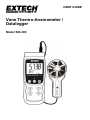
Congratulations on your purchase of the Extech SDL300 Thermo-Anemometer Datalogger. This meter
displays and stores air velocity and temperature readings. Temperature readings from the
thermometer built into the vane probe or from an externally connected type K or J thermocouple
temperature probe can be displayed and recorded. Data is stored on an SD card for transfer to a PC.
In addition, an RS232 port allows data streaming to a PC. This instrument is shipped fully tested and
calibrated and, with proper use, will provide years of reliable service. Please visit the Extech
Instruments website (www.extech.com) to check for the latest version of this User Guide. Extech
Instruments is an ISO-9001 certified company.
Safety
International Safety Symbols
This symbol, adjacent to another symbol or terminal, indicates the user must refer to the
manual for further information.
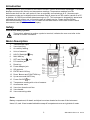
Meter Description
1.
2.
Thermocouple input
Vane input plug
3.
Air velocity reading
4.
Units of measure
5.
HOLD / Backlight
6.
MAX-MIN key
7.
SET and Clock
8.
PC interface jack
9.
Reset key
key
key
10. Power Adaptor jack
11. SD card slot
12. ENTER and LOG key
13. Down ▼arrow and FUNCTION key
14. Up ▲ arrow and UNITS key
15. Power ON-OFF
key
16. Temperature reading with units of measure
17. Anemometer vane
18. Vane icon faces the air flow
19. Vane handle
20. Vane connecting cable
Notes:
Battery compartment, tilt stand, and tripod mount are located on the rear of the instrument.
Items 8, 9, and 10 are located behind the snap-off compartment cover on right side of meter.
2
SDL300-EU-EN V1.5 07/13