1
2. DRIVER INSTALLATION
1. For iButton reader: The configuration of the iButton reader can be programmed through
Hyper Terminal function at the COM port that the RJ45 type cable of SD-6000 is
connected to. The reader can be programmed to output through the USB port (connected
with the conversion cable) as an USB KB or through RS232 interface as the application
software requires. Please enter the “Hyper Terminal” function on KS system and select the
COM port. Type fully capitalized “SETUP” and press “enter” key. All available
configuration parameters will then be presented.
2. For MSR: The magnetic stripe reader in SD-600, no matter how many tracks are in the
reader head, connects to the host through the proprietary internal USB port working as a
USB KB and therefore requires no driver installation. For application in OS other than
Windows (such as MS-DOS or Linux), some technical internal modifications will be
required and it is most advised to specify such conditions clearly when ordering the SD-600.
For application of MS-DOS model please also enable the USB keyboard in system CMOS
setup. Refer to “Operation Guide” for manipulation over the reader configuration.
III.
OPERATION GUIDE
1. iBUTTON READER
Each iButton receptor is delivered with 2 iButton keys attached. Each iButton key carries
a unique ID. Whenever the user places an iButton key to the reading area of the iButton reader,
the key will stick to the reader by magnetism and the unique ID will be sent to the KS system
through USB or RS232 interface as preprogrammed. Please approach your dealer for purchase
of any additional iButton key required.
2. MAGNETIC STRIPE READER
For magnetic stripe card reading, be sure to insert the card to the bottom with magnetic
stripe facing the mark aside the slot. The movement of the card can be either inserting the card
from the top surface then sliding the card down out of the slot, or sliding the card upward from
the lower side of the slot till it reaches the top end as long as the card is a standard one. A nonstandard card recorded without complete degaussing prior to recovery may accept only one
direction in card reading.
The MSR in SD-600 reads an ISO or JIS magnetic stripe card without driver. Yet, there
is a “Posiflex USB MSR Manager” program provided to control some parameter configuration
for ISO MSR. The features controllable in this program covers: each track enable/disable,
Alt+Num approach for ASCII codes and Leading/Stop code enable/disable. The function for
enabling each track of course comes in effect only when the track is physically available.
Please find in the Product Information CD delivered with KS system the folder
“\Drivers\SD_Series\USBMSR_xxx” and “SetUp” this manager program or download the
installation program from our web http://www.posiflex.com or http://www.posiflex.com.tw.
3. SOUND PORTS
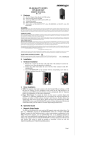
The audio port in KS system is arranged to have an internal audio
speaker with maximum audio power of 2 W at lower left corner of the main
unit but no direct access port in the main unit. The external access to audio
ports can be found in the side mount option kit SD-600 with a Microphone in
and a stereo line out jacks at its bottom surface as circled in the right picture.
The internal speaker will be automatically disconnected when a plug is
inserted in the line output jack (the lower one in the circle).
a.
1.
Page 2 / 2