1
Troubleshooting
Check the following before calling for service.
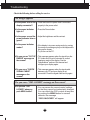
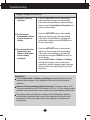
No image appears
● Is the power cord of the • Check and see if the power cord is connected
properly to the power outlet.
display connected?
● Is the power indicator
light on?
• Press the Power button.
● Is the power on and the • Adjust the brightness and the contrast.
power indicator blue or
green?
● Is the power indicator
amber?
• If the display is in power saving mode, try moving
the mouse or pressing any key on the keyboard to
bring up the screen.
• Try to turn on the PC.
● Do you see an "OUT OF • This message appears when the signal from the
PC (video card) is out of horizontal or vertical
RANGE" message on
frequency range of the display. See the
the screen?
'Specifications' section of this manual and
configure your display again.
● Do you see a "CHECK
SIGNAL CABLE"
message on the
screen?
• This message appears when the signal cable
between your PC and your display is not
connected. Check the signal cable and try again.
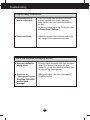
Do you see a "OSD LOCKED" message on the screen?
● Do you see “OSD
LOCKED” when you
push MENU button?
• You can secure the current control settings,
so that they cannot be inadvertently changed.
You can unlock the OSD controls at any time
by pushing the MENU button for several
seconds: the message
“OSD UNLOCKED” will appear.
A16