1
© ETB Instruments LTD 2005
DigiDash2 - LITE Manual
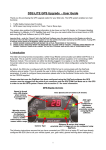
5.3.8 Fuel Tab
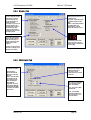
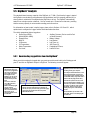
Use this screen for selecting the type of fuel sender that will be used in conjunction with the
DigiDash2. The ETB float arm sensor is supplied as standard and therefore the default setting is to
use this fuel sensor. Alternatively you can set the DigiDash2 to work with either VDO lever-arm float
units, VDO Dip-Pipe fuel senders, or a Capacitive Type Fuel sender. All these fuel senders are
available for purchase from ETB Instruments.
5.3.9 Calibrate Tab
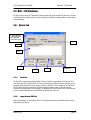
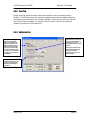
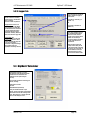
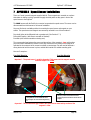
Use this box for entering the
pulses for the Tachometer
(RPM) input. Effectively, the
number (1-8) represents the
number of cylinders that the
engine has. However, wasted
spark systems or ECU outputs
may vary the number of pulses
per engine cycle, and therefore
this number can be changed to
accommodate.
The values entered in the Speed
Calibration box are essential not
only for the speed reading to be
accurate, but also for the
engaged gear display to indicate
correctly.
Clicking on the Goto Calculator
button will automatically open
the DigiTools Calculator
program to obtain the correct
numerical factors.
The weight of you vehicle can
be entered using this box. This
is used to for estimating the
brake horse power (BHP) of
your vehicle.
Version: 1.01
Page 32