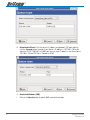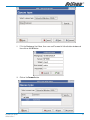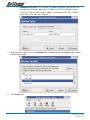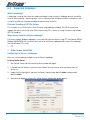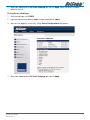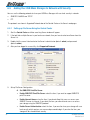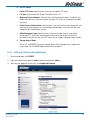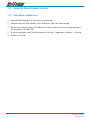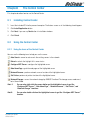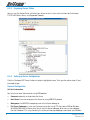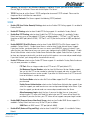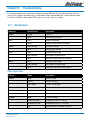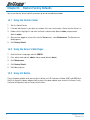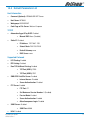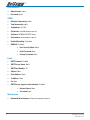
1
User Guide NP3680 2-Port USB Print - Scanner - Storage Server Contents Chapter1 Introduction........................................................................................................................ 4 1.1 About this Manual....................................................................................................... 4 1.2 Customer Support....................................................................................................... 4 Chapter2 Product Overview................................................................................................................ 5 2.1 Package Contents....................................................................................................... 5 2.2 Product CD................................................................................................................. 5 2.3 Physical Description.................................................................................................... 6 2.4 Installation Procedures . ............................................................................................. 7 2.5 Features and Benefits ................................................................................................ 8 Chapter3 Basic Installation................................................................................................................. 9 3.1 Connecting the Hardware ........................................................................................... 9 3.2 Assigning an IP Address to the Server . ..................................................................... 10 Chapter4 Installing the Print Server in Windows . .............................................................................. 15 4.1 Overview of Installation Methods ............................................................................. 15 4.2 Connecting the Server ............................................................................................. 16 4.3 Setting up Local Windows Printer Driver..................................................................... 17 4.4 Adding Network Printers in Windows . ....................................................................... 18 Chapter5 Installing the Print Server in Unix/Linux............................................................................... 28 5.1 Configuring Host File . .............................................................................................. 28 5.2 Printing by LPD/LPR.................................................................................................. 28 5.3 Using the Server on BSD UNIX/Linux.......................................................................... 29 5.4 Using the Server on RedHat Linux (Fedora Core) ....................................................... 30 Chapter6 Connecting a File Server.................................................................................................... 35 6.1 Preliminary............................................................................................................... 35 6.2 Storage Names......................................................................................................... 35 6.3 Connecting USB Mass Storage to the Server.............................................................. 35 6.4 Supported Codepages............................................................................................... 36 6.5 Adding Your USB Mass Storages to Network with Security........................................... 38 Chapter7 Connecting a Scanner....................................................................................................... 43 7.1 Connecting HP All-In-One to the Server...................................................................... 43 7.2 Using the Shared Scanner in Windows....................................................................... 43 7.3 Using the Shared Scanner in Linux............................................................................. 46 Chapter8 The Control Center . ......................................................................................................... 47 8.1 Installing Control Center ........................................................................................... 47 8.2 Using the Control Center........................................................................................... 47 8.3 Quitting the Control Center........................................................................................ 54 NP3680 User Guide YML838 Rev 2 Chapter9 The NetUSB Technology..................................................................................................... 55 9.1 Introduction.............................................................................................................. 55 9.2 Link & Unlink............................................................................................................ 56 9.3 How to Use............................................................................................................... 57 9.4 Limitations............................................................................................................... 61 Chapter10 The Server’s Web Pages . ................................................................................................. 62 10.1 Introduction.............................................................................................................. 62 10.2 Using the Server’s Web Pages................................................................................... 62 Chapter11 Email Alerting................................................................................................................... 71 Chapter12 SNMP.............................................................................................................................. 72 Chapter13 Troubleshooting................................................................................................................ 73 13.1 LED Indicators.......................................................................................................... 73 Chapter14 Restore Factory Defaults.................................................................................................... 74 14.1 Using the Control Center........................................................................................... 74 14.2 Using the Server’s Web Pages................................................................................... 74 14.3 Using Init Button....................................................................................................... 74 14.4 Default Parameters List............................................................................................. 75 Chapter15 Upgrade Firmware............................................................................................................ 77 Chapter16 The Init Button.................................................................................................................. 79 APPENDIX A Cable Information.............................................................................................................. 80 RJ-45 Network Ports ........................................................................................................ 80 Straight and crossover cable configuration . ....................................................................... 80 Straight-Through Cabling................................................................................................... 81 Cross-Over Cabling........................................................................................................... 81 APPENDIX B Registration and Warranty Information................................................................................ 82 Contact Information........................................................................................................... 82 Copyright Information........................................................................................................ 82 Customer Information........................................................................................................ 83 NP3680 User Guide YML838 Rev 2 Chapter1 Introduction Thank you for purchasing this NP3680 USB MFP Server (in the following referred to as “Server”). This Server is designed to connect your AIO/MFPs (All-In-One/Multifunction Peripheral), printers, USB mass storages (hard drives, flash drives, and memory card readers), and scanners, to your network, allowing all network users access to these shared USB devices resources. 1.1 About this Manual This manual provides introductory information as well as detailed instructions on how to set up and manage NP3680 in various network environments. To fully benefit from this document, you should be familiar with basic networking principles. The instructions described in this manual are based on the settings in a new Server. To reload the Factory Parameters, you can reset this Server back to Factory Default, which will restore most of the settings. For details, please refer to the chapter “Restore Factory Defaults”. 1.2 Customer Support Should you require any technical assistance, please contact your product reseller. Or you can visit our website at http://www.netcomm.com.au for latest product information. This document is subject to changes without prior notice. NP3680 User Guide YML838 Rev 2 Chapter2 Product Overview 2.1 Package Contents Verify that nothing is missing from the package by using the check list below. Please contact your dealer if anything is missing or damaged. All packing materials are recyclable. Please confirm the items in the package below: • One NetComm MFP Server • One CD (Control Center Utility and User Documentation) • One Power Adaptor • One USB Cable • One Ethernet Cable • One Package Contents Note 2.2 Product CD This CD provides easy-to-use Control Center software, and the User’s Manual and Quick Installation Guide. If your computer is configured to auto start CDs, this CD will start automatically when inserted. You can also navigate to the CD and start the autorun.exe file from within the Windows file manager. NP3680 User Guide YML838 Rev 2 2.3 Physical Description Rear Panel Power Adaptor Port: DC IN 5V/2A adaptor Init Button: Print the configuration page and initialize this Server Ethernet Port: A twisted pair category 5 cable USB Host Ports: USB 1.1/2.0 low, full, and Hi-Speed compliant Front Panel Indicators Power Indicator: is lit while power is applied. If it is not lit, or if it blinks, there is a problem with this Server or power adapter. Link Indicator: is lit while network is applied. If it is not lit, it indicates that this server does not connect to the network. Status Indicator: blinks to indicate network activity. USB1 Indicator: is lit while a USB device connects to USB1 Port of this Server. If it is not lit, or if it blinks, there is a problem with the USB device or this Server. USB2 Indicator: is lit while a USB device connects to USB2 Port of this Server. If it is not lit, or if it blinks, there is a problem with the USB device or this Server. NP3680 User Guide YML838 Rev 2 2.4 Installation Procedures 2.4.1 Installation and Integration Please refer to the table below to select the appropriate installation method. The Control Center is available on the CD or from NetComm’ website. Function OS Method Description Print Server Windows Standard Windows Add Printer Wizard Installation of LPR, Raw TCP (JetDirect), Local Port Using SMB, and IPP Control Center Tool Installation of LPR, Raw TCP, Local Port Using SMB Apple MAC OS X Printer Setup Tool LPR, Raw TCP (JetDirect) SMB, IPP Unix/Linux Edit /etc/printcap File Using vi or other editors to edit the printcap file RedHat Linux Printer System Manager Using X-Windows Interface to operate Windows None Don’t need installation Apple MAC OS X None Unix/Linux Samba Use smbclient in Samba Windows The Control Center Installation of SANE Client and SANE-Twain Driver Apple MAC OS X Download and install SANE Use terminal Unix/Linux Download and install SANE Frontends Use SANE Applications such as XSANE File Server Scan Server 2.4.2 Configuration and Management This Server can be configured and managed from its internal web pages or from the Control Center. These web pages or PC tools offer you a management tool suitable for all supported network environments. NP3680 User Guide YML838 Rev 2 2.5 Features and Benefits This Server provides the following features and benefits: Reliability: The Server provides high performance and reliability combined with low power consumption. Flexibility: The Server supports Print/File/Scan sharing in all major computer systems and environments. Easy to Install: The Server installs, operates, and is managed in a reliable and easy fashion. Security: You can assign administrator name and password to restrict login. Monitoring: The Server’s web pages and user software allow you to continuously monitor the status of connected USB devices. Future Proof: The firmware stored in the Server’s Flash memory can be upgraded over the network. This allows you to quickly update and enhance its operational features when new Server software becomes available. NP3680 User Guide YML838 Rev 2 Chapter3 Basic Installation 3.1 Connecting the Hardware 1. Make sure that your USB devices are switched off and that the Server’s Power Adapter is disconnected. 2. Connect the USB devices to the USB ports with the USB cables. 3. Connect the Server to the network with a twisted-pair category 5 cable, 10baseT or 100baseTX. 4. Turn on the USB devices and make sure they are ready for use. 5. Connect the Power Adapter to the Server. The power indicator will light up and USB1 and USB2 indicators will flash in turn. When the Link indicator lights up, the Server is correctly connected to the network. When the USB1 and USB2 indicators stop flashing, the Server is ready to work. 6. If you connect USB HP printers to the Server, please press the Init button for 3 seconds on the Server once to print a page of Server configuration report. NP3680 User Guide YML838 Rev 2 3.2 Assigning an IP Address to the Server 3.2.1 Preliminary • If you have a DHCP server on your network, your Server will receive an IP address automatically. The IP address will then appear on the Control Center or on the page of configuration report that you printed earlier. If your DHCP server does not give an IP address to the Server, the Server will use the Factory IP address: 192.168.1.100. • If you are not working in a DHCP network, you need to manually set the Server’s IP address. • If you are connecting multiple MFP Servers, and not using a DHCP server on your network, you will need to disconnect the other MFP Servers if they are using the default IP Address (192.168.1.100) to avoid IP conflicts and configure the server. 3.2.2 Ethernet Address You do not need to know the Ethernet address of your Server to assign an IP address to it. The Control Center will automatically search for Servers and list their Ethernet addresses. 3.2.3 IP Address Unless you are assigning an IP address using DHCP, you must obtain an unused IP address from your network administrator. 3.2.4 Methods for Setting the IP Address You can set the IP address of your Server using one of the following methods, depending on your network operating environment: • Automatic IP Address Assignment • Manual IP Address Assignment 3.2.5 Host Names and Host Name Rules The Host Name of the Server defaults to be “NP3680” (for NP3680). If you put two or more Servers in your local area network, to avoid using the same Host Names you have to change the Host Names by using the Control Center or the Server’s web pages. If your Host Name is longer than 15 characters, the Server uses only the first 15 characters. 10 NP3680 User Guide YML838 Rev 2 3.2.6 Setting the IP Address Using DHCP Follow the instructions below to get an IP address using DHCP: 1. Edit or create a scope in the DHCP manager of the DHCP daemon. The entries included in this scope should contain the following parameters: • range of IP addresses • subnet mask • default router IP address • DNS server IP address • lease duration 2. Activate the scope. The Server automatically gets the DHCP parameters. If you are using DNS, you may include at least one DNS server IP address in the DHCP scope or manually set the DNS server IP address using Server’s web pages or the Control Center. 3.2.7 Setting the IP Address Using the Control Center 1. Install the Control Center. The Control Center is available on the Product CD. 2. Start the Control Center and Auto-searching Server window will appear. NP3680 User Guide YML838 Rev 2 11 3. If the tool finds multiple Servers in your local area network, then you have to select one Server from the Server List. 4. Double click the server in the list and enter the Server’s administrator (default: admin) and password (default: admin). 5. After you have logged in successfully, select the TCP/IP tab. The Set IP Address dialog appears. 6. Click the button corresponding to your choice of IP setting method (static or dynamic using DHCP). When assigning a static IP address you also have to define Subnet Mask and Default Gateway. If you choose Automatically get IP by DHCP, you can use desired DNS by clicking the Manual DNS button and manually assigning a DNS. 7. Click Apply to save your settings and the Server will reboot. 8. You have now finished the procedure of setting the IP address. 12 NP3680 User Guide YML838 Rev 2 3.2.8 Setting the IP Address Using the Server’s Web Pages 1. If you don’t know the current IP of you Server, follow Step1~Step4 of Set the IP Address Using the Control Center. 2. You can see the IP address of you Server in the Server List. Open a Web Browser and enter the Server’s IP address or click the Home Icon of the Control Center. 3. Go to the web page and click the CONFIG menu icon. 4. Enter administrator (default: admin) and password (default: admin). 5. Click the TCP/IP menu icon. NP3680 User Guide YML838 Rev 2 13 6. Click the button corresponding to your choice of IP setting methods (static or dynamic using DHCP). When assigning a static IP address you also have to define Subnet Mask and Default Gateway. 7. Click Submit to save your settings. And the Server will reboot. You have now finished the procedure of setting the IP address. 14 NP3680 User Guide YML838 Rev 2 Chapter4 Installing the Print Server in Windows 4.1 Overview of Installation Methods This chapter describes how to add network printers. Table List for Installing Network Printer Windows Platform Printing Protocols Method Windows 98, ME, 2000, XP and 2003 SMB/CIFS Printing Standard Windows Add Printer Wizard The Control Center’s Add Printer Windows 2000, XP and 2003 IPP Printing Standard Windows Add Printer Wizard LPR Printing Standard Windows Add Printer Wizard The Control Center’s Add Printer Raw TCP/JetDirect Printing Standard Windows Add Printer Wizard The Control Center’s Add Printer Steps for Installing Network Printer Step 2 Connect Your Printer to the MFP Server and Connect the MFP Server to the Network Step 1 Step 3 Set up / Install the Local Windows Printer Driver Turn on Your Printer and MFP Server Step 6 Step 4 Turn on “Online Use Printer” in Installed Windows Printer Driver Configure Your MFP Server Step 5 Add Network Printer by Windows Standard Method or Control Center Utility NP3680 User Guide YML838 Rev 2 15 4.2 Connecting the Server To configure your Server correctly, you should know which type of network topology that your Server is connecting to. 4.2.1 The Server and Windows PC on Same LAN 4.2.2 The Server and Windows PC on Different LANs Example: Wired Windows PC across Internet Internet 16 NP3680 User Guide YML838 Rev 2 4.3 Setting up Local Windows Printer Driver You are advised to install your Windows printer driver in advance. For most printers, you can install the printer drivers with the following procedure: 1. Click Start, click Control Panel, click Printers and Other Hardware, and then click Printers and Faxes. 2. Double click Add Printer to start the Add Printer Wizard, and then click Next. 3. Click Local printer, clear the Automatically detect and install my Plug-n-Play printer check box to avoid having to wait for the completion of another printer search, and then click Next. If you leave this option selected, Windows will attempt to find the printer itself and figure out what kind it is. If Windows does not find the printer, the wizard will continue as described in this task. 4. Select a Windows driver for your printer. Click Next. 5. Choose whether you want to share the printer with other network users. Do you want to print a test page? Select the appropriate radio button and click Next and Finish. NP3680 User Guide YML838 Rev 2 17 4.4 Adding Network Printers in Windows Follow the instructions below to use the standard Windows Add Printer Wizard and the Control Center for adding a network printer in Windows 98 SE, ME, 2000, XP and 2003. Note: 1. Before adding a network printer, you are advised to install the local Windows printer driver in advance. 2. Before using network printer, you have to turn on “Use Printer Online” in installed network printer driver and then you can use the printer. 4.4.1 Using Standard Windows Methods for LPR Printing Protocol Windows Platform: Windows 2000, XP and 2003 1. Open Printers and Faxes. 2. Right-click the printer for which you want to change settings, and then click Properties/ports. 3. Clear Enable bidirectional support and click Add port, and then click Standard TCP/IP Port from the dropdown and click New port. 4. The Add Standard TCP/IP Printer Port Wizard will pop up and click Next. 5. In the Printer Name or IP Address box, enter the Host Name of the Server (default: NP3680) or IP address of the Server. In the Port Name box, enter your desired names or USB1_LPR or USB2_LPR for printer connected to USB1 port and USB2 port, respectively. 18 NP3680 User Guide YML838 Rev 2 @If your Server is running on a different LAN than your Windows PC such as Internet PC, you must enter Server’s IP address in Printer Name or IP Address box. 6. Click Next. NP3680 User Guide YML838 Rev 2 19 7. Click Custom/settings. 8. Click Settings and confirm that the settings are as below. The queue names are USB1_LQ, USB2_LQ for USB1 port 1 and USB2 port, respectively. Click OK. 9. Click Finish. 20 NP3680 User Guide YML838 Rev 2 4.4.2 Using the Control Center for LPR Printing Windows Platform: Windows 2000, XP and 2003 1. Start the Control Center, select your Server and click Set Printer. 2. Select USB1 Port or USB2 Port to add the printer in Set printer in box, choose to use Host Name or IP address to represent the Server in Select IP address or Host Name in printer port box, and select the network printing protocol of Printing with LPR (Line Printer Remote). @If your Server is running on a different LAN than your Windows PC such as Internet PC, you must choose IP address in Select IP address or Host Name in printer port box. 3. Click Apply. NP3680 User Guide YML838 Rev 2 21 4. Select the desired printer driver and click Set Port to Printer. 5. If you cannot find any printer driver in Printer List, please install your printer driver first or click Add New Printer to install the printer driver. 4.4.3 Using Standard Windows Method for Raw TCP Printing Windows Platform: Windows 2000, XP and 2003 1. Open Printers and Faxes. 2. Right-click the printer for which you want to change settings, and then click Properties. 3. Clear Enable bidirectional support and click Add port, and then click Standard TCP/IP Port from the dropdown and click New port. 4. The “Add Standard TCP/IP Printer Port Wizard” will pop up and click Next. 5. In the Printer Name or IP Address box, enter the Host Name of the Server (default: NP3680) or IP address of the Server. In the Port Name box, enter USB1_RAW or USB2_RAW for printer connected to USB1 port and USB2 port, respectively. @If your Server is running on a different LAN than your Windows PC such Internet PC, you must enter the Server’s IP address in Printer Name or IP Address box. 6. Click Next. 7. Click Custom/settings. 8. The click Settings and confirm that the settings are as below. The default Port Number values are 9100, 9101 for USB port 1 and USB port 2, respectively. Refer to the Server’s web pages or the Control Center, you can get exact values. Click OK. 9. Click Finish. 22 NP3680 User Guide YML838 Rev 2 4.4.4 Using the Control Center for Raw TCP/JetDirect Printing Windows Platform: Windows 2000, XP and 2003 1. Start the Control Center, select your Server and click Set Printer. 2. Select USB1 Port or USB2 Port to add the printer in Set printer in box, choose to use or IP address to represent the Server in Select IP Address or Host Name in printer port box, and select the network printing protocol of Print with Raw TCP Mode. @If your Server is running on a different LAN than your Windows PC such as Internet PC, you must choose IP address in Select IP Address or Host Name in printer port box. 3. Click Apply. NP3680 User Guide YML838 Rev 2 23 4. Select the desired printer driver and click Set Port to Printer. 5. If you cannot find any printer driver in Printer List, please install your printer driver first or click Add New Printer to install the printer driver. 4.4.5 Using Standard Windows Methods for SMB/CIFS Printing @Before using SMB/CIFS printing, you have to login the SMB/CIF Print/File server in advance and then you may use it; otherwise you have to disable SMB/CIFS Print/File Server Authentication. @If you use SMB on Windows 98 SE/ME with Server Authentication, you must login to your Windows 98 SE/ME using the same user name as in the Server’s User Account. Windows Platform: Windows 98SE, ME, 2000, XP and 2003 1. Open Printers and Faxes. 2. Right-click the printer for which you want to change settings, and then click Properties. 3. Click the Ports tab. 4. Clear Enable bidirectional support and click add port, and click Local Port, and then click New Port… in the Printer Ports box. 5. In the Port Name box, enter the path to the printer with the following format: ”\\ Server’s Host Name\ printer name” or ”\\ Server’s IP address\printer name” (Please refer to the Server’s web pages or the Control Center to know exact path). For example: if you set the Server’s Host Name as “NP3680” and printer name (USB1 port) as LaserJet 303, then the network path is expressed as: \\NP3680\ LaserJet303 @If your Server is running on a different LAN than your windows PC such as Internet PC, you must enter IP address in Port Name box. 24 NP3680 User Guide YML838 Rev 2 6. Click OK, and then select a Windows driver for your printer. If you already have the printer’s driver installed, you will be asked whether to keep it or to replace it. Click Next. 7. Choose whether you want to share the printer with other network users. Do you want to print a test page? Select the appropriate radio button and click Next and Finish. 4.4.6 Using the Control Center for SMB/CIFS Printing @Before using SMB/CIFS printing, you have to login the SMB/CIF Print/File server in advance and then you may use it; otherwise you have to disable SMB/CIFS Print/File Server authentication. @If you use SMB on Windows 98 SE/ME with Server Authentication, you must login to your Windows 98 SE/ME using the same user name as in the Server’s User Account. Windows Platform: Windows 98, ME, 2000, XP and 2003 1. Start the Control Center, select your Server and click Set Printer. 2. Select USB1 Port or USB2 Port to add the printer in Set printer in box, choose to use Host Name or IP address to represent the Server in Select IP Address or Host Name in printer port box, and select the network printing protocol of Printing with Network Path (SMB). @If your Server is running on a different LAN than your Windows PC such as Internet PC, you must choose IP address in Select IP address or Host Name in printer port box. NP3680 User Guide YML838 Rev 2 25 3. Click Apply. 4. Select the desired printer driver and click Set Port to Printer. 5. If you cannot find any printer driver in Printer List, please install your printer driver first or click Add New Printer to install the printer driver. 4.4.7 Using Standard Windows Method for IPP Printing Windows Platform: Windows 98 SE, ME, 2000, XP and 2003 1. Click Start, click Control Panel, click Printers and Other Hardware, and then click Printers and Faxes. 2. Double click Add Printer to start the Add Printer Wizard, and then click Next. 3. In this window, select a network printer, or a printer attached to another computer and click Next. 4. Click the Next button. On the next window, select Connect to a printer on the Internet or on a home or office network. In the URL: field, enter the following to connect to the Server: http://Server’s Host Name /printer name or http:/Server’s IP address /printer name For example, http://NP3680/LaserJet 303 26 NP3680 User Guide YML838 Rev 2 @If your Server is running on a different LAN than your windows PC such as Internet PC, you must enter IP address in URL: Field. 5. Click Next and then continue Windows Add Printer Wizard. NP3680 User Guide YML838 Rev 2 27 Chapter5 Installing the Print Server in Unix/Linux This chapter describes how to add network printers to Unix/Linux PC. 5.1 Configuring Host File If using IP administration system like DNS, manually registering the Host Name and IP address may be not required. Otherwise, you have to edit hosts file and contact your network administrator. 1. Log in to Linux machine by “root”. # login root 2. Register the Server’s Host Name and IP address into /etc/hosts file. To edit host file, use an editor, e.g. “vi”. Example: The IP address is “ 192.168.1.100”, Host Name is “NP3680” 192.168.1.1 dns # DNS Server 192.168.1.2 mail # Mail Server 192.168.1.100 NP3680 # Server 3. Switch on the Server. Verify the network connection by using the ping command. # ping NP3680 If there is no response or error occurs, there may be problems with IP address configuration, host file editing or network status. Please contact your network administrator. 5.2 Printing by LPD/LPR This section explains how to print using LPD protocol of TCP/IP. For further information on “lpr” and “lp” commands, refer to your workstation manual. LPD Protocol: LPD (Line Printer Daemon) is a protocol that enables you to execute printing to a printer on the network. Remote-Printer Queue: The Server has two remote printer queues: USB1_LQ and USB2_LQ with respect to USB port 1 and USB port2. To print files using a printer driver, use “lp” or “lpr”. 28 NP3680 User Guide YML838 Rev 2 5.3 Using the Server on BSD UNIX/Linux 1. Log in to the BSD Unix machine through “root”. # login root 2. Register the Server into /etc/printcap file. Example: To register the printer of USB1 port by the printer name “Printer1”. Printer1:\ ---(A) where :lp=:rm=NP3680:rp=USB1_LQ:\ ---(B) :sd=/var/spool/lpd/Printer1:\ ---(C) :lf=/var/spool/lpd/Printer1/Printer1_errs: ---(D) (A) Describes the printer name. (B) lp: Device file name to connect printer. No name designation required on the network. rm: Host Name for the remote printer. Enter the Host Name registered to /etc/hosts file. rp: Remote printer name. Please input the remote printer queue name. (C) sd: Spool directory name. It must be the absolute path. (D) lf: Error log file name. It must be the absolute path. 3. Create the spool directory and error log file registered to /etc/printcap file. Example: To create the spool directory “Printer1” and error log file “Printer1_errs”. # mkdir /var/spool/lpd/Printer1 Create the spool directory # touch /var/spool/lpd/Printer1/Printer1_errs Create the error log file # chown -R daemon /var/spool/lpd/Printer1 Change the owner to daemon # chgrp -R daemon /var/spool/lpd/Printer1 Change the group to daemon 4. Start Printing. A. Use the “lp” command. - # lp -d Printer1 <Print file name> - # lp -d Printer2 <Print file name> B. Use the “lpr” command. - # lpr -P Printer1 <Print file name> - # lpr -P Printer2 <Print file name> NP3680 User Guide YML838 Rev 2 29 5.4 Using the Server on RedHat Linux (Fedora Core) In the RedHat (Fedora Core) x-window user interface, follow these steps: 1. To start the application, select Main Menu button (on the Panel)-> Applications->System Settings -> Printing. 2. Click on the New button in the Printer configuration window. 3. Click on the Forward button in the Add a new print queue window. 30 NP3680 User Guide YML838 Rev 2 4. Fill in your desired printer name and description (optional) in Queue name window and then click on the Forward button. 5. In Queue type window, you will now be asked to specify which Printer Queue type you are using, select the one option form Networked Unix (LPD), Networked CUPS (IPP), Networked Windows (SMB) and Networked JetDirect options. Click on the Forward button. 6. Fill in parameters for Queue type window: A. Networked Unix (LPD): Fill in the Server’s IP address and queue name and then click the Forward button. Example: If your Server’s IP address is 192.168.1.100 and it connects to HP PSC 1300 MFP via USB1 port. You can enter IP address in the Server box as 192.168.1.100 and Queue name in Queue box as USB1_LQ. NP3680 User Guide YML838 Rev 2 31 B. Networked JetDirect: Fill in the Server’s IP address and protocol’s TCP port and then click the Forward button. Example: If your Server’s IP address is 192.168.1.100 and it connects HP PSC 1300 MFP via USB1 port. You can enter IP address in the Server box as 192.168.1.100 and TCP Port in Port box as 9100. C. Networked Windows (SMB): i. Click on the Specify button to specify SMB server Authentication. 32 NP3680 User Guide YML838 Rev 2 ii. Fill in the Workgroup, Host Name, User name and Password in Authentication window and then click on the OK button. iii. Click on the Forward button. NP3680 User Guide YML838 Rev 2 33 D. Networked CUPS (IPP): Fill in the Server’s IP address and printer name then click the Forward button. Example: If your Server’s IP address is 192.168.1.100 and its printer name is psc 1300 ser. You can enter IP address in Server box as 192.168.1.100 and printer name in Path box as psc 1300 ser. 7. Select your printer driver. Click on the Forward button. Windows will display the Finish, and create the new print queue folder. 8. Click Finish button. 34 NP3680 User Guide YML838 Rev 2 Chapter6 Connecting a File Server This chapter describes the file server function of the Server which allows USB storage devices to be shared across a network by using SMB: NetBIOS over TCP/IP and FTP protocol. 6.1 Preliminary 1. This product supports a file format of FAT12/16/32 and NTFS. However, NTFS is only supported in NetUSB mode. Please refer to the Storage Access Mode. 2. NetComm is not responsible for the loss or corruption of data in memory devices, including hard disk; NetComm is not responsible for the leak, manipulation, loss, or corruption of data in memory devices connected to the Server after unauthorized access. 3. In order to use the USB Mass Storage device connected to the Server, the SMB protocol or FTP protocol must be set up. 4. This product does not support to magnet optical drive devices such as CD/DVD. 5. This product allows shared two USB storage devices over the network in Windows through the USB ports. 6. This product does not support the USB devices through USB hub. 6.2 Storage Names The local drives of the two storages in USB1 port and USB2 port are named as USBx_DxPx, where USBx represents the USBx port, Dx represents the the x-th Disk and Px represents the x-th partition. 6.3 Connecting USB Mass Storage to the Server NP3680 User Guide YML838 Rev 2 35 6.4 Supported Codepages What is codepage? A code page is used by the system to encode and interpret string characters. Codepage formats are not the same for each language. Some languages, such as Japanese have multibyte characters, while others, such as English and German, need only one byte to represent each character. Filename Encoding of FAT File System This is known as an 8.3 file name, a short file name using codepage encoding. The FAT file system also supports file names that can be up to 255 characters long. This is known as a long file name using Unicode (UTF-16) encoding. When do you need to configure codepage? The Server supports Windows codepages. If users want to communicate files using FTP client tool or SMB on Windows 98/Me/2000 with the Server, they have to set their Server codepage to be same as the codepage that their Windows PC is using. 1. FTP 2. SMB on Windows 98/Me/2000 Configuring the Server’s Codepages Users can use the following methods to set the Server’s codepage. A. Using Control Center 1. Start Control Center and Auto-searching Server window will appear. 2. If the tool finds the Servers in your local area network, then you have to select one Server from the Server List. 3. Double click the highlight list and enter the Server’s administrator (default: admin) and password (default: admin). 4. After you have logged in successfully, setting General Configuration dialog appears. 36 NP3680 User Guide YML838 Rev 2 5. Select your codepage form File Server Codepage box and click Apply. Select the Western European option for Australia. B. Using Server’s Web Pages 1. Go to the web page, click CONFIG 2. Login your administrator (default: admin) and password (default: admin). 3. After you have logged in successfully, setting General Configuration dialog appears. 4. Select your codepage form File Server Codepage box and click Apply. NP3680 User Guide YML838 Rev 2 37 6.5 Adding Your USB Mass Storages to Network with Security You can use the following protocols to share your USB Mass Storages with user level security in network: • SMB/CIFS: NetBIOS over TCP/IP • FTP The protocols are shown in Supported Protocols box of the Control Center or the Server’s web pages. 6.5.1 Setting up File Server Using the Control Center 1. Start the Control Center and Auto-searching Server window will appear. 2. If the tool finds multiple Servers in your local area network, then you have to select one Server from the Server List. 3. Double click the server listed and enter the Server’s administrator (default: admin) and password (default: admin). 4. After you have logged in successfully, click Supported Protocols. 5. Set up File Server Configuration: A. Set SMB/CIFS Print/File Server • Enable SMB/CIFS Print/File Server: select the item, if you want to support SMB/CIFS print/File server. • Enable Internet Access: clear the item, if you do not allow that users can access your SMB/CIFS server via Internet. If you select the item, you allow Internet users can access your storage using the SMB/CIFS protocol. • Enable Server Authentication: select the item, if you want to share your storage with user level security which requires user name and password to login. If you clear the item, your storage will be shared without security. 38 NP3680 User Guide YML838 Rev 2 B. Set FTP Server: • Enable FTP Server: select the item, if you want to support FTP server. • FTP port: enter the desired FTP port. The default value is 21. • Maximum Session Number: select the item and fill in desired number. * Enable Passive Mode: select the item, if you want to allow that your FTP server can accept passive mode command. • Enable Server Authentication: select the item, if you want to share your storage with user level security which requires user name and password to login. If you clear the item, your storage will be shared without security. • Allow Anonymous Login: select the item, if you want to allow the user “anonymous” to login your FTP server with read-only permission and the Server will not check the password. If you clear the item, your FTP server will not support anonymous login function. C. Storage Access Mode: To use FTP and SMB/CIFS to access storage, please set the storage access mode to the server mode. For the NetUSB mode, please refer to chapter 9. 6.5.2 Setting up File Server Using Web Pages 1. Go to the web page, click CONFIG. 2. Login your administrator (default: admin) and password (default: admin). 3. After you have logged in successfully, click Supported Protocols. NP3680 User Guide YML838 Rev 2 39 4. Set up File Server Configuration: A. Set SMB/CIFS Print/File Server • Enable SMB/CIFS Print/File Server: select the item, if you want to support SMB/CIFS print/File server. • Enable Internet Access: clear the item, if you do not allow that users can access your SMB/CIFS server via Internet. If you select the item, you allow Internet users can access your storage using the SMB/CIFS protocol. • Enable Server Authentication: select the item, if you want to share your storage or printer with user level security which requires user name and password to login. If you clear the item, your storage will be shared without security. B. Set FTP Server: • Enable FTP Server: select the item, if you want to support FTP server. • FTP port: enter the desired FTP port. The default value is 21. • Maximum Session Number: select the item and fill in desired number. • Enable Passive Mode: select the item, if you want to allow that your FTP server can accept passive mode command. • Enable Server Authentication: select the item, if you want to share your storage with user level security which requires user name and password to login. If you clear the item, your storage will be shared without security. • Allow Anonymous Login: select the item, if you want to allow the user “anonymous” to login your FTP server with read-only permission and the Server will not check the password. If you clear the item, your FTP server will not support anonymous login function. C. Storage Access Mode: 40 To use FTP and SMB/CIFS to access storage, please set the storage access mode to the server mode. For the NetUSB mode, please refer to chapter 9. NP3680 User Guide YML838 Rev 2 6.5.3 Using Shared Storages by SMB/CIFS Method for Windows 1. Connect a USB storage device to this product. 2. Select My Network Places. 3. Click Display the Computers of Workgroup. 4. Double click Microsoft Windows Network icon. 5. Double click the Workgroup that the Server belongs to. The default Workgroup name is “WORKGROUP”. You can refer to Control Center or the Server’s web pages to get it. You will see that the Server will be displayed as the default Host Name “NP3680” or the Host Name that you have set. 6. If you cannot find Workgroup name of the Server in Microsoft Windows Network, you can select Search for Computer… in My Network Places and enter the Host Name of the Server (For example, default Host Name “NP3680” or the Server’s IP address) to find it. 7. Double click this Host Name icon. 8. If you clear Enable SMB/CIFS Print/File Server Authentication in Supported Protocols, you login to the SMB server without requiring authentication; otherwise you have to enter user name and password to login to the Server. You can add user name and password in User Account box by the Control Center or the Server’s Web page. Note: If you use SMB on Windows 98 SE/ME, you must login to your Windows 98 SE/ME using the same user name as in the Server’s User Account. 9. The shared folders will be listed as USB1_DyPz, and USB2_DyPz where Dy represents the y-th disk and Pz represents the z-th partition with respect to USB1 port and USB2 port. 10. Perform Open, Paste, Remove or Copy the files to the shared folders. Note: Another way to use shared storages by SMB/CIFS method : In Control Center, click the “Network Storage” button. NP3680 User Guide YML838 Rev 2 41 6.5.4 Using Shared Storage by FTP Methods for Windows A. Use Microsoft IE to access the shared USB Mass Storages 1. Open Microsoft IE 2. In Web Address List, enter command: “ftp://Server’s Host Name“ or “ftp://Server’s IP address”. If you have changed the default FTP port : 21 to the new value, you have to add the new port number in the tail of command as “ftp://Server’s Host Name: ftp port” or “ftp://Server’s IP address: ftp port”. 3. If you set Enable Server Authentication in FTP server protocol settings you have to enter user name and password to login to the Server; if you set Allow Anonymous Login, you can use the user name “anonymous” to login with Read-only permission. If you clear Server authentication, you do not need username or password to login to the Server. You can add user name and password in User Account box by the Control Center or the Server’s Web pages. 4. The shared folders will be listed in IE. 5. Perform Paste, Remove or Copy the files to the shared folders. B. Use Microsoft Dos’s FTP client 1. Enter Dos command as “ftp” 2. Enter “open server’s Host Name” or “open server’s IP address”. If you have changed the default FTP port : 21 to the new value, you have to add the new port number in the tail of command as “open server’s Host Name ftp port” or “open server’s IP address ftp port” . 3. If you set Enable Server Authentication in FTP server protocol settings you have to enter user name and password to login to the Server; if you set Allow Anonymous Login, you can use the user name “anonymous” to login with Read-only permission. If you clear Server authentication, you do not need username or password to login to the Server. You can add user name and password in User Account box the Control Center or the Server’s Web pages. 4. Perform FTP commands to use this FTP server. 42 NP3680 User Guide YML838 Rev 2 Chapter7 Connecting a Scanner This chapter explains how to use the scan server function of this product. The scan server function enables a USB scanner of HP all-in-one series, connected to this product, to be shared as a network scanner. The scan server function is available in any platform that can use SANE client. For non HP MFPs/Scanners, please use “NetUSB” technology, which is described in Chapter 9. 7.1 Connecting HP All-In-One to the Server 7.2 Using the Shared Scanner in Windows 7.2.1 Using the Control Center 1. Start the Control Center, select your Server, and click Network Scanner. 2. Select your scanner for USB1 port or USB2 port. NP3680 User Guide YML838 Rev 2 43 3. Set the options. The options are defined as follows: Source: choose flatbed scanning or scrollfed scanning Mode: choose lineart (black/white), Gray and color mode Resolution: choose the image resolution Contrast: tune the contrast of the image Brightness: tune the brightness of the image Range: define the scanning range of the image Note: Not all the MFP scanners support the options above. In such a case, the options will be grayed out and not accessible. 4. Click Preview button. 5. Adjust the window size to be scanned. 6. Click Scan button. 7. Save as your images to the file. 44 NP3680 User Guide YML838 Rev 2 7.2.2 Using Windows Applications Prior to using scanning functions in Windows applications such as MS Word, Photoshop …etc, you have to install network scanner’s TWAIN driver in advance. When you install the Control Center, it will also install this TWAIN driver. Example: Using Photoshop 1. Start Photoshop, click File ->Import->NetComm Network Scanner 2. Select a Server’s IP address or enter a Server IP address in Server Information box. You can click Search Server button to search existing Servers in your network. 3. Click Connect to Network Scanner button in Server Information box. 4. Select your scanner in Server Information box. 5. Click Preview button. 6. Adjust the window size to be scanned. 7. Click Scan button. NP3680 User Guide YML838 Rev 2 45 7.3 Using the Shared Scanner in Linux 7.3.1 Using XSane in RedHat Linux 1. Download SANE-Backends from http://www.sane-project.org. 2. Download and install SANE-frontends: XSane (UNIX binary) from http://www.xsane.org. 3. Edit \etc\sane.d\net.conf and put the IP address of the Server where the scanner is connected into one line, for example: 192.168.1.100. 4. To start the application, select Main Menu button (on the Panel)-> Applications->Graphics -> Scanning. 5. Perform scan function. 46 NP3680 User Guide YML838 Rev 2 Chapter8 The Control Center This chapter describes how to use the Control Center. 8.1 Installing Control Center 1. Insert the included CD into the personal computer. The Autorun screen as in the following should appear. 2. Click Install Application button. 3. Click Next, if you see any Next button in installation windows. 4. Click Finish. 8.2 Using the Control Center 8.2.1 Using the Icons of the Control Center You can use the following icons to help you use the server: Auto Search : renew to auto search the existing servers in the network. Refresh : refresh the highlight list’s server status. Configure MFP Server : configure the highlighted server. Goto HomePage : go to the web pages of the highlighted server. Network Scanner : perform network scanner function of the highlighted server. Set Printer: perform set printer function of the highlighted server. Network Storage : access the network storage by SMB/CIFS method. The storage access mode must be in Server Mode. Note 1: You can also right-click the mouse button on the highlighted server to get the “Configure MFP Server”, “Goto HomePage”, “Network Scanner”, “Set Printer”, and “Network Storage” functions. Note2: You can also double-click on the highlighted server to get the “Configure MFP Server” function. NP3680 User Guide YML838 Rev 2 47 8.2.2 Displaying Server Status You can start the Control Center and select your Server to see its status which includes Host Information, TCP/IP, USB Devices Status, and Supported Protocols. 8.2.3 Setting up Server Configuration Click the “Configure MFP Server” button to setup the highlighted server. Then type the administrator ID and password to login. General Configuration Set Host Information: You have to set some information for using SMB protocol: • Comment: optionally set to describe the Server • Host Name: the name to represent the Server for using SMB/CIFS protocol • Workgroup: the SMB/CIFS workgroup name that the Server belongs to. • File Server Codepage: If users want to communicate files using FTP client tool or SMB on Windows 98 SE/Me/2000 with the Server, they have to set their Server codepage to be same as the codepage that their Windows PC is using. Generally, the criteria of choosing codepage are based on your Windows 48 NP3680 User Guide YML838 Rev 2 codepage. For example, if your Windows codepage is Traditional Chinese, you have to select Traditional Chinese (Big5) in the Server. Please refer to the chapter “File Server”. • TCP/IP: You have to set the Server’s TCP/IP configuration to connect TCP/IP network. Please see the chapter on Basic Installation for more details. • Supported Protocols: The Server supports the following TCP/IP protocols: TCP/IP • Enable LPR (Line Printer Remote) Printing: select or clear Enable LPR Printing support. It is enabled in Factory Default. • Enable IPP Printing: select or clear Enable IPP Printing support. It is enabled in Factory Default. • Enable Raw TCP Printing: select or clear Enable Raw TCP Printing support. It is enabled in Factory Default and users may set the protocol’s TCP ports as following boxes: - TCP Port 1: set TCP port for the printer of USB1 port (default: 9100) - TCP Port 2: set TCP port for the printer of USB2 port (default: 9101) • Enable SMB/CIFS Print/File Server: select or clear Enable SMB/CIFS Print/File Server support. It is enabled in Factory Default. - Enable Internet Access: select or clear Enable Internet Access support. If you clear the item, you do not allow that users can access your SMB/CIFS server via Internet. If you select the item, you allow Internet users can access your storage using the SMB/CIFS protocol. - Enable Server Authentication: select or clear Enable Server Authentication support. Select the item, if you want to share your storage or printer with user level security which requires user name and password to login. If you clear the item, your storage will be shared without security. • Enable FTP Server: select or clear Enable FTP Server support. It is enabled in Factory Default and users may set some parameters as follows: - FTP Port: Enter an integer number to set FTP server’s TCP port (default: 21) - Set Maximum Session Number: select or clear Set Maximum Session Number support. You can limit the FTP session number by selecting the support and enter an integer to set the allowable maximum session number. If you clear this field it means that FTP server will have no limitation in session number. - Set Passive Mode: select or clear Set Passive Mode support that FTP server can accept passive mode. - Enable Server Authentication: select or clear Enable Server Authentication support. If you select the support, you need to enter user name and password to login to the Server. If you clear the support, you do not need user name and password to enter the Server. - Allow Anonymous Login: select the item, if you want to allow the user “anonymous” to login to your FTP server with Read-Only permission and FTP server will not check the password. If you clear the item, your FTP server will not support anonymous login function. • Enable SANE (Scanner Access Now Easy) Server: select or clear Enable SANE Server support. It is enabled in Factory Default and users may set the TCP port as follows: - SANE Port: set SANE server’s TCP port (default: 6566) • Enable UPnP (Universal Plug and Play): select or clear Enable UPnP support. It is enabled in Factory Default. NP3680 User Guide YML838 Rev 2 49 Storage Access Mode 1. Server Mode: In this mode, you can access the USB storage via FTP or SMB/CIFS protocols. Only FAT16/32 file format is supported in this mode. This is the default mode. 2. NetUSB Mode: In this mode, you can access the USB storage using NetUSB technology. In this mode, FAT16/32 and NTFS file formats are supported, but only one user is allowed to access the storage at the same time. Please refer to chapter 9 for the details about NetUSB technology. • User Accounts: You can change administrator name and password or add a user account for SMB/CIFS Print/File server and FTP File server. If you forgot administrator name and password, you must to perform Restore Factory Default action by plugging in the power adaptor while pressing the Init button. Please refer to the chapter “Restore Factory Defaults”. Administrator owns the Read-Write Permission for File servers. 50 NP3680 User Guide YML838 Rev 2 Set Administrator • New Administrator: enter your desired administrator name. • New Password: enter your desired password. • Retype Password: confirm your previous password typing. User Accounts list • User name: add a new user account for accessing the storage attached to the Server. • Password: set a password for added user. • Permission: select Read-Only or Read-Write permission to access File servers. • Add: click Add button, after entering the user name, corresponding password, and Permission selection. The account will take effect once shown in the blank below. • Delete: delete the existing user account. • SNMP: You can set community and some parameters for SNMP server. Furthermore, you can enable SNMP v3 for more security. NP3680 User Guide YML838 Rev 2 51 Set SNMP Configuration • Authentic Community: set Community name of SNMP server. • Trap Community: set Trap Community name for SNMP server to send trap packets. • Trap Address: enter an IP address to send the Trap packet. • SysContact: enter some letters for variable of SysContact that represents the name of system contact. • SysName: enter some letters for variable of SysName that represents the name of system. • SysLocation: enter some letters for variable of SysLocation that represents the location of system. • EnableAuthenTrap: enter 1 or 2 for the variable of EnableAuthenTrap that represents to enable (1) or disable (2) to send Trap packets receiving the wrong Community name. SNMP V3 • Enable SNMP V3: select or clear Enable SnmpV3 support • User Security name: set user security name of SNMP v3 • Auth Password: set authentication password of SNMP v3. • Privacy Password: set privacy password of SNMP v3. • Email: If you want to receive some alerting mail from the Server, you have to enable SMTP Protocol, and set Email configuration. You can set new SMTP port number (default: 25). 52 NP3680 User Guide YML838 Rev 2 Set Email Configuration • SMTP Protocol: select or clear Enable SMTP support • SMTP Server Name: enter your SMTP server’s Host Name or IP address. • SMTP Port Number: set new SMTP server’s TCP port number (default: 25). • Subject: enter the subject of the e-mail. • From Address: enter the sender’s e-mail address. • To Address: enter an e-mail address to send that mail to a person. • Cc: stands for carbon copy; enter an e-mail address to send that mail to a second person. • SMTP Server requires authentication: login to remote SMTP server which requires authentication. • Account Name: enter account name for remote SMTP server. • Password: enter account’s password for remote SMTP server. NP3680 User Guide YML838 Rev 2 53 Maintenance If you want to restart the Server, restore the Server to factory defaults, download new firmware file from product’s public website and upgrade new firmware, you can use the Maintenance tool. • Restart Server: click this button, the Server will restart. • Factory Default: click this button, the Server will restore factory default values. • Download New Firmware: click this button to download new firmware or user software from this product’s public website. • Upgrade Firmware: click Open to find the firmware file to be upgraded. Click Upgrade to upload the firmware into the Server. 8.3 Quitting the Control Center The Control Center doesn’t really quit if you click the “X” box (close box) at the top right corner of the window. Instead, the it just minimizes itself to the system tray. There are two ways to really close the Control Center. The first way is choosing “Exit” item in the “File” menu in the Control Center. The second way is right-clicking the icon of the Control Center in the system tray and choosing the “Exit” item. 54 NP3680 User Guide YML838 Rev 2 Chapter9 The NetUSB Technology 9.1 Introduction The goal of NP3680 USB MFP server is to provide the print/scan/file server in a single product. For printers and scanners, there is no industrial standard. In order to support many different models of printers and scanners from various vendors, you must put so many printer/scanner drivers into a single product. Obviously this is very hard and not practical. We have developed a new technology, called “NetUSB”, to solve this problem. With the NetUSB technology, it is not necessary to implement printer/scanner drivers in NP3680. Actually, NP3680 relies on printer/scanner drivers that are installed on PCs. By the way, in the field of traditional network print server, the common protocols used are, for example, SMB/CIFS, LPR, raw TCP, and IPP. However, in order to reduce cost, many printer vendors produce so-called GDI or host-based printers. For technical reasons, these kinds of printers can not work with the traditional network printer protocols. The NetUSB technology can also deal with the problem. The basic concept and the usage of NetUSB will be introduced in this chapter. In summary, NP3680 has a totally different technology, “NetUSB”, to deal with printers and scanners (MFPs). A. For printers, some special kinds of printers, such as GDI printers or host-based printers, can not work well with traditional print server technology as described in the previous chapters. Users should use the NetUSB technology to deal with these kinds of printers. B. For MFPs or scanners, the operations described in chapter 7 are only workable for HP’s MFPs. Users should use the NetUSB technology to deal with non-HP MFPs. C. For USB mass storage, such as USB hard drives and flash drives and card readers on some kinds of MFPs, users can also use the NetUSB technology to access them in single-user mode. By this way, NTFS file system is supported for read/write. To use the NetUSB technology to access storage, please set the storage access mode to NetUSB mode. Please refer to chapter 8 for how to set the storage access mode. Note: The default storage access mode is server mode. NP3680 User Guide YML838 Rev 2 55 9.2 Link & Unlink “NetUSB” allows you to use USB printers or USB MFPs as if they were connected directly to your PC although they are actually connected to the NP3680 USB MFP server. The “link” operation is a software operation that simulates an actual USB device plug-in. That is to say, when you do a “link” operation in the Control Center, PC can then detect a USB device’s plug-in, although actually you do not plug in any USB device. Similarly, the “unlink” operation is a software operation that simulates the disconnection of the USB device. Once the link operation is successful, the operations to use that USB device are just the same as if the USB device is directly connected to the PC. If a USB device is linked by a PC, we say that PC has the ownership of the USB device. Only one PC can get the ownership of a USB device at the same time. However, we provide a “force link” operation for users to forcedly get the ownership. Basically, the “force link” operation is equivalent to two consecutive operations – unlink from the original PC and link to the new PC. However, we don’t recommend this way to get ownership because data loss may occur if the USB device is busy in operation while the “force link” takes place. For printers, users can mix print jobs with traditional printing protocols, such as LPR or SMB or IPP, and with the NetUSB printing, as long as the printer is in “unlink” state (that is, no PC get the ownership of that printer.) when a print job with traditional protocols occurs. Similarly, for scanners, users can mix scan jobs with “Network Scanner” described in Chapter 7 and with the NetUSB scanning, as long as the scanner is in “unlink” state when a user uses “Network Scanner” to scan. However, for USB storage, if the storage access mode is in NetUSB mode, users can only use NetUSB technology to access storage. On the other hand, if the storage access mode is in server mode, users can only use FTP or SMB to access storage. 56 NP3680 User Guide YML838 Rev 2 9.3 How to Use 9.3.1 Remote Installation Here we will describe how to use the NetUSB technology to do “remote installation” for a USB device. Before using the NetUSB technology, you must first make sure that your PC can access NetComm USB MFP server via TCP/IP. The simplest way to do this is using “Control Center” to search for the NetComm USB MFP server on the network and change its IP address to be the same subnet as your PC. If the MFP server and your PC are not in the same TCP/IP subnet, Control Center will show the MFP server in green, as the following figure. You must change the IP address (or using DHCP) of the MFP server so that the MFP server and your PC are in the same subnet. Control Center will show these MFP servers in blue, meaning you can safely access these MFP servers by the NetUSB technology. The steps to do remote installation for USB devices, like MFPs: A. Turn on NP3680 and the USB device. B. Connect the USB device to NP3680. The LED of the USB port will light-on. C. Run the Control Center. In the “USB MFP Server List” window, you can see the host names and IP addresses all of the NP3680 servers (in blue) on the network, as the following figure. D. Click the server. Then all USB devices attached on the server will be shown. NP3680 User Guide YML838 Rev 2 57 E. Please follow the user manual of the USB device to do the driver installation. For example, you may put the driver CD of the USB device in the CDROM to install the driver. F. When you are asked to plug in the USB device into PC’s USB port, either before running the driver setup program or during the execution of the driver setup program (This depends on the USB device. Please check the user manual from the vendor.), click the desired USB device in the Control Center and then click the “Link” button to do the link operation and get the ownership of the USB device, as the following figure. The computer name of the device owner will be shown at the end of the device. G. PC will automatically detect the plug-in of the USB device. On the right side of Windows Task Bar, you can see the information of the new device. Continue to follow the user manual of the USB device to do the rest jobs of installation, until the driver installation finished. After the installation, you can see the newly created devices on the PC. If the USB device is a MFP, you can see a new printer and a new scanner from the “Control Panel”. 58 NP3680 User Guide YML838 Rev 2 9.3.2 NetUSB Printing After the driver is installed as described in 9.3.1, you can see a newly created printer in the Control Panel’s “Printers and Faxes”. Follow the steps below to do a NetUSB printing. A. In the Control Center, click the MFP server that has the desired printer (or MFP) attached. B. Click the desired printer (or MFP). C. Click the “Set Auto Link” button. The following figure will appear. D. Choose the desired printer. The desired printer must be the Windows printer (this is a logical printer) that matches the printer attached on the MFP server (this is a physical printer). Then click the “Apply” button. E. Then, in the “Auto Link Printer List” you can see a newly created item that describes the association between the Windows printer and the physical printer on the server. F. Then try to issue a print job to the desired printer. You will see the Control Center will automatically do a link operation and, once the print job finished, it will automatically do an unlink operation. This is socalled “Auto Link / Unlink” operation. G. Even you already properly setup an auto-link printer, the Control Center must be running while a print job is issued. This means you’d better run the Control Center every time after you login Windows. In order to skip this manual operation, you can make the Control Center be run automatically after you login Windows. To do this, choose the “Configuration” item in the “Tools” menu. The following window will appear. Click on the check box and then on the “OK” button. This feature is enabled by default. H. If you would like to break the association between the Windows printer and the physical printer, just click on the association and click the “Delete” button in the “Auto Link Printer List”. I. By the way, if the printer is manually linked (owned) by someone else and he forgets to unlink the printer, you can click the “Force Link” button to forcedly get the ownership. However, this way is not recommended. NP3680 User Guide YML838 Rev 2 59 9.3.3 NetUSB Scanning After the driver is installed as described in 9.3.1, you can see a newly created scanner in the Control Panel’s “Scanners and Cameras”. Follow the steps below to do a NetUSB scanning. A. In the Control Center, click the MFP server that has the desired scanner (or MFP) attached. B. Click the desired scanner (or MFP). C. Click the “Link” button to manually link the scanner (or MFP). D. Right-click the scanner icon in the Control Panel’s “Scanners and Cameras”, and choose “Get picture using Scanner Wizard”, as the following figure. E. Then the “Scanner Wizard” will run. Set the options as your need. Then submit the scan job. F. After the scanning finished, click the “Unlink” button in the Control Center to release the ownership of the scanner (or MFP). 60 NP3680 User Guide YML838 Rev 2 9.3.4 Accessing USB Storage using NetUSB Technology Before you use NetUSB technology to access USB storage, please make sure the storage access mode is in NetUSB mode. A. In the Control Center, click the MFP server that has the desired USB storage device attached. B. Click the desired USB storage device. C. Click the “Link” button to manually link the USB storage device. D. Your PC will have a new disk. For example, if you link a flash drive, your PC will have a new “removable disk”. You can see the storage icon in the system tray, as the following figure. E. Just use the new disk as a general disk. F. After you finish the disk operations, click the storage icon in the system tray and choose “Safely remove USB Mass Storage Device”. G. In the Control Center, click the “Unlink” button to unlink the USB storage device. Please note that by this way, FAT32 and NTFS file system can be fully supported. 9.4 Limitations There are some limitations to use the NetUSB technology. A. Only supports Windows 2000/XP/2003. Windows 98/ME is not supported. B. Only one PC can get the ownership of the same USB device at the same time. Moreover, once a USB device is “linked” by a PC so that the PC “owns” that USB device, other PCs can not “access” this USB device by any means. For example, if a printer is linked by a PC using the NetUSB technology, no other PCs can print to this printer by LPR or SMB or IPP protocols, until the printer is unlinked. C. The “Auto Link / Unlink” function can only be used with printers. Only manually link/ unlink is supported for scanners or USB storage. D. For USB storage, although NTFS can be supported by the NetUSB technology, it can not be shared among network users. NP3680 User Guide YML838 Rev 2 61 Chapter10 The Server’s Web Pages 10.1 Introduction The Server runs the daemon of http server, httpd on TCP port: 80. Users may use the web pages to see the Server’s system status and configure the Server. 10.2 Using the Server’s Web Pages 1. If you don’t know the current IP of you Server, open the Control Center utility. 2. You can see the IP address of you Server in the Server List. 3. Open a Web Browser and enter the Server’s IP address or click the Home Icon of the Control Center. 62 NP3680 User Guide YML838 Rev 2 10.2.1 Displaying Server Status Click on Status in the menu bar. This will display the status of Host Information, TCP/IP and USB devices. NP3680 User Guide YML838 Rev 2 63 10.2.2 Setting up Server Configuration To set up the Server configuration, the system will request user to enter administrator (default: admin) and password (default: admin) to login. General Configuration • Set Host Information: You have to set some information for networking using SMB protocol: • Comment: optionally set to describe the Server • Host Name: the name to represent the Server for using SMB protocol • Workgroup: the SMB workgroup name that the Server belongs to. • File Server Codepage: if users want to communicate files using FTP client tool or SMB on Windows 98 SE/Me/2000 with the Server, they have to set their Server codepage to be same as the codepage that their Windows PC is using. Generally, the criteria of choosing codepage are based on your Windows codepage. For example, if your Windows codepage is Traditional Chinese, you have to select Traditional Chinese (Big5) in the Server. Please refer to the chapter “File Server”. 64 NP3680 User Guide YML838 Rev 2 TCP/IP You have to set the Server’s TCP/IP configuration to connect TCP/IP network. Please see Chapter 3 Basic Installation for more details. Supported Protocols The Server supports the following TCP/IP protocols: TCP/IP • Enable LPR (Line Printer Remote) Printing: select or clear Enable LPR Printing support. It is enabled in Factory Default. • Enable IPP Printing: select or clear Enable IPP Printing support. It is enabled in Factory Default. • Enable Raw TCP Printing: select or clear Enable Raw TCP Printing support. It is enabled in Factory Default and users may set the protocol’s TCP ports as following boxes: - TCP Port 1: set TCP port for the printer of USB1 port (default: 9100) - TCP Port 2: set TCP port for the printer of USB2 port (default: 9101) • Enable SMB/CIFS Print/File Server: select or clear Enable SMB/CIFS Print/File Server support. It is enabled in Factory Default. - Enable Internet Access: select or clear Enable Internet Access support. If you clear the item, you do not allow that users can access your SMB/CIFS server via Internet. If you select the item, you allow Internet users can access your storage using the SMB/CIFS protocol. NP3680 User Guide YML838 Rev 2 65 - Enable Server Authentication: select or clear Enable Server Authentication support. Select the item, if you want to share your storage or printer with user level security which requires user name and password to login. If you clear the item, your storage will be shared without security. • Enable FTP Server: select or clear Enable FTP Server support. It is enabled in Factory Default and users may set some parameters as follows: - FTP Port: enter an integer number to set FTP server’s TCP port (default: 21) - Set Maximum Session Number: select or clear Set Maximum Session Number support. You can limit the FTP session number by selecting the support and enter an integer to set the allowable maximum session number. If you clear the support, it means that FTP server will have not any limitation in session number. - Set Passive Mode: select or clear Set Passive Mode support that FTP server can accept passive mode. - Enable Server Authentication: select or clear Enable Server Authentication support. If you select the support, you need to enter user name and password to login to the Server. If you clear the support, you do not need user name and password to enter the Server. - Allow Anonymous Login: select the item, if you want to allow the user “anonymous” to login to your FTP server with Read-Only permission and FTP server will not check the password. If you clear the item, your FTP server will not support anonymous login function. • Enable SANE (Scanner Access Now Easy) Server: select or clear Enable SANE Server support. It is enabled in Factory Default and users may set the TCP port as follows: - SANE Port: set SANE server’s TCP port (default: 6566) • Enable UPnP (Universal Plug and Play): select or clear Enable UPnP support. It is enabled in Factory Default. Storage Access Mode 1. Server Mode: In this mode, you can access the USB storage via FTP or SMB/CIFS protocols. Only FAT16/32 file format is supported in this mode. This is the default mode. 2. NetUSB Mode: In this mode, you can access the USB storage using NetUSB technology. In this mode, FAT16/32 and NTFS file formats are supported, but only one user is allowed to access the storage at the same time. Please refer to chapter 9 for the details about NetUSB technology. 66 NP3680 User Guide YML838 Rev 2 User Accounts You can change administrator name and password or add a user account for SMB/CIFS Print/File server and FTP File server. If you forgot administrator name and password, you must perform Restore Factory Default action by plugging in the power adaptor while pressing the Init button. Please refer to the chapter “Restore Factory Defaults”. Administrator owns the Read-Write Permission for File servers. Set Administrator • New Administrator: enter your desired administrator name. • New Password: enter your desired password. • Retype Password: confirm your previous password typing. User Accounts list • User name: add a new user account for accessing the storage attached to the Server. • Password: set a password for added user. • Permission: select Read-Only or Read-Write permission to access File servers. • Add: click Add button, after entering the user name, corresponding password, and Permission selection. The account will take effect once shown in the blank below. • Delete: delete the existing user account. NP3680 User Guide YML838 Rev 2 67 SNMP You can set community and some parameters for SNMP server. Furthermore, you can enable SNMP v3 for more security. Set SNMP Configuration • Authentic Community: set Community name of SNMP server. • Trap Community: set Trap Community name for SNMP server to send trap packets. • Trap Address: enter an IP address to send the Trap packet. • SysContact: enter some letters for variable of SysContact that represents the name of system contact. • SysName: enter some letters for variable of SysName that represents the name of system. • SysLocation: enter some letters for variable of SysLocation that represents the location of system. • EnableAuthenTrap: enter 1 or 2 for the variable of EnableAuthenTrap that represents to enable (1) or disable (2) to send Trap packets receiving the wrong Community name. SNMP V3 • Enable SNMP V3: select or clear Enable SnmpV3 support • User Security name: set user security name of SNMP v3 • Auth Password: set authentication password of SNMP v3. • Privacy Password: set privacy password of SNMP v3. 68 NP3680 User Guide YML838 Rev 2 Restart Server Click this button, the Server will restart. NP3680 User Guide YML838 Rev 2 69 Maintenance If you want to restore factory default values of the Server and upgrade new firmware, you can use the Maintenance tool. • Factory Default: click this button, the Server will restore factory default values. • Download New Firmware from Website: click this button to download new firmware or user software from this product’s public website. • Upgrade Firmware: click Open to find the firmware file to be upgraded. Click Upgrade to upload the firmware into the Server. 70 NP3680 User Guide YML838 Rev 2 Chapter11 Email Alerting This Server emails a notification to the user at these events: 1. Adding or Removing a USB device. 2. System Error. NP3680 User Guide YML838 Rev 2 71 Chapter12 SNMP This Server runs an SNMP daemon supporting SNMP v1, v2c, and v3 protocols (Simple Network Management Protocol). Users can use SNMP client software such as HP OpenView to manage the Server. The Server supports all relevant parts of MIB-II and a private MIB. You can set these MIB variables from the Server’s web pages or by using the Control Center. 72 NP3680 User Guide YML838 Rev 2 Chapter13 Troubleshooting This chapter provides useful information to help you resolve difficulties that you may experience with your Server. Fault symptoms, possible causes, and remedial actions are provided within a quick reference table. This Server’s USB ports only support MFPs, printers, scanners, and mass storage. 13.1 LED Indicators Indicators Color/Behavior Description Power Orange Power On Not lit Power off/System error Green Network connected Not Lit No physical connection to network Green blinking Activity on network Not lit No activity on network Green USB device connected Green blinking Connected USB device error Not lit No physical connection to USB device Green USB device connected Green blinking Connected USB device error Not lit No physical connection to USB device Devices Status Description Printer Ready Printer is ready. Printing Printer is printing. Out of paper Printer is out of paper. Error There are errors in network printing. Ready Storage is ready. Error There are errors in network File server. Ready Scanner is ready. Flatbed Scanning Flatbed of scanner is scanning. Scrollfed Scanning Scrollfeed of scanner is scanning. Error There are errors in network scanning. Link Status USB1 USB2 USB Device Status Mass Storage Scanner NP3680 User Guide YML838 Rev 2 73 Chapter14 Restore Factory Defaults You may restore the Server’s default parameters by one of the following methods. 14.1 Using the Control Center 1. Start the Control Center. 2. If the tool finds Servers in your local area network, then you have to select a Server from the Server List. 3. Double click the highlight list and enter the Server’s administrator (default: admin) and password (default: admin). 4. After you have logged in successfully, from the Server menu, select Maintenance. The Maintenance dialog appears. 5. Click Factory Default. 14.2 Using the Server’s Web Pages 1. Go to the Server’s web page and click CONFIG. 2. Enter administrator (default: admin) and password (default: admin). 3. Click Maintenance. 4. Click Factory Default. 5. Click Yes to confirm. 14.3 Using Init Button Plug in the power adaptor while pressing the Init button until LED indicators of Power, USB1 and USB2 blink. After that, plug off the power adaptor and then plug in the power adapter again to restart the Server. Finally, the Server will operate using the Factory Default values. 74 NP3680 User Guide YML838 Rev 2 14.4 Default Parameters List Host Information • Comment (Optional): NP3680 USB MFP Server • Host Name: NP3680 • Workgroup: WORKGROUP • Code Page of File Server: Western European TCP/IP • Automatically get IP by DHCP: Enabled • Manual DNS: None (Disabled). • Static IP: Disabled • IP Address: 192.168.1.100 • Subnet Mask: 255.255.255.0 • Default Gateway: none • DNS Server: none Supported Protocols • LPR Printing: Enabled • IPP Printing: Enabled • Raw TCP/JetDirect Printing: Enabled • TCP Port (USB1): 9100 • TCP Port (USB2): 9101 • SMB/CIFS Print/File Server: Enabled • Internet Access: Disabled • Server Authentication: Disabled • FTP Server: Enabled • FTP Port: 21 • Set Maximum Session Number: 5 (Enabled) • Passive Mode: Enabled • Server Authentication: Enabled • Allow Anonymous Login: Disabled • SANE Server: Enabled • SANE Port: 6566 • UPnP: Enabled NP3680 User Guide YML838 Rev 2 75 User Accounts • Administrator: admin • Password: admin SNMP • Authentic Community: public • Trap Community: public • Trap Address: 0.0.0.0 • SysContact: [email protected] • SysName: NP3680 USB MFP Server • SysLocation: www.netcomm.com.au • EnableAuthenTrap: 2 (disable) • SNMPv3: Disabled • User Security Name: None • Auth Password: None • Privacy Password: None Email • SMTP Protocol: Disabled • SMTP Server Name: None • SMTP Port Number: 25 • Subject: None • From Address: None • To Address: None • Cc: None • SMTP Server requires authentication: Disabled • Account Name: None • Password: None Maintenance • Download New Firmware: http://www.netcomm.com.au 76 NP3680 User Guide YML838 Rev 2 Chapter15 Upgrade Firmware This chapter describes the three methods available to upgrade the MFP Server firmware. Please follow one of the following Procedures: Procedure A: Using the Control Center 1. Open Control Center. It will automatically search the existing Servers and display their statuses. 2. Select the Server that you want to upgrade the firmware. Double click the selected Server and enter Administrator (default: admin) and Password (default: admin). 3. Select the Maintenance button. 4. Click Open to find your new firmware file and click Upgrade to start upgrading the firmware. 5. Wait for 15 seconds for system reboot. Procedure B: Using the Server’s Web Pages 1. Power on the Server. Suppose that the Server is in DHCP mode. 2. Check the Server’s IP address. 3. First, run Control Center. It will automatically search for Servers on the LAN. Then Servers’ IP addresses will be shown in Control Center. 4. Run any Web browser, like Microsoft Internet Explorer. Go to “http://Server’s IP address “or “http:// Server’s Host Name” to access the Server’s home page. 5. Click CONFIG at the top of the menu. 6. Login the Server with Administrator (default: admin) and Password (default: admin). 7. Click Maintenance. 8. Click Upgrade Firmware. 9. Click Browse button to choose the file of new firmware. 10. Click Upload button to start firmware upgrade. 11. Wait for 15 seconds for system reboot. Procedure C: Using the Init Button and the TFTP Client 1. Plug in the power adaptor while pressing the Init button until LED indicators of Power, USB1 and USB2 blink. Please note that after that, the Server will operate using the factory default values after restarting, i.e., your Server’s configuration will recover to Factory Default values. 2. Start the TFTP client Tool: Image Burner 3. Enter the Server’s Fallback IP address: 192.168.1.100 and click Open Image to open your new NP3680 User Guide YML838 Rev 2 77 firmware. Please note that you must configure your PC’s TCP/IP such that PC and the Server belong to the same LAN, i.e. PC’s IP is 192.168.1.xxx and subnet mask is 255.255.255.0. 4. Click Upload Image. 5. Wait for Image Uploading to finish and then click Close. 6. Plug-off the power adapter and then plug-in the power adapter to restart the Server. 78 NP3680 User Guide YML838 Rev 2 Chapter16 The Init Button The Init button is used for: 1. Print Configuration Report: Press Init button for exceeding 3 seconds and then the connected HP printer or PCL supported printer will print out the system configuration. 2. Maintenance: Plugging in the power adapter while pressing the Init button until USB1 and USB2 LED indicators blink alternately. After that, the Server will do the following tasks: A. Reset the Server to factory default, which will restore most of the parameters and settings to factory default values, B. Perform a TFTP server. You can upgrade new firmware using the “Image Burner” utility. Note: After performing the tasks mentioned above, you have to plug off the power adaptor and then plug in the power adaptor to restart the Server. NP3680 User Guide YML838 Rev 2 79 APPENDIX A Cable Information This cable information is provided for your reference only. Please ensure you only connect the appropriate cable into the correct socket on either this product or your computer. If you are unsure about which cable to use or which socket to connect it to, please refer to the hardware installation section in this manual. If you are still not sure about cable connections, please contact a professional computer technician or NetComm for further advice. RJ-45 Network Ports RJ-45 Network Ports can connect any networking devices that use a standard LAN interface, such as a Hub/ Switch Hub or Router. Use unshielded twisted-pair (UTP) or shield twisted-pair (STP) cable to connect the networking device to the RJ-45 Ethernet port. Depending on the type of connection, 10Mbps or 100Mbps, use the following Ethernet cable, as prescribed. 10Mbps: Use EIA/TIA-568-100-Category 3, 4 or 5 cable. 100Mbps: Use EIA/TIA-568-100-Category 5 cable. Note: To prevent loss of signal, make sure that the length of any twisted-pair connection does not exceed 100 metres. RJ-45 Connector Pin Assignment 1 2 3 6 4,5,7,8 Normal Assignment Input Receive Data + Input Receive Data Output Transmit Data + Output Transmit Data Not used Figure 1 RJ-45 plug attached to cable Figure 2 Straight and crossover cable configuration There are two types of the wiring: Straight-Through Cables and Crossover Cables. Category 5 UTP/STP cable has eight wires inside the sheath. The wires form four pairs. Straight-Through Cables has same pinouts at both ends while Crossover Cables has a different pin arrangement at each end. 80 NP3680 User Guide YML838 Rev 2 In a straight-through cable, wires 1,2,3,4,5,6,7 and 8 at one end of the cable are still wires 1~8 at the other end. In a crossover cable, the wires of 1,2,3,6 are reversed so that wire 1 become 3 at the other end of the cable, 2 becomes 6, and so forth. To determine which wire is wire 1, hold the RJ-45 cable tip with the spring clip facing towards the ground and the end pointing away from you. The copper wires exposed upwards to your view. The first wire on the far left is wire 1. You can also refer to the illustrations and charts of the internal wiring on the following page. Straight-Through Cabling Figure 3 Wire 1 2 3 6 Becomes 1 2 3 6 Cross-Over Cabling Figure 4 Note: Wire 1 2 3 6 Becomes 3 6 1 2 To prevent loss of signal, make sure that the length of any twisted-pair connection does not exceed 100 metres. NP3680 User Guide YML838 Rev 2 81 APPENDIX B Registration and Warranty Information All NetComm Limited (“NetComm”) products have a standard 12 month warranty from date of purchase against defects in manufacturing and that the products will operate in accordance with the specifications outlined in the User Guide. However some products have an extended warranty option (please refer to your packaging). To be eligible for the extended warranty you must supply the requested warranty information to NetComm within 30 days of the original purchase by registering on-line via the NetComm web site at: www.netcomm.com.au Contact Information If you have any technical difficulties with your product, please do not hesitate to contact NetComm’s Customer Support Department. Email: [email protected] Fax: Web: (+612) 9424-2010 www.netcomm.com.au Copyright Information This manual is copyright. Apart from any fair dealing for the purposes of private study, research, criticism or review, as permitted under the Copyright Act, no part may be reproduced, stored in a retrieval system or transmitted in any form, by any means, be it electronic, mechanical, recording or otherwise, without the prior written permission of NetComm Limited. NetComm Limited accepts no liability or responsibility, for consequences arising from the use of this product. Please note that the images used in this document may vary slightly from those of the actual product. Specifications are accurate at the time of the preparation of this document but are subject to change without notice. NetComm Limited reserves the right to change the specifications and operating details of this product without notice. NetComm is a registered trademark of NetComm Limited. All other trademarks are acknowledged the property of their respective owners. 82 NP3680 User Guide YML838 Rev 2 Customer Information ACA (Australian Communications Authority) requires you to be aware of the following information and warnings: (1) This unit shall be connected to the Telecommunication Network through a line cord which meets the requirements of the ACA TS008 Standard. (2) This equipment has been tested and found to comply with the Standards for C-Tick and or A-Tick as set by the ACA. These standards are designed to provide reasonable protection against harmful interference in a residential installation. This equipment generates, uses, and can radiate radio noise and, if not installed and used in accordance with the instructions detailed within this manual, may cause interference to radio communications. However, there is no guarantee that interference will not occur with the installation of this product in your home or office. If this equipment does cause some degree of interference to radio or television reception, which can be determined by turning the equipment off and on, we encourage the user to try to correct the interference by one or more of the following measures: • Change the direction or relocate the receiving antenna. • Increase the separation between this equipment and the receiver. • Connect the equipment to an alternate power outlet on a different power circuit from that to which the receiver/TV is connected. • Consult an experienced radio/TV technician for help. (3) The power supply that is provided with this unit is only intended for use with this product. Do not use this power supply with any other product or do not use any other power supply that is not approved for use with this product by NetComm. Failure to do so may cause damage to this product, fire or result in personal injury. NP3680 User Guide YML838 Rev 2 83 Product Warranty The warranty is granted on the following conditions: 1. This warranty extends to the original purchaser (you) and is not transferable; 2. This warranty shall not apply to software programs, batteries, power supplies, cables or other accessories supplied in or with the product; 3. The customer complies with all of the terms of any relevant agreement with NetComm and any other reasonable requirements of NetComm including producing such evidence of purchase as NetComm may require; 4. The cost of transporting product to and from NetComm’s nominated premises is your responsibility; and, 5. NetComm does not have any liability or responsibility under this warranty where any cost, loss, injury or damage of any kind, whether direct, indirect, consequential, incidental or otherwise arises out of events beyond NetComm’s reasonable control. This includes but is not limited to: acts of God, war, riot, embargoes, acts of civil or military authorities, fire, floods, electricity outages, lightning, power surges, or shortages of materials or labour. 6. The customer is responsible for the security of their computer and network at all times. Security features may be disabled within the factory default settings. NetComm recommends that you enable these features to enhance your security. The warranty is automatically voided if: 1. You, or someone else, use the product, or attempts to use it, other than as specified by NetComm; 2. The fault or defect in your product is the result of a voltage surge subjected to the product either by the way of power supply or communication line, whether caused by thunderstorm activity or any other cause(s); 3. The fault is the result of accidental damage or damage in transit, including but not limited to liquid spillage; 4. Your product has been used for any purposes other than that for which it is sold, or in any way other than in strict accordance with the user manual supplied; 5. Your product has been repaired or modified or attempted to be repaired or modified, other than by a qualified person at a service centre authorised by NetComm; and, 6. The serial number has been defaced or altered in any way or if the serial number plate has been removed. Limitations of Warranty The Trade Practices Act 1974 and corresponding State and Territory Fair Trading Acts or legalisation of another Government (“the relevant acts”) in certain circumstances imply mandatory conditions and warranties which cannot be excluded. This warranty is in addition to and not in replacement for such conditions and warranties. To the extent permitted by the Relevant Acts, in relation to your product and any other materials provided with the product (“the Goods”) the liability of NetComm under the Relevant Acts is limited at the option of NetComm to: • Replacement of the Goods; or • Repair of the Goods; or • Payment of the cost of replacing the Goods; or • Payment of the cost of having the Goods repaired. 84 NP3680 User Guide YML838 Rev 2