1
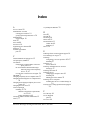
Nortel PBX 15
NT Server 4.0 Service Pack 24
NT Service Pack 5 23
NTFS 78
NuPoint Messenger 46
O
ODBC 20
OnePoint Messenger 7
Administrator Guide 11
components of 20
configuring 41
described 7–8
documentation for 9–11
readme file 69
installing client components of 55–75
testing installation 69
installing on Telephony Server computer
running Directory Administration 54
running Directory Initialization 47
overview of 77
removing 67, 71
requisite skills for installation of 9
User Guide 11
utilities 11
OnePoint Messenger Exchange Extension. See
also Exchange 8
OnePoint Messenger license key 14
OnePoint Messenger software 78
Online help 71
ONS card 81
Option Pack, NT 23
Outlook 7, 78
changing settings in 64
installing 57
installing OnePoint Messenger extensions
to 68–70
Outlook Web Access 23
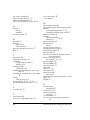
Nortel 15
PBX integrations 78
pcAnywhere 78
pcAnywhere remote control software 16
Pentium III 77
Peripherals, settings 78
Pilot number
Message Center, Automated Attendant,
and Fax on Demand 53
Power On Self Test (POST) 31
Power outlet 17
Power Supply 78
Processor 8, 77
Protocol converter 15
Protocol converters 78
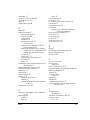
R
RAM 77
Reinstalling OneP oint Messenger 20
Remote management 16
RJ-14 ports 81
S
Security level, set 58
Service packs
required 24
Show N Tel Runtime 21, 78
Simplified Message Desk Interface (SMDI) 15
SMDI call pickup box 15
Software 78
Sound system, PC
testing 75
SX-200 81
SX-2000 80
Synchronizing directories 47
Systium Technologies guide Eight Slot NLX
Mid-tower 30
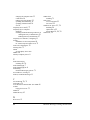
P
T
Password, local Telephony Server administrator 32
PBX integration
Lucent 15
Mitel 16
TCPIP Properties
configuring 32
Telephone User Interface (TUI) 21
Telephony Server
access 16
Index
87