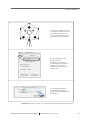
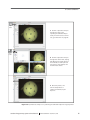
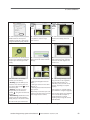
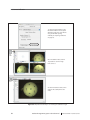
1
Electrical Geodesics, Inc.
Geodesic Photogrammetry System Technical Manual
Geodesic
Photogrammetry
System
Technical Manual
Electrical Geodesics, Inc.
Riverfront Research Park
1600 Millrace Drive, Suite 307
Eugene, OR 97403
[email protected]
www.egi.com
Geodesic
Photogrammetry
System
Technical Manual
S-MAN-200-GPSR-001
November 22, 2006
Electrical Geodesics makes no warranty or
representation, either express or implied,
with respect to this manual, its quality,
accuracy, merchantability, or fitness for a
particular purpose. In no event will Electrical
Geodesics be liable for direct, indirect,
special, incidental, or consequential damages resulting from any defect or inaccuracy in this
manual, even if advised of the possibility of such damage.
Copyright 2006 by Electrical Geodesics, Inc.
All rights reserved.
CONTENTS
List of Figures ix
List of Tables xv
Preface xvii
About This Manual . . . xix
Support and Resources . . . xxii
chapter 1
System Overview 23
Intended Use . . . 23
Hardware Design . . . 23
Operational Theory . . . 24
Operational Overview . . . 28
chapter 2
Hardware Assembly 31
GPS Environmental Conditions . . . 32
Site Requirements . . . 32
Labels and Symbols . . . 33
Overall System (Dome and Gantry) . . . 34
Assembly Instructions . . . 35
Computer and Monitor . . . 49
Isolation Transformer . . . 50
chapter 3
Safety 53
General Safety Warnings . . . 53
Moving Warnings . . . 54
Grounding Warnings . . . 54
Geodesic Photogrammetry System Technical Manual
S-MAN-200-GPSR-001 • November 22, 2006
v
Contents
Cords, Connectors, and Cables . . . 54
Disassembly . . . 55
Cleaning . . . 55
chapter 4
Software Installation 57
System Requirements . . . 57
GPS Package Contents . . . 57
Software Installation . . . 58
File Organization . . . 58
Starting Net Station . . . 59
chapter 5
Startup and Menus 61
Starting Photogrammetry . . . 61
Photogrammetry Dialog . . . 62
Photogrammetry Menu Bar . . . 64
Opening a GPS File . . . 73
chapter 6
Camera Calibration 75
Calibration Principles . . . 75
Calibration Overview . . . 76
Image Acquisition . . . 78
Modeling the Targets . . . 82
Error Messages . . . 87
The Calibration Pane . . . 91
The Calibration Files . . . 92
chapter 7
Image Acquisition 95
Acquisition Principles . . . 95
Acquisition Overview . . . 95
Before Image Acquisition . . . 97
Image Acquisition Instructions . . . 97
Acquisition Window . . . 99
chapter 8
Sensor Modeling 105
Process Overview . . . 105
Saving File Copies . . . 109
Cardinal Points . . . 109
vi
Geodesic Photogrammetry System Technical Manual
S-MAN-200-GPSR-001 • November 22, 2006
Contents
Cardinal Point Instructions . . . 110
Non-Cardinal Point Instructions . . . 117
Model Window . . . 118
Additional Window Tools . . . 124
Other Modeling Tools . . . 131
chapter 9
Data Export 137
Export Principles . . . 137
Export Instructions . . . 139
chapter 10
Compare Nets 141
Compare Nets Principles . . . 141
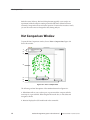
Net Comparison Window . . . 142
Compare Nets Instructions . . . 144
chapter 11
Printing GPS Images 145
Screen Shots . . . 145
TIFF Images . . . 145
chapter 12
GPS FAQs 147
General Issues . . . 148
Acquiring the Images . . . 150
Marking the Points . . . 151
Modeling the Points . . . 152
Photogrammetry Error Messages . . . 156
Appendix A
Technical Support
159
Before Contacting EGI . . . 159
Contacting EGI . . . 159
Appendix B
Updating EGI Licenses
161
Tips on Updating EGI Licenses . . . 162
Opening the Updater Application . . . 163
Generating the Update File . . . 164
Applying an Updated File . . . 165
Questions . . . 166
Geodesic Photogrammetry System Technical Manual
S-MAN-200-GPSR-001 • November 22, 2006
vii
Contents
Appendix C
EMC Declarations for GPS
167
Appendix D
Calibration Target Layouts
173
Appendix E
Sensor Layouts
179
Glossary 187
Index 191
viii
Geodesic Photogrammetry System Technical Manual
S-MAN-200-GPSR-001 • November 22, 2006
LIST OF FIGURES
Preface
P-1
chapter 1
chapter 2
Image acquisition, and sensor modeling xvii
System Overview
1-1
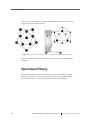
A top view of the dome and its 11 cameras (left), and attached to the
gantry (right) 24
1-2
GPS operational overview 28
Hardware Assembly
2-1
The GPS dome and gantry assembled 31
2-2
Weight, length, width, and height of assembled system 34
2-3
The gantry’s main body, straps (attached to body’s interior), and
rolling base 36
2-4
Dimensions of the assembled rolling gantry, front (left) and side
view (right) 36
2-5
Another view of the positions of the front, bottom, and strap bolts 37
2-6
Rolling base and main body connection points 39
2-7
Gantry-assembly process 40
2-8
Gantry bolt sets at three main connection points 41
2-9
The dome structure, with cameras numbered for identification 42
2-10
Gantry and dome connection points 45
2-11
Pipe clamp configurations 46
2-12
Dome-assembly process 47
2-13
Connecting the power and the USB cables 48
2-14
GPS connectivities 49
Geodesic Photogrammetry System Technical Manual
S-MAN-200-GPSR-001 • November 22, 2006
ix
List of Figures
chapter 4
Software Installation
4-1
chapter 5
chapter 6
x
The Net Station icon 59
Startup and Menus
5-1
Starting Photogrammetry 61
5-2
The Photogrammetry dialog 62
5-3
Select Subject window 63
5-4
Photogrammetry menu bar 64
5-5
Edit menu, in the 1-Up Model window 65
5-6
View menu 66
5-7
View > Info Window > General 67
5-8
OK to Revert dialog 68
5-9
View > Info Window > Calibration 68
5-10
View > Info Window > Log 69
5-11
View > Compare Nets 69
5-12
Actions menu 70
5-13
Net Station menu 70
5-14
File menu 71
5-15
Docs menu 72
5-16
Tools menu 72
5-17
GPS file icon 73
Camera Calibration
6-1
The GPS Calibration Object, separate from its stand (left) and outside the
dome (right) 76
6-2
Calibration process 77
6-3
Overview of positioning the Calibration Object for image acquisition 78
6-4
Expanded view of Steps 1–3 in positioning the Calibration Object for image
acquisition 79
6-5
Expanded view of Steps 4–6 in positioning the Calibration Object for image
acquisition 80
6-6
Expanded view of Steps 7–9 in positioning the Calibration Object for image
acquisition 81
6-7
Marking the calibration targets 83
6-8
Expanded view of Steps 1–3 in marking the calibration targets 84
6-9
Expanded view of Steps 4–6a in marking the calibration targets 85
6-10
Expanded view of Steps 6b–8 in marking the calibration targets 86
Geodesic Photogrammetry System Technical Manual
S-MAN-200-GPSR-001 • November 22, 2006
List of Figures
chapter 7
chapter 8
6-11
Unable to acquire images 87
6-12
Retry window 88
6-13
The default Acquisition window 88
6-14
Sensor Locations window 89
6-15
Calibration pane 91
6-16
File-selection dialog 92
Image Acquisition
7-1
Acquisition process 96
7-2
3-Up, All-Up, and 1-Up Acquisition windows 99
7-3
3-Up Acquisition window 100
7-4
Navigation tool 101
7-5
All-Up Acquisition window 102
7-6
1-Up Acquisition window 103
Sensor Modeling
8-1
Sensor marking 107
8-2
Editing points 108
8-3
Overview of marking and editing cardinal points 110
8-4
Expanded view of Steps 1–3 in marking and editing cardinal points 111
8-5
Expanded view of Steps 4–6 in marking and editing cardinal points 112
8-6
Expanded view of Steps 7–9 in marking and editing cardinal points 113
8-7
Point status, by dot or parentheses, in the Sensor Locations window 115
8-8
Sensor status, by color, in the Model window 115
8-9
Sensor Locations window 116
8-10
All-Up Model window 119
8-11
3-Up Model window 121
8-12
Navigation tool 121
8-13
1-Up Model window 123
8-14
The three filtered views: Normal, Inverse, and Onion Skin 125
8-15
The EGI Head Model overlay 126
8-16
The 3D Point Cloud overlay 127
8-17
Numbers applied to a model 128
8-18
The model view, in the 1-Up camera view 129
8-19
Observations window 131
Geodesic Photogrammetry System Technical Manual
S-MAN-200-GPSR-001 • November 22, 2006
xi
List of Figures
chapter 9
chapter 10
Appendix B
Appendix D
xii
8-20
The selected model number in the acquired image 133
8-21
Sensor Locations window 134
8-22
The selected sensor number in the 3-Up Model window and the
model view 135
Data Export
9-1
Skull landmarks 137
9-2
Export process 139
9-3
The Export dialog 140
9-4
An example BESA export file (left) and EMSE export file (right) 140
Compare Nets
10-1
View > Compare Nets 142
10-2
Example results from comparing the sensor registrations of a GSN, pre- and
post-exam 144
Updating EGI Licenses
B-1
Overview of the license-updating process 161
B-2
HASP-updating tips 162
B-3
Open the HASP Updater application 163
B-4
Create the HASP Update file, compress it, and email it to EGI 164
B-5
Apply the Updated file from EGI to the corresponding HASP 165
Calibration Target Layouts
D-1
Camera view 1 173
D-2
Camera view 2 174
D-3
Camera view 3 174
D-4
Camera view 4 175
D-5
Camera view 5 175
D-6
Camera view 6 176
D-7
Camera view 7 176
D-8
Camera view 8 177
D-9
Camera view 9 177
D-10
Camera view 10 178
D-11
Camera view 11 178
Geodesic Photogrammetry System Technical Manual
S-MAN-200-GPSR-001 • November 22, 2006
List of Figures
Appendix E
Sensor Layouts
E-1
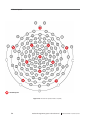
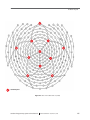
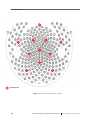
32-channel HydroCel GSN v1.0 (Adult) 180
E-2
64-channel GSN 200 v2.0 (Adult) 181
E-3
64-channel HydroCel GSN v1.0 (Adult) 182
E-4
128-channel GSN 200 v2.0 (Adult) 183
E-5
128-channel HydroCel GSN v1.0 (Adult) 184
E-6
256-channel GSN 200 v1.0 (Adult) 185
E-7
256-channel HydroCel GSN v. 1.0 (Adult) 186
Geodesic Photogrammetry System Technical Manual
S-MAN-200-GPSR-001 • November 22, 2006
xiii
List of Figures
xiv
Geodesic Photogrammetry System Technical Manual
S-MAN-200-GPSR-001 • November 22, 2006
LIST OF TABLES
chapter 2
chapter 7
Hardware Assembly
2-1
Overall operating environment
2-2
Site requirements
2-3
Labels and symbols
2-4
GPS hardware
2-5
Rolling base bolt sets
2-6
Bolts, nuts, and washers for gantry
2-7
Dome support bolt sets
2-8
Bolts, nuts, and washers for dome support
2-9
Isolation transformer specifications
2-10
GPS power values
34
37
38
43
44
50
51
Subject-positioning tips
98
Cardinal points for the GSN 200s and the HCGSNs
109
Data Export
9-1
chapter 12
33
Sensor Modeling
8-1
chapter 9
32
Image Acquisition
7-1
chapter 8
32
Fiducial points per camera view
138
GPS FAQs
12-1
GPS error messages
Geodesic Photogrammetry System Technical Manual
156
S-MAN-200-GPSR-001 • November 22, 2006
xv
List of Tables
Appendix C
Appendix E
EMC Declarations for GPS
C-1
Electromagnetic emissions for GPS
168
C-2
Electromagnetic immunity for GPS
169
C-3
Electromagnetic immunity for non-life-supporting equipment (GPS)
C-4
Recommended separation distances between portable and mobile RF
communications equipment and the GPS 171
Sensor Layouts
E-1
xvi
170
Sensor layouts
179
Geodesic Photogrammetry System Technical Manual
S-MAN-200-GPSR-001 • November 22, 2006
PREFACE
elcome to the Geodesic Photogrammetry System (GPS) from Electrical
Geodesics, Inc. (EGI). The GPS consists of a geodesic dome structure
containing 11 mounted cameras, a motorized steel gantry, and the Photogrammetry
software feature in Net Station. The GPS also comes with a data-acquisition computer
and monitor.
W
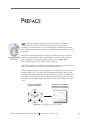
The GPS file icon
When used with the Geodesic Sensor Net (GSN) and Net Station software, the GPS
enables you to digitize dense sensor array locations conveniently and accurately.
Sensor registration is considered essential to projects involving high-density
electroencephalography (EEG), such as source localization.
Typical sensor registration is labor- and time-intensive, requiring a technician to use a
stylus or other device to touch each sensor on the subject’s head.
The GPS simplifies this process by dividing it into two: image acquisition, and sensor
modeling (Figure P-1). The geodesic dome photographs the subject wearing a GSN,
and that’s all the subject time needed for sensor registration. At some convenient time,
you mark the sensors digitally using the Photogrammetry feature, by clicking on the
tops of the sensor pedestals visible in the photos. You can view and edit your work, as
you go.
Use the GPS to photograph a
subject wearing a GSN
Mark sensors on photographs in
Net Station and model them to
determine their 3D coordinates
Figure P-1. Image acquisition, and sensor modeling
Geodesic Photogrammetry System Technical Manual
S-MAN-200-GPSR-001 • November 22, 2006
xvii
Preface
The GPS works with the GSN and Net Station. Following are brief descriptions of
these and other related EGI products. The manuals are available as PDF files at
www.egi.com/documentation.html:
Hardware related
• The Geodesic Photogrammetry System is EGI’s
icosahedron-based structure for acquiring images of
subjects wearing Geodesic Sensor Nets and for registering
sensor positions in Net Station. This manual, the Geodesic
Photogrammetry System Technical Manual, describes all
GPS features and functions.
• The Geodesic Sensor Net is EGI’s patented dense-array
device for acquiring electrical signals from the human
scalp. The Geodesic Sensor Net Technical Manual
describes all GSN features and functions.
• The GES hardware is all the hardware for the Geodesic
EEG Systems except for the GSN. GES hardware
components support the acquisition and processing of EEG
data and include an amplifier, data-acquisition computer,
and oftentimes a system cart. The GES Hardware Technical
Manual describes all hardware components and features
of the Geodesic EEG Systems.
Software related
• The Net Station Acquisition is the component of
Net Station for acquiring EEG, in conjunction with
Geodesic Sensor Nets. The Net Station Acquisition
Technical Manual describes all Acquisition features and
functions.
• The Net Station Viewer is the component of Net Station for
viewing and navigating EEG data. The Net Station Viewer
Technical Manual describes all Viewer features and
functions.
xviii
Geodesic Photogrammetry System Technical Manual
S-MAN-200-GPSR-001 • November 22, 2006
Preface
• The Net Station Waveform Tools is the component of
Net Station for performing various operations on EEG
data. The Net Station Waveform Tools Technical Manual
describes all Waveform Tools features and functions.
• The Net Station Viewer and Waveform Tools Tutorial
instructs you in the use of Net Station Viewer and
Waveform Tools by guiding you through the analysis of a
sample data set. It is not intended to be a comprehensive
guide to these components, but it is a good place to start
when learning about the software.
• The Net Station File Formats Technical Manual
documents the objects contained in a native Net Station
file, the formats of the export files, and other files
associated with Net Station.
These publications contain a good deal of background information on the EEG field.
However, they are not intended to represent a complete primer. To get the most out of
these books, you should have some background in EEG methods.
The manuals assume familiarity with the Macintosh computer, the platform for
Net Station.
Note: Net Station does not support Unicode string.
About This Manual
This manual, the Geodesic Photogrammetry System Technical Manual, covers both the
hardware and software aspects of the GPS. It documents the concepts underlying the
system, installation requirements and procedures, and all software menus, windows,
dialogs, and features. The manual also describes the operating procedures for image
acquisition, sensor marking and editing, and data export.
Features
This manual is supplied as a PDF file and in printed form. The hard-copy version has
been printed from the PDF so the content of both will match. The hard-copy manual
contains mostly grayscale images; the PDF contains color and grayscale images.
Geodesic Photogrammetry System Technical Manual
S-MAN-200-GPSR-001 • November 22, 2006
xix
Preface
Manual Organization
This manual features a table of contents, list of figures, list of tables, and index, which
in the PDF are all hyperlinked to the topics they reference in the manual.
The chapters fall into two main categories:
• Background and setup
° Chapter 1, "System Overview,” describes the system operational theory,
hardware design, and routine operation.
° Chapter 2, "Hardware Assembly,” describes the hardware components, site
requirements, and assembly procedures.
° Chapter 3, "Safety,” describes warnings and cautions related to the GPS.
° Chapter 4, "Software Installation,” provides general information about the
software, such as system requirements, GPS package contents, and
installation.
• Operations and windows
° Chapter 5, "Startup and Menus,” describes basic GPS controls and tasks,
including the Photogrammetry dialog and Photogrammetry menu bar, and
how to open a GPS file.
° Chapter 6, "Camera Calibration,” describes the procedures for using the
supplied Calibration Object to generate the Precise Camera Description file
for the GPS.
° Chapter 7, "Image Acquisition,” describes how to use the Acquisition
window to acquire high-quality images. The chapter also includes detailed
descriptions of the window’s menus, views, dialogs, and options.
° Chapter 8, "Sensor Modeling,” describes how to use the Model window to
mark sensors on the acquired images. The chapter discusses how to fit an
approximate model of the Net, generate estimates of sensor locations, check
Net model solutions, and edit User marks. The chapter also includes detailed
descriptions of the window’s menus, views, dialogs, and options.
° Chapter 9, "Data Export,” describes how to export the coordinate data to a
text file for use in the third-party applications BESA and EMSE.
xx
Geodesic Photogrammetry System Technical Manual
S-MAN-200-GPSR-001 • November 22, 2006
Preface
° Chapter 10, "Compare Nets,” describes using the Compare Nets menu
command to register sensors before and after an EEG session, to measure
sensor displacement.
° Chapter 11, "Printing GPS Images,” describes how to print images acquired
by the GPS.
° Chapter 12, "GPS FAQs,” lists frequently asked questions regarding overall
GPS operations, image acquisition, and sensor modeling and provides a table
of error messages and solutions.
A number of appendixes are also included:
•
•
•
•
•
Appendix A, "Technical Support”
Appendix B, "Updating EGI Licenses”
Appendix C, "EMC Declarations for GPS”
Appendix D, "Calibration Target Layouts”
Appendix E, "Sensor Layouts”
Conventions and Typography
• In this manual, Geodesic Sensor Net, GSN, and Net are synonyms and refer
generically to both the GSN 200 and HydroCel GSN, unless otherwise noted.
• In this manual, Geodesic Photogrammetry System and GPS are synonyms and
refer to the system in general; Photogrammetry refers to the software interface
used to acquire images and to mark, edit, and export sensor locations.
• The GPS can be used in both research and clinical settings. For convenience, the
manual uses the term subjects to refer to both research subjects and clinical
patients.
• In general, a minimal amount of special fonts is used—italics for definitions or
newly introduced terms, boldface italics for important concepts or for special
emphasis, and boldface for command paths (for example, File > Open).
Geodesic Photogrammetry System Technical Manual
S-MAN-200-GPSR-001 • November 22, 2006
xxi
Preface
Additional Information
Three different methods are used to convey additional information: notes, cautions,
and warnings.
Note: This indicates information that is helpful in understanding GPS operations.
Caution!: This denotes important information that, if unheeded, could hinder use
of the product or result in injury or equipment damage.
WARNING!: This denotes important information that, if unheeded, could result
in serious injury or death.
Support and Resources
• For online updates to this book, check EGI’s Documentation page at
www.egi.com/documentation.html.
• For GPS technical support, see Appendix A, "Technical Support.”
xxii
Geodesic Photogrammetry System Technical Manual
S-MAN-200-GPSR-001 • November 22, 2006
chapter 1
CHAPTER
1
SYSTEM OVERVIEW
T
he Geodesic Photogrammetry System (GPS) increases the convenience and
accuracy of sensor registration by dividing the process into two steps: image
acquisition, and onscreen sensor modeling.
The two main advantages of this division are:
• Subject time is minimized during image acquisition. Acquiring images typically
takes less than 5 minutes.
• Sensor registration is editable. You can correct errors or improve the accuracy of
the sensor registration, through careful work with the acquired images.
This chapter introduces you to the GPS. Included are descriptions of the intended use,
hardware design, operational theory, and operational overview.
Intended Use
The GPS is intended for use in recording precise locations of EEG electrodes in the
Geodesic Sensor Net (GSN) on a patient’s or subject’s head.
Hardware Design
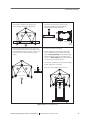
The main GPS hardware consists of a geodesic dome attached to a motorized gantry
(Figure 1-1), which lifts and lowers the dome over a subject wearing a GSN. The dome
is in the shape of an icosahedron with the bottom removed, and a camera is mounted
Geodesic Photogrammetry System Technical Manual
S-MAN-200-GPSR-001 • November 22, 2006
23
1: System Overview
at each of the 11 remaining vertices. Other standard GPS hardware includes the dataacquisition computer and the monitor.
Figure 1-1. A top view of the dome and its 11 cameras (left), and attached to the gantry (right)
Chapter 2 describes the GPS hardware in detail and provides step-by-step assembly
instructions.
Operational Theory
The aim of photogrammetry is to reconstruct a 3D world from 2D images. The basic
principle is triangulation, which mathematically intersects lines of sight extending
from multiple cameras to a point on the object to produce a 3D coordinate.
24
Geodesic Photogrammetry System Technical Manual
S-MAN-200-GPSR-001 • November 22, 2006
1: System Overview
Calibration
The GPS process depends on accurate calibration of the camera system, so that the
lines of sight to each sensor in a GSN can be projected precisely into space and the
locations can be triangulated accurately.
Theory
With the GPS, a linear camera model is created by defining 11 parameters:
•
•
•
•
•
•
camera location (3 parameters)
camera orientation (3)
focal length (1)
pixel scale (1)
pixel aspect ratio (1)
image plane center offset (2)
These parameters are used to define a projection operator for each camera, which maps
from a 3D point in space to a 2D location in the acquired image.
From these physically defined parameters, a linear polynomial camera projection
operator can be defined as follows:
u=
ax + by + cz + d
ix + jy + kz + 1
v=
ex + fy + gz + h
ix + jy + kz + 1
where a–k are the camera parameters; x, y, and z are the object (model) point
coordinates; and u and v are the image coordinates.
If a single object (with 3-space coordinates x, y, and z) is viewed through two or more
cameras, then a linear system with distinct camera parameters and image coordinates
for each camera can be formed. The resulting system has three unknowns and 2*n
equations (where n is the number of cameras). This system is solved using pseudoinverse methods to obtain a “least squares” estimate of the 3-space coordinates.
Geodesic Photogrammetry System Technical Manual
S-MAN-200-GPSR-001 • November 22, 2006
25
1: System Overview
These coordinates are substituted into the projection operator to obtain new values
for the image coordinates u and v; the difference norm (root-mean-square or RMS
error) between the measured and the projected image coordinates is used as a
measure of the consistency between the observed image coordinates.
Practice
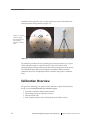
The GPS Calibration Object is a precisely manufactured sphere with 36 calibration
targets marked and labeled on its surface; the x, y, z coordinates of each target are
known in the GPS software.
To calibrate the GPS, place the Calibration Object in the geodesic dome, acquire an
image set, and in the acquired images mark and number the calibration targets. An
optimization procedure is used for the camera parameters so as to place all the
calibration targets on a spherical surface of the correct radius, while maintaining high
convergence between intersecting rays corresponding with each target.
Once a camera is calibrated, a point within an image defines a ray in space, which
must intersect the position of the point in 3D space. The intersection of two such rays
(from two different cameras) uniquely defines that 3D position.
Calibration instructions are provided in Chapter 6.
Modeling
With the GPS, you create 2D User marks by clicking on visible sensors in each of the 11
acquired images. Once the marking is completed, click the Identify Sensors button to
initiate the process of determining the sensors’ correct ID numbers (according to the
built-in sensor layout) and using triangulation to create a 3D model of the GSN.
26
Geodesic Photogrammetry System Technical Manual
S-MAN-200-GPSR-001 • November 22, 2006
1: System Overview
The software projects those 3D points back through the cameras (applying the camera
calibration values to them), and displays them as points in a 3D Point Cloud model
that can be overlaid on the acquired images. The differences between the 2D User
marks and the 3D Point Cloud marks are the root mean square errors of the solved
locations. The RMS is measured in centimeters (if measuring the RMS for the entire
system or for a Compare Nets function, which occur in 3D space) or pixels (if viewing
the RMS in the Sensor Locations window, which calculates the error in 2D space).
Point Solution
If the software is uncertain about the correct ID numbers of some sensor locations, it
assigns temporary numbers and labels them as “unsolved.” To solve these points, you
must renumber them, based on the information provided by the GSN sensor layout
map, and click the Update Model button to propagate the changes to the 3D model.
Because of the large number of sensor positions that must be solved, the GPS requires
a two-step approach:
• Mark and solve a subset of sensors in the GSN. These sensors, called cardinal
points, are control points and establish an initial solution set.
• Mark and solve all the other sensors in the GSN. The software uses the cardinalpoint solutions to anchor its calculations.
Chapter 7 describes image acquisition; Chapter 8 covers sensor modeling.
Geodesic Photogrammetry System Technical Manual
S-MAN-200-GPSR-001 • November 22, 2006
27
1: System Overview
Operational Overview
We recommend practicing the entire acquisition and modeling processes at least once
before attempting sensor registration on a subject. Figure 1-2 provides a broad outline
of typical operational steps using a GPS that has been properly calibrated.
Image Acquisition
Center the subject
within the dome.
In the Photogrammetry
dialog, create a GPS file,
choose the correct Net
size, and click Capture
Images to view streaming
video of the subject.
Review streaming images to ensure that the
subject’s head is centered in each camera
view and almost no sensors are obscured;
adjust as necessary. Click Take Pictures to
capture still images; review again; click
Accept Pictures when satisfied.
Sensor Markup and Modeling
Use the mouse or other
pointer to mark visible
sensor pedestals on each
acquired image; click
Identify to cross-correlate
correct sensor IDs and points;
use camera overlays,
camera filters, and other
tools to solve “unsolved”
points; and click Update to
modify the 3D Point Cloud.
Export data for use in
third-party applications
such as BESA or EMSE.
Figure 1-2. GPS operational overview
28
Geodesic Photogrammetry System Technical Manual
S-MAN-200-GPSR-001 • November 22, 2006
1: System Overview
If the sensors become disarranged during the EEG session, the Compare Nets
feature enables you to measure the amount of sensor displacement. Just repeat the
image-acquisition and sensor-modeling process illustrated in Figure 1-2 and choose
View > Compare Nets.
The Compare Nets feature is described in Chapter 10.
Note: In most cases, comparing Nets should be unnecessary. The exceptions are timeintensive experiments such as sleep studies.
Geodesic Photogrammetry System Technical Manual
S-MAN-200-GPSR-001 • November 22, 2006
29
1: System Overview
30
Geodesic Photogrammetry System Technical Manual
S-MAN-200-GPSR-001 • November 22, 2006
chapter 2
CHAPTER
2
HARDWARE
ASSEMBLY
T
he Geodesic Photogrammetry System is designed for easy assembly. The main
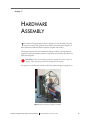
hardware consists of the geodesic dome and the motorized gantry (Figure 2-1).
Other hardware includes the data-acquisition computer and monitor.
This chapter discusses the environmental operating conditions, site requirements,
equipment symbols and labels, hardware components, and assembly procedures for
the dome and gantry.
WARNING!: Follow the assembly instructions carefully and review Chapter 3,
"Safety,” before operating the Geodesic Photogrammetry System.
For topics not covered in this manual, contact EGI Technical Support (Appendix A).
Figure 2-1. The GPS dome and gantry assembled
Geodesic Photogrammetry System Technical Manual
S-MAN-200-GPSR-001 • November 22, 2006
31
2: Hardware Assembly
GPS Environmental Conditions
The GPS is designed for use under the environmental conditions listed in Table 2-1.
For information about electromagnetic compliance (EMC), see Appendix C.
Table 2-1. Overall operating environment
Storage temperature
–10° to 50° C (14° to 122° F)
Operating temperature
10° to 35° C (50° to 95° F)
Relative humidity
5% to 95% noncondensing
Maximum altitude
3,000 m (9,842 ft)
Site Requirements
The site requirements fo4r the assembled GPS gantry and dome are listed in Table 2-2.
Table 2-2. Site requirements
Location
In or adjacent to the room containing the EGI data-acquisition setup
Area
102 x 150 cm, or 40 x 59 in (w x d)
Ceiling height
221 cm (87 in)
Door width
89 cm (35 in) if dome is separated from gantry and tilted sideways
—or—
102 cm (40 in) if GPS is assembled
32
Lighting
Even and diffuse; no exposed light bulbs. May need to open curtains
or blinds for additional natural light
Subject chair
Low-backed chair for clear lines of sight from the cameras to the
sensors on the head
Geodesic Photogrammetry System Technical Manual
S-MAN-200-GPSR-001 • November 22, 2006
2: Hardware Assembly
Labels and Symbols
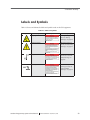
Table 2-3 shows and defines the labels and symbols used on the GPS equipment.
Table 2-3. Labels and symbols
Symbol
Description
Symbol
Description
Tipping hazard
Moving warnings; for
text, see “Moving
Warnings” on page 54
Electrical hazard
Grounding warnings;
for text, see “Grounding
Warnings” on page 54
Temperature limits
Moving parts warnings;
for text, see “General
Safety Warnings” on
page 53
Humidity limits
General safety
warnings; for text, see
“General Safety
Warnings” on page 53
Geodesic Photogrammetry System Technical Manual
S-MAN-200-GPSR-001 • November 22, 2006
33
2: Hardware Assembly
Overall System (Dome and Gantry)
The main components of the Geodesic Photogrammetry System are the geodesic
dome and the gantry, which are shipped in two separate crates. Assembly of the main
system components is discussed later in this chapter. Assembled, the system
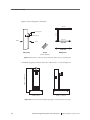
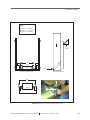
measures 150 x 102 x 221 cm. (l x w x h) and weighs 77 kg; see Figure 2-2.
weight = 77 kg
length = 150 cm
width = 102 cm
height = 221 cm
Figure 2-2. Weight, length, width, and height of assembled system
Table 2-4 lists all the hardware components that come in the two crates for assembling
the complete GPS.
Table 2-4. GPS hardware
Component
34
Description
Dome
Icosahedral aluminum structure measuring:
102 x 102 x 89 cm, or 40 x 40 x 35 in (l x w x h)
Gantry (main body)
Steel support structure measuring:
57.2 x 34.6 x 130.2 cm, or 2.5 x 13.6 x 51.3 in (l x w x h)
Gantry (rolling base)
Steel mobile base measuring:
110.5 x 84 x 15 cm, or 43.5 x 33 x 6 in (l x w x h)
Calibration Object
Precisely manufactured sphere measuring:
10.91 cm (9 in) in radius
Geodesic Photogrammetry System Technical Manual
S-MAN-200-GPSR-001 • November 22, 2006
2: Hardware Assembly
Table 2-4. GPS hardware
Calibration stand
Manfrotto 3001 BD tripod stand
Materials to connect
gantry’s rolling base
to main body
(2) 3/8-16 x 2 1/2 bolts
(2) 3/8-16 hex nuts
(4) 3/8 flat washers
(4) 1/4-20 x 3/4 bolts
(2) 1/4-20 hex nuts
(4) 1/4 flat washers
Assembly requires (1) 9/16 end wrench, (1) 9/16 socket
wrench, (1) 7/16 end wrench, and (1) 7/16 socket wrench,
which are not provided.
Materials to connect
dome to gantry’s dome
support
(2) 1/4-20 x 3 bolts
(4) 1/4-20 x 2 bolts
(6) 3/8 acorn nuts
(3) pipe clamps
(6) 3/8 flat washers (shims)
Assembly requires (1) 3/8 end wrench and 1 (3/8) socket
wrench, which are not provided.
Assembly Instructions
The geodesic dome and gantry are packaged in two separate crates. Bolts, washers,
nuts, and clamps are loosely attached to their intended locations on the equipment.
Caution!: Assembly requires two people because of the GPS size and weight.
Gantry Overview
The gantry consists of the rolling base and the main body. Assembly entails securing
the main body to the rolling base. The main body contains a dome support (see Figure
2-3) that is designed to hold the GPS dome. In addition, a motorized control on the
gantry lifts and lowers the dome.
Geodesic Photogrammetry System Technical Manual
S-MAN-200-GPSR-001 • November 22, 2006
35
2: Hardware Assembly
Figure 2-3 shows the gantry’s main parts.
left arm
back
Dome support
Motorized control
right arm
Back
Front
Top view
Side view
Main body
Straps
(internal supports)
Rolling base
Figure 2-3. The gantry’s main body, straps (attached to body’s interior), and rolling base
height = 145.42 cm
Assembled, the gantry measures 110.5 x 84 x 145.42 cm (l x w x h); see Figure 2-4.
width = 84 cm
length = 110.5 cm
Figure 2-4. Dimensions of the assembled rolling gantry, front (left) and side view (right)
36
Geodesic Photogrammetry System Technical Manual
S-MAN-200-GPSR-001 • November 22, 2006
2: Hardware Assembly
Assembling the Gantry
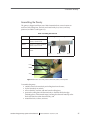
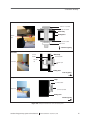
The gantry is shipped with three sets of bolts fastened in their correct locations on
each arm of the rolling base. The bolts are located in the front, bottom, and strap
positions (see Table 2-5 and Figure 2-5).
Table 2-5. Rolling base bolt sets
Location
Components
Photo of right arm of rolling base
Front
1/4-20 x 3/4 bolt, (2) 1/4 flat
washers, 1/4-20 hex nut
Bottom
3/8-16 x 2 1/2 bolt, (2) 3/8 flat
washers, 3/8-16 hex nut
Strap
1/4-20 x 3/4 bolt and 1/4
washer
Front
Bottom
Strap
Front
Bottom
Strap
Figure 2-5. Another view of the positions of the front, bottom, and strap bolts
To assemble the gantry:
•
•
•
•
carefully remove the main body and rolling base from the crate;
lay the main body on its back;
remove the bolts, washers, and nuts from the rolling base;
position the rolling base and the main body so that their bolt holes align
(including those of the internal straps), ensuring that the small metal lip at the
back of the base lies within the main body; and
• reattach the bolts, washers, and nuts.
Geodesic Photogrammetry System Technical Manual
S-MAN-200-GPSR-001 • November 22, 2006
37
2: Hardware Assembly
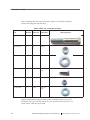
Table 2-6 identifies the bolts, nuts, and washers. Figure 2-6 shows their connection
points in the rolling base and main body.
Table 2-6. Bolts, nuts, and washers for gantry
Label in
Position in
Item
Quantity
Figure 2-6
rolling base
3/8-16 x 2 1/2 bolt
2
B
bottom
3/8-16 hex nut
2
B
bottom
3/8 flat washer
4
B
bottom
1/4-20 x 3/4 bolt
4
A&C
front and
strap
1/4-20 hex nut
2
A
front
1/4 flat washer
4
A&C
front and
strap
Photo (actual size)
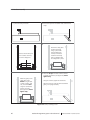
Figure 2-7 illustrates the gantry-assembly process. Assembly requires one (1) 9/16
end wrench, one (1) 9/16 socket wrench, one (1) 7/16 end wrench, and one (1) 7/16
socket wrench, which are not provided.
38
Geodesic Photogrammetry System Technical Manual
S-MAN-200-GPSR-001 • November 22, 2006
2: Hardware Assembly
Key:
A (front) = 1/4-20 bolt
B (bottom) = 3/8-16 bolt
C (strap) = 1/4-20 bolt
dome
support
A
B
C
C
Rolling base (bottom view)
Main body (side view)
A
A
B
B
Main body (bottom view)
C
Figure 2-6. Rolling base and main body connection points
Geodesic Photogrammetry System Technical Manual
S-MAN-200-GPSR-001 • November 22, 2006
39
2: Hardware Assembly
1 Lay the main body on its back.
2 Remove the tape from the bottom ends of the internal
straps.
3
4
Remove the six bolts (and
their washers and nuts)
from the rolling base.
5
Position the rolling base
and the main body,
lining up the six bolt
holes and fitting the
small lip on the base
inside the main body.
Have a colleague hold
the rolling base in place.
6 Attach the straps to the base with the 1/2-20 x
3/4 bolts and washers. (See Figure 2-8.) Hand
tighten only.
Attach the gantry to the
rolling base at the
bottom using the 3/816 bolts, washers, and
nuts, and at the front
using the 1/4-20 bolts,
washers, and nuts.
(See Figure 2-8.) Hand
tighten only.
Using the wrenches, tighten all six bolt sets.
With one person on each side of the assembled
gantry, set it upright carefully.
Figure 2-7. Gantry-assembly process
40
Geodesic Photogrammetry System Technical Manual
S-MAN-200-GPSR-001 • November 22, 2006
2: Hardware Assembly
Bottom bolt
3/8-16 x 2 1/2 bolt
3/8-16 washer
Main body
Rolling base
Bottom
bolt
3/8-16 washer
3/8-16 nut
Bottom of gantry
Front bolt
1/4-20
washer
Front bolt
1/4-20
nut
Main body
1/4-20 washer
1/4-20 x 3/4
bolt
Rolling base
Front of gantry
Strap bolt
Strap
1/4-20 washer
Strap bolt
1/4-20 x 3/4 bolt
Rolling base
Inside of gantry
Figure 2-8. Gantry bolt sets at three main connection points
Geodesic Photogrammetry System Technical Manual
S-MAN-200-GPSR-001 • November 22, 2006
41
2: Hardware Assembly
Dome Overview
The dome is a single, welded aluminum unit that measures 102 x 102 x 89 cm
(l x w x h); see Figure 2-9. A pentagon-shaped container at each of the 11 vertices
holds a circuit board mounted with a camera, a Universal Serial Bus interface, and a
ring of high-intensity white LEDs.
USB cables pass through the hollow aluminum tubes of the dome, supplying power
to the cameras and linking each camera to the hub, which is housed in camera 9.
Top level
(1)
Second level
(2–6,
clockwise)
89 cm
Third level
(7–11,
clockwise)
Hub
Power cable exiting the hub
USB cable exiting the hub
Gantry
Front of GPS
102 cm
Figure 2-9. The dome structure, with cameras numbered for identification
A USB cable exits camera 9 and connects to a USB port on the data-acquisition
computer.
42
Geodesic Photogrammetry System Technical Manual
S-MAN-200-GPSR-001 • November 22, 2006
2: Hardware Assembly
Note: Do not plug the USB cable into another USB hub. Running the cable through the
hub may result in poor-quality images.
A power supply cable also exits camera 9 and plugs into the power supply cable
located on the front of the gantry’s main body.
The cameras are not numbered on the dome. For reference, Figure 2-9 shows the
camera-numbering scheme, which has (clockwise from top to bottom) camera 1
pointed up and camera 2 pointed forward. Camera 9 faces the gantry.
Connecting the Dome to the Gantry
Assembly requires securing the dome to the dome support on the gantry. Three
sets of bolts are fastened in their correct positions on the dome support before
shipping. The locations are in vertical and horizontal positions. The bolt sets are listed
in Table 2-7, which also shows a photograph of the bolt sets on the vertical and
horizontal arms of the dome support.
Table 2-7. Dome support bolt sets
Location
Components
Photo
Vertical
pipe clamp, 1/4-20 x 2 bolts,
3/8 acorn nuts, 3/8 flat washers
(shims)
Horizontal
pipe clamp, 1/4-20 x 3 bolts,
Vertical
3/8 acorn nuts
Horizontal
To secure the dome to the dome support:
• carefully remove the dome from its crate;
• remove the protective foam tubing from the dome;
• remove the acorn nuts and the top halves of the pipe clamps on the gantry’s
dome support;
• position the dome so that it fits within the bottom halves of the pipe clamps on
the dome support; and
• reattach the top halves of the pipe clamps and the acorn nuts.
Geodesic Photogrammetry System Technical Manual
S-MAN-200-GPSR-001 • November 22, 2006
43
2: Hardware Assembly
Table 2-8 identifies the bolts, nuts, pipe clamps, and washers. Figure 2-10 indicates the
connection points in the dome support and dome.
Table 2-8. Bolts, nuts, and washers for dome support
Label in
Item
44
Quantity
Figure 2-10
1/4-20 x 2 bolt
4
B
3/8 acorn nut
6
A&B
pipe clamp
3
A&B
1/4-20 x 3 bolt
2
A
3/8 flat washer
6
A
Photo (actual size)
Geodesic Photogrammetry System Technical Manual
S-MAN-200-GPSR-001 • November 22, 2006
2: Hardware Assembly
Key:
A (vertical) = 1/4-20 x 3 bolt
B (horizontal) = 1/4-20 x 2 bolt
A
A
4
5
B
B
B
9
Figure 2-10. Gantry and dome connection points
Figure 2-11 shows the configuration of the pipe clamp sets.
Figure 2-12 illustrates the dome-assembly process. Assembly requires one (1) 3/8 end
wrench and one (1) 3/8 socket wrench, which are not provided.
Figure 2-13 shows how to connect the USB and power cables.
Geodesic Photogrammetry System Technical Manual
S-MAN-200-GPSR-001 • November 22, 2006
45
2: Hardware Assembly
A. Three sets of pipe clamps are
attached to the dome support.
B. A pipe clamp set consists of two separable
halves connected by bolts and nuts.
top half
bottom half
C. The pipe clamp on the vertical arm
of the dome support contains 1/4-20 x
3 bolts and uses three washers per bolt
as shims.
D. The pipe clamps on the horizontal
arm each contain 1/4-20 x 2 bolts and
use no shims.
acorn nuts
acorn nuts
washers
1/4-20 x 2 bolts
1/4-20 x 3 bolts
dome support
dome support
Figure 2-11. Pipe clamp configurations
46
Geodesic Photogrammetry System Technical Manual
S-MAN-200-GPSR-001 • November 22, 2006
2: Hardware Assembly
1 Use a straight edge and/or a level to verify that the
dome tubing is straight. If any tubing is bent,
contact EGI Technical Support (Appendix A).
2 The dome support on the gantry contains three
pipe clamp sets. Unscrew the acorn nuts and
remove the top half of each pipe clamp set,
leaving the bottom halves connected.
top half
bottom half
dome
support
3 Power and USB cables exit camera 9, which is the
hub. Tubing connects camera 9 to cameras 4 and 5.
The tubing between cameras 4 and 5, 5 and 9, and 9
and 4 are where the dome connects to the pipe
clamps.
4 Lock the front wheels of the gantry.
Have a colleague line up the dome with the pipe
clamps and hold the dome in place. Connect the
dome by hand-tightening the top half of the pipe
clamps and the acorn nuts over the tubing on the
vertical arm. Hand-tighten the pipe clamps and nuts
over the tubing on the horizontal arm.
Tilt the dome up and down, to ensure that the tubing is
straight; adjust dome, as needed.
A
A
4
Using the wrenches, tighten all six acorn nuts.
5
B
B
B
B
9
Figure 2-12. Dome-assembly process
Geodesic Photogrammetry System Technical Manual
S-MAN-200-GPSR-001 • November 22, 2006
47
2: Hardware Assembly
After the GPS is assembled, plug the USB cable exiting camera 9 into an unused
USB port on the data-acquisition computer. Do not plug the USB cable into a
USB hub.
Plug the power supply cable exiting camera 9 into the power supply cable exiting
the front of the gantry (see photo below).
Power supply
cable (gantry)
Power supply
cable (dome)
USB cable
At the bottom of the gantry, plug the power cord to a 110–127 VAC, 60 Hz power
supply in the room.
Power cord for
connection to
external power
supply
Figure 2-13. Connecting the power and the USB cables
48
Geodesic Photogrammetry System Technical Manual
S-MAN-200-GPSR-001 • November 22, 2006
2: Hardware Assembly
Computer and Monitor
The GPS comes with a data-acquisition computer and monitor to acquire, view, and
edit GPS images. The computer is an Apple PowerMac G5, and the monitor is a 23inch Apple Cinema Display. Information about both is provided in the GES Hardware
Technical Manual and the respective Apple User’s Manuals.
Connectivities
The computer serves as the platform for the Photogrammetry image acquisition and
review software. The computer connects to the GPS hardware via a USB cable; see
Figure 2-14, which also shows the connectivities for the monitor and the keyboard.
The keyboard is supplied with a 2-meter USB cable, and extensions are available. For
troubleshooting the monitor, keyboard, or mouse, see the GES Hardware Technical
Manual, the Apple User’s Manual, or http://www.store.apple.com.
Gantry
Power cord
from dome
to gantry
Monitor
Dome
Power
Monitor
Power
supply
Power
Keyboard
Computer
Actuator
motor
USB
USB
USB
Mouse
Isolation
transformer
Power
Figure 2-14. GPS connectivities
Geodesic Photogrammetry System Technical Manual
S-MAN-200-GPSR-001 • November 22, 2006
49
2: Hardware Assembly
Isolation Transformer
Inside the gantry are a power supply, isolation transformer, and actuator motor (for
moving the dome vertically).
Both the power supply and actuator motor plug into the isolation transformer, which
plugs into mains supply. The purpose of the isolation transformer is to provide
isolation from ground for all components plugged into it. As a result, if a person
inadvertently comes into contact with these components and an electrical potential,
the transformer will prevent a current flowing from these components through the
person’s body to ground.
The isolation transformer is an international medical/hospital-grade unit from Toroid
Corporation of Maryland. The transformer is fused for 3.15 AT (120 V) or 1.6 AT
(240 V); its capacity is 300 VA max. For fuse replacement instructions, refer to the
transformer operating instructions.
Table 2-9 lists the transformer’s specifications. Table 2-10 lists the power consumption
values for the GPS.
Table 2-9. Isolation transformer specifications
50
Fuse rating
3.15 AT (120 V) or 1.6 AT (240 V)
Capacity
300 VA max
Compliance
UL2601.1,CSA C22.2 No. 601.1, EN60601-1,EN60742,
IEC601-1, CE Mark
Power
Selectable, 115 or 230 V 50-60 Hz, input/output
Leakage current
<100 µA
Outlets
Appliance type (IEC 60320)
Miscellaneous
Low weight, magnetic strayfield, mechanical noise, and losses;
high efficiency
Geodesic Photogrammetry System Technical Manual
S-MAN-200-GPSR-001 • November 22, 2006
2: Hardware Assembly
Table 2-10. GPS power values
Monitor only
80 VA
DAC only
150 VA
Gantry motor only
150 VA
Gantry motor and dome
170 VA
Full system (DAC, monitor, dome, and gantry),
attached but inactive
275 VA
Full system, acquiring video, lights on, gantry
motor active
400 VA
GPS load on isolation transformer
(gantry and dome)
170 VA
Geodesic Photogrammetry System Technical Manual
S-MAN-200-GPSR-001 • November 22, 2006
51
2: Hardware Assembly
52
Geodesic Photogrammetry System Technical Manual
S-MAN-200-GPSR-001 • November 22, 2006
chapter 3
CHAPTER
3
SAFETY
A
fter installing the hardware, read the cautions and warnings in this chapter
before operating the GPS. For issues not covered in this chapter, contact EGI
Technical Support (Appendix A).
The information in this manual is subject to change, without notice. The manufacturer
declines responsibility for the safety, reliability, and performance of system
components, if not used in compliance with official documentation.
WARNING!: It is important to use the GPS only according to the
manufacturer’s instructions.
General Safety Warnings
Following are general safety WARNINGs regarding the GPS. As stated in the
Preface, warnings denote important information that, if unheeded, could result
in serious injury or death:
• Moving parts are a pinch-and-crush hazard. Keep all clothing, hair, and body
parts well away from moving parts. Use caution when operating to prevent
injury.
• Keep objects clear of system during adjustment. Doing so will prevent damage
or system tipping.
• Do not immerse or splash electrical equipment. Damage or injury may result. If
liquids are spilled on the GPS’s electronic components, immediately disconnect
it from any power source. Do not use a GPS that has suffered exposure to
liquids until EGI or other qualified personnel certify that the liquid or liquid
residue has not affected device operation or subject safety.
• Do not use in flammable gas environments.
Geodesic Photogrammetry System Technical Manual
S-MAN-200-GPSR-001 • November 22, 2006
53
3: Safety
Moving Warnings
The Geodesic Photogrammetry System weighs 77 kg (170 lb). Following are
WARNINGs regarding moving the GPS:
• Do not tip the system greater than 10 degrees in any direction. Damage or
injury may result.
• Use caution when moving.Otherwise, damage or injury may result.
Grounding Warnings
Following are WARNINGs regarding the GPS’s grounding issues:
• Only authorized personnel may service this equipment. Hazardous mains
voltage inside. Refer all servicing to EGI or other qualified personnel.
• Disconnect power before servicing to prevent damage or injury.
• Ensure grounding reliability. This can be achieved only when equipment is
connected to an equivalent receptacle marked “Hospital Only” or “Hospital
Grade.”
• Use a properly grounded outlet. Otherwise, damage or injury may result.
Cords, Connectors, and Cables
Following are WARNINGs regarding the GPS’s cords, connectors, and
cables:
• Use approved power cords. Do not use any power cord with the GPS that is not
approved in the country where the system is being used. In the United States
and Canada, a hospital-grade plug-cord set must be used.
• Inspect your connectors and cables. To reduce the risk of electrical shock,
discontinue use of worn or damaged electrical connectors and cables.
54
Geodesic Photogrammetry System Technical Manual
S-MAN-200-GPSR-001 • November 22, 2006
3: Safety
Disassembly
Following are WARNINGs regarding disassembly of the GPS:
• Do not open and try to fix the GPS. The interior of the GPS contains no userserviceable parts. In the event that the GPS requires servicing, contact EGI
Technical Support (Appendix A).
• Do not touch the power supply. The gantry body houses the power supply.
Touching any internal portion of the power supply while the GPS is powered
could result in electrical shock or electrocution.
• Do not open the GPS when in use. Open the GPS gantry body only if the system
is powered off and the power cord is unplugged from the outlet.
Caution!: Removing any of the outer panels of the GPS or disassembling the
system in any way may defeat electrical safety.
Cleaning
To clean the GPS safely:
•
•
•
•
•
Switch the GPS off before cleaning.
Prevent any liquid or sterilized agent from entering the GPS.
Do not use abrasive products.
Use a soft brush to remove dust from cracks and near connectors.
Clean the external surface with a cloth, lightly soaked with lukewarm water
and a gentle detergent based on neutral soap.
• Dry with a clean, dry, lintfree cloth.
Geodesic Photogrammetry System Technical Manual
S-MAN-200-GPSR-001 • November 22, 2006
55
3: Safety
56
Geodesic Photogrammetry System Technical Manual
S-MAN-200-GPSR-001 • November 22, 2006
chapter 4
CHAPTER
4
SOFTWARE
INSTALLATION
T
his chapter provides general information about the software, such as system
requirements, GPS package contents, installation, file organization, and
Net Station startup.
System Requirements
The Photogrammetry module operates within Net Station 4.0 or later on Macintosh
OS X (version 10.2 or later). The minimum recommended configuration is a desktop
Power Macintosh G5. The module is designed to perform well on computers with at
least a 500 MHz processor and 512 MB of RAM.
GPS Package Contents
The GPS software package includes:
• The EGI Net Station CD
• HASP key
• The Geodesic Photogrammetry System Technical Manual
The EGI Net Station CD contains everything you need to install and run
Photogrammetry, including the Net Station/Photogrammetry installer. For a
complete listing of the CD contents, see the ReadMe file on the CD.
Geodesic Photogrammetry System Technical Manual
S-MAN-200-GPSR-001 • November 22, 2006
57
4: Software Installation
HASP key
A HASP is a security device designed to provide authorized users access to the
software. A HASP is a hardware key that plugs into a USB port on your computer or
into your keyport. The HASP is small, measuring 3.8 x 1.3 cm (1.5 x 0.5 in), and is
your license to the software. Replacements are not free. GPS customers will find their
HASPs attached to the geodesic dome.
The HASP must remain plugged in and illuminated when you:
• use Net Station
• generate a HASP file to request a license update
• download the modified HASP file from EGI to update your license
For detailed instructions about updating the HASP, see Appendix B, "Updating
EGI Licenses.”
Software Installation
You can install Photogrammetry directly from the CD. Double-click on the
Net Station Installer and follow the onscreen instructions. If you are installing this
software on a computer containing an earlier version of Net Station, contact
[email protected] to have your license updated.
File Organization
The Net Station Application Program Package contains many files that cannot be
accessed by the user. These include the files that contain the system calibration and
head modeling values for Photogrammetry. Brief descriptions of these files are
provided here to facilitate understanding of how GPS works.
Caution!: If you inadvertently open the Net Station Application Program
Package, be sure not to move, rename, or delete any item.
58
Geodesic Photogrammetry System Technical Manual
S-MAN-200-GPSR-001 • November 22, 2006
4: Software Installation
During software installation, the Net Station application is saved to the Applications
folder on the hard drive. The Net Station folder contains the Net Station icon and the
Extras folder.
The application also installs two types of Photogrammetry-specific files: the EGI Head
Models and the Precise Camera Description file. Photogrammetry automatically
accesses these two file types, while you proceed with your sensor-registration work.
The EGI Head Models serve as the starting points for the 3D modeling performed
using the Photogrammetry module. The EGI Head Models, which are averaged 3D
models developed by EGI, are based on numerous measurements of subjects of
various head shapes and sizes wearing the Geodesic Sensor Net. While you work
further with Photogrammetry, the models change until they closely resemble the real
subjects’ head shapes and sizes.
The Precise Camera Description file is created when you calibrate the cameras
(discussed in Chapter 6). The file contains values that define the system’s camera
parameters, enabling Photogrammetry to rely on only two camera views, to produce a
3D point position.
Starting Net Station
To start Net Station, double-click on its icon on the Finder Desktop. If the Net Station
icon is on the Dock in Macintosh OS X, only a single click is needed (Figure 4-1).
desktop
Dock
Figure 4-1. The Net Station icon
Geodesic Photogrammetry System Technical Manual
S-MAN-200-GPSR-001 • November 22, 2006
59
4: Software Installation
60
Geodesic Photogrammetry System Technical Manual
S-MAN-200-GPSR-001 • November 22, 2006
chapter 5
CHAPTER
5
STARTUP AND MENUS
Photogrammetry menu bar provides an alternate way to access many of the
T hefunctions
of the Acquisition and Model windows, which are described in Chapters
7 and 8. The menu bar also allows access to diagnostic information about the current
GPS file.
This chapter describes the Photogrammetry menu bar, and provides general
information such as how to start Photogrammetry, use the Photogrammetry dialog,
and open a Photogrammetry file.
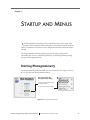
Starting Photogrammetry
The Photogrammetry mode is available only to licensed GPS users. Figure 5-1 shows
how to open the main Photogrammetry dialog.
Two ways to open the
Photogrammetry dialog:
1. from the Net Station start-up
window (left) and
2. from the Tools menu (right)
Figure 5-1. Starting Photogrammetry
Geodesic Photogrammetry System Technical Manual
S-MAN-200-GPSR-001 • November 22, 2006
61
5: Startup and Menus
The Photogrammetry mode is independent of the other Net Station functions. All
other features, such as Waveform Tools, are described in their respective manuals.
Photogrammetry Dialog
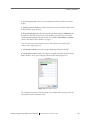
Figure 5-2 shows the Photogrammetry dialog.
The dialog contains the Net Size pop-up menu, for indicating the GSN model worn
by the subject/patient. This information enables the Photogrammetry software to use
the correct EGI head model for sensor registration and modeling.
Caution!: Be sure to select the correct GSN model. After the photos are
acquired and the subject dismissed, the Photogrammetry software provides no
means for changing this information.
To open:
Click the Photogrammetry
button in the Net Station
start-up window or choose
Tools > Photogrammetry
1
2
To close:
Click the red button in the
top-left corner of the
Photogrammetry dialog.
3
4
5
*An Assign Subjects
button is visible if no
subject is assigned.
6*
7
8
Figure 5-2. The Photogrammetry dialog
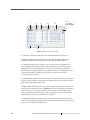
The following are brief descriptions of the numbered items from Figure 5-2.
1. GPS file buttons. Consist of two options:
° New: for creating a new GPS file.
° Close: for closing the new GPS file.
62
Geodesic Photogrammetry System Technical Manual
S-MAN-200-GPSR-001 • November 22, 2006
5: Startup and Menus
2. Net Size pop-up menu. Allows you to indicate the model of the GSN worn by the
subject.
3. Number of Sensors indicator. Lists the number of sensors in the GSN model chosen
in the Net Size pop-up menu (2).
4. Pedestal Height indicator. Shows the standard pedestal height (in millimeters) for
the sensors in the GSN model chosen in the Net Size pop-up menu (2). To view the
variant pedestal heights for the GSN model, choose View > Info Window > General,
which is described in “Info Window” on page 67.
Note: To create variant pedestal heights that are not included in the standard GSN
models, contact [email protected].
5. GPS Number indicator. Shows the unique identifying number for the GPS.
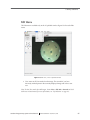
6. Assign Subject button (visible if no subject is assigned to the file). Opens the Select
Subject window, where you can assign a subject to the GPS file (Figure 5-3).
Figure 5-3. Select Subject window
The resulting GPS solution set is then saved to that subject and is used to provide 3D
information for other Net Station tools.
Geodesic Photogrammetry System Technical Manual
S-MAN-200-GPSR-001 • November 22, 2006
63
5: Startup and Menus
7. Capture Images button. Signals the software to establish communication with each
camera. A streaming video feed of the subject appears in the resulting Acquisition
window. (See Chapter 7, "Image Acquisition,” for more information.)
8. Open Dataset button. Automatically opens the most recent dataset, when clicked
immediately after image acquisition.
Photogrammetry Menu Bar
The Photogrammetry menu bar contains seven menus: Net Station, File, Edit, Docs,
Tools, View, and Actions (Figure 5-4).
Figure 5-4. Photogrammetry menu bar
In general, the Net Station, File, Docs, and Tools menus are standard Net Station
menus. The Edit, View, and Actions menus contain commands specific to
Photogrammetry.
This section discusses the Edit, View, and Action menus first. Descriptions of the
remaining menus and how to open a GPS file round out the chapter.
64
Geodesic Photogrammetry System Technical Manual
S-MAN-200-GPSR-001 • November 22, 2006
5: Startup and Menus
Edit Menu
The Edit menu is available only in the 1-Up Model window. Figure 5-5 shows the Edit
menu.
Figure 5-5. Edit menu, in the 1-Up Model window
• Clear: removes all User marks from the image. This is useful if you have
incorrectly marked points in the currently displayed image and wish to start
over.
Note: To clear User marks from all images, choose View > File Info > General and click
the Revert to Start button (for more information, see “Info Window” on page 67).
Geodesic Photogrammetry System Technical Manual
S-MAN-200-GPSR-001 • November 22, 2006
65
5: Startup and Menus
View Menu
The View menu allows you to view the data in a GPS file in many different ways: via
views, modeling tools, the Info Window, and the Compare Nets feature. Figure 5-6
shows the View menu.
Views
Modeling tools
Figure 5-6. View menu
View Options
The Views options duplicate selected controls in the Acquisition and Model windows:
• 1-Up: accesses the 1-Up mode; see page 103 for the 1-Up Acquisition window
and page 126 for the 1-Up Model window.
• 3-Up: accesses the 3-Up mode; see page 99 for the 3-Up Acquisition window
and page 123 for the 3-Up Model window.
• All Images: accesses the All-Up mode; see page 101 for the All-Up Acquisition
window and page 121 for the All-Up Model window.
• Model: accesses the Model view; see “Model View” on page 133.
Modeling Tools
The Modeling tools duplicate selected controls in the Model window:
• Observations: opens the Observations window; see “Observations Window” on
page 138.
• Sensor Locations: opens the Sensor Locations window; see “Sensor Locations
Window” on page 140.
66
Geodesic Photogrammetry System Technical Manual
S-MAN-200-GPSR-001 • November 22, 2006
5: Startup and Menus
Info Window
The Info Window contains uneditable information that describes the file. The
information panes include General, Calibration, and Log.
• General. Provides an overview of the file. Figure 5-7 shows the General pane.
Fiducial mapping and
pedestal heights box
Figure 5-7. View > Info Window > General
Following is a list of the pane contents:
° Date/Time: indicates the date and time the GPS file was created.
° Hardware Number: shows the serial number of the GPS dome that produced
the current file.
° Net: indicates the GSN model number.
° Fiducial mapping and pedestal heights box: displays the fiducial mapping
performed, and the pedestal height (in millimeters) of each measured sensor.
° # of Observations: indicates the total number of User marks made on the
acquired images.
° Solved Sensor Locations: displays the number of sensor locations with
acceptable triangulation solutions.
° Unsolved Sensor Locations: displays the number of sensor locations with
unacceptable triangulation solutions.
Geodesic Photogrammetry System Technical Manual
S-MAN-200-GPSR-001 • November 22, 2006
67
5: Startup and Menus
° Revert to Saved button: opens the OK to Revert dialog, requesting
confirmation to clear User marks from all images (Figure 5-8). This
action is irreversible, so use with care.
Figure 5-8. OK to Revert dialog
° Assign Subject: If no subject is assigned to a file, the Assign Subject button is
visible. Clicking this button opens the Select Subject window (see Figure 5-3
on page 63). (Note that a calibration file has no subject.)
The resulting GPS solution set is then saved to that subject, which is used by
the Viewer and Waveform Tools.
• Calibration. Provides information about the calibration values applied to the
current GPS file. Figure 5-9 shows the Calibration pane. Chapter 6, "Camera
Calibration,” describes this pane in detail.
Figure 5-9. View > Info Window > Calibration
68
Geodesic Photogrammetry System Technical Manual
S-MAN-200-GPSR-001 • November 22, 2006
5: Startup and Menus
• Log. Displays a history of the operations performed by Net Station on the file.
This is not a log of user operations. Figure 5-10 shows the Log pane.
Figure 5-10. View > Info Window > Log
° Clear Log button: deletes the list of operations from the window.
Compare Nets
The Compare Nets command opens the Net Comparison window, which allows you
to compare the GPS files of a subject before and after an EEG session, for sensor
displacement. For a full description, see Chapter 10, "Compare Nets.”
Select the other
GPS file for
comparison
Figure 5-11. View > Compare Nets
Geodesic Photogrammetry System Technical Manual
S-MAN-200-GPSR-001 • November 22, 2006
69
5: Startup and Menus
Actions Menu
The Actions menu items are identical to the Identify Sensors, Update Model, and
Calibrate buttons displayed in the Model window during system calibration or sensor
modeling. Figure 5-12 shows the menu.
Figure 5-12. Actions menu
• Identify: identical to clicking the Identify Sensors button; see “2. Identify
Sensors button” on page 122.
• Update: identical to clicking the Update Model button; see “3. Update Model
button” on page 122.
• Calibrate: identical to clicking the Calibrate button; see Step 8 on page 83 and
read “Chapter 6, "Camera Calibration,” for a discussion of the calibration
process.
Net Station Menu
The Net Station menu (Figure 5-13) contains standard commands for operating
Net Station. For a full description of all the menu commands, see Chapter 4, “Menus,”
of the Net Station Viewer Technical Manual.
Figure 5-13. Net Station menu
70
Geodesic Photogrammetry System Technical Manual
S-MAN-200-GPSR-001 • November 22, 2006
5: Startup and Menus
File Menu
The File menu (Figure 5-14) contains standard commands for working with Net
Station files. The most important in Photogrammetry are Open, Export, and Find File:
Does not allow you to create a new GPS
file; to do this, use the Photogrammetry
dialog (see Figure 5-2 on page 62).
Figure 5-14. File menu
• Open: displays the Net Station Open window, which allows you to locate
and open files of various Net Station formats, including Photogrammetry.
• Export: allows you to rename and save the GPS file as either a BESA SFP file or
an EMSE Elp file.
• Find File: displays a window that allows you to specify the parameters of your
file search, primarily location and search term (for example, name or kind,
including Photogrammetry) or subject ID.
Note: Printing is unavailable from the File menu; however, you can save Photogrammetry
windows as screen shots or TIFF files and print them in that format. For details, see
Chapter 11, "Printing GPS Images.“
Geodesic Photogrammetry System Technical Manual
S-MAN-200-GPSR-001 • November 22, 2006
71
5: Startup and Menus
Docs Menu
The Docs menu (Figure 5-15) allows you to organize your screen space. For a full
description of all the menu commands, see Chapter 4, “Menus,” of the Net Station
Viewer Technical Manual.
Figure 5-15. Docs menu
Tools Menu
The Tools menu (Figure 5-16) offers advanced features for processing data. The most
important for this application is Photogrammetry:
The appearance may
vary depending on your
Net Station license
Figure 5-16. Tools menu
• Photogrammetry: opens the Photogrammetry dialog.
72
Geodesic Photogrammetry System Technical Manual
S-MAN-200-GPSR-001 • November 22, 2006
5: Startup and Menus
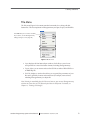
Opening a GPS File
You can open a GPS file using various methods, many of
which are familiar to Macintosh users:
• Open Net Station, choose File > Open (or press
Command-O), and navigate to the file.
• Open Net Station, click the Select button, and
navigate to the file.
• Double-click on the GPS file icon (see Figure 5-17),
which also opens Net Station (if closed).
• If you have just acquired images and want to
immediately open the GPS file, click the Open
Dataset button in the Photogrammetry dialog.
Geodesic Photogrammetry System Technical Manual
S-MAN-200-GPSR-001 • November 22, 2006
Figure 5-17. GPS file icon
73
5: Startup and Menus
74
Geodesic Photogrammetry System Technical Manual
S-MAN-200-GPSR-001 • November 22, 2006
chapter 6
CHAPTER
6
CAMERA
CALIBRATION
the hardware and software are installed, the first task is to calibrate the
O nce
cameras. After the system is calibrated, it can project lines from the camera
image planes to the sensors on the head surface precisely, allowing it to solve for the
sensor positions.
Calibration is typically required only once, right after system installation. However, if
you reinstall the Net Station software or move the GPS to another room or building,
the system should be calibrated again.
This chapter discusses calibration principles, calibration-specific menus and buttons,
and step-by-step calibration instructions.
If you have difficulty discerning the numbers on the calibration targets when using
the camera views, see Appendix D, "Calibration Target Layouts,” which provides
maps of the calibration targets visible from each of the 11 camera views.
Calibration Principles
The GPS uses 11 cameras to acquire sensor images. The camera lenses have very low
radial distortion, typically less than one pixel over the field of view. The camera model
is defined by 11 radial parameters: camera location (radius, theta, and phi); camera
angle (theta, phi, and rotation); pixel scale and pixel aspect ratio; and other camera
variables (focal length, u offset, and v offset).
The Calibration Object supplied with the GPS is a precisely manufactured sphere,
with a threaded opening at its base. The Calibration Object measures 10.91 cm (4.3 in)
in radius, approximately the size of a human head. The calibration targets are
Geodesic Photogrammetry System Technical Manual
S-MAN-200-GPSR-001 • November 22, 2006
75
6: Camera Calibration
36 numbered circles spaced evenly over the object that you mark and number from
within Net Station Photogrammetry (Figure 6-1).
Targets 1–11 are the
“camera” targets.
They should point to
their respective
cameras in the GPS
dome.
Figure 6-1. The GPS Calibration Object, separate from its stand (left) and outside the dome (right)
The calibration procedure involves optimizing the camera parameters so as to place
all the calibration targets on a spherical surface of the correct radius, while
maintaining high convergence between the lines from the image planes to the surface.
The Calibration Object and stand are shipped unassembled. Simply mount the
Calibration Object onto the adjustable stand to assemble, and position it within the
dome.
Calibration Overview
The process of calibrating your system is nearly identical to regular GPS operations,
except you must manually number the calibration targets:
•
•
•
•
76
position the Calibration Object within the dome,
acquire images using the Acquisition window,
open the GPS file, and
mark, manually number, and model the points in the Model window.
Geodesic Photogrammetry System Technical Manual
S-MAN-200-GPSR-001 • November 22, 2006
6: Camera Calibration
This chapter does not discuss the Acquisition and Model windows; detailed
descriptions of those windows are provided in Chapter 7, "Image Acquisition,” and
Chapter 8, "Sensor Modeling.”
Figure 6-2 provides a flowchart of the calibration process.
Place the Calibration Object on its stand and
center it within the GPS dome.
Open Photogrammetry, choose Calibration
Object from the Net Size pop-up menu, and
click New.
Is the object
positioned
well?
Click Capture Images.
Yes
Follow the instructions in
Figure 7-1 on page 96,
starting with the “Click the
Take Pictures” box.
No
Reposition the object until all 11 cameras
have an unimpeded view.
Cycle through the camera views,
correcting misplaced or misnumbered
points, and click Calibrate.
Follow the instructions in
Figure 8-1 on page 107
except click precisely on
the dot in the center of
each target visible in each
image, label the point with
its assigned number, and
when done, click Calibrate.
Yes
Did you
receive an error
message?
No
Close the GPS file. The GPS will automatically apply the calibration
values to any images acquired afterward with that dome.
Figure 6-2. Calibration process
Geodesic Photogrammetry System Technical Manual
S-MAN-200-GPSR-001 • November 22, 2006
77
6: Camera Calibration
Image Acquisition
Figure 6-3 provides an overview of acquiring images of the Calibration Object.
Figures 6-4, 6-5, and 6-6 provide expanded views of the steps.
1 Position the Calibration Object on
its stand within the GPS dome, so that
each target labeled from 1 to 11 is
pointing toward its respective camera
in the GPS dome; lower the dome.
2 Open the Photogrammetry
dialog, choose Calibration Object
from the Net Size pop-up menu in
the Photogrammetry dialog, and
click the New button.
3 In the New Photogrammetry
Recording dialog that appears,
specify a name and destination
folder and click New.
All-Up
button
4 In the Photogrammetry dialog,
click the Capture Images button to
initiate system connection with the
cameras.
5 When connected, the 3-Up
window appears, displaying video
from cameras 1, 2, and 3. (If the
“unable to acquire” message
appears, go to “Retry Initialization”
on page 87.)
1-Up
button
3-Up
button
7 Click the 1-Up button and cycle
through each camera view,
inspecting the Calibration Object
closely. If a red tint covers a camera
view, see “Red Tints” on page 82.
8 Click the 3-Up button and cycle
through each camera triad, verifying
that difficult-to-see targets (those on
the underside) are seen by at least
two cameras; when satisfied, click
the Take Pictures button.
6 Click the All-Up button, and
verify that each camera target is
facing its respective camera and that
the Calibration Object is fully visible
in each camera and is centered.
9 Review the pictures, and
click the Accept Pictures if
satisfied. If unsatisfied, repeat
Steps 6–8.
Figure 6-3. Overview of positioning the Calibration Object for image acquisition
78
Geodesic Photogrammetry System Technical Manual
S-MAN-200-GPSR-001 • November 22, 2006
6: Camera Calibration
1 Position the Calibration Object on
its stand within the GPS dome, so that
each target labeled from 1 to 11 is
pointing toward its respective camera
in the GPS dome; lower the dome.
2 Open the Photogrammetry
dialog (see “Starting
Photogrammetry” on page 61),
choose Calibration Object from the
Net Size pop-up menu in the
Photogrammetry dialog, and click
the New button.
3 In the New Photogrammetry
Recording dialog that appears,
specify a name and destination folder
and click New.
Figure 6-4. Expanded view of Steps 1–3 in positioning the Calibration Object for image acquisition
Geodesic Photogrammetry System Technical Manual
S-MAN-200-GPSR-001 • November 22, 2006
79
6: Camera Calibration
4 In the Photogrammetry dialog,
click the Capture Images button to
initiate system connection with the
cameras.
5 When connected, the 3-Up
window appears, with video from
cameras 1, 2, and 3. (If the
“unable to acquire” message
appears, see “Retry Initialization”
on page 87.)
All-Up
button
6 Click the All-Up button, and
verify that each camera target is
facing its respective camera and that
the Calibration Object is fully visible
in each camera and is centered.
Figure 6-5. Expanded view of Steps 4–6 in positioning the Calibration Object for image acquisition
80
Geodesic Photogrammetry System Technical Manual
S-MAN-200-GPSR-001 • November 22, 2006
6: Camera Calibration
1-Up
button
7 Click the 1-Up button and cycle
through each camera view,
inspecting the Calibration Object
closely. If a red tint covers a camera
view, go to “Red Tints” on page 82.
3-Up
button
8 Click the 3-Up button and cycle
through each camera triad, verifying
that difficult-to-see targets (those on
the underside) are seen by at least
two cameras; when satisfied, click
the Take Pictures button.
9 Review the pictures, and
click the Accept Pictures if
satisfied. If unsatisfied, repeat
Steps 6–9.
Figure 6-6. Expanded view of Steps 7–9 in positioning the Calibration Object for image acquisition
Geodesic Photogrammetry System Technical Manual
S-MAN-200-GPSR-001 • November 22, 2006
81
6: Camera Calibration
Red Tints
If a red tint covers a camera view, it may indicate any of the following:
• USB problems
• lighting difficulties
• sudden movements within the camera view
To remove the tint, try any of the following:
• Click the Capture Images button again to reinitiate the connection between
Photogrammetry and the camera.
• View each image in the 1-Up mode to individually establish the connection to
each camera, and then view the images in All-Up.
• Restart the application to clear the USB connection.
• Ensure that the lighting in the room is even and diffuse, open curtains or blinds
for more natural light, if needed.
If problems persist, contact [email protected].
Modeling the Targets
Marking and editing the targets requires careful work. Depending on user experience,
it can take 15–25 minutes to mark the Calibration Object. Save regularly in case the
application unexpectedly quits.
Figure 6-7 provides an overview to marking and editing the calibration targets.
Figures 6-8, 6-9, and 6-10 provide expanded views of the steps.
Calibration Target Maps
If you cannot easily read the numbers of the calibration targets in the acquired
images, see Appendix D, "Calibration Target Layouts,” on page 173.
82
Geodesic Photogrammetry System Technical Manual
S-MAN-200-GPSR-001 • November 22, 2006
6: Camera Calibration
1-Up
button
Numbers
button
1 Click the Open Dataset to open the
Model window for the acquired
calibration image set or open the file
using standard file-opening methods.
2 In the Model window, click the
1-Up button to view the image
from camera 1.
3 Click the Numbers button, which
enhances the visibility of the User
marks.
4 In the camera view, double-click on
the dot in the middle of the calibration
target to open the Change Number
dialog.
5 In the Change Number dialog,
type in the correct number and click
Change.
6a If the mark is precisely positioned
and numbered correctly, repeat the
process for the other targets in the
camera view.
6b If the mark is not correctly
marked, you can edit it by:
7 Go to the next camera view by:
8 After marking all images, save a
copy of the file. In the original file,
click the Calibrate button; the
calibration process can take 10–15
minutes, depending on computer
capacity.
• Deleting: press the Shift key and
move the cursor over the point until
you see the delete symbol
; click to
remove the point.
• Moving: move the cursor over
the point until you see the move
symbol
; drag the mark to the new
location.
• Renumbering: double-click on the
mark to open the Change Number
dialog and type in the correct number.
• clicking the Navigation forward
button,
• clicking on camera 2 in the dome
diagram, or
• choosing camera 2 from the camera
pop-up menu.
Repeat Steps 4–6 and save your work;
continue to the next camera view until
each image has been marked.
If the “high-error” message appears.
go to “RMS Error Is High” on page 89.
If no message appears, the calibration
was successful. Go to Chapter 7,
"Image Acquisition,” to begin
acquiring subject image sets with the
calibrated GPS.
To undo an edit, press Command-z.
Figure 6-7. Marking the calibration targets
Geodesic Photogrammetry System Technical Manual
S-MAN-200-GPSR-001 • November 22, 2006
83
6: Camera Calibration
1 Click the Open Dataset to open
the Model window for the acquired
calibration image set or open the file
using standard file-opening
methods (see “Opening a GPS File”
on page 74).
1-Up
button
2 In the Model window, click the
1-Up button to view the image
from camera 1.
Numbers
button
3 Click the Numbers button, which
enhances the visibility of the User
marks.
Figure 6-8. Expanded view of Steps 1–3 in marking the calibration targets
84
Geodesic Photogrammetry System Technical Manual
S-MAN-200-GPSR-001 • November 22, 2006
6: Camera Calibration
4 In the camera view, double-click on
the dot in the middle of the calibration
target to open the Change Number
dialog.
5 In the Change Number dialog,
type in the correct number and click
Change.
Note: An alternate way to number
the calibration targets is to use the
Number labeler (see “7. Number
labeler” on page 125).
6a If the mark is precisely positioned
and numbered correctly, repeat the
process for the other targets in the
camera view and click Save.
Figure 6-9. Expanded view of Steps 4–6a in marking the calibration targets
Geodesic Photogrammetry System Technical Manual
S-MAN-200-GPSR-001 • November 22, 2006
85
6: Camera Calibration
6b If the mark is not correctly marked, you
can edit it by:
• Deleting: press the Shift key and move the
cursor over the point until you see the delete
symbol
; click to remove the point.
• Moving: move the cursor over
the point until you see the move
symbol
; drag the mark to the new
location.
• Renumbering: double-click on the mark
to open the Change Number dialog and type
in the correct number.
To undo an edit, press Command-z.
7 Go to the next camera view by:
Click the camera
in the dome
Click the forward button.
• clicking the Navigation forward button,
• clicking on camera 2 in the dome
diagram, or
• choosing camera 2 from the camera popup menu.
Choose the camera from
the pop-up menu.
Repeat Steps 4–6 and save your work;
continue to the next camera view until each
image has been marked.
8 After marking all images, save a copy of
the file. In the original file, click the Calibrate
button, which signals the software to calculate
the 3D locations of the targets on the
Calibration Object; the calibration process
can take 10–15 minutes, depending on
computer capacity.
If the “high-error” message appears. go to
“RMS Error Is High” on page 89.
If no message appears, the calibration was
successful. Go to Chapter 7, "Image
Acquisition,” to begin acquiring subject image
sets with the calibrated GPS.
Saving a copy of the marked-up file is useful
if you wish to redo the editing, but not the
marking.
Figure 6-10. Expanded view of Steps 6b–8 in marking the calibration targets
86
Geodesic Photogrammetry System Technical Manual
S-MAN-200-GPSR-001 • November 22, 2006
6: Camera Calibration
Note: Each time you double-click on a calibration target to number it, the software
defaults to “1.” Therefore, for camera view 1, it is best to mark target #1 last.
Error Messages
This section describes common calibration-related error messages. For more
information about other Photogrammetry error messages, see page 156.
Retry Initialization
After clicking the Capture Images button, the “unable to acquire images” message
may appear (Figure 6-11).
Figure 6-11. Unable to acquire images
This window can result from various factors, such as lighting or USB problems.
To solve:
1 Check that the room lighting is even and diffuse, with no lights directly pointed
at the cameras. Opening the room’s curtains or blinds may help.
Geodesic Photogrammetry System Technical Manual
S-MAN-200-GPSR-001 • November 22, 2006
87
6: Camera Calibration
2 Click the OK button in the “unable to acquire images” dialog, which opens the
retry window. In this window, click the Retry Initialization button to reattempt
to establish connection with the cameras (Figure 6-12).
Figure 6-12. Retry window
If successful, the default Acquisition window appears (Figure 6-13).
Figure 6-13. The default Acquisition window
If unsuccessful after two or three attempts, restart the application to clear the
USB connection and retry the Capture Images operation.
If problems persist, contact [email protected].
88
Geodesic Photogrammetry System Technical Manual
S-MAN-200-GPSR-001 • November 22, 2006
6: Camera Calibration
RMS Error Is High
The system RMS error is calculated in 3D space and measured in units of centimeters.
A system RMS error of more than 2.0 centimeters produces the “RMS error is high”
message. Your system cannot be calibrated until this value is 2.0 or below.
The RMS (or root-mean-square) error is defined as the difference norm between the
measured and the projected image coordinates; the RMS error is a measure of the
consistency between the observed image coordinates.
Possible causes of high RMS values include:
•
•
•
•
poorly placed marks on calibration targets
misnumbered marks
calibration targets marked only once (two marks are needed)
calibration targets marked in too many camera views (the ideal number is three)
The next section discusses how to use the Sensor Locations window to lower highRMS values.
Sensor Locations Window
The Sensor Locations window displays 3D information based on estimated or
triangulated 3D sensor locations, and is useful for solving 3D positions. Figure 6-14
shows the Sensor Locations window; a detailed description is provided in “Sensor
Locations Window” on page 140.
To open:
choose Views >
Sensor Locations
calibration target
number
Figure 6-14. Sensor Locations window
Unlike the system RMS value, the RMS value in the Sensor Locations window is
calculated in 2D space and measured in units of pixels. As a general guideline, if all
the relevant points in the Sensor Locations window have RMS values of less than 3
pixels, the system will successfully calibrate, producing a system RMS of less than or
equal to 2 centimeters.
Geodesic Photogrammetry System Technical Manual
S-MAN-200-GPSR-001 • November 22, 2006
89
6: Camera Calibration
To improve RMS values using the Sensor Locations window:
1 Click on the RMS column to sort the calibration targets by RMS value.
2 Locate calibration targets with high individual RMS values (in general, greater
than 3).
3 For a high-RMS calibration target, double-click on its number in the Number
column to open a 3-Up window of the calibration target, which is circled in the
camera views.
4 Move, add, or delete User marks (using as viewing aids the camera filters and
overlays, which are discussed in Chapter 8, "Sensor Modeling”).
Some tips for lowering high-RMS values:
° In most cases, if more than three cameras are listed in the Cameras column,
you can improve the RMS value by deleting one of the marks.
° If only one camera is listed in the Cameras column, then view the calibration
target in the 3-Up window and mark it in one more camera view, even if it is
obliquely visible. (See Appendix D, "Calibration Target Layouts,” for the
calibration target numbers.)
° If three cameras are listed in the Cameras column, then view the calibration
target in the 3-Up window and move the marks until they appear more
precisely placed. If this fails, you may need to delete a mark in one camera
view and mark the calibration target in another camera view for better lineof-sight.
5
Click the Update Model button in the Model window to recalculate the
individual RMS values.
6 Progress through the Sensor Locations window until no target has an RMS
value greater than 3.
7 Click the Calibrate button.
8 If no “RMS error is high” message appears, the system is correctly calibrated
and you can continue to Chapter 7, "Image Acquisition”; if the “RMS error is
high” error message appears, repeat Steps 1–7 until the system is successfully
calibrated.
90
Geodesic Photogrammetry System Technical Manual
S-MAN-200-GPSR-001 • November 22, 2006
6: Camera Calibration
To enhance the visibility of the User marks and calibration targets, you can apply a
camera filter or overlay to the camera views (for more information, see “Camera
Filters” on page 127, and “Camera Overlays” on page 129.)
The Calibration Pane
After calibrating the cameras, you can choose Views > File Info > Calibration to view
the Calibration pane, which displays the calibration values for each camera in the
system. Figure 6-15 shows the Calibration pane.
1
2
3
Figure 6-15. Calibration pane
The following are brief descriptions of the numbered items from Figure 6-15.
1. Linear and Radial Parameters. Express the calibration values for each camera in
terms of a formula (linear) and a 3D position in space (radial). The radial parameters
include camera position, camera angle, focal length, pixel scale, pixel aspect ratio, and
image plane center offsets (see “Theory” on page 25 for more discussion).
2. Navigation tool. Allows you to view the calibration values for each camera, by
clicking on the dome diagram or by clicking a Navigation tool forward or backward
button.
3. Assign Calibration button. Click this button to navigate to the corresponding
calibration file and to apply the correct calibration values to the current GPS file.
Geodesic Photogrammetry System Technical Manual
S-MAN-200-GPSR-001 • November 22, 2006
91
6: Camera Calibration
Figure 6-16 shows the file-selection dialog that appears after you click the Assign
Calibration button.
Figure 6-16. File-selection dialog
The Calibration Files
When the system is calibrated, it creates two files: one on the hard drive called the
Precise Camera Description file, and the other in a user-selected folder called the
calibration file.
Precise Camera Description File
You will never work with the Precise Camera Description file, but for completeness
this section describes it briefly.
The Photogrammetry software stores the Precise Camera Description file in the Net
Station Application Program Package folder. Because the file is tagged with the GPS
serial number, whenever you use that same GPS dome to acquire images, the
Photogrammetry software will automatically apply the correct calibration values to
the files.
If you recalibrate the GPS, Photogrammetry will replace the Precise Camera
Description file with the new version and apply the new values to any image sets
created thereafter.
92
Geodesic Photogrammetry System Technical Manual
S-MAN-200-GPSR-001 • November 22, 2006
6: Camera Calibration
Calibration File
The other file, the calibration file, can be accessed by the user. It is a GPS file that
contains the images, edits, and values produced during the system calibration. You
can use this file for various tasks.
For example, suppose you recalibrated the GPS and want to apply the new calibration
values to a GPS file created before the recalibration.
1 Choose View > Info Window > Calibration to open the Calibration pane.
2 Click the Assign Calibration button, navigate to the new calibration file, and
select it.
Or if your site has more than one GPS dome, there will be more than one calibration
file. If you are unsure whether your current GPS file is linked to the correct calibration
file, choose View > File Info > General and check the GPS serial number. If the
number is incorrect, follow Steps 1 and 2 above.
Geodesic Photogrammetry System Technical Manual
S-MAN-200-GPSR-001 • November 22, 2006
93
6: Camera Calibration
94
Geodesic Photogrammetry System Technical Manual
S-MAN-200-GPSR-001 • November 22, 2006
chapter 7
CHAPTER
7
IMAGE ACQUISITION
images with the GPS is fast, making sensor registration convenient for
A cquiring
both the subject and the technician.
This chapter discusses acquisition principles and references step-by-step instructions.
Detailed descriptions of the Acquisition window round out the chapter, and begin on
page 99.
Acquisition Principles
Using the GPS to acquire images minimizes the amount of subject time. During
typical sensor-registration procedures, the subject must remain still while the
technician manually touches each sensor with a pointing device.
By acquiring still images of the sensors on the subject, the GPS obtains the same
information in a few minutes, making it ideal for active subjects such as children. The
process of registering each sensor can be postponed because the images are saved to
disk and can be opened and edited at any time.
Acquisition Overview
Acquiring images is straightforward:
• Prepare for acquisition by making sure that the pedestals of the GSN’s cardinal
points are colored; if they are uncolored, color them with a permanent marker,
making sure not to cover the sensor number.
Geodesic Photogrammetry System Technical Manual
S-MAN-200-GPSR-001 • November 22, 2006
95
7: Image Acquisition
• Apply the GSN carefully to the subject and ensure that the cardinal points and
preauricular points are visible.
• Position the subject in the GPS dome so that he or she is centered in the dome.
• Click the Capture Images button and view the streaming video of the subject in
the dome. The subject’s head should be centered in all camera views; adjust the
dome height or subject’s position as necessary.
• Carefully review the images before accepting them.
Figure 7-1 provides a flowchart of the acquisition process.
Open the Photogrammetry dialog
and select the correct Net size.
Click the New
button, name the
file, and save it.
In the dialog, click Capture
Images, which opens the
Acquisition window.
Is the subject
positioned
well?
Yes
No
Reposition the subject so that he or she is
facing camera #2. Make sure that all 11
images have a complete view of the head,
with no part cut off.
No
Are the
images
good?
Click the Take Pictures button
in the Modeling window.
Yes
Click the Accept Pictures button.
Figure 7-1. Acquisition process
96
Geodesic Photogrammetry System Technical Manual
S-MAN-200-GPSR-001 • November 22, 2006
7: Image Acquisition
Before Image Acquisition
Reminder
A good Net application
improves the sensorregistration results. So,
make sure the cardinal
points are colored, the
preauricular points are
marked, the sensors are
evenly spaced, and the
wires are not obscuring
the pedestals.
The accuracy of the sensor registration depends, in some measure, on the application
of the GSN to the subject’s head. Therefore, before acquiring images, remember to:
• If the pedestals of the GSN’s cardinal points are uncolored, color them with a
permanent marker, being careful not to cover the sensor number. Each Net has
6–11 evenly spaced cardinal points, which serve as control points for additional
sensor modeling. Table 8-1 on page 109 lists the cardinal points for the 64-, 128-,
and 256-channel GSN 200s and the 32-, 64-, 128-, and 256-channel HCGSNs.
• Apply the GSN according to the detailed instructions given in the Geodesic
Sensor Net Technical Manual.
• Verify that the GSN sensors are evenly spaced on the surface of the scalp.
• Ensure that the subject’s preauricular points—
the indentations in front of the ear flaps, where
the jaw meets the skull—are visible; you may
want to mark them with round stickers,
especially if the subject has much hair.
• Evenly distribute the wires of the GSN 200 as
much as possible to prevent sensors from being
covered by wires. (The HCGSN features sleek
wire management that groups the wires
conveniently.)
Preauricular
point
Gray’s Anatomy
Image Acquisition Instructions
Acquiring images of the subject is nearly identical to the process of acquiring images
of the Calibration Object. Therefore, for image acquisition instructions, see Figure 6-3
on page 78, and the expanded views of the steps in Figures 6-4, 6-5, and 6-6.
Note: Remember in the Photogrammetry dialog to select the correct GSN model worn by
the subject from the Net Size pop-up menu.
Geodesic Photogrammetry System Technical Manual
S-MAN-200-GPSR-001 • November 22, 2006
97
7: Image Acquisition
Any difference between the calibration and subject image-acquisition processes stems
from visibility issues. Namely, the sensors in a GSN on a subject’s head are more
difficult to see than the targets on a smooth Calibration Object. The next section
addresses those issues.
Positioning the Subject
Position the subject so that the GSN is fully visible in all camera views. Table 7-1
provides positioning tips.
Table 7-1. Subject-positioning tips
In . . .
Ensure that . . .
Each camera view
The lighting glare off the pedestals is minimal, if possible.
Each camera view
Three cardinal points are visible, if possible. This may not be
possible for camera views 2 and 7 because of the camera
angles.
Each camera view
No pedestals are upturned (especially in the back with camera
views 8, 9, and 10)
Camera view 1
The subject is centered.
Camera views 2 & 7
Sensors near the top of head are visible.
Camera views 4-5-9
GSN 200 wires do not overly obscure pedestals.
Camera views 3-7-8 and
6-10-11
Fiducial points (preauriculars, vertex, and nasion) are visible.
Opposing camera views
(3 & 6; 4 & 5; 7 & 11;
8 & 10)
Subject is as symmetrically positioned as possible.
When adjusting the GPS dome to accommodate the subject’s height or position, heed
the following:
WARNING!: Moving parts are a pinch-and-crush hazard. Keep all clothing, hair,
and body parts well away from moving parts. Use caution when operating to
prevent injury.
98
Geodesic Photogrammetry System Technical Manual
S-MAN-200-GPSR-001 • November 22, 2006
7: Image Acquisition
Acquisition Window
The Acquisition window offers three camera view options: 3-Up, All-Up, and 1-Up
(Figure 7-2).
Figure 7-2. 3-Up, All-Up, and 1-Up Acquisition windows
3-Up Window
The 3-Up window displays trios of images (called triads) from adjacent cameras.
Images are scaled to fit the window. Double-click in one of the three camera views to
display that image in the 1-Up mode.
Because the cameras are adjacent, the triads represent a set of
cameras most likely to be involved in triangulating a point.
Therefore, you can use the 3-Up window to check lines of sight and
to increase the chances for a good triangulation.
The default camera triad is 1-2-3. Click the forward button of the
Navigation tool (described in “4. Navigation tool” on page 100) to
make the next triad appear (1-3-4), or click in the triangular space
between cameras in the GPS dome diagram.
Navigation tool
forward button
Occasionally, you may want to select nonadjacent cameras manually, because the lines
of sight in 3D are better. You can select these cameras using the camera pop-up menus
above the camera views.
Geodesic Photogrammetry System Technical Manual
S-MAN-200-GPSR-001 • November 22, 2006
99
7: Image Acquisition
Figure 7-3 shows the 3-Up Acquisition window.
1
Click the 3-Up
button
(middle) to
view camera
triads
2
3
4
5
6
Figure 7-3. 3-Up Acquisition window
The following are brief descriptions of the numbered items from Figure 7-3.
1. Camera view buttons. Allow you to view the subject from the viewpoint of one
camera, three cameras, or 11 cameras. These buttons are visible in all Acquisition and
Model windows.
2. Take Pictures button. Triggers the shutters for all cameras and saves all resulting
images to memory. This button is visible in all three Acquisition modes.
3. Accept Pictures button. Writes the images in the current GPS file’s memory to disk.
This button is visible in all three Acquisition modes and is unavailable if no images
are stored in memory.
4. Navigation tool. Consists of a dynamic graphical representation of the GPS dome,
and forward and backward buttons (Figure 7-4). This tool is visible in 1-Up and 3-Up
Acquisition and Model windows. It is not visible in any All-Up modes.
100
Geodesic Photogrammetry System Technical Manual
S-MAN-200-GPSR-001 • November 22, 2006
7: Image Acquisition
° GPS dome: highlights in color the
currently selected camera or camera
triads. To navigate to specific cameras,
click on individual cameras or in the
space between triads.
° Forward and backward buttons: cycle
through single camera selection in
numerical order or through camera
triads.
Figure 7-4. Navigation tool
5. Camera pop-up menu. Displays the current camera and allows manual selection of
another camera (1 through 11). This menu is visible in 1-Up and 3-Up Acquisition and
Model windows; it is not visible in any All-Up modes.
6. Camera view. Streams video from the current camera until the Take Pictures button
is clicked. The camera view then shows the captured stills for the camera. The images
are not clickable or editable.
All-Up Window
The All-Up window contains 11 thumbnails, representing 11 different perspectives.
The camera views are arranged in the same pattern as the cameras in the GPS dome.
Double-click in any of the camera views to display that selected image in the 1-Up
mode.
The All-Up window is useful for determining whether the subject is positioned well
in all camera views during image acquisition. The All-Up window contains few
buttons and options.
Geodesic Photogrammetry System Technical Manual
S-MAN-200-GPSR-001 • November 22, 2006
101
7: Image Acquisition
Figure 7-5 shows the All-Up Acquisition window.
1
Click the
All-Up button
(rightmost) to
view all 11
thumbnails
2
3
4
5
The camera views
are in the same
positions as the
cameras in the GPS
camera structure
Figure 7-5. All-Up Acquisition window
The following are references for, or brief descriptions of, the numbered items from
Figure 7-5.
1. Camera view buttons. Described in “1. Camera view buttons” on page 100.
2. Take Pictures button. Described in “2. Take Pictures button” on page 100.
3. Accept Pictures button. Described in “3. Accept Pictures button” on page 100.
4. Camera view. Described in “6. Camera view” on page 101.
5. Camera label. Indicates the camera associated with the view.
102
Geodesic Photogrammetry System Technical Manual
S-MAN-200-GPSR-001 • November 22, 2006
7: Image Acquisition
1-Up Window
The 1-Up window provides the closest view of the sensors. It displays an image
captured by one camera, with a maximum scale of 1:1. Use this window during image
acquisition to check the visibility of difficult-to-see sensors (cameras 4, 5, and 9, for
example).
Figure 7-6 shows the 1-Up Acquisition window.
Click the 1-Up
button (leftmost)
for the closest
view
1
2
3
4
5
6
Figure 7-6. 1-Up Acquisition window
The following are references for the numbered items from Figure 7-6.
1. Camera view buttons. Described in “1. Camera view buttons” on page 100.
2. Take Pictures button. Described in “2. Take Pictures button” on page 100.
3. Accept Pictures button. Described in “3. Accept Pictures button” on page 100.
4. Navigation tool. Described in “4. Navigation tool” on page 100.
5. Camera pop-up menu. Described in “5. Camera pop-up menu” on page 101.
6. Camera view. Described in “6. Camera view” on page 101.
Geodesic Photogrammetry System Technical Manual
S-MAN-200-GPSR-001 • November 22, 2006
103
7: Image Acquisition
104
Geodesic Photogrammetry System Technical Manual
S-MAN-200-GPSR-001 • November 22, 2006
chapter 8
CHAPTER
8
SENSOR MODELING
modeling involves using the acquired images to register sensor positions. It
S ensor
entails marking sensors in each of the 11 images in Net Station by clicking on them
(in any order) with the mouse, initiating Photogrammetry’s triangulation calculation,
and editing the marks on the images to improve the triangulation model.
This chapter describes modeling principles, lists the cardinal points for the GSN 200s
and the HCGSNs, and provides step-by-step modeling instructions. Detailed
descriptions of the Model window and its modeling tools, the Observations window,
and the Sensor Locations window round out the chapter, and begin on page 118.
Note: Because the modeling stage entails careful work by the user, this chapter delves into
the details of the modeling process. If you wish to model sensors immediately, go to
page 110, where the instructions begin.
Process Overview
The GPS is designed to make the modeling of sensors as convenient as possible. Using
the Photogrammetry software, a click of the mouse (or other cursor device) marks a
sensor in an image. Photogrammetry records your clicks onscreen with brightly
colored symbols, so you can view your progress while marking the sensors and detect
poorly placed marks immediately. You can delete, edit, or reselect sensors using a
variety of windows and tools.
Sensor modeling differs from calibration modeling in that you do NOT number the
points when you mark them; the software semiautomatically determines the points’
sensor numbers and positions based on User marks and built-in sensor layouts.
Geodesic Photogrammetry System Technical Manual
S-MAN-200-GPSR-001 • November 22, 2006
105
8: Sensor Modeling
The steps to the sensor-modeling process are:
1 Using the GSN’s sensor layout as a guide, mark the cardinal points in each of
the 11 camera views (cardinal points are defined on page 109); save a copy of
the marked-up file. (See “Saving File Copies” on page 109.)
2 In the original file, click the Identify Sensors button to determine the sensors’
true IDs and to triangulate the cardinal points’ 3D locations. The software is
designed to minimize “false positives” and will often regard some correctly
marked points as “unsolved.”
° If an error message appears, you must: (a) edit “unsolved” points in the
camera views (correcting for poor placement, incorrect numbers, too few or
too many User marks for a sensor, etc.), and (b) click the Identify Sensors
button.
° If an error message appears again, you must: (a) review the User marks in
each camera view, (b) correct the marks (using the sensor layout for guidance
as needed), (c) choose View > Sensor Locations, (d) manually mark
“unsolved” points as “solved” in the Sensor Locations window, and (e) click
the Identify Sensors button.
Repeat this process until no error message appears, which indicates that the
cardinal set has been “identified.”
° Even when the cardinal set is “identified,” some “unsolved” points may
remain in the data set. You must solve these remaining “unsolved” points
using the steps just described and click the Update Model button. After all
points are “solved,” save a copy of the solved file.
Note: For more information, see“Tips on Editing the Cardinal Points” on page 114.
Once the cardinal points are successfully “identified,” you can export the data or
mark the other sensors. Exporting after the cardinal stage results in a partially solved
data set containing estimated positions of the non-cardinal points.
To mark the other sensors:
1 Mark the non-cardinal points in each of the 11 views. Do NOT touch the
cardinal points. Save a copy of the marked-up file.
2 Follow Step 2 in the preceding section, with one exception: after clicking the
Identify Sensors button, the set is considered “identified” even if many sensors
are considered “unsolved” or “questionable.” Therefore, any edits made
106
Geodesic Photogrammetry System Technical Manual
S-MAN-200-GPSR-001 • November 22, 2006
8: Sensor Modeling
thereafter will require that you click the Update Model button, unless you wish
the software to renumber or recalculate the solution set. In that case, you will
click the Identify Sensors button.
Figure 8-1 shows a flowchart of the marking process, and Figure 8-2 shows a
flowchart of the editing process. The sections that follow these flowcharts provide
additional information about these procedures.
Acquire images following the steps in Figure 7-1 on page 96.
No
Do you have
acquired
images?
Yes
In the Model window, click the
1-Up button.
Open the GPS file.
Using the sensor layout as a
guide, mark the cardinal points
visible in the camera view.
Click a Navigation
forward button to
view another image.
No
Do you want
to change a
point?
Yes
After marking the cardinal
sensors in all 11 images,
save a copy of the markedup file. In the original file,
click the Identify Sensors
button, which signals the
GPS to use triangulation to
solve for the points.
Yes
To delete a point, press the Shift
key and roll over the point with
the cursor. When the delete
symbol
appears, click.
Are you
satisfied with
the points?
To move a point, roll over the
point with the cursor. When the
move symbol
appears, drag
the point to the new location.
No
To undo a deletion or a move, press
Command-Z.
Figure 8-1. Sensor marking
Geodesic Photogrammetry System Technical Manual
S-MAN-200-GPSR-001 • November 22, 2006
107
8: Sensor Modeling
Did you receive
a message about an
incorrect number of
points?
Yes
This means that some points are misnumbered,
marked in only one camera, marked in too many
cameras, etc.. In both cardinal and non-cardinal
mode, you must correctly identify the points once.
View each image and make sure that each sensor is
correctly marked; edit the marks, using the sensor
layout for guidance as needed. In the Sensor
Locations window, mark these points as “solved.”
No
Choose View > Sensor
Locations to find the
“unsolved” points. Doubleclick on a point to view it in
its camera views. Edit the
point (renumber, move,
add, or delete a mark) in
the camera views,
manually mark the point as
“solved” in the Sensor
Locations window, and click
Update Model. Repeat until
all points are solved; save a
copy of the “solved” file.
Do you want to
export your
data?
Click the Identify Sensors button to identify the
points correctly.
Yes
Follow the instructions in “Chapter 9, "Data Export.”
No
Do you
want to mark all
remaining
sensors?
Yes
Using the original file, follow the instructions in
Figure 8-1 on page 107, except mark the other
sensors, NOT the cardinals.
Figure 8-2. Editing points
108
Geodesic Photogrammetry System Technical Manual
S-MAN-200-GPSR-001 • November 22, 2006
8: Sensor Modeling
Saving File Copies
It is a good idea to save a copy of the GPS file after:
• marking all the points in both cardinal and non-cardinal modes, and
• “identifying” the data sets in both cardinal and non-cardinal modes.
Saving a copy of a marked-up or “identified” file is useful if you wish to redo the most
recent sensor editing, but not the previous marking or “identifying.”
Cardinal Points
Cardinal points are a small number of sensors (6–11) that are evenly distributed
throughout a Geodesic Sensor Net. In Photogrammetry, these sensors serve as control
points and anchor the process of calculating 3D coordinates. Table 8-1 lists the
cardinal points for the adult GSN 200 and the adult HCGSN.
Table 8-1. Cardinal points for the GSN 200s and the HCGSNs
Number of sensors
GSN model
Cardinal points
between cardinal points
32-channel HCGCN
3, 4, 18, 21, 22, 25, 26, 33 (Ref)
64-channel GSN 200
10, 13, 23, 25, 35, 38, 50, 59, 62, 65 (Ref)
varies; see page 180
2
64-channel HCGSN
12, 26, 36, 46, 60, 65 (Ref)
3
128-channel GSN 200
17, 25, 44, 48, 69, 73, 95, 99, 120, 124, 129 (Ref)
3
128-channel HCGSN
17, 24, 43, 47, 68, 72, 94, 98, 120, 124, 129 (Ref)
3
256-channel GSN 200
30, 35, 66, 71, 115, 120, 169, 174, 221, 226, 257 (Ref)
4
256-channel HCGSN
31, 36, 67, 72, 114, 119, 168, 173, 219, 224, 257 (Ref)
4
Appendix E provides sensor maps of these GSN models with their cardinal points
circled. When marking and editing sensors, keep a copy of the appropriate sensor
layout readily at hand for reference.
Note: Sensor layouts are particularly useful when marking the cardinal points in an
HCGSN. The cardinal points in the HCGSNs are colored red; however, some HCGSNs
contain sensors with red pedestals that are NOT cardinal points. Refer to the sensor
layout for the correct cardinal points.
Geodesic Photogrammetry System Technical Manual
S-MAN-200-GPSR-001 • November 22, 2006
109
8: Sensor Modeling
Cardinal Point Instructions
Figure 8-3 provides an overview of how to mark and edit cardinal points.
Figures 8-4, 8-5, and 8-6 provide expanded views of the steps.
1 Using the GSN’s sensor layout as a
guide, mark the cardinal points in
camera view 1; the average number of
cardinal points visible in each camera
view is 3.
2 Proceed to camera view 2, and
mark the visible cardinal points.
.
3 Continue marking the cardinal
points in each camera view; when
done, save a copy of the marked-up
file. In the original file, click the
Identify Sensors button.
4 If an error message appears, you
must edit the unsolved or
questionable User marks.
If no error message appears, you
may still need to solve any
remaining “unsolved” points before
exporting the cardinal-point solution
or marking the non-cardinal points.
5 To edit the User marks, choose
View > Sensor Locations to open
the Sensor Locations window.
7 Click on the Number column and
on the sort toggle to sort the results by
number; scroll down to 31, which has
been marked in only one camera
view (camera 2).
8 In the 3-Up window, view sensor
31 using a camera triad that includes
camera 2 (e.g., 2-7-11).
6 Click on the Solved column and
on the sort toggle (arrow button) to
view the solved cardinal points. In this
example, sensor 31 is missing from
the list of solved cardinal points for a
256-channel HCGSN.
9 Click the pedestal of sensor 31 in
either of the other camera views and
click the Identify Sensors button; the
software will automatically number
the User mark and the cardinal-point
solution will be “identified.”
Figure 8-3. Overview of marking and editing cardinal points
110
Geodesic Photogrammetry System Technical Manual
S-MAN-200-GPSR-001 • November 22, 2006
8: Sensor Modeling
1 Using the GSN’s sensor layout as a guide, mark the cardinal
points in camera view 1; the average number of cardinal points
visible in each camera view is 3. (For more guidance on marking
cardinal points, see “Tips on Marking the Cardinal Points” on
page 114.)
With the Onion Skin filter
applied, we can see that 3
cardinal points have been
marked. Arbitrary numbers
are assigned to them until
the Identify Sensors button is
clicked, which triggers the
cross-correlation and
numbering process.
2 Proceed to camera view 2, and mark the visible cardinal
points.
The Onion Skin filter
shows that 3 cardinal
points have been
marked.
3 Continue marking the cardinal points in each camera view;
when done, save a copy of the marked-up file. In the original
file, click the Identify Sensors button. (See “Saving File Copies”
on page 109.)
The Onion Skin filter shows that
only 1 cardinal point has been
marked. Depending on camera
angles and head shape, some
camera views may display only
1 cardinal point and others may
show as many as 4.
Figure 8-4. Expanded view of Steps 1–3 in marking and editing cardinal points
Geodesic Photogrammetry System Technical Manual
S-MAN-200-GPSR-001 • November 22, 2006
111
8: Sensor Modeling
4 If an error message appears, you must edit
some of the User marks.
If no error message appears, you may still
need to solve any remaining “unsolved” points
before exporting the cardinal-point solution
(see Chapter 9, "Data Export”) or marking the
non-cardinal points (see “Marking the NonCardinal Points” on page 117). In either case,
save a copy of the “identified” file before
proceeding to Step 5. (See “Saving File
Copies” on page 109.)
5 To edit the User marks, choose View > Sensor
Locations to open the Sensor Locations window.
(For more guidance, see “Tips on Editing the
Cardinal Points” on page 114.)
The Sensor Locations window allows you to
view the unsolved points and to sort the points
by number, camera, solved status, RMS, or
coordinates.
6 Click on the Solved column and on the
sort toggle (arrow button) to view the solved
cardinal points. In this example, sensor 31 is
missing from the list of solved cardinal points
for a 256-channel HCGSN.
We know that 31 is missing because we
compared the solved cardinal points in the
Sensor Locations window with the list of
cardinal points for a 256-channel HCGSN
(see Table 8-1 on 109 or Figure E-9 on
page 196).
Figure 8-5. Expanded view of Steps 4–6 in marking and editing cardinal points
112
Geodesic Photogrammetry System Technical Manual
S-MAN-200-GPSR-001 • November 22, 2006
8: Sensor Modeling
7 Click on the Number column and on the sort
toggle to sort the results by number; scroll down to
31, which has been marked in only one camera
view (camera 2).
A point may be “unsolved” because it is marked
in too many camera views. In this case, follow
Steps 8–9, but instead of adding User marks,
delete them as necessary. Only two User marks
are needed for GPS triangulation (three marks are
ideal).
8 In the 3-Up window, view sensor 31
using a camera triad that includes camera
2 (e.g., 2-7-11).
You can open the 3-Up window by
double-clicking on the point’s camera list
in the Sensor Locations window or by
clicking the 3-Up button in the Model
window.
camera list in the Sensor
Locations window
3-Up button in the
Model window
9 Click the pedestal of sensor 31 in either of
the other camera views and click the Identify
Sensors button; the software will automatically
number the User mark and the cardinal-point
solution will be “identified.”
This has been an easy data set to model.
Solving for non-cardinal points is much more
complicated because of the greater number of
points (and, therefore, User marks) involved.
With the hundreds of User marks in a noncardinal set, you will have to refer to the
sensor layouts and use the modeling tools (see
pages 114, 124, and 131) to solve the
unsolved or questionable points.
Figure 8-6. Expanded view of Steps 7–9 in marking and editing cardinal points
Geodesic Photogrammetry System Technical Manual
S-MAN-200-GPSR-001 • November 22, 2006
113
8: Sensor Modeling
Tips on Marking the Cardinal Points
Marking cardinal points requires careful work. Remember to:
• Save your work regularly, in case the application unexpectedly quits.
• Click in the center of the pedestal top, not where the sponge contacts the scalp.
Pedestal heights will be automatically subtracted later.
• Do not number the points; the software will do this for you during the
identification process.
Caution!: Mark only cardinal points during Cardinal mode. Marking other
sensors will invalidate the process.
Tips on Editing the Cardinal Points
The “incorrect number” message can be evoked by a number of situations:
•
•
•
•
A sensor is imprecisely marked.
A sensor is misnumbered in one of the camera views.
A sensor is marked in only one camera view.
A sensor is marked in more than three camera views, and some of the marks
are in views that offer poor line-of-sight to the sensor (the sensor is on the edge
or underside of the head, for example).
Following are descriptions of various tools to use to fix these problems.
Software Tools
In the camera views, the software indicates whether a point is solved, unsolved, or
“questionable” by using different colors to represent a point’s status in the camera
views (Figure 8-7):
•
•
•
•
•
pink for questionable
blue for solved cardinal points
light blue for unsolved cardinal points
bright green for solved non-cardinal points
khaki-green for unsolved non-cardinal points
Note: “Questionable” means that the software can only estimate the sensor location and
number. You will use various modeling tools to confirm or correct these estimates.
114
Geodesic Photogrammetry System Technical Manual
S-MAN-200-GPSR-001 • November 22, 2006
8: Sensor Modeling
Solved cardinal
point (blue)
Solved non-cardinal
point (bright green)
“Questionable”
point (pink)
Unsolved noncardinal point (khaki
green)
Figure 8-7. Sensor status, by color, in the Model window
If you have difficulty discerning the different colors, you can obtain the same
information by choosing View > Sensor Locations. The “solved” locations are
represented by a green dot in the Solved column, the “unsolved” by no green dot in
the Solved column, and the “questionable” by parenthesis around the camera list
(Figure 8-8).
Solved
Unsolved
Questionable
Figure 8-8. Point status, by dot or parentheses, in the Sensor Locations window
Geodesic Photogrammetry System Technical Manual
S-MAN-200-GPSR-001 • November 22, 2006
115
8: Sensor Modeling
Editing Instructions
To solve “unsolved” sensor locations, you will need a sensor layout (see Appendix E,
"Sensor Layouts”). You may also need to apply a variety of camera views and
overlays (see pages 124 and 125), to improve visibility of the sensors and to view their
true numeric IDs.
Following are instructions on how to edit points:
1 Choose View > Sensor Locations and view the “unsolved” points (Figure 8-9).
All unsolved
Camera lists
Figure 8-9. Sensor Locations window
2 For an “unsolved” sensor, double-click on its camera list, to open a 3-Up
window; the sensor is circled in the camera view(s); see Figure 8-22 on page 135
for a picture of this operation.
3 To edit User marks:
° In each camera view, check the placement of the User mark, compared with
the pedestal center: (a) move it, if necessary, and (b) click the Update Model
button in the 3-Up window.
° Use the sensor layout to verify the
numbering of the point in each of its
camera views; if the software
misnumbered the sensor you can:
(a) double-click on the User mark in the
116
Geodesic Photogrammetry System Technical Manual
S-MAN-200-GPSR-001 • November 22, 2006
8: Sensor Modeling
camera view to open the Change Number dialog, (b) type the correct number
in the dialog, (c) click OK to close the dialog, and (d) click the Update Model
button in the 3-Up window.
° If the sensor is marked in only one camera view, you can: (a) use the sensor
layout to find the sensor in the another camera view, (b) mark and label the
sensor, and (c) click the Update Model button in the 3-Up window.
° If the sensor is marked in more than two camera views, you can: (a) delete the
User mark from a camera view with poor line of sight to the sensor, and (b)
click the Update Model button in the 3-Up window.
4 Click the Update Model or Identify Sensors button in the Model window,
depending on whether you are working with an “identified” solution set.
5 In the Sensor Locations window, select the point and click the Mark Solved
button, if it is not already marked as “solved.”
6 Repeat Steps 2–5 for all other sensors with the “unsolved” or “questionable”
status.
Non-Cardinal Point Instructions
Modeling the non-cardinal points is nearly identical to the cardinal-point process.
Marking the Non-Cardinal Points
• Follow the hints and steps in “Tips on Marking the Cardinal Points” on
page 114, except mark the other sensors. Do not change the marks or labels for
the cardinal points.
• Do not mark the common sensor (which is directly above the nasion), the ear
sensors of the GSN 200, the bottom three rows of the 256-channel GSN 200, or
other “spacer” sensors used to provide stability to the Net structure (for
example, the HCGSN has a bottom row of “stabilizer” pedestals designed to
keep the Net from turning over on the back of the neck; these pedestals contain
no electrodes and are not numbered). During sensor modeling, refer to the GSN
sensor layout for the correct sensors.
• After marking all the non-cardinal points, save a copy of the marked-up file (see
“Saving File Copies” on page 109).
Geodesic Photogrammetry System Technical Manual
S-MAN-200-GPSR-001 • November 22, 2006
117
8: Sensor Modeling
Editing the Non-Cardinal Points
• Follow the hints and steps in “Tips on Editing the Cardinal Points” on page 114
except edit the other sensors. Do not change the marks or labels for the
cardinal points.
• In non-cardinal mode, you will click the Identify Sensors button only once; no
error message will appear even if a large number of sensors are “unsolved” or
“questionable.” Thereafter, click the Update Model button after making any
edits to the User marks, unless you want the software to renumber points or
recalculate the solution set. In this case, click the Identify Sensors button.
• Because of the many more points to solve compared with the cardinal-point
mode, it can be difficult to determine the correct numbering of the sensors.
Refer to the sensor layouts (Appendix E, "Sensor Layouts”) or the EGI Head
Model overlay while renumbering unsolved points.
• If editing proves problematic, you can always redo the sensor-editing work in
the marked-up non-cardinal file you saved (see “Saving File Copies” on
page 109).
• To export your data, go to Chapter 9, "Data Export.”
Model Window
Similar to the Acquisition window, the Model window offers three camera views: AllUp, 3-Up, and 1-Up.
The Model window provides additional features, such as the model view, three
camera filters (Normal, Inverse, and Onion Skin), and three camera overlays
(EGI Head Model, 3D Point Cloud, and Numbers). These are discussed in
“Additional Window Tools” on page 124.
All-Up Window
The All-Up window contains 11 thumbnails, representing 11 different perspectives.
The camera views are arranged in the same pattern as the cameras in the GPS camera
structure. Double-click in any of the camera views to display that image in the 1-Up
mode.
118
Geodesic Photogrammetry System Technical Manual
S-MAN-200-GPSR-001 • November 22, 2006
8: Sensor Modeling
This window is useful for quickly surveying the acquired images. The window
contains few buttons and options (it is perhaps more useful for acquiring images; see
Chapter 7, "Image Acquisition”). Figure 8-10 shows the All-Up Model window.
1
Click the
All-Up button
(rightmost) to
view all 11
thumbnails
2
3
4
5
6
The camera views
are in the same
positions as the
cameras in the GPS
camera structure
7
Figure 8-10. All-Up Model window
The following are brief descriptions of the numbered items from Figure 8-10.
1. Camera view buttons. Allow you to view the subject from the viewpoint of one
camera, three cameras, or 11 cameras. These buttons are visible in all Model and
Acquisition windows.
2. Identify Sensors button. Signals the software to map the sensors’ 2D locations and
true numeric IDs, triangulate locations, and mark points as solved or unsolved. Click
this button after marking points in all 11 images.
3. Update Model button. Signals the software to triangulate locations and to update
the 3D Point Cloud, which is a projection of the 2D User marks into 3D space. Click
this button after making changes to the User marks, Observations window, or Sensor
Locations window of an “identified” data set.
Geodesic Photogrammetry System Technical Manual
S-MAN-200-GPSR-001 • November 22, 2006
119
8: Sensor Modeling
4. Mode indicator. Displays whether the file is in cardinal or non-cardinal mode. The
default is cardinal mode; once the cardinal-point data set is solved, the mode
automatically changes to non-cardinal.
Mode indicators
5. Camera view. Shows the captured stills for the current cameras. The images are
clickable and editable.
6. Camera label. Indicates the camera associated with the view.
7. Task indicator. Reminds you of the task to be performed in the window. This
indicator is helpful if a break occurs during the sensor-modeling process.
Task indicators
3-Up Window
The 3-Up window displays trios of images (called triads) from adjacent cameras.
Images are displayed in full scale (1:1) but depending on monitor resolution, you may
need to use scroll bars to see the entire images. Double-click in one of the three
camera views to display that image in the 1-Up mode.
Because the cameras are adjacent, the triads represent cameras
most likely to be involved in triangulating a point. Therefore,
you can use the 3-Up window to verify that a point has been
correctly mapped by viewing it from the cameras that were used
in the triangulation or to find another camera view in which to
mark the point.
Navigation tool
forward button
The default camera triad is 1-2-3. Click the forward button of the
Navigation tool (described in “4. Navigation tool” on page 121)
to make the next triad appear (1-3-4), or click in the triangular
space between cameras in the camera dome.
Occasionally, you may want to select nonadjacent cameras manually because the lines
of sight in 3D are better. You can select these cameras using the camera pop-up menus
above the camera views.
120
Geodesic Photogrammetry System Technical Manual
S-MAN-200-GPSR-001 • November 22, 2006
8: Sensor Modeling
Figure 8-11 shows the 3-Up Model window.
Click the 3-Up
button (middle)
to view camera
triads
1
2
3
4
5
6
7
8
9
10
11
12
13
14
Figure 8-11. 3-Up Model window
The following are brief descriptions of, or references for, the numbered items from
Figure 8-11.
1. Camera view buttons. Described in “1. Camera view buttons” on page 119.
2. Identify Sensors button. Described in “2. Identify Sensors button” on page 119.
3. Update Model button. Described in “3. Update Model button” on page 119.
4. Navigation tool. Consists of a dynamic graphical
representation of the GPS dome, and forward and
backward buttons (Figure 8-12). This tool is visible in
1-Up and 3-Up Acquisition and Model windows. It
is not visible in any All-Up modes.
° GPS dome: highlights in color the currently
selected camera or camera triads (in the 1Up or 3-Up windows, respectively). To
navigate to specific cameras, click on
individual cameras or in the space between
triads.
Geodesic Photogrammetry System Technical Manual
Figure 8-12. Navigation tool
S-MAN-200-GPSR-001 • November 22, 2006
121
8: Sensor Modeling
° Forward and backward buttons: cycle through single camera selection in
numerical order (in 1-Up mode) or through camera triads (in 3-Up mode).
5. Mode indicator. Described in “4. Mode indicator” on page 120.
Fiducial buttons
6. Fiducial buttons. Represent the following fiducial or “landmark” marks: vertex
(Cz), nasion (Nas), left preauricular (Lpa), and right preauricular (Rpa).
As a minimum, you must mark the left and right preauricular points in all images in
which they appear before using the Compare Nets menu command or exporting the
data. For details, see Chapter 9, "Data Export” and Chapter 10, "Compare Nets.”
Number labeler
7. Number labeler. Allows you to assign numbers manually. Click the checkbox to
activate the labeling function; to change the number in the labeler box, click an arrow
button, press Command-arrow key, or swipe and type; and click on a point in a
camera view.
8. Model view. Described in “Model View” on page 129.
9. Model view controls. Described in “Model View Controls” on page 130.
10. Camera pop-up menu. Displays the current camera and allows manual selection
of another camera (1 through 11). This menu is visible in 1-Up and 3-Up Acquisition
and Model windows; it is not visible in any All-Up modes.
11. Camera filters. Described in “Camera Filters” on page 124.
12. Camera overlays. Described in “Camera Overlays” on page 125.
13. Camera view. Described in “5. Camera view” on page 119.
14. Task indicator. Described in “7. Task indicator” on page 120.
122
Geodesic Photogrammetry System Technical Manual
S-MAN-200-GPSR-001 • November 22, 2006
8: Sensor Modeling
1-Up Window
The 1-Up window provides the closest view of an image captured by one camera,
with a maximum scale of 1:1. Use this window during sensor marking and modeling
for placing User marks precisely.
Figure 8-13 shows the 1-Up Model window.
1
Click the 1-Up
button (leftmost)
for the closest
view
2
3
4
5
6
7
8
9
10
11
12
Figure 8-13. 1-Up Model window
The following are references for, or brief descriptions of, the numbered items from
Figure 8-13.
1. Camera view buttons. Described in “1. Camera view buttons” on page 119.
2. Identify Sensors button. Described in “2. Identify Sensors button” on page 119.
3. Update Model button. Described in “3. Update Model button” on page 119.
4. Navigation tool. Described in “4. Navigation tool” on page 121.
5. Mode indicator. Described in “4. Mode indicator” on page 120.
Geodesic Photogrammetry System Technical Manual
S-MAN-200-GPSR-001 • November 22, 2006
123
8: Sensor Modeling
6. Fiducial buttons. Described in “6. Fiducial buttons” on page 122.
7. Number control. Described in “7. Number labeler” on page 122.
8. Camera pop-up menu. Described in “10. Camera pop-up menu” on page 122. Also
allows selection of the model view, with its associated controls (see ““Model View”
on page 129 and “Model View Controls” on page 130).
9. Camera filters. Described in “Camera Filters” on page 124.
10. Camera overlays. Described in “Camera Overlays” on page 125.
11. Camera view. Described in “5. Camera view” on page 119.
12. Task indicator. Described in “7. Task indicator” on page 120.
Additional Window Tools
The Model window provides additional tools to help solve the model points: camera
filters, camera overlays, and the model view.
Camera Filters
These tools allow you to lay different “filters” over the camera views. The filters
highlight different features in the pictures, making it easier to check the positions or
identities of the User marks.
The filters are Normal, Onion Skin, and Inverse (see Figure 8-14; apply each view by
clicking on its corresponding button).
124
Geodesic Photogrammetry System Technical Manual
S-MAN-200-GPSR-001 • November 22, 2006
8: Sensor Modeling
You can apply filters in the 1-Up or 3-Up window. To apply a filter to all the camera
views in the 3-Up window simultaneously, Command-click on the filter button.
Normal
button
(left)
Normal
Inverse
button
(middle)
Onion Skin
button
(right)
Onion
Skin
Inverse
Figure 8-14. The three filtered views: Normal, Inverse, and Onion Skin
• Normal. Provides an unfiltered view. The most familiar of the views, it is useful
for gathering a general impression of the sensor marks and for marking the
sensors.
• Inverse. Reverses the color values to provide a “negative” view. With its “x-ray”
view, this is good for verifying that the User marks are in the center of the tops
of the sensor pedestals.
• Onion Skin. Overlays the image with a white, translucent skin of 50% opacity.
By dulling the background image, this enhances the readability of the User
marks, model points, and numbers.
Camera Overlays
These tools allow you to lay different “3D models” or numbers over the 2D images.
The 3D models indicate the “goodness of fit” of your sensor marks (i.e., how close the
positions and numeric IDs of your marks are to the models). This comparison allows
you to correct point numbers and to solve sensor locations.
Geodesic Photogrammetry System Technical Manual
S-MAN-200-GPSR-001 • November 22, 2006
125
8: Sensor Modeling
The model overlays are EGI Head Model and 3D Point Cloud. The Numbers overlay
displays the sensor IDs for each model as well as for the User marks. Click on the EGI
Head Model, 3D Point Cloud, and Numbers buttons to project them onto the images.
You can apply overlays in the 1-Up or 3-Up window. To apply an overlay to all the
camera views in the 3-Up window simultaneously, Command-click on the overlay
button.
EGI Head Model
Figure 8-15 shows the EGI Head Model overlay.
EGI Head
Model
button
EGI Head
Model applied
Figure 8-15. The EGI Head Model overlay
When you click the EGI Head Model button, the software overlays the EGI Head
Model points onto the acquired images, displaying it in purple type.
126
Geodesic Photogrammetry System Technical Manual
S-MAN-200-GPSR-001 • November 22, 2006
8: Sensor Modeling
The EGI Head Model is best for verifying the accuracy of the mapping of the points. It
can also help you identify User marks that are incorrectly numbered (view the
numbers by clicking the Numbers button).
This is useful in 3-Up mode, which displays up to three views in which the sensor is
marked. To renumber a point, double-click on the User mark to open the Change
Number dialog and assign the correct number according to the EGI Head Model.
Note: After cardinal points are solved, the EGI Head Model is scaled to fit the solved
cardinal point locations. Further solutions supply additional information to fit the EGI
Head Model at more points.
3D Point Cloud
Figure 8-16 shows the 3D Point Cloud overlay.
3D Point
Cloud
button
3D Point Cloud
applied
Figure 8-16. The 3D Point Cloud overlay
Geodesic Photogrammetry System Technical Manual
S-MAN-200-GPSR-001 • November 22, 2006
127
8: Sensor Modeling
When you click the 3D Point Cloud button, the software projects the Point Cloud
defined in 3D space back onto the 2D images. The 3D Point Cloud is displayed in
orange type.
The purpose of this overlay is to allow you to compare the 2D User marks with the
Point Cloud points, providing a general idea of the accuracy of your sensor modeling
(view the numbers by clicking the Numbers button). The 3D Point Cloud is best as a
reference, confirming the general placement of the User marks.
Numbers
Figure 8-17 shows the Numbers overlay.
Numbers
button
Numbers
applied
Figure 8-17. Numbers applied to a model
When you click the Numbers button, the software projects ID numbers onto the
acquired images. The numbers correspond to the User marks and any model overlays
applied to the images. When points in the overlay and the User marks are physically
very close, the Numbers overlay displays one number, to save space.
128
Geodesic Photogrammetry System Technical Manual
S-MAN-200-GPSR-001 • November 22, 2006
8: Sensor Modeling
Model View
The model view is visible in the 3-Up Model window and can be selected from the
camera pop-up menu in the 1-Up Model window. The model in the view is an
interactive 3D representation of the 2D User marks. When you change a mark in a 2D
image and click Update, the model in the view also updates.
Model View Purpose
The model view allows you to detect poorly spaced points (the geodesic tesselation
ensures even spacing between points) or jagged outlines, indicating that sensor
positions need editing. This view also provides feedback about changes made to
sensor locations, IDs, or both.
The model view represents cardinal points in blue, fiducials in yellow, other solved
points in bright green, unsolved points in khaki green, and EGI Head Model points in
gray (not all are represented in Figure 8-18).
Model
view
Model
view
controls
Figure 8-18. The model view, in the 1-Up camera view
Geodesic Photogrammetry System Technical Manual
S-MAN-200-GPSR-001 • November 22, 2006
129
8: Sensor Modeling
Model View Controls
The model view controls allow you to manipulate the model. You can view it from
different perspectives, zoom in or out, rotate or move the model, or change viewing
preferences, such as background color.
• Perspectives: click this button to open a pop-up menu that allows you to choose
different perspective from which to view the model.
Perspectives
• Zoom: click this button, and drag the cursor toward or away from the center of
the model to zoom in or out.
• Rotate: click this button, and drag the model to rotate. This allows you to
examine the model from any angle.
Zoom
• Move: click this button, and drag the model in any direction.
• Filters: click this button to open a pop-up menu allowing you to choose from
various drawing tools:
Rotate
Move
° Renderer: Quesa Wireframe or Quesa Interactive for a wire-based or a solidbased representation. Wireframe graphics display much faster than
interactive graphics.
° Brightness: changes brightness on a 10-point scale, with 6 as normal.
° Background color: allows selection of color.
Filters
° Remove backfaces: allows you to view only the front plane, not the back
plane, of an object; speeds up the display.
° Phong shading: interpolates colors across an image for a realistic 3D effect;
requires additional display time.
° Antialiasing: smooths model edges for a more polished graphic; requires
additional display time.
130
Geodesic Photogrammetry System Technical Manual
S-MAN-200-GPSR-001 • November 22, 2006
8: Sensor Modeling
Other Modeling Tools
From the Model window, you can access two modeling tools from the
Photogrammetry menu bar: the Observations window and the Sensor Locations
window.
Observations Window
Choose View > Observations to open the Observations window, which displays
information about each 2D User mark in all the images. After the 3D model is solved,
the Observations window identifies the true ID number for each observation.
Changes made in this window propagate to the camera views but not to the Sensor
Locations window. To propagate changes to the Sensor Locations window manually,
click the Update Model button in the Model window.
Figure 8-19 shows the Observations window.
1
2
3
4
To open:
choose Views >
Observations
5
6
7
Figure 8-19. Observations window
Geodesic Photogrammetry System Technical Manual
S-MAN-200-GPSR-001 • November 22, 2006
131
8: Sensor Modeling
The following are brief descriptions of the numbered items from Figure 8-19.
1. Camera column. Indicates the camera in which the point is marked. Click on the
column header to sort the data by camera.
2. Point Number column. Indicates the point’s arbitrary number. Click on the column
header to sort the data by point number.
3. Model Number column. Indicates the point’s actual GSN ID number, determined
through triangulation and scaling of the corresponding EGI Head Model. Click on the
column header to sort the data by model number.
4. Solved column. Indicates whether the software has solved the point’s location and
true ID number. Click on the column header to sort the data by solved status.
5. Sorting toggle. Allows you to sort the columns in ascending (up arrow) or
descending (down arrow) order.
6. Delete button. Allows you to delete a row by selecting the row and clicking this
button.
7. Clear/Mark Solved button. Allows you to designate a model number as solved or
unsolved by selecting an item in a row and clicking this button; the model number’s
solved/unsolved status propagates throughout the window.
The status of the button depends on the row selected. If an unsolved row is selected,
the Mark Solved button appears. If a solved row is selected, the Clear Solved button
appears. If no row is selected, neither button is available.
Note: An alternative to the Clear Solved button is clicking a green circle in the Solved
column; all instances of that model number are automatically cleared of their solved
status in the Observations window.
132
Geodesic Photogrammetry System Technical Manual
S-MAN-200-GPSR-001 • November 22, 2006
8: Sensor Modeling
Selecting Rows
If you double-click on an item in a row in the Observations window, the 1-Up window
appears, with the selected model number circled in the image (Figure 8-20).
Doubleclicking in a
row displays
the 1-Up
window, with
the model
number circled
Figure 8-20. The selected model number in the acquired image
Sensor Locations Window
Choose View > Sensor Locations to open the Sensor Locations window, which
displays 3D information based on estimated or triangulated 3D sensor locations. This
window is useful for solving 3D positions.
Changes made in this window propagate to both the camera views and the
Observations window. Figure 8-21 shows the Sensor Locations window.
Geodesic Photogrammetry System Technical Manual
S-MAN-200-GPSR-001 • November 22, 2006
133
8: Sensor Modeling
1
2
3
4
5
To open:
choose Views >
Sensor Locations
6
7
8
Figure 8-21. Sensor Locations window
The following are brief descriptions of the numbered items from Figure 8-21.
1. Number column. Indicates the sensor’s actual GSN ID number, determined
through triangulation and scaling of the corresponding EGI Head Model.
2. Cameras column. Lists the camera views where the sensors are marked. The
software displays the camera numbers within parentheses if it considers a point
questionable; the software substitutes a point from the EGI Head Model for the
questionable point. “Questionable” means that the software is estimating the sensor
location and number; to verify, apply the camera overlays and refer to the
corresponding sensor layout.
3. Solved column. Indicates whether the software considers the sensor’s location and
ID solved. In the images, solved points are in bright green, unsolved points in khaki
green, and questionable points in pink.
4. RMS column. Indicates the root mean square error of the coordinates of the solved
sensor location, measured in units of millimeters. The error represents the difference
between the “solved” 3D points that the software overlays on the images (the 3D
Point Cloud) and the actual 2D marks on the images (the User marks). The RMS is
calculated in 2D space and measured in units of pixels.
5. Coordinate column. Indicates the XYZ coordinates of the sensor location. If the
camera list is enclosed in parentheses, then these coordinates are based on User marks
and one or more EGI Head Model points.
134
Geodesic Photogrammetry System Technical Manual
S-MAN-200-GPSR-001 • November 22, 2006
8: Sensor Modeling
6. Sorting toggle. Allows you to sort the columns in ascending (up arrow) or
descending (down arrow) order.
7. Delete button. Allows you to delete a row by selecting the row and clicking this
button.
8. Clear/Mark Solved button. Allows you to designate a model point number as
solved or unsolved by selecting an item in a row and clicking this button.
The status of the button depends on the row selected. If an unsolved row is selected,
the Mark Solved button appears. If a solved row is selected, the Clear Solved button
appears. If no row is selected, neither button is unavailable.
Selecting Rows
If you double-click on an item in a row in the Sensor Locations window, the 3-Up
window appears, with the views corresponding to the first three cameras in the list.
(For example, if cameras 1, 2, 3, and 7 are listed, then the views for cameras 1, 2, and 3
are shown.)
In each view, the selected sensor number is circled and in the model view, the sensor is
colored red (see Figure 8-22).
Doubleclicking in a
row displays
the 3-Up
window, with
the model
number
highlighted.
Figure 8-22. The selected sensor number in the 3-Up Model window and the model view
Geodesic Photogrammetry System Technical Manual
S-MAN-200-GPSR-001 • November 22, 2006
135
8: Sensor Modeling
136
Geodesic Photogrammetry System Technical Manual
S-MAN-200-GPSR-001 • November 22, 2006
chapter 9
CHAPTER
9
DATA EXPORT
routine step is exporting the data to text files, in either BESA SFP or EMSE
T heElpfinal
file formats. The process involves marking fiducial points, triangulating their
3D positions, and choosing File > Export. After export, these points serve as reference
points for integrating your GPS data with BESA or EMSE.
Note: You can mark the fiducial points at any time during the sensor-modeling process,
not just before data export.
This chapter describes the export principles and provides step-by-step instructions.
Export Principles
Fiducial points are reference points (or “landmarks”) that enable you to integrate
data generated by different image modalities (e.g., integrating EEG with MRI).
Photogrammetry uses four fiducials: the vertex, nasion, left preauricular point (Lpa),
and the right preauricular point (Rpa; the preauricular points are the indentations just
in front of the ear flaps, where the jaw meets the skull, as shown in Figure 9-1).
Vertex and Cz (beneath sensor
#129 in a 128-channel GSN 200)
Rpa
Nasion (beneath
sensor #17 in a 128channel GSN 200)
Preauricular
point
Gray’s Anatomy
Figure 9-1. Skull landmarks
Geodesic Photogrammetry System Technical Manual
S-MAN-200-GPSR-001 • November 22, 2006
137
9: Data Export
However, you cannot place a point directly over an existing point, and the nasion and
vertex are located underneath two points. Fortunately, their positions are already
marked in the GSN sensor map (e.g., as sensors #17 and 129 in a 128-channel
GSN 200). This means that, in most cases, you will need to mark only the left and
right preauricular points. (One rare exception is if the head shape is unusual and the
nasion and vertex sensors do not quite sit on those skull landmarks, even though the
Net is properly applied. In this case, you may want to mark the nasion and vertex, in
addition to the preauricular points.)
Table 9-1 shows the cameras and the fiducial points typically in view; a top-down
view of the dome shows the points in relation to the geodesic structure. In brief, the
Rpa is typically visible in camera views 3, 7, and 8; the Lpa, in views 6, 10, and 11.
Table 9-1. Fiducial points per camera view
Camera
Fiducial point
1
vertex
2
nasion, vertex
3
Rpa, vertex
4
vertex
5
vertex
6
Lpa, vertex
7
nasion, Rpa
8
Rpa
9
vertex
10
Lpa
11
nasion, Lpa
Camera map (top view, nose up)
N
L
R
V
fiducial
138
Geodesic Photogrammetry System Technical Manual
camera
S-MAN-200-GPSR-001 • November 22, 2006
9: Data Export
Figure 9-2 provides a flowchart of the export process.
Open the image file,
and click the 1-Up or
3-Up button.
When finished
marking the Lpa
(in 2 images is fine),
repeat the process for
the right preauricular
point (Rpa).
Select the Lpa button
and in each image
click where the left
preauricular point is
visible; a yellow “LPA”
marks each click.
When finished, click
the Update button.
Choose File >
Export and select the
export format, output
file name, and output
destination.
Figure 9-2. Export process
Export Instructions
1 In the Model window, click the 1-Up button.
2 Click either the Lpa or Rpa button and mark the corresponding preauricular
point in the image; a yellow “LPA” or “RPA” label appears at each mark.
3 Cycle through the images, marking this point where it appears.
4 Repeat Steps 2–3 for the other preauricular point.
5 Click the Update Model button.
Geodesic Photogrammetry System Technical Manual
S-MAN-200-GPSR-001 • November 22, 2006
139
9: Data Export
6 Choose File > Export and select the export format, output file name, and
output destination (see Figure 9-3).
Figure 9-3. The Export dialog
Note: If you receive an error message, see “Photogrammetry Error Messages” on page
156.
Examples of exported files are shown in Figure 9-4.
Figure 9-4. An example BESA export file (left) and EMSE export file (right)
Consult the manufacturer’s manuals about how to use the exported data in either
EMSE or BESA.
140
Geodesic Photogrammetry System Technical Manual
S-MAN-200-GPSR-001 • November 22, 2006
chapter 10
CHAPTER
10
COMPARE NETS
Compare Nets menu command allows you to compare the
P hotogrammetry’s
positions of sensors of the same Net, registered at different times. Some example
applications may include:
• To account for sensor displacement, which may occur during long EEG exams
or experiments, such as sleep studies.
• To provide an additional means of quantifying study results, by allowing you to
specify in your published work the amount of sensor displacement that
occurred during the experiment.
This chapter describes the Compare Nets principles and window, and provides stepby-step instructions on how to use this feature.
Compare Nets Principles
The Compare Nets menu command opens the Net Comparison window, which
enables you to compare the positions of GSN sensors, before and after an EEG dataacquisition session.
After the exam, you reacquire images of the subject wearing the Net, re-mark and
re-edit the sensors, and produce a second GPS file for that individual. From within
that file, choose View > Compare Nets and select the subject’s pre-exam GPS file. The
software compares each sensor with its corresponding sensor, derives the difference in
distance between each pair of 3D coordinates, and calculates the RMS error of the
current GPS file in 3D space and in units of centimeters. The model view represents
the point pairs with a bicolor model.
When used for correcting sensor displacement during a long EEG session, the postexam data can often provide a more feasible sensor position than the one registered
Geodesic Photogrammetry System Technical Manual
S-MAN-200-GPSR-001 • November 22, 2006
141
10: Compare Nets
before the exam. In theory, this kind of displacement typically occurs early in an
experiment (while the subject is settling in) and the EEG data collected will more
accurately correspond to the second sensor position. If a sensor has moved too much,
you can also make a note to disregard its data, during analysis.
Net Comparison Window
To open the Net Comparison window, choose View > Compare Nets. Figure 10-1
shows this window.
1
2
3
4
5
6
7
Figure 10-1. View > Compare Nets
The following are brief descriptions of the numbered items from Figure 10-1.
1. File selector. Allows you to select a pre- or post-exam file to compare with the
current post- or pre-exam file. Either drag the file into the box, or click Select and
navigate to the file.
2. Net size. Displays the GSN model used in the current file.
142
Geodesic Photogrammetry System Technical Manual
S-MAN-200-GPSR-001 • November 22, 2006
10: Compare Nets
3. Difference window. Calculates and displays the difference between files for each
point.
• Model Number: lists the model points by number.
• Distance: indicates the difference (in centimeters) between files for each model
number.
4. Model view. Displays two superimposed 3D Point Cloud of the files. The view
scales to fit, is always centered, and displays all points. Green represents points from
the currently opened file, and blue represents points from the comparison file.
If the comparison file uses a different GSN model, a message appears, indicating that
the Nets are incompatible. The model view will display only the current Net. (For
information about other Photogrammetry error messages, see “Photogrammetry
Error Messages” on page 156.)
5. Model view controls. Described in “Model View Controls” on page 134.
6. Net model color. Indicates the color of the file’s 3D Point Cloud in the model view.
7. RMS error indicator. Calculates and displays the average RMS error of the current
GPS file, compared with the second GPS file. The error is calculated in 3D space, in
units of centimeters.
Note: This RMS error differs from the RMS error calculated during the sensor-modeling
process, which is calculated in 2D space and in units of pixels.
Geodesic Photogrammetry System Technical Manual
S-MAN-200-GPSR-001 • November 22, 2006
143
10: Compare Nets
Compare Nets Instructions
1 After the exam or experiment, register the sensors again, following the
instructions in Chapter 7, "Image Acquisition,” and Chapter 8, "Sensor
Modeling.”
2 In both the pre- and post-exam GPS files, mark and save the fiducials,
following the instructions in Chapter 9, "Data Export,” but do not export the
data.
3 Open one of the GPS files, and choose View > Compare Nets.
4 In the file selector of the Net Comparison window, select the other GPS file by
either dragging it to the file selector window or clicking the Select button and
navigating to it.
5 The window automatically compares the two files and displays three items:
(a) a bicolor model in the model view, showing the current file’s points in green
and the comparison file’s points in blue; (b) the difference between each model
point in the Difference window in centimeters; and (c) the average RMS error
in centimeters (Figure 10-2).
Figure 10-2. Example results from comparing the sensor registrations of a GSN, pre- and post-exam
144
Geodesic Photogrammetry System Technical Manual
S-MAN-200-GPSR-001 • November 22, 2006
chapter 11
CHAPTER
11
PRINTING GPS
IMAGES
mentioned in “File Menu” on page 72, the Photogrammetry software offers no
A sprinting
option. You can, however, take screen shots of the windows or create
TIFF images of the contents of selected views and print from those programs.
Screen Shots
For screen shots, press Command-Shift-4 (for a user-selectable image), or CommandShift-3 (for the entire screen). Open the resulting Acrobat Touch-Up Image file using a
graphics-editing program and save in the appropriate format.
TIFF Images
To obtain an image of the contents of a camera view only, Option-click in the camera
view and drag the image to the Desktop. Open the resulting TIFF file (640 x 480) using
a graphics-editing program and save in the appropriate format.
Geodesic Photogrammetry System Technical Manual
S-MAN-200-GPSR-001 • November 22, 2006
145
11: Printing GPS Images
146
Geodesic Photogrammetry System Technical Manual
S-MAN-200-GPSR-001 • November 22, 2006
chapter 12
CHAPTER
12
GPS FAQS
represents an elegant way to register your sensor positions. As with all
T hetools,GPShowever,
using the GPS successfully requires some practice.
Fortunately, the GPS allows you to work on the acquired images for as long as you
need. If editing the marked sensors proves problematic, you can erase the marked
points and start from the beginning. The software provides the ability to clear all
marked points from all camera views (see “Revert to Saved” button on page 68) or
from a specific camera view (see “Clear” menu command on page 65).
Note: An alternate method is to save a copy of the file with all relevant points marked or
“identified,” to which you can return. See “Saving File Copies” on page 109 for more
information.
This chapter contains frequently asked questions (FAQs) about the GPS that are
designed to help you mark and edit sensors successfully. These questions have been
asked by EGI testers, support staff, and customers, and we hope they prove useful to
you. If you have a new FAQ to submit, please send it to [email protected] and we will
add it to this chapter.
A table listing the software error messages and possible user solutions rounds out the
chapter.
Geodesic Photogrammetry System Technical Manual
S-MAN-200-GPSR-001 • November 22, 2006
147
12: GPS FAQs
General Issues
How does the GPS compare with a competing sensor-registration product?
The GPS performs comparably with other systems. Data from the GPS method were
compared with data acquired with a conventional electromagnetic method. The
accuracy of the GPS method, quantified as RMS of the measured positions and the
actual known positions, was similar (mean error = 1.27 mm) to the electromagnetic
method (mean error = 1.02 mm), and both approximated the localization error of the
Calibration Object (mean error = 0.56 mm). For a copy of an EGI white paper about
this study, contact [email protected].
Why choose the GPS over competing sensor-registration products?
The accuracy of the GPS may be comparable with other systems, but its convenience is
unmatched. Here are just a few highlights:
• Decreased subject time. The subject is needed just long enough to have his or her
picture taken within the GPS dome; other systems require the subject to sit still
for 20 or more minutes.
• Complete system. The GPS is designed to work seamlessly with EGI’s Geodesic
Sensor Net sensor array and Net Station software, so you can go from GSN
application, GPS image acquisition, and Net Station Photogrammetry marking,
editing, and exporting of sensor data effortlessly.
• Repeatable and reversible registration. The GPS displays your marks on the
acquired images onscreen, allowing you to see obvious user errors quickly. You
can correct your mistakes immediately, and continue marking the points. Later
you can review the marks and correct them as needed. If necessary, you can
even erase all your work and start from the beginning. The GPS is flexible
enough to accommodate users with a wide range of experience and skills.
148
Geodesic Photogrammetry System Technical Manual
S-MAN-200-GPSR-001 • November 22, 2006
12: GPS FAQs
What are the general steps to registering sensor positions with the GPS?
Assuming that the system has been correctly calibrated, the steps are:
1 Position subject wearing a GSN within the GPS dome.
2 Acquire images of the subject, ensuring that he or she is centered in each of the
11 camera views.
3 Mark and edit the visible cardinal points in each of the 11 camera views until
the points are “identified” and “solved.”
Note: If you wish to export the cardinal-point solution, proceed to Step 5.
4 Mark and edit the visible non-cardinal points in each of the 11 camera views
until the points are “identified” and “solved.”
5 Mark the preauricular points, and then export the data to the BESA or EMSE
format.
So, registering sensors with the GPS requires user interaction?
Yes, you must mark and edit the points. The GPS is semiautomated; after you mark the
points, the software determines the sensors’ correct numbers and positions for you. It
also directs you to points that require additional editing.
One major advantage of the GPS is that it is forgiving. Your work is editable, so if you
make a mistake, you can correct it and continue with your work. Or, if there are too
many errors to sort out, you can go back to Square One, by choosing View > Info
Window and clicking the Revert to Start button to clear all marks in all camera views,
or by choosing Edit > Clear to clear all marks in a selected camera view.
An alternate method is to save a copy of your file after marking all points and
“identifying” the data set during cardinal and non-cardinal modes. This method
allows you to return to the previous version of the file.
How long does it take to solve a file, from start to finish?
The answer varies, depending on user experience, skill level, and GSN model. For a
newcomer working with a 256-channel GSN, it may take two hours or more; for
experienced users, it can take as little as 30 minutes.
Geodesic Photogrammetry System Technical Manual
S-MAN-200-GPSR-001 • November 22, 2006
149
12: GPS FAQs
Acquiring the Images
Is the lighting in my room with the GPS really important?
Yes. If you have glare from exposed lighting, then some of your points may be
difficult or impossible to identify correctly. The lighting must be even and diffuse.
Why are some of my camera views tinted red?
A red camera view indicates insufficient lighting in the room. Adjust the lighting and
try acquiring images again. Insufficient lighting is often the reason for imageacquisition failures.
What can I do if some cameras are out of focus?
Contact [email protected] for instructions. You cannot focus the cameras yourself, and
most likely will need to return the GPS to EGI for servicing by trained personnel.
What are some common image-acquisition issues?
Marking and editing the points is difficult if the acquired images are of poor quality.
Before saving your images to disk, remember to:
• Manage the wires of the GSN 200. Clumps of wires from the GSN 200 can
obscure sensor pedestals, especially when viewed from cameras 4, 5, and 9.
Make sure that you use some sort of wire-management technique (e.g.,
distribute the wires evenly throughout the web structure, so that no one area—
such as the back of the head—is blanketed by a majority of the wires).
• Center the subject. Try to center the subject in each of the 11 camera views. Try to
ensure that no part of his or her head is cut off and that as many sensors as
possible are visible for registration.
• Upright the sensors. Tilted or overturned sensors cannot be accurately
registered in the images. The Photogrammetry software assumes that all the
sensors are perpendicular to the scalp and automatically subtracts the known
pedestal heights from the User marks to determine the 3D locations. If the
pedestals are tilted or overturned, your 3D coordinates will be slightly off.
150
Geodesic Photogrammetry System Technical Manual
S-MAN-200-GPSR-001 • November 22, 2006
12: GPS FAQs
Marking the Points
Do I mark all the points at one time?
No, there are two main stages: cardinal and non-cardinal.
• First, mark and edit the cardinal points of the GSN. This establishes a “control
network,” on which the remaining sensor registration can be based.
• Second, mark and edit the non-cardinal points of the GSN. (Do not mark, move,
or change the cardinal points at this stage.)
Are there sensors I do not mark?
Yes, there are.
• In cardinal mode: Do not mark any other sensors except the cardinal points.
• In non-cardinal mode: Do not mark the cardinal points.
• In non-cardinal mode: Do not mark the common sensor (which is directly above
the nasion), the ear sensors of the GSN 200, or other “spacer” sensors used to
provide stability to the Net structure (for example, the HCGSN has a bottom
row of “stabilizer” pedestals designed to keep the Net from turning over on the
back of the neck; these pedestals contain no electrodes and are not numbered).
During sensor modeling, refer to the GSN sensor layout for the correct sensors.
Do I need to number the points myself?
No, that’s what the Identification function does. After you mark the points (in any
order) in the 11 camera views, click the Identify Sensors button. The software
compares your User marks with the built-in EGI Head Model of that Net model, and
assigns the correct sensor ID numbers to the User marks.
Geodesic Photogrammetry System Technical Manual
S-MAN-200-GPSR-001 • November 22, 2006
151
12: GPS FAQs
However, you may need to number individual points manually, if:
• The software has incorrectly numbered them. Check the appropriate sensor
layout for the numbering scheme, manually renumber the points in the camera
views, and click the Update Model button.
• A point is marked in only one camera view. Because you need at least two points
to triangulate a position, view the point from another camera view, mark and
number it appropriately, and click the Update Model button.
Do I need to number the calibration targets myself?
Yes. Fortunately, there are only 36 calibration targets, and in most cases, you will need
to calibrate the GPS only once. Calibration is required after you set up the system. If
you disassemble and reassemble the system (e.g., to move it to a new building) or
reinstall the software, then you must recalibrate it.
Modeling the Points
What are some helpful tools to use to solve “unsolved” points?
The Photogrammetry software offers a variety of tools to help you visualize the
sensors and to determine their numbers. Which ones you find most useful will
depend on personal preference. In general, however, the following have proven
popular with users:
•
•
•
•
•
•
•
Onion Skin camera filter
Inverse camera filter
3D Point Cloud camera overlay
The appropriate sensor layout for the Net used
Sensor Locations window
Mark Solved button in the Sensor Locations window
Change Number dialog
Also, after editing your User mark in the camera views, remember to click the Update
Model button (or Identify Sensors button, if the sensors have not been assigned their
sensor numbers) to view the effect of your edits.
152
Geodesic Photogrammetry System Technical Manual
S-MAN-200-GPSR-001 • November 22, 2006
12: GPS FAQs
What is the difference between Update Model and Identify Sensors?
Update Model is similar to Identify Sensors in that it uses your User marks and a
built-in EGI Head Model to triangulate positions for the GSN sensors. The main
difference is that Identify Sensors assigns sensor numbers to your User marks, and
Update Model does not.
Your cardinal and your non-cardinal points must be “identified” once each—that is, at
each stage (cardinal, and non-cardinal), you must click the Identify Sensors button
and the numbers must be assigned. Once your set of User marks has been “identified”
and automatically numbered by the Photogrammetry software, if you make further
edits to the marks, you should click the Update Model button afterward, unless you
wish to automatically renumber points or to recalculate the solution set.
What is the EGI Head Model overlay? And the 3D Point Cloud overlay?
EGI Head Model
The EGI Head Model overlay is initiated by the “I” button (see left). When you click
this button, the Photogrammetry software overlays the built-in EGI Head Model
points (for the Net model used on your subject) onto the acquired images. If the
Numbers overlay is applied, the EGI Head Model overlay allows you to verify that
your User marks are correctly numbered because it projects the EGI Head Model
points and numbers on top of your User marks.
3D Point Cloud
The 3D Point Cloud overlay is initiated by the “red comet” button (see left). When
you click this button, the Photogrammetry software projects the 3D Point Cloud
defined in 3D space back onto the 2D images. This overlay allows you to compare
your 2D User marks with the 3D Point Cloud points so that you can have a general
idea of the accuracy of your sensor modeling.
Why might I need to mark some points as “solved” manually?
Given the large number of sensors in a GSN and their proximity to each other in the
dense Net structure, sometimes the Photogrammetry software marks a point’s
identification as “questionable” or “unsolved” because it cannot provide complete
assurance that the point has been correctly numbered or cross-correlated.
In these cases, the Sensor Locations window may list camera views for that point, but
enclose them in parentheses and not mark the point with the green “solved” dot. You
must then double-click on the camera list to bring up the 3-Up Model window,
confirm that the point is correctly cross-correlated, and verify the point’s number with
the sensor layout.
Geodesic Photogrammetry System Technical Manual
S-MAN-200-GPSR-001 • November 22, 2006
153
12: GPS FAQs
If it all checks out, select the point in the Sensor Locations window and click the Mark
Solved button.
If it doesn’t check out (e.g., if you need to renumber the point or add a User mark in
another camera view for triangulation), then edit the point, assign the correct number,
and click the Update Model button in the Model window. If the point is not
automatically marked as “solved” in the Sensor Locations window, then manually
mark it as “solved” using the techniques described in the preceding paragraphs.
Couldn’t I just manually number all the points in all the camera views and
bypass having to model “unsolved” points?
You could try, but manually marking all the points takes much more time than
marking and editing them using the Photogrammetry software. The software
automatically numbers most of the sensors, and as you gain more experience, you will
become more skilled at sensor marking and your work will yield higher percentages
of solved sensors.
Also, manually marking and numbering all the points is more prone to error than
using the Photogrammetry software as it is designed.
So, be patient and keep practicing, preferably with a copy of an acquired image set.
If I click the Identify Sensors button and no error message appears, can I
automatically go to the next step?
No. An “identified” set can contain “unsolved” points (this is most likely to occur
during the non-cardinal mode). “Identified” only means that the software was able to
assign numbers to the User marks; the software may still be unsure about some of the
points.
You must choose View > Sensor Locations and solve the “unsolved” points and edit
the User marks of those points, before proceeding to the next step.
154
Geodesic Photogrammetry System Technical Manual
S-MAN-200-GPSR-001 • November 22, 2006
12: GPS FAQs
Are there some precise steps I can follow to model my points?
Not yet. We can, however, provide the following guidelines:
• More is not always better. A point must be marked in at least two camera views
for the software to triangulate its position (three is ideal). But, if you’ve marked
the point in many camera views, delete some of the marks. More marks often
means more chances for error.
• Know your Net. Knowing the numbering scheme of your GSN will make
solving the “unsolved” sensors much easier. Consult the appropriate sensor
layout or apply the EGI Head Model overlay for the correct numbers.
• Return to Square One. If you get “lost” in trying to solve your sensor
coordinates, sometimes the best thing to do is choose View > Info Window and
click the Revert to Start button, or revert to a previous file. A blank slate may be
what you need. Just be patient and try again.
Why do I have to mark the fiducial points?
Fiducial points represent common skull landmarks that enable you to align data
acquired with different sensor-registration systems. You must mark the fiducial points
before exporting your data.
With the GPS, you need to mark only the left and right preauricular points because
the other fiducial points—the nasion and the vertex—are covered by sensors whose
positions will already be included in the exported data set. (One rare exception is if
the head shape is unusual and the nasion and vertex sensors do not quite sit on those
skull landmarks, even though the Net is properly applied. In this case, you may want
to mark the nasion and vertex, in addition to the preauricular points.)
You can mark the preauricular points at any time, even before marking the cardinal
points. To mark the preauricular points, select the appropriate fiducial button in the
Model window and click on the preauricular point visible in the camera view. A label
representing that preauricular point (i.e., LPA or RPA) will appear on the image.
Remember to mark the points in at least two camera views.
Geodesic Photogrammetry System Technical Manual
S-MAN-200-GPSR-001 • November 22, 2006
155
12: GPS FAQs
Photogrammetry Error Messages
This section provides a table listing Photogrammetry error messages and their
solutions.
Table 12-1. GPS error messages
Category
156
Message
Solution
General
Controller has been
disconnected. Please check
the USB cables.
Check USB cables and connections from
dome to gantry, from gantry to
computer, and so forth.
Calibration
All points must be solved
before cameras can be
calibrated.
All targets must have their “solved” state
set to true for the calibration to be
successful. Make sure all the targets
have been marked “solved” in the
Sensor Locations window.
Calibration
There are not enough points
to calibrate the cameras.
You have not accounted for all the
targets on the Calibration Object. Check
that all targets are marked in at least two
cameras and correctly numbered; then
manually mark them as solved in the
Sensor Locations window.
Calibration
RMS error is high. Camera did Make sure your marks are crossnot calibrate correctly. Please correlated to the correct target. Make
check points and re-calibrate. sure the targets are numbered correctly.
Add, remove, or move points, as
needed.
Acquisition
Unable to find camera . . . .
The GPS cannot find all the cameras to
establish connection and start up. This is
usually caused by lighting or contrast
issues. Adjust room lighting or place a
person in the dome to provide sufficient
contrast.
Cardinal mode
Incorrect number of cardinal
points . . . . Please re-check
point locations and try again,
or solve manually if
necessary.
After you clicked the Identify button in
cardinal mode, the software did not
come up with the correct number of
cardinal points. Check for extra points,
add more points, and try again; make
sure you have a valid Calibration
Object; or click the Revert to Saved
button in the Info Window and try again.
Geodesic Photogrammetry System Technical Manual
S-MAN-200-GPSR-001 • November 22, 2006
12: GPS FAQs
Table 12-1. GPS error messages
Category
Message
Solution
Cardinal mode
There are not enough points
selected to identify the
cardinal points for this net.
Please select more sensors.
You must have at least twice as many
User marks as you have cardinal points
before attempting to identify. Add some
more User marks.
Cardinal mode
All cardinal points need to be
solved before you can
continue.
You have not solved all the cardinal
points. Check the Sensor Locations
window and determine which cardinal
points are missing. Mark and model
them, as needed.
Non-cardinal mode You must solve the cardinal
points before you can solve
the non-cardinal points.
You are trying to solve in non-cardinal
mode before you have selected and
solved the cardinal points. Stop, make
sure the mode indicator is set to
Cardinal Mode, mark the cardinal
points, click Identify, and model the
points, as needed.
Non-cardinal mode Not enough points are solved
to continue.
You are in non-cardinal mode, but have
not solved all the cardinal points. Check
the Sensor Locations window and
determine which cardinal points are
missing. Mark and model them, as
needed.
Non-cardinal mode Not enough points have been
marked to perform
triangulation. Please mark
more points.
You must have at least twice as many
User marks as you have points to solve
before attempting to identify. Add some
more User marks.
Cardinal or noncardinal mode
That number is already taken.
Try another number.
You are manually trying to number a
User mark with a number already
assigned in that camera view. Either
delete the other User mark or use a
different number.
Cardinal or noncardinal mode
You must enter a positive
number.
You are trying to provide a negative
value. Enter a positive value.
Data export
All fiducials must be marked
and solved in order to export
to other file types.
You are trying to export data that lack
marked and solved fiducial points. Click
a fiducial button and mark the
corresponding fiducial in at least two
camera views. Do this for the other
fiducial points.
Geodesic Photogrammetry System Technical Manual
S-MAN-200-GPSR-001 • November 22, 2006
157
12: GPS FAQs
Table 12-1. GPS error messages
Category
158
Message
Solution
Compare Nets
All fiducials must be marked
and solved in order to use the
Compare Nets function.
You are trying to compare Net data that
lack marked and solved fiducial points.
Click a fiducial button and mark the
corresponding fiducial in at least two
camera views. Do this for the other
fiducial points.
Compare Nets
Unable to compare nets of
different types.
You are trying to compare sensorregistration data obtained with different
Net models (64-channel GSN 200 adult
and 128-channel HydroCel GSN adult,
for example). Reselect the comparison
GPS file and make sure it is based on the
same Net model as the current GPS file.
Geodesic Photogrammetry System Technical Manual
S-MAN-200-GPSR-001 • November 22, 2006
appendix A
APPENDIX
A
TECHNICAL SUPPORT
Before Contacting EGI
Please check the Contents on page v and
the Index on 191 for coverage of your
issue or question. You can also perform
an electronic search using Find or Search
in the PDF version of this manual posted
on the Documents page of the EGI
website (www.egi.com/
documentation.html).
In addition, the Support page of the EGI
website (www.egi.com/support.html)
may have the information you need.
Contacting EGI
EGI Support
web page
www.egi.com/
support.html
Email support
[email protected]
Sales
information
[email protected]
Telephone
+541-687-7962
Fax
+541-687-7963
Address
Electrical Geodesics, Inc.
1600 Millrace Drive
Suite 307
If you need more help, EGI recommends
the following:
Eugene, OR 97403
USA
• Try to isolate the problem. Is your
problem well defined and repeatable?
• Document the problem. Carefully
record and organize the details gleaned
from the above step and report the
problem to EGI.
Geodesic Photogrammetry System Technical Manual
S-MAN-200-GPSR-001 • November 22, 2006
159
A: Technical Support
160
Geodesic Photogrammetry System Technical Manual
S-MAN-200-GPSR-001 • November 22, 2006
appendix B
APPENDIX
HASP key
B
UPDATING
EGI LICENSES
EGI protects its software from unauthorized use by encoding licensing data in HASP
keys. If you have purchased a complete EGI EEG System, the HASP key is attached to
the system cart handle. If you have purchased only the Net Station software, the key is
included in the software installation package.
A HASP key is a small hardware device (sometimes called a dongle) that you plug into
a computer’s USB port. The information in the HASP key tells Net Station whether
you are allowed to use the software.
All authorized Net Station users have a HASP key. To update your EGI license, do not
send EGI the actual hardware key. Instead, you will need to generate a computer file
from the HASP key and email the file to EGI, which will update the licensing
information in the file and email it back to you. Use the edited HASP file to update
your software. (See Figure B-1.)
Figure B-2 lists some points to keep in mind before you begin the HASP key–updating
process. Step-by-step instructions for updating EGI licenses follow the tips.
1
Generate an
Update file from
your HASP key.
Success!
2
Compress the file
and email it
to EGI.
3
EGI will update
the file and email
it to you.
4
Uncompress the
Updated file and
use it to update
your HASP key.
Figure B-1. Overview of the license-updating process
Geodesic Photogrammetry System Technical Manual
S-MAN-200-GPSR-001 • November 22, 2006
161
B: Updating EGI Licenses
Tips on Updating EGI Licenses
File compression. Before emailing
your Update file to EGI, compress the
file using a software program such as
NutCase Binhex or StuffIt (with the
Binhex option on) to safeguard against
file corruption during the email
process.
Unique HASPs. Updated HASP files
are unique to their individual HASP
keys. The HASP key that created the
Update file must be plugged in when
the Updated file from EGI is applied to
update the license. Note: You may
have multiple HASP keys with the
same name, followed by a number.
The number of the HASP key must
match the number of the Update file
when updating.
HASP names. To determine which
HASP key is which, launch Net Station.
The name of the HASP key is in the
bottom-left of the Net Station start-up
screen. Quit Net Station, launch the
Updater application, and apply the
corresponding HASP file.
File organization. Avoid duplicate
Update files. After emailing your
Update file to EGI, delete it from your
computer. Likewise, after applying the
Updated file from EGI to your HASP
key, delete the file.
Figure B-2. HASP-updating tips
162
Geodesic Photogrammetry System Technical Manual
S-MAN-200-GPSR-001 • November 22, 2006
B: Updating EGI Licenses
Opening the Updater Application
1 Quit Net Station, if necessary.
2 Insert the HASP key into the USB port at the side of your keyboard or at the back
of your computer. A light should illuminate within the key.
3 On your hard drive,
open the Applications
folder.
4 Open the Net Station install
folder in the Applications folder.
5 Open the Extras folder and
double-click on the NS
Remote HASP Updater icon to
launch the application and
open the Updater dialog.
Figure B-3. Open the HASP Updater application
Geodesic Photogrammetry System Technical Manual
S-MAN-200-GPSR-001 • November 22, 2006
163
B: Updating EGI Licenses
Generating the Update File
1 Make sure that the
Create Update File tab is
frontmost in the Updater
dialog.
2 Click the HASP
file button.
3 The Update dialog will automatically close, and an Update
file will appear on your Desktop with the filename “NS –
xxxx,” where xxxx is the license holder’s name. If you have
more than one HASP, the number of the HASP will be
appended (e.g., NS - Ling Chan, NS - Ling Chan 1).
4 Compress the file using a software program such as NutCase Binhex
(www.blackdiamond.co.za/bdfreex.html) or StuffIt, with the Binhex option
on (www.stuffit.com/mac/standard). This will ensure that your file is not
corrupted in transit. Note that this operation must be performed on a
Macintosh computer, not a PC.
5 Email the compressed file to
[email protected] and include in the email
message your name, the license holder’s
name (if you are not the licensee), your
organization, and a
description of what
must be updated.
For best results, email
the file from the Macintosh computer that
generated it. Or, you can copy the file to a
Mac HFS-formatted removable drive, transfer
it to another Mac, and email it. Do not email it
from a PC.
6 Delete the HASP
Update file and any
previous compressed
copies from your
Desktop.
7 EGI will modify the file, updating your
license, and email it back to you,
typically within two to three days.
Figure B-4. Create the HASP Update file, compress it, and email it to EGI
164
Geodesic Photogrammetry System Technical Manual
S-MAN-200-GPSR-001 • November 22, 2006
B: Updating EGI Licenses
Applying an Updated File
1 Save to the Desktop the Updated file from EGI, uncompressing it if needed.
2 Quit Net Station, if necessary.
3 Insert the corresponding HASP key into the USB port at the side of your
keyboard or at the back of your computer. A light should illuminate within the key.
4 Open the Net Station install folder in the Applications folder on your hard drive.
5 Double-click on the NS Remote HASP Updater icon, which will open the
Updater dialog.
6 Make sure that the
Update HASP tab is
frontmost in the Updater
dialog.
7 Drag the Updated file
into the Update box.
8 A dialog will appear, with
a message indicating a
successful update.
9 Delete the Updated
file and any compressed
copies from your
Desktop.
Figure B-5. Apply the Updated file from EGI to the corresponding HASP
Geodesic Photogrammetry System Technical Manual
S-MAN-200-GPSR-001 • November 22, 2006
165
B: Updating EGI Licenses
Questions
Contact EGI at [email protected] with any questions regarding this document and the
issues discussed.
166
Geodesic Photogrammetry System Technical Manual
S-MAN-200-GPSR-001 • November 22, 2006
appendix C
APPENDIX
C
EMC DECLARATIONS
FOR GPS
The Geodesic Photogrammetry System (GPS) needs special precautions regarding
electromagnetic compliance (EMC) and needs to be installed and put into service
according to the EMC information provided in this appendix.
The EMC information is encapsulated in the following tables:
• Table C-1 on page 168: electromagnetic emissions for the GPS
• Table C-2 on page 169: electromagnetic immunity for the GPS
• Table C-3 on page 170: electromagnetic immunity for non-life-supporting
equipment (such as the GPS)
• Table C-4 on page 171: recommended separation distances between radiofrequency (RF) communications equipment and the GPS
Note: Portable and mobile RF communications equipment can affect the GPS.
WARNING!: The use of accessories and cables other than those that ship with the
GPS, with the exception of those sold by EGI as replacement parts for internal
components, may result in increased emissions or decreased immunity of the GPS.
WARNING!: The GPS should not be used adjacent to or stacked with other
equipment. If adjacent or stacked use is necessary, the GPS should be observed to
verify normal operation in the configuration in which it will be used.
Geodesic Photogrammetry System Technical Manual
S-MAN-200-GPSR-001 • November 22, 2006
167
C: EMC Declarations for GPS
Table C-1 lists the EMC emissions guidelines and declarations for the GPS.
Table C-1. Electromagnetic emissions for GPS
The Geodesic Photogrammetry System (GPS) is intended for use in the electromagnetic environment
specified below. The customer or the user of the GPS should ensure that it is used in such an
environment.
Emissions test
168
Compliance
Electromagnetic environment—guidance
RF emissions
CISPR 11
Group 1
The GPS uses RF energy only for its internal function.
Therefore, its RF emissions are very low and are not
likely to cause any interference in nearby electronic
equipment.
RF emissions
CISPR 11
Class A
Harmonic emissions
IEC 61000-3-2
Class A
The GPS is suitable for use in all establishments other
than domestic and those directly connected to the
public low-voltage power-supply network that supplies
buildings used for domestic purposes.
Voltage fluctuations/
flicker emissions
IEC 61000-3-3
Complies
Geodesic Photogrammetry System Technical Manual
S-MAN-200-GPSR-001 • November 22, 2006
C: EMC Declarations for GPS
Table C-2 lists the EMC immunity guidelines and declarations for the GPS.
Table C-2. Electromagnetic immunity for GPS
The Geodesic Photogrammetry System (GPS) is intended for use in the electromagnetic environment
specified below. The customer or the user of the GPS should ensure that it is used in such an environment.
Immunity test
Electromagnetic environment—
IEC 60601
test level
Compliance level
±6 kV contact
±8 kV air
guidance
Electrostatic
discharge (ESD)
IEC 61000-4-2
±6 kV contact
±8 kV air
The GPS camera function is susceptible to
ESD. Floors should be wood, concrete, or
ceramic tile. if floors are covered with
synthetic material, the relative humidity
should be at least 30%. If an ESD
interrupts the GPS camera function,
image acquisition will need to be
repeated.
Electrical fast
transient (EFT)/
burst
IEC 61000-4-4
±2 kV for power±2 kV for powerThe GPS does not feature high-level EFT
supply lines / ±1 kV supply lines / ±1 kV protection; EFTs may interrupt the USB
for input/output lines for input/output lines communications between the cameras
and the computer. Mains power quality
should be that of a typical commercial or
hospital environment. If an EFT interrupts
the GPS camera–computer
communications, image acquisition will
need to be repeated.
Surge
IEC 61000-4-5
±1 kV differential
mode / ±2 kV
common mode
±1 kV differential
mode / ±2 kV
common mode
Mains power quality should be that of a
typical commercial or hospital
environment.
Voltage dips,
short
interruptions, and
voltage variations
on power-supply
input lines
IEC 61000-4-11
<5% UT (>95% dip
in UT) for 0.5 cycle
<5% UT (>95% dip
in UT) for 0.5 cycle
40% UT (60% dip in
UT) for 5 cycles
40% UT (60% dip in
UT) for 5 cycles
70% UT (30% dip in
UT) for 25 cycles
70% UT (30% dip in
UT) for 25 cycles
<5% UT (>95% dip
in UT) for 5 sec.
<5% UT (>95% dip
in UT) for 5 sec.
Mains power quality should be that of a
typical commercial or hospital
environment. If the user of the GPS
requires continued operation during
power mains interruptions, it is
recommended that the GPS be powered
from an uninterruptible power supply or
a battery.
Power frequency
(50/60 Hz)
magnetic field
IEC 61000-4-8
3 A/m
3 A/m
Power frequency magnetic fields should
be at levels characteristic of a typical
location in a typical commercial or
hospital environment.
Note: UT is the a.c. mains voltage before application of the test level.
Geodesic Photogrammetry System Technical Manual
S-MAN-200-GPSR-001 • November 22, 2006
169
C: EMC Declarations for GPS
Table C-3 lists the EMC immunity guidelines and declarations for non-life-supporting
equipment, such as the GPS.
Table C-3. Electromagnetic immunity for non-life-supporting equipment (GPS)
The Geodesic Photogrammetry System (GPS) is intended for use in the electromagnetic environment
specified below. The customer or the user of the GPS should ensure that it is used in such an environment.
Immunity test
IEC 60601
test level
Compliance
level
Electromagnetic environment—guidance
Portable and mobile RF communications
equipment should be used no closer to any part
of the GPS, including cables, than the
recommended separation distance calculated
from the equation applicable to the frequency of
the transmitter.
Recommended separation distance:
Conducted RF
IEC 61000-4-6
3 V rms
Radiated RF
IEC 61000-4-3
3 V/m
3 V rms
d = 1.2 √P
3 V/m
d = 1.2√P 80 MHz to 800 MHz
150 kHz to 80 MHz
80 MHz to 2.5 GHz
d = 2.3 √P 800 MHz to 2.5 GHz
where P is the maximum output power rating of
the transmitter in watts (W) according to the
transmitter manufacturer, and d is the
recommended separation distance in meters (m).
Field strengths from fixed RF transmitters, as
determined by an electromagnetic site survey,a
should be less than the compliance level in each
frequency range.b
Interference may occur in the vicinity of
equipment marked with the following symbol:
Note 1: At 80 MHz and 800 MHz, the higher frequency range applies.
Note 2: These guidelines may not apply in all situations. Electromagnetic propagation is affected by absorption and
reflection from structures, objects, and people.
a Field strengths from fixed transmitters, such as base stations for radio (cellular/cordless) telephones and land mobile
radios, amateur radio, AM and FM radio broadcast, and TV broadcast cannot be predicted theoretically with accuracy.
To assess the electromagnetic environment due to fixed RF transmitters, an electromagnetic site survey should be
considered. If the measured field strength in the location in which the GPS is used exceeds the applicable RF compliance
level above, the GPS should be observed to verify normal operation. If abnormal performance is observed, additional
measures may be necessary, such as reorienting or relocating the GPS.
b Over the frequency range 150 KHz to 80 MHz, field strengths should be less than 3 V/m.
170
Geodesic Photogrammetry System Technical Manual
S-MAN-200-GPSR-001 • November 22, 2006
C: EMC Declarations for GPS
Table C-4 lists the recommended distances between the GPS and RF equipment.
Table C-4. Recommended separation distances between portable
and mobile RF communications equipment and the GPS
The Geodesic Photogrammetry System (GPS) is intended for use in an electromagnetic environment
in which radiated RF disturbances are controlled. The customer or the user of the GPS can help
prevent electromagnetic interference by maintaining a minimum distance between portable and
mobile RF communications equipment (transmitters) and the GPS as recommended below,
according to the maximum output power of the communications equipment.
Rated maximum output
power of transmitter
(in watts)
Separation distance according to frequency of transmitter
(in meters)
150 kHz to 80 MHz
d = 1.2 √P
80 MHz to 800 MHz
d = 1.2 √P
800 MHz to 2.5 GHz
d = 2.3 √P
0.01
0.12 m
0.12 m
0.23m
0.1
0.38 m
0.38 m
0.73 m
1
1.2 m
1.2 m
2.3 m
10
3.8 m
3.8 m
7.3 m
100
12 m
12 m
23 m
For transmitters rated at a maximum output power not listed above, the recommended separation distance d in
meters (m) can be estimated using the equation applicable to the frequency of the transmitter, where P is the
maximum output power rating of the transmitter in watts (W) according to the transmitter manufacturer.
Note 1: At 80 MHz and 800 MHz, the separation distance for the higher frequency range applies.
Note 2: These guidelines may not apply in all situations. Electromagnetic propagation is affected by absorption
and reflection from structures, objects, and people.
Geodesic Photogrammetry System Technical Manual
S-MAN-200-GPSR-001 • November 22, 2006
171
C: EMC Declarations for GPS
172
Geodesic Photogrammetry System Technical Manual
S-MAN-200-GPSR-001 • November 22, 2006
appendix D
APPENDIX
D
CALIBRATION
TARGET LAYOUTS
This appendix provides target layouts for the Calibration Object. Each of the 11
camera views is represented, displaying the targets typically visible. Use these layouts
to help mark or model the calibration targets.
Figure D-1. Camera view 1
Geodesic Photogrammetry System Technical Manual
S-MAN-200-GPSR-001 • November 22, 2006
173
D: Calibration Target Layouts
Figure D-2. Camera view 2
Figure D-3. Camera view 3
174
Geodesic Photogrammetry System Technical Manual
S-MAN-200-GPSR-001 • November 22, 2006
D: Calibration Target Layouts
Figure D-4. Camera view 4
Figure D-5. Camera view 5
Geodesic Photogrammetry System Technical Manual
S-MAN-200-GPSR-001 • November 22, 2006
175
D: Calibration Target Layouts
Figure D-6. Camera view 6
Figure D-7. Camera view 7
176
Geodesic Photogrammetry System Technical Manual
S-MAN-200-GPSR-001 • November 22, 2006
D: Calibration Target Layouts
Figure D-8. Camera view 8
Figure D-9. Camera view 9
Geodesic Photogrammetry System Technical Manual
S-MAN-200-GPSR-001 • November 22, 2006
177
D: Calibration Target Layouts
Figure D-10. Camera view 10
Figure D-11. Camera view 11
178
Geodesic Photogrammetry System Technical Manual
S-MAN-200-GPSR-001 • November 22, 2006
appendix E
APPENDIX
E
SENSOR LAYOUTS
Table E-1 is a guide to the sensor layouts contained in this appendix.
Table E-1. Sensor layouts
Page number
Sensor layout
page 180
32-channel HydroCel GSN v1.0 (Adult)
page 181
64-channel GSN 200 v2.0 (Adult)
page 182
64-channel HydroCel GSN v1.0 (Adult)
page 183
128-channel GSN 200 v2.0 (Adult)
page 184
128-channel HydroCel GSN v1.0 (Adult)
page 185
256-channel GSN 200 v1.0 (Adult)
page 186
256-channel HydroCel GSN v. 1.0 (Adult)
You may want to photocopy and enlarge the following sensor layouts, and have the
appropriate sensor layout readily at hand when you begin to mark and edit cardinal
and non-cardinal points.
Geodesic Photogrammetry System Technical Manual
S-MAN-200-GPSR-001 • November 22, 2006
179
E: Sensor Layouts
= Cardinal point
Figure E-1. 32-channel HydroCel GSN v1.0 (Adult)
180
Geodesic Photogrammetry System Technical Manual
S-MAN-200-GPSR-001 • November 22, 2006
E: Sensor Layouts
= Cardinal point
Figure E-2. 64-channel GSN 200 v2.0 (Adult)
Geodesic Photogrammetry System Technical Manual
S-MAN-200-GPSR-001 • November 22, 2006
181
E: Sensor Layouts
= Cardinal point
Figure E-3. 64-channel HydroCel GSN v1.0 (Adult)
182
Geodesic Photogrammetry System Technical Manual
S-MAN-200-GPSR-001 • November 22, 2006
E: Sensor Layouts
= Cardinal point
Figure E-4. 128-channel GSN 200 v2.0 (Adult)
Geodesic Photogrammetry System Technical Manual
S-MAN-200-GPSR-001 • November 22, 2006
183
E: Sensor Layouts
= Cardinal point
Figure E-5. 128-channel HydroCel GSN v1.0 (Adult)
184
Geodesic Photogrammetry System Technical Manual
S-MAN-200-GPSR-001 • November 22, 2006
E: Sensor Layouts
= Cardinal point
Figure E-6. 256-channel GSN 200 v1.0 (Adult)
Geodesic Photogrammetry System Technical Manual
S-MAN-200-GPSR-001 • November 22, 2006
185
E: Sensor Layouts
= Cardinal point
Figure E-7. 256-channel HydroCel GSN v. 1.0 (Adult)
186
Geodesic Photogrammetry System Technical Manual
S-MAN-200-GPSR-001 • November 22, 2006
GLOSSARY
A
C
algorithm A step-by-step problemsolving procedure.
calibration The act of checking or
adjusting the graduations of (a
quantitative measuring instrument).
aliasing (1) In terms of graphics, this
occurs when a computer monitor,
printer, or graphics file lacks the
resolution to represent a graphic image
or text smoothly; the result is often
called the “jaggies.” (2) In terms of EEG,
this occurs when the EEG signal is
digitized at a rate less than half the
highest frequency present.
antialiasing (1) In terms of graphics,
this is the smoothing or blending of the
transition of pixels in an image.
Antialiazing the edges of a graphic
image makes the edges appear smooth,
not jagged. (2) In terms of EEG, this is
the filtering of a signal before
digitization so that high-frequency
components do not appear as false
lower-frequency components.
azimuth The horizontal angular
distance from a reference direction,
usually measured clockwise from due
north, to the point where a vertical circle
through a celestial body intersects the
horizon.
Geodesic Photogrammetry System Technical Manual
cardinal point A sensor that is of
foremost importance; paramount. In the
GPS, the cardinal points are 10–11 wellspaced sensors that help establish
general Geodesic Sensor Net
orientation.
coregistration The process of lining up
two images, covering the same area, in a
way so that they fit exactly on top of
each other.
D
dense (sensor) array Any (sensor)
system that supports a sufficient
number of sensors to spatially sample a
phenomenon adequately. For EEG
recording, this generally means 64
channels or more.
digitization The process of putting
data into digital form.
S-MAN-200-GPSR-001 • November 22, 2006
187
Glossary
dome One of the two main hardware
components of the GPS, the other being
the gantry. The aluminum dome is in the
shape of an icosahedron, with the
bottom omitted. A camera is mounted in
each of the 11 vertices.
Geodesic Photogrammetry System
EGI’s sensor-registration system
(consisting of a geodesic-based dome,
with cameras mounted in its vertices),
for image acquisition, and a
Photogrammetry feature for sensor
marking and modeling.
E
Geodesic Sensor Net EGI’s dense
sensor array. A structure of elastomer
lines in the approximation of a geodesic.
EEG See electroencephalography.
electroencephalography The science of
recording and analyzing the electrical
activity of the brain.
elastomer Any of various polymers
having the elastic properties of natural
rubber.
F
focal length The distance from the
surface of a lens or mirror to its focal
point.
GPS See Geodesic Photogrammetry
System.
GSN See Geodesic Sensor Net.
H
HASP Stands for Hardware Against
Software Piracy. A hardware-based
cross-platform software copy-protection
system that prevents unauthorized use
of software applications.
I
G
gantry One of the two main hardware
components of the GPS, the other being
the dome. The motorized steel gantry
supports the dome. It is hinged to allow
for subject entry and exit, and its
motorized control lowers and raises the
dome to accommodate various subject
heights.
geodesic The shortest distance between
two points on the surface of a sphere.
188
iconize In graphical user interface
terms, a way to maximize screen space
by reversibly causing a window to
shrink down to a token that is much
smaller than the window.
icosahedron A polygon having 20 faces.
inion Protuberance on the midline of
the occipital bone at the base of the
skull, below which the skull curves
inward to the foramen magnum (the
opening through which the spinal cord
enters the brain).
Geodesic Photogrammetry System Technical Manual
S-MAN-200-GPSR-001 • November 22, 2006
Glossary
N
R
nasion The point where the bridge of
the nose meets the skull.
reference An electrical point that is
treated as zero for purposes of
amplifying electrical signals. The
Geodesic Sensor Net has a reference
electrode located at the vertex.
Net Station EGI’s data-acquisition and
processing software.
P
paradigm An example that serves as a
pattern or model.
parameter A measurable factor, such as
temperature, that helps define a system
and its behavior.
photogrammetry The technique of
measuring objects from photograms. Its
most important feature is that it allows
objects to be measured without being
touched.
pixel A single picture element. A pixel
is a point in 2D with a single color value.
The number of pixels visible on a
monitor is controlled by the monitor’s
resolution setting.
polyhedron A solid whose faces are
polygons (closed plane figures bounded
by three or more line segments).
preauricular point The indentation just
in front of the ear flap (pinna) where the
jaw meets the skull.
Phong shading A model of how light is
reflected from surfaces. Used
extensively in 3D graphics to generate
visually realistic images.
Geodesic Photogrammetry System Technical Manual
resolution Indicates the number of
pixels per image. It is often represented
as N x M, where N and M are the
number of pixels per column and per
row, respectively.
RMS See root mean square.
root mean square The square root of the
average of the squares of a set of
numbers. Used in statistics.
S
sensor A device that picks up a signal
being generated by something in the real
world.
sensor layout Descriptive information
for a particular quantity and
arrangement of sensors. Includes 2D
and/or 3D coordinates specifying the
locations of sensors, labels (names) of
sensors, and connectivity. Such
information is stored in a sensor layout
file.
T
tessellate To cover a surface with
interlocking patterns.
S-MAN-200-GPSR-001 • November 22, 2006
189
Glossary
3D Point Cloud The 2D User marks
projected into 3D space by means of the
Photogrammetry algorithm and
Calibration values.
toggle Changing between two states.
For example, each time a button is
clicked, it changes the state of what it is
controlling to one of two possible states
and is said to toggle between the states.
U
USB Stands for Universal Serial Bus. A
plug-and-play interface between a
computer and add-on devices. Allows
devices to be added to a computer
without having to add an adapter card
or to even turn off the computer.
V
vertex The point on an EEG subject’s
scalp that is closest to the top of the
head, located midway between the
nasion and inion, and centered between
the preauricular points. In the
International 10–20 system, Cz is the
vertex electrode. In an adult-size, 128channel GSN, electrode #129 is the
vertex.
190
Geodesic Photogrammetry System Technical Manual
S-MAN-200-GPSR-001 • November 22, 2006
INDEX
A
camera view overlays
Accept Pictures button
3D Point Cloud Projection
102
Acquire Images window
1-Up window
103, 123
3-Up window
99, 120
Accept Pictures button
Camera view
Navigation tool
Actions menu
Numbered
128
11-Up
102
102
66
3-Up
66
Compare Nets
70
64
69
Difference window
91
file selector
142
instructions
144
principles
B
143
141
RMS error indicator
BESA export option
127
66
1-Up
Capture Images button
100
Assign Calibration button
128
Camera view modes
102
Camera view buttons
Combined
137
Compare Nets window
C
143
142
D
Calibration file
92
data export
calibration instructions
instructions
marking and editing targets
Calibration pane
82
91
91
Linear and Radial Parameters
calibration principles
75
camera pop-up menu
101
99, 120
camera view filters
Inverse
125
Normal
125
Onion Skin
139
137
Difference window
Assign Calibration button
camera triad
principles
Docs menu
143
72
91
E
Edit menu
65
EMSE export option
137
125
Geodesic Photogrammetry System Technical Manual
S-MAN-200-GPSR-001 • November 22, 2006
191
Index
M
F
Fiducial buttons
File menu
Mode indicator
122
120
Model Images window
137
fiducial points
Camera view
71
120
119
Camera view buttons
Fiducial buttons
G
GPS
environmental condition
hardware components
how to start
61
intended use
operational theory
site requirements
GPS computer
Task indicator
120
122
Update button
119
122
122, 130
24
N
101
Navigation tool
49
GPS connectivities
GPS monitor
122
Model view controls
33
32
GPS camera structure
120
Model view
23
labels and symbols
Mode indicator
Model view controls
34, 49
73
how to open file
119
Model view
32
122
Identify button
forward and backward buttons
49
GPS camera structure
49
GPS Number indicator
GPS package contents
Net Size pop-up menu
63
63
Number of Sensors indicator
57
101, 122
101
63
O
H
hardware components
34, 49
Observations window
Open Dataset button
I
Identify Sensors button
95
Pedestal Height indicator
Photogrammetry dialog
Info Window
Calibration
General
P
119
image acquisition principles
66
64
Photogrammetry menu bar
68
70
137
preauricular point
67
S
L
labels and symbols
63
62
33
sensor layouts
179
sensor modeling
marking and editing instructions
site requirements
192
110
32
software installation
58
system requirements
57
Geodesic Photogrammetry System Technical Manual
S-MAN-200-GPSR-001 • November 22, 2006
Index
T
Task indicator
120
3D Point Cloud Projection
Tools menu
127
72
Photogrammetry command
72
U
Update Model button
119
V
View menu
66
Geodesic Photogrammetry System Technical Manual
S-MAN-200-GPSR-001 • November 22, 2006
193
Index
194
Geodesic Photogrammetry System Technical Manual
S-MAN-200-GPSR-001 • November 22, 2006
EGI
1600 Millrace Drive, Suite 307
Eugene, OR 97403-1995, USA
+1.541.687.7962 (tel) • +1.541.687.7963 (fax)
www.egi.com