1
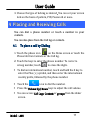
User Guide 3. Choose the type of locking as desired. You can set your screen lock on the basis of pattern, PIN, Password or none. 4 Placing and Receiving Calls You can dial a phone number or touch a number in your contacts. You can also place from the Call log or contacts. 4.1 To place a call by Dialing 1. Touch the phone icon on the Home screen or touch the Phone tab from Contacts or the Call log. 2. Touch the keys to enter the phone number. To correct a wrong number, touch to erase the digits. To dial an international number, touch and hold the 0 key to enter the Plus (+) symbol, and then enter the international country prefix, followed by the phone number. Touch the icon to dial the number. Press the Volume Up/ Down keys to adjust the call volume. You can access Call Logs, Contacts or groups from the dialer screen. Model – A80 11