1
User Guide
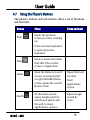
4.7 Using the Phone’s Buttons
The phone’s buttons and soft buttons offers a lot of functions
and shortcuts.
Button
Press
Back
Opens the previous
screen you were working
on,
Press and hold
If the onscreen keyboard
is open, closes the
keyboard
Menu
Home
Search
Model – A80
Opens a menu with items
that affect the current
screen or Application.
Open the Home screen, If
you are viewing the left
or right Extended Home
screen, opens the central
Home screen.
Opens the most
recently
On the home screen,
opens Google search to
search your phone and
the web. In many
applications, opens a
Opens Google
search by
voice.
Used
applications
screen.
15