1
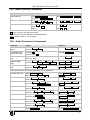
908 Commands in Protocol 3000
Command
Syntax
Response
Read audio mute state MUTE?
MUTE MUTE-MODE
Set stereo mode
STEREO STEREO-MODE
STEREO STEREO-MODE
RESULT
Read stereo mode
STEREO?
STEREO STEREO-MODE
Set balance mode
BALANCE OUT-CHANNEL, BALANCE-LEVEL
BALANCE OUT-CHANNEL,
BALANCE-LEVEL RESULT
Read balance mode
BALANCE? OUT-CHANNEL
BALANCE OUT-CHANNEL,
BALANCE-LEVEL
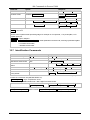
Parameter Description:
STAGE = ‘IN, ’OUT’
or
Numeric value of present audio processing stage. For example: ‘0’ for input level, ‘1’ for pre-amplifier, ‘2’ for
amplifier (OUT) etc.
CHANNEL = Input or Output #
VOLUME / BASS / TREBLE / MID_RANGE = Audio parameter in Kramer units, minus sign precedes negative
values.
++ increase current value,
-- decrease current value.
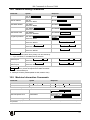
10.7 Identification Commands
Command
Syntax
Response
Protocol handshaking
#CR
~OK CRLF
Read device model
MODEL?
MODEL MACHINE_MODEL
Read device serial number
SN?
SN SERIAL_NUMBER
Read device firmware
version
VERSION?
VERSION MAJOR .MINOR .BUILD .REVISION
Set machine name
NAME MACHINE_NAME
NAME MACHINE_NAME RESULT
Read machine name
NAME?
NAME MACHINE_NAME
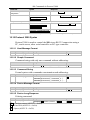
Reset machine name to
factory default*
NAME-RST
NAME-RST MACHINE_FACTORY_NAME
RESULT
*Note: The machine name is not the same as the model name. The machine name is used to identify a specific
machine or a network in use (with DNS feature on).
MACHINE_NAME = Up to 14 alphameric chars.
* Machine factory name = Model name + last 4 digits from serial number.
Set machine ID number
MACH-NUM
MACHINE_NUMBER
MACH-NUM OLD_MACHINE_NUMBER
,NEW_MACHINE_NUMBER RESULT
* A response is sent after the machine number was changed. The response with the header is:
NEW_MACHINE_NUMBER @MACH-NUM OLD_MACHINE_NUMBER ,NEW_MACHINE_NUMBER OK
18
KRAMER: SIMPLE CREATIVE TECHNOLOGY