1
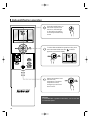
Dehumidification operation
Press the On/Off button on
the remote control to turn
the unit on; LED will light
on the indoor unit and the
unit will respond with beep
sound.
To select Dehumidification operation mode, press
the mode button.Make sure the " " indicator
appears in the remote display.
Set the temperature lower
than the room
temperature. The desire
temperature can be
changed up to 92°F and
down to 64°F.
NOTICE
If Dehumidification operation mode select, you are not able
to control fan speed.
10