1
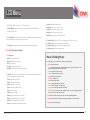
LCD Menu
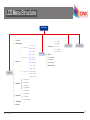
ABSrequired(Default:Extruder,255℃; Build plate, 45℃)
Preheat ABS Bed: PreheatbuildplatetotheworkingtemperatureofABSrequired(
Default:Buildplate,45℃ ).
1.6 - Leveling Bed: Build plate calibration assist-function. Rotate the button, the extruder will
move to next position in clockwise direction in top view.
1.7 - Cool down: Cool down the extruder and build plate to normal temperature.
2 - Control: Adjust printer settings
2.1 - Temperature:
Nozzle: Left temperature setup
Nozzle 2: Right temperature setup
Bed: build plate setup
Fan speed: Cooling fan speed setup
Auto Temp: All the above data setup automatically
2.2 - Motion: Please do NOT change any data in this menu if without specialist experience.
Accel:Acceleratedspeedofextrudermotion
Vmax x: Max speed in X direction
Vmax y: Max speed in Y direction
Vmax z: Max speed in Z direction
Vmax e: Max speed of feeding motor
Vmin: Min printing speed
VTrav min: Min travel speed
Amax x: Max accelerated speed in X direction
Amax y: Max accelerated speed in Y direction
Amax z: Max accelerated speed in Z direction
Amax e: Max accelerated speed of feeding motor
www.mankati.com
A-retract: Accelerated speed of retract
Xsteps/mm: Transmission ratio of X motor
Ysteps/mm: Transmission ratio of Y motor
Zsteps/mm: Transmission ratio of Z motor
Esteps/mm: Transmission ratio of feeding motor
2.3 - Restore Failsafe: Please do NOT change any data setting here in this menu.
2.4 - Save memory: Record the coordinate of printing stop
2.5 - Restore factory: Restore the manufacturer default settings
2.6 - Firmware version:Currentfirmwareversion
Menus in Printing Process
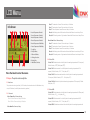
During the printing, you can press the knob to change some printing settings.
1. Tune: Re-set some parameters
- F/R: the actual printing speed takes the percentage of the pre-set speed in the software. It can be
adjusted while printing according to the actual situation.
- Nozzle: Temperature setup of left nozzle
- Nozzle 2: Temperature setup of right nozzle
- Bed: Temperature setup of build plate
- Fan speed: Fan speed setup
- Flow: Filament feeding flow rate
- Flow 0: Filament feeding flow rate of left nozzle
- Flow 1: Filament feeding flow rate of right nozzle
- Auto Temp: Set all the above temperature automatically
- Change filament: To stop the printing and change the filament. It will record the printing stop position
so as to continue to print after filament changing.
2. Control: Please do NOT change any data in this menu if without specialist experience.
3. Pause: To stop the printing, but it will record the printing stop position to continue the printing.
4. Stop Print: To finish the printing job
19