1
Pegasus ® Pro Series Dimmer
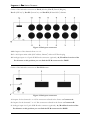
Outlet of the backside connectors at Pro-S (Schuko), Pro-F (French/Belgian),
Pro-C (CEE16/3), Pro-PC (PowerCon) and Pro-WL (Wieland ST17) dimmer
Figure 2. Back part connectors
1-12. Outputs of the channels from 1 to 12.
13. 3 x 40A input mains cable (H07 rubber; 5x6mm2) without CEE male plug
14. Analogue input via 15 pole SUB-D male connector (optional). At /B suffixed version of the
Pro dimmer at this position you can find the XLR connectors for DMX!
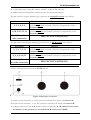
Outlet of the backside connectors at Pro-H2 dimmer:
Figure 3. Back part connectors
1. Outputs for the channels 1 to 6. This connector referred in the future as Connector A.
2. Outputs for the channels 7 to 12. This connector referred in the future as Connector B.
3. Analogue input via 15 pole SUB-D male connector (optional). At /B suffixed version of the
Pro dimmer at this position you can find the XLR connectors for DMX!
4