1
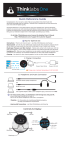
Thinklabs One User’s Manual Table of Contents Introduction W elcome to Thinklabs Community……………………………………………………….………..Pg. 3 S tethoscope Features…………………………………………………………………….……………….Pg. 4 O ptimal Use of your Thinklabs One……………………………………………………….……...Pg. 5 P ackage Contents…………………………………………………………………………….…………....Pg. 6 Rechargeable Battery B attery Charging………………………………………………………………………………….……..….Pg. 8 B attery Charging Precautions…………………………………………………………….……..…..Pg. 9 B attery Level Indication…………………………………………………….…………………..…….Pg. 10 Operating The One C ontrols and Display………………………………………………………………….…….….…………Pg. 7 P ower On / Off……………………………………………………………….……………….…….…....Pg. 10 V olume Control………………………………………………………………………………...………....Pg. 11 F ilter Selection……………………………………………………………………………….….….….….Pg. 12 R eading the Hz Scale………………………………………………………………………..……..….Pg. 13 A uto Shutoff Programming…………………………………………………….………...………...Pg. 15 1 Advanced Topics Stethoscope Filters………………………………………………………………………...……..Pg. 12-14 Diaphragm Pressure & Frequency……………………………………………………...……...Pg. 16 Psychoacoustics & Volume…………………………………………………………………….…….Pg. 17 Thinklink & Connectivity………………………………………………………………………….Pg. 18-20 Maintenance General Maintenance……………………………………………………………………..…………….Pg. 21 Headphone Maintenance………………………………………………………………………..…...Pg. 22 Diaphragm Cleaning & Removal…………………………………………………………..……..Pg. 23 Cleaning Inside the One………………………………………………………….……………….....Pg. 24 Additional Information Quick Reference Guide………………………………………………………………..………………….Pg. 3 Troubleshooting………………………………………………………………………….…………..Pg. 25-29 Filters……………………………………………………………………………………….…………………...Pg. 30 Indications for Use/Caution………………………………………………………...……………...P g. 31 Service & Warranty……………………………………………………………………………..……..Pg. 32 2 Welcome to the Thinklabs Community Congratulations! You now own the revolutionary Thinklabs One - an electronic stethoscope like no other. Welcome to the Thinklabs Community of clinicians, researchers, educators and students who believe in quality in everything they do. Quick Reference Guide Design - Thinklabs One is designed with form and function intended for an era of compact, efficient design; a stethoscope for the age of digital music and instant communication. The design hides advanced technology and an elegantly simple form. Amplification - With over 100X amplification compared to a typical acoustic stethoscope, One's small form hides an extraordinary power to reproduce heart sounds with the punch of a rock drummer or a hip-hop track. Audio Filter System - Multiple filters give you control over the sound with far more nuance than the blunt instrument of a "bell" or "diaphragm". You can also limit bandwidth to exclude ambient noise. Rechargeable Battery - A Lithium Ion battery gives you the battery life you need in a compact device. Charging is made convenient and easy, using a standard USB style charger. Patented Transducer - Thinklabs has built its reputation on technology that maintains the timbre and tactile sense of an acoustic instrument, with the clarity and power of electronics. Connectivity - Thinklink gives you connection to almost any device you're likely to use for recording, telemedicine, communication, teaching or research. Use mobile phones, tablets, computers, digital audio recorders. Support - Owning a Thinklabs is a mark of those who take medicine seriously. We take our service to you as seriously. 3 Thinklabs One - Features ★ ★ ★ ★ ★ ★ ★ ★ ★ ★ ★ ★ ★ ★ ★ Amplification Versatile Filters Ambient Noise Rejection Thinklabs Patented Technology Compact Design Thinklabs Quality Headphones Headphone Choice Rechargeable Battery Industrial Design Ergonomics Connectivity Apps Support Assembled in USA ● More than 100X a typical conventional stethoscope ● Amplification increases sound level from obese patients and faint heart sounds ● Multiple filters for different frequency ranges to provide more control over sound ● Filters include settings that reduce ambient noise ● Electromagnetic diaphragm recognized for producing excellent sound ● Handheld design that fits in your pocket ● Excellent sound and comfortable fit ● Use high quality external headphones from your favorite audio brand ● No need to replace hard-to-find batteries ● Luxurious design using best-in-class materials ● Clear user interface and simple operation ● Thinklink connects to iPhone, iPad, Android, Tablet, computers, etc. ● Record and Share sounds using audio apps and communications apps ● Thinklabs personal support, going the extra mile for customers ● Quality assembly inside Thinklabs own facility 4 Optimal Use of Your Thinklabs One Digital Stethoscope Instructions - Your Thinklabs One Digital Stethoscope has been designed to be very easy to use. However, if you take the time to learn the deeper features of your stethoscope, you will probably use it more effectively. Sound Levels - Thinklabs One can be set to very loud volume levels. Don't make your stethoscope volume louder than necessary. Adjust volume so that heart and lung sounds are clear and comfortable to listen to. Protect your hearing! Diaphragm Pressure and Skin Contact - Making skin contact will provide you with the best sound quality. If you do listen through clothing, avoid listening through thick garments. Headphone Fit - Make sure your headphones are as sealed as possible against outside noise. This will enhance your own listening. Use Thinklabs headphones or equivalent high quality headphones. Battery Charge - Remember to charge your battery. Your Thinklabs One will give you many warnings to recharge your battery and it is designed to have enough charge for only one or two charge cycles a week. 5 Package Contents 1X Thinklabs One Digital Stethoscope 1X Thinklabs In Ear studio quality headphones 1X Spare Eartips (Small, Medium, Large pairs provided) 1X USB Style Battery Charger (100-240V worldwide use), US style plug 1X Charger Cable 1X Headphone (10cm) male-female adapter 1X Thinklink: Thinklink switching system for recording and monitoring Male-Male long cable (1m) Male-Male - short cable (10cm) Male-Male right angle connector for mobile devices 1X Quick Reference 1X Regulatory and Warranty Information 6 Control and Display Controls are shown below. Four keys control Volume, Filter Selection and other functions. Briefly: - Hold any key to Turn On. - Hold (a) & (-) to power off manually. - Volume: Use (+) and (-). - Filter: Click (f) rapidly to switch between 2 "favorite" filters. Hold (f) longer to sequence through all filters. Any current selection becomes a "favorite". The Display shows: - Volume on 0-10 scale. - Filter selection , indicating low, medium or high range. - Battery Level (scrolls across 0-10 scale when One turns off). - Battery Low Level warning or Charging. 7 Battery Charging Thinklabs One Digital Stethoscope is powered by an internal rechargeable Lithium Ion battery. A USB-style charger is included with your One stethoscope. Your One will usually be shipped to you with a partial charge. You should charge it fully before using it clinically. A full charge should provide over 4 hours of listening. Before you charge your stethoscope, read these Battery Charging Precautions before you proceed. To charge your stethoscope: 1. Connect the Charger Cable 3.5mm plug to your One, disconnecting headphones if they are plugged in. The Charger Cable is a white cable with 3.5mm phone and USB plug on each end, respectively. 2. Connect the USB plug to the USB Charger. Use only the charger supplied with One - it has been tested and qualified to be safe for use with your stethoscope. Other USB chargers will charge your One, however we cannot guarantee their operation. 3. Connect the charger to an AC Mains outlet. The charger is a worldwide charger (100-240V, 50/60Hz). In some countries, you may require a plug adapter. 4. When charging, the Battery LED will flash. As the battery charges, the flash rate will slow. When the battery is fully charged, the LED will be On and stop flashing. A thorough charge cycle can take as long as 8 hours, however your One will have almost full capacity within 4 hours. To check the battery level, see the section. Battery Level Indication 8 Battery Charging Precautions Thinklabs One Digital Stethoscope is powered by an internal rechargeable Lithium Ion battery. Lithium Ion batteries power many devices today - mobile phones, tablets, medical devices. However, they must be handled properly to ensure safe use. Please take the following seriously to avoid injury, fire or explosion: ● We have tested One with the included USB Charger. We cannot guarantee the safety of charging One with other USB chargers. ● If One becomes hot while charging, disconnect immediately and allow it to cool. Do not move One while it is cooling. Contact Us immediately if One warms up during charging. ● Charge One at ambient temperatures between 5C-35C (41F - 95F). If the battery temperature is out of range, a safety circuit may shut off charging until the battery temperature falls within an acceptable range. ● Disconnect the Charger from the AC Mains or from the stethoscope once charging is complete. ● Do not attempt to open or replace the battery. . ● If your stethoscope fails to charge, C ontact Us For more information, go to B attery Charging Instructions . 9 Battery Capacity and Battery Level Indicator The battery discharge profile is shown at right, and indicates that you should get over 4 hours of listening (over 100 patients typically). The battery level is shown on the 0-10 scale when the One powers off, either through manually or auto shutoff. The diagrams show the various levels. Power On - Off Push ANY key to turn on your One stethoscope Manual Shutoff To manually turn off your stethoscope, simultaneously push and hold the "-" key AND the "Alt" key. After 2 seconds, the battery level indication will flash across the 0-10 scale display and you can release the keys. Automatic shutoff Your One is programmed to automatically shut off after a preset time. The factory default is 2 minutes, and you can change this to a range of 1-10 minutes. See . Auto Shutoff Programming Constant On (no auto shutoff) You can also DISABLE the automatic shutoff. This is not advisable for normal clinical use, but is useful for longer term recordings. Constant On mode will keep the stethoscope on until the battery is discharged, at which time, it will shut off. 10 Volume Control Click the "-" Key (Minus Key) to reduce volume. Click the "+" Key (Plus Key) to increase volume. Volume Level is indicated on the 0-10 Scale. NOTE: Set the Volume at a level that is comfortable. Protect your hearing - Do not listen at excessive volume. If you have normal hearing, you should seldom need to use a volume level in excess of 5. See the P sychoacoustics (pg. 17) discussion for more on hearing and perception. 11 Filter Selection Your Thinklabs One Digital Stethoscope is programmed with multiple audio filters, so that you can more finely set your stethoscope to listen to particular frequency ranges, according to your work needs and personal preferences. The specific filters are listed here . (The selection may change from time to time. Your One package includes details of the specific filters programmed into your One.) Using the Filter (f) Key, you can sequence through all the filters, or rapidly flip between two selections. As shown in Circle 1, Push & Hold the Filter (f) Key and One will sequence to the next filter in red circle 1, cycling through all selections. If you then CLICK the Filter (f) Key (rapid click rather than hold down), your One will remember which filter you have currently selected in red circle 1 and will then jump across to red circle 2. You can then repeat the Push & Hold sequence to cycle through the same selections in red circle 2. If you then CLICK the Filter (f) Key, One will remember your selection in circle 2 and jump back to circle 1, remembering your selection in circle 1. CLICK again and jump back to your last selection in circle 2. In short, Push & Hold to sequence through filters, Click to save your selection and jump to the other circle. Once you've selected a favorite in each circle, simply click the Filter (f) Key to alternate between your two favorite filters. 12 Reading the Hz Scale The Hz (pronounced Hertz) scale provides a general indication of the frequency range, or pitch, to which your selected filter has been set. This provides a superior foundation for understanding what you are listening to and provides a more informed view of auscultation. If the LEDs towards the left are on, the filter you have selected will pass low frequencies. If the LEDs to the right are on, higher frequencies will be passed. The broader the number of LEDs, the broader the frequency range being reproduced. How do you choose filters for particular listening? Use lower pitched filters for heart sounds and higher pitched for lung sounds. A range of filters is provided, so that you can fine tune your own preferences. See details of the c omplete selection , and do some listening tests to determine your preference. Alternatively, turn on your One and simply enjoy it. 13 Stethoscope Filter Selection Your Thinklabs One Digital Stethoscope offers a revolutionary change in filtering sound for auscultation. Instead of the limited Bell/Diaphragm selection, you get multiple filters (Actual filters can change between software revisions). Sounds comprise a combination of lower and higher pitched sounds. Some sounds, such as S3 heart sounds, contain very low frequencies (low-pitched), valve clicks have somewhat midrange frequencies, and lung sounds and wheezes contain much higher frequencies. The filter charts show the extent to which a given range of frequencies are amplified or allowed to pass, and which are attenuated or blocked. The higher the graph, the more that frequency is passed through for you to listen. Notice that the mauve graphic extends to a lower frequency before it begins to drop off sharply. This means that lower frequencies will be audible using the mauve filter (ooo---) - better for low heart sounds. Conversely, selecting the cyan filter (---ooo) will allow higher frequencies to be audible (better for lungs). Note that there is a tradeoff between hearing higher frequencies and filtering out ambient sound. Ambient noise tends to be higher frequency, so it's advantageous to filter out higher frequencies to eliminate background noise, but it can also attenuate higher pitched breath sounds. Play with different filters and this will become apparent. 14 Power - Auto Shut Off Time Programming You can set the Auto Shutoff time to be from 1-10 minutes. You can also disable Auto Shutoff. To program Auto Shutoff: 1. Turn on One by pressing any key. 2. Click the Alt Key to indicate the number of minutes you'd like to program for Auto Shutoff. If you'd like a 1-minute Auto Shutoff time, click once; for 2 minutes, click twice; for ten minutes, click 10 times. DO NOT CLICK MORE THAN 10 TIMES if you want Auto Shutoff to operate. 3. Now Push and Hold the Alt Key until the One shuts off. This will take about 15 seconds. Your One is now programmed. Constant On Mode - Disabling Auto Shutoff Perform the same procedure as above, but Click the Alt Key AT LEAST 11 times in Step 2. 15 Diaphragm Pressure & Stethoscope Frequency Response The Thinklabs Electromagnetic Diaphragm maintains the tactile sense of an acoustic stethoscope, where diaphragm pressure was always used to adjust the sensitivity to lower or higher frequencies. Thinklabs takes this to a new level. The stethoscope diaphragm sits in front of a conductive plate inside the stethoscope body. Vibration is sensed when the diaphragm vibrates and the gap between the diaphragm and the plate behind it changes due to diaphragm vibration. Body sounds cause very small gap changes. Pressure you apply against the patient has a far greater effect on the gap between diaphragm and the plate. The chart shows how frequency sensitivity changes as you push harder, reducing the gap - sensitivity changes from the blue to purple to pink graph. Notice how the low frequency (bass sounds) increase? When you listen, as you apply more pressure, low-pitched sounds get louder. HOWEVER, when you push hard enough for the diaphragm and plate to touch, vibration will decrease, and you will no longer hear low pitched sounds as intensely. This can be helpful to reduce heart sounds when listening to lungs. But generally, apply enough pressure to find a "sweet spot" where sounds are rich and loud. NOTE - Changing diaphragm pressure and thereby changing gap produces very large signals that can "clip" the sound. So make gentle changes in pressure and generally apply a steady, consistent pressure to avoid clipped sound. 16 Psychoacoustics and Stethoscope Volume As you adjust stethoscope volume, you will find that you hear low pitched sounds better when the volume is higher, even if you do not change filters or diaphragm pressure. This is due to a psychoacoustic phenomenon discovered by Fletcher & Munson in 1933 . The chart shows that as frequency increases (increasing X axis), the ear requires less and less volume to perceive the sound at "equal loudness." Going the other way, from higher to lower frequency, in order to hear a low frequency with the same sense of loudness as a higher frequency, it is necessary to "turn up" the volume as you get lower in frequency. Looking at the lowest red curve, a sound at 1000Hz and 0dB (A), will sound just as loud as a 100Hz sound that is 20dB louder (B). Looking at the curves higher up on the chart, notice how they are flatter? What that means is that when sounds are louder, the ear perceives lower and higher pitched sounds more equally. What does this mean? Quite simply, your ears don't hear bass very well when the sound is quiet, but as you turn up the volume, your ear begins to hear MORE bass. Turn up the music and you hear more bass! Now you know why sub-woofers are so large. When you auscultate, increase stethoscope volume and low pitched sounds will be more prominent. Turn down volume and bass diminishes faster than treble. This is psychoacoustic, not real. It's also why an acoustic stethoscope is so unsuited for low-pitched heart sounds! 17 Thinklink - Using One with Mobile Devices The Think link kit provides all the cables and connections to connect One to iPhones, iPads, Android devices, computers, digital recorders and so on. (NOTE - Image at right does not represent a connection diagram. See Connecting Thinklink for specifics.) You can record sounds from One to your recording device (iPhone, iPad, etc.) while listening via headphones. You can then listen to your recordings via the headphones. Thinklink allows you to do this with a simple connection configuration. Simply switch between recording or playback on the Thinklink switch. Your One becomes an external microphone to your mobile device. It can therefore work with almost any App. See the Apps Page for ideas on how to use One. Note, however, that the quality of recordings or stethoscope sounds depends on the device you are using, as well as the App. For example, many telemedicine apps compress the sound, so recording sounds first and then sending files can sometimes superior to using a low-cost video-conferencing App. 18 Thinklink - Connections There are 4 jacks on Thinklink, two on the left, two on the right. The arrows (>, <) show their positions. Follow the connection steps very carefully: Before you start: a. Set the SOURCE switch to the MIDDLE position. b. Set the MONITOR switch to the left. (1) Connect Headphones to the upper left jack. (2) Connect Thinklabs One to the lower left jack via the long male-male cable supplied with your One. (3) a. Plug a short 3.5mm male-male right angle connector or short cable to the lower right jack (3). Do NOT connect to iPhone or iPad yet. (3) b. Turn on your Thinklabs One and set to a medium volume. Make sure all switches are set correctly. (3) c. Launch the Thinklabs Stethoscope App on your iPhone or iPad. If needed, download the App and start these steps again. (3) d. Once the App is running, and the One is ON, only NOW, plug the connector or cable you plugged into jack (3) into your iPad or iPhone. AS YOU PLUG IT IN, a message on the upper left corner should say "Headset". This tells you that the iPad or iPhone is recording from your One, rather than recording from its built-in mic. If the message instead reads "Built-In mic", unplug from the iPhone/iPad and try again and if it doesn't want to cooperate, turn up the One and tap on the diaphragm as you plug it into the ipad/iPhone. (What's going on is that the iDevice makes up its own mind as to whether to use built-in mic or external, and the only way to coax it to use external is to have a sound signal active AS the plug is inserted.) To Headphones (1) > < PC Mic Jack (Not Req'd for Mobiles) From Thinklabs One (2) > (3.5mm malemale) < (3) To Mobile Device Headset Jack (Right Angle connect./short 3.5mm cable) 19 Thinklink - Recording To Record, Set the Monitor switch to the left (monitor One). Set the Source switch to the center or right position. The center position reduces the signal level to the mobile device. This is usually necessary, since the One is usually too loud for most recording devices. You may also find that reducing One's volume level to a 0 to 2 range is necessary during recording, to reduce clipping and distortion. Note that you can record from a headset microphone by switching the Source switch to the left position. This will connect your headset mic to the mobile device input, rather than connecting One as the audio source. This can be useful for dictating voice to annotate recordings. Note that you must be using headphones that have a built-in microphone to perform this function. T hinklink - Playback To Play back recording and listen to your recording device via the headphones, Set the Monitor switch to the right (mobile). Adjust the volume on the playback device itself. 20 General Maintenance and Cleaning ● Do not immerse your One electronic stethoscope in any liquid. If One is inadvertently immersed in liquid, do NOT Power ON the unit. Completely dry out the inner spaces before trying to use the stethoscope again. Contact Thinklabs for assistance. ● Do not sterilize One using any sterilization process. ● Wipe your One with alcohol swabs or a soft cloth moistened with alcohol or water. Do not use abrasive cleaning agents, and do not allow fluids to enter the device. ● Avoid extreme heat, cold or humidity for either storage or use of this device. -4F to 110F (-20C to 43C) storage. Room temperature is recommended for use. Note that closed vehicles reach well above 120F in summer. ● Avoid excessive force applied to any part of the stethoscope. Damage could result. ● Avoid dropping the One on hard floors, especially concrete. Damage could result. ● Fully charge battery if stethoscope is not to be used for a period of months. ● Damage resulting from inappropriate care of the device may compromise product performance or void the Warranty. 21 Headphone and Eartip Cleaning and Replacement Your Thinklabs One is supplied with Thinklabs in-ear studio quality headphones. Three eartip sizes are included - Small, Medium, Large. The Medium size is fitted on your Thinklabs headphones. ● Changing Eartips - To remove ear tips, grip the eartip by the flap and gently twist it off. DO NOT place undue force on the headphones. Almost no force is required for removal, it's just a matter of pulling in the correct direction, pulling and angling the eartip so that it rolls off the shaft. To place the new eartips onto the headphone shaft, gently push the ear tips on, keeping them straight. ● C leaning - You can clean the ear tips with alcohol wipes or with soap and water if they need a thorough cleaning. Whatever you do, try not to lose them while removing and cleaning them. ● Replacement - You can go to the Thinklabs Store to purchase eartips, or Contact Us and request eartips, telling us which model Thinklabs stethoscope you own. 22 Diaphragm Cleaning and Replacement Your Thinklabs One Digital Stethoscope has a patented Thinklabs Electromagnetic Diaphragm. It operates on an elegantly simple principle of physics - a large electric field exists between the back of the diaphragm and a conductive plate behind the diaphragm. (Note that there is NO electric field outside your One stethoscope.) This is a robust system and the diaphragm is strong and not easily damaged. What is important is to keep your One stethoscope reasonably clean and dust-free - good practice for health reasons anyway. Read below, but also see the related section on Cleaning Inside your stethoscope. Cleaning Outside - Wipe any external part of your Thinklabs One Digital Stethoscope with alcohol wipes. The diaphragm can be cleaned with other cleaning agents, but avoid allowing liquids to leak into the stethoscope. You can also unscrew the diaphragm ring to clean inside the stethoscope and in more inaccessible places that might need cleaning from time to time. Removing and Cleaning - Unscrew the diaphragm ring (counter-clockwise when looking at the diaphragm). You can clean both sides of the diaphragm with alcohol. Make sure that the inside of the diaphragm does not remain with any oily or other residue. It's important that the inside surface be clean and free of any surface grease or other chemicals to operate well. Attaching the Diaphragm - V ERY IMPORTANT - When you replace the diaphragm and screw on the diaphragm ring (clockwise), make absolutely sure that you have it on straight. It's a good idea to turn it COUNTER-clockwise until you feel it align, and then GENTLY screw it clockwise. If it feels like it's not screwing on cleanly, start again. The reason is that the thread is intentionally quite soft to keep the ring on, and can be easily threaded. Screw until the diaphragm is in place and doesn't rotate freely, but DO NOT OVERTIGHTEN - firm, not tight! 23 Cleaning Inside Your Stethoscope There is generally no reason to open your Thinklabs One Digital Stethoscope. However, if the situation arises that you'd like to clean inside, this is how you do it. You might also want to perform these steps if your One stethoscope is producing strange noises, which may be caused by lint or dirt inside your stethoscope. 1. Turn off your Thinklabs One stethoscope (Push and hold "-" and ALT keys together for a few seconds, then release). 2. Unscrew the Diaphragm and clean it (see instructions here). 3. Using a dry air spray, available from office supply stores and hardware stores, spray around the blue circuit that you see when you've removed the diaphragm. use the straw that's supplied with the spray can. Do it well, but don't overdo it. 4. Allow the open stethoscope to dry out for a couple of minutes or more if you're in a humid environment. 5. Replace the diaphragm (see instructions here. READ THEM - they're important). 6. Turn on your stethoscope and check the sound quality. If you're hearing strange sounds, give it a few minutes to settle down and dry out more, especially in humid environments, then try again. 7. If repeated cleaning does not correct any noise problems, contact us. If your One stethoscope sounds good, you've probably successfully cleaned your stethoscope. NOTE: A. DO NOT use liquids to clean inside the One stethoscope. B. If liquids/dirt entered other areas of your stethoscope, such as via the headphone jack, contact us before dismantling!!! 24 Troubleshooting ● My Thinklabs One doesn't turn on . -Make sure you know how to turn it on - just push any key. -One uses a rechargeable Lithium Ion battery. See the battery charging instructions for further information. -If you have attempted to charge the battery and you are sure that the charger was connected to a live power source, it is possible that either the charger, the charger cable, or the stethoscope are faulty. Contact us for further assistance. ● There is a lack of bass or sound is "tinny". 1. Are the headphones connected properly? Is the plug in all the way? If not, plug may be too fat and you need to use the short extension cable we provide. 2. Are the headphones sealed in your ears well enough? If using in-ear headphones, they MUST be well-sealed (blocking outside sound) if you want good bass. 3. Are the headphones up to the job? Some headphones don't have good bass. If you're using on-the-ear or over-the-ear headphones, you need really good quality headphones that seal out outside noise and have really good bass. 4. What Filter setting are you using? You must use a lower frequency filter setting when listening to heart sounds, for instance. See the section on Filter settings to learn more. ● Heart sounds on some patients are difficult to hear. Heart sounds naturally vary from patient to patient. Obese patients have attenuated heart sounds, as do older patients. Chest hair and some clothing, such as knitted or thick garments, can reduce the coupling between the diaphragm and the chest. Finally, sounds are dependent on the location on the body. There is also a technique to using One well: Start by applying a light pressure on the diaphragm. As you increase pressure, One becomes more sensitive and volume increases. There is a "sweet spot" where diaphragm sensitivity is at a maximum. Then if you push even harder, the diaphragm will 25 touch the sensing plate behind it and its vibration will decrease. This is similar to conventional stethoscopes, where pressure of the chestpiece had an effect on sensitivity. We've kept that tactile feel on One, along with other abilities to control the sound. So vary the pressure of the diaphragm against the patient and learn to find that "sweet spot." Another obvious matter is the volume level and filter setting. Make sure you have enough volume for faint-sounding patients, and set the filter appropriately to capture low frequencies for heart sounds. Finally, there's the question of headphone seal and headphone quality whether you are using good headphones. This is discussed in this FAQ and also in the general headphone FAQ on the website. ● I can hear sound from Left or Right headphone but not both. Your headphones are probably faulty, likely due to a damaged wire. But first, let's eliminate the simplest possibility - that you haven't plugged the headphones in all the way. Check to make sure you've connected your headphone plug all the way into One's jack. Note that the jack hole is rather narrow, about 6.5mm to be precise. So some plugs are a bit too fat to fit all the way. If that's a possibility, use the short male-female extension cable supplied with your One. Connect this short cable into One and connect your headphones to the cable. If you hear both L and R, your headphones weren't plugged in all the way. If you're sure that the headphone plug is connected well and you still have only one side playing, check the headphones themselves. This is simple to diagnose connect the headphones to a different sound source, such as a computer or mobile phone and play music. If the headphones work properly, move the wires around to check if you have an intermittent connection. Alternatively, connect a different set of headphones to your One and see if the problem persists. If you have discovered that your headphones are working well and it's definitely your Thinklabs One electronic stethoscope, go to Support for further help. ● One is producing unexpected interference or noise Your One electronic stethoscope should provide a low-noise, high-quality signal. If used on clothing or not applied correctly to the patient, artifact can be produced. Simply apply the Probe as recommended, making good contact with the patient. 26 There are some interfering noises that can occur even when not examining a patient. Some potential culprits are listed below, with remedies: - Radio stations or electromagnetic pickup: Move One to a location that does not have strong electromagnetic fields. One has been hardened against such interference, but it is technically possible, albeit unlikely, that noise can be induced by such sources. - Continuous loud buzzing: The diaphragm is loose. Tighten the diaphragm retainer ring. - Continuous loud buzzing: One is connected to other equipment that is either producing its own buzzing or noise, or has grounding problems that are inducing noise in the system. Try disconnected One from the equipment and listening. If problem goes away, it's not the One. If it persists, check diaphragm et al. - Other noise: Dust or moisture may exist inside the Probe. See the instructions on cleaning the inside of your One electronic stethoscope. ● I'm hearing some strange noises - squealing, or thunder/hissing noises. This is a rare, but possible problem that's really easy to correct. If you're hearing really weird noises from your stethoscope, that possibly change when you press on the diaphragm, there's probably some lint or foreign speck of dust inside your stethoscope. Super easy to clean. Refer to the cleaning instructions, unscrewing the diaphragm and using a dry air spray to clean out the space around the sensor. The origin of such noises is quite simple. There's a high voltage between the diaphragm and the plate behind it. This is the unique Thinklabs sensor design. Now, if a piece of lint gets into your stethoscope, it might sit between the high voltage plate and some other part of the circuit, or the diaphragm. The lint then provides a current path for the sensor to discharge. This tiny pico-amp or nano-amp current flow will sound like thunder or strange sound effects after it's amplified, but in reality, it's completely benign in terms of potential for damage. So don't worry, just clean it out. ● Sound is sometimes distorted or cuts out temporarily when listening. 27 Your Thinklabs One digital stethoscope is designed to produce very clear, undistorted sound. If you're not getting clear sound, possible problems and solutions: - Volume is too high. Reduce Volume level. - Excessive pressure is being applied when listening. Decrease pressure for loud sounds. - For in-ear headphones, your headphones might not be sealed in your auditory canals, so the speaker cones are moving with no resistance and the One's power is driving them hard. Try sealing your in-ear headphones. - For on-ear or over-the-ear headphones, your headphones might not be up to the task of reproducing the One's bass. Even high-priced headphones aren't always designed for strong bass. Think hip-hop, not classical music when considering what your headphones can handle. - One is not being held in a firm and steady position, or is not being held with a steady pressure against the patient. Changing pressure is akin to vibration. Thinklabs EmD diaphragm can sense frequencies down to the sub-sonic range, in order to cover the whole audio spectrum for murmur detection. Vibrations caused by patient or user hand movement are also sometimes sensed as loud signals that distort body sounds. Hold One steady with a light but consistent pressure against the patient. If in a moving situation (ambulance, aircraft) it sometimes helps to hold the One stethoscope so that the fingers holding your stethoscope also touch the patient chest wall, so that stethoscope and chest wall move in unison. ● I work in a noisy environment and I can hear ambient sound. Thinklabs stethoscopes are designed to attenuate ambient noise. The EmD Diaphragm and acoustic design of the One naturally reduce ambient noise. However, this works best when you have good skin contact. - First thing to do is get good skin contact rather than listening through clothing. - Consider your filter settings. We provide filter settings that cut out higher frequencies, especially for heart sounds. Play with the various filters and find the ones you like best for your work environment. See the Filters section for more advice on this. - Consider the volume level. Don't over-amplify if you don't need to. 28 ● My Thinklabs One got wet or something leaked into it. 1. Unscrew the diaphragm ring, remove the diaphragm, and holding your finger against the plate behind the diaphragm (on the silver circle), shake the One to get as much liquid out as possible. 2. Let it dry! Do NOT try and charge the stethoscope or even turn it on while it's wet. Shake out all the liquid and allow it to dry. Google search drying cell phones - lots of tricks out there! 3. AFTER it's dry, replace the diaphragm and diaphragm ring. Read the instructions for doing so, and do not damage the sensitive thread on the One by screwing it on wrong. 4. AFTER it's dry and you've closed it up, try turning it on and test it out. If it sounds OK, and seems to be working, you're probably OK. Try charging the One, but only if you're convinced it's working OK and it's dry inside. If it doesn't work, contact us immediately. WARNING: Lithium Ion batteries can explode if not used correctly. Contact us if you have any questions or have any doubts about the condition of your One. ● Nothing here has helped me solve my problem. OK, time to get more help. We do our utmost to help you get the best from your Thinklabs One Digital Stethoscope. To save your time and trouble, first look at the other FAQs to see if there's something more relevant to your problem and you can get the answer quickly. Failing that, go to the Support page or Contact Us and we'll help you out. 29 The Audio Filters In Your One The following filters are provided in your Thinklabs One. Refer to the Quick Reference if you’d like to change the 2 favorites, currently set to Filter 1 and Filter 3. 1. 30Hz - 500Hz. Produces strong low frequencies for heart sounds, especially S3. Bass may be challenging for some third party headphones and other external devices. An intense version of a Bell mode. 2. 60Hz - 500Hz. Good for heart sounds, especially if Filter 1 bass is too intense for your tastes. Similar to Bell mode. 3. 80Hz - 500Hz. Good for lung sounds, heart valve clicks, S2 splits. Removes lower heart sound frequencies. Similar to Diaphragm mode. 4. 100Hz - 1000Hz. Good for lung sounds. Filters out lower frequencies and vibrations. Provides more high frequencies for lung sounds than Filter 3, but this will also increase ambient sound slightly. 5. 20Hz - 2000Hz +/-3dB. Wideband mode, very sensitive. Intended for capturing professional research/academic recordings. Also great for listening if you can handle the sensivitity or you tend to listen at lower volumes. 30 Indications for Use The Thinklabs One Digital Stethoscope is intended for use as a diagnostic aid in patient diagnosis. It can be used for the amplification of heart, lung, and other body sounds with selective frequency filtering. This product is not designed, sold, or intended for any use except as indicated. Caution ● Follow directions for use. Misuse of this product could result in damage to the product, malfunction of the product, or compromise performance. ● Use only the Charger provided. The One has been tested for safety with the provided charger. Other chargers could damage the battery or cause heat, fire or explosion. The One will not function if battery voltage is depleted. ● Do not sterilize this device or immerse it in liquids. Clean using alcohol swabs or non-abrasive cloth dampened with alcohol or water. ● Do not attempt to modify or repair this device yourself. If you experience problems, send this device to Thinklabs for repair. ● Avoid use/storage in very high humidity, high temperature or dusty conditions. Leaving the device in excessively hot or cold vehicles is not recommended. ● The Thinklabs One has been tested to be resistant to electromagnetic interference (EMI & ESD). However, it may be susceptible to stray electromagnetic fields. If unexpected sounds are heard, change location, or move away from possible sources of interference, such as cellular telephones or wireless devices. ● At the conclusion of this device’s useful life, dispose or recycle in accordance with local regulations. 31 Service and Warranty This product is warranted against manufacturing or materials defects for a period of two years from the invoice date. If a material or manufacturing defect occurs within the warranty period, repairs will be performed free of charge upon returning the device to Thinklabs. The warranty will be voided in cases of abuse, excessive or inappropriate use conditions, or accidental damage to the product. Thinklabs may, at it’s sole discretion, replace the product with a suitable equivalent model. The warranty is transferable at Thinklabs’ discretion only. Warranty Document . For maintenance, repair, service and contact information, check the Support Page, which has helpful information for troubleshooting, getting help or sending your stethoscope to us for repair. You can also C ontact Us for assistance. Patents, Copyrights, Notes Thinklabs One is Assembled in the USA. Sub-Assemblies Made in USA and other countries. US Patents 6,498,854 6,661,897 7,940,937 8,275,140 7,346,174 8,243,940 Other US and Foreign Patents Issued and Pending. © 2004-2014 Thinklabs Medical LLC. All rights reserved. Thinklabs, Rhythm, “Hear Everything in a Heartbeat”, are registered trademarks of Thinklabs Medical LLC, Centennial, CO 80111 The Thinklabs logo, One, the Rhythm logo, High Resolution Auscultation, EmD, Electromagnetic Diaphragm, ANR2, are all trademarks of Thinklabs Medical LLC, Centennial, CO 80111 Tel: 1.800.918.1088, Outside USA +1.303.525.3458 6500 South Quebec, #250 Centennial, CO 80111 32