1
alarm counterclockwise. Remove the battery, and dispose properly.
8.When programming for this zone is complete, program other
zones for the transmitter as necessary (except for Tamper Loop
4, which does not require programming).
2.To ensure proper power-down sequence, wait a minimum of 20
seconds before installing new battery.
WARNING: The fire protection zone enrolled must always be
Loop 1. Otherwise, fire annunciations will not be reported by
the control.
3.Install a new 3-volt CR123A Lithium battery in the battery
compartment. Follow the polarity diagram inside the compartment.
4.Reinstall the smoke alarm onto the mounting base by turning the smoke
alarm clockwise.
9.Exit Programming mode when programming is complete, and test the
smoke alarm. Refer to the Testing Section.
5.Test the smoke alarm as described in the TESTING SIGNAL STRENGTH
section of this manual. The green LED should blink about once every
10 seconds to indicate normal operation. If the battery is not installed
correctly, the smoke alarm will not operate and the battery may be
damaged. If the smoke alarm does not appear to be sending a signal
during any of the tests, check for correct battery installation and for a
fully charged battery.
See the control unit’s installation instructions for further details.
Mounting
First, determine the best location for the smoke alarm, one that provides
a strong wireless transmission path and proper smoke detection. A GOOD
TRANSMISSION PATH MUST BE ESTABLISHED FROM THE PROPOSED MOUNTING
LOCATION BEFORE PERMANENTLY INSTALLING THE SMOKE ALARM. To check,
perform the test described in the TESTING SIGNAL STRENGTH section of
this manual. Prior to mounting the smoke alarm to the mounting base,
you must “enroll” the smoke alarm’s serial number into the system (see the
PROGRAMMING section). To mount the smoke alarm, perform the following
steps:
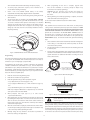
Test Switch
1.Once a suitable location has been determined, install the mounting base
on the ceiling or on the wall (if local ordinances permit). Use the two
screws and anchors provided.
Green LED
2.Turn the smoke alarm in a clockwise direction in the mounting base until
it clicks into place.
Red LED
S0289-00
3.Test the smoke alarm immediately after completing the installation (as
described in the TESTING section of this manual) and refer to the control
system’s instructions for additional information concerning the use of
wireless smoke alarms.
Figure 1. 5808W3A Wireless Smoke Alarm/Heat Detector
Programming
The smoke alarm must be enrolled in the control panel before it can operate
in the system. The 5808W3A smoke alarm/heat protection zone must be
enrolled as Loop 1 and “Input Type” 3 (supervised RF).
Direct Mount Holes
If programmed, this smoke alarm is capable of monitoring the additional
conditions of Maintenance (transmitted as Loop 2), and Low Temperature
(transmitted as Loop 3). Tamper is transmitted as Loop 4, but does not require
programming. To take advantage of the value added features of Maintenance
and Low Temperature, you must program each loop as a separate zone in the
5800 series wireless compatible panel.
1.
Enter the control’s Zone Programming mode.
2.
Enter the zone number to be programmed.
3.
Enter the applicable zone type when prompted. Program
• Loop 1 (Heat/Smoke) as a Fire zone (type 9 or 16),
• Loop 2 (High/Low Maintenance) as a 24-Hr. Trouble zone (type 19),
and
• Loop 3 (Freeze Warning Sensor) as a 24-Hr. Aux. zone (type 8).
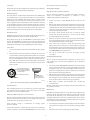
Tamper
Release Tab
Tamper Resistant Tab
(Cut off small tab activate
to
tamper resist feature)
S0290-00
Figure 2. Smoke Alarm Mounting Base
NOTE: Loop 2 High/Low Maintenance is supported only on commercial
control panels such as the Vista-128FBP.
S0162-01
4.When prompted, enter Input Type 03 (3 on some controls)
– Supervised RF Transmitter.
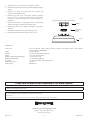
Figure 3. Mount Smoke Alarm Across Ceiling Panel Support
5.When prompted for the serial number, transmit from the smoke alarm
by activating the tamper switch. To do this, hold the base of the smoke
alarm in one hand, and rotate the smoke alarm counter-clockwise on
the base until it snaps open. Then return to clockwise position until the
smoke alarm snaps into place.
DO NOT attach the smoke alarm to removable ceiling
panels. Attach the smoke alarm across panel support as
shown in Figure 3.
Dust covers are an effective way to limit the entry of dust into the smoke alarm
sensing chamber during construction. However, they may not completely
prevent airborne dust particles from entering the smoke alarm. Therefore, it is
recommended that the detectors be removed before beginning construction
or other dust producing activity. When returning the system to service, be sure
to remove the dust covers from any detectors that were left in place during
6.When the serial number is displayed, transmit from the smoke alarm a
second time by activating the tamper switch again as described in Step
5. The current loop number (4) will begin to flash.
7.Manually change the loop number to the desired loop number for
the zone (according to the application).
-2-