1
pointer to the instance of the CollisionBody class that has been created internally.
You will then be able to use that pointer to get or set values of the body.
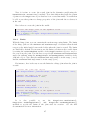
You can see in the following code how to create a Collision Body in the world.
// Initial position and orientation of the collision body
rp3d :: Vector3 initPosition (0.0 , 3.0 , 0.0) ;
rp3d :: Quaternion initOrientation = rp3d :: Quaternion :: identity () ;
rp3d :: Transform transform ( initPosition , initOrientation ) ;
// Create a collision body in the world
rp3d :: CollisionBody * body ;
body = world . c re a te C o ll i si o n Bo d y ( transform ) ;
7.2
Moving a Collision Body
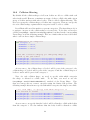
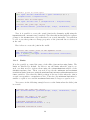
A Collision Body has to be moved manually in the world. To do that, you need to
use the CollisionBody::setTransform() method to set a new position and new
orientation to the body.
// New position and orientation of the collision body
rp3d :: Vector3 position (10.0 , 3.0 , 0.0) ;
rp3d :: Quaternion orientation = rp3d :: Quaternion :: identity () ;
rp3d :: Transform newTransform ( position , orientation ) ;
// Move the collision body
body - > setTransform ( newTransform ) ;
7.3
Destroying a Collision Body
In order to destroy a Collision Body from the world, you need to use the
CollisionWorld::destroyCollisionBody() method. You need to use the pointer
to the body you want to destroy in argument. Note that after calling that method,
the pointer will not be valid anymore and therefore, you should not use it. Note
that you must destroy all the bodies at the end of the simulation before you destroy
the world.
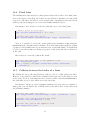
Here is how to destroy a Collision Body:
// Here , world is an instance of the CollisionWorld class
// and body is a CollisionBody * pointer
// Destroy the collision body and remove it from the world
world . d e s t r o y C o l l i s i o n Bo d y ( body ) ;
9