1
TROUBLESHOOTING TIPS
BATTERY LIFE
If the
symbol blinks or appears on the display,
replace the battery with a new (CR2032) battery.
If the battery is removed, the settings and all
measurement values will be deleted. Please reset the
settings (refer to “SETTINGS”).
Problem
The low battery
indicator blinks
or appears
continuously.
NOTES:
• If you want to keep any of the measurement values,
make a note of them before removing the battery.
• The supplied battery is for initial use. The battery
life may be shorter.
BATTERY REPLACEMENT
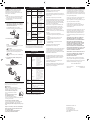
1. Loosen the screw of the battery cover on the back
of the unit. Remove the battery cover by pulling it
off in the direction of the arrow.
Use the supplied screwdriver or use a small
screwdriver to loosen the screw on the battery cover.
Nothing is
displayed.
Probable Cause
The battery is low
or worn.
Battery saving mode
active.
Press either of
,
or
, refer
to “About the battery
saving mode (sleep
mode)” in “READING
THE CURRENT
DISPLAY”.
The polarities of the
battery (+ and -) are
aligned in the wrong
directions.
Insert the battery in
correct alignement,
refer to “BATTERY
REPLACEMENT”.
The battery is worn.
Replace the battery with
a new one (CR2032),
refer to “BATTERY
REPLACEMENT”.
The unit is positioned
incorrectly.
The displayed
values are
incorrect.
Irregular movement.
Inconsistent pace. Up
and down movement.
The set values are
wrong.
The display is unusual or the buttons do
not operate normally.
CAUTION
Do not throw the battery into fire. The battery may
explode.
3. Insert the battery (CR2032) with the positive (+)
side face up.
SPECIFICATIONS
Model:
CARE AND MAINTENANCE
3VDC (1 lithium battery CR2032)
Measurement
Range:
Steps:
0 to 99,999 steps
Distance:
0.0 to 3,725.9 miles /
0.0 to 5,999.9 km
Activity calories:
0 to 59,999 kcal
Clean the unit with a soft dry cloth.
Do not use any abrasive or volatile
cleaners.
Do not immerse the unit or any of
the components in water.
The unit is not waterproof. Do not
wash it or touch it with wet hands. Be careful that water
does not get into the unit.
Aerobic steps:
0 to 99,999 steps
Pitch:
0 to 9,999.9 step/min
(in increments of
0.1 step/min)
Time:
12:00AM to 11:59PM /
0:00 to 23:59
Memory:
Previous 7 days on display
Setting Range:
Time:
12:00AM to 11:59PM /
0:00 to 23:59
Weight:
22 to 300 lb (in increments
of 1 lb) / 10 to 136 kg (in
increments of 1 kg)
Height:
3'4'' to 6'6'' (in increments
of 1 inch) / 100 to 199 cm
(in increments of 1 cm)
Stride length:
12" to 48" (in increments
of 1'') / 30 to 120 cm (in
increments of 1 cm)
Operating
Temperature/
Humidity:
14°F to 104°F (-10°C to +40°C) /
30% to 85% RH
Battery Life:
Approx. 6 months* (When used for 12 hours
a day)
NOTE:
The supplied battery is for initial use. This battery
can run out within 6 months.
External
Dimensions:
Approx. 3''(w) × 1 3/4''(h) × 3/8''(d)
(75 mm × 31 mm × 8 mm)
CAUTION
Do not disassemble or modify the unit.
Changes or modifications not approved by Omron
Healthcare will void the user warranty.
HJ-321 (HJ-321-Z)
Power Supply:
4. Replace the battery cover by sliding the catch in
first, then tighten the screw.
To keep the unit in the best condition and protect the unit from
damage follow the directions listed below:
Replace the battery with
a new one (CR2032),
refer to “BATTERY
REPLACEMENT”.
NOTE:
If a malfuncion has occurred and you need to repair your
unit, all settings and measurement results are deleted.
We recommend that you record measurement results.
Dispose of the device, battery, and components
according to applicable local regulations. Unlawful
disposal may cause environmental pollution.
CAUTION
Refer to “The unit may
not count steps correctly
in the following
conditions:”.
Check the settings, refer
to “SETTINGS”.
2. Remove the battery with a toothpick.
NOTE:
DO NOT use a pair of metal tweezers or any metal
object such as a small screwdriver.
How to Correct
Replace the battery with
a new one (CR2032),
refer to “BATTERY
REPLACEMENT”.
Weight:
Approx. 0.7 oz (battery included)
Contents:
Pedometer, Holder, Battery (CR2032 installed),
Screwdriver, and Instruction manual
FCC STATEMENT
NOTE:
POTENTIAL FOR RADIO/TELEVISION
INTERFERENCE (for U.S.A. only)
This product has been tested and found to comply with
the limits for a Class B digital device, pursuant to part 15
of the FCC rules.
These limits are designed to provide reasonable
protection against harmful interference in a residential
installation. The product generates, uses, and can radiate
radio frequency energy and, if not installed and used
in accordance with the instructions, may cause harmful
interference to radio communications.
However, there is no guarantee that interference will
not occur in a particular installation. If the product
does cause harmful interference to radio or television
reception, which can be determined by turning the
product on and off, the user is encouraged to try to
correct the interference by one or more of the following
measures:
• Reorient or relocate the receiving antenna.
• Increase the separation between the product and the
receiver.
• Connect the product into an outlet on a circuit
different from that to which the receiver is
connected.
• Consult the dealer or an experienced radio/TV
technician for help.
POTENTIAL FOR RADIO/TELEVISION
INTERFERENCE (for Canada only)
This digital apparatus does not exceed the Class B limits
for radio noise emissions from digital apparatus as set
out in the interference-causing equipment standard
entitled “Digital Apparatus”, ICES-003 of the Canadian
Department of Communications.
Cet appareil numérique respecte les limites de bruits
radioeléctriques applicables aux appareils numériques
de Clase B prescrites dans la norme sur le materiel
brouilleur:
“Appareils Numériques”, ICES-003 édictée par le
minister des communications.
Changes or modifications not expressly approved by the
party responsible for compliance could void the user’s
authority to operate the equipment.
LIMITED WARRANTY
Your OMRON HJ-321 Pedometer, excluding the battery,
is warranted to be free from defects in materials and
workmanship appearing within 1 year from the date of
purchase, when used in accordance with the instructions
provided with the unit. The above warranties extend only
to the original retail purchaser.
We will, at our option, repair or replace without charge
any Pedometer covered by the above warranties.
Repair or replacement is our only responsibility and your
only remedy under the above warranties.
To obtain warranty service contact Omron’s
Customer Support at 1-800-634-4350. Information for
warranty service is available on our website at www.
omronhealthcare.com.
Enclose the Proof of Purchase. Include a letter, with your
name, address, phone number, and description of the
specific problem. Pack the product carefully to prevent
damage in transit. Because of possible loss in transit,
we recommend insuring the product with return receipt
requested.
THE FOREGOING IS THE SOLE WARRANTY
PROVIDED BY OMRON IN CONNECTION
WITH THIS PRODUCT, AND OMRON HEREBY
DISCLAIMS ANY OTHER WARRANTIES,
EXPRESS OR IMPLIED, INCLUDING IMPLIED
WARRANTIES OF MERCHANTABILITY AND
FITNESS FOR A PARTICULAR PURPOSE.
IMPLIED WARRANTIES AND OTHER TERMS
THAT MAY BE IMPOSED BY LAW, IF ANY, ARE
LIMITED IN DURATION TO THE PERIOD OF
THE ABOVE EXPRESS WARRANTY.
OMRON SHALL NOT BE LIABLE FOR LOSS OF
USE OR ANY OTHER SPECIAL, INCIDENTAL,
CONSEQUENTIAL OR INDIRECT COSTS,
EXPENSES OR DAMAGES.
This warranty provides you with specific legal rights,
and you may have other rights that vary by jurisdiction.
Because of special local requirements, some of the above
limitations and exclusions may not apply to you.
FOR CUSTOMER SERVICE
Visit our web site at:
Call toll free:
www.omronhealthcare.com
1-800-634-4350
• Specifications are subject to change without notice.
* New battery life based on OMRON testing.
Store the unit in a safe and dry location.
Avoid the unit being exposed to direct sunlight, high
temperatures, high humidity, water and/or dust.
Do not subject the unit to strong shock, drop, or step
on it.
Replace a worn battery with a new one immediately.
Remove the battery if the unit will not be used for
three months or longer.
Use of the unit must be consistent with the
instructions provided in this manual.
OMRON HEALTHCARE, INC.
1925 West Field Court
Lake Forest, IL 60045 U.S.A.
www.omronhealthcare.com
© 2012 OMRON HEALTHCARE, INC.
Made in China