1
Operation Guide
Please read the Operation Guide before using the facsimile.
Keep it close to the facsimile for easy reference.
IMPORTANT INFORMATION
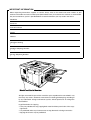
When requesting information, supplies or service always refer to the model and serial number of your
machine. The model and serial number plate (Main Name Plate) is located on the machine as shown below.
For your convenience, space is provided below to record information you may need in the future.
Model No.
Serial No.
Date of Purchase
Dealer
Address
Telephone Number
(
)
–
Supplies Telephone Number
(
)
–
Service Telephone Number
(
)
–
Model and Serial Number
All rights reserved. No part of this material may be reproduced or transmitted in any
form or by any means, electronic or mechanical, including photocopying, recording or
by any information storage and retrieval system, without permission in writing from
the Publisher.
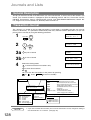
Legal Restriction On Copying
• It may be prohibited to copy copyrighted material without permission of the copyright owner.
• It is prohibited under any circumstances to copy domestic or foreign currencies.
• Copying other items may be prohibited.
Table of Contents
Getting to Know Your Machine
Safety Information ...............................................................................................................7
Function Key..................................................................................................................... 12
External View .................................................................................................................... 13
Control Panel .................................................................................................................... 14
Installing Your Machine
Main Unit and Accessories ..............................................................................................16
Installing the Accessories ............................................................................................... 17
Installing the Toner Cartridge.......................................................................................... 18
Loading the Recording Paper ......................................................................................... 20
■ Paper Specifications .......................................................................................... 20
Connecting the Telephone Line Cable and Power Cord ............................................... 22
Setting the Dialing Method (Tone or Pulse) ................................................................... 24
Adjusting the Volume ....................................................................................................... 25
■ Setting the Monitor Volume ............................................................................... 25
■ Setting the Ringer Volume ................................................................................. 25
User Parameters ............................................................................................................... 26
■
■
■
■
■
General Description ..........................................................................................
Setting the Date and Time .................................................................................
Setting Your LOGO ............................................................................................
Setting Your Character ID ..................................................................................
Setting Your ID Number (Fax Telephone Number) ............................................
26
26
27
28
29
Programming Your Machine
One-Touch/Abbreviated Dialing Numbers ..................................................................... 30
■ Entering One-Touch/Abbreviated Dialing Numbers ........................................... 30
■ Editing One-Touch/Abbreviated Dialing Numbers ............................................. 32
■ Printing Out a Directory Sheet .......................................................................... 34
Customizing Your Machine ...............................................................................................35
■ General Description .......................................................................................... 35
■ Setting the Fax Parameters .............................................................................. 35
■ Fax Parameter Table .......................................................................................... 36
Basic Operations
Loading Documents ..........................................................................................................40
■ Documents You Can Send ................................................................................. 40
■ Documents You Cannot Send ........................................................................... 40
■ How to Load Documents ................................................................................... 41
Basic Transmission Settings ............................................................................................42
■
■
■
■
■
■
General Description .......................................................................................... 42
Contrast ............................................................................................................. 42
Resolution .......................................................................................................... 42
Halftone ............................................................................................................. 43
Verification Stamp ............................................................................................. 43
Communication Journal (COMM. JOURNAL) ................................................... 44
3
Table of Contents
Sending Documents ........................................................................................................ 45
■
■
■
■
■
■
General Description .......................................................................................... 45
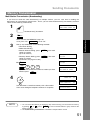
Memory Transmission ....................................................................................... 45
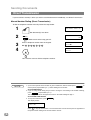
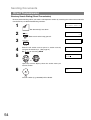
Direct Transmission ........................................................................................... 52
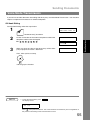
Voice Mode Transmission .................................................................................. 55
Transmission Reservation ................................................................................. 57
Redialing ............................................................................................................ 60
Receiving Documents ...................................................................................................... 61
■
■
■
■
■
■
■
■
General Description ..........................................................................................
Automatic Reception .........................................................................................
Manual Reception .............................................................................................
Print Reduction ..................................................................................................
Selecting the Print Reduction Mode ..................................................................
Receiving Oversize Documents ........................................................................
Substitute Memory Reception ...........................................................................
Print Collation Mode ..........................................................................................
61
61
61
62
62
63
64
64
Making Copies .................................................................................................................. 65
Advanced Features
Batch Transmission ......................................................................................................... 66
■ General Description .......................................................................................... 66
■ Real-time Batch Transmission ........................................................................... 66
■ Delayed Batch Transmission ............................................................................. 66
Timer Controlled Communications ................................................................................ 67
■ General Description .......................................................................................... 67
■ Deferred Transmission ....................................................................................... 67
■ Deferred Polling ................................................................................................. 68
Polling ............................................................................................................................... 69
■
■
■
■
General Description ..........................................................................................
Setting the Polling Password .............................................................................
Preparing to be Polled .......................................................................................
To Poll Documents from Another Station ..........................................................
69
69
70
71
Program Keys ....................................................................................................................72
■
■
■
■
■
■
■
General Description ........................................................................................... 72
Setting for Group Dialing .................................................................................... 72
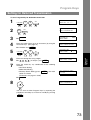
Setting for Deferred Transmission ...................................................................... 73
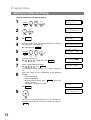
Setting for Deferred Polling ................................................................................ 74
Setting for Normal Polling ................................................................................... 75
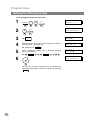
Setting for One-Touch Key ................................................................................. 76
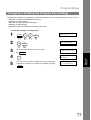
Changing or Erasing the Program Key Settings ................................................. 77
Edit File Mode ....................................................................................................................78
■
■
■
■
■
■
■
■
General Description ........................................................................................... 78
Printing a File List ............................................................................................... 78
Viewing the Contents of a File List ..................................................................... 79
Changing the Start Time or the Station of a File ................................................ 80
Deleting a File .................................................................................................... 82
Printing Out a File .............................................................................................. 83
Adding Documents into a File ............................................................................ 84
Retry an Incomplete File .................................................................................... 85
Access Code ......................................................................................................................86
■
■
■
■
4
General Description ........................................................................................... 86
Setting the Access Code .................................................................................... 86
Operating Your Machine with the Access Code (Restrict all operations) ........... 87
Operating Your Machine with the Access Code
(Restrict access of Fax Parameters and Journal) .............................................. 87
Table of Contents
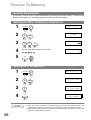
Receive To Memory ...........................................................................................................88
■
■
■
■
General Description ........................................................................................... 88
Setting the RCV To Memory Password .............................................................. 88
Setting RCV To Memory ..................................................................................... 88
Printing Out Documents ..................................................................................... 89
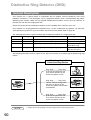
Distinctive Ring Detector (DRD) ......................................................................................90
■ General Description ........................................................................................... 90
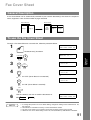
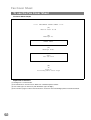
Fax Cover Sheet ................................................................................................................91
■ General Description ........................................................................................... 91
■ To use the Fax Cover Sheet ............................................................................... 91
PIN Code Access ...............................................................................................................93
■ General Description ........................................................................................... 93
■ Selecting the Access Method (Prefix or Suffix) .................................................. 93
■ Dialing with a PIN Code ..................................................................................... 94
Fax Forward .......................................................................................................................95
■ Setting Fax Forward ........................................................................................... 95
File Transmission ..............................................................................................................96
■
■
■
■
■
General Description ........................................................................................... 96
Storing the Document(s) .................................................................................... 96
Sending the Stored Document(s) ....................................................................... 97
Deleting the Stored Document(s) ....................................................................... 98
Printing the Stored Document(s) ........................................................................ 98
Department Code ..............................................................................................................99
■
■
■
■
■
■
■
General Description ........................................................................................... 99
Setting the Department Code .......................................................................... 100
Changing or Erasing the Department Code ..................................................... 101
Sending Document with Department Code ...................................................... 103
Sending Document with Department Code (Voice Mode Transmission) .......... 104
Printing a Department Code List ...................................................................... 105
Printing a Department Code Journal ................................................................ 106
Multiple LOGO .................................................................................................................108
■
■
■
■
■
General Description ......................................................................................... 108
Setting the Multiple LOGO ............................................................................... 108
Changing or Erasing the Multiple LOGO .......................................................... 109
Sending Document with Multiple LOGO .......................................................... 110
Printing a Multiple Logo List ............................................................................. 111
Network Features
Selective Reception ........................................................................................................112
■ General Description ......................................................................................... 112
■ Setting the Selective Reception ....................................................................... 112
Password Communications ...........................................................................................113
■
■
■
■
■
■
General Description ......................................................................................... 113
Compatibility with Other Machines ................................................................... 113
Setting Password Transmission ........................................................................ 114
Setting Password Reception ............................................................................ 115
Using Password Transmission .......................................................................... 116
Using Password Reception .............................................................................. 117
5
Table of Contents
Confidential Mailbox .......................................................................................................118
■
■
■
■
■
■
■
■
General Description .........................................................................................118
Confidential Mailbox .........................................................................................118
Sending a Confidential Document to a Remote Station’s Mailbox ................... 119
Polling a Confidential Document from a Remote Station’s Mailbox ................. 120
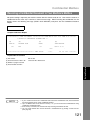
Receiving a Confidential Document to Your Machine’s Mailbox ....................... 121
Storing a Confidential Document in Your Machine’s Mailbox............................ 122
Printing Out a Confidential Document from Your Machine’s Mailbox................ 123
Deleting a Confidential Document Stored in Your Machine’s Mailbox .............. 124
Sub-Addressing ..............................................................................................................125
■ General Description .........................................................................................125
■ To set the Sub-address into a One-Touch/ABBR. Dialing Numbers ................. 126
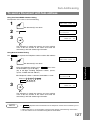
■ To send a Document with Sub-address ........................................................... 127
Prntout Journals and Lists
Journals and Lists ..........................................................................................................128
■
■
■
■
■
■
■
General Description .........................................................................................128
Transaction Journal .......................................................................................... 128
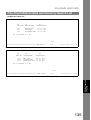
Individual Transmission Journal (IND. XMT JOURNAL) ................................... 129
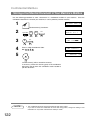
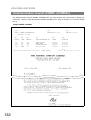
Communication Journal (COMM. JOURNAL) .................................................. 132
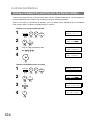
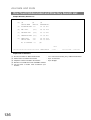
One-Touch/Abbreviated and Directory Search List .......................................... 134
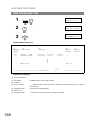
Program List .....................................................................................................137
FAX Parameter List .......................................................................................... 138
Problem Solving
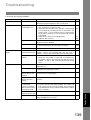
Troubleshooting ..............................................................................................................139
■
■
■
■
■
■
■
■
■
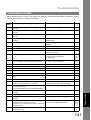
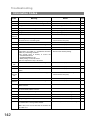
Information Codes ............................................................................................ 141
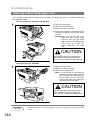
Clearing a Recording Paper Jam ..................................................................... 144
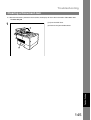
Clearing a Document Jam ................................................................................ 145
Cleaning the Document Scanning Area ........................................................... 146
Cleaning the Printer Roller ............................................................................... 147
Adjusting the Automatic Document Feeder (ADF) ........................................... 148
Verification Stamp ............................................................................................ 149
Replacing the Lithium Battery .......................................................................... 150
Checking the Telephone Line ........................................................................... 151
Appendix
Specifications ..................................................................................................................152
Recording Paper Specifications ....................................................................................155
Options and Supplies .....................................................................................................156
■ Installing the Memory Card (Flash Memory Card and/or DRAM Card) ........... 158
FCC Notice for User in USA ...........................................................................................159
Notice to User in Canada ................................................................................................161
Glossary ...........................................................................................................................163
ITU-T Image No. 1 ............................................................................................................166
Index .................................................................................................................................167
6
Getting to Know
Your Machine
Safety Information
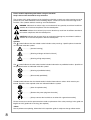
WARNING
denotes a potential hazard that could result in serious injury or death.
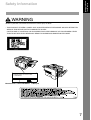
• THIS PRODUCT UTILIZES A LASER. ONLY QUALIFIED SERVICE PERSONNEL SHOULD ATTEMPT TO
SERVICE THIS DEVICE DUE TO POSSIBLE EYE INJURY.
CAUTION-USE OF CONTROLS OR ADJUSTMENTS OR PERFORMANCE OF PROCEDURES OTHER
THAN THOSE SPECIFIED HEREIN MAY RESULT IN HAZARDOUS RADIATION EXPOSURE.
Product complies with DHHS Rules 21
CFR Subchapter J in effect at date
of manufacture.
Manufacturer's name and address Factory ID
7
Please read the operation guide before using the facsimile.
Keep it close to the facsimile for easy reference.
The sections of this guide and parts of the facsimile marked with symbols are safety warnings meant to
protect the user, other individuals and surrounding objects, and ensure correct and safe usage of the
facsimile. The symbols and their meanings are indicated below.
DANGER: Indicates that serious injury or even death will very possibly result from insufficient
attention to or incorrect compliance with the related points.
WARNING: Indicates that serious injury or even death may result from insufficient attention to
or incorrect compliance with the related points.
CAUTION: Indicates that personal injury or mechanical damage may result from insufficient
attention to or incorrect compliance with the related points.
Symbols
The
symbol indicates that the related section includes safety warnings. Specific points of attention
are indicated inside the symbol.
................. [General warning]
................. [Warning of danger of electrical shock]
................. [Warning of high temperature]
symbol indicates that the related section includes information on prohibited actions. Specifics of
The
the prohibited action are indicated inside the symbol.
................. [Warning of prohibited action]
................. [Disassembly prohibited]
The ● symbol indicates that the related section includes information on actions which must be performed. Specifics of the required action are indicated inside the symbol.
................. [Alert of required action]
................. [Remove the power plug from the outlet]
................. [Always connect the facsimile to an outlet with a ground connection]
Please contact your service representative to order a replacement if the safety warnings in the guide are
illegible or if the guide itself is missing. (fee required)
<Note>
Due to performance updating, information in this operation guide is subject to change without notice.
8
Getting to Know
Your Machine
CAUTION LABELS
Caution labels have been attached to the facsimile at the following locations for safety purposes. BE
SUFFICIENTLY CAREFUL to avoid fire or electric shock when removing a paper jam or when replacing toner.
Label 1
High temperature inside. Do not touch
parts in this area, because there is a
danger of getting burned. ...................
NOTE: DO NOT remove these labels.
INSTALLATION PRECAUTIONS
■ Environment
Other precautions
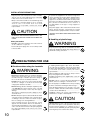
CAUTION
• Avoid placing the facsimile on or in locations which
are unstable or not level. Such locations may cause
the facsimile to fall down or fall over. This type of
situation presents a danger of personal injury or
damage to the facsimile. ...........................................
• Avoid locations with humidity or dust and dirt. If dust
or dirt become attached to the power plug, clean the
plug to avoid the danger of fire or electrical shock. ..
• Avoid locations near radiators, heaters, or other heat
sources, or locations near flammable items, to avoid
the danger of fire. ......................................................
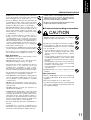
• To keep the facsimile cool and facilitate changing of
parts and maintenance, allow access space as shown
below.
Leave adequate space, especially around the rear
cover, to allow air to be properly ventilated out of the
facsimile. ....................................................................
• Adverse environmental conditions may affect the safe operation
and performance of the facsimile. Install in an air-conditioned
room (recommended room temperature: around 68°F (20°C),
humidity: around 65%RH) and avoid the following locations
when selecting a site for the facsimile.
. Avoid locations near a window or with exposure to direct
sunlight.
. Avoid locations with vibrations.
. Avoid locations with drastic temperature fluctuations.
. Avoid locations with direct exposure to hot or cold air.
. Avoid poorly ventilated locations.
• DO NOT USE THIS PRODUCT NEAR WATER, FOR
EXAMPLE, NEAR A BATH TUB, WASH BOWL, KITCHEN
SINK OR LAUNDRY TUB, IN A WET BASEMENT OR NEAR
A SWIMMING POOL.
• During print out, some ozone is released, but the amount does
not cause any ill effect to one's health. If, however, the facsimile
is used over a long period of time in a poorly ventilated room
or when making an extremely large number of copies, the smell
may become unpleasant. To maintain the appropriate
environment for the facsimile, it is suggested that the room be
properly ventilated.
■ Power supply/Grounding the facsimile
WARNING
4"
10 cm
4"
10 cm
4"
10 cm
• DO NOT use a power supply with a voltage other than
that specified. Avoid multiple connections in the same
outlet. These types of situations present a danger of
fire or electrical shock. ..............................................
9
INSTALLATION PRECAUTIONS
• Plug the power cord securely into the outlet. If metallic
objects come in contact with the prongs on the plug,
it may cause a fire or electric shock. ........................
• Always connect the facsimile to an outlet with a ground
connection to avoid the danger of fire or electrical
shock in case of an electric short. If an earth
connection is not possible, contact your service
representative. ...........................................................
CAUTION
• TO REDUCE THE RISK OF SHOCK OR FIRE, USE
ONLY NO. 26 AWG OR LARGER TELEPHONE LINE
CABLE.
• To protect the equipment from electrical surges that
can be caused by, among other things, lightning strikes
and utility company switching, a quality surge
suppressor should be installed. This should provide
protection on both the power line and the telephone
line. (Contact an authorized service center for a
recommendation of the type of surge suppressor
required.)
• The power supply cord is used as the main disconnect
device. Ensure that the socket/outlet is located/
installed near the equipment and is easily accessible.
• USE ONLY THE POWER CORD INDICATED IN THIS
MANUAL.
■ Handling of plastic bags
Other precautions
WARNING
• DO NOT connect the facsimile to the same outlet as
an air conditioner or copier, etc.
• Connect the power plug to the closest outlet possible
to the facsimile.
• Keep the plastic bags that are used with the facsimile
away from children. The plastic may cling to their nose
and mouth causing suffocation. ...............................
PRECAUTIONS FOR USE
■ Cautions when using the facsimile
WARNING
• DO NOT place metallic objects or containers with water
(flower vases, flower pots, cups, etc.) on or near the
facsimile. This type of situation presents a danger of
fire or electrical shock should they fall inside. .........
• DO NOT remove any of the covers from the facsimile
as there is a danger of electrical shock from high
voltage parts inside the facsimile. .............................
• DO NOT damage, break or attempt to repair the power
cord. DO NOT place heavy objects on the cord, pull
it, bend it unnecessarily or cause any other type of
damage.
These types of situations present a danger of fire or
electrical shock. ........................................................
• NEVER attempt to repair or disassemble the facsimile
or its parts as there is a danger of fire, electrical shock
or damage to the laser. If the laser beam escapes,
there is a danger of it causing blindness. .................
• If the facsimile becomes excessively hot, smoke
appears from the facsimile, there is an odd smell, or
any other abnormal situation occurs, there is a danger
of fire or electrical shock. Remove the power plug from
the outlet immediately and contact your service
representative. ...........................................................
10
• If anything harmful (paper clips, water, other fluids,
etc.) falls into the facsimile, remove the power plug
from the outlet immediately to avoid the danger of fire
or electrical shock. Then contact your service
representative. ...........................................................
• When installing an add-on memory, always remove
the power plug from the outlet first.
Installing it with the power supplied may cause an
electrical shock. ........................................................
• DO NOT remove or connect the power plug with wet
hands, as there is a danger of electrical shock. .......
• For safety purposes, ALWAYS remove the power plug
from the outlet when cleaning the main charger. .....
• Keep the button batteries in a safe place out of the
reach of children. Should a child swallow a battery,
consult a doctor immediately. ...................................
• ALWAYS contact your service representative for
maintenance or repair of internal parts. ..................
CAUTION
• DO NOT pull the power cord when removing it from
the outlet. If the power cord is pulled, the wires may
become broken and there is a danger of fire or
electrical shock. (ALWAYS grasp the power plug when
removing the power cord from the outlet.) ................
• ALWAYS remove the power plug from the outlet when
moving the facsimile. If the power cord is damaged,
there is a danger of fire or electrical shock. ............
• Do not use batteries other than those specified to be
used with this facsimile, and do not mix new and old
batteries. Doing so may cause battery explosion or
leakage, resulting in fire, injury or contamination. ....
• When installing batteries in the facsimile, make sure
that they are correctly oriented according to the (+)
and (-) marks. Failure to adhere to this may cause
battery explosion or leakage, resulting in fire, injury
or contamination. .......................................................
• If dust accumulates within the facsimile, there is a
danger of fire or other trouble. It is therefore
recommended that you consult with your service
representative in regard to cleaning of internal parts.
This is particularly effective if accomplished prior to
seasons of high humidity. Consult with your service
representative in regard to the cost of cleaning the
internal parts of the facsimile. ..................................
• For safety purposes, ALWAYS remove the power plug
from the outlet when performing cleaning operations.
• Do not dispose of worn out batteries in fire. Doing so
may cause explosion, resulting in fire or burns. .......
Other precautions
• DO NOT place heavy objects on the facsimile or cause
other damage to the facsimile.
• DO NOT open the front cover or pull out the power
plug while transmitting, receiving, or copying.
• The facsimile may only be used within the country of
purchase due to the different safety and
communication standards in each countr y.
(International communication standards, however,
make the communication between countries possible.)
• The facsimile may be inoperable in areas with poor
telephone lines or communication conditions.
• “CALL WAITING” or other telephone company optional
services that produce audible tones or clicks on the
line can disrupt or cause termination of facsimile
communications.
• DO NOT touch electrical parts, such as connectors or
printed circuit boards. They could be damaged by
static electricity.
• AVOID USING A TELEPHONE (OTHER THAN A
CORDLESS TYPE) DURING AN ELECTRICAL
STORM. THERE MAY BE A REMOTE RISK OF
ELECTRIC SHOCK FROM LIGHTNING.
• DO NOT USE THE TELEPHONE TO REPORT A GAS
LEAK IN THE VICINITY OF THE LEAK.
■ Cautions when handling consumables
CAUTION
• DO NOT attempt to incinerate the toner cartridges.
Dangerous sparks may cause burns. ......................
• Keep the toner cartridges out of the reach of children.
• If toner happens to spill from the toner cartridges,
avoid inhalation and ingestion, as well as contact with
your eyes and skin. ...................................................
• If you do happen to inhale toner, move to a place
with fresh air and gargle thoroughly with a large
amount of water. If coughing develops, contact a
physician.
• If you do happen to ingest toner, rinse your mouth
out with water and drink 1 or 2 cups of water to dilute
the contents of your stomach. If necessary, contact a
physician.
• If you do happen to get toner in your eyes, flush them
thoroughly with water. If there is any remaining
tenderness, contact a physician.
• If toner does happen to get on your skin, wash with
soap and water.
• DO NOT attempt to force open or destroy the toner
cartridges. ................................................................
Other precautions
• After use, ALWAYS dispose of the toner cartridges in
accordance with Federal, State and Local rules and
regulations.
• Store all consumables in a cool, dark location.
• If you will not be using the copier for a prolonged period
of time, remove all paper from the drawer(s) and seal
in its original packaging.
• DO NOT attempt to perform any operations not
explained in this handbook.
• ATTENTION: The product that you have purchased
contains a rechargeable battery. The battery is
recyclable. At the end of it's useful life, under various
state and local laws, it may be illegal to dispose of
this battery into the municipal waste stream. Check
with your local solid waste officials for details in your
area for recycling options or proper disposal.
* The above warning is valid only in United States of
America.
• CAUTION: Use of controls or adjustments or
performance of procedures other than those specified
herein may result in hazardous radiation exposure.
11
Getting to Know
Your Machine
PRECAUTIONS FOR USE
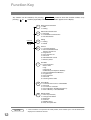
Function Key
Any function can be started by first pressing
pressing
or
FUNCTION and then enter the function number, or by
scroll key repeatedly until the desired function appears on the display.
1
2
FUNCTION
3
6
7
8
9
NOTE
12
Deferred Communication
1 = XMT
2 = Polling
Advanced Communication
1 = Not Used
2 = Confidential Communication
3 = File Transmission
Polling
1 = Polling
2 = Polled
Printout
1 = Journal (Print/View)
2 = One-Touch/Abbreviated/
Directory Search List
3 = Program List
4 = Fax Parameter List
5 = Not used
6 = Individual XMT Journal
7 = Directory Sheet
Set Mode
1 = User Parameters
• Date & Time
• Logo
• Character ID
• ID Number (Fax Telephone Number)
2 = One-Touch/Abbreviated Numbers
3 = Program Keys
4 = Fax Parameters
5 = Not Used
6 = Cleaning Printer Roller
Select Mode
1 = Communication Journal = OFF/ON/INC
2 = Not Used
3 = Cover Sheet = OFF/ON
4 = Password-XMT = OFF/ON (See Note 1)
5 = RCV to Memory = OFF/ON/PRINT
Edit File Mode
1 = File List (Print/View)
2 = Change Time/Station
3 = Delete File
4 = Print File
5 = Add Document
6 = Retry Incomplete File
1. If Fax Parameter is not preset to the Valid position, which enables you to use the function, the
display will not show the function.
Getting to Know
Your Machine
External View
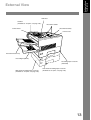
ADF Door
Handset
(Available as an option, see page 156.)
Document Guides
Control Panel
Document Sub Tray
Printer Cover
Document Return Tray
Recording Paper Tray
Recording Paper Cassette
(Standard)
500 sheets Recording Paper Cassette
(Available as an option, see page 156.)
250 sheets Recording Paper Cassette
(Available as an option, see page 156.)
13
Control Panel
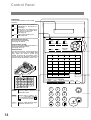
LCD Display
Indicates date and time, or the current
operation.
ON LINE
TONER
ALARM
Blinks when the machine is
transmitting a document or
receiving.
Blinks when the remaining toner
is getting low and lights when
the toner is running out.
(See page 18)
Lights when trouble occurs.
(See page 139)
ON LINE
One-Touch Keys (01-32)
Used for One-Touch Dialing.
(See page 48 and 53)
01
02
03
04
05
06
07
08
09
10
11
12
13
14
15
16
17
18
19
20
21
22
23
24
25
26
27
28
29
30
31
32
P1
P2
P3
P4
P5
P6
SPACE
SYMBOLS
CAPS
14
SPACE
P7 SYMBOLS P8
ALARM
+
DARKER
S-FINE
FAST
LIGHTER
FINE
QUALITY
CONTRAST RESOLUTION HALFTONE
Program Keys (P1-P8)
Used to record long dialing procedures or
Group Dialing Number keys.
(See page 72 to 77)
Character Keys
The One-Touch Keys and Program Keys
also serve as character and symbol input
keys which are used to record your
LOGO, character ID and station name.
The character key template is printed on
the panel under the directory sheet cover.
TONER
VOLUME
MEMORY
STAMP
DIRECTORY
SEARCH
01
A 02
B 03
C 04
D 05
E 06
F
07
G 08
H 09
I
10
J 11
K 12
L
13
M 14
N 15
O 16
P 17
Q 18
R
19
S 20
T 21
U 22
V 23
W 24
X
25
Y 26
Z 27
28
29
30
31
A 32
A P1
O P2
U P3
P4
P5
P6
SPACE
PAUSE
REDIAL
P7 SYMBOLS P8
CAPS
LINE
MONITOR
SELECT
SUB-ADDR
ABBR
FLASH
FUNCTION
CLEAR
SET
CAPS
Used to insert a space while
entering LOGO, character ID
and station name.
Used to enter a symbol (, ' & (
) : ; + - . /) for LOGO, character
ID and station name. Use
or
to select the symbols.
Used to switch between upper
and lower character set.
ABC
DEF
1
2
3
GHI
JKL
MNO
4
5
6
PRS
TUV
WXY
7
8
9
TONE
OPER
0
STOP
COPY
START
+
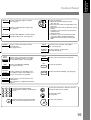
CONTRAST
Used to set Normal, Lighter, or Darker.
(See page 42)
VOLUME
RESOLUTION
Used to set Standard, Fine, Super-Fine.
(See page 42)
HALFTONE
Provides OFF, QUALITY or FAST settings
for halftone documents. (See page 43)
MEMORY
Used to select either memory or direct
communication.
(See page 45 to 51)
-
STAMP
DIRECTRY
SEARCH
PAUSE
Used to enter a pause when recording or
dialing a telephone number, or to redial
the last dialed number. (See page 60)
REDIAL
Used to start Abbreviated Dialing.
(See page 49 and 53)
ABBR
SUB-ADDR
Used to separate the Sub-address from
the telephone number when dialing, or to
access some features of your PBX.
FLASH
FUNCTION
ABC
CLEAR
SET
MONITOR
Used for the following:
• Adjust the monitor and ringer volume.
(See page 25)
• Move the cursor while entering numbers and
characters.
• Search the station name for Directory Search
Dialing.
• Confirm the entered station for multi-station
communication.
• Select functions.
• Confirm the current communication modes
(e.g. Page number, ID, Dialed Telephone
number, File number) when the unit is ON
LINE.
Used to turn the verification stamp ON or
OFF. (See page 43)
Used to search for a station name.
(See page 50 and 54)
Used to erase the previously entered input.
Used to set operations.
Used to start On-Hook Dialing. (See page 56)
Used to start or select the function and
sub-functions.
These functions are explained in detail on
page 12.
DEF
1
2
3
GHI
JKL
MNO
4
5
6
PRS
TUV
WXY
7
8
9
TONE
OPER
Used for manual number dialing,
recording phone numbers, and numerical
entries.
STOP
Used to cancel operations. When it is pressed,
the machine will return to standby.
COPY
Used to make copies.
(See page 65)
0
TONE
Used to start operations.
Used to temporarily change the Dialing
Mode to Tone when Pulse mode is set.
START
15
Getting to Know
Your Machine
Control Panel
Installing Your Machine
Main Unit and Accessories
Unpack the carton and check that you have all the accessories illustrated.
Machine
Toner Cartridge
Document Return Tray
Recording Paper Tray
Telephone Line Cable
Power Cord
Operation Guide
CD-ROM
16
Paper Size Label
Lithium Battery and Holder
Installing Your
Machine
Installing the Accessories
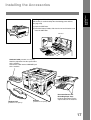
Installing the Lithium Battery
(This battery is used to backup the clock during power failures,
see page 150)
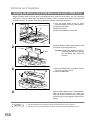
(1) Open the ADF Door.
(2) Install the Battery Holder, slide it to the Left until it latches and
close the ADF Door.
ADF Door
Final Installed View
Handset Cradle [Available as an Option]
Hook the projections into the square holes
on the machine.
Connect the cable into the HANDSET jack
on the machine.
Handset Cord
[Available as an Option]
Handset
Document Return and
Recording Paper Trays
Hook the projections into the
square holes on the machine.
[Available as an Option]
17
Installing the Toner Cartridge
1
Unpack the Toner Cartridge and rock it back
and forth as shown for 5 or 6 times to even the
toner inside.
Toner Cartridge
2
Remove the protective seal.
3
Push the Release Button to open the Right
Note: Pull on the seal slowly and straight
out.
Cover.
Right Cover
Release Button
18
4
Align the arrow and the projection on both
sides as shown and insert the Toner Cartridge
into the machine.
5
Close the Right Cover firmly.
Right Cover
6
If you are replacing the Toner Cartridge, it is recommended to clean the Printer Roller to maintain good
printing quality. To clean the Printer Roller, follow the procedure on page 147.
CAUTION
DO NOT attempt to incinerate the toner cartridges.
Dangerous sparks may cause burns.
CAUTION
DO NOT attempt to force open or destroy the toner
cartridges.
● After use, ALWAYS dispose of the toner containers
and the waste toner tank in accordance with
Federal, State and Local rules and regulations.
19
Installing Your
Machine
Installing the Toner Cartridge
Loading the Recording Paper
Paper Specifications
In general, most bond papers will produce excellent results. Most photocopy papers will also work very well.
There are many "name" and "generic" brands of paper available. We recommend that you test various
papers until you obtain the results you are looking for. For detailed recommended paper specifications, see
page 155.
How to Load the Recording Paper
1
Slide out the Paper Cassette from the machine.
Paper Cassette
2
Adjust the Paper Length Guide to the proper paper
Paper Length Guide
size (A4, LTR, or LGL).
For LGL size paper, remove the Paper Length
Guide and store it in the provided slot in the front
left side of the Paper Cassette.
If reloading the same size of paper, skip the step 2
and 3.
3
Adjust the Paper Width Guide and Clip to the
proper paper (A4, or LTR/LGL).
The factory default for the Paper Width Guide and
Clip are on LTR/LGL position. For A4 paper size,
L
L
A
A
adjust by following the steps below.
Paper Width Clip
Paper Width Guide
20
1. Replace the Paper Width Guide into the
proper slot (A4 or LTR/LGL).
2. Release the Paper Width Clip latch.
3. Pull upwards to remove the Paper Width Clip.
4. Replace the Paper Width Clip into the A(A4)
or L(LTR/LGL) slot.
5. Push down on the Paper Width Clip to latch it
in place.
Loading the Recording Paper
4
2
1. Release the hook and remove the Paper Size
Selector.
2. Rotate the Paper Size Selector until the
appropriate setting marked on the Selector is
facing upward and the wording is upright.
3. Reinstall the Paper Size Selector.
1
3
5
Clip
Clip
1. Push the Pressure Plate until it is locked
down.
2. Load the paper into the Paper Cassette.
Caution:Make sure that the paper is set
under the clips of the Paper
Cassette. You can load about 500
sheets with standard weight paper
(20 lb. weight). For paper
specification see page 155.
3. Set the proper paper size label.
1
3
Clip
2
Recording Paper
6
Slide the Paper Cassette into the machine.
Paper Cassette
NOTE
1. Your machine will properly print on A4, Letter and Legal size paper only. If other size of paper
(B4, B5, A5) is used, your machine may not print properly.
21
Installing Your
Machine
Paper Specifications
Connecting the Telephone Line Cable and Power Cord
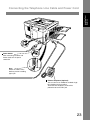
■ Power Cord
Plug one end of the power cord into an ordinary 3 prong AC outlet and the other end into the receptacle on
the rear of the machine.
Warning: This apparatus must be properly grounded through an ordinary 3 prong AC outlet.
Do not break off the earth (ground) prong to fit a 2 prong outlet.
Power Cord (Included)
■ Telephone Line Cable
Plug one end of the telephone line cable into the "RJ-11C" telephone jack supplied by the telephone
company and the other end into the LINE jack on the left side of the machine.
RJ-11C Telephone Jack
Telephone Line Cable (Included)
NOTE
22
1. Your machine uses little power and you should keep it ON at all times.
Installing Your
Machine
Connecting the Telephone Line Cable and Power Cord
Power Switch
After connecting all cables and
Power Cord, turn the power
switch ON.
Note
Attach the cables to the
Hook to prevent recording
paper jam.
External Telephone (Optional)
You can connect an additional standard single
line telephone to the machine.
To connect the telephone, break off the
protective tab on the TEL jack.
23
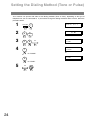
Setting the Dialing Method (Tone or Pulse)
Your machine can operate with either of two dialing methods (Tone or Pulse), depending on the type of
telephone line you are connected to. If you need to change the dialing method to Tone or Pulse, follow the
procedure below.
1
FUNCTION
2
4
SET
3
0
6
4
SET MODE
(1-6)
ENTER NO. OR ∨ ∧
7
FAX PARAMETER(01-99)
NO.=❚
SET
06 DIALING METHOD
2:TONE
06 DIALING METHOD
1:PULSE
1
for “PULSE“.
or
or
06 DIALING METHOD
2:TONE
2
for “TONE“.
5
24
SET
STOP
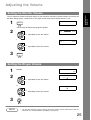
Adjusting the Volume
You can adjust the monitor and ringer volume on your machine. The built-in speaker enables you to hear the
dial tone, dialing signals, and busy tone. The ringer sounds when your machine receives a call.
1
* MONITOR *
❚
MONITOR
You will hear the dial tone through the speaker.
2
MONITOR VOLUME
LOW [❚❚❚❚❚❚❚❚] HIGH
+
VOLUME
repeatedly to raise the volume.
-
or
MONITOR VOLUME
LOW [
] HIGH
+
VOLUME
repeatedly to lower the volume.
-
3
MONITOR
Setting the Ringer Volume
1
2
Standby
NOV-12-2001 15:00
00%
RINGER VOLUME
((((
))))
+
VOLUME
repeatedly to raise the volume.
☎
-
or
RINGER VOLUME
+
☎
VOLUME
repeatedly to lower the volume.
-
3
NOTE
STOP
1. You can also adjust the volume of the key touch tone and the volume of the buzzer in the Fax
Parameter No. 10 (KEY/BUZZER VOLUME). (See page 36)
25
Installing Your
Machine
Setting the Monitor Volume
User Parameters
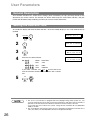
General Description
Your facsimile machine has several basic settings (User Parameters) to help you keep records of the
documents you send or receive. For example, the built-in clock keeps the current date and time, and your
LOGO and ID Number help to identify you when you send or receive documents.
Setting the Date and Time
At standby the display will show the date and time. Once the standby display is set, it will automatically be
updated.
1
2
3
4
FUNCTION
SET MODE
(1-6)
ENTER NO. OR ∨ ∧
7
1:USER PARAMETERS?
PRESS SET TO SELECT
1
DATE & TIME
❚1-01-2001 00:00
SET
Enter the new date and time.
Ex: 1 1
Month : November
1 2
Date
: 12th
2 0 0 1
Year
: 2001
DATE & TIME
11-12-2001 15:00
Time
: 3:00 PM
1 5 0 0
If you make a mistake, use
or
to move the cursor
over the incorrect number, then overwrite it with a correct
one.
5
NOTE
26
SET
STOP
1. The clock of your machine is equipped with D.S.T.(Daylight Saving Time) system. So, your
clock will automatically set the time forward from 2:00 AM to 3:00 AM on the first Sunday of
April and set the time back from 2:00 AM to 1:00 AM on the last Sunday of October.
If your state does not use the D.S.T. system, change the Fax Parameter No. 35 (DAYLIGHT
TIME) to "Invalid" .
2. The current Date & Time must be set because it is required by the Telephone Consumer Act of
1991. (For details, see FCC NOTICE at the end of this Operation Guide)
User Parameters
Installing Your
Machine
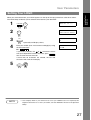
Setting Your LOGO
When you send a document, your LOGO appears on the top of the copy printed out at the other station.
The LOGO helps to identify you to someone who receives your document.
1
2
3
4
FUNCTION
SET MODE
(1-6)
ENTER NO. OR ∨ ∧
7
1:USER PARAMETERS?
PRESS SET TO SELECT
1
LOGO
❚
SET
repeatedly until display shows;
Enter your LOGO (max. 25 characters and digits) by using
the Character keys.
Ex: A B C D
If you make a mistake, use
or
LOGO
ABCD❚
to move the cursor
one space beyond the incorrect character, press CLEAR
then re-enter the new character.
If more than 19 characters are entered, the left side
characters will scroll off the display.
5
NOTE
SET
STOP
1. Your Company Name or your name must be set as your LOGO because it is required by the
Telephone Consumer Act of 1991. (For details, see FCC NOTICE at the end of this Operation
Guide)
27
User Parameters
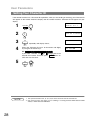
Setting Your Character ID
If the remote machine has a Character ID capabilities, when you are sending or receiving, your Character ID
will appear on the remote machine’s display and the remote machine’s Character ID will appear on your
display.
1
2
3
4
FUNCTION
7
SET MODE
(1-6)
ENTER NO. OR ∨ ∧
1:USER PARAMETERS?
PRESS SET TO SELECT
1
CHARACTER ID
❚
SET
repeatedly until display shows;
Enter your Character ID (max. 16 characters and digits)
by using the Character keys.
CHARACTER ID
HEAD OFFICE❚
Ex: H E A D SPACE O F F I C E
If you make a mistake, use
or
to move the cursor
beyond the incorrect character, press CLEAR then reenter the new character.
5
NOTE
28
SET
STOP
1. The special characters of Å, Ä, Ö, Ü, Æ, è and é cannot be used for Character ID.
2. This function works only when you are sending or receiving between KM-F1050 and KMF1050, or KM-F1050 and KM-F650.
User Parameters
If the remote machine does not have a Character ID but it has an ID Number, when sending or receiving,
your ID Number will appear on the remote machine’s display and their ID Number will appear on your
display.
We suggest you use your facsimile telephone number as your ID number. (max. 20 digits)
1
2
3
4
FUNCTION
7
SET MODE
(1-6)
ENTER NO. OR ∨ ∧
1:USER PARAMETERS?
PRESS SET TO SELECT
1
ID NO.
❚
SET
repeatedly until display shows;
Enter your ID (max. 20 digits) by using the keypad and
SPACE key to enter a space between numbers.
ID NO.
201 555 1212❚
Ex: 2 0 1 SPACE 5 5 5 SPACE 1 2 1 2
If you make a mistake, use
or
to move the cursor
one space beyond the incorrect number, press CLEAR
then re-enter the new number.
5
NOTE
SET
STOP
1. You may use
to enter a "+" character at the beginning of the ID number to indicate the
following digit(s) for your country code.
Ex :+1 201 555 1212 +1 for U.S.A. country code.
+81 3 111 2345
+81 for Japan country code.
2. Your Fax Telephone Number must be set as your ID Number because it is required by the
Telephone Consumer Act of 1991. (For details, see FCC NOTICE at the end of this Operation
Guide)
29
Installing Your
Machine
Setting Your ID Number (Fax Telephone Number)
Programming Your Machine
One-Touch/Abbreviated Dialing Numbers
Entering One-Touch/Abbreviated Dialing Numbers
One-Touch and Abbreviated Dialing are two fast ways of dialing full telephone numbers. To use these
dialing methods, you must first store the telephone number using the following procedure.
To enter a One-Touch key, follow the steps below
1
2
3
4
5
6
7
8
FUNCTION
SET MODE
(1-6)
ENTER NO. OR ∨ ∧
7
1:ONE-TOUCH
2:ABBR NO.
SET
2
ONE-TOUCH< >
PRESS ONE-TCH OR ∨ ∧
1
Ex:
<01>
ENTER TEL. NO.
01
Enter the telephone number
(up to 36 digits including pauses and spaces).
Ex: 9
PAUSE
5
5
5
SPACE
1
Enter the station name using character keys
(up to 15 characters).
SPACE
3
4
ONE-TOUCH< >
PRESS ONE-TCH OR ∨ ∧
SET
To return to standby, press
<01> SALES DEPT❚
9-555 1234
D E P T
To record another number, repeat step 4 to 8.
30
2
<01> ENTER NAME
9-555 1234
SET
Ex: S A L E S
<01>
9-555 1234❚
STOP
.
One-Touch/Abbreviated Dialing Numbers
Entering One-Touch/Abbreviated Dialing Numbers
To set an Abbreviated Dialing Number, follow the steps below
2
3
4
5
6
7
8
SET MODE
(1-6)
ENTER NO. OR ∨ ∧
7
FUNCTION
1:ONE-TOUCH
2:ABBR NO.
SET
2
Programming
Your Machine
1
ABBR.[❚
]
ENTER NO. OR ∨ ∧
2
Ex: 0
2
2
[022]
ENTER TEL. NO.
(001 to 160)
Enter the telephone number
(up to 36 digits including pauses and spaces).
Ex: 9
PAUSE
5
5
5
SPACE
2
[022]
9-555 2345❚
3
4
5
[022]ENTER NAME
9-555 2345
SET
Enter the station name using character keys
(up to 15 characters).
[022]ACCOUNTING❚
9-555 2345
Ex: A C C O U N T I N G
ABBR.[❚
]
ENTER NO. OR ∨ ∧
SET
To record another number, repeat step 4 to 8.
To return to standby, press
NOTE
STOP
.
1. If you require a special access number to get an outside line, enter it first and then press
PAUSE . A hyphen "-" is displayed for pause.
2. Use SPACE or MONITOR to enter a space between the numbers to make it easier to
read.
3. If you are using Pulse dialing and you wish to change to Tone dialing in the middle of dialing,
press TONE (represented by a "/"). The dialing method will be changed from Pulse to
Tone after dialing the digit "/".
Ex : 9 PAUSE TONE 5551234
4. You can search for an unused One-Touch key or ABBR. number by pressing
step 3 or 4.
or
in
31
One-Touch/Abbreviated Dialing Numbers
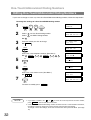
Editing One-Touch/Abbreviated Dialing Numbers
If you have to change or erase any of the One-Touch/Abbreviated dialing numbers, follow the steps below.
To change the settings of a One-Touch/ABBR dialing number
1
2
7
FUNCTION
1:ONE-TOUCH
2:ABBR NO.
SET
2
Select
1
for One-Touch Dialing number
Select
2
for ABBR. Dialing Number
ONE-TOUCH< >
PRESS ONE-TCH OR ∨ ∧
Ex: 1
3
4
Enter the station you wish to change.
Ex:
<01> SALES DEPT
9-555 1234
01
<01> SALES DEPT
ENTER TEL. NO.
CLEAR
then enter a new telephone number. (See Note 1)
Ex: 9
5
6
PAUSE
5
5
5
SPACE
3
6
<01> SALES DEPT
9-555 3456❚
<01> SALES DEPT
9-555 3456
CLEAR
<01> ENTER NAME
9-555 3456
Ex: F A X
<01> FAX❚
9-555 3456
ONE-TOUCH< >
PRESS ONE-TCH OR ∨ ∧
SET
To return to standby, press
NOTE
5
SET
then enter a new station name. (See Note 1)
7
4
STOP
1. If you make a mistake, use
.
or
to move the cursor beyond the incorrect number,
press CLEAR then re-enter the new number.
2. If the One-Touch/Abbreviated dialing number has been used for a communication reservation,
the settings cannot be changed or erased until the communication has finished.
To change or erase the settings, cancel the communication first by Edit File Mode. (See Page
78)
32
One-Touch/Abbreviated Dialing Numbers
Editing One-Touch/Abbreviated Dialing Numbers
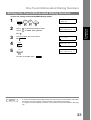
To erase the settings of One-Touch/ABBR Dialing number
2
7
FUNCTION
2
1:ONE-TOUCH
2:ABBR NO.
SET
Select
1
for One-Touch Dialing number
Select
2
for ABBR. Dialing Number
ONE-TOUCH< >
PRESS ONE-TCH OR ∨ ∧
Programming
Your Machine
1
Ex: 1
3
4
5
Enter the station you wish to erase.
Ex:
<01> SALES DEPT
ENTER TEL. NO.
CLEAR
ONE-TOUCH< >
PRESS ONE-TCH OR ∨ ∧
SET
To return to standby, press
NOTE
<01> SALES DEPT
9-555 1234
01
STOP
.
1. If the One-Touch/Abbreviated dialing number has been used for a communication reservation,
the settings cannot be changed or erased until the communication has finished.
To change or erase the settings, cancel the communication first by Edit File Mode. (See Page
78)
33
One-Touch/Abbreviated Dialing Numbers
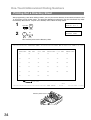
Printing Out a Directory Sheet
After programming a one-touch dialing number, you can print out the directory sheet which includes the first
12 characters of each station name. Cut along the dotted line and place it over the One-Touch key under
the Directory Sheet Cover. To print out a directory sheet, follow the steps below.
1
2
7
PRINT OUT
(1-7)
ENTER NO. OR ∨ ∧
6
FUNCTION
* PRINTING *
DIRECTORY SHEET
SET
Your machine prints out the directory sheet.
******************* -DIRECTORY SHEET- ****************** DATE
NOV-12-2001 ***** TIME 15:00 *****
01
SALES DEPT
02
ENG. DEPT
03
ACCT. DEPT
04
EXPORT DEPT
05
R & D DEPT
06
MARKET DEPT
07
08
09
10
11
12
13
14
15
16
17
18
19
20
21
22
23
24
25
26
27
28
29
30
31
32
P1
P2
P3
P4
P5
P6
P7
P8
dotted line
********************************************* -HEAD OFFICE
Directory Sheet Cover
34
ABCD
- ****** -
201 555 1212- *******
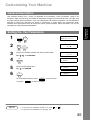
Customizing Your Machine
General Description
Programming
Your Machine
Your facsimile machine has a variety of adjustable Fax Parameters. These parameters, listed in the
Parameter Table, are preset for you and do not need to be changed. If you do want to make a change, read
the table carefully. Some parameters, such as the Resolution and Contrast parameters, can be temporarily
changed by simple key operation just before a transmission is made. When the transmission ends,
however, these parameters return to their preset values (Home position). Other parameters can only be
changed by the procedure described below.
Setting the Fax Parameters
1
2
SET MODE
(1-6)
ENTER NO. OR ∨ ∧
7
FUNCTION
FAX PARAMETER(01-99)
NO.=❚
SET
4
3
4
Enter Fax Parameter number from the Parameter Table.
5
6
Enter the new setting value.
Ex: 0
1
FAX PARAMETER(01-99)
NO.=01
for CONTRAST
01 CONTRAST
1:NORMAL
SET
Ex: 2
01 CONTRAST
2:LIGHTER
for LIGHTER
02 RESOLUTION
1:STANDARD
SET
To set another parameter, press CLEAR to return to step
3 or press
NOTE
STOP
to return to standby.
1. To scroll the Fax Parameters in Step 2 or 4, press
2. To print out a Fax Parameter List, see page 138.
or
.
35
Customizing Your Machine
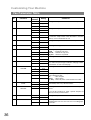
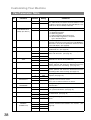
Fax Parameter Table
No.
Parameter
Setting
Number
Setting
01
CONTRAST
*1
Normal
2
Lighter
3
Darker
*1
Standard
2
Fine
3
S-Fine
*1
Off
2
On
1
Off
*2
On
1
Pulse
*2
Tone
*1
Inside
2
Outside
3
No print
02
04
05
06
07
08
09
10
12
13
14
RESOLUTION
STAMP
MEMORY
DIALING METHOD
HEADER PRINT
HEADER FORMAT
RCV’D TIME PRINT
KEY/BUZZER
VOLUME
COMM. JOURNAL
AUTO JOURNAL
PRINT
FILE ACCEPTANCE
REPORT
*1
Comments
Setting the home position of the CONTRAST key.
Setting the home position of the RESOLUTION key.
Setting the home position of the STAMP key.
To select the stamp function when document is stored in
memory, see Fax Parameter No. 28.
Setting the home position of the MEMORY key.
Selecting the dialing method.
Selecting the printing position of the header.
Inside
: Inside TX copy area.
Outside : Outside TX copy area.
No print : Header is not printed.
Logo, ID No. Selecting the header format.
2
From To
*1
Invalid
2
Valid
1
Off
*2
Soft
3
Loud
1
Off
2
Always
*3
Inc. only
1
Invalid
*2
Valid
*1
Invalid
2
Valid
Selecting whether the machine prints the received date &
time, remote ID, percentage of reduction and page number
on the bottom of each received page.
Selecting the volume of the Key/Buzzer tone.
Selecting the home position of printout mode for COMM.
Journal Off/Always/INC.
Off
: Does not print
Always : Always prints
Inc. only : Prints only when communication has failed.
Selecting whether the machine prints
automatically after every 100 transactions.
the
journal
Selecting whether the machine prints the file acceptance
journal.
If you set this parameter to valid, a journal will print out
after any memory communication.
17
22
36
RECEIVE MODE
SUBSTITUTE RCV
1
Manual
*2
Auto
1
Invalid
*2
Valid
Setting the reception mode to automatic or manual.
Selecting whether the machine receives to memory when
recording paper runs out, toner runs out or recording paper
is jammed.
Customizing Your Machine
No.
Parameter
Setting
Number
Setting
Comments
24
PRINT REDUCTION
1
Fixed
*2
Auto
Selecting print reduction mode.
Fixed : Reduce received document according to setting
of Parameter No. 25.
Auto
: Reduce received document according to the
length of received documents.
70
70%
----
----
100
100%
25
REDUCTION RATIO
26
POLLING PASSWORD
27
POLLED FILE SAVE
28
31
32
33
34
Selecting fixed print reduction ratio from 70% to 100%.
This parameter functions only when fixed print reduction is
selected on Fax Parameter No. 24.
(----)
Setting a 4-digit password for secured polling. (See page
69)
*1
Invalid
2
Valid
Selecting whether the machine retains the polled
document in memory even after the document is polled
once.
1
Invalid
*2
Valid
INCOMPLETE FILE
SAVE
*1
Invalid
2
Valid
COPY REDUCTION
1
Manual
*2
Auto
1
Invalid
*2
Valid
1
Off
2
EnergySaver
*3
Sleep
STAMP AT MEM. XMT
XMT REDUCTION
ENERGY SAVER
MODE
Selecting whether the machine stamps the original
documents when storing the documents into memory.
(Depending on the Stamp setting on the Control Panel)
Selecting whether the machine retains the document in
memory if the document is not successfully transmitted.
Selecting whether the machine performs the copy
reduction ratio automatically or manually.
Manual : The machine will prompt you for the Zoom ratio
(100% to 70%) when making copies.
Auto
: The machine will automatically determine the
reduction ratio according to the length of the
original document.
Selecting whether the machine performs reduction when
the transmitting document is wider than the recording
paper used at the receiving machine.
To reduce the power consumption in standby, select either
Energy-Saver or Sleep mode and specify the Delay Time
(1 to 120 minutes) for the machine to enter into the
selected mode.
The Delay Timer setting is only available in the EnergySaver or Sleep Modes.
Off
: The unit will remain in standby
mode and consume more energy
than when in Energy-Saver or
Sleep modes.
Energy-Saver Mode : Saves energy by consuming less
power than when in standby mode
by turning off the fuser unit after the
specified time.
Sleep Mode
: This is the lowest power state that
the machine enters after the
specified time without actually
turning off.
Continued on the next page...
37
Programming
Your Machine
Fax Parameter Table
Customizing Your Machine
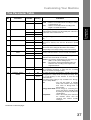
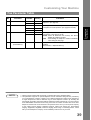
Fax Parameter Table
No.
Parameter
Setting
Number
Setting
Comments
35
DAYLIGHT TIME
1
Invalid
*2
Valid
Selecting whether the clock adjusts for Daylight Saving
Time automatically. The built-in clock will advance 1 hour
at 2:00 am on the first Sunday in April and fallback 1 hour
at 2:00 am on the last Sunday in October.
*1
Invalid
2
Valid
Select a ring pattern for automatic answering.
1: A Standard ring pattern.
2: B Double ring pattern.
3: C Triple ring pattern (Short-Short-Long).
4: D All other triple ring patterns, except the
type C described above.
36
All ring patterns.
37
RCV TO MEMORY
(----)
Enter a 4-digit password used to print out the received
document in memory by using F8-5 (RCV TO MEMORY).
When F8-5 is set to On, this parameter will not be shown
on the LCD display. (See page 88)
38
ACCESS CODE
(----)
Enter a 4-digit Access Code to secure the machine from
unauthorized use. (See page 86)
39
PIN CODE ACCESS
*1
None
2
Suffix
Selecting the access method (Prefix or Suffix) to dial a
number with PIN Code. (See page 93)
3
Prefix
CONF. POLLED FILE
SAVE
*1
Invalid
2
Valid
PASSWORD-XMT
*1
Off
2
On
*1
Off
2
On
*1
Invalid
2
Valid
1
Invalid
*2
Valid
42
43
44
46
51
PASSWORD-RCV
SELECT RCV
REMOTE
DIAGNOSTIC
53
SUB-ADDRESS
PASSWORD
54
FAX FORWARD
56
58
60
38
RING
PATTERNDETECT
(DRD) (See Note 2)
COVER SHEET
LANGUAGE
OPTION PAGE
MEMORY
(D-RAM Card)
Selecting whether the machine saves the confidential
polled file even after the file is polled once.
Setting a 4-digit XMT-Password and selecting whether the
machine performs and checks the XMT-Password of the
receiving station when transmitting. (See page 114)
Setting a 4-digit RCV-Password and selecting whether the
machine performs and checks the RCV-Password of the
transmitting station when receiving. (See page 115)
Selecting whether the machine
reception. (See page 112)
performs
selective
Selecting whether or not the machine accepts the Remote
Diagnostics from the remote station.
Please ask our Authorized Dealer for details.
(----)
Setting a 20-digit password for secured sub-address
communication.
*1
Invalid
2
Valid
Selecting whether the machine performs Fax Forwarding
to the specified destination. (See page 95)
*1
Off
2
On
*1
A-English
2
Spanish
*1
0MB
2
2MB
3
4MB
4
8MB
Setting the home position of the Cover Sheet parameter in
the Select Mode. (See page 91)
Selecting the language to be shown on the display and
reports.
Set the size of the page memory to match the optional
Expansion D-RAM Card installed in the machine. (See
page 156)
Customizing Your Machine
Fax Parameter Table
No.
Parameter
Setting
Number
Setting
Comments
65
PRINT COLLATION
1
Invalid
*2
Valid
Selecting whether the machine prints out documents in
sequence. (See page 64)
*1
Invalid
2
Multi-LOGO
3
Dept.Code
1
Invalid
*2
Valid
-
-
82
99
LOGO/DEPT. CODE
QUICK MEMORY XMT
MEMORY SIZE
(Flash Memory)
NOTE
Selecting whether the machine performs the Multiple Logo
or Department Code operation. (See page 99 and 108)
Selecting whether the machine performs Quick Memory
Transmission. (See page 47 to 50)
Invalid : Stores all documents into memory first before
dialing the telephone number.
Valid : Starts dialing the telephone number immediately
after storing the first page.
Displays the amount of base and optional memory
installed.
(Base Memory + Optional Memory)
1. Setting number marked with an asterisk (*) indicates the factory standard setting.
2. This parameter supports an optional telephone service "Distinctive Ring Service" provided by
your local telephone company. It allows up to 4 different telephone numbers to be assigned on
a single telephone line with a distinctive ring for each telephone number. By selecting the
appropriate ring pattern associated with the telephone number assigned for your fax machine.
It can differentiate and answer the incoming call on the fax number. All other calls on the other
telephone numbers will not be answered. This optional service from your local phone company
is also called Custom Ringing, Distinctive Ringing, Ident-a-call, Ident-a-ring, Personalized
Ringing, RingMaster, RingMate, Selective Ringing, Smart Ring or something similar. Check
with your local telephone company on the availability of this service in your area.
39
Programming
Your Machine
77
Basic Operations
Loading Documents
Documents You Can Send
In general, your machine will send any document printed on A4, Letter or Legal size paper.
Document Size
Maximum Size
11.0 in (280 mm)
Document Thickness
Minimum Size
Single sheet:
0.0024 in (0.06 mm), to
0.0060 in (0.15 mm)
5.8 in (148 mm)
5.0 in (128 mm)
Multiple sheets:
0.0024 in (0.06 mm), to
0.0048 in (0.12 mm)
78.7 in (2000 mm)
Direction
Direction
Documents You Cannot Send
You must never try to send documents that are:
Wet
Covered with wet ink or paste
ABC
Too thin (e.g., onionskin, airmail
paper,
pages
from
some
magazines, etc.)
Wrinkled, curled or folded
Coated (e.g., glossy paper, etc.)
abcdef
ghijklm
nopqrs
abcdef
tuvwx
ghijklm
yzabcd
abcdef
ef
ghijklm nopqrstuvwx
yzabcd
nopqrs
abcdef
efg
ghijklm
tuvwx
yzabcd
nopqrs
abcdef
efg
tuvwx
ghijklm
yzabcd
nopqrs
abcdef
efg
ghijklm
tuvwx
yza
nopqrs
tuvwxyza bcdefg
bcdefg
abcd
ab
abcdef
abcdef
g
ghijkl
abcdef
mnopq
abcdef
ghi
rstuvw
ghijkl
xyzabc
mnopq
abcdef
def
rstuvw
ghijkl
mnopq
xyzabc
abcdef
rstuvw
def
ghijkl
xyzabc
mnopq
abcdef
defg
rstuvw
ghijkl
xyzabc
mnopq
defg
rstuvw
xyzabc
defg
Chemically
processed
(e.g.,
pressure-sensitive paper, carboncoated paper, etc.) or made of cloth
or metal
To transmit these kinds of documents, make a photocopy first and then transmit the copy instead.
40
Loading Documents
How to Load Documents
1. Be sure the document(s) is free of staples, paper clips and is not torn, greasy or covered by foreign
objects.
2. Place the document(s) FACE DOWN on the Automatic Document Feeder (ADF) until the leading edge
placed into the machine stops.
If you are sending multiple pages, make sure that the bottom sheet enters first. You can also stack up
to 70 PAGES on the ADF at one time by setting the documents as stairs shape as the figure below.
If you have more than 70 pages, wait until transmission or storing in memory starts as pages feed
through, place any remaining pages on top of the last page in the feeder.
3. Adjust the Document Guides to center the document on the ADF.
CORRECT
Basic Operations
Document Guides
INCORRECT
When you set a document on the ADF, the display message will change from date and time (standby) to
the following message. You can now change basic transmission settings, or begin the dialing procedure.
ENTER STATION(S)
THEN PRESS START 00%
NOTE
1 The document limitation to send multiple pages is as follows.
Document Size
Up to 50 pages
Up to 70 pages*
Up to 10.1 x 14.3 in (257 x 364 mm)
A4 or Letter size
Document Thickness
0.0024 - 0.0048 in
0.0024 - 0.0039 in
* Please note that although the size and thickness meets the specifications, you might not be
able to set 70 pages with some types of papers.
2. Transmitting documents longer than 14 in (356 mm) requires user’s assistance.
3. When transmitting documents longer than Letter size (8.5 × 11 in), please extend the sub-tray
as shown below.
Sub - Tray
41
Basic Transmission Settings
General Description
You can temporarily change the transmission settings either before or after you place the document on the
ADF.
These settings are as follows
• Contrast
• Resolution
• Halftone
• Stamp
• Communication Journal
After your document(s) have been sent, your machine will automatically return to the preset settings.
Contrast
Your machine is preset to Normal contrast. If you wish to send a document with lighter contrast, change the
setting to Lighter. If you wish to send a document with darker contrast, change the setting to Darker.
Press
CONTRAST to:
DARKER
DARKER
LIGHTER
LIGHTER
DARKER
LIGHTER
CONTRAST
CONTRAST
CONTRAST
CONTRAST = Normal
CONTRAST = Lighter
CONTRAST = Darker
Resolution
Your machine is preset to Standard resolution, which is suitable for most documents.
Use Fine or Super Fine for detailed documents.
Press
RESOLUTION
NOTE
42
to:
S - FINE
S - FINE
FINE
FINE
S - FINE
FINE
RESOLUTION
RESOLUTION
RESOLUTION
RESOLUTION = Standard
RESOLUTION = Fine
RESOLUTION = Super Fine
1. To change the preset Contrast position, change the setting of Fax Parameter No. 01. (See
page 36)
2. To change the preset Resolution position, change the setting of Fax Parameter No. 02. (See
page 36)
3. If you send a photographic document with Halftone set to Fast or Quality and the Resolution
set to Super Fine (406 pels/inch x 391 lines/inch), the reproduction of the received document
will be determined by the capability of the remote station.
Basic Transmission Settings
Halftone
The Halftone setting is useful when sending photographs or illustrations with gray tones. Your machine is
preset to HALFTONE = Off. You can select either Fast or Quality mode.
HALFTONE
to:
FAST
FAST
FAST
QUALITY
QUALITY
QUALITY
HALFTONE
HALFTONE
HALFTONE
HALFTONE = Off
HALFTONE = Quality
HALFTONE = Fast
Verification Stamp
The Verification Stamp helps you to confirm successful transmissions by stamping the bottom of each
successfully transmitted page with a small
mark.
Press
STAMP
NOTE
to:
STAMP
STAMP
STAMP = Off
STAMP = On
1. When you select HALFTONE, FAST or QUALITY, your machine will automatically select Fine
Resolution.
2. When you store a document in memory, the Verification Stamp will stamp on the document if it
is successfully stored in memory. In this case the Verification Stamp is not a confirmation that
the document was successfully transmitted. If you wish to disable the use of the Verification
Stamp when storing document in memory, change the setting of Fax Parameter No. 28. (See
page 37)
3. To change the preset Verification Stamp position, change the setting of Fax Parameter No. 04.
(See page 36)
43
Basic Operations
Press
Basic Transmission Settings
Communication Journal (COMM. JOURNAL)
A Communication Journal lets you verify if the transmission was successful. You can select the condition to
print out the Communication Journal as follows.
When you set COMM. JOURNAL = OFF
:
a Communication Journal will not be printed out.
When you set COMM. JOURNAL = ON
:
a Communication Journal is printed out automatically after every
communication.
When you set COMM. JOURNAL = INC.
:
a Communication Journal is printed out automatically only if the
communication has failed.
1
FUNCTION
2
1
3
1
8
SET
SELECT MODE
(1-5)
ENTER NO. OR ∨ ∧
COMM. JOURNAL=INC
1:OFF 2:ON 3:INC
COMM. JOURNAL=OFF
1:OFF 2:ON 3:INC
for “OFF”.
or
or
COMM. JOURNAL=ON
1:OFF 2:ON 3:INC
2
for “ON” (Always print out).
or
or
COMM. JOURNAL=INC
1:OFF 2:ON 3:INC
3
for “INCOMPLETE” only.
4
NOTE
44
SET
1. To change the preset Comm. Journal condition, change the setting of Fax Parameter No. 12.
(See page 36)
Sending Documents
General Description
You can choose either Memory or Direct Transmission.
Use Memory Transmission if:
• You want to send the document to multiple stations.
• You have to retrieve the document immediately.
• You want to take advantage of Dual Operation design.
Use Direct Transmission if:
• The memory is full.
• You want to send the document immediately.
Basic Operations
Use Voice Mode Transmission if:
• You want to send the document after talking with the other party.
• You want to send the document after listening to a voice prompting.
Memory Transmission
Your machine quickly stores the document into the machine's memory.
Then, starts to dial the telephone number.
If the transmission fails, your machine will re-transmit the remaining unsuccessful page(s) automatically.
2
1
Store document
in memory
Transmit
3
Destination A
Receive
A
A
Destination B
A
45
Sending Documents
Memory Transmission
NOTE
1. The File Number of the document being stored is shown at the upper right corner of the display
while storing the document. It is also printed on the Communication Journal (COMM.
JOURNAL), Transaction Journal and File List. The percentage of memory used is shown on
the lower right corner of the display after each page is stored.
* STORE *
NO.003
PAGES=002 10%
* STORE * COMPLETED
TOTAL PAGES=005 30%
2. If memory overflow occurs while storing documents, the remaining documents on the ADF will
be ejected. The machine prompts you whether to transmit the successfully stored documents
or to cancel the transmission. Press 1 to cancel or press 2 to transmit.
MEMORY OVERFLOW
INFO. CODE=870
See the Specifications on page 153 for the image memory capacity.
If no action is taken within 10 seconds, the machine will start transmitting the stored
documents.
15 PAGES COMPLETED
DELETE? 1:YES 2:NO
3. An Information Code will be displayed if the transmission has failed or no answer at the
receiving side after the last automatic redial.
The document stored for this transmission will be erased from the memory automatically and the
information code is printed for the transmission on the Communication Journal (COMM. JOURNAL).
If you need to retain the incomplete documents even after the last redial, change Fax
Parameter No. 31 (INC. FILE SAVE) to "Valid" in advance. (See page 37) To retry the
incomplete documents, refer to page 85.
INCOMPLETE
INFO. CODE=XXX
4. To stop the transmission, press
The display shows:
COMMUNICATION STOP?
1:YES 2:NO
STOP .
Press 1 to stop the transmission. The document you stored will be erased automatically.
If you do not want to erase the documents, change the setting of Fax Parameter No. 31 (INC.
FILE SAVE) to "Valid" in advance. (See page 37)
Then the following display will appear and you can select whether to save the file as an
incomplete file for editing and retry, or delete the file manually.
SAVE AS INCOMP.FILE?
1:YES 2:NO
5. If you would like to print a Communication Journal (COMM. JOURNAL) after stopping a
transmission, press 1 when the display shows:
PRINT COMM. JOURNAL?
1:YES 2:NO
6. If the file memory capacity reaches 30 files and you try to store another file, the following
display appears and the machine will not accept additional files until a file is completed and
becomes available.
FILE STORAGE IS FULL
PLEASE WAIT!
46
Sending Documents
Memory Transmission
Manual Number Dialing
To dial the telephone number manually, follow the steps below.
1
ENTER STATION(S)
THEN PRESS START 00%
Set document(s) face down.
2
MEMORY
Make sure that the MEMORY lamp is on.
3
4
to set “On”.
Enter a telephone number from the keypad.
Ex: 5
5
5
1
2
3
4
Basic Operations
If not, press “On”. MEMORY
TEL. NO.
5551234❚
* STORE *
NO.002
PAGES=001 05%
START
* DIALING *
5551234
NO.002
The document is stored into memory with a file number.
Then starts dialing the telephone number immediately
after storing the first page. (See Note 3)
The remaining page(s) continue to store into memory.
NOTE
1. If you need a special access number to get an outside line, dial it first then press PAUSE to
enter a pause (represented by a "-") before dialing the full number.
Ex: 9 PAUSE 5551234
2. If you are using Pulse dialing and you wish to change to Tone dialing in the middle of dialing,
press TONE (represented by a "/").
The dialing mode will be changed from Pulse to Tone after dialing the digit "/".
Ex: 9 PAUSE TONE 5551234
3. This feature is called “Quick Memory Transmission”. If you wish to store all the document(s)
into memory first before transmitting, change the Fax Parameter No. 82 (QUICK MEMORY
XMT) to “ Invalid”. (See page 39)
47
Sending Documents
Memory Transmission
One-Touch Dialing
One-Touch Dialing allows you to dial a full telephone number by pressing a single key. To set up the OneTouch keys, see page 30.
1
ENTER STATION(S)
THEN PRESS START 00%
Set document(s) face down.
2
MEMORY
Make sure that the MEMORY lamp is on.
If not, press “On”. MEMORY
3
4
to set “On”.
Press a One-Touch key.
Ex:
01
<01>(Station name)
5551234
* STORE *
NO.002
PAGES=001 05%
START
The document is stored into memory with a file number.
Then starts dialing the telephone number immediately
after storing the first page. (See Note 1)
The remaining page(s) continue to store into memory.
NOTE
48
* DIALING *
NO.002
(Station name)
1. This feature is called “Quick Memory Transmission”. If you wish to store all the document(s)
into memory first before transmitting, change the Fax Parameter No. 82 (QUICK MEMORY
XMT) to “ Invalid”. (See page 39)
Sending Documents
Memory Transmission
Abbreviated Dialing
Abbreviated dialing is a speedy way to dial a frequently dialed telephone number by preprogramming the
telephone number into the built-in auto-dialer with a 3-digit abbreviated code. To program an abbreviated
dialing number, see page 31.
1
ENTER STATION(S)
THEN PRESS START 00%
Set document(s) face down.
2
MEMORY
If not, press “On”. MEMORY
3
ABBR
Press
Ex:
ABBR
to set “On”.
then enter a 3-digit code.
0
1
Basic Operations
Make sure that the MEMORY lamp is on.
[010](Station name)
5553456
0
4
* STORE *
NO.002
PAGES=001 05%
START
* DIALING *
NO.002
(Station name)
The document is stored into memory with a file number.
Then starts dialing the telephone number immediately
after storing the first page. (See Note 1)
The remaining page(s) continue to store into memory.
NOTE
1. This feature is called “Quick Memory Transmission”. If you wish to store all the document(s)
into memory first before transmitting, change the Fax Parameter No. 82 (QUICK MEMORY
XMT) to “ Invalid”. (See page 39)
49
Sending Documents
Memory Transmission
Directory Search Dialing
Directory Search dialing allows you to dial a full telephone number by searching the station name entered in
One-Touch keys or Abbreviated dialing numbers.
1
ENTER STATION(S)
THEN PRESS START 00%
Set document(s) face down.
2
MEMORY
Make sure that the MEMORY lamp is on.
If not, press “On”. MEMORY
to set “On”.
3
DIRECTORY
SEARCH
ENTER LETTER(S)
4
Enter the full station name or part of a station name by
using the Character keys. (See page 14)
ENTER LETTER(S)
AB
Ex: A B for searching ABCD
5
[010] ABCD
5553456
or
-
repeatedly until the display shows the station name you
want to send to.
6
* STORE *
NO.002
PAGES=001 05%
START
* DIALING *
ABCD
NO.002
The document is stored into memory with a file number.
Then starts dialing the telephone number immediately
after storing the first page. (See Note 1)
The remaining page(s) continue to store into memory.
NOTE
50
1. This feature is called “Quick Memory Transmission”. If you wish to store all the document(s)
into memory first before transmitting, change the Fax Parameter No. 82 (QUICK MEMORY
XMT) to “ Invalid”. (See page 39)
Sending Documents
Memory Transmission
Multi-Station Transmission (Broadcasting)
If you have to send the same document(s) to multiple stations, you can save time in feeding the
document(s) by using memory transmission. That is, you can store the document(s) into memory and then
send it to the station(s) automatically.
1
ENTER STATION(S)
THEN PRESS START 00%
Set document(s) face down.
2
MEMORY
If not, press “On”. MEMORY
3
to set “On”.
Dial by any combination of the following methods:
• One-Touch Dialing
• Abbreviated Dialing
• Manual Number Dialing, press
station is entered
(Up to 32 stations)
SET
after each
• Directory Search Dialing, press
station is entered
(For details, see page 47 to 50.)
SET
after each
Ex:
<01>(Station name)
5551234
[010](Station name)
5553456
01
ABBR
0
1
0
If you want to confirm the number of stations you have
entered, press
SET
2 STN(S) ARE SET
ADD MORE OR START
.
4
* STORE *
NO.001
PAGES=001 01%
START
The document is stored into memory with a file number.
Then starts dialing the telephone numbers in sequence.
NOTE
Basic Operations
Make sure that the MEMORY lamp is on.
* STORE * COMPLETED
TOTAL PAGE=005
25%
* DIALING *
NO.001
(Station name)
1. You can review the stations you entered in step 3 before storing your document into memory
by pressing
or
. Press CLEAR to clear an entered station or group shown on the
display if needed.
2. The “Quick Memory Transmission” is disabled if multiple stations are set.
51
Sending Documents
Direct Transmission
If your machine’s memory is full or you wish to send the document immediately, use Direct Transmission.
Manual Number Dialing (Direct Transmission)
To dial the telephone number manually, follow the steps below.
1
ENTER STATION(S)
THEN PRESS START 00%
Set document(s) face down.
2
3
4
ENTER STATION
MEMORY
00%
Make sure that the lamp goes off.
Enter a telephone number from the keypad.
Ex: 5
5
5
1
2
3
4
PRESS START TO DIAL
5551234❚
* DIALING *
5551234
START
Your machine starts to dial the telephone number.
NOTE
1. If you need a special access number to get an outside line, dial it first then press PAUSE to
enter a pause (represented by a "-") before dialing the full number.
Ex: 9 PAUSE 5551234
2. If you are using Pulse dialing and you wish to change to Tone dialing in the middle of dialing,
press TONE (represented by a "/").
The dialing mode will be changed from Pulse to Tone after dialing the digit "/".
Ex: 9 PAUSE TONE 5551234
3. To stop the transmission, press
The display shows:
STOP .
COMMUNICATION STOP?
1:YES 2:NO
Press 1 to stop the transmission. The Communication Journal will not print out regardless of
the printout mode setting of the Communication Journal.
52
Sending Documents
Direct Transmission
One-Touch Dialing (Direct Transmission)
One-Touch Dialing allows you to dial a full telephone number by pressing a single key. To set up the OneTouch keys, see page 30.
1
ENTER STATION(S)
THEN PRESS START 00%
Set document(s) face down.
3
00%
Make sure that the lamp goes off.
Press a One-Touch key.
Ex:
<01>(Station name)
5551234
01
The display will show the One-Touch number and station
name. The full number (e.g. 5551234) will then be dialed.
Basic Operations
2
ENTER STATION
MEMORY
* DIALING *
(Station name)
Abbreviated Dialing (Direct Transmission)
Abbreviated dialing is a speedy way to dial a frequently dialed telephone number by preprogramming the
telephone number into the built-in auto-dialer with a 3-digit abbreviated code. To program an abbreviated
dialing number, see page 31.
1
ENTER STATION(S)
THEN PRESS START 00%
Set document(s) face down.
2
3
ENTER STATION
MEMORY
00%
Make sure that the lamp goes off.
Press
Ex:
ABBR
ABBR
and a 3-digit code.
0
1
0
The display will show the ABBR number and station
name.
The full number (e.g. 5553456) will then be dialed.
[010](Station name)
5553456
* DIALING *
(Station name)
53
Sending Documents
Direct Transmission
Directory Search Dialing (Direct Transmission)
Directory Search dialing allows you to dial a full telephone number by searching the station name entered in
One-Touch keys or Abbreviated dialing numbers.
1
ENTER STATION(S)
THEN PRESS START 00%
Set document(s) face down.
2
ENTER STATION
MEMORY
00%
Make sure that the lamp goes off.
3
DIRECTORY
SEARCH
ENTER LETTER(S)
4
Enter the full station name or part of a station name by
using the Character keys. (See page 14)
ENTER LETTER(S)
AB
Ex: A B for searching ABCD
5
[010] ABCD
5553456
-
or
repeatedly until the display shows the station name you
want to send to.
6
* DIALING *
ABCD
START
The full number (e.g. 5553456) will be dialed.
54
Sending Documents
Voice Mode Transmission
If you wish to send the document after talking with other party, use Voice Mode Transmission. Your machine
requires an optional fax handset or an external telephone.
Off-Hook Dialing
For Off-Hook Dialing, follow the steps below.
1
ENTER STATION(S)
THEN PRESS START 00%
Set document(s) face down.
3
Lift the fax handset or the external telephone and dial the
telephone number from the keypad.
Ex: 5
5
5
1
2
3
4
* PHONE OFF HOOK *
Basic Operations
2
* DIALING *
5551234❚
When you hear the voice of the other party, tell the other
party to prepare to receive a document.
ON LINE * XMT *
Then, when you hear a beep,
START
and hang up the handset.
NOTE
1. To stop the transmission, press
The display shows:
STOP .
COMMUNICATION STOP?
1:YES 2:NO
Press 1 to stop the transmission. The Communication Journal will not print out regardless of
the printout mode setting of the Communication Journal.
55
Sending Documents
Voice Mode Transmission
On-Hook Dialing
For On-Hook Dialing, follow the steps below.
1
ENTER STATION(S)
THEN PRESS START 00%
Set document(s) face down.
2
* MONITOR *
❚
MONITOR
You will hear dial tone through the monitor speaker.
3
4
Dial the telephone number from the keypad.
Ex: 5
5
5
1
2
When you hear a beep,
3
4
* DIALING *
5551234❚
ON LINE * XMT *
START
NOTE
1. If you need a special access number to get an outside line, dial it first then press PAUSE to
enter a pause (represented by a "-") before dialing the full number.
Ex: 9 PAUSE 5551234
2. If you are using Pulse dialing and you wish to change to Tone dialing in the middle of dialing,
press /"). TONE (represented by a "/").
The dialing mode will be changed from Pulse to Tone after dialing the digit "/".
Ex: 9 PAUSE TONE 5551234
56
Sending Documents
Transmission Reservation
You can do the following while sending a document from memory or receiving a document.
• Reserve the next transmission into memory. (Up to 30 different files)
• Reserve a priority transmission.
Memory Transmission Reservation (Multi-tasking)
If your machine is on-line busy transmitting from memory, receiving or printing received documents, you can
reserve a transmission by the following procedure.
ON LINE * MEM.XMT *
ID:(Identification)
ON LINE * PC MODE *
ON LINE * RCV *
ID:(Identification)
ON LINE * PRT MODE *
* PRINTING *
MEMORY RCV’D DOC
* PRINTING PC DATA *
* PRINTING *
PC DATA
2
Basic Operations
1
Your machine is on-line, the ON LINE lamp is blinking or
printing received documents.
ENTER STATION(S)
THEN PRESS START 00%
Set document(s) face down.
3
MEMORY
Make sure that the MEMORY lamp is on.
If not, press "On". MEMORY to set "On".
4
Dial by any combination of the following methods:
• One-Touch Dialing
• Abbreviated Dialing
• Manual Number Dialing, press
station is entered
(Up to 32 stations)
SET
after each
• Directory Search Dialing, press
station is entered
(For details, see page 47 to 50.)
SET
after each
Ex:
01
5
<01>(Station name)
5551234
* STORE *
NO.005
PAGES=001 01%
START
* STORE * COMPLETED
TOTAL PAGE=005
25%
Your machine will store the document(s) into memory.
NOTE
1. To cancel the memory transmission reservation, see page 82
2. If the same station has been reserved with different files, the files will be executed in a single
transmission (Batch Transmission). (See page 66)
57
Sending Documents
Transmission Reservation
Direct Transmission Reservation (Priority Transmission Reservation)
If you are in a rush to send an urgent document, however there are many files in the memory, use Direct
Transmission Reservation to send the urgent document. The urgent document will be sent immediately
after the current communication is finished.
Note that you cannot send documents to multiple stations.
To reserve your machine for sending the urgent documents
1
Your machine is on-line, the ON LINE lamp is blinking or
printing received documents.
ON LINE * MEM.XMT *
ID:(Identification)
ON LINE * PC MODE *
ON LINE * RCV *
ID:(Identification)
ON LINE * PRT MODE *
* PRINTING *
MEMORY RCV’D DOC
* PRINTING PC DATA *
* PRINTING *
PC DATA
2
ENTER STATION(S)
THEN PRESS START 00%
Set document(s) face down.
3
4
ENTER STATION
MEMORY
00%
Make sure that the lamp goes off.
Dial by using any one of the following methods:
• One-Touch Dialing
• Abbreviated Dialing
• Manual Number Dialing and press
• Directory Search Dialing and press
(For details, see pages 52 to 54.)
Ex:
START
START
01
You can reserve sending an urgent document to a
single station only.
A message “DIRECT XMT RESERVED” will be
shown on the display.
58
<01>(Station name)
5551234
Sending Documents
Transmission Reservation
To cancel the direct transmission reservation
3
Make sure the document is on the ADF.
DIRECT XMT RESERVED
<01>(Station name)
CANCEL XMT RESERVE ?
1:YES 2:NO
STOP
1
and then remove the document from ADF.
Basic Operations
1
2
59
Sending Documents
Redialing
Automatic Redialing
If a busy line is detected, the machine will redial the number up to 5 times
at 3 minutes interval. However, if a busy line is not detected, the machine
will redial only one time. During that time, a message will appear as shown
to the right.
WAIT TO DIAL NO.001
<01>(Station name)
A file number is shown in the upper right hand corner of the display if it is a memory
transmission file.
Manual Redialing
You can also redial the last dialed number manually by pressing REDIAL key.
To redial the last dialed number through memory
1
ENTER STATION(S)
THEN PRESS START 00%
Set document(s) face down.
Make sure that the MEMORY lamp is on.
2
TEL. NO.
5551234
PAUSE
REDIAL
3
* STORE *
NO.002
PAGES=001 01%
START
* DIALING *
5551234
NO.002
The document is stored into memory with a file number.
Then dials the last dialed number.
To redial the last dialed number through ADF
1
ENTER STATION(S)
THEN PRESS START 00%
Set document(s) face down.
2
3
ENTER STATION
MEMORY
00%
Make sure that the lamp goes off.
PRESS START TO DIAL
5551234
PAUSE
REDIAL
START
* DIALING *
5551234
Your machine starts to dial the last dialed number.
NOTE
60
1. While the unit is displaying "WAIT TO DIAL", you can press
immediately.
REDIAL
to start redialing
Receiving Documents
General Description
Your machine is provided with both automatic and manual reception modes.
reception mode is made with Fax Parameter No. 17 (RCV MODE).
The selection of either
Automatic Reception
Your machine will receive documents automatically if the Fax Parameter No. 17 (RECEIVE MODE) is set to
“Auto”.
You may wish to receive documents manually if you use the telephone line in your office primarily as a
personal telephone and occasionally for your facsimile machine.
To receive documents manually, change the Fax Parameter No. 17 (RECEIVE MODE) to “Manual” and the
following message will be shown on the display.
NOV-12-2001 15:00
MANUAL RCV 00%
1
2
3
When the telephone rings, lift the handset. (See Note 1)
If you hear a beep, the sound tells you that someone
wants to send a document.
Remove any documents from the ADF.
START
Your machine starts receiving the document.
4
NOTE
Hang up the telephone.
1. Your machine requires an optional fax handset or an external telephone connected to the TEL
jack on the left side of the machine.
2. If you receive a document with Super Fine resolution (406 pels/inch x 391 lines/inch), it might
be divided into multiple pages with no reduction.
61
Basic Operations
Manual Reception
Receiving Documents
Print Reduction
This machine can use Letter, Legal or A4 size plain paper for recording. Sometimes, oversized documents
sent to you by the other parties cannot be printed within a single page. When this occurs, the document will
be divided into separate pages.
This machine is equipped with a Print Reduction function to solve this problem. You may select the most
appropriate setting from the selections described below.
1. Automatic Reduction
Each page of a received document is first stored in memory. Based on the document length, your
machine will automatically calculate the suitable reduction ratio (70% to 100%) to print the entire
document on a single page. If the received document is extremely long (over 39% longer than the
recording paper), the document will be divided into separate pages and print without reduction.
2. Fixed Reduction
You can pre-determine the reduction ratio from 70% to 100% in 1% steps. The document(s) you receive
will be reduced to the fixed ratio regardless of size.
Selecting the Print Reduction Mode
Set Fax Parameters as shown below.
1. To set Automatic Reduction mode.
1) No. 24 Print Reduction set to “Auto”.
2. To set Fixed Reduction mode.
1) No. 24 Print Reduction set to “Fixed”.
2) No. 25 Reduction Ratio set to any number between 70% through 100%. (See Note 1)
Ex: A4 to A4 - 96%
A4 to Letter - 90%
Letter to Letter - 96%
Legal to Letter - 75%
NOTE
62
1. If the sending side is set to print the header on the outside of the copy area, more reduction
ratio will be required.
Receiving Documents
Receiving Oversize Documents
If the received document is extremely long (over 39% longer than the recording paper), the document will be
divided into separate pages. When printing on separate pages, the bottom 0.4 in (10 mm) of first page will
be overlapped on top of the next page.
Received Document
Basic Operations
Transmitted Document
Overlap print.
0.4 in (10 mm)
The receiving document is divided
into two sheets with overlap printing.
NOTE
1. If the reduction method is set to the Automatic Reduction mode, the document is printed out
with no reduction when printing out separate pages. If the reduction method is set to Fixed
Reduction mode, the document is printed out by the ratio you set in Fax Parameter No. 25.
63
Receiving Documents
Substitute Memory Reception
If the recording paper runs out or jams or if the toner runs out during reception, the machine automatically
starts receiving documents into its image data memory. Stored documents are printed automatically after
replacing the recording paper or the toner cartridge. (See Note 1 and 2)
1
When the machine finishes the memory reception and
there is no recording paper or toner, an Information Code
appears on the display.
NO RECORDING PAPER
INFO. CODE=010
OUT OF TONER
INFO. CODE=041
2
Install the recording paper (See page 20) or replace the
toner cartridge (See page 18).
* PRINTING *
MEMORY RCV’D DOC
The machine will automatically start printing the document
stored in the memory.
Print Collation Mode
The printing mechanism of this machine is a Reverse Order Stacking construction. This machine has a
Print Collation Mode that stacks received documents in the correct order. When the Print Collation Mode is
enabled, all received documents are stored into memory first, then printed out in Correct Order Stacking.
The requirements for the Print Collation Mode to be active are; 1) Fax Parameter No. 65 PRINT
COLLATION set to “Valid”, and 2) enough remaining memory.
The unit will print in Reverse Order Stacking (Non-Collation Mode) whenever one of the above requirements
is not met.
To use this function, we recommend installing an Optional Flash Memory Card. See page 156 (Options and
Supplies).
Sending Document Order
Stacking Document Order
Correct Order Stacking
(Collation Mode)
1
1
2
NOTE
64
3
2
3
Reverse Order Stacking
(Non-Collation Mode)
2
3
1
1. If the memory overflows, the machine will stop receiving and release the communication line.
The document(s) stored in the memory up to that moment will be printed out.
2. If you wish to turn off the substitute reception function, change the setting of Fax Parameter
No. 22 to "Invalid". (See page 36)
Making Copies
Your machine has a copy function which can make single or multiple copies. When copying, your machine
will automatically select Fine resolution.
1
ENTER STATION(S)
THEN PRESS START 00%
Set document(s) face down.
3
4
Enter the number of copies.
Ex: 1
0
COPY
NO. OF COPY=10
Basic Operations
2
COPY
NO. OF COPY=1
COPY
* STORE *
NO.005
PAGES=001 01%
START
* COPY *
NO. OF COPY=01/10
The machine stores the document, then prints the copies.
NOTE
1. The copy will be reduced automatically depending on the length of the original document. If
you wish to be prompted for the reduction ratio when making copies, change the setting of Fax
Parameter No. 32 (COPY REDUCTION) to "Manual".
If Copy Reduction is set to Manual, press % steps. (100% to 70%)
and
to set the
zoom ratio in 1% steps. (100% to 70%)
2. If you make a copy with Super Fine resolution, it will be reduced slightly even if the reduction
ratio is set to 100% in order to fit the data on one page.
3. Standard Resolution is not available in Copy Mode.
4. An optional D-RAM Card is required when copying a Legal size document with the settings on
Super Fine resolution and the reduction ratio at 100%. If no optional D-RAM Card is installed,
the bottom portion of the document will be cut off.
65
Advanced Features
Batch Transmission
General Description
To reduce transmission time and cost, this feature allows your machine to accumulate different documents
for the same destination(s) to be transmitted in a single phone call.
Real-time Batch Transmission
During memory transmission, your machine searches its memory for reserved files (up to 5 files) to transmit
to the same destination, automatically batching and transmitting them in a single phone call.
The following is an example to show Real-time Batch Transmission. (See Note 1)
Delayed Batch Transmission
Assign a time for batch transmission to a Program Key in advance. All transmission(s) using the Program
Key are batched and transmitted at the reserved time.
The following is an example to show Delayed Batch Transmission.
NOTE
66
1. The machine cannot Batch to a file(s) that is/are Waiting to Redial or currently being sent, but it
will Batch to files that are pending to dial.
Timer Controlled Communications
General Description
You can send a document to one or multiple stations at any preset time within the next 24 hours. Up to 30
built-in timers can be set for deferred transmission and deferred polling.
Deferred Transmission
1
ENTER STATION(S)
THEN PRESS START 00%
Set document(s) face down.
3
4
5
DEFERRED XMT
START TIME
SET
1
Enter the start time from the keypad.
(Use a 4-digit, 24-hour clock)
Ex: 2
3
3
0 (11:30 p.m.) and
ENTER STATION(S)
THEN PRESS START
SET
Dial by any combination of the following methods:
• One-Touch Dialing
• Abbreviated Dialing
• Manual Number Dialing, press
station is entered
(Up to 32 stations)
SET
after each
• Directory Search Dialing, press
station is entered
(For details, see page 47 to 50.)
SET
after each
Ex:
01
6
<01>(Station name)
5551234
* STORE *
NO.002
PAGES=001 05%
START
to store documents into the memory.
NOTE
❚ :
Advanced
Features
2
DEFERRED COMM. (1-2)
ENTER NO. OR ∨ ∧
1
FUNCTION
* STORE * COMPLETED
TOTAL PAGES=005 30%
1. If you enter a wrong number in Step 4, press CLEAR then re-enter the right number.
2. To change or cancel the Deferred Communication settings, see page 80 and 82.
3. When you reserve a deferred transmission without storing a document into memory, the
following message will be shown on the display after pressing
START
in the last step.
DEF DIRECT XMT RSV’D
<01>(Station name)
67
Timer Controlled Communications
Deferred Polling
1
2
3
4
5
DEFERRED COMM. (1-2)
ENTER NO. OR ∨ ∧
1
FUNCTION
DEFERRED POLLING
START TIME
❚ :
SET
2
Enter the start time from the keypad.
(Use a 4-digit, 24-hour clock)
Ex: 0
3
3
0
(3:30 a.m.) and
DEFERRED POLLING
PASSWORD=❚❚❚❚
SET
Enter a 4-digit polling password.
Ex: 9
8
7
6
and
ENTER STATION(S)
THEN PRESS START
SET
Dial by any combination of the following methods:
• One-Touch Dialing
• Abbreviated Dialing
• Manual Number Dialing, press
station is entered
(Up to 32 stations)
SET
after each
• Directory Search Dialing, press
station is entered
(For details, see page 47 to 50.)
SET
after each
Ex:
01
6
<01>(Station name)
5551234
* STORE *
NO.001
START
NOTE
68
1. If you enter a wrong number in Step 3, press CLEAR , then re-enter the right number.
2. To change or cancel the Deferred Communication settings, see page 80 and 82.
3. If you use the polling function with your password, the polling function works only when
you are sending and receiving between KM-F1050 and KM-F1050, or KM-F1050 and KMF650.
Polling
General Description
Polling means calling other station(s) to retrieve a document. The other station must know in advance that
you will call and must have a document set on the ADF or stored in the memory. You may need to set a
polling password, shared by the other station, to ensure security.
Setting the Polling Password
If the polling password does not match with the polled station, your polling request will be refused
automatically.
To set the polling password, follow the steps below.
2
3
4
5
NOTE
SET MODE
(1-6)
ENTER NO. OR ∨ ∧
7
4
SET
2
6
FAX PARAMETER(01-99)
NO.=❚
SET
Enter a 4-digit polling password.
Ex: 1
SET
2
3
4
26 POLLING PASSWORD
❚❚❚❚
Advanced
Features
1
FUNCTION
26 POLLING PASSWORD
1234
STOP
1. Polling might not function with all fax machines. We suggest you attempt a trial polling before
you actually poll important documents.
2. If a password is not set in the polled station, you may poll the other station even though your
machine has a password.
3. This function works only when you are sending or receiving between KM-F1050 and KMF1050, or KM-F1050 and KM-F650.
69
Polling
Preparing to be Polled
In order to let other stations poll your machine, you must prepare your machine with a document stored in
memory. Be sure to set the polling password before storing the document into memory. After being polled,
the documents stored in the memory will be erased automatically. To retain the documents in memory so
that they can be polled repeatedly change Fax Parameter No. 27 (POLLED FILE SAVE) to "Valid".
1
ENTER STATION(S)
THEN PRESS START 00%
Set document(s) face down.
2
3
4
5
POLLING
NO.=❚
1:POLLING 2:POLLED
3
FUNCTION
POLLED
PASSWORD=1234
2
Enter a 4-digit polling password. (See Note 3)
Ex: 4
3
2
1
POLLED
PASSWORD=4321
* STORE *
NO.015
PAGES=001 01%
START
* STORE * COMPLETED
TOTAL PAGES=005 24%
The document(s) will be stored into memory.
NOTE
70
1. You can still send or receive documents even when set to be polled.
2. Only 1 polled file can be stored in memory. If you need to add document(s) into the same
polled file, see page 84.
3. If you have set the polling password in Fax Parameter No. 26, the password will appear on the
display. You can still change the password temporarily by overwriting it with a new one.
4. If you use the polling function with your password, the polling function works only when
you are sending and receiving between KM-F1050 and KM-F1050, or KM-F1050 and KMF650.
Polling
To Poll Documents from Another Station
The following procedure lets you poll a document from one or multiple stations. Be sure to set the polling
password before polling. (See page 69)
2
POLLING
NO.=❚
1:POLLING 2:POLLED
3
POLLING
PASSWORD=1234
1
3
4
Enter a 4-digit polling password. (See Note 2)
5
Dial by any combination of the following methods:
• One-Touch Dialing
• Abbreviated Dialing
Ex: 1
1
1
POLLING
PASSWORD=1111
1
ENTER STATION(S)
THEN PRESS START
SET
• Manual Number Dialing, press
station is entered
(Up to 32 stations)
SET
• Directory Search Dialing, press
station is entered
(For details, see page 47 to 50.)
SET
Ex:
after each
Advanced
Features
1
FUNCTION
<01>(Station name)
5551234
after each
01
6
* STORE *
NO.001
START
NOTE
1. You can review the entered stations in step 5 by pressing
or
key, press
SET
to erase the displayed station or group as needed.
2. If you have set the polling password in Fax Parameter No. 26, the password will appear on the
display.
You can still change the password temporarily by overwriting it with a new one.
3. If you use the polling function with your password, the polling function works only when
you are sending and receiving between KM-F1050 and KM-F1050, or KM-F1050 and KMF650.
71
Program Keys
General Description
Your fax machine has special Program Keys. These keys are useful if you frequently need to send or poll
the same group of stations. You can use these keys to store a One-Touch group key, a sequence of stations
to be polled, a deferred transmission or polling sequence or an additional One-Touch key.
Setting for Group Dialing
To set a Program Key for Group Dialing
1
2
3
4
5
7
FUNCTION
3
PROGRAM[P ]
PRESS PROGRAM KEY
SET
1
Ex:
PROGRAM
(1-4)
ENTER NO. OR ∨ ∧
SET
PROGRAM[P1]
ENTER NAME
P1
Enter the station name (up to 15 characters) by using the
Character keys. (See page 14)
Ex: PROG.A and
NAME
ENTER STATION(S)
THEN PRESS START
SET
Enter the station numbers by using One-Touch Key or
ABBR
Ex:
and 3-digit code.
01
and
ABBR
0
1
0
You may use the
or
keys to review the entered
station(s) before going to next step. If you find an error,
<01>(Station name)
5551234
[010](Station name)
5553456
press CLEAR to erase the displayed station.
6
PROGRAM[P ]
PRESS PROGRAM KEY
START
You can now set other Program Keys by repeating the
procedures from Step 3, or return to standby by pressing
STOP
72
.
Program Keys
Setting for Deferred Transmission
To set a Program Key for deferred transmission
2
3
4
5
6
7
7
FUNCTION
PROGRAM
(1-4)
ENTER NO. OR ∨ ∧
SET
PROGRAM[P ]
PRESS PROGRAM KEY
SET
2
Ex:
3
PROGRAM[P1]
ENTER NAME
P1
Enter the station name (up to 15 characters) by using the
Character keys. (See page 14)
Ex: PROG.A and
1
FUNCTION
3
3
PROGRAM[P1]
PRESS FUNCTION KEY
SET
1
DEFERRED XMT
START TIME
SET
Enter the starting time using 4 digits.
Ex: 2
NAME
0 (11:30 p.m.) and
❚ :
ENTER STATION(S)
THEN PRESS START
SET
Advanced
Features
1
Enter the station by any combination of the following
methods:
• One-Touch Dialing
• Abbreviated Dialing
• Directory Search Dialing, press
station is entered
(For details, see page 47 to 50.)
Ex:
SET
after each
<01>(Station name)
5551234
01
8
PROGRAM[P ]
PRESS PROGRAM KEY
START
You can now set other Program Keys by repeating the
procedures from Step 3, or return to standby by pressing
STOP
.
73
Program Keys
Setting for Deferred Polling
To set a Program Key for deferred polling
1
2
3
4
5
7
FUNCTION
PROGRAM
(1-4)
ENTER NO. OR ∨ ∧
SET
PROGRAM[P ]
PRESS PROGRAM KEY
SET
2
Ex:
3
PROGRAM[P1]
ENTER NAME
P1
Enter the station name (up to 15 characters) by using the
Character keys. (See page 14)
Ex: PROG.A and
1
FUNCTION
2
DEFERRED POLLING
❚ :
START TIME
SET
6
7
8
Enter the station by any combination of the following
methods:
• One-Touch Dialing
• Abbreviated Dialing
2
0
0
(10:00 p.m.) and
DEFERRED POLLING
PASSWORD=❚❚❚❚
SET
Enter a 4-digit polling password.
Ex: 1 1 1 1 and
SET
The polling password appears if it has been previously
set.
• Directory Search Dialing, press
station is entered
(For details, see page 47 to 50.)
Ex:
SET
ENTER STATION(S)
THEN PRESS START
after each
<01>(Station name)
5551234
01
9
PROGRAM[P ]
PRESS PROGRAM KEY
START
You can now set other Program Keys by repeating the
procedures from Step 3, or return to standby by pressing
STOP
74
PROGRAM[P1]
PRESS FUNCTION KEY
SET
Enter the starting time.
Ex: 2
NAME
.
Program Keys
Setting for Normal Polling
To set a Program Key for normal polling
2
3
4
5
7
FUNCTION
PROGRAM
(1-4)
ENTER NO. OR ∨ ∧
SET
PROGRAM[P ]
PRESS PROGRAM KEY
SET
2
Ex:
3
PROGRAM[P1]
ENTER NAME
P1
Enter the station name (up to 15 characters) by using the
Character keys. (See page 14)
Ex: PROG.A and
POLLING
PASSWORD=❚❚❚❚
6
Enter a 4-digit polling password.
7
Enter the station by any combination of the following
methods:
• One-Touch Dialing
• Abbreviated Dialing
Ex: 1 1 1 1 and
SET
The polling password appears if it has been previously
set.
• Directory Search Dialing, press
station is entered
(For details, see page 47 to 50.)
Ex:
PROGRAM[P1]
PRESS FUNCTION KEY
SET
3
FUNCTION
NAME
SET
ENTER STATION(S)
THEN PRESS START
Advanced
Features
1
<01>(Station name)
5551234
after each
01
8
PROGRAM[P ]
PRESS PROGRAM KEY
START
You can now set other Program Keys by repeating the
procedures from Step 3, or return to standby by pressing
STOP
.
75
Program Keys
Setting for One-Touch Key
To set a Program Key for One-Touch Key
1
2
3
4
5
7
FUNCTION
PROGRAM[P ]
PRESS PROGRAM KEY
SET
3
Ex:
PROGRAM
(1-4)
ENTER NO. OR ∨ ∧
SET
3
PROGRAM[P1]
ENTER NAME
P1
Enter the station name (up to 15 characters) by using the
Character keys. (See page 14)
Enter a telephone number (up to 36 digits including
pauses and spaces).
PAUSE
5
5
5
SPACE
1
2
3
[P1] PROG.A
9-555 1234❚
4
6
PROGRAM[P ]
PRESS PROGRAM KEY
START
You can now set other Program Keys by repeating the
procedures from Step 3, or return to standby by pressing
STOP
76
[P1] PROG.A
ENTER TEL. NO.
SET
Ex: PROG.A and
Ex: 9
NAME
.
Program Keys
Changing or Erasing the Program Key Settings
To change the settings in a Program Key, follow the procedure on setting a Program Key on pages 72 to 76.
• Start time or station(s) for deferred transmission
• Station(s) for normal polling
• Start time or station(s) for deferred polling
• Station(s) for group dialing
• Telephone number and station name for One-Touch key
To erase the settings in a Program Key
2
3
4
5
7
3
SET
SET
4
Press the Program key you want to erase.
Ex:
P1
PROGRAM[P ]
PRESS PROGRAM KEY
PROGRAM[P1]
DELETE? 1:YES 2:NO
* DELETING *
PROGRAM[P1]
1
You can now erase other Program Keys by repeating the
procedures from Step 3, or return to standby by pressing
STOP
PROGRAM
(1-4)
ENTER NO. OR ∨ ∧
Advanced
Features
1
FUNCTION
PROGRAM[P ]
PRESS PROGRAM KEY
.
77
Edit File Mode
General Description
Your machine has a document image memory which enables you to reserve memory transmission, memory
deferred transmission, memory polling and so on.
After reserving the communications in memory, you may need to change the settings of the
communication(s) while it is still in memory. This section describes how to use the file editing features.
Printing a File List
The contents of the communication settings may have to be modified or deleted. To verify the contents,
follow the steps below to print out a file list.
1
2
3
4
EDIT FILE MODE (1-6)
ENTER NO. OR ∨ ∧
9
FUNCTION
FILE LIST?
PRESS SET TO SELECT
1
FILE LIST
1:PRINT 2:VIEW
SET
* PRINTING *
FILE LIST
1
Sample File List
*************** -FILE LIST- *********************** DATE NOV-12-2001 ***** TIME 15:00 *********
(1)
FILE
No.
(2)
COMM. TYPE
(3)
CREATED TIME
(4)
START TIME
001
DEFERRED XMT
NOV-12 13:20
20:30
002
MEM. DEF. XMT
NOV-12 13:20
22:30
(5)
(6)
PAGES DESTINATION(S)
[001]
003
[011] [012] [013] [016] [017]
-ABCD
************************************ -HEAD OFFICE
- ***** -
201 555 1212- *********
Explanation of Contents
(1) File number
If the file is now being executed, a "*" is indicated on the left of the file number.
(2) Communication type
(3) Stored date/time
Date/time that these files were stored.
(4) Executing time
If the file is a Timer Controlled Communication, the start time is printed in this
column.
If the file is an incomplete file, "INCOMP" is printed in this column.
(5) Number of stored page(s)
(6) Destination
78
ABBR. No./One-Touch No./Manual Dialing No.
Edit File Mode
Viewing the Contents of a File List
To view the contents of a file list on the display without printing it, follow the steps below.
1
2
3
4
FUNCTION
EDIT FILE MODE (1-6)
ENTER NO. OR ∨ ∧
9
FILE LIST?
PRESS SET TO SELECT
1
FILE LIST
1:PRINT 2:VIEW
SET
USE THE ∨ ∧ KEYS TO
SCROLL EACH FILE
2
5
repeatedly until the display shows a file you want to edit.
Advanced
Features
or
-
Sample display
Type of File
XMT:
POLL:
POLLED:
RCV TO MEM:
CONF. MAIL:
PC JOB:
FILE XMT:
JOURNAL:
Status
Transmission
Polling
Polled
Receive to Memory
Conf. RCV / Conf. Polled
PC Interface Job
File Transmission
Journal / Report
nn:nn:
IN PRG:
REDIAL:
INCOMP:
Start time
In progress
Waiting to redial
Incomplete file
001 XMT 10:00 P010
<01>(Station name)
File Number
6
Entered station
Number of pages
STOP
79
Edit File Mode
Changing the Start Time or the Station of a File
To change the start time and/or stations in a communication file, follow the steps below.
1
2
3
5
6
7
Enter the file number or use
that you want to change.
0
or
to select the file
ENTER FILE NO.OR ∨ ∧
FILE NO.=001
1
SET
DEFERRED XMT
START TIME
22:30
DEFERRED XMT
START TIME
06:00
(See Note 2)
Enter a new start time.
Ex: 0 6 0 0 (6:00 a.m.)
(If you do not have to change the time, skip to step 6.)
<01>(Station name)
5551234
SET
To delete the station(s), press
or
key until the
ENTER STATION(S)
THEN PRESS START
station you want to delete appears. Then press CLEAR
or
Enter the station(s) you want to add.
Ex:
01
8
SET
1 STN(S) ARE SET
ADD MORE OR START
* STORE *
START
80
ENTER FILE NO.OR ∨ ∧
FILE NO.=❚❚❚
SET
2
Ex: 0
4
EDIT FILE MODE (1-6)
ENTER NO. OR ∨ ∧
9
FUNCTION
005
Edit File Mode
Changing the Start Time or the Station of a File
1. Your machine cannot change the start time and/or stations in the file while it is being sent or
waiting to redial.
2. If the file is not a Deferred Communication File, the following message is shown on the display.
SET DEFERRED COMM.?
1:YES 2:NO
Press 1 to change the type of the file for deferred communication file.
3. If you edit the file that is saved as an incomplete file, after pressing START in step 8, your
machine will prompt you whether to execute the file immediately.
The display shows:
RETRY INCOMP. FILE?
1:YES 2:NO
Press 1 to execute the file immediately.
Advanced
Features
NOTE
81
Edit File Mode
Deleting a File
To delete the file in memory, follow the steps below.
1
2
3
5
ENTER FILE NO.OR ∨ ∧
FILE NO.=❚❚❚
SET
3
Enter the file number or use
that you want to delete.
Ex: 0
4
EDIT FILE MODE (1-6)
ENTER NO. OR ∨ ∧
9
FUNCTION
0
or
to select the file
1 (See Note 2)
DELETE FILE
1:YES 2:NO
SET
STOP
ENTER FILE NO.OR ∨ ∧
FILE NO.=❚❚❚
to return to standby.
1. Your machine cannot delete the file while it is being sent.
2. Enter
as the file number and press
progress).
The following message is shown on the display.
DELETE ALL FILES?
1:YES 2:NO
Press 1 to delete all files.
82
NO.001?
* DELETING *
FILE NO.=001
1
Enter the next file number you want to delete or press
NOTE
ENTER FILE NO.OR ∨ ∧
FILE NO.=001
SET
to delete all files (except the file in
Edit File Mode
Printing Out a File
To print the contents of the communication file, follow the steps bellow.
1
2
3
EDIT FILE MODE (1-6)
ENTER NO. OR ∨ ∧
9
FUNCTION
ENTER FILE NO.OR ∨ ∧
FILE NO.=❚❚❚
SET
4
Enter the file number or use
that you want to print.
Ex: 0
0
or
to select the file
ENTER FILE NO.OR ∨ ∧
FILE NO.=001
1
4
* PRINTING *
PAGE=001/003
START
Advanced
Features
Your machine will print the file. The document(s) will
remain in memory even after printing the file.
NOTE
1. Your machine cannot print the file while it is being sent.
83
Edit File Mode
Adding Documents into a File
To add documents into the file, follow the steps bellow.
1
ENTER STATION(S)
THEN PRESS START 05%
Set document(s) face down.
2
3
EDIT FILE MODE (1-6)
ENTER NO. OR ∨ ∧
9
FUNCTION
ENTER FILE NO.OR ∨ ∧
FILE NO.=❚❚❚
SET
5
Enter the file number or use
that you want to add.
Ex: 0
0
or
to select the file
ENTER FILE NO.OR ∨ ∧
FILE NO.=001
1
4
* STORE *
NO.001
PAGES=002 10%
START
Your machine will start storing the document(s) into a file.
NOTE
84
1. Your machine cannot add the document into the file while it is being sent or waiting to redial.
Edit File Mode
Retry an Incomplete File
If a memory communication has been unsuccessful due to a busy line or no answer, the document you
stored is automatically erased from memory after the last redial.
If you need to retain the document even if the communication failed, change the setting of Fax Parameter
No. 31 (INC. FILE SAVE) to Valid in advance.
To retry the incomplete file, print a File List first to verify the file number. (See page 78)
Then, follow the steps below.
2
3
EDIT FILE MODE (1-6)
ENTER NO. OR ∨ ∧
9
6
ENTER FILE NO.OR ∨ ∧
FILE NO.=❚❚❚
SET
Enter the file number or use
that you want to retry.
Ex: 0
0
or
to select the file
ENTER FILE NO.OR ∨ ∧
FILE NO.=001
1
4
* STORE *
NO.001
<01>(Station name)
START
Advanced
Features
1
FUNCTION
* DIALING *
NO.001
<01>(Station name)
Your machine will retry the file and start dialing
immediately.
NOTE
1. To confirm or change the entered telephone number for the file, see page 78 and 80.
2. If you set Fax Parameter No.31 to Valid, all incomplete files will remain in the memory. To
avoid memory overflow, please check the memory content frequently. We recommend that
optional flash memory card is installed when this function is used. (See page 156)
85
Access Code
General Description
The Access Code prevents an unauthorized user from operating the machine. Once a 4-digit Access Code
is registered, no one can operate the machine without entering the correct access code.
Automatic Receiving, however, is always available. After you complete any operation, such as mode setting
or transmission, and the display returns to standby, you have to re-enter the access code in order to use the
machine again. Registering the Access Code does not affect the use of the machine in any other way.
Setting the Access Code
1
SET MODE
(1-6)
ENTER NO. OR ∨ ∧
7
FUNCTION
2
4
SET
3
3
8
FAX PARAMETER(01-99)
NO.=❚
38 ACCESS CODE
4
5
Enter a 4-digit Access Code.
6
Select Restriction Level.
Ex: 1
2
❚❚❚❚
SET
3
38 ACCESS CODE
1234
4
SET
1 for All operations
or
38 ACCESS CODE
1:ALL
1234
38 ACCESS CODE
2:PARAMETERS
1234
2 for Setting and Printing the Fax Parameters only.
Ex: 2
7
NOTE
SET
STOP
1. To erase the Access Code, enter the Access Code and press
procedure above to step 3, then press
86
CLEAR
SET
and
SET
and follow the
STOP
.
Access Code
Operating Your Machine with the Access Code
(Restrict all operations)
1
Enter the Access Code.
Ex: 1
2
3
4
NOV-12-2001 15:00
ACCESS CODE=❚
NOV-12-2001 15:00
ACCESS CODE=❚❚❚❚
2
SET
NOV-12-2001 15:00
00%
Now you can operate the machine normally.
Operating Your Machine with the Access Code
(Restrict access of Fax Parameters and Journal)
The machine can restrict the operation of setting/printing the Fax Parameters and printing the Transaction
Journal when the Department Code is set.
Ex: When setting the Fax Parameter.
2
3
4
4
SET MODE
(1-6)
ENTER NO. OR ∨ ∧
7
INPUT ACCESS CODE
❚❚❚❚
SET
Enter a 4-digit Access Code.
Ex: 1
2
3
Advanced
Features
1
FUNCTION
4
SET
INPUT ACCESS CODE
****
FAX PARAMETER(01-99)
NO.=❚
Now you can operate the machine normally.
87
Receive To Memory
General Description
This feature is used to secure all received documents by storing them into the memory. To print out the
document from memory, the authorized operator must enter the correct password.
Setting the RCV To Memory Password
1
2
3
4
5
SET MODE
(1-6)
ENTER NO. OR ∨ ∧
7
FUNCTION
FAX PARAMETER(01-99)
NO.=❚
SET
4
37 RCV TO MEMORY
3
SET
7
Enter a 4-digit RCV to Memory Password.
Ex: 1
SET
2
3
4
❚❚❚❚
37 RCV TO MEMORY
1234
STOP
Setting RCV To Memory
1
2
5
3
2
4
NOTE
88
FUNCTION
SET
8
SET
SELECT MODE
(1-5)
ENTER NO. OR ∨ ∧
RCV TO MEMORY=OFF
1:OFF 2:ON 3:PRINT
RCV TO MEMORY=ON
1:OFF 2:ON 3:PRINT
NOV-12-2001 15:00
< RCV TO MEMORY >
1. When the memory overflows, the machine will stop receiving and release the line. The
machine will not answer the next incoming call until there is space available in the memory.
2. We recommend that optional flash memory card is installed when this function is used. See
page 153 on Image Memory Capacity.
Receive To Memory
Printing Out Documents
After receiving a document with the Receive To Memory feature, the following message will appear on the
display.
MESSAGE IN MEMORY
< RCV TO MEMORY >
To print the document, follow the steps below.
2
3
4
5
6
RCV TO MEMORY=ON
1:OFF 2:ON 3:PRINT
SET
5
RCV TO MEMORY=PRINT
1:OFF 2:ON 3:PRINT
3
INPUT PASSWORD
SET
❚❚❚❚
Enter the password to print the documents.
(See Note 1)
Ex: 1
2
3
Advanced
Features
1
SELECT MODE
(1-5)
ENTER NO. OR ∨ ∧
8
FUNCTION
INPUT PASSWORD
1234
4
* PRINTING *
MEMORY RCV’D DOC
SET
Machine will start to print the documents.
NOTE
1. If the password has not been set, your machine will not prompt you to enter the password.
2. The documents will be printed immediately after pressing
SET in step 4.
3. Once the RCV TO MEMORY feature is set to "On", the password cannot be changed (Fax
Parameter No. 37 will not be shown on the LCD display). If you wish to change the password,
set RCV TO MEMORY feature to “Off” first. Then change the password. (See page 88)
89
Distinctive Ring Detector (DRD)
General Description
Your machine has a special feature in conjunction with an optional service provided by many local
telephone companies. It can distinguish up to 4 telephone numbers with a corresponding ring pattern
identifying each number. "DRD" lets you provide multiple phone numbers, one for your fax, business or
personal use with only one single phone line.
Please check with your local telephone company on the availability of this service in your area.
Your machine can be programmed to respond to only 1 of the 4 distinctive ring patterns. To select the
corresponding ring pattern for your fax number, refer to the Fax Parameter Table on page 36.
The following table shows a typical example with 4 telephone numbers on a single phone line
Telephone No.
Usage
Distinctive Ring Sound
Ring Pattern
555-1111
Business
Riiing...............................Riiing................................
Type A, Standard Ring
555-2222
Fax
Ring...Ring.......................Ring...Ring........................
Type B, Double Ring
555-3333
Personal
Ring...Ring...Riiing............Ring...Ring...Riiing.............
Type C,Triple Ring
(Short-Short-Long)
555-4444
Teenager
Ring...Riiing...Ring............Ring...Riiing...Ring.............
Type D,Triple Ring
(All other than type C)
The following illustration shows a typical set up, with your machine set to detect Type B (double ring) ring
pattern.
At Your Location with
Distinctive Ring Service
Ring..Ring.............Ring..Ring
A person recognizes the call
is for the fax machine by the
double ring pattern sound.
Ring..Ring.............Ring..Ring
The fax machine distinguishes
the call is for the fax by the
double ring pattern and answers
automatically.
Fax No. "555-2222"
Dialing "555-2222"
Ring..Ring.............Ring..Ring
A person recognizes the call
is for the fax machine by the
double ring pattern sound.
NOTE
90
1. "Riiing" means a long ringing sound and "Ring" means a short ringing sound.
Fax Cover Sheet
General Description
A Fax Cover Sheet can be automatically attached to your transmit document(s) that shows the recipient’s
name, originator’s name and the number of pages attached.
Transmitted as:
Page 1
Received as:
Page 2
Fax
Cover
Sheet
Header P.01
Header P.02
Page 1
Page 2
Total P.02
To use the Fax Cover Sheet
To attach a Fax Cover Sheet to a transmission, follow the procedure below.
1
ENTER STATION(S)
THEN PRESS START 00%
Set document(s) face down.
3
8
COVER SHEET=OFF
1:OFF 2:ON
SET
3
4
SELECT MODE
(1-5)
ENTER NO. OR ∨ ∧
Advanced
Features
2
FUNCTION
COVER SHEET=OFF
1:OFF 2:ON
1
for “OFF” (Cover Sheet is not attached)
or
or
COVER SHEET=ON
1:OFF 2:ON
2
for “ON” (Cover Sheet is attached)
5
6
NOTE
SET
Dial the station(s) you wish to send the documents to.
Ex:
01
START
ENTER STATION(S)
THEN PRESS START 00%
1. To change the preset Fax Cover Sheet Setting, change the setting of Fax Parameter No. 56,
see page 38.
2. This function is available for memory or direct transmission modes.
3. The Fax Cover Sheet is not counted in the number of pages column of the journals.
4. When the Fax Cover Sheet setting is set to On, the Quick Memory XMT feature is disabled.
91
Fax Cover Sheet
To use the Fax Cover Sheet
Fax Cover Sheet Sample
***** FACSIMILE COVER SHEET *****
(1)
NOV-12-2001 15:00
(2)
Message To:
SALES DEPT.
(3)
Message From:
ABCD
201 555 1212
(4)
02
Page(s)
Following This Cover Page
Explanation of Contents
(1) Starting time of communication.
(2) Recorded name in the One-Touch, ABBR. No. or dialed telephone number.
(3) Your LOGO (up to 25 characters) and ID Number. (Up to 20 digits)
(4) The number of pages to follow. This information is not shown when transmitting by Direct Transmission Mode.
92
PIN Code Access
General Description
If your PBX requires a PIN (Personal Identification Number) code to get an outside line, your machine can
be set to prompt the user to enter a PIN code before any dialing.
Selecting the Access Method (Prefix or Suffix)
7
2
4
SET
3
3
9
4
SET MODE
(1-6)
ENTER NO. OR ∨ ∧
FAX PARAMETER(01-99)
NO.=❚
SET
39 PIN CODE ACCESS
1:NONE
39 PIN CODE ACCESS
2:SUFFIX
2
for suffix code.
or
Advanced
Features
1
FUNCTION
or
39 PIN CODE ACCESS
3:PREFIX
3
for prefix code.
5
SET
STOP
93
PIN Code Access
Dialing with a PIN Code
1
ENTER STATION(S)
THEN PRESS START 00%
Set document(s) face down.
2
Dial by any combination of the following methods:
• One-Touch Dialing
• Abbreviated Dialing
• Manual Number Dialing, press
SET
station is entered (Up to 32 stations)
after each
SET
after each
• Directory Search Dialing, press
station is entered
(For details, see page 47 to 50.)
Ex:
<01>(Station name)
5551234
01
0
ABBR
1
0
If you want to confirm the number of stations you have
entered, press
SET
.
3
[010](Station name)
5553456
2 STN(S) ARE SET
ADD MORE OR START
ENTER PIN CODE
❚
START
4
5
Ex: 9
8
7
6
(Up to 36 digits)
ENTER PIN CODE
9876❚
* STORE *
NO.002
PAGES=001 05%
START
* DIALING *
❚❚❚❚5551234
NO.002
Your machine stores the document and starts dialing the
PIN code and telephone number as you specified.
NOTE
94
1. The PIN code is shown as "
" on the display when dialing the number.
2. This feature is not available when dialing a number by using Off-Hook or On-Hook Direct
Dialing mode.
Fax Forward
Setting Fax Forward
This feature allows all incoming faxes to be forwarded to the station registered in the one-touch or
abbreviated dialing number. Once the faxes are received in the memory, the machine will forward the
received document(s) to the telephone number registered in the one-touch or abbreviated dialing number.
This function is convenient when you would like to receive faxes in another place (i. e. your home) at night
or during a holiday.
2
4
SET
3
5
4
4
2
5
6
NOTE
FAX PARAMETER(01-99)
NO.=❚
SET
54 FAX FORWARD
1:INVALID
54 FAX FORWARD
2:VALID
54 FAX FORWARD
ENTER STATION
SET
Enter the station to forward the received faxes to, by
assigning a one-touch key or an abbreviated dialing
number.
Ex:
7
SET MODE
(1-6)
ENTER NO. OR ∨ ∧
7
Advanced
Features
1
FUNCTION
<01>(Station name)
5551234
01
SET
STOP
1. When the Fax Forward feature is set, the one-touch or the abbreviated dialing number is
restricted from editing. Please change this function to “Invalid” when you would like to edit the
telephone number.
2. If the communication to transfer a received document(s) fails, the received document will print
out and then is erased from memory even if the Fax Parameter No. 31 (INC. FILE SAVE) is set
to “Valid”.
If you wish to save the document into memory in case of communication failure, set your
machine to Receive To Memory. (See page 88)
3. It is not possible to receive a document if the memory of your machine overflows or is about
95% used.
95
File Transmission
General Description
This feature allows your machine to store the document(s) into the File Transmission in order to send to a
single or to multiple locations when desired. The document(s) in the File Transmission will be kept until it is
manually deleted.
Storing the Document(s)
To store the document(s), follow the steps below.
1
ENTER STATION(S)
THEN PRESS START 00%
Set document(s) face down.
2
3
4
FUNCTION
2
3
SET
1:STORE FILE?
PRESS SET TO SELECT
1
* STORE *
NO.001
PAGES=002 10%
SET
Your machine will start storing the document(s) into the
memory.
NOTE
96
FILE XMT MODE (1-4)
ENTER NO. OR ∨ ∧
1. Only 1 file can be stored for File Transmission.
File Transmission
Sending the Stored Document(s)
To send the stored document(s), follow the steps below.
2
3
2
FILE XMT MODE (1-4)
ENTER NO. OR ∨ ∧
SET
3
ENTER STATION(S)
THEN PRESS START
SET
2
Dial by any combination of the following methods:
• One-Touch Dialing
• Abbreviated Dialing
• Manual Number Dialing, press
SET
station is entered (Up to 32 stations)
after each
SET
after each
• Directory Search Dialing, press
station is entered
(For details, see page 47 to 50.)
Ex:
<01>(Station name)
5551234
01
ABBR
0
1
0
If you want to confirm the number of stations you have
entered, press
SET
.
4
[010](Station name)
5553456
Advanced
Features
1
FUNCTION
2 STN(S) ARE SET
ADD MORE OR START
* STORE *
NO.001
PAGES=001 01%
START
Your machine starts dialing the telephone numbers in
sequence.
97
File Transmission
Deleting the Stored Document(s)
To delete the stored document(s), follow the steps below.
1
2
3
FUNCTION
2
3
SET
FILE XMT MODE (1-4)
ENTER NO. OR ∨ ∧
3:DELETE FILE?
PRESS SET TO SELECT
3
* DELETING *
SET
Printing the Stored Document(s)
To print the stored document(s), follow the steps below.
1
2
3
FUNCTION
2
3
SET
4
SET
Your machine will print the file. The document(s) will
remain in the memory even after printing the file.
98
FILE XMT MODE (1-4)
ENTER NO. OR ∨ ∧
4:PRINT FILE?
PRESS SET TO SELECT
* PRINTING *
FILE XMT DOC
Department Code
General Description
This operation requires the user to input a preset 4-digit Department Code before transmission. The
Department Name of the selected Department Code is printed on the Header of each page sent, Cover
Sheet, COMM
Journal and Individual Transmission Journal. When the Department Code is set, the Transaction Journal
will be sorted by the Department Code number (01 - 24) when it is printed.
Advanced
Features
If you wish to prevent unauthorized persons from setting, changing or erasing the Department Code
settings, you should set the Access Code to restrict these settings. (See page 86)
99
Department Code
Setting the Department Code
1
2
7
4
3
5
6
7
FAX PARAMETER(01-99)
NO.=❚
SET
4
3
SET MODE
(1-6)
ENTER NO. OR ∨ ∧
7
FUNCTION
77 LOGO/DEPT. CODE
1:INVALID
SET
7
77 LOGO/DEPT. CODE
3:DEPT. CODE
DEPT. CODE
(01-24)
ENTER NO. OR ∨ ∧
SET
Enter Department Code number.
Ex: 1
2
LOGO/DEPT. NAME
12 ❚
(01 to 24)
Enter your Department Name (max. 25 characters and
digits) by using Character keys. (See page 14)
Ex: A B C D
LOGO/DEPT. NAME
12 ABCD SALES❚
SPACE
S A L E S (See Note 1)
8
9
10
INPUT DEPT. CODE
SET
❚❚❚❚
Enter a 4-digit Department Code.
Ex: 1
2
3
INPUT DEPT. CODE
1234
4
LOGO/DEPT. NAME
13 ❚
SET
To record another Department Code, repeat step 6 to 10.
To return to standby, press
NOTE
STOP
1. Use COPY to copy the default LOGO which is set in the User Parameters. You can add
the department name following the default LOGO.
2. When enabling the Dept. Code feature for the first time, it is important to Print the Journal by
pressing FUNCTION ,
journal contents.
100
.
6 ,
1 ,
SET
and
1
in order to erase the previous
Department Code
Changing or Erasing the Department Code
If you have to change or erase any of the Department Codes, follow the steps below.
2
3
4
5
6
7
4
SET MODE
(1-6)
ENTER NO. OR ∨ ∧
7
INPUT ACCESS CODE
❚❚❚❚
SET
If you set the Access Code to restrict the Parameters
settings, the unit prompts you to Input the Access Code.
Input the Access Code and press
7
SET
.
SET
7
Enter the Department Code number you wish to change
or erase.
2
LOGO/DEPT. NAME
12 ❚
CLEAR
Ex: F A X SPACE S A L E S
or just go to step 10 to erase the Department Code.
9
LOGO/DEPT. NAME
12 FAX SALES❚
INPUT DEPT. CODE
1234
SET
INPUT DEPT. CODE
CLEAR
❚❚❚❚
Then enter a new Department Code.
Ex: 5
LOGO/DEPT. NAME
12 PANASONIC SALES
(01 to 24)
then enter a new LOGO. (See Note 1 and 2)
8
77 LOGO/DEPT. CODE
3:DEPT. CODE
DEPT. CODE
(01-24)
ENTER NO. OR ∨ ∧
SET
Ex: 1
FAX PARAMETER(01-99)
NO.=❚
Advanced
Features
1
FUNCTION
6
7
INPUT DEPT. CODE
5678
8
Continued on the next page...
101
Department Code
Changing or Erasing the Department Code
10
LOGO/DEPT. NAME
13 ❚
SET
To change or erase another Department Code, repeat
step 6 to 10. To return to standby, press
NOTE
1. If you make a mistake, use
STOP
.
to move the cursor beyond the incorrect character, press
CLEAR then re-enter the correct Department Name.
2. Use COPY to copy the default LOGO which is set in the User Parameters. You can add
the department name following the default LOGO.
102
Department Code
Sending Document with Department Code
1
ENTER STATION(S)
THEN PRESS START 00%
Set document(s) face down.
Dial by any combination of the following methods:
• One-Touch Dialing
• Abbreviated Dialing
• Manual Number Dialing, press
SET
station is entered (Up to 32 stations)
after each
SET
after each
• Directory Search Dialing, press
station is entered
(For details, see page 47 to 50.)
Ex:
<01>(Station name)
5551234
01
0
ABBR
1
0
If you want to confirm the number of stations you have
entered, press
SET
.
3
[010](Station name)
5553456
2 STN(S) ARE SET
ADD MORE OR START
INPUT DEPT. CODE
❚❚❚❚
START
4
5
Enter a 4-digit Department Code.
Ex: 1
2
3
4
INPUT DEPT. CODE
1234
START
The document is sent with the header of the selected
Department Name. The selected Department Name is
printed on the COMM. Journal, Individual Transmission
Journal and Cover Sheet.
103
Advanced
Features
2
Department Code
Sending Document with Department Code (Voice Mode Transmission)
1
ENTER STATION(S)
THEN PRESS START 00%
Set document(s) face down.
2
Lift the optional handset or the external telephone or
press
MONITOR
3
4
Enter a 4-digit Department Code.
5
6
Dial the telephone number from the keypad.
2
3
4
5
5
1
2
3
4
When you hear a beep,
START
The document is sent with the header of the selected
Department Name. The selected Department Name is
printed on the COMM. Journal, Individual Transmission
Journal and Cover Sheet.
104
INPUT DEPT. CODE
1234
* MONITOR *
❚
SET
Ex: 5
❚❚❚❚
MONITOR .
Ex: Press
Ex: 1
INPUT DEPT. CODE
* DIALING *
5551234❚
ON LINE * XMT *
Department Code
Printing a Department Code List
The Department Code List can be printed out following the Fax Parameter List.
1
6
FUNCTION
2
4
PRINT OUT
(1-7)
ENTER NO. OR ∨ ∧
* PRINTING *
FAX PARAMETER LIST
SET
Sample Department Code List (Prints following the Fax Parameter List)
*************** -FAX PARAMETER LIST- ************** DATE NOV-12-2001 ***** TIME 15:00 *** P.02
DEPARTMENT CODE LIST
(2)
DEPARTMENT NAME
(3)
DEPARTMENT CODE
01
02
03
Fax Sales
Fax Service
Fax Accounting
0001
0002
0003
24
Fax Engineering
0024
************************************ -HEAD OFFICE
Advanced
Features
(1)
NUMBER
-ABCD
- ********* -
201 555 1212 - ********
Explanation of Contents
(1) Department Code Number
01-24
(2) Department Name
Up to 25 characters
(3) Department Code
4 digits
105
Department Code
Printing a Department Code Journal
When the Department Code is set, the Transaction Journal will be sorted by the Department Code number
when it is printed. All contents of the Journal will be erased automatically after being printed.
1
6
FUNCTION
2
1
3
PRINT OUT
(1-7)
ENTER NO. OR ∨ ∧
JOURNAL
1:PRINT 2:VIEW
SET
* PRINTING *
JOURNAL
1
Sample Department Code Journal / Originated Calls
*************** -JOURNAL- ************************* DATE NOV-12-2001 ***** TIME 15:00 *** P.01
ORIGINATED CALLS
NOV-10 TO NOV-12 (1)
(3)
(2)
TOTAL PAGES = 000038
(4)
(5)
01: Fax Sales
-------------------------------NO. COMM. PAGES
FILE DURATION
01
21
TOTAL TIME = 00:23:56
OK
OK
005
021/021
(6)
019
00:05:13
00:10:15
TOTAL PAGES = 000026
X/R
XMT
FWD
(7)
IDENTIFICATION
DATE
TIME
☎ 5551234
FAX FORWARD
NOV-10
NOV-10
15:10
18:10
X/R
IDENTIFICATION
DATE
TIME
19
30
XMT
XMT
☎ 5551234
SERVICE DEPT.
NOV-11
NOV-12
10:10
13:10
001/001
011/011
017
045
00:00:13
00:08:15
TOTAL PAGES = 000012
DIAGNOSTIC
C0044903C0000
C0044903C0000
TOTAL TIME = 00:08:28
************************************ -HEAD OFFICE
106
C0044903C0000
C0044903C0000
TOTAL TIME = 00:15:28
02: Fax Service
-------------------------------NO. COMM. PAGES
FILE DURATION
OK
OK
DIAGNOSTIC
-ABCD
- ********* -
201 555 1212 - ********
Department Code
Printing a Department Code Journal
Sample Department Code Journal / Received Calls
*************** -JOURNAL- ************************* DATE NOV-12-2001 ***** TIME 15:00 *** P.02
RECEIVED CALLS
NOV-10 TO NOV-12 (1)
(3)
(2)
TOTAL PAGES = 000011
NO.
COMM. PAGES
TOTAL TIME = 00:13:41
FILE
DURATION
X/R
IDENTIFICATION
DATE
TIME
DIAGNOSTIC
55
56
OK
OK
005
005/005
020
00:05:13
00:08:15
RCV
PLD
4445678
111 222 333
NOV-10
NOV-10
12:10
19:15
C0044903C0000
C0044903C0000
70
OK
001
017
00:00:13
RCV
44567345
NOV-11
10:10
C0044903C0000
************************************ -HEAD OFFICE
-ABCD
- ********* -
201 555 1212 - ********
Explanation of Contents
(1) Period date of this journal
(2) Number of total pages transmitted/received for this machine.
(3) Total transmitted/received time for this machine.
01-24
Advanced
Features
(4) Department Code Number
(5) Department Name
(6) Number of total pages transmitted/received for this department.
(7) Total transmitted/received time for this department.
107
Multiple LOGO
General Description
This operation allows the user to select one of the 25 preset LOGOs before a transmission. The selected
LOGO is printed on the Header of each page sent, Cover Sheet, COMM. Journal and Individual
Transmission Journal.
Setting the Multiple LOGO
1
2
7
4
2
5
6
7
FAX PARAMETER(01-99)
NO.=❚
SET
4
3
SET MODE
(1-6)
ENTER NO. OR ∨ ∧
7
FUNCTION
77 LOGO/DEPT. CODE
1:INVALID
SET
7
77 LOGO/DEPT. CODE
2:MULTI-LOGO
MULTI-LOGO
(01-24)
ENTER NO. OR ∨ ∧
SET
Enter LOGO number.
Ex: 1
2
LOGO/DEPT. NAME
12 ❚
(01 to 24)
Enter your LOGO (max. 25 characters and digits) by using
character keys. (See page 14)
LOGO/DEPT. NAME
12 ABCD SALES❚
Ex: A B C D SPACE
S A L E S
8
LOGO/DEPT. NAME
13 ❚
SET
To record another LOGO, repeat step 6 to 8. To return to
standby, press
NOTE
108
STOP
.
1. Use COPY to copy the default LOGO which is set in the User Parameters. You can add
the department name following the default LOGO.
Multiple LOGO
Changing or Erasing the Multiple LOGO
If you have to change or erase any of the Multiple LOGOs, follow the steps below.
7
2
4
SET
3
7
7
4
5
6
SET MODE
(1-6)
ENTER NO. OR ∨ ∧
FAX PARAMETER(01-99)
NO.=❚
77 LOGO/DEPT. CODE
2:MULTI-LOGO
SET
MULTI-LOGO
(01-24)
ENTER NO. OR ∨ ∧
SET
Enter the LOGO number you wish to change or erase.
Ex: 1
2
(01 to 24)
LOGO/DEPT. NAME
12 ABCD SALES
LOGO/DEPT. NAME
12 ❚
CLEAR
Advanced
Features
1
FUNCTION
then enter a new LOGO (See Note 1 and 2).
Ex: F A X SPACE S A L E S
or just go to step 7 to erase the LOGO.
7
LOGO/DEPT. NAME
13 ❚
SET
To return to standby, press
NOTE
STOP
1. If you make a mistake, use
.
to move the cursor beyond the incorrect character, press
CLEAR then re-enter the correct LOGO.
2. Use COPY to copy the default LOGO which is set in the User Parameters. You can add
the department name following the default LOGO.
109
Multiple LOGO
Sending Document with Multiple LOGO
1
ENTER STATION(S)
THEN PRESS START 00%
Set document(s) face down.
2
Dial by any combination of the following methods:
• One-Touch Dialing
• Abbreviated Dialing
• Manual Number Dialing, press
SET
station is entered (Up to 32 stations)
after each
SET
after each
• Directory Search Dialing, press
station is entered
(For details, see page 47 to 50.)
Ex:
<01>(Station name)
5551234
01
ABBR
0
1
0
[010](Station name)
5553456
If you want to confirm the number of stations you have
entered, press
SET
.
3
2 STN(S) ARE SET
ADD MORE OR START
SELECT LOGO (00-24)
ENTER NO. OR ∨ ∧
START
4
Enter the LOGO No. or use
or
LOGO that you want to use. (See Note 2)
Ex: 1
to select the
12 ABCD SALES
2
5
START
The document is sent with the header of the selected
LOGO. The selected LOGO is printed on the COMM.
Journal, Individual Transmission Journal and Cover
Sheet.
NOTE
110
1. The Multiple LOGO function cannot be used in the Voice Dialing Mode.
2. If you skip selecting the LOGO in the step 4, the unit selects the default LOGO (00) which is set
in the User Parameters.
Multiple LOGO
Printing a Multiple Logo List
The Multiple Logo List can be printed out following the Fax Parameter List.
1
FUNCTION
2
4
PRINT OUT
(1-7)
ENTER NO. OR ∨ ∧
6
* PRINTING *
FAX PARAMETER LIST
SET
Sample Multiple LOGO List (Prints following the Fax Parameter List)
*************** -FAX PARAMETER LIST- ************** DATE NOV-12-2001 ***** TIME 15:00 *** P.02
24
Fax Engineering
************************************ -HEAD OFFICE
-ABCD
- ********* -
201 555 1212 - ********
Explanation of Contents
(1) LOGO Number
01-24
(2) Multiple LOGO
Up to 25 characters
111
Advanced
Features
MULTI-LOGO LIST
(1)
(2)
NUMBER
LOGO
01
Fax Sales
02
Fax Service
03
Fax Accounting
Network Features
Selective Reception
General Description
Your machine has a special feature, Selective Reception, which can prevent the receiving of unnecessary
documents (i.e. junk fax, direct mail, etc.).
Before receiving the document, the last 4 digits of the ID Number received from the sending machine will be
compared with the last 4 digits of the telephone number programmed in each One-Touch or Abbreviated
station. When a match is found, your machine will start receiving the document. If a match is not found, your
machine will cancel the reception and an Information Code 406 will be recorded on the Journal.
Setting the Selective Reception.
1
2
4
3
4
6
4
2
5
SET
SET MODE
(1-6)
ENTER NO. OR ∨ ∧
7
SET
NOTE
112
FUNCTION
FAX PARAMETER(01-99)
NO.=❚
SET
46 SELECT RCV
1:INVALID
46 SELECT RCV
2:VALID
STOP
1. When the Selective Reception is set, your machine can receive only from those stations which
are programmed in the built-in auto-dialer.
2. If your ID number has not been set, your machine might not be able to receive from some
models. To set your ID number, see page 29.
Password Communications
General Description
Password Communications, including Password Transmission and Password Reception will prevent your
machine from sending a fax to a wrong station or receiving a fax from an unauthorized stations. You can set
Password Transmission and Password Reception independently, or both together.
To use Password Transmission, you must set a 4-digit transmission password in advance. The password
must be shared with other compatible fax machine(s). If the transmission password in your machine
does not match the transmission password in the other compatible fax machine(s), the transmission will
fail. You can select password transmission by setting Function 8-4 (PASSWORD-XMT) to "ON" when you
send a document.
To use Password Reception, you must set a 4-digit receiving password in advance. The password must
be shared with the other compatible fax machine(s). If the password in your machine does not match the
receiving password in the other compatible fax machine(s), the reception will fail. Once you set password
reception and set the parameter to “ON”, it stays until you change the setting to “OFF”.
Compatibility with Other Machines
You can only use password transmission and reception with another fax compatible machine(s) listed below.
KM-F650
Special Settings
Required
Please refer to the individual Operation Guide of each model.
Network Features
Model
113
Password Communications
Setting Password Transmission
To set transmission password and parameter,
1
2
4
SET
3
4
3
4
5
SET MODE
(1-6)
ENTER NO. OR ∨ ∧
7
FUNCTION
FAX PARAMETER(01-99)
NO.=❚
43 PASSWORD-XMT
❚❚❚❚
SET
Enter a 4-digit Transmission Password.
Ex: 1
2
3
4
and press
SET
43 PASSWORD-XMT
1:OFF
1234
43 PASSWORD-XMT
1:OFF
1234
1
for “OFF” (password is not checked)
or
or
43 PASSWORD-XMT
2:ON
1234
2
for “ON” (password is checked)
6
NOTE
SET
STOP
1. You can change the setting temporarily by using FUNCTION 8-4 (PASSWORD-XMT) for each
transmission. See page 116 for details.
2. To change the password, press
114
CLEAR in step 4. Then re-enter a new one.
Password Communications
Setting Password Reception
To set receiving password and parameter,
1
2
4
SET
3
4
4
4
5
SET MODE
(1-6)
ENTER NO. OR ∨ ∧
7
FUNCTION
FAX PARAMETER(01-99)
NO.=❚
44 PASSWORD-RCV
❚❚❚❚
SET
Enter a 4-digit Transmission Password.
Ex: 1
2
3
4 and press
SET
44 PASSWORD-RCV
1:OFF
1234
44 PASSWORD-RCV
1:OFF
1234
1
for “OFF” (password is not checked)
or
or
44 PASSWORD-RCV
2:ON
1234
2
6
NOTE
SET
Network Features
for “ON” (password is checked)
STOP
1. Once you set the parameter, you cannot select the parameter, “OFF” or “ON”, for each
reception. It is always “OFF” or “ON” until you change the setting.
2. To change the password, press
CLEAR in step 4. Then re-enter a new one.
115
Password Communications
Using Password Transmission
To use Password Transmission, you can select PASSWORD-XMT “OFF” or “ON” for each Transmission by
following the procedure below.
1
ENTER STATION(S)
THEN PRESS START 00%
Set document(s) face down.
2
FUNCTION
3
4
4
1
SELECT MODE
(1-5)
ENTER NO. OR ∨ ∧
8
PASSWD-XMT=OFF
1:OFF 2:ON
SET
PASSWD-XMT=OFF
1:OFF 2:ON
for “OFF” (password is not checked)
or
or
PASSWD-XMT=ON
1:OFF 2:ON
2
for “ON” (password is checked)
5
6
Dial by any combination of the following methods:
• One-Touch Dialing
• Abbreviated Dialing
• Manual Number Dialing, press
SET
station is entered (Up to 32 stations)
after each
SET
after each
• Directory Search Dialing, press
station is entered
(For details, see page 47 to 50.)
Ex:
116
ENTER STATION(S)
THEN PRESS START
SET
01
<01>(Station name)
5551234
Password Communications
7
START
If your machine's Transmission Password coincides with
the other station's Transmission Password, your machine
starts sending the document.
When transmission is completed, PASSWORD-XMT
returns to standard setting (“OFF” or “ON”).
Using Password Reception
Network Features
There is no additional operation required once you set the parameter by following the procedure on page
115. The parameter, “OFF” or “ON”, cannot be selected for each reception. It is always “OFF” or “ON” until
you change the setting.
117
Confidential Mailbox
General Description
Your machine is equipped with two Confidential Communication features which ensure that the Confidential
information you send is received only by the person with the correct confidential code.
Confidential Mailbox
The confidential mailbox feature can be used as a mailbox to communicate with other compatible models
using a 4-digit confidential code. The Confidential Mailbox feature receives document(s) with a confidential
code into memory. These documents can only be printed by the person who has the correct confidential
code.
Fax
Compatible
Model
Send A
with
Conf.Code
1000
Fax
Compatible
Model
Send B
with
Conf.Code
2000
Fax Compatible Model
MAILBOX
Document "A" and "B"
are stored into memory.
Fax
Compatible
Model
Polling A
with
Conf.Code
1000
B
Print out
with
Conf.Code
2000
Compatibility with Other Machines
Table 1 shows a list of compatible fax models which have the Confidential Mailbox feature. It also shows
whether or not special settings are required.
Table 1 : Confidential Mailbox Requirement
Compatible Model
KM-F650
NOTE
118
KM-F1050
Special Settings
Not required.
1. If your machine receives two confidential faxes with same confidential code, both documents
are stored together in the same confidential mailbox.
2. Up to 10 Mailbox files can be stored in memory. So, you can receive the confidential fax using
10 different confidential codes.
3. If the memory overflows, the machine will stop receiving and release the line.
4. We recommend that optional flash memory card be installed when this function is used. See
page 153 on Image Memory Capacity.
Confidential Mailbox
Sending a Confidential Document to a Remote Station’s Mailbox
1
ENTER STATION(S)
THEN PRESS START 00%
Set document(s) face down.
3
2
2
SET
SET
1
4
5
Enter a 4-digit Confidential Code.
6
Dial by any one of the following methods:
• One-Touch Dialing
• Abbreviated Dialing
• Manual Number Dialing
• Directory Search Dialing
Ex: 2 2 3 3
SET
Ex:
CONF. COMM.
(1-5)
ENTER NO. OR ∨ ∧
CONFIDENTIAL XMT
CONF. CODE=❚❚❚❚
CONFIDENTIAL XMT
CONF. CODE=2233
ENTER STATION
THEN PRESS START
<01>(Station name)
5551234
01
Network Features
2
FUNCTION
7
START
If necessary, inform the receiving person and tell them the
Confidential Code.
119
Confidential Mailbox
Polling a Confidential Document from a Remote Station’s Mailbox
After you have been informed that someone has transmitted a confidential document to a remote station’s
mailbox, you can poll the confidential document from the remote station by following the procedure below.
1
2
FUNCTION
2
2
SET
SET
2
3
4
Enter a 4-digit Confidential Code.
5
Dial by any one of the following methods:
• One-Touch Dialing
• Abbreviated Dialing
• Manual Number Dialing
• Directory Search Dialing
Ex: 2 2 3 3
CONFIDENTIAL POLL
CONF. CODE=❚❚❚❚
CONFIDENTIAL POLL
CONF. CODE=2233
ENTER STATION
THEN PRESS START
SET
Ex:
CONF. COMM.
(1-5)
ENTER NO. OR ∨ ∧
<01>(Station name)
5551234
01
6
START
NOTE
120
1. The confidential file will be erased automatically at the center station after being polled.
Confidential Mailbox
Receiving a Confidential Document to Your Machine’s Mailbox
No special setting is required, your machine comes with this feature ready to use. Your machine receives a
confidential fax the same way it receives a normal fax message. When receiving the confidential fax, the
display shows the following message (CONF. RCV REPORT) and prints out the Confidential Receive
Report.
MESSAGE IN MAIL BOX
Sample CONF. RCV Report
*************** -CONF. RCV REPORT- **************** DATE NOV-12-2001 ***** TIME 15:00 ********
** NOTICE OF CONFIDENTIAL DOCUMENT HELD **
(1)
FILE NO.
040
(2)
RECEIVED FROM
(3)
PAGES
FAX
(4)
TIME RECEIVED
001
NOV-12 15:00
-ABCD
************************************ -HEAD OFFICE
- ***** -
201 555 1212- *********
Explanation of Contents
(1) File number
001 to 999
(2) Received remote station’s ID
Character ID or Numeric ID
(3) Number of pages received
Network Features
(4) Received date and time
NOTE
1. If your machine receives two confidential faxes with same confidential code, both documents
are stored together in the same confidential mailbox.
2. Up to 10 Mailbox files can be stored in memory. So, you can receive the confidential fax using
10 different confidential codes.
3. If the memory overflows, the machine will stop receiving and release the line.
4. You can verify whether the unit has received a confidential fax by printing out the File List.
(See page 78)
121
Confidential Mailbox
Storing a Confidential Document in Your Machine’s Mailbox
Use the following procedure to store a document in a confidential mailbox in your machine. Once the
confidential document is stored in your machine, it can be polled by another machine.
1
ENTER STATION(S)
THEN PRESS START 00%
Set document(s) face down.
2
3
4
5
FUNCTION
2
2
SET
SET
3
Enter a 4-digit Confidential Code.
Ex: 2 2 3 3
CONF. COMM.
(1-5)
ENTER NO. OR ∨ ∧
CONFIDENTIAL POLLED
CONF. CODE=❚❚❚❚
CONFIDENTIAL POLLED
CONF. CODE=2233
* STORE *
NO.002
PAGES=001 01%
START
The document(s) will be stored into memory.
If necessary, inform the receiving party of the confidential
document and tell them the confidential code needed to
poll the document.
NOTE
122
1. The confidential file will be erased automatically after being polled.
If you wish to retain the confidential file even after being polled, change the setting of Fax
Parameter No. 42 (CONF. POLLED FILE SAVE) to "Valid".
Confidential Mailbox
Printing Out a Confidential Document from Your Machine’s Mailbox
After you have been notified that someone has transmitted a confidential document to your machine’s
mailbox, use the following procedure to print out the confidential document.
1
2
3
FUNCTION
2
2
SET
SET
4
Enter the Confidential Code of the document you want to
print out.
CONF. COMM.
(1-5)
ENTER NO. OR ∨ ∧
PRINT CONF. FILE
CONF. CODE=❚❚❚❚
PRINT CONF. FILE
CONF. CODE=2233
Ex: 2 2 3 3
4
* PRINTING *
PAGE=001/001
START
Network Features
The machine will print out the confidential documents.
NOTE
1. The confidential file will be erased automatically after being printed out even if the setting of
Fax Parameter No. 42 (CONF. POLLED FILE SAVE) is changed to "Valid".
123
Confidential Mailbox
Deleting a Confidential Document Stored in Your Machine’s Mailbox
If your memory becomes full, or you just want to clean out your confidential documents, you may delete one
or more confidential faxes stored in your machine by using the following procedure.
There are two types of confidential file deletions, one is to delete the file individually by its Confidential
Code, and the other is to delete all confidential files in memory.
To delete a file using Confidential Code
1
2
3
4
FUNCTION
5
2
2
SET
CONF. COMM.
(1-5)
ENTER NO. OR ∨ ∧
DELETE CONF. FILE
CONF. CODE=❚❚❚❚
SET
Enter a 4-digit Confidential Code.
Ex: 2 2 3 3
DELETE CONF. FILE
CONF. CODE=2233
* DELETING *
CONF. CODE=2233
START
To delete all confidential files in memory
1
2
3
4
124
FUNCTION
5
SET
1
2
SET
2
SET
CONF. COMM.
(1-5)
ENTER NO. OR ∨ ∧
DELETE CONF. FILE
CONF. CODE=❚❚❚❚
DELETE ALL CONF.
FILES? 1:YES 2:NO
* DELETING *
ALL CONF. FILES
Sub-Addressing
General Description
The Sub-Addressing function allows you further routing, forwarding or relaying of document(s) to the
desired recipient(s) when used in combination with Internet Fax capable models and/or the Networking
version of HydraFax/LaserFAX software. This function conforms to the ITU-T recommendation for T. RoutingFacsimile Routing utilizing the Sub-Address.
Example of a Network
Dial to:
555 1234
Sub-address: 0001
TSI:
555 9999
bbb
aaa
Fax1
Internet Fax
capable models
aaa
PC1
PC2
aaa
bbb
Dial to:
555 1234
Sub-address: None
TSI:
555 6789
Network Features
Automatic Routing Table of Internet Fax capable models
(Own Tel. # : 555 1234)
Direction
TSI
One-Touch #
Sub-address
-PC1
<01>
0001
PC2
<02>
-0002
555 6789
Fax1
0003
<03>
Compatibility with Other Machines
• Sub-addressing Transmission:
KM-F650/KM-F1050
Sub-addressing Transmission Methods
You can send a document with Sub-address information to the desired recipient by the following methods.
the Sub-address information into One-Touch/ABBR. Dialing Numbers.
• By specifying the Sub-address information in the Manual Number Dialing Mode.
• By registering
Setting of Routing, Forwarding or Relaying
You can customize the Automatic Routing to any combination of LAN (Local Area Network), PSTN (Public Switched
Telephone Network) or PBX Extension with Internet Fax capable models and/or HydraFax/LaserFAX Routing Table
(Please refer to the Operation Guide of the applicable models and/or the HydraFax/LaserFAX User Manual).
NOTE
1. HydraFax and LaserFAX are trademarks of Wordcraft International Ltd.
125
Sub-Addressing
To set the Sub-address into a One-Touch/ABBR. Dialing Numbers
1
FUNCTION
2
7
2
SET
1:ONE-TOUCH
2:ABBR NO.
ONE-TOUCH< >
PRESS ONE-TCH OR ∨ ∧
1
to select “One-Touch”.
or
or
2
ABBR.[❚
]
ENTER NO. OR ∨ ∧
to select “ABBR.NO.”.
Ex: 1
3
4
Ex:
<01>
ENTER TEL. NO.
01
Enter the telephone number, press FLASH then enter
the Sub-address. (Up to 20 digits)
(Up to 36 digits including telephone number, pauses,
spaces, FLASH and Sub-address)
Ex: Telephone number = 5551234, Sub-address =2762
<01>
5551234s2762❚
Enter as: 5 5 5 1 2 3 4
FLASH
5
2 7 6 2
<01> SALES DEPT❚
5551234s2762
SET
Enter the station name.
6
NOTE
126
SET
STOP
1.
FLASH separates the Sub-address from the Telephone number and is indicated by an "s"
in the display.
Sub-Addressing
To send a Document with Sub-address
Using One-Touch/ABBR. Number Dialing
The operation is the same as for normal dialing
1
ENTER STATION(S)
THEN PRESS START 00%
Set document(s) face down.
2
3
Ex:
<01>(Station name)
5551234s2762
01
* STORE *
NO.001
PAGES=001 01%
START
The document is stored into memory and your machine
starts to dial the number of the station and sends the
document(s) with Sub-addressing information.
Using Manual Number Dialing
Use
FLASH to separate the Telephone number and the Sub-address.
1
ENTER STATION(S)
THEN PRESS START 00%
Set document(s) face down.
Enter the telephone number, press FLASH then enter
the Sub-address (up to 20 digits).
(Up to 36 digits including telephone number, pauses,
spaces, FLASH and Sub-address)
Ex: Telephone number = 5551234, Sub-address =2762
Network Features
2
TEL. NO.
5551234s2762❚
Enter as: 5 5 5 1 2 3 4
FLASH
2 7 6 2
3
* STORE *
NO.001
PAGES=001 01%
START
The document is stored into memory and your machine
starts to dial the number of the station and sends the
document(s) with Sub-addressing information.
NOTE
FLASH separates the Sub-address from the Telephone number and is indicated by an "s"
in the display.
2. Manual Off-Hook or On-Hook Dialing cannot be used with the Sub-addressing Transmission.
3. The Sub-address is not transmitted during Manual Redial Mode.
1.
127
Printout Journals and Lists
Journals and Lists
General Description
To help you maintain records of the documents you sent and received, as well as lists of the numbers you
record, your facsimile machine is equipped to print the following journals and lists: Transaction Journal,
Individual Transmission Journal, Communication Journal, One-Touch/Abbreviated/Directory Search No.
List, Program List, Fax Parameter List, Directory Sheet and File List.
Transaction Journal
The "Journal" is a record of the last 100 transactions (a transaction is recorded each time you send or
receive a document). It is printed out automatically after every 100 transactions (See Note 1) or you can
print or view it manually by using the following procedure:
1
FUNCTION
2
6
JOURNAL
1:PRINT 2:VIEW
SET
1
3a
3b
4
PRINT OUT
(1-7)
ENTER NO. OR ∨ ∧
1 to print a Journal
* PRINTING *
JOURNAL
2 to view a Journal
JOURNAL VIEW
1:XMT ONLY 2:ALL
Select the viewing mode.
1 to view transmission transactions only
USE THE ∨ ∧ KEYS TO
SCROLL EACH RECORD
2 to view all transactions
Ex: 2
You can view the transactions in the journal by pressing
or
. Press
STOP
to return to standby.
Date & Time
Communication Result
OK
B-OK
P-OK
01/12 10:00
OK P01
XMT ☎ 5551234
Type of Communication
XMT :
RCV :
POL :
PLD :
FWD :
RMT :
NOTE
128
Transmission
Reception
Polling
Polled
Fax Forward
Remote Diagnostic
Received ID,
Recorded name or
the dialed
telephone number
: Communication was successful.
: Batch Transmission was successful.
: Reserved transmission was successful
under memory full condition.
R-OK
: Confidential transmission was successful.
BUSY
: Line busy
STOP
: STOP was pressed.
3-digit Info Code : Communication has failed
(Refer to page 141 for details.)
Number of pages successfully transmitted or received.
Scroll Marker
: Latest transaction
: Oldest transaction
: Only 1 transaction
1. If you wish to disable the automatic print out of the Transaction Journal, change the setting of
Fax Parameter No. 13 to "Invalid". (See page 36)
Journals and Lists
Individual Transmission Journal (IND. XMT JOURNAL)
An Individual Transmission Journal contains the information on the latest transmission.
2
3
FUNCTION
6
SET
6
6:IND. XMT JOURNAL?
PRESS SET TO PRINT
* PRINTING *
IND. XMT JOURNAL
Printout Journals
and Lists
1
PRINT OUT
(1-7)
ENTER NO. OR ∨ ∧
129
Journals and Lists
Individual Transmission Journal (IND. XMT JOURNAL)
Sample Transaction Journal
(1)
(2)
***************** -JOURNAL- ************************* DATE NOV-12-2001 ***** TIME 15:00 *********
(3)
NO.
(4)
(5)
COMM. PAGES
(6)
FILE
(7)
DURATION
(8)
X/R
(9)
IDENTIFICATION
DATE
(10)
TIME
(11)
(12)
DIAGNOSTIC
01
02
03
04
05
06
07
OK
OK
OK
630
STOP
OK
408
005/005
003
001
000/005
000
001/001
*003
001
002
003
004
005
006
007
00:00:22
00:01:17
00:00:31
00:00:00
00:00:34
00:00:20
00:02:14
XMT
RCV
XMT
XMT
XMT
XMT
XMT
SERVICE DEPT.
111 222 333
ACCOUNTING DEPT.
☎ 342345676
☎ 12324567
☎ 44567345
☎ 2345678
NOV-11
NOV-11
NOV-11
NOV-11
NOV-11
NOV-11
NOV-11
17:35
17:41
17:50
17:57
18:35
18:44
18:55
C0044903C0000
C0044903C0000
C0044903C0000
0800420000000
0210260200000
C8044B03C0000
0040440A30080
31
32
OK
OK
002/002
003/003
050
051
00:00:31
00:01:32
XMT
XMT
☎ 0245674533
☎ 0353678980
NOV-12
NOV-12
08:35
08:57
C8044B03C1000
C8044B03C1000
************************************ -HEAD OFFICE
(13)
-ABCD
- ***** -
201 555 1212- *********
(15)
(14)
Sample Individual Transmission Journal (IND. XMT JOURNAL)
************** -IND. XMT JOURNAL(10)(11)
(1)
(2)
**************** DATE NOV-12-2001 ***** TIME 15:00 *********
DATE/TIME
= NOV-12-2001 09:00
(3)
JOURNAL No.
= 21
(4)
COMM. RESULT = OK
(5)
PAGE(S)
= 001
(7)
DURATION
= 00:00:16
(6)
FILE No.
= 010
(16)
MODE
= TRANSMISSION
(17)
DESTINATION
= [001] / 555 1234 /ABCDEFG
(18)
RECEIVED ID
=
(19)
RESOLUTION
= STD
(13)
-ABCD
******************************-HEAD OFFICE
(15)
130
-*******-
201 555 1212- *****************
(14)
Journals and Lists
Individual Transmission Journal (IND. XMT JOURNAL)
Explanation of Contents
(1) Printout date
(2) Printout time
(3) Journal number
(4) Communication result
"OK" indicates that the communication was successful.
"BUSY" indicates that the communication has failed because of busy line.
"STOP" indicates that STOP was pressed during communication.
"B-OK" indicates that the Batch Transmission was successful.
(All batched files are listed below the batched transaction.)
"M-OK" indicates that the substitute reception message in memory was not
printed out.
"P-OK" indicates that memory overflow or document misfeeding occurred while
storing the documents into memory for transmission but successfully stored
document(s) was sent.
"R-OK" indicates that the Confidential Communication was successful.
"3-digit Info Code (See page 141) indicates that the communication has failed.
(5) Number of pages transmitted
or received
The 3-digit number is the number of pages successfully transmitted or received.
When the documents are stored into memory, two 3-digit numbers will appear.
The first 3-digit number represents the number of pages successfully transmitted.
The second 3-digit number represents the total number of pages that were
attempted to be transmitted.
Asterisk "*" indicates that the quality of some received copies was poor.
(6) File number
001 to 999 (If the communication is stored into memory, a file number is assigned
for each communication.)
(7) Duration of communication
(8) Type of communication
"XMT" means Transmission
"RCV" means Reception
"POL" means Polling
"PLD" means Polled
"FWD" means Fax Forward
"RMT" means Remote Diagnostic
(9) Remote station identification
Name
: Recorded name in One-Touch or ABBR. Numbers or remote station’s
Character ID.
☎ number: Dialed telephone number
Number : Remote station’s ID number.
(10) Communication date
(12) Diagnostic
For service personnel only
(13) Own LOGO
Up to 25 characters
(14) Own ID number
Up to 20 digits
(15) Own Character ID
Up to 16 characters
(16) Type of communication
Transmission or memory transmission
(17) Destination
If a One-Touch or ABBR was used for the transmission:
One-Touch or ABBR. No./Telephone Number/Recorded Name
If not : Telephone number
(18) Received remote station’s ID
Character ID or ID number
(19) Resolution
"STD" means standard resolution
"FINE" means fine resolution
"S-FINE" means super fine resolution
Printout Journals
and Lists
(11) Communication Start time
131
Journals and Lists
Communication Journal (COMM. JOURNAL)
The Communication Journal (COMM. JOURNAL) lets you verify whether the transmission or polling was
successful. You may select the printout condition (Off/Always/Inc. only) in Function 8-1 or Fax Parameter
No. 12.
Sample COMM. JOURNAL
************** - COMM. JOURNAL - ***************** DATE NOV-12-2001 **** TIME 15:00 ********
(1)
MODE = MEMORY TRANSMISSION
(2)
START=NOV-12 14:50
(3)
END=NOV-12 15:00
FILE NO.= 050 (4)
(5)
STN NO.
001
002
003
004
(6)
COMM.
(7)
ABBR NO.
(8)
STATION NAME/TEL NO.
(9)
PAGES
(10)
DURATION
OK
OK
407
BUSY
<01>
<02>
<03>
☎
SERVICE DEPT.
SALES DEPT.
ACCOUNTING DEPT.
021 111 1234
001/001
001/001
000/001
000/001
00:01:30
00:01:25
00:01:45
00:00:00
************************************* - HEAD OFFICE
132
- ABCD - ****** - 201 555 1212 - *******
Journals and Lists
Communication Journal (COMM. JOURNAL)
Explanation of Contents
(1) Indication of communication mode
(2) Start time of communication
(3) End time of communication
(4) File number
001 to 999 (When the communication is stored into memory, a file number is
assigned for each communication.)
(5) Station number
Sequential number of the Stations.
(6) Communication result
"OK" indicates that the communication was successful.
"BUSY" indicates that the communication has failed because of busy line.
"STOP" indicates that STOP was pressed during communication.
"B-OK" indicates that the Batch Transmission was successful.
"M-OK" indicates that the substitute reception message in memory was not
printed out.
"P-OK" indicates that memory overflow or document misfeeding occurred while
storing the documents into memory for transmission but successfully stored
document(s) was sent.
"R-OK" indicates that the Confidential Communication was successful.
"3-digit Info Code" (See page 141) Information Codes indicates that the
communication has failed. In this case, the machine will print out the attached
report with first page of your document as shown on the previous page.
(7) Abbreviated number or ☎ mark
☎ mark indicates dialed by direct number dial.
(8) Recorded name in One-Touch,
ABBR. or direct dialing number
(9) Number of pages transmitted
or received
The 3-digit number is the number of pages successfully transmitted or received.
When the documents are stored into memory, two 3-digit numbers will appear.
The first 3-digit number represents the number of pages successfully transmitted.
The second 3-digit number represents the total number of pages that were
attempted to be transmitted.
Printout Journals
and Lists
(10) Duration of Communication
133
Journals and Lists
One-Touch/Abbreviated and Directory Search List
To print a One-Touch/Abbreviated Number and Directory Search List of the telephone numbers you have
stored.
1
2
3
4
FUNCTION
6
PRINT OUT
(1-7)
ENTER NO. OR ∨ ∧
2:ONE-TCH/ABBR LIST?
PRESS SET TO PRINT
2
1:ONE-TOUCH/ABBR.NO.
2:DIR. SEARCH
SET
* PRINTING *
ONE-TOUCH/ABBR LIST
1
for One-Touch/ABBR. Number List
* PRINTING *
DIR. SEARCH LIST
2
for Directory Search List
134
Journals and Lists
One-Touch/Abbreviated and Directory Search List
Sample One-Touch List
*************** -ONE-TOUCH LIST- ****************** DATE NOV-12-2001 ***** TIME 15:00 *******
(1)
ONE-TOUCH
(2)
STATION NAME
(3)
TELEPHONE NO.
<01>
<02>
<03>
SERVICE DEPT.
SALES DEPT.
ACCOUNTING DEPT
121 555 1234
222 666 2345
313 333 3456
NO. OF STATIONS = 03 (4)
-ABCD
************************************** -HEAD OFFICE
- ***** -
201 555 1212- *********
Sample ABBR. Number List
*************** -ABBR NO. LIST- ****************** DATE NOV-12-2001 ***** TIME 15:00 *******
(1)
ABBR NO.
[001]
[002]
[003]
(2)
STATION NAME
(3)
TELEPHONE NO.
ENG. DEPT.
PURCHASE DEPT.
REGULATION DEPT
888 555 1234
999 666 2345
777 333 3456
NO. OF STATIONS = 03 (4)
*************************************** -HEAD OFFICE
- ***** -
201 555 1212- *********
Printout Journals
and Lists
-ABCD
135
Journals and Lists
One-Touch/Abbreviated and Directory Search List
Sample Directory Search List
*************** -DIR. SEARCH LIST- ***************** DATE NOV-12-2001 ***** TIME 15:00 *******
(5)
(2)
STATION NAME
(1)
ABBR NO.
(3)
TELEPHONE NO.
[A]
ACCOUNTING DEPT <03>
313 333 3456
[E]
ENG. DEPT.
[001]
888 555 1234
[P]
PURCHASE DEPT
[002]
555 666 2345
[R]
REGULATION DEPT [003]
777 333 3456
[S]
SALES DEPT.
SERVICE DEPT
121 555 1234
222 666 2345T
<01>
<02>
NO. OF STATIONS = 06
(4)
-ABCD
************************************ -HEAD OFFICE
- ***** -
201 555 1212 - *********
Explanation of Contents
(1) One-Touch number or Abbreviated number
: <nn>= One-Touch number, [nnn] = Abbreviated number
(2) Station name recorded in the machine
: Up to 15 characters
(3) Telephone number recorded in the machine
: Up to 36 digits
(4) Number of recorded One-Touch and ABBR. numbers
(5) The first letter of station name recorded in your
machine
136
Journals and Lists
Program List
To print a Program List of the Dialing Patterns that you have previously entered into the Program Keys.
1
FUNCTION
2
PRINT OUT
(1-7)
ENTER NO. OR ∨ ∧
6
3:PROGRAM LIST?
PRESS SET TO PRINT
3
3
* PRINTING *
PROGRAM LIST
SET
Sample Program List
*************** -PROGRAM
(1)
PROGRAM
[P1]
[P2]
[P3]
LIST- ******************** DATE NOV-12-2001 ***** TIME 15:00 *******
(2)
PROGRAM NAME
(3)
TYPE
(4)
TIMER
(5)
ABBR NOS.
TIMER XMT
TIMER POLL
PROG. A
XMT
POLL
POLL
12:00
19:00
-----
[001]
[002]
[001] [002]
-ABCD
************************************ -HEAD OFFICE
- ***** -
201 555 1212- *********
Explanation of Contents
(2) Program name
Up to 15 characters
(3) Type of communication
"XMT" indicates transmission.
"POLL" indicates polling.
"ABBR/GRP" indicates that the Program key is programmed as a group key.
"ONE-TOUCH" indicates that the Program key is programmed as a One-Touch
key.
(4) Timer
Indicates the starting time.
"---- " indicates that the Program key contains "non-deferred" program.
(5) Numbers recorded in the program One-Touch/ABBR. numbers
137
Printout Journals
and Lists
(1) Program key
Journals and Lists
FAX Parameter List
1
2
PRINT OUT
(1-7)
ENTER NO. OR ∨ ∧
6
FUNCTION
4:FAX PARA. LIST?
PRESS SET TO PRINT
4
3
* PRINTING *
FAX PARAMETER LIST
SET
Sample FAX Parameter List
*************** -FAX PARAMETER LIST- ************** DATE NOV-12-2001 ***** TIME 15:00 ********
(1)
PARAMETER
NUMBER
(7)01
* 02
99
(2)
DESCRIPTION
CONTRAST
(HOME)
RESOLUTION (HOME)
(3)
SELECTION
(1:Normal
(1:Standard
(4)
CURRENT
SETTING
2:Lighter
2:Fine
3:Darker)
3:S-Fine)
MEMORY SIZE
1
1
(2MB) (6)
-ABCD
************************************ -HEAD OFFICE
1
2
(5)
STANDARD
SETTING
- ***** -
201 555 1212- *********
Explanation of Contents
(1) Parameter number
(2) Description
: "(HOME)" means home position setting.
(3) Selection
(4) Current setting
: "----" indicates code or password is not set. When the code or password is set, it is shown
in parenthesis.
(5) Standard setting
: Factory preset standard setting
(6) Memory size
(7) Changed setting
138
: "*" indicates that the Factory preset setting was changed.
Problem Solving
Troubleshooting
If You Have Any of These Problems
Symptom
Cause / Action
page
During Standby
The display is blinking
The battery is not installed or the battery is completely
discharged. Install a New battery and reset the clock.
26
During Transmission
Document doesn’t
feed/multiple feed
1. Check that your document is free of staples and paper
clips, and that it is not greasy or torn.
2. Check that your document is the right type to send through
a fax machine by consulting the list on "Documents You
Cannot Send". If your document has the characteristics
listed, make a photocopy of your document and send the
copy instead.
3. Check that the document is loaded properly.
4. Adjust the ADF Pressure.
Transmission Copy
Quality
During Reception
40
41
148
Document jam
The information code 031 will appear on the display if the
document becomes jammed.
145
Does not stamp
1. Check if Stamp LED is lit.
2. Check Fax parameter No. 04 and No. 28 settings.
Stamp too light
Replace stamp or refill ink.
149
Vertical lines on the
transmitted document
Check own copy quality. If copy is OK, your machine has no
problem, report to the receiving party that they have a
problem. If copy is NG, clean the Document Scanning Area.
146
Transmitted document
is blank
1. Make sure the document is set face down.
2. Check own copy quality. If copy is OK, your machine has
no problem, report to the receiving party that they have a
problem. If copy is NG, clean the Document Scanning
Area.
146
No recording paper
The information code 010 will appear on the display if the
paper runs out.
20
Recording paper jam
The information code 001, 002, 003, 007 or 008 will appear on
the display if the paper gets jammed.
144
Recording paper
doesn’t advance into
machine
Make sure that there is paper in the Paper Cassette. Follow
the instructions for loading paper.
20
Recording paper
doesn’t eject after
printing
Check to see if the recording paper is jammed inside of the
machine.
144
Recording papers are
not stacked in
sequence. Machine
does not print from the
last page received.
1. Check if Fax Parameter No. 65 is set to valid.
2. If memory becomes full during reception, the machine will
start to print from the 1st page received. We recommend
that optional flash memory card is installed if this symptom
occurs frequently.
39
Document auto
reduction doesn’t work
Check Print Reduction settings.
62
Out of toner
The information code 041 will appear on the display if the
Toner Cartridge runs out of toner.
18
43
36, 37
139
Problem Solving
Mode
Troubleshooting
Mode
Print Copy Quality
Communication
No Unit Operation
140
Symptom
Cause / Action
page
Print out a Journal report (e.g. FUNCTION, 6, 1 , SET and 1)
and check quality to make sure whether your machine has
trouble.
128
If Journal report quality is OK, your machine has no problem,
report to the sending party that they have a problem.If copy is
NG, replace the Toner Cartridge.
18
Fuzzy print
1. Make sure you are using the correct paper for the best
possible print quality.
2. Try reversing the recording paper to the other side.
155
Missing dots or lines/
inconsistent darkness
within print
1. Make sure you are using the correct paper for the best
possible print quality.
2. Replace the Toner Cartridge.
155
Fading print
Your Toner Cartridge may be running out of toner. Replace
the Toner Cartridge.
18
Faint print
You may need to choose a different paper for the best
possible print quality.
155
Intermittent partial or Your Optional Page Memory setting value is set larger than
total black print.
the actual DRAM Memory Card installed. Make sure Fax
Parameter 60 is set to the DRAM Memory Card Size.
38
No dial tone
1. Check the connection of the telephone line.
2. Check the telephone line.
151
No auto answer
1. Check the connection of the telephone line.
2. Check the Reception mode setting.
3. If the Fax Parameter No. 13 (AUTO JOURNAL PRINT) is
set to "Valid" (default setting) and the machine is printing
the received document from memory, which also happens
to be the 100th transaction, the machine will not auto
answer until the Transaction Journal completes printing.
151
61
Cannot transmit or
receive
An information code will be shown on the display. Refer to the
information code table to find out the trouble.
141
No unit operation
To reset the machine, turn-off the Power Switch for a few
seconds then turn it on again.
22
Vertical lines printing
on the received
document
18
Troubleshooting
Information Codes
When something unusual occurs, the display may show one of the Information Codes listed below. These
will help you to identify and correct the problem.
Meaning
Action
Page
001
Recording paper jammed when feeding from the 1st Remove the jammed paper.
cassette.
144
002
Recording paper jammed when feeding from the 2nd Remove the jammed paper.
cassette.
144
003
Recording paper jammed when feeding from the 3rd Remove the jammed paper.
cassette.
144
007
Recording paper did not completely exit out of Remove the Toner Cartridge and remove the
machine.
jammed paper.
144
008
Paper cassette is opened while paper is feeding.
Remove the jammed paper and close the
cassette.
144
010
No recording paper.
Load the recording paper.
20
011
Recording Paper Cassette is not installed properly.
Install the Recording Paper Cassette.
--
026
The backup battery is getting weak.
Replace the battery, otherwise, the clock
contents may be lost.
150
030
Document is misfeeding.
1. Reload the document properly.
2. Remove the document jam.
3. Adjust ADF.
41
145
148
031
Document paper is too long or jammed.
Document length exceeds 78.8 inches (2 meters).
1. Reload the document properly.
2. Remove the document jam.
41
145
041
Out of toner.
Replace the Toner Cartridge.
18
043
Toner is getting low.
045
Toner Cartridge is not installed.
Install the Toner Cartridge.
18
060
Printer Cover is open.
Close the Printer Cover.
--
061
ADF Door (Document Return Guide) is open.
Close the ADF Door.
--
063
Jam Access Cover (Optional 2nd Feeder Unit) is Close the Jam Access Cover.
open.
--
064
Jam Access Cover (Optional 3rd Feeder Unit) is open. Close the Jam Access Cover.
--
400
During initial handshake, receiving station did not 1. Check with the other party.
respond or communication error occurred.
2. Reload the document and send again.
--
401
Remote station required a Receiving Password to Check the remote station.
receive the document.
Remote station does not have Confidential Mailbox.
--
402
During initial
occurred.
error Reload the document and send again.
--
403
No polling capability at the remote side.
Ask remote side to set "POLLED=ON".
--
error Reload the document and send again.
--
404/405 During initial
occurred.
handshake,
handshake,
--
communication
communication
406
Transmission Password does not match.
Check the password or the telephone number
Receiving Password does not match.
in One-Touch or Abbreviated station.
Received from an unauthorized station in Selective
Reception mode.
407
No confirmation from the receiving station for the Wait a few minutes and send again.
previous page sent.
112
114
115
--
141
Problem Solving
Info.
Code
Troubleshooting
Information Codes
Info.
Code
Meaning
Action
408/409 Remote side confirmation of previous page is illegible. Wait a few minutes and send again.
--
410
Communication aborted by the transmitting side.
Check with the other party.
--
411
Polling password does not match.
Check the polling password.
69
412
No data from the transmitting side.
Check with the other party.
--
414
Polling password does not match.
Check the polling password.
69
415
Polling transmission error.
Check the polling password.
69
Check with the other party.
--
416/417 Received data has too many errors.
418/419
420/421 Machine goes to receiving mode, but receives no 1. Remote side misdial.
command from the transmitting side.
2. Check with the other party.
--
422/427 Interface is incompatible.
Check with the other party.
--
430/434 Communication error occurred while receiving.
Check with the other party.
--
436/490 Received data has too many errors.
Check with the other party.
--
456
• Unit received a confidential document or was 1. Print a File List and check the contents.
requested to be polled of a confidential document 2. Wait until unit finishes printing.
under any of following conditions.
1. Not enough space in memory to receive the
confidential document.
2. Confidential Mailbox is full.
3. While printing received document.
• Unit was requested to relay a document.
492/493 Communication error occurred while receiving.
494
78
Check with the other party.
--
Check with the other party.
--
501/502 Communication error occurred using the internal V.34 Check with the other party.
Modem.
--
540/541 Communication error occurred while transmitting.
542/543
544
1. Reload the document and send again.
2. Check with the other party.
--
Check with the other party.
--
Check with the other party.
--
495
550
Telephone line disconnected.
Telephone line disconnected.
552/553 Communication error occurred while receiving.
554/555
580
Sub-address transmission to a unit that has no Sub- Check the remote station.
address function.
125
581
Sub-address Password transmission to a unit that has Check the remote station.
no Password Sub-address function.
125
601
ADF Door was opened during ADF transmission.
Close the ADF Door and send again.
145
623
No document loaded on the ADF.
Reload the document and send again.
--
630
Redial was not successful due to a busy line.
Reload the document and send again.
--
631
During dialing, STOP was pressed.
Reload the document and send again.
--
634
Redial was not successful due to no response from Check the telephone number and send again.
the called station or wrong number dialed.
Note: If busy tone was not detected, the machine will
only redial once.
142
Page
--
Troubleshooting
Information Codes
Meaning
Action
638
Power failure occurred during the communication.
870
Memory overflow occurred while storing documents 1. Transmit documents without storing into
into memory for transmission.
memory.
2. Install Optional Flash Memory Card.
NOTE
Check the power cord and plug.
Page
22
52
158
1. After identifying the problem and verifying the recommended action, if the information Codes
keep reoccurring or for help on Information Codes that appear on your machine but are not
listed above, please contact our Authorized Dealer.
143
Problem Solving
Info.
Code
Troubleshooting
Clearing a Recording Paper Jam
If the recording paper becomes jammed in the machine, the display will show an Information Code 001,
002, 003, 007 or 008.
To clear the jam, Info. Code 001, 002, 003, 008
1
(1) Open the Printer Cover.
(2) Remove the jammed paper.
(3) Slide out the Paper Cassette.
(4) Remove the jammed or wrinkled paper and
reload the recording paper into the paper
cassette.
Caution: Make sure that the paper is set
under the clips of the Paper
Cassette. You can load about
500 sheets with standard weight
paper (20 lb. or 75 g/m2). For
paper specification see page
155.
1
2
CAUTION
4
3
The facsimile’s fixing unit is extremely hot.
Take sufficient care when working in this
area, as there is a danger of getting burned.
To clear the jam, Info. Code 007
1
(1) Open the Printer Cover.
(2) Remove the Toner Cartridge.
2
(3) Remove the jammed paper.
Note: If at all possible, try removing the
jammed paper from inside of the unit
first (as shown in the upper figure) to
prevent toner that has not been
fused on the paper from rubbing off
and dirtying the Fuser Roller.
3
1
CAUTION
The facsimile’s fixing unit is extremely hot.
Take sufficient care when working in this
area, as there is a danger of getting burned.
3
NOTE
144
1. The Recording Paper Jam message display is reset only by opening and closing of the Printer
Cover.
Troubleshooting
Clearing a Document Jam
If a document becomes jammed in the machine, the display will show the Information Code 030 or 031.
To clear the jam
1
(1) Open the ADF Door.
(2) Remove the jammed document.
1
Problem Solving
2
145
Troubleshooting
Cleaning the Document Scanning Area
If the receiving party reports that the received documents were black, or contained black lines, try making a
copy on your unit to verify. If the copy is black or has black lines, the document Scanning Area is probably
dirty and must be cleaned.
CAUTION
For safety purposes, ALWAYS remove the power plug from the outlet when performing cleaning operations.
To clean the Scanning Area
1
Open the ADF Door.
ADF Door
2
Wipe the Scanning Area gently with a soft
cloth gauze wet with ethyl alcohol. Be sure to
Scanning Area
use a clean cloth, the scanning area can be
easily scratched.
146
Troubleshooting
Cleaning the Printer Roller
If you find toner on the back of the recording paper, the printer roller in the fuser unit is probably dirty.
To clean the Printer Rollers
1
2
FUNCTION
7
6
SET
CLEANING CHARTS
1:PRINT 2:CLEAN
* PRINTING *
CLEANING CHARTS
1
The machine will print out 3 Cleaning Charts.
Then, return to standby.
<PRINTER ROLLER CLEANING CHART>
HOW TO LOAD THE CLEANING CHARTS
1.OPEN THE PAPER CASSETTE
(If multiple cassette configuration, OPEN THE UPPER PAPER CASSETTE)
2.SET THESE 3 CLEANING CHARTS IN THE CASSETTE FACE UP
3.CLOSE THE PAPER CASSETTE
4.PRESS [FUNCTION][7][6][SET][2] TO START CLEANING
5.DISPOSE OF THE CLEANING CHARTS
*** SET THIS END TOWARDS THE RIGHT, FACE UP ***
5
Load the Cleaning Charts into the cassette face up.
(See Note 1)
FUNCTION
7
6
SET
CLEANING CHARTS
1:PRINT 2:CLEAN
* CLEANING *
PRINTER ROLLER
2
Problem Solving
3
4
The Machine will feed out the charts and clean the printer
roller.
NOTE
1. If you have installed the optional cassette(s), load the Cleaning Charts into the upper cassette.
147
Troubleshooting
Adjusting the Automatic Document Feeder (ADF)
If document misfeeding occurs frequently, we suggest you adjust the ADF.
To adjust the ADF
1
Pull the blue Pressure Adjusting Lever upward
and slide it to the desired position depending
on the condition.
Position
148
Condition
1
To prevent no feed trouble
2
Standard position
3
To prevent multiple feed trouble
Troubleshooting
Verification Stamp
The Verification Stamp contains ink. When the stamp mark appears faded or hard to see, the stamp should
be replaced or refilled with ink.
To remove the stamp
1
Open the ADF Door.
ADF Door
2
(1) Remove by pulling the Stamp Assembly
2
upward.
(2) Remove the Stamp. Replace the stamp
with a new one or refill the stamp with a
1
few drops of the specified ink into the back
NOTE
1. Please contact our Authorized Dealer to purchase a new stamp. See page 157 for order
number.
2. Stamp ink refills can be purchased from a stationary store. Use blue Shachihata X Stamp ink
(No. 22113) or its equivalent.
149
Problem Solving
of the stamp.
Troubleshooting
Replacing the Lithium Battery
During the initial self test, when the power is turn “On”, the machine will evaluate the condition of the back
up battery. If the battery is weak or fully discharged, the following message will be shown on the display.
REPLACE BATTERY
INFO. CODE=026
To replace the battery, follow the procedure below:
1
(1) Turn the Power Switch to the “O” (OFF)
2
position.
3
(2) Open the ADF Door.
(3) Remove the Battery together with the
Battery Holder.
Caution: Dispose
the
Lithium
battery
properly and keep it away from
small children.
2
Replace the Lithium Battery.
Caution: When replacing the battery make
sure to observe the polarity to
avoid damage to the machine.
3
2
(1) Install the Battery Holder into the machine.
(2) Close the ADF Door.
(3) Turn the Power Switch to the “I” (ON)
1
4
position.
If the clock is flashing on the LCD Display,
follow the procedure on page 26 to reset the
clock.
NOTE
150
1. The service life of the battery is approximately 1 year when the machine is turned “Off”.
Troubleshooting
Checking the Telephone Line
When you do not hear a dial tone through the telephone connected to the machine or when the telephone
does not ring (No automatic receive).
1
Unplug the Telephone Line Cable from the
telephone jack that was supplied by the
telephone company.
2
Plug a different regular telephone into the
3
Check for dial tone through the handset. If
same telephone jack.
there is still no dial tone, report it to your local
telephone company.
or
Call from another telephone to this number. If
the telephone does not ring, report it to your
Problem Solving
local telephone company.
151
Appendix
Specifications
Compatibility
ITU-T Group 3
Coding Scheme
MH, MR, MMR, JBIG (Conforms to ITU-T Recommendations)
Modem Type
ITU-T V.34, V.33, V.17, V.29, V.27ter and V.21
Modem Speed
33600 - 2400 bps
Document Size
Max. : 11.0 x 78.7 in (280 x 2000 mm)
(with operator’s assistance)
Min. : 5.8 x 5.0 in (148 x 128 mm)
Document Thickness
Single page
Multiple pages
ADF Capacity
(Automatic Document Feeder)
Built-in, up to 70 Sheets
: 0.0024 - 0.0060 in (0.06 - 0.15 mm)
: 0.0024 - 0.0039 in (0.06 - 0.10 mm)
Note : The document limitation to send multiple pages is as follows
Document Size
Document Thickness
Up to 10.1 × 14.3 in
0.0024 - 0.0048 in
(257 × 364 mm)
Up to 70 pages
A4 or Letter size
0.0024 - 0.0039 in
* Please note that although the size and thickness meets the specifications, you
might not be able to set 70 pages with some types of papers.
Up to 50 pages
Scanning Method
Sheet Feeding with CCD type image sensor
Effective Scanning Width
9.9 in (252 mm)
Horizontal
203 pels/inch
(8 pels/mm)
203 pels/inch
(8 pels/mm)
406 pels/inch
(16 pels/mm)
(Interpolated)
Scanner Resolution
Standard
Fine
Super Fine
152
Recording Method
Laser printer
Recording Paper
Plain Paper
Recording Paper Size
Letter, A4 or Legal
Printer Resolution
Fax/Copy Mode
Printer Mode
Effective Recording Size
Letter
A4
Legal
x
x
x
x
x
x
Vertical
98 lines/inch
(3.85 lines/mm)
196 lines/inch
(7.7 lines/mm)
391 lines/inch
(15.4 lines/mm)
: 406 x 391 dpi
: 300 x 300 dpi
600 x 600 dpi (Capable if an additional D-RAM Card is installed.
The optimum size of the D-RAM Card depends on how you use
the ma chine. Please ask our Authorized Dealer for the details.)
: 8.2 x 10.7 in (208 x 271 mm)
: 8.0 x 11.4 in (202 x 289 mm)
: 8.2 x 13.7 in (208 x 348 mm)
Specifications
Print Margin (See Note 1)
0.16 in
(4 mm)
0.16 in
(4 mm)
0.16 in
(4 mm)
0.16 in
(4 mm)
Recording Paper Capacity
Approx. 500 sheets (using 20 lbs paper)
One-Touch/Abbreviated Dialing
Memory Capacity
200 stations
(including 32 One-Touch keys and 8 Program keys)
Each station can register up to 36 digits for each telephone number (including
pauses and spaces) and up to 15 characters for each station name
Image Memory Capacity
Base Memory 120 pages
with 2 MB Flash Memory Card 280 pages
with 4 MB Flash Memory Card 440 pages
with 8 MB Flash Memory Card 760 pages
(Based on ITU-T Image No.1 using Standard Resolution)
1. The left and right print margin is 0.22 in (5.5 mm) when printing a Letter or Legal size document
with 600 dpi from a PC using the Parallel Port Interface Kit.
153
Appendix
NOTE
Specifications
154
Power Supply
108-132 VAC, 47-63 Hz, Single Phase
Power Consumption
Standby (Sleep Mode : On)
Standby (Energy-Saver : On)
Standby (Energy-Saver : Off)
[Room temperature : 77°F (25°C)]
Transmission
Reception
Copy
PC Print
Max
Less than 1.2 Wh
Approx. 12 Wh
Approx. 80 Wh
Approx. 28 W
Approx. 460 W
Approx. 470 W
Approx. 460 W
Approx. 470 W
Dimensions
17.3 (W) x 17.7 (D) x 12.2 (H) in
(440 x 450 x 310 mm)
(excluding Projections and optional Paper Cassette)
Weight
Approx. 35 lbs (Approx. 16 kg)
(excluding consumable supplies and options)
Operating Environment
Temperature
: 50 to 95°F (10 to 35°C)
Relative Humidity : 15 to 70%
FCC Registration Number
US:BTLFA21BMGCS01-02
Ringer Equivalence
2.1B
Recording Paper Specifications
In general, most photocopy papers will also work very well. There are many "name" and "generic" brands of
paper available. We recommend that you test various papers until you obtain the results you are looking for.
The following table summarizes the major specifications to consider when selecting white or colored paper.
16 to 24 lb (60 to 90 g/m2)
Cut Edge Conditions
Cut with sharp blades, no visible frayed edges
Grain
Long grain
Moisture Content
3.7% to 5.3% by weight
Opacity
88% minimum
Packing
Polylaminated moisture-proof ream wrap
Sizes
Letter
A4
Legal
Type
Cut sheet
: 8.5 x 11 in (216 mm x 279 mm)
: 8.3 x 11.7 in (210 mm x 297 mm)
: 8.5 x 14 in (216 mm x 356 mm)
1. It is possible that the paper could meet all of the specifications listed above and still not print
well because of the variations in paper manufacturing. Therefore, we recommend that you test
the paper thoroughly before purchasing.
155
Appendix
NOTE
Basic Weight
Options and Supplies
Please contact our Authorized Dealer for availability.
A. Options:
Picture
HS-45
Handset Kit
PF-45
250 sheets Letter / Legal / A4 Size Paper
Cassette with the Feeder Unit
PF-46
500 sheets Letter / Legal / A4 Size Paper
Cassette with the Feeder Unit
MM-15-2
Expansion Flash Memory Card, 2 MB
MM-15-4
Expansion Flash Memory Card, 4 MB
MM-15-8
Expansion Flash Memory Card, 8 MB
MM-10-4
Expansion D-RAM Card, 4 MB
MM-10-8
Expansion D-RAM Card, 8 MB
NOTE
156
Description
1. Flash Memory Card is used for document storage.
2. D-RAM Memory Card is used to enhance the machine’s overall performance and printing
resolution.
Options and Supplies
B. Supplies:
5GV07790A
TK-45
Picture
Description
Verification Stamp
Toner Cartridge
157
Appendix
Order No.
Options and Supplies
Installing the Memory Card (Flash Memory Card and/or DRAM Card)
Before installing, make sure that there is no document file(s) stored in the memory. You may confirm by
printing out a File List (See page 78). When the memory card is installed, the machine will initialize the
document memory, all contents stored in the document memory at that time will be lost.
1
Memory Card Cover
2
3
2
Insert the Memory Card(s) gently into the card
slot with the logo facing to the rear.
FLASH
D-RAM
3
(1) Turn the Power Switch to the "O" (OFF)
position located in the rear of the machine.
(2) Open the ADF Door.
(3) Remove a Screw.
(4) Remove the Memory Card Cover.
1
Caution: Installing the Memory Card(s) in
the wrong direction may damage
the connecting pins inside the
machine.
(1) Re-install the Memory Card Cover and the
Screw to secure the Cover.
(2) Close the ADF Door.
2
4
Turn the Power Switch to the "I" (ON) position.
Print out the Fax Parameter List (See page
138) and confirm that the memory size on Fax
Parameter No. 99. (See page 39 and the Note 2
below)
NOTE
158
1. The document(s) stored in memory will be lost if the memory card is removed.
2. The memory size on Fax Parameter No.99 is only shown for the Flash Memory Card.
FCC Notice for User in USA
WARNING
This equipment has been tested and found to comply with the limits for a Class B digital device, pursuant to
Part 15 of the FCC Rules. These limits are designed to provide reasonable protection against harmful
interference in a residential installation. This equipment generates, uses and can radiate radio frequency
energy and, if not installed and used in accordance with the instructions, may cause harmful interference to
radio communications. However, there is no guarantee that interference will not occur in a particular
installation. If this equipment does cause harmful interference to radio or television reception, which can be
determined by turning the equipment off and on, the user is encouraged to try to correct the interference by
one of the following measures:
1. Reorient or relocate the receiving antenna.
2. Relocate fax machine with respect to receiver or other equipment.
3. Connect fax machine into outlet on a circuit different from that to which the receiver is connected.
4. Consult the dealer or an experienced radio/TV technician for help.
Warning: To assure continued compliance, use only shielded interface cable when connecting the facsimile
machine parallel interface port to host computer. Also, any changes or modifications not expressly approved
by the party responsible for compliance could void the user’s authority to operate this equipment.
This device complies with Part 15 of the FCC Rules. Operation is subject to the following two conditions: (1)
This device may not cause harmful interference, and (2) this device must accept any interference received,
including interference that may cause undesired operation.
Responsible Party:
KYOCERA MITA AMERICA, INC.
225 Sand Road, P. O. Box 40008, Fairfield,
New Jersey 07004-0008, U. S. A.
Technical Support:
KYOCERA MITA AMERICA, INC.
225 Sand Road, P. O. Box 40008, Fairfield,
New Jersey 07004-0008, U. S. A.
973-808-8444
Ask your telephone company or installer to install the jack suitable for your device if such is not available.
A FCC Compliant telephone cord and modular plug is provided with this equipment. This equipment is
designed to be connected to the telephone network or premises wring using a compatible modular jack that
is Part 68 compliant.
The REN is useful to determine the quantity of devices you may connect to your telephone line and still
have all of those devices ring when your telephone number is called. In most, but not all areas, the sum of
the REN ’s of all devices connected to one line should not exceed five (5.0). To be certain of the number of
devices you may connect to your line, as determined by the REN, you should contact your local telephone
company to determine the maximum REN for your calling area.
If your telephone equipment causes harm to the telephone network, the Telephone Company may
discontinue your service temporarily. If possible, they will notify you in advance. But if advance notice isn’t
practical, you will be notified as soon as possible. You will be informed of your right to file a complaint with
FCC.
Your telephone company may make changes in it’s facilities, equipment, operations or procedures that
could affect the proper functioning of your equipment. If they do, you will be notified in advance to give you
an opportunity to maintain uninterrupted telephone service.
159
Appendix
If you experience trouble with this telephone equipment, please contact the manufacturer’s authorized
service agency for information on obtaining service or repairs. The telephone company may ask that you
disconnect this equipment from the network until the problem has been corrected or until you are sure that
the equipment is not malfunctioning.
FCC Notice for User in USA
This equipment is hearing aid compatible.
For protection against the risk of electric shock, always disconnect all cables from the wall outlet before
servicing, modifying or installing the equipment.
This equipment may not be used on coin service provided by the telephone company nor connected to party
lines. Connection to party line service is subject to state tariffs. (Contact the state public utility commission,
public service commission or corporation commission for information.)
The Telephone Consumer Protection Act of 1991 makes it unlawful for any person to use a computer or
other electronic device to send any message via telephone facsimile machine unless such message clearly
contains in a margin at the top or bottom of each transmitted page or on the first page of transmission the
following information:
1. Date and Time of transmission; and,
2. Identification of either business, business entity or individual sending the message: and,
3. Telephone number of either the sending machine, business, business entity or individual.
In order to program this information into your facsimile machine, you should refer to page number 26 to 29
in this Operation Guide to complete the steps.
Example of Header Format (LOGO, ID Number setting)
NOV-12-2001 09:00
ABC D
201 348 7000
1) Date and Time
2) LOGO
3) ID Number
P.01/05
As an E NERGY S TAR ® Partner, KYOCERA MITA AMERICA, INC. has
determined that this product meets the E NERGY S TAR ® guidelines for
energy efficiency.
This voluntary program specifies certain energy consumption and usage
standards. This product will automatically "power down" after a specified
®
period of non-use. The use of this ENERGY STAR compliant product will
reduce energy consumption and ultimately benefit the environment.
The default functions can be adjusted depending on your office requirements.
Please see your authorized dealer for more details.
NOTE
160
1. This equipment complies with Part 68 of the FCC Rules. On the rear panel of this equipment is
a label that contains, among other information, the FCC Registration Number and Ringer
Equivalence Number (REN) for this equipment. You must, upon request, provide this
information to your telephone company.
Notice to User in Canada
NOTICE
This equipment meets telecommunications network protective, operational and safety requirements as
prescribed in the appropriate Terminal Equipment Technical Requirements document(s). This is confirmed
by marking the equipment with the Industry Canada certification number. The Department does not
guarantee the equipment will operate to the user’s satisfaction.
Before installing this equipment, users should ensure that it is permissible to be connected to the facilities of
the local telecommunications company. The equipment must also be installed using an acceptable method
of connection. The customer should be aware that compliance with the above conditions may not prevent
degradation of service in some situations.
Repairs to certified equipment should be made by an authorized Canadian maintenance facility designated
by supplier. Any repairs or alterations made by the user to this equipment, or equipment malfunctions, may
give the telecommunications company cause to request the user to disconnect the equipment.
Users should ensure for their own protection that the electrical ground connections of the power utility,
telephone lines and internal metallic water pipe system, if present, are connected together. This precaution
may be particularly important in rural areas.
CAUTION
Users should not attempt to make such connections themselves, but should contact the appropriate electric
inspection authority, or electrician, as appropriate.
NOTICE
161
Appendix
The ringer equivalence number (REN) assigned to each terminal device provides an indication of the
maximum number of terminals allowed to be connected to a telephone interface. The termination on an
interface may consist of any combination of devices subject only to the requirement that the sum of the
ringer equivalence numbers of all the devices does not exceed 5.
Notice to User in Canada
Avis
L'étiquette de Industrie Canada identifie le matériel homologué. Cette étiquette certifie que le matériel est
conforme à certaines normes de protection, d'exploitation et de sécurité des réseaux de
télécommunications. Le Ministère n'assure toutefois pas que le matériel fonctionnera à la satisfaction de
l'utilisateur. Avant d'installer ce matériel, l'utilisateur doit s'assurer qu'il est permis de le raccorder aux
installations de l'entreprise locale de télécommunication. Le matériel doit également être installé en suivant
une méthode acceptée de raccordement.
L'abonné ne doit pas oublier qu'il est possible que la conformité aux conditions énoncées ci-dessus
n'empêche pas la dégradation du service dans certaines situations. Les réparations de matériel
homologué doivent être effectuées par un centre d'entretien canadien autorisé désigné par le fournisseur.
La compagnie de télécommunications peut demander à l'utilisateur de débrancher un appareil à la suite de
réparations ou de modifications effectuées par l'utilisateur ou à cause de mauvais fonctionnement. Pour sa
propre protection, l'utilisateur doit s'assurer que tous les fils de mise à la terre de la source d'énergie
électrique, des lignes téléphoniques et des canalisations d'eau métalliques, s'il y en a, sont raccordé
ensemble. Cette précaution est particulièrement importante dans les régions rurales.
ATTENTION
L'utilisateur ne doit pas tenter de faire ces raccordements lui-même; il doit avoir recours à un service
d'inspection des installations électriques, ou à un électricien, selon le cas.
Avis
L'indice d'équivalence de la sonnerie (IES) assigné à chaque dispositif terminal indique le nombre maximal
de terminaux qui peuvent être raccordés à une interface. La terminaison d'une interface téléphonique peut
consister en une combinaison de quelques dispositifs, à la seule condition que la somme d'indices
d'équivalence de la sonnerie de tous les dispositifs n'excède pas 5.
162
Glossary
ABBR. No.
(Abbreviated Number)
The ability to store full phone numbers into the dialer and then utilizing a short series of
keystrokes to speed dial that number in the future.
Access code
A 4-digit programmable access code that prevents unauthorized operation of your Fax.
ADF
(Automatic Document
Feeder)
The mechanism that delivers a stack of document pages to the scanner one page at a time.
Automatic reception
The mode that allows you to receive fax documents without user intervention.
Auto print reduction
The method of automatically reducing a received document so that it can be printed onto a
standard size piece of plain paper. For example, your machine will reduce an incoming legal
size page to 75% of its original size so it could fit on a letter size page.
Batch Transmission
The ability to accumulate different documents for the same destination(s) to be transmitted in
a single phone call.
BPS
(Bits Per Second)
The amount of data that is transmitted over the phone line. Your machine can start at each
Max. Modem speed and automatically steps down to suitable speed depending on the phone
line condition and the receiving machines capabilities.(Max. Modem Speed 33600 BPS)
C.C.I.T.T.
Consultative Committee on International Telegraph and Telephone. This organization has
presently developed four groups of industry standards that insure facsimile compatibility.
Character ID
A programmed proprietary code name that allows
identifying your facsimile machine.
Character keys
The keys that are used to enter letters and symbols for various programming functions.
Coding scheme
The data compression method used by facsimile machines. Your machine utilizes Modified
Huffman (MH), Modified Read (MR), Modified Modified Read (MMR) and Joint Bi-level
Experts Group (JBIG) coding schemes.
COMM. JOURNAL
Refers to either the Communication Journal, Relay Transmission Report, or the Confidential
XMT Report.
CONTRAST
Signifies the scanning sensitivity in terms of lightness and darkness of your original
transmitting pages.
Cover Sheet
A Fax Cover Sheet can be attached to your transmit document(s) that shows the recipient’s
name, originator’s name and number of pages attached.
DDD
(Direct Distance Dialing)
A telephone service that allows unassisted dialing, no operator assistance is required.
Deferred polling
The ability to retrieve documents from other stations at a later time.
Deferred transmission
The ability to send documents to other stations at a later time.
Department Code
This operation require the user to input a preset 4-digit Department Code before
transmission. The Department Name of selected Department Code is printed on the Header
of each page sent, Cover Sheet, COMM. Journal and Individual Transmission Journal.
Direct Dialing
The method of dialing where you enter the entire telephone number through the keypad.
Directory Search Dialing
Allows you to dial a full telephone number by searching the station’s name entered in the
One-Touch keys or Abbreviated dialing numbers.
Directory Sheet
The list that contains the station names that are programmed into your unit.
DTMF (Dual Tone MultiFrequency)
Dialing method that sends a different set of frequencies for each digit of the telephone
keypad. Commonly refers to touch tone dialing.
ECM (Error Correction
Mode)
The ability to correct transmission errors as detected during the transmitting phone call.
Energy-Saver Mode
Saves energy by consuming less power than when in standby mode by turning off the fuser
unit after the specified time.
FAX Forward
The ability to forward all incoming faxes to the registered station.
FAX Parameter List
The list that contains the home FAX parameters settings that you have programmed into your
machine.
163
Appendix
up to 16 alphanumeric characters
Glossary
164
F.C.C.
Federal Communications Commission. The U.S. Government organization that regulates
communications originating or terminating in the United States.
File
A task that has been stored into the memory of your unit. Examples are deferred
transactions.
File Transmission
A feature that allows you to store a perpetual File (until it is erased) in the memory that can
be sent to a single or multiple stations repeatedly.
Fixed print reduction
The method that allows you to determine one reduction rate, such as 75%, for all incoming
documents.
FUNCTION
The control panel key that will be utilized to begin an operation or configuration of a feature.
G3 mode (Group 3)
Refers to the standards and transmission capabilities of the current generation of facsimile
machines.
Group dialing
The ability to program many telephone numbers into a single station so that many locations
can be dialed in sequence utilizing a single keystroke.
HALFTONE
A scanning technique to distinguish levels of gray from black and white. Your machine can
detect up to 64 levels of gray in halftone mode.
Handshaking
The exchange of a group of control signals that communicate between the transmitter and
receiver. These signals determine the condition at which communication can occur.
Header
A row of information that is transmitted by the sending machine and printed on the top of
each page by the receiving unit. This identifies the transmitting unit and information about
the transmission, such as time and date.
ITU-T
International Telecommunication Union - Telecommunication, formerly known as C.C.I.T.T.
ITU-T Image No.1
An industry standard document that allows comparisons of the transmission speeds and
capabilities of facsimile machines.
ID
A programmable address of up to 20 digits identifying your machine.
Image memory capacity
This signifies the amount of memory available in your unit capable of storing pages of
documents. All page units of measure are based on the ITU-T Image No.1.
Individual Transmission
Journal
A report that is printed by the transmitting unit stating information regarding the last document
transaction.
Industry Canada (D.O.C)
Department of Communications. The Canadian Government organization that regulates
communications originating or terminating in Canada.
Information code
A code that is internally generated by your Fax stating a specific operational error or machine
failure.
Initial sending station
In a relay network, the station that is originating the document transmission.
Journal
A report that is printed by your unit listing the last 100 transactions.
Keypad
A group of numeric keys located on your control panel.
LCD
Liquid Crystal Display. The display area of your machine.
LOGO
Your programmed company name or identification up to 25 alphanumeric characters.
Multiple Logo
The user can select one of 25 preset LOGOs before a transmission.
Manual reception
A mode that requires operator intervention to receive an incoming document.
Memory transmission
The documents are scanned into memory before actual connection to the phone line for
transmission.
Modem
A device that converts signals from your fax machine into signals that can be transmitted
over telephone lines.
Multi-file transmission
The ability to store many files into your machine’s memory before actual telephone
connection occurs.
Multi-station transmission
The ability to broadcast the same set of documents to a programmed number of locations.
Off-hook dialing
The direct dialing of a telephone number with the handset out of the cradle or "off the hook."
On-hook dialing
The direct dialing of a telephone number with the handset in the cradle or "on the hook."
One-Touch dialing
The ability to dial an entire telephone number by pressing one key.
Overlap Printing
Documents too long to be reduced are automatically printed on two pages with approximately
10 mm overlap.
Super Smoothing
An electronic image enhancement (Super Smoothing) that will create a particular pattern for
the improvement of copy quality.
Polling
The ability to retrieve a document from another facsimile machine.
Polling password
A 4-digit programmed code that enables the security of a document being polled.
Power Saver Mode
To reduce the power consumption of the machine in standby, select the time period to turn
OFF the high temperature fuser unit when the printer is idle.
Print Collation
The ability to stack received documents in the correct order.
Print reduction modes
The methods used to determine how an incoming document will be reduced to print onto the
paper loaded in your machine.
Program keys
Keys that are defined for storing a sequence of stations to be dialed or polled.
Protocol
A protocol is the special set of rules for communicating that the end points in a
telecommunication connection use when they send signals back and forth. Both end points
must recognize and observe the protocol.
PSTN
Public Switched Telephone Network. Network of interconnected switching equipment and
transmission facilities.
Receiving password
A 4-digit password that is checked before a document is received.
RESOLUTION
Relates to the number of dots scanned or printed per certain square. The quality of the
image increases as the number of dots per certain square increases.
Selective reception
A function that can be set so that your unit will receive from only those machines
programmed into your dialer.
Sleep Mode
The lowest power state that the machine enters after the specified time without actually
turning off. (See page 2 of Operation Guide “Document Management System”)
Station name
Alphanumeric ID which can be programmed for each One-Touch dialing and Abbreviated
dialing number.
Stored documents
Documents that have been scanned and now are stored in your machine’s memory.
Sub-address
ITU-T recommendation for further routing, forwarding or relaying of incoming faxes.
Sub-address Password
ITU-T recommendation for additional security that corresponds to the Sub-address.
Substitute memory
reception
Your machine’s ability to store an incoming document into its memory, when it runs out of
recording paper or toner.
Transmission reservation
The ability to preset a telephone number so that you may reserve a transmission while your
unit is performing another function.
Transmission password
A 4-digit password that is checked when a document is transmitted.
User parameter
Programmed parameters that provide information to other stations. Examples are logo,
character ID, date and time.
Verification stamp
A user selectable transmission verification stamp can be placed on scanned documents that
are successfully transmitted or stored in memory.
View Mode - File List
Allows you to view the brief contents of the memory files through the LCD display without
having to print the Memory File List.
View Mode - Journal
Allows you to view the brief contents of the journal through the LCD display without having to
print the journal.
165
Appendix
Glossary
ITU-T Image No. 1
All specifications are based on the ITU-T Image No. 1 (The sample shown below is not to scale).
166
Index
A
F
ABBR. Number List ........................................... 135
Abbreviated Dialing ....................................... 49, 53
Abbreviated Dialing Number ............................... 31
Access Code ....................................................... 86
ADF Capacity .................................................... 152
Adjusting the Automatic
Document Feeder (ADF) ................................... 148
Automatic Document Feeder .............................. 41
Automatic Reception ........................................... 61
Automatic Reduction ........................................... 62
Fax Forward.........................................................95
FAX Parameter List............................................138
Fax Parameter Table ...........................................36
FCC Registration Number..................................154
File List.................................................................78
File Transmission.................................................96
Fixed Reduction ...................................................62
Function Key List .................................................12
B
Group Dialing .......................................................72
Batch Transmission............................................. 66
H
C
Halftone................................................................43
Header Format.....................................................36
Header Print.........................................................36
Character ID........................................................ 28
Character Keys ................................................... 14
Cleaning the Document Scanning Area ............ 146
Cleaning the Printer Roller ................................ 147
Communication Journal (COMM. Journal) .. 44, 132
Confidential Code.............................................. 118
Confidential Communication ............................. 118
Confidential Mailbox .......................................... 118
Confidential Receive Report ............................. 121
Contrast............................................................... 42
Control Panel ...................................................... 14
Copy.................................................................... 65
Cover Sheet ........................................................ 91
D
Daignostic Password........................................... 38
Date and Time..................................................... 26
Deferred Polling .................................................. 68
Deferred Transmission........................................ 67
Delayed Batch Transmission .............................. 66
Department Code................................................ 99
Dialing Method (Tone or Pulse) .......................... 24
Dimensions ....................................................... 154
Direct Transmission ............................................ 52
Direct Transmission Reservation ........................ 58
Directory Search Dialing ............................... 50, 54
Directory Search List......................................... 136
Directory Sheet ................................................... 34
Distinctive Ring Detector (DRD).......................... 90
Document Jam .................................................. 145
Document Size.................................................. 152
Document Thickness......................................... 152
G
I
ID Number............................................................29
Image Memory Capacity ....................................153
Incomplete File Save ...........................................37
IND. XMT Journal ..............................................129
Information Codes..............................................141
Installing the Accessories ....................................17
Installing the Toner Cartridge...............................18
ITU-T Image No. 1 .............................................166
K
Key/Buzzer Volume .............................................36
L
Lithium Battery ...................................................150
Loading Documents .............................................40
Loading the Recording Paper ..............................20
LOGO...................................................................27
M
Manual Number Dialing .................................47, 52
Manual Reception ................................................61
Memory Card .............................................156, 158
Memory Transmission..........................................45
Memory Transmission Reservation .....................57
Monitor Volume....................................................25
Multiple LOGO ...................................................108
Multi-Station Transmission (Broadcasting) ..........51
E
O
Edit File Mode ..................................................... 78
Off-Hook Dialing...................................................55
One-Touch Dialing .........................................48, 53
One-Touch key ....................................................30
One-Touch List ..................................................135
On-Hook Dialing...................................................56
Operating Environment ......................................154
Overlap Printing ...................................................63
167
Index
P
Paper Specifications ..........................................155
Password Reception ..........................................115
Password Transmission.....................................114
PIN Code Access.................................................93
Polling ..................................................................69
Polling Password .................................................69
Power Consumption...........................................154
Print Collation.......................................................64
Print Margin........................................................153
Print Reduction ....................................................37
Priority Transmission Reservation .......................58
Program Keys ......................................................72
Program List.......................................................137
R
Real-time Batch Transmission .............................66
Receive To Memory.............................................88
Received Time Print.............................................36
Receiving Password ..........................................113
Recording Paper Jam ........................................144
Redialing ..............................................................60
Reduction Ratio ...................................................37
Resolution ............................................................42
Retry an Incomplete File ......................................85
Ringer Equivalence............................................154
Ringer Volume .....................................................25
S
Scanner Resolution............................................152
Selective Reception ...........................................112
Stamp...................................................................36
Sub-Address Password .......................................38
Sub-Addressing .................................................125
Substitute Memory Reception..............................64
T
Toner Cartridge..................................................157
Transaction Journal ...........................................128
Transmission Password.....................................113
U
User Parameters..................................................26
V
Verification Stamp........................................43, 157
Viewing the Contents of a File List.......................79
W
Weight................................................................154
168
NEW FACSIMILE MACHINE LIMITED WARRANTY
1. KYOCERA MITA AMERICA, INC. and KYOCERA MITA CANADA, LTD.
(both referred to as “KYOCERA MITA”) warrant your new facsimile machine against any defects in material and workmanship for a period of 90
days from date of installation by an Authorized Dealer. In the event your
facsimile machine is found to be defective within the warranty period,
KYOCERA MITA’s only obligation and your exclusive remedy shall be
replacement of any defective parts. It is understood that KYOCERA MITA
shall have no obligation to furnish labor.
2. This warranty is valid only as to the original retail purchaser of a new
KYOCERA MITA facsimile machine in the United States of America, or
Canada, based upon the country of purchase.
3. In order to obtain performance of this warranty, the original retail purchaser must immediately notify the Authorized Dealer from whom the
facsimile machine was purchased of the defects. If the dealer from whom
you purchased the facsimile machine is not able to provide warranty service, write to KYOCERA MITA at the below address, for the name and
address of an Authorized Dealer in your area, or call 1-800-255-6482 in
the United States or 1-800-268-4735 in Canada.
4. This warranty does not cover facsimile machines: (a) which have become damaged due to operator negligence, misuse, or accidents;
(b) which do not work properly because of the use of parts or supplies
not meeting KYOCERA MITA’s specifications; (c) which have been serviced by a technician not employed by KYOCERA MITA, or an Authorized Dealer; or (d) which has had the serial number modified, altered or
removed.
5. This warranty gives you specific legal rights. You may also have other
rights which vary from state to state, or province to province. Neither the
seller, nor any other person, is authorized to extend the time period, or
expand this warranty on behalf of KYOCERA MITA.
6. THIS WARRANTY IS MADE IN LIEU OF ALL OTHER WARRANTIES
(AND CONDITIONS), EXPRESS OR IMPLIED, AND KYOCERA MITA
SPECIFICALLY DISCLAIMS ANY IMPLIED WARRANTY (OR CONDITION) OF MERCHANTABILITY OR FITNESS FOR A PARTICULAR PURPOSE. THIS WARRANTY SHALL NOT EXTEND TO ANY INCIDENTAL
OR CONSEQUENTIAL DAMAGE WHICH MAY ARISE OUT OF THE
USE OR INABILITY TO USE THE FACSIMILE MACHINE.
KYOCERA MITA AMERICA, INC.
225 Sand Road,
P.O. Box 40008,
Fairfield, New Jersey,
07004-0008 U.S.A
KYOCERA MITA CANADA, LTD.
6120 Kestrel Road
Mississauga, Ontario L5T 1S8,
Canada
KYOCERA MITA AMERICA, INC.
Headquarters:
225 Sand Road, P.O. Box 40008
Fairfield, New Jersey 07004-0008
TEL : (973) 808-8444
FAX : (973) 882-6000
Western Region:
14101 Alton Parkway, Irvine,
California 92618-7006
TEL : (949) 457-9000
FAX : (949) 457-9119
New York Show Room:
149 West 51 st street,
New York, NY 10019
TEL : (212) 554-2679
FAX : (212) 554-2625
Southeastern Region:
1500 Oakbrook Drive,
Norcross, Georgia 30093
TEL : (770) 729-9786
FAX : (770) 729-9873
Northeastern Region:
225 Sand Road, P.O. Box 40008
Fairfield, New Jersey 07004-0008
TEL : (973) 808-8444
FAX : (973) 882-4401
Southwestern Region:
2825 West Story Road,
Irving, Texas 75038-5299
TEL : (972) 550-8987
FAX : (972) 570-4704
Midwestern Region:
201 Hansen Court Suite 119
Wood Dale, Illinois 60179
TEL : (630) 238-9982
FAX : (630) 238-9487
Dallas Parts Distribution Center
& National Training Center:
2825 West Story Road,
Irving, Texas 75038-5299
TEL : (972) 659-0055
FAX : (972) 570-5816
KYOCERA MITA CANADA, LTD.
6120 Kestrel Road,
Mississauga, Ontario L5T 1S8, Canada
TEL : (905) 670-4425
FAX : (905) 670-8116
KYOCERA MITA MEXICO, S.A. DE C.V.
Av. 16 de Septiembre #407
Col. Santa Inés,
02130 Azcapotzalco
México, D.F. México
TEL : (5) 383-2741
FAX : (5) 383-7804
© 2001 KYOCERA MITA CORPORATION
is a trademark of Kyocera Corporation
is registered trademark of KYOCERA MITA CORPORATION
2001. 11
5GV80010A
DZSD001598-0