1
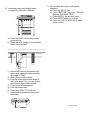
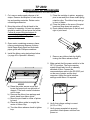
8. Load paper using instructions below.
(or page 32 in Operator’s Manual)
9. Run a printer self-test to verify proper
operation.
a) Press the SETUP key.
b) Press FEATURE ^ key once. The LCD
displays RUN SELF TEST.
c) Press ENTER, the self-test starts.
d) Press ENTER again, to stop test.
e) Press the LINE / LOCAL key to place
printer on line.
a) Press the LINE / LOCAL key to take
printer off line.
b) Place and align supply of forms directly
below tractor guides.
c) Unlock both tractors and position left
tractor with alignment mark on printer,
allow right to “float”.
d) Open doors on both tractors.
e) Load top three holes of both sides of
form (min. width 8.5 in.) on the bottom
three-tractor pins on both wheels.
f) Close doors on both tractors.
g) Lock right side tractor.
h) Press the LOCAL FF LOAD key.
i) Load profile that matches the current
document.
Part No. 109610