1
CX-9_8CA9-EC-11G_Edition1 Page406
Wednesday, June 29 2011 5:18 PM
Black plate (406,1)
Interior Comfort
Bluetooth Hands-Free (Voice Recognition)
3. Prompt: “Dialing”
Ending the current call
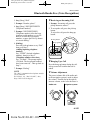
Press the hang-up button during the call.
qPhonebook Settings
Editing phonebook
The data registered to the Bluetooth
Hands-Free phonebook can be edited.
NOTE
Do this function only when parked. It is too
distracting to attempt while driving and you
may make too many errors to be effective.
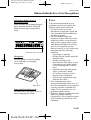
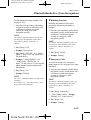
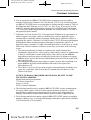
1. Press the pick-up button (with/without
navigation system) or talk button with
a short press (without navigation
system) or a long press (with
navigation system).
NOTE
For vehicles with the navigation system, you
can also press the talk button with a short
press and say: [Beep] “Telephone” or
“Phone”.
2. Say: [Beep] “Phonebook”
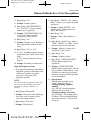
8. Say: [Beep] “Home” (Say the
registered location to be edited:
“Home”, “Work”, “Mobile”, or
“Other”).
9. Prompt: “XXXXX... (Ex. “Mary's
phone”) (Registered voice tag) XXXX
(Ex. “Home”) (Registered location). Is
this correct?”
10. Say: [Beep] “Yes”
11. Prompt: “The current number is
XXXXXXXXXXX (Ex. “555-1234”)
(Currently registered number). New
number, please.”
NOTE
If there was no previous phone number
registered to a location (Ex. “Work”), the
prompt will only read out “Number, please”.
12. Say: [Beep] “XXXXXXXXXXX
(Ex. “555-5678”)” (Say the new
phone number to be registered.)
13. Prompt: “XXXXXXXXXXX (Ex.
“555-5678”) (The new phone number
to be registered). Is this correct?”
14. Say: [Beep] “Yes”
3. Prompt: “Select one of the following:
New entry, edit, list names, delete,
erase all or import contact.”
15. Prompt: “Number changed, returning
to main menu.”
4. Say: [Beep] “Edit”
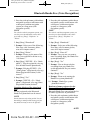
Phonebook data deletion
5. Prompt: “Please say the name of the
entry you would like to edit or say,
“List names”.”
Erasing individual phonebook data
6. Say: [Beep] “XXXXX... (Ex. “Mary's
phone”)” (Say the voice tag for the
registered name to be edited in the
phonebook.)
NOTE
7. Prompt: “Home, Work, Mobile, or
Other?”
6-150
Form No.8CA9-EC-11G
Individual data registered to the Bluetooth
Hands-Free phonebook can be cleared.
Do this function only when parked. It is too
distracting to attempt while driving and you
may make too many errors to be effective.